



When customer support relies entirely on Slack, critical data often gets buried in threads, leaving leaders without the insights they need to make informed decisions. While Slack enables faster response times and easier collaboration, its lack of structure creates challenges for tracking team performance, managing SLAs, and identifying trends.
Key issues include:
- Hidden Data: Important updates get lost in Slack threads, making it hard to track resolutions.
- No Metrics: Slack doesn’t provide tools for monitoring KPIs like response times or SLA compliance.
- Scattered Context: Support data is spread across Slack, CRMs, and other tools, leading to inefficiencies.
- Agent Burnout: Agents face cognitive overload from constant tool-switching and unstructured workflows.
AI-driven tools can solve these problems by summarizing Slack threads, centralizing support data, and automating reporting. Companies like Tinybird and n8n have already seen faster response times and reduced escalations by integrating Slack with structured systems. These steps help VPs turn Slack data into actionable insights and align support operations with broader business goals.
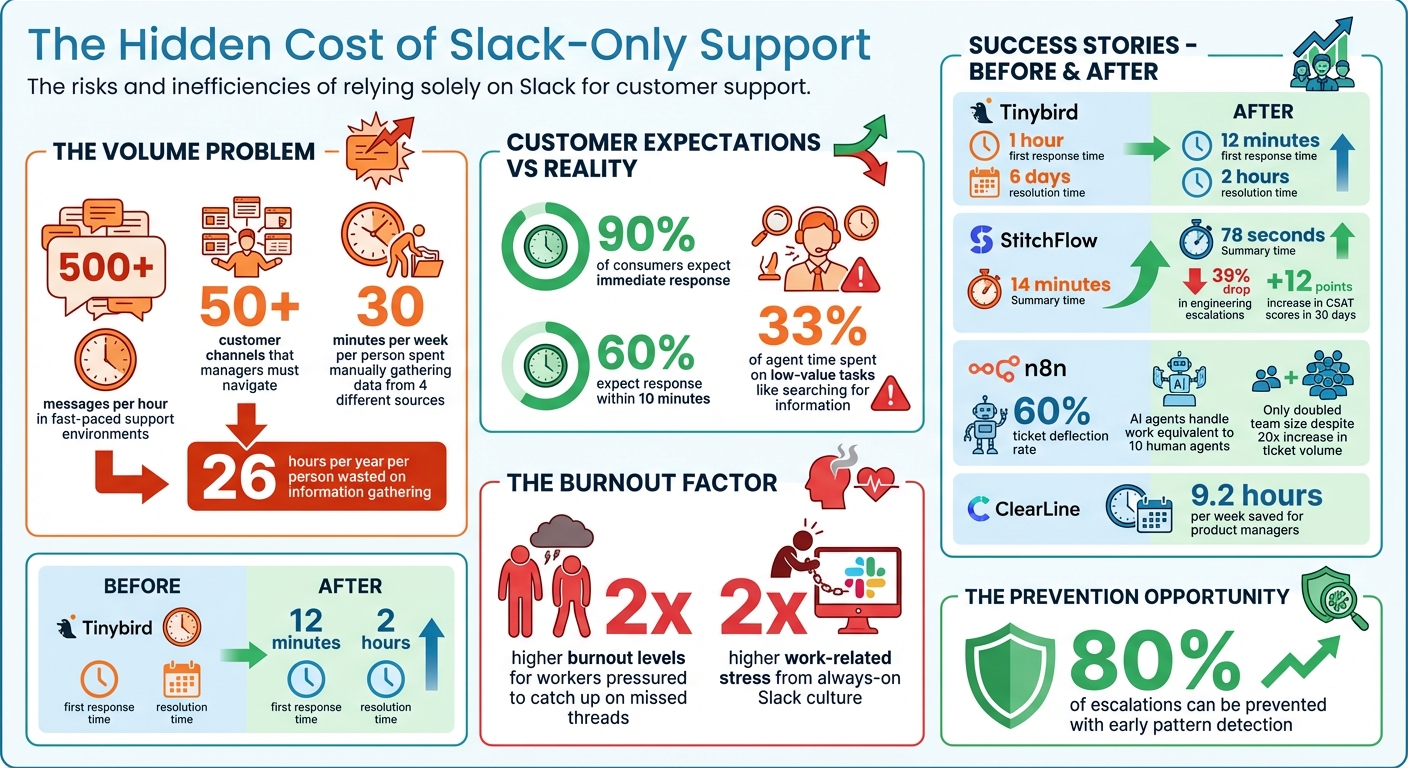
The Hidden Cost of Slack-Only Support: Key Statistics on Response Times, Agent Burnout, and Escalation Prevention
Automatic analytics & KPI reports for Slack
Why Slack Channels Hide Critical Support Data
Slack’s design as a real-time messaging platform makes it difficult to manage structured support operations effectively. For VPs and managers, this creates significant challenges in tracking activity and gaining visibility into critical issues. Unlike systems built for support, Slack functions as a continuous, linear stream of messages – essentially a chat log. This lack of structure means there are no ticket statuses, priority markers, or ownership assignments, all of which are essential for efficient support management [3]. Without these tools, leaders struggle to make quick, informed decisions during high-pressure situations.
Messages Get Buried in Threads
In fast-paced support environments, the sheer volume of messages can be overwhelming – sometimes exceeding 500 messages per hour [3]. For managers trying to assess a critical customer issue, this flood of unstructured information becomes a major obstacle.
"The ‘state’ of the incident is effectively distributed across these 1,500 unstructured fragments. The responder must assemble these fragments into a clear picture."
- Wireframe Report [3]
Threads, while useful for organizing discussions, can make matters worse. Updates buried deep within sub-threads often go unnoticed unless explicitly shared in the main channel. For instance, an agent might resolve an issue or find a workaround, but if that update isn’t broadcasted, leadership scanning the channel could miss it entirely. Without structured fields like "Severity Level" or "Resolution Status", identifying what’s resolved versus what’s still pending becomes a tedious, manual process. This fragmentation leaves teams without a clear, centralized view of ongoing support efforts.
No Central View of Support Activity
When companies manage 50+ customer channels, Slack’s sidebar becomes nearly impossible to navigate. Managers lose the ability to quickly identify which customers require urgent attention because there’s no unified queue to consolidate issues across channels [2]. Each conversation stands alone, making it hard to spot trends – like multiple customers reporting the same bug – that demand immediate action.
This problem is further intensified by the scattered nature of critical context. Key details like customer contracts, technical specs, or past issues often reside in external tools like CRMs, Confluence, or Google Docs. Because Slack’s search and tools don’t integrate seamlessly with these systems, vital information is often inaccessible. For example, manually pulling data from just four different sources takes 30 minutes per week per person, adding up to 26 hours per year spent simply gathering information [4]. This inefficiency highlights the need for automated solutions to bridge these gaps. By addressing these silos, AI-driven tools can unify data streams and reclaim valuable time for teams.
What VPs Miss When Support Data Stays in Slack
When support data is confined to Slack, VPs lose access to the structured information they need for informed decision-making. While Slack’s real-time communication may seem transparent, it only provides unfiltered activity logs – not the kind of measurable, actionable data required for strategic oversight. This lack of clarity makes it harder for VPs to spot trends or address potential issues before they snowball into major problems.
This gap in actionable data leads to two major challenges:
No Metrics for Team Performance
Slack doesn’t offer tools to track key performance indicators like response times, SLA compliance, or escalation rates. Without these metrics, VPs can’t see which agents are overwhelmed, which customers are waiting too long, or whether support commitments are being met.
"Slack’s native analytics tell you nothing about support performance." – Plain.com [1]
Because of this limitation, managers often spend hours each week manually exporting data, only to end up with outdated reports that delay critical decisions [4].
Lost Insights for Business Decisions
The lack of structured data also hinders strategic planning. For example, if multiple customers report the same bug across various Slack channels, there’s no system in place to automatically flag it as a widespread issue. By the time it’s recognized, it may have already escalated into a major crisis [4].
"Support teams operate blind, problems escalate before they’re detected, and leadership lacks visibility." – Pylar.ai Blog [4]
This absence of actionable insights leaves VPs unable to address key priorities, such as identifying the top issues of the week, spotting sentiment shifts among high-value accounts before renewals, or tracking how often support teams rely on engineering or product teams. These hidden dependencies can slow down development velocity [1]. Early detection of patterns could prevent up to 80% of escalations [4]. Without this visibility, aligning support operations with broader business goals becomes nearly impossible.
Risks of Using Only Slack for Support
Relying solely on Slack for support may seem convenient, but it comes with serious operational risks. Beyond visibility challenges, these risks can strain customer relationships and waste valuable resources.
Missed SLAs and Delayed Escalations
One major issue is Slack’s lack of built-in SLA tracking. It can’t manage SLA clocks, send breach alerts, or provide live dashboards, making it hard to stay on top of response times [6]. And when 90% of consumers expect an immediate response – 60% within just 10 minutes – failing to meet these expectations can lead to disappointment [6].
"Customers expect accountability in Slack – sometimes even more so than in your helpdesk. If they don’t get a reply fast, frustration builds." – Happy Das, ClearFeed [6]
The absence of a unified ticketing system means high-priority issues and aging requests often get overlooked, leading to SLA breaches [6][1]. For example, in January 2026, Tinybird revealed that before they implemented a structured support system, their first response time averaged 1 hour, with resolution times stretching to 6 days. After centralizing their Slack support, they reduced their first response time to just 12 minutes and cut resolution times down to 2 hours [1].
Agent Burnout from Constant Context Switching
Slack’s design forces agents to juggle between different tools – like CRMs and engineering platforms – leading to cognitive overload. In fact, agents spend about 33% of their time on low-value tasks, such as searching for scattered information [8]. Reconstructing conversation histories across multiple systems only worsens this inefficiency.
The always-on nature of Slack can also lead to burnout. Workers who feel pressured to catch up on missed threads after hours report twice the level of burnout and over two times the work-related stress [9]. One tech writer even described this phenomenon as "always-on anxiety", a far cry from the asynchronous flexibility Slack promises [7]. Without clear prioritization or a centralized system, agents often treat every issue with the same urgency, which not only wears them down but also slows down issue resolution [1][8]. This inefficiency impacts both agent well-being and the customer experience.
sbb-itb-e60d259
How to Surface Hidden Data in Slack
AI-powered tools can simplify the process of extracting and organizing valuable insights from Slack conversations. By integrating these tools into your workflows, you can streamline support operations without asking your team to change how they work.
AI Summarization and Sentiment Analysis
AI can turn chaotic Slack threads into clear, actionable insights. Instead of sifting through endless messages, AI summarization cuts through the noise, answering key questions like "What’s broken?" or "What does the user need?" [10][11].
Take StitchFlow, for example. In early 2026, they automated support ticket summaries using Make.com and Claude 3 Haiku. This reduced the time spent on summaries from 14 minutes to just 78 seconds and led to a 39% drop in engineering escalations, while customer satisfaction (CSAT) scores jumped by 12 points in just 30 days [11]. Similarly, ClearLine, a small SaaS company, used a custom AI agent in 2024 to summarize Slack DMs. This tool saved product managers 9.2 hours per week by summarizing threads and even cross-referencing Google Calendar to add meeting context to action items [10].
"Summarization without action extraction is noise reduction, not workflow acceleration. The value isn’t in compressing text – it’s in compressing cognitive load." – Dr. Lena Torres, Human-Computer Interaction Researcher, MIT Media Lab [10]
To ensure accuracy, configure the AI with a low temperature setting (0.1 or lower) and define a strict output format. For example, summaries might include a single sentence, a list of bullet-pointed action items with assigned owners, and an urgency level (Low/Medium/High). AI can also identify urgency by analyzing message frequency, escalation patterns, and keywords like "ASAP" or "down" [10][11].
Once the insights are summarized, centralizing Slack data into unified queues can further improve visibility.
Unified Queues to Centralize Support Data
Slack conversations often get scattered across multiple threads, making it hard to track everything. Unified queues solve this by gathering all Slack support data into a single view, allowing leaders to monitor priorities, SLAs, and team workloads in real time.
For instance, n8n implemented an AI-driven support layer in Slack, achieving a 60% ticket deflection rate. Even with a 20x increase in ticket volume, the team only had to double in size because AI agents handled work equivalent to 10 human agents – at a fraction of the cost [1].
"Having all customer interactions – email, Slack, and more – in one place means we can respond faster and collaborate seamlessly. We no longer have to guess what’s outstanding or where a conversation happened." – Will Stewart, CEO, Northflank [1]
Platforms like Supportbench pull Slack conversations into unified queues alongside emails, portal tickets, and other channels. This gives agents a complete view of customer interactions without requiring them to leave Slack. AI tools further enhance this process by prioritizing cases, tagging conversations, and auto-assigning issue types, ensuring the team focuses on the most critical tasks.
Once data is centralized, automated reporting can turn raw metrics into meaningful insights for leadership.
Automated Reporting for Leadership Visibility
To help leadership make informed decisions, automated reporting converts Slack data into dashboards that display metrics like First Response Time, SLA adherence, escalation trends, and customer satisfaction. This eliminates the need for managers to spend hours creating spreadsheets.
The key lies in integrating Slack data with other systems like CRM (customer tier, account value), billing (revenue impact), and product analytics (error rates). By combining this data, you can provide full business context [4]. Materialized views can pre-calculate daily, weekly, and monthly metrics, ensuring dashboards load instantly [4]. AI-generated executive summaries can then explain metric shifts and offer actionable recommendations [4][5].
For example, instead of just listing ticket volumes, AI can generate a three-paragraph summary highlighting overall performance, key trends, and leadership recommendations [4]. Topic clustering can group similar conversations under themes like "API Integration" or "Billing", helping identify areas that generate the most support workload [4]. Anomaly detection can flag unusual spikes in ticket volume or drops in satisfaction, giving leadership early warnings before issues escalate [4].
"Support managers spend hours analyzing data instead of acting on insights." – Pylar.ai [4]
Deliver these insights directly into Slack channels where leadership is already active, reducing the need to rely on external BI tools [5]. Every insight should link back to its original source for verification, turning Slack into a transparent, data-driven support hub that aligns seamlessly with broader business objectives.
Connecting Slack Support to Business Goals
When support data moves out of Slack silos and into centralized systems, it becomes a powerful tool for strategy. This broader visibility allows VPs to align support operations with key company objectives, like improving product development, boosting customer retention, and refining revenue forecasting. By integrating support insights into larger systems, businesses bridge the gap between daily operations and big-picture decision-making.
Using Support Data for Product and Planning
Slack support conversations often hold critical clues about what’s working – and what isn’t – in your product. When these patterns are identified, product teams can make roadmap decisions based on actual customer feedback instead of relying on assumptions.
Take Clerk, for example. This developer-focused company uses Slack labels to track recurring issues. Their Developer Success team regularly reviews these labels, and the trends they uncover directly guide product updates and bug fixes. This feedback loop ensures that support data doesn’t just sit idle in Slack channels – it actively shapes the product roadmap.
Another example is Tinybird. In 2025-2026, they introduced a structured Slack support workflow, giving their product managers quicker access to critical customer feedback. This allowed them to identify and address emerging issues before they escalated [1].
When Slack data integrates with systems like CRM, billing, and product analytics, it provides context that goes beyond surface-level insights. For example, teams can track which features generate the most support tickets, pinpoint customer segments struggling with specific workflows, and prioritize fixes that impact high-value accounts. This shifts support from being a reactive cost center to becoming a proactive source of product intelligence. These insights naturally feed into strategies aimed at improving customer retention.
Better Customer Retention and Forecasting
The proactive product improvements driven by support data also enhance customer retention efforts. Deeper visibility into support patterns helps VPs anticipate churn risks and refine retention strategies. For instance, tracking repeated escalations, declining sentiment scores, or slower response times for specific customers can signal the need for early intervention with tailored retention efforts.
"Having all customer interactions – email, Slack, and more – in one place means we can respond faster and collaborate seamlessly. We no longer have to guess what’s outstanding or where a conversation happened." – Will Stewart, CEO, Northflank [1]
Support data also improves forecasting accuracy when paired with revenue metrics. For example, if a particular product issue is driving a high volume of support requests from enterprise clients, you can model its potential impact on renewals and expansion opportunities. Spotting these patterns early can prevent 80% of escalations [4], reducing the risk of unexpected churn. By connecting Slack support workflows to overarching business goals, VPs gain the insights needed to make data-driven decisions that safeguard revenue and enhance customer lifetime value.
Conclusion
When support data is confined to Slack channels, it creates critical blind spots for VPs. Hidden threads, missing performance metrics, and disconnected workflows can lead to missed SLAs, delayed escalations, and agent burnout – all of which directly impact product planning and customer retention.
While these challenges are significant, they are far from unsolvable. AI-powered tools like summarization, sentiment analysis, and automated reporting can uncover patterns buried in Slack conversations. By connecting Slack to unified queues and integrating it with CRM and analytics platforms, scattered conversations can turn into actionable insights. For instance, companies like n8n have shown that AI agents can handle 60% of support tickets, while Tinybird cut enterprise first response times from 1 hour to just 12 minutes [1].
Moving from reactive to proactive support requires deliberate steps. Start by automating SLA tracking with real-time alerts, defining clear escalation paths to safeguard engineering resources, and leveraging AI to extract structured action items from conversations [1][10]. These measures can prevent up to 80% of escalations and equip leadership with the data needed for accurate forecasting and customer retention [4]. Implementing these strategies enhances not just support efficiency but also aligns support operations with broader business goals.
Slack can be a powerful tool when used effectively. The real question isn’t whether Slack is the right platform – it’s whether your organization is ready to eliminate the visibility gaps that limit its potential. The solutions are available, and the results are proven. Now is the time to take action. By addressing these gaps, VPs can make informed decisions that boost team performance and drive customer success.
FAQs
When should we stop using Slack as the “system of record” for support?
Slack is great for quick, real-time communication, but it falls short when your support needs surpass its core functionality. It doesn’t offer tools like detailed analytics, SLA tracking, or scalable workflows – all of which are essential for growing support teams. When you start facing problems like untrackable metrics or struggling to prioritize requests, it’s a clear sign you’ve outgrown Slack as your “system of record.” Moving to a dedicated support platform can streamline processes, introduce automation, and help align your team with broader organizational objectives.
How can we track SLAs and response times from Slack conversations?
To keep tabs on SLAs and response times in Slack, leverage AI-powered tools and integrations that provide real-time tracking, automated notifications, and detailed analytics. For instance, setting up automated alerts at critical SLA checkpoints – like 25%, 75%, or 90% completion – helps ensure teams respond promptly. AI can also assess sentiment and ticket complexity, allowing you to prioritize cases that might pose higher risks. By using integrated platforms, you can streamline SLA tracking, combining efficient management with actionable insights to enhance overall performance.
What’s the fastest way to turn Slack threads into structured support data?
The quickest solution is leveraging AI-powered summarization tools to automatically turn Slack threads into concise, searchable summaries. These tools, combined with no-code workflows, can monitor conversations, generate summaries, and archive them directly into knowledge bases or support systems. Platforms like Supportbench simplify the process by extracting key details from Slack discussions, cutting down on manual work, and turning unstructured chats into actionable support data with ease.
Related Blog Posts
- Tool Sprawl vs Unified Platforms: Key Differences
- Pylon vs full helpdesk: what features do teams need next (and why)?
- What are the signs you’ve outgrown Help Scout (SLAs, tiers, escalations, reporting)?
- Slack Channel Fatigue: Why Your Support Agents Are Burning Out
Evaluating help desks for a B2B team?
Supportbench is all-inclusive from $32 per agent per month, with migration and onboarding included. See pricing or book a 20-minute demo.






