


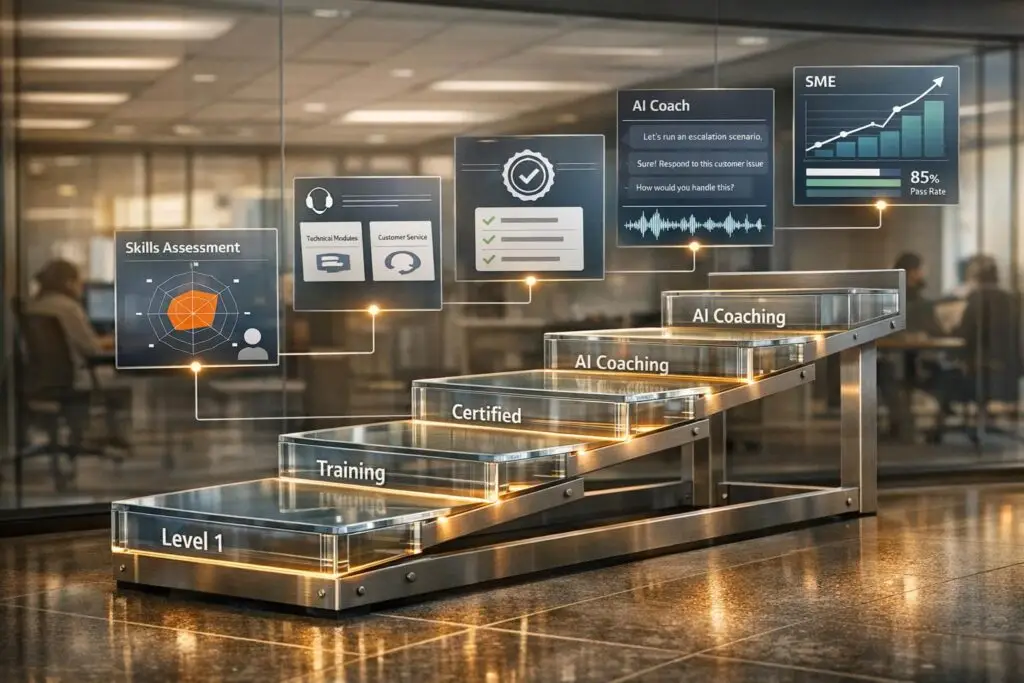
To build an effective training and certification program for tiered support teams, focus on five key steps:
- Assess Current Skills: Analyze ticket data, escalation trends, and agent performance to identify skill gaps. Use metrics like First Contact Resolution (FCR) and Escalation Rates to pinpoint areas for improvement.
- Design Role-Specific Training: Create tailored learning paths for each tier. For example:
- Tier 1: Basic troubleshooting (password resets, DNS cache clearing) and communication skills.
- Tier 2: Advanced diagnostics (software configurations, endpoint checks).
- Tier 3 (SME): Root Cause Analysis, infrastructure management, and vendor collaboration.
- Establish Certification Standards: Define clear benchmarks, such as simulation-based assessments and metrics like resolution times, to validate readiness for role progression.
- Leverage AI Tools: Use AI for real-time skill gap analysis, personalized learning modules, and simulated customer interactions to accelerate training.
- Track and Maintain Progress: Monitor key metrics like FCR, resolution times, and repeat ticket rates. Regularly update training materials and conduct quality reviews to address evolving challenges.
A structured program ensures agents are prepared for their roles, reduces ticket mishandling, and improves customer satisfaction. AI tools further streamline the process by keeping training relevant and efficient.
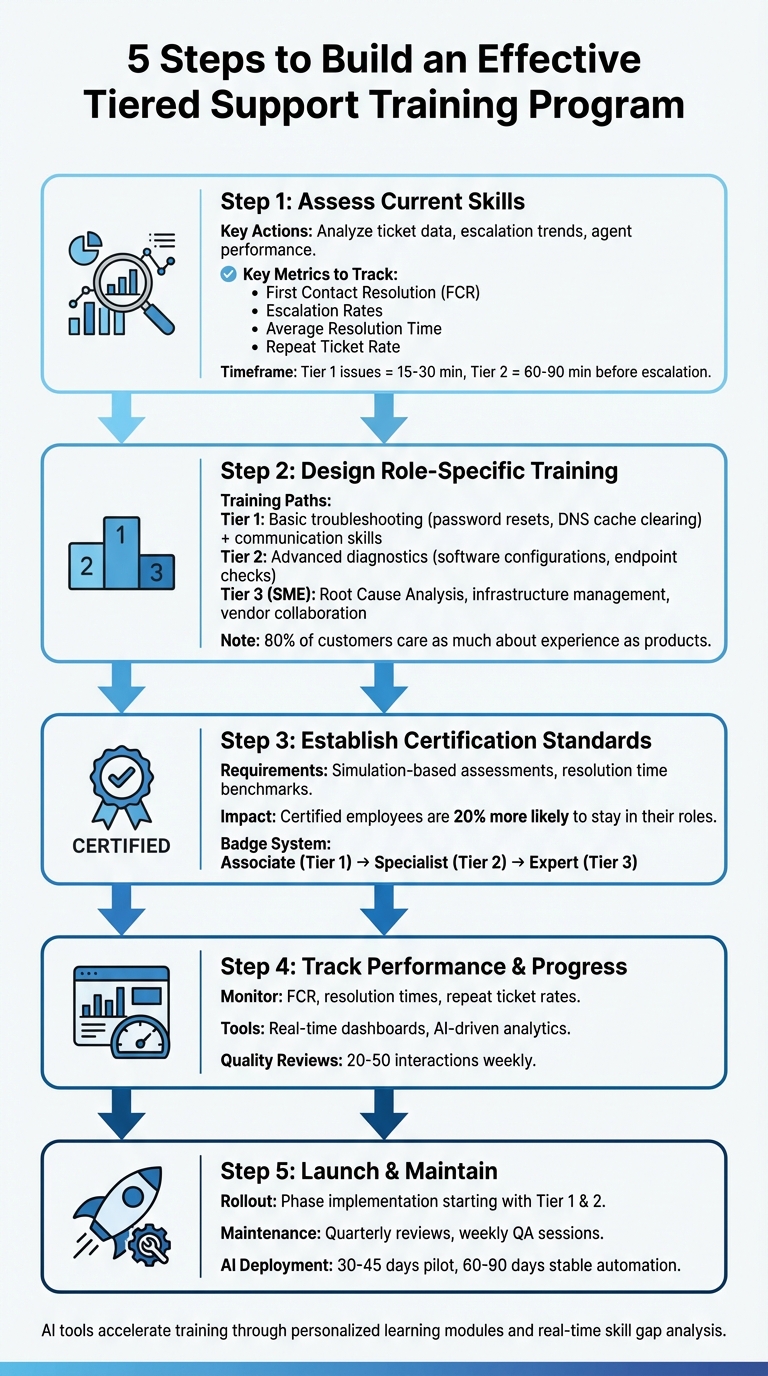
5-Step Framework for Building Tiered Support Training and Certification Programs
Step 1: Evaluate Current Skills and Set Role Requirements
Start by taking a close look at your team’s existing skills using historical ticket data. Group tickets by type and complexity – like billing questions, login issues, or bugs – to identify which queries are handled at each tier and where bottlenecks occur. Then, use clear metrics to assess skills and pinpoint training needs.
Keep an eye on escalation timing, too. Delays in escalation often signal unclear role definitions. As a rule of thumb, Level 1 issues should take 15–30 minutes to troubleshoot, while Level 2 problems should take 60–90 minutes before being escalated.
Running Skill Assessments
Tie your assessment metrics directly to training outcomes. For instance:
- First Contact Resolution (FCR): If Tier 1 agents struggle to resolve basic tickets independently, low FCR rates could indicate a need for better training or resource access.
- Escalation Rates: A high number of escalations from Tier 1 to Tier 2 suggests that frontline agents aren’t adequately prepared to handle common issues.
Examine ticket notes for quality. Look for clear documentation using a structure like "Problem – Action – Result – Next Step." Poorly documented handoffs can lead to delays at higher tiers, often pointing to either knowledge gaps or weak communication skills. Also, review tier-specific Customer Satisfaction (CSAT) scores. Low Tier 1 scores often highlight a need for soft-skills training, while low scores at Tier 2 or 3 usually indicate gaps in technical expertise.
Go beyond metrics by conducting staff interviews and focus groups to uncover challenges that numbers might not reveal. Shadowing sessions, where junior technicians pair with experienced "buddies", are a great way to identify gaps in applying knowledge in real-world scenarios – because knowing something isn’t the same as knowing how to use it.
Setting Skills for Each Role
Once you’ve identified performance gaps, it’s time to define the specific skills required for each tier:
- Tier 1 agents: Focus on mastering basic tasks like password resets, DNS cache clearing, and troubleshooting simple issues. Soft skills like empathy and de-escalation are equally important.
- Tier 2 technicians: These roles demand deeper diagnostic skills, such as endpoint health checks, software configurations, and network adapter troubleshooting.
- Tier 3 SMEs: Specialists at this level should excel in Root Cause Analysis (RCA), server and firewall management, and vendor collaboration.
To make role expectations crystal clear, create a Tier Decision Matrix. This tool maps common scenarios – like VPN failures versus password resets – to the appropriate tier, helping technicians know when to resolve an issue or escalate it. Additionally, set skill checkpoints for role transitions. For example, require Tier 1 agents to master basic scripting and thorough ticket documentation before moving to Tier 2. These milestones provide a clear path for growth and remove uncertainty about role expectations.
By defining these skills, you’ll lay the groundwork for creating targeted training programs in the next step.
| Metric – Indicator |
|---|
| First Contact Resolution (FCR) – Low rates suggest Tier 1 lacks training or access to necessary resources |
| Escalation Rate – High rates indicate Tier 1 is not sufficiently trained or the product has deep root-level issues |
| Average Resolution Time – Rising trends at Tier 2/3 point to knowledge gaps |
| Repeat Ticket Rate – High rates suggest agents are failing to identify or resolve the root cause of issues |
Step 2: Build Training Paths for Each Role
Once you’ve outlined the skills and requirements for each role, the next step is to create training paths that guide agents from basic proficiency to advanced, tier-specific expertise.
Core Training for All Tiers
Before diving into technical tasks, every support team member needs a strong foundation. Start with baseline training that focuses on essential soft skills like de-escalation, empathy, and clear communication. Teach agents how to document tickets effectively using the "Problem-Action-Result-Next Step" format. This ensures consistency and clarity in internal communication protocols.
Another key component is onboarding that introduces new hires to your company’s identity and service approach. Why is this so important? Research shows that 80% of customers care as much about their experience with a company as they do about the actual products or services. So, training your team on how to communicate is just as important as teaching them what to say.
Tier-Specific Training Modules
After establishing the basics, it’s time to customize training for each support tier.
- Tier 1 agents should focus on routine tasks like password resets, basic troubleshooting, and running simple automation commands. For example, they might use
ipconfig /flushdnsto clear a DNS cache ornet start spoolerto restart printing services. - Tier 2 technicians need more advanced diagnostic skills. Training should cover PowerShell health checks, configuring software, and performing diagnostics on endpoints.
- Tier 3 SMEs (Subject Matter Experts) require expertise in managing infrastructure. This includes server and firewall management, conducting in-depth root cause analyses, and performing comprehensive system audits.
To ensure agents are ready to advance tiers, incorporate practical exercises. For example:
- Tier 1 agents can practice running basic scripts.
- Tier 2 agents might perform network adapter health checks.
- Tier 3 agents could conduct full infrastructure audits.
You can also add mentorship opportunities, like "Tier Buddy" sessions, where junior agents shadow experienced technicians during live ticket reviews. This approach combines hands-on learning with real-world exposure.
Using AI to Build Skills Faster
AI tools can speed up training by providing safe, simulated environments for agents to practice. For example, platforms that mimic customer interactions allow agents to role-play scenarios like calming frustrated customers or solving complex technical issues – without the pressure of handling a live ticket.
AI can also personalize learning paths. By analyzing performance data, such as resolution times or escalation patterns, AI tools can identify specific training gaps. For instance, if an agent frequently escalates tickets that should be resolved at Tier 1, the system can assign targeted micro-learning modules – quick 5-minute videos that address those gaps. Additionally, AI copilots can offer real-time suggestions during live tickets, helping agents learn on the job while maintaining consistent support quality across all tiers.
Before deploying AI tools, review your knowledge base to ensure it’s up-to-date. Outdated or conflicting documentation can mislead the AI, so consolidate your help center articles and runbooks into a single, reliable source. Using Retrieval-Augmented Generation (RAG) can also ensure that training materials stay aligned with live, accurate documentation rather than static content.
| Support Tier | Training Focus | Practical Exercise |
|---|---|---|
| Tier 1 | Routine inquiries & basic automation | Password resets, DNS flushing, basic troubleshooting scripts |
| Tier 2 | Advanced diagnostics & root cause analysis | Network adapter health checks, software configurations, endpoint diagnostics |
| Tier 3 (SME) | Infrastructure & expert analysis | Server/firewall management, deep system audits, vendor collaboration |
Step 3: Create Certification Standards
After establishing your training paths, the next step is to define certification standards. These standards validate an agent’s readiness, ensure consistency across skill levels, and outline clear career growth opportunities. This section dives into the criteria and recognition systems that solidify skill mastery while encouraging long-term development.
Defining Certification Requirements
Certification requirements should align closely with the role-specific skills identified earlier. For Tier 1 agents, the focus is on essential metrics like First Contact Resolution (FCR) rates and accurate ticket documentation. They should demonstrate proficiency in routine tasks, such as password resets and basic scripting, before advancing. Tier 2 technicians, on the other hand, need to handle more complex challenges, such as diagnostics and multi-user incidents. Their benchmarks might include Average Resolution Time and Escalation Rate. Finally, Tier 3 Subject Matter Experts (SMEs) must excel in areas like Root Cause Analysis (RCA), infrastructure audits, and collaborating with developers.
Metrics alone aren’t enough – practical simulations are key. Use simulated tickets to test agents’ decision-making and communication skills in realistic scenarios. For instance, create pre-built simulations tailored to common Tier 1, Tier 2, and Tier 3 challenges, and evaluate how effectively candidates manage these under pressure. You can also introduce a "Tier Decision Matrix" that clarifies which tier should handle specific issues, such as login failures versus server outages. This ensures agents understand the expertise required for each certification level.
Additionally, include training on de-escalation techniques and effective communication. Customer service success often hinges on applying knowledge in real-world situations – where 10% is theoretical understanding and 90% is practical execution.
Adding Digital Badges and Recognition
Digital badges play a powerful role in boosting retention. Certified employees are 20% more likely to stay in their roles compared to non-certified peers. Use badges to celebrate certification milestones, and encourage agents to share their achievements on internal platforms or professional networks. This not only increases visibility but also motivates others to pursue certifications.
A Pyramid badge system works well for structuring recognition. Begin with foundational "Associate" badges for Tier 1 agents, move to "Specialist" badges for Tier 2, and finish with "Expert" badges for Tier 3 SMEs. To streamline the process, automate badge issuance for instant acknowledgment, reinforcing engagement. Tie these credentials directly to promotion criteria, so agents see a clear link between certifications and career growth. As Mozhdeh Rastegar-Panah, Senior Director of Product Marketing at Zendesk, explains:
"A tiered structure gives a clear line for promotions and career growth, which can help with overall agent satisfaction".
sbb-itb-e60d259
Step 4: Track Performance and Progress
Set up systems to continuously measure performance and identify skill gaps. Use real-time tracking tools, like dashboards, to catch coaching opportunities early – before small problems turn into bigger issues.
Measuring Performance Over Time
Keep an eye on key metrics for different support tiers. For Tier 1, focus on First Contact Resolution (FCR) rates and escalation percentages. For Tier 2, watch resolution times and how often tickets are escalated. In Tier 3, monitor repeat ticket rates. These metrics work alongside the certification benchmarks you established earlier. For instance:
- A low FCR suggests agents may lack the training or tools to resolve tickets independently.
- Longer resolution times could signal handoff issues or missing knowledge.
- If resolved issues keep resurfacing, it’s a sign the training isn’t addressing root causes.
To maintain quality, review 20–50 interactions weekly and ensure communication standards are met. Using a "Problem-Action-Result-Next Step" format for ticket notes ensures all details are clear for senior staff or AI audits. Additionally, tracking Time-to-Escalation – how long agents hold onto tickets before escalating – can highlight areas where coaching is needed. Pair these insights with dashboard analytics for a more proactive approach to training and support.
Monitoring Progress with Dashboards
Feed these metrics into real-time dashboards to monitor team performance. AI-driven dashboards can connect training progress with live support metrics like Mean Time to Resolution (MTTR), FCR, and escalation rates. Managers get a clear picture of team readiness by tracking training completion rates, quiz scores, and topic-specific weaknesses. This allows for targeted coaching before agents interact with customers. For example, if an agent consistently struggles with password policy assessments, the system can flag this so additional training can be provided before it impacts customer satisfaction.
Some advanced platforms go even further, analyzing soft skills like speaking pace, filler words, and voice sentiment. Others use simulations to predict how agents might perform in high-pressure scenarios by tracking decision-making patterns. Automated ticket tagging also helps by categorizing issues by tier and intent, enabling real-time monitoring of resolution speed and escalation trends while keeping performance data consistent.
Before rolling out new AI tools, test them in a "shadow mode" for 2–3 weeks to ensure they’re accurate and compliant with policies. This trial phase helps you gauge how well the training translates into live performance without affecting customer experience. Ameya Deshmukh of EverWorker puts it perfectly:
"The quickest way to trustworthy automation is the simplest: train AI customer support the way you onboard employees. Give it the right knowledge, write down the steps, set clear fences, and coach with data".
Step 5: Launch and Maintain the Training Program
Rolling Out the Program
Once you’ve set up role-specific training and certification, rolling out the program in phases helps ensure a smooth implementation. Start with Tier 1 and Tier 2 processes to let agents master the basics – like understanding when to resolve issues versus when to escalate – before introducing the more complex Tier 3 and SME roles. This step-by-step approach allows agents to build confidence and competence before tackling advanced scenarios.
Use a tiered decision matrix to link common issues to their appropriate tiers. Pair this with mock ticket simulations that include realistic scenarios so agents can practice seamless handoffs. For example, password resets should stay within Tier 1, while server outages should escalate directly to Tier 2 or higher.
From the outset, establish minimum escalation requirements. Before escalating a ticket, agents should attach screenshots, document troubleshooting efforts, and outline the issue using a "Problem-Action-Result-Next Step" format. This ensures higher-tier agents have all the context they need to pick up where the previous agent left off, preventing vague or incomplete escalations.
With these foundational elements in place, the focus can shift toward sustaining and refining the training program over time.
Keeping the Program Running Long-Term
To keep the training program effective, schedule quarterly review cycles. These reviews help you update tier definitions, streamline workflows based on ticket trends, and identify high-performing agents ready to move up to advanced tiers. Assign content owners to specific knowledge base articles, with clear SLAs for updates, to avoid "knowledge drift" and ensure all information stays current.
Leverage AI-native tools to maintain consistency as your team grows. Platforms like Supportbench integrate AI directly into case management and knowledge creation, eliminating the need for costly add-ons. Connect training tools to your help center using Retrieval-Augmented Generation (RAG), which ensures AI assistants pull from up-to-date documentation rather than requiring frequent and expensive retraining. This keeps both agents and AI aligned, working from the same accurate and current resources.
Finally, conduct weekly QA reviews of 20–50 interactions to monitor agent adherence to policies and tone. If you notice an agent struggling with specific skills – such as handling a particular product module – trigger automated refresher courses or microlearning sessions to address the gap before it impacts customer satisfaction. Regular coaching and targeted training ensure your team stays sharp and responsive.
Conclusion
Developing a training and certification program for tiered support teams involves five essential steps: assessing current skills, designing role-specific training paths, establishing clear certification standards, monitoring performance through real-time dashboards, and planning for long-term program maintenance. These steps help define role expectations and give leaders valuable insights into performance metrics.
AI takes these programs to the next level by utilizing Retrieval-Augmented Generation (RAG) to ensure training materials stay up-to-date with current company SOPs. Tools like those offered by Supportbench integrate AI to automate routine tasks and provide real-time customer satisfaction predictions. Many support teams roll out an AI pilot within 30–45 days and reach stable Tier 0/1 automation in 60–90 days.
"The quickest way to trustworthy automation is the simplest: train AI customer support the way you onboard employees. Give it the right knowledge, write down the steps, set clear fences, and coach with data." – EverWorker
Key metrics like improved First Contact Resolution and reduced escalation rates confirm the program’s success. AI-driven metrics further ensure compliance with support policies. Regular quarterly reviews and weekly QA sessions create a feedback loop that keeps training aligned with changing products and customer expectations.
A well-structured tiered program doesn’t just improve efficiency – it also provides agents with a clear career progression from Level 1 to SME, which helps reduce turnover and build a more robust team. By combining AI-powered tools, tailored training, and consistent performance tracking, your support team can handle increasing ticket volumes without a corresponding rise in costs. This approach keeps your support operations efficient and adaptable over time.
FAQs
How can AI improve training and certification programs for support teams?
AI is reshaping training and certification programs for support teams by making them more efficient, tailored, and scalable. With AI, personalized learning paths can be designed based on an agent’s unique strengths and areas that need improvement. This ensures that training is not only focused but also relevant to each individual. AI can also simulate real-world scenarios, giving agents a chance to practice problem-solving in a safe, controlled environment.
Beyond training, AI streamlines performance tracking and certification. It analyzes key metrics to ensure agents meet required competency standards and provides continuous feedback to help them refine their skills. This keeps them up to speed with new products or policies. By automating these processes and reducing the need for instructor-led sessions, AI cuts costs while speeding up onboarding and skill development across all levels of support teams.
What metrics should I track to measure the success of a tiered support training program?
To determine how effective a tiered support training program is, keep an eye on critical metrics like average resolution time, first contact resolution (FCR) rates, and escalation rates. These numbers reveal how efficiently and independently your agents are handling customer issues.
It’s also important to track customer satisfaction (CSAT) scores to understand the program’s impact on the customer experience. At the same time, assess agent performance consistency by reviewing their troubleshooting accuracy and how well they follow established best practices. Together, these metrics offer valuable insights into how the training program is enhancing agent skills and boosting overall team performance.
How do digital badges and certifications help with employee retention and career development?
Digital badges and certifications play a key role in keeping employees engaged and encouraging career growth. They offer a clear way to acknowledge an employee’s skills and expertise, which can boost both confidence and motivation. Certifications also create structured learning paths, helping employees progress from beginner roles to advanced positions, such as Subject Matter Experts (SMEs).
These credentials send a strong message that a company values its workforce by investing in their development. When employees see opportunities to grow, they feel more appreciated and committed, leading to higher engagement and lower turnover. Certifications, therefore, contribute to success on both an individual and team level.
Related Blog Posts
- Call Center Training: A Complete Training Plan + Weekly Schedule
- What’s the best way to set up tier 1 / tier 2 / tier 3 support workflows in a help desk?
- How do you merge two product support teams? A Tiger-Team cross-training playbook (Tier 1 vs Tier 2)
- How do you design a tiered support model without slowing down resolution?






