
To create a unified taxonomy for Product, Support, and Success teams, you need a clear, shared language that eliminates silos and aligns data across departments. This ensures everyone talks about customer issues consistently, enabling faster solutions and better insights. Here’s a simplified approach:
- Get Executive Buy-In: Secure leadership support to allocate resources and align taxonomy with business goals.
- Form a Cross-Functional Team: Include representatives from Product, Support, and Success to ensure the taxonomy reflects all needs.
- Audit Current Systems: Review existing tags and categories to identify inconsistencies, redundancies, and gaps.
- Define and Standardize Terms: Create a shared glossary with clear definitions, examples, and ownership for key terms.
- Integrate into Workflows: Embed the taxonomy into daily processes, routing rules, and tools like AI-powered tagging and routing systems.
- Set Up Governance: Establish a governance team to manage updates, prevent category drift, and maintain consistency.
- Train Teams and Drive Adoption: Provide clear training materials and demonstrate how the taxonomy improves workflows.
Why it matters: Without a shared taxonomy, teams struggle to analyze data effectively, leading to inefficiencies and missed opportunities. A unified system helps streamline operations, reduce ticket resolution times, and improve collaboration across departments.
The goal is to ensure all teams speak the same language, making it easier to prioritize fixes, understand customer pain points, and drive better outcomes.
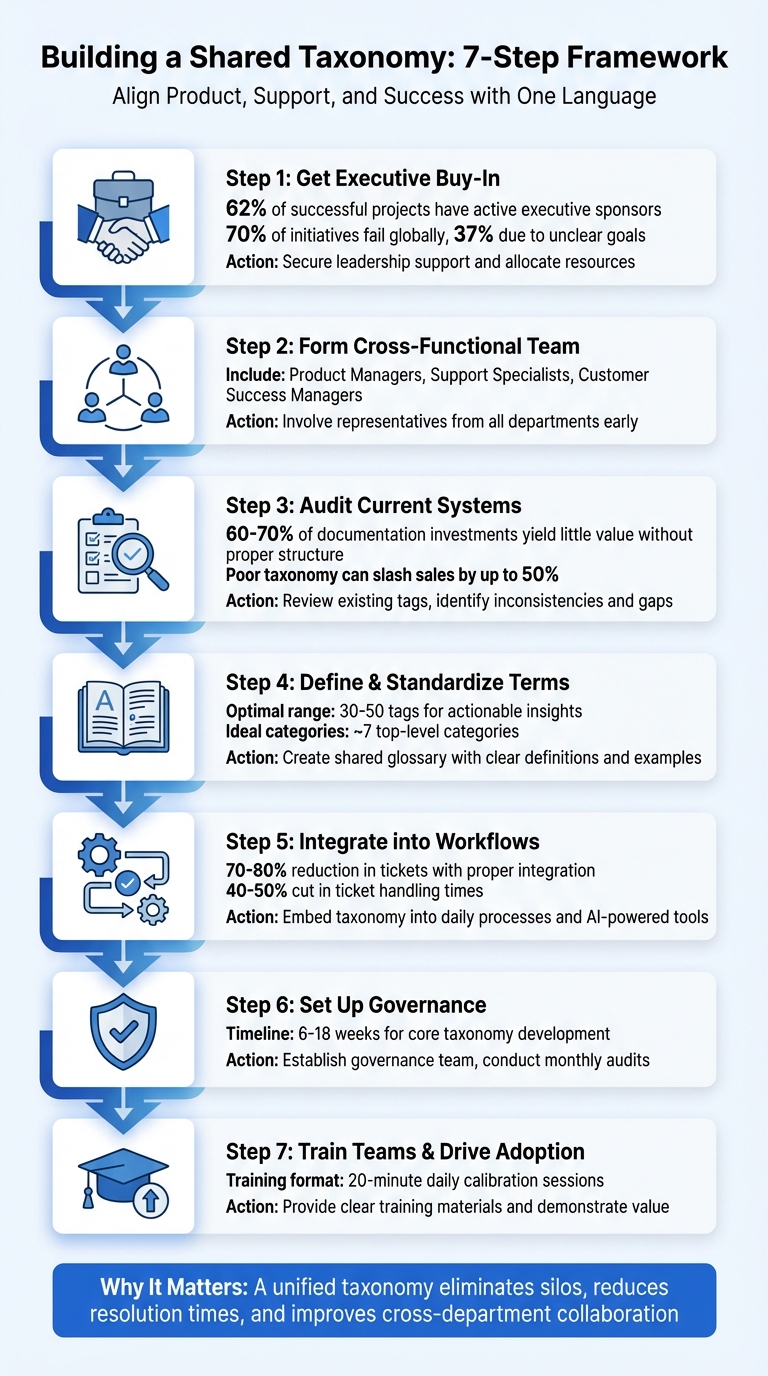
7-Step Framework for Building a Shared Taxonomy Across Product, Support, and Success Teams
Step 1: Get Executive Support and Form a Cross-Functional Team
Getting Leadership Approval
To establish a shared terminology, you need two things: leadership support and a diverse team to guide the process. Why? Because creating a unified taxonomy requires time, resources, and organizational changes – things only leadership can effectively champion. Without their backing, your project risks joining the 70% of initiatives that fail globally, with 37% of those failures tied directly to unclear goals. On the flip side, 62% of successful projects have one thing in common: executive sponsors who actively support them.
When presenting to leadership, make your case crystal clear. Connect the taxonomy to your company’s strategic objectives. For example, highlight how it could help reduce support costs over the next year or pave the way for market expansion over the next three years. This isn’t just a technical undertaking – it’s a business enabler. Use examples like improved productivity, reduced friction, and measurable financial gains to emphasize its importance.
"Securing executive buy-in is essential to prevent your project from being part of that unlucky 70% [of failed projects]." – Scott Olson, Marketing and Product Strategy Professional, Pragmatic Institute
Executives are busy, so keep your pitch concise and data-driven. Use tools like flowcharts or Gantt charts to outline the implementation plan and potential ROI. Tie the taxonomy to metrics they care about, such as Net Promoter Score (NPS), Customer Lifetime Value (CLV), or lead conversion rates. High-performing teams excel at linking their projects to these kinds of business outcomes – 82% do so, compared to just 40% of low-performing teams.
Once leadership is on board, the next step is to bring in insights from across the organization.
Including Team Members from the Start
With executive support secured, it’s time to build a cross-functional team. A taxonomy that works across the organization requires input from all key departments. Involve team members early to avoid creating siloed systems. For example, include Product Managers and Product Marketing Managers to define accurate feature names, Support Specialists who understand customer language, and Customer Success Managers who monitor long-term customer health.
Your team should include subject matter experts who can challenge ideas and validate the shared vocabulary. Arthur Patterson, Director of Global Taxonomy at Salesforce, underscores the importance of choosing the right people for each classification:
"Find the right experts for your classification categories… Make sure that the buck stops with that person/group and they are the authority on that subject." – Arthur Patterson, Director of Global Taxonomy at Salesforce
"Product vocab won’t work if it feels like it only applies to certain departments." – Zach Dunn, Rally
Don’t forget to include the employees who will be tagging data daily. Their input ensures labels are clear and easy to use. Assign one owner per high-level category to handle change requests and prevent “category drift” as the system evolves. Early collaboration like this helps avoid the creation of competing systems in isolation.
sbb-itb-e60d259
Step 2: Review Current Classification Systems
Running a Cross-Team Taxonomy Audit
Once your cross-functional team is set up, the next step is to evaluate your existing classification systems. Before designing anything new, it’s critical to understand what’s already in place. A good starting point is hosting a workshop with representatives from Product, Support, and Success teams to map out how they currently organize customer feedback, pain points, and feature requests. Pay close attention to why certain terms are used and how the data is applied within each team.
Jenny Dempsey, CX Manager at Apeel, shares her insight from experience:
"I typically start by talking to other teams to understand what needs to be measured outside of what I/my team want to measure. I learned early on that if I just measure what I want, I don’t have access to data that other teams need." – Jenny Dempsey, CX Manager, Apeel
To keep things organized, document this process in a spreadsheet. Include high-level categories, sub-categories, and any tags used, noting whether they are specific to a project or applied more broadly across the organization. Ask key questions: Who uses these insights? Which business decisions rely on 360-degree customer reporting and current tags? How do different teams define terms like "refund" or "feature request"?
Once you’ve gathered this information, start ranking tags by how often they’re used. Frequently used tags might need to be broken down into more specific categories, while rarely used ones might be redundant and should be merged. Studies suggest that users can effectively manage around 7 top-level categories, with an ideal range of 30–50 tags for actionable insights. Use this data to identify inconsistencies, conflicting definitions, and areas of overlap.
Finding Problems and Duplicate Work
The audit will likely reveal some uncomfortable truths. For example, you might discover that different teams define the same term in conflicting ways – like one team using "refund" to describe a request, while another uses it for completed transactions. This leads to reporting errors and confusion. You might also notice vague categories like "General" or "Miscellaneous", which fail to provide clarity and obscure the root causes of issues. And don’t be surprised if you uncover redundant tags being used across departments due to a lack of coordination.
These issues aren’t just frustrating – they’re expensive. Poorly structured taxonomies can result in 60–70% of documentation investments yielding little value because customers can’t find what they’re looking for. In online retail, disorganized classification systems can slash sales by up to 50% compared to stores with well-structured taxonomies. With 61% of website users expecting to find information within 5 seconds – or leaving for a competitor – every poorly aligned tag could cost your business.
To tackle these problems, replace vague categories with specific "Problem" or "Reason" tags that pinpoint actual customer issues. Create a shared glossary of terms, store it in a central knowledge base, and schedule regular reviews – every 3 to 6 months – to keep your taxonomy consistent as your product evolves. These audits will help prevent "tag drift" and ensure that all teams are speaking the same language.
Focus on identifying high-value tags that can serve multiple teams, and elevate them to an organization-wide standard rather than duplicating efforts across projects. This approach lays the groundwork for the next step: defining core terms and standardizing language across the board.
Step 3: Define Core Terms and Standardize Language
Building a Shared Glossary
Once your audit is complete, the next step is to create a shared glossary that clearly defines term usage, ownership, and examples. This glossary serves as a guide to ensure everyone in your organization is on the same page. Start by assembling your cross-functional team and identifying the terms that need attention first. Focus on terms that often cause confusion or directly impact business decisions. A good strategy is to prioritize those with a high "confusion factor" or those that play a critical role in your operations.
Each glossary entry should include the following: the preferred term, a plain-language definition, examples of usage, any potential exceptions, and synonyms. For example, if your company recently rebranded "Premier Support" as "Priority Support", include both terms in the glossary. This way, both long-time customers and new team members can easily understand the transition. A real-world example of this comes from May 2024, when Robin, under the leadership of Zach Dunn, faced a conflict between their "Premier" pricing plan and "Premier Support" add-on. They resolved this by renaming the service to "Priority Support" and documenting the historical name in their glossary.
Don’t get stuck waiting for everyone to agree on every detail. Make decisions, document them, and adjust later if needed. As Abby Covert, an Information Architect, wisely notes:
"Consensus is overrated: Sometimes you need to make a decision, agree to measure the results and move on. Waiting for everyone to agree on the perfect category name is a recipe for paralysis."
Use a consistent template for your glossary entries, such as: Term, Definition, Department Owner, Status, and Last Updated Date. Store this glossary in a central knowledge base to create a single source of truth that eliminates ambiguity and ensures clear communication across teams.
Once your glossary is established, the next step is to align your terms with recognized industry standards.
Using Industry Standards as a Starting Point
After building your glossary, take it a step further by aligning your terminology with established industry frameworks. Referencing external standards can save time and ensure consistency. Arthur Patterson, Director of Global Taxonomy at Salesforce, advises:
"Use outside lists wherever possible… Why reinvent the wheel? Straying from sources like this is just making more work for yourself."
Start by mapping your taxonomy to widely recognized standards like ISO Country Codes, SIC Industry Codes, or GAAP for financial terms. This approach not only keeps your terminology aligned with best practices but also minimizes the learning curve for new hires.
For teams managing large volumes of customer interactions, consider using a hierarchical structure for organizing terms. This means categorizing terms from broad to specific – such as Billing → Refund → Credit Card Refund. Such a structure supports granular reporting and allows different teams to access the level of detail they need. For example, Support teams might use detailed "problem tags", while Product teams might prefer broader categories like "feature requests." Research suggests that most users can handle about seven top-level categories effectively, with an ideal range of 30–50 tags to balance detail and usability .
When disagreements arise over terminology, prioritize the language your customers use, rather than relying on internal jargon. A great example comes from Robin, where teams had been using various terms like "No-show", "unbooked", "ghost", and "zombie" to describe the same concept. They ultimately standardized on "Abandoned Meetings" because it resonated best with users and required minimal explanation.
Finally, document the context and usage for each term to avoid misunderstandings in different scenarios. Good metadata management can dramatically cut down the time spent searching for definitions – from 5–10 minutes to under a minute – and increase user adoption of your glossary from 30% to 85%. By grounding your taxonomy in industry standards and customer-friendly language, you’ll create a framework that’s scalable and easy to maintain as your organization evolves.
Step 4: Connect the Taxonomy to Workflows and AI Tools
Connecting Taxonomy to Daily Workflows
A shared taxonomy only works when it’s woven into your team’s daily routines. Start by assigning ownership and routing rules to each Level 1 category. For instance, tickets tagged as "Access" can go directly to security-trained agents, while those under "Billing" are sent to finance-focused teams. This setup ensures tickets reach the right people without unnecessary manual sorting.
Take it a step further by linking subcategories to predefined responses and relevant Knowledge Base (KB) articles. For example, when an agent selects "Password Reset", they should automatically see the standard reply and the appropriate KB article. This approach provides consistent, reliable answers across the board. Teams adopting this method often report a 70-80% reduction in tickets as self-service options and structured KBs resolve common queries.
When escalations are necessary, capture detailed product context upfront – such as specific features, error messages, or user actions – and align support fields like "Customer Impact" to "Priority." This minimizes data loss during handoffs. This "intelligent escalation" process prevents follow-up questions from teams like Product or Engineering, cutting ticket handling times by 40-50%. Richie Aharonian, Head of Customer Experience & Revenue Operations at Unito, explains:
"The architectural vulnerability is this: every handoff is a compression point. Information gets compressed into whatever the receiving system can accept."
Lastly, steer clear of generic categories like "General" or "Other." These tags obscure issues. Instead, categorize tickets by intent – group them into "problem", "question/request", or "feedback" buckets. This makes it easier for Product and Success teams to analyze and act on reports.
By embedding these practices, you lay the groundwork for using AI to keep your taxonomy sharp, ensuring efficient and cost-effective support operations.
Using AI for Taxonomy Management
AI-powered platforms like Supportbench bring automation to tagging and classification. These tools can instantly label, prioritize, and route tickets based on your taxonomy. Unlike manual tagging – which can vary between agents and slow down during busy periods – AI ensures consistent tagging across all conversations in real time.
Supportbench’s automation capabilities include prioritizing cases, auto-assigning issue types, and tagging cases without agent intervention. The platform even predicts outcomes like First Contact Resolution (FCR) and CSAT, providing insights before surveys are completed. AI tools can also retroactively tag historical data, making it easier to analyze past interactions and refine your taxonomy as needed.
Over time, AI helps combat "taxonomy drift." It can suggest new topics based on emerging trends, identify redundant tags to merge, and flag overloaded categories that may need splitting. Gemma Johnson, Head of Customer Success, shared her experience with AI-powered tools:
"Prodsight increased our understanding of customer pain points through analysis of support data without any manual effort from our busy support team."
For teams handling large volumes, AI takes care of repetitive tasks like analyzing thousands of tickets, freeing human experts to focus on critical decisions and oversight. This "AI-led, human-governed" model ensures your taxonomy evolves with customer needs while reducing the burden of manual upkeep, keeping your support operations efficient and effective.
Step 5: Set Up Governance and Maintenance Processes
Creating Metadata and Governance Rules
Form a centralized governance team that includes members from Product, Support, and Success. This team will handle standards, manage updates, and address conflicts between global and local tagging needs. Software Architect Albin Issac highlights the importance of this approach:
"A centralized governance model ensures that the global taxonomy remains consistent and aligned with organizational goals."
Establish clear lifecycle policies for each taxonomy term. Changes can include actions like Add, Remove, Move, Rename, Split, or Merge – each requiring specific workflows. For instance, adding a new term is relatively simple, but splitting an existing category into two involves manually reviewing every previously tagged item, which is far more labor-intensive.
Define roles for updates using a RACI matrix, and implement a ticketing system to handle change requests. Each request should include examples and an analysis of its potential impact.
When a term becomes obsolete, deprecate it rather than deleting it. Deprecation removes the term from active use while preserving historical data, avoiding the need for mass re-tagging. Conduct monthly audits to identify and merge duplicate subcategories and retire tags with minimal usage. While a core taxonomy definition can typically be developed in 6 to 18 weeks, ongoing maintenance is crucial.
With these governance processes in place, you’ll be better equipped to scale and adapt to future challenges.
Planning for Future Growth
Strong governance, combined with automated tagging, ensures your taxonomy remains flexible and aligned with your business as it grows. Use a hierarchical structure for detailed reporting and scalable expansion. Keep taxonomy depth to three or four levels to ensure categories remain easy to navigate.
Maintain a master taxonomy for universal categories and use data mapping to align system-specific terms with it. This approach complements earlier efforts to integrate taxonomy into everyday workflows. Synchronize updates across systems using APIs for real-time changes or batch processing when needed.
Assign a dedicated owner to each high-level category. Maintain a synonyms table to map variations in terminology, ensuring consistency with the language your customers use.
As data volume increases, shift from manual tagging to automated processes. This reduces inconsistencies and prevents tagging fatigue. A well-maintained taxonomy should evolve alongside new product features, shifting user personas, and emerging data sources.
This framework not only supports scalability but also ensures you’re ready for continuous growth as you move into training and adoption in later stages.
Step 6: Train Teams and Drive Adoption
Running Cross-Team Training Sessions
Start with a focused pilot program involving one team, using 20-minute daily calibration sessions to test and refine how the taxonomy is applied. This keeps the process manageable and allows for real-time adjustments without overwhelming the team.
Create a simple internal guide featuring screenshots and clear examples. For each category, include straightforward "Do vs. Don’t" rules, such as: Do: use for profile settings; Don’t: use for billing issues. This ensures consistency across teams like Product, Support, and Success. As Kirsty Pinner, Product Owner at SentiSum, puts it:
"The sweet spot for great insights and ease of tagging for agents is a taxonomy with 30-50 tags maximum covering the main problems, questions and feedback that arise."
When agents notice that selecting "Installation Issues" automatically pulls up the right help article or routes the issue to the correct team member, they’re more likely to adopt the system willingly rather than feeling pressured into it.
Once training is in place, demonstrate the direct benefits to encourage broader adoption.
Showing Value Through Practical Examples
Practical demonstrations can effectively show how a unified taxonomy improves workflows across Product, Support, and Success teams. For Product teams, showcase how accurate tagging uncovers recurring customer pain points and feature requests without requiring manual analysis. For Support, highlight how hierarchical issue tracking speeds up ticket resolution and simplifies "contact reason" reporting. For Success, point out how maintaining consistent language during onboarding helps build trust and boosts customer retention.
For instance, in January 2025, Level Nine Sports, a US-based outdoor retailer, implemented an AI-driven system alongside a refined taxonomy. The results? A 23.4% increase in conversion rate and a 42% increase in time spent on the website after search. The improved taxonomy made it easier for customers to locate niche items like "backcountry avalanche transceivers", while merchandisers could strategically promote inventory on category pages. Similarly, HD Supply, a major industrial distributor in North America, saw a 16% boost in revenue from search and a 4% increase in add-to-cart rate after organizing their complex categories using a structured product taxonomy.
Frame tagging as something that enhances reporting and workflows rather than just another task to check off. As Paul Tucker, Head of Support at EveryoneSocial, advises:
"If the tags aren’t helping with reporting, workflows, or helping your team to quickly understand the context of the conversation with the customer, don’t worry about adding those tags."
Use short videos and internal demos to show how different teams are benefiting from the taxonomy. When teams see tangible results – like Product teams quickly identifying top feature requests or Support teams resolving issues faster – adoption tends to grow naturally and enthusiastically.
How Taxonomy Powers Knowledge Centers with Amanda Patterson, Ph.D. and Amy Bowman
Conclusion
Blending AI automation with strong governance in your taxonomy strategy ensures it stays relevant and efficient. Gaining executive buy-in, auditing systems, standardizing terminology, integrating workflows, establishing governance, and training teams all contribute to creating a shared language that simplifies operations and enhances collaboration.
These steps deliver tangible results. Companies that focus on customer-centered data analysis often see better business outcomes. For example, when Product teams can quickly locate feature requests, Support teams efficiently route tickets, and Success teams onboard customers with consistent language, the entire organization benefits.
"A taxonomy is a living document and will change as your company does" – Arthur Patterson, Director of Global Taxonomy at Salesforce
To keep your system effective as your company grows, conduct regular maintenance audits, enforce clear governance policies, and leverage AI tools.
Start small – aim for 30–50 tags initially – and expand thoughtfully based on data insights. Monitor metrics like resolution times, customer satisfaction (CSAT) per category, and taxonomy usage to evaluate success and pinpoint areas needing improvement. When results are visible, adoption happens naturally. A well-maintained and adaptable taxonomy is the backbone of efficient and impactful support operations.
FAQs
How can creating a shared taxonomy help Product, Support, and Success teams work better together?
A shared taxonomy acts as a common language that brings Product, Support, and Success teams onto the same page. When everyone relies on consistent terms, it minimizes misunderstandings, aligns goals, and makes it simpler to coordinate workflows, exchange insights, and address customer needs effectively.
This unified approach helps close communication gaps, enabling teams to collaborate more smoothly, make better decisions, and stay focused on shared objectives. The result? Stronger internal teamwork and a more seamless experience for customers.
How can we create a shared taxonomy for Product, Support, and Success teams?
To get Product, Support, and Success teams on the same page, start by creating a shared set of terms that everyone understands and agrees on. When everyone speaks the same language, it cuts down on misunderstandings and makes collaboration smoother.
Once the taxonomy is in place, weave it into daily workflows. This means training your teams, setting clear guidelines, and using tools that support consistent categorization. Don’t let it gather dust – review it regularly to keep up with changes in your products and what your customers need.
Lastly, set up ongoing governance and feedback loops. Keep an eye on how it’s being used, collect feedback from the teams, and tweak it as necessary. This continuous process helps the taxonomy stay effective and strengthens teamwork across departments.
How can AI help create and maintain a shared taxonomy for Product, Support, and Success teams?
AI takes the hassle out of building and managing a shared taxonomy by automating tasks like sorting, organizing, and validating data. This cuts down on manual work, reduces mistakes, and keeps things consistent across teams. For instance, AI tools can sift through massive datasets to recommend standardized categories and attributes, helping everyone stay on the same page.
It also flags outdated terms, spots inconsistencies, and highlights gaps in the taxonomy, making updates simpler as business needs change. By creating a structure that scales easily, AI improves collaboration among Product, Support, and Success teams. This minimizes miscommunication and boosts efficiency in customer-facing workflows.