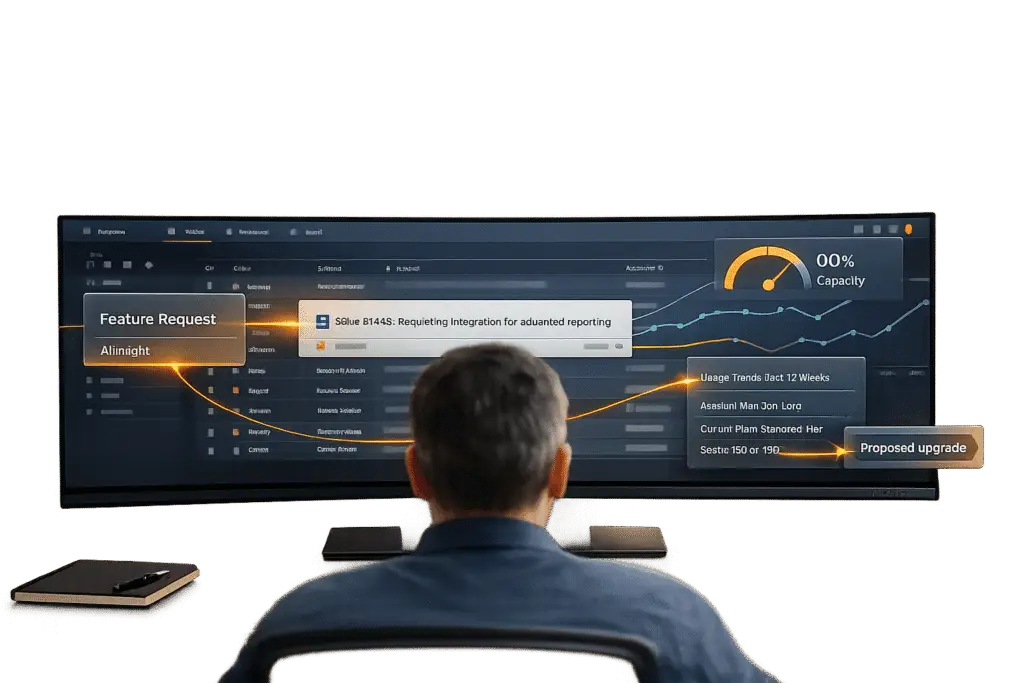
Support tickets aren’t just problems to fix – they’re hidden opportunities for growth. Every customer inquiry is a chance to understand their needs and suggest solutions that align with their goals. For example:
- Feature Requests: Asking about SSO or API integrations may signal readiness for higher-tier plans.
- Capacity Issues: Hitting storage or usage limits suggests a need for add-ons or upgrades.
- Workarounds: Manual processes like exporting data could highlight demand for advanced features.
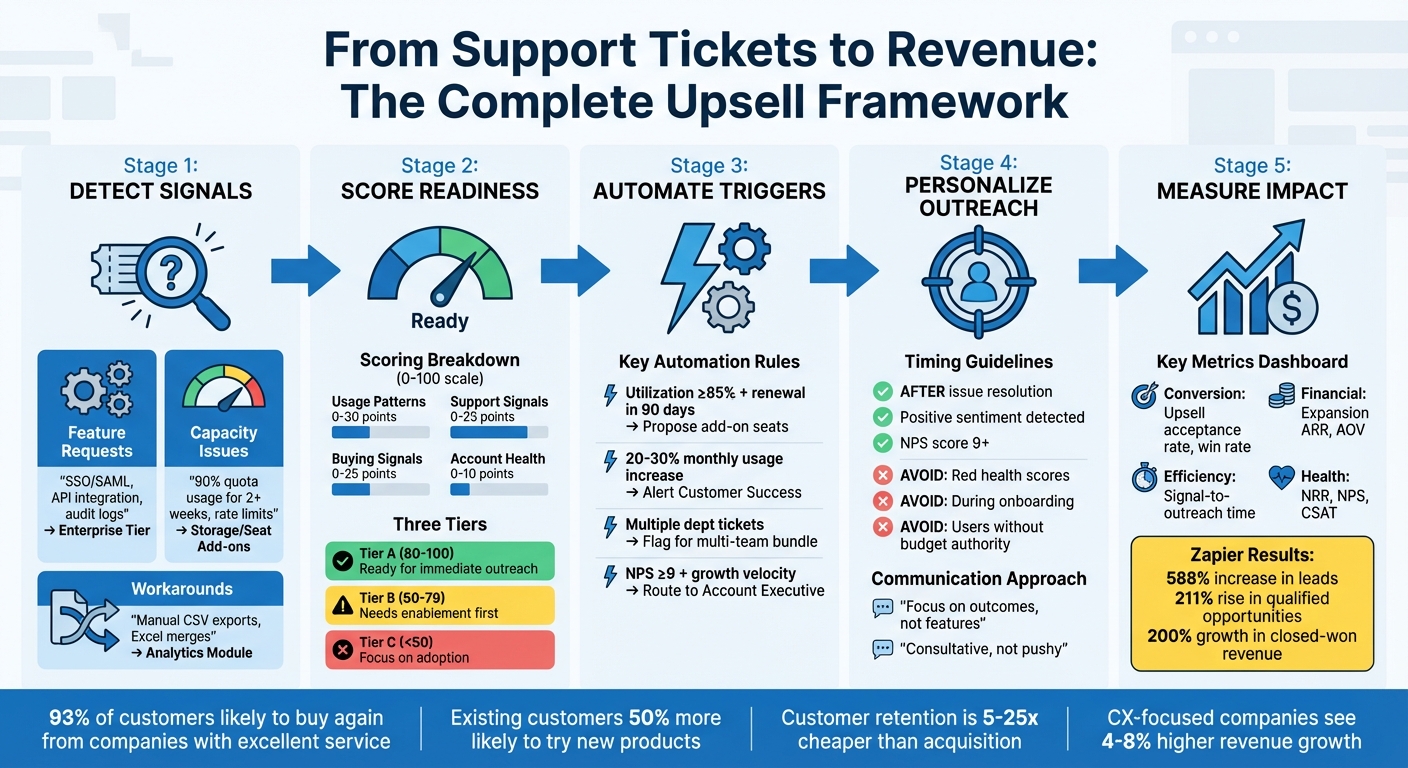
AI-Powered Upsell Detection Framework: From Support Signals to Revenue Growth
Increasing UPSELL Revenues with CUSTOMER INTELLIGENCE Tools
sbb-itb-e60d259
How to Spot Upsell Signals in Support Tickets
Support tickets aren’t just about solving problems – they can also reveal opportunities for upselling. For instance, when a customer inquires about SSO integration or mentions running out of storage, they might be signaling that their current plan no longer meets their needs. Recognizing these signals and acting on them can make a big difference.
Feature Requests That Point to Higher Plans
Feature requests are one of the clearest indicators of upsell potential. When customers ask about Single Sign-On (SSO), SAML/SCIM, role-based permissions, or audit logs, they’re often hinting at a need for an Enterprise-tier plan [2][9]. These features typically align with larger organizational demands that basic plans may not support.
Similarly, requests for API compatibility, Snowflake sync, or ETL connector packs suggest the customer is increasing their technical engagement. This could mean they’re ready for add-on services or bundles [2][9]. To make the most of these opportunities, train your support team to group these requests into categories like Feature Requests, Capacity Complaints, Workaround Descriptions, or Integration Questions [2]. Accounts that submit multiple tickets for higher-plan features within a 30-day period should be flagged – this frequency often signals urgency rather than casual interest [2].
| Support Signal | Implied Need | Suggested Upsell |
|---|---|---|
| "Requesting SSO/SAML" | Security & Compliance | Enterprise Tier [2] |
| "File/Storage limit reached" | Increased Capacity | Storage Add-on Bundle [2] |
| "Manual CSV export/Excel hacks" | Advanced Reporting | Analytics Module [2] |
| "Need Snowflake/API sync" | Data Integration | ETL/Connector Pack [2] |
| "How to add another team?" | Multi-department use | Multi-team Bundle [11] |
Usage Patterns That Indicate Growth
Sometimes, upsell opportunities come from indirect signals. For example, when customers consistently hit 90% of their seat, storage, or API quotas over two weeks, it’s a clear sign they’re outgrowing their current plan [2]. A 20–30% monthly usage increase also suggests they’re adopting the product more heavily [4].
Pay attention to tickets mentioning "rate limit exceeded" or patterns of "viral growth", such as multiple new seat invites within a short span of 14 days [2]. When customers describe workarounds like exporting data to Excel to merge reports, it’s a sign they might benefit from advanced analytics modules [2].
While these trends highlight upsell readiness, knowing when to act is just as important. Timing matters, and that’s explored in the next section.
When Not to Suggest an Upsell
Upselling at the wrong time can backfire. Avoid pitching upgrades to accounts with "red" health scores or those actively exploring alternative solutions [2]. For accounts in crisis, focus on resolving their immediate issues before introducing an upgrade. Tools like sentiment analysis reports can help determine whether an account is healthy – look for an NPS score of 9 or higher or a generally positive tone before making an offer [8][2].
It’s also wise to hold off on upsell conversations during onboarding. As the Datagrid Team explains:
Early-stage accounts hitting limits may need onboarding reinforcement before an upgrade offer, while mature accounts hitting the same threshold are ready for pricing discussions [2].
Lastly, avoid pitching to users without administrative or budget authority [11]. Since 93% of customers are likely to buy again from a company that delivers excellent service [10], addressing their immediate concerns should always come before discussing expansions.
Using Customer Data to Personalize Upsell Offers
To make upsell offers resonate, you need more than just a hunch. By connecting customer data with insights from support interactions, you can craft recommendations that align with each account’s specific needs. Generic pitches often fall flat because they fail to address what the customer truly values. Instead, linking support conversations to customer data can help you deliver timely and relevant suggestions.
Review Past Purchases and Support History
Start by digging into ticket history to spot recurring themes like capacity issues, feature requests, or manual workarounds. These patterns often highlight unmet needs or growth opportunities.
Use a customer health scoring system to prioritize accounts based on their upsell readiness. Assign points for factors like usage trends, ticket topics, and customer sentiment. Then, group accounts into three tiers:
- Tier A: Ready for immediate outreach
- Tier B: Needs some enablement first
- Tier C: Focused on adoption
For example, an account that has consistently used 90% of its seat quota for two weeks and submitted multiple feature requests in the past month would likely fall into Tier A [2].
Refine your categorization by tracking specific ticket intents. For instance:
- Capacity complaints signal immediate upgrade potential.
- Feature requests suggest enterprise-level interest.
- Workaround descriptions highlight functionality gaps.
- Integration questions point to opportunities for add-on services.
If multiple departments – like marketing and engineering – within a single account start submitting tickets, it’s a strong indicator that the product is spreading across the organization, making it a prime candidate for a bundle upgrade [2][9]. Combining this ticket analysis with CRM data can make your upsell strategy even sharper.
Connect CRM Data to Support Conversations
Integrating CRM data with support tickets equips agents with crucial information, such as company size, current subscription tier, renewal dates, and recent milestones like funding rounds or hiring surges [4][5]. This added context transforms everyday support interactions into strategic opportunities.
Take Zapier’s 2024 approach as an example. They implemented an automated sales opportunity detector that combined support ticket data with HubSpot CRM insights. By identifying sales interest and high usage patterns, they achieved impressive results:
- 588% increase in leads
- 211% rise in qualified opportunities
- 200% growth in closed-won revenue from support [5]
The secret? Real-time integration of support and CRM data, enabling agents to spot and act on expansion opportunities as they arise.
To make this process seamless, set up automated routing so that identified opportunities are sent directly to the appropriate Account Executive or Customer Success Manager, complete with all relevant conversation details. This ensures no opportunity slips through the cracks. According to ZoomInfo, 75% of revenue teams say that real-time account and intent signals helped them uncover expansion opportunities they would have otherwise missed [4].
Imagine your support team noticing that a customer recently hired 15 new employees or renewed their contract ahead of schedule. With this insight, they can time upsell suggestions perfectly, shifting from reactive troubleshooting to proactive revenue generation. By integrating AI-powered tools and customer-centric data, your support team can become a driving force for growth.
Using AI to Automate Upsell Detection
Manually reviewing support tickets simply can’t keep up when you’re dealing with hundreds – or even thousands – of interactions each week. AI-powered tools solve this challenge by automatically scanning tickets, identifying upsell signals, and delivering actionable insights in real time. This ensures no conversation is overlooked when it comes to upsell opportunities.
AI Ticket Summaries and Intent Detection
AI takes personalized upsell offers to the next level by capturing signals in real time. While manual review can miss critical indicators, AI consistently categorizes customer intents at scale.
For example, AI can analyze ticket content and classify customer needs into four main categories: requests for higher-tier features, capacity-related complaints, descriptions of workarounds, and questions about integrations [2]. Imagine a customer saying, "I’m exporting to Excel to merge reports." AI flags this as a workaround that highlights a missing feature – possibly an advanced analytics module [2]. Similarly, tickets with terms signaling enterprise readiness are tagged as potential expansion opportunities [2].
Unlike manual sampling, which reviews only a fraction of interactions, modern AI evaluates every single ticket and call [8]. Take Zapier as an example: they implemented an automated system to detect sales opportunities. Their AI analyzed support tickets for sales-related keywords, identified enterprise intent, extracted email domains, and pulled company data (like ARR) from their CRM. High-intent leads – companies with $10,000+ ARR – were routed directly to the sales team. The result? A 588% increase in leads and a 200% boost in closed-won revenue sourced from support [5][7].
Predictive Scoring for Upsell Readiness
AI doesn’t just stop at identifying signals – it calculates a propensity score (on a 0–100 scale) to rank accounts based on their likelihood to upgrade [9][11]. This score aggregates data from tickets, usage patterns, and sentiment, transforming support teams from reactive problem-solvers into proactive revenue drivers. Here’s how the scoring typically breaks down: usage (0–30 points), support signals (0–25 points), buying signals (0–25 points), and account health (0–10 points) [9].
Accounts scoring 80–100 points are Tier A, meaning they’re ready for immediate outreach by executives. Tier B accounts (50–79 points) need some targeted engagement before upselling, while Tier C (below 50 points) should focus on adoption and product use before expansion [2].
"Upsell identification = signals → scoring → triggers → outreach → outcome." – The Pedowitz Group [11]
AI also evaluates sentiment and resolution success. A combination of positive sentiment and high usage growth often points to a "happy champion" – someone ready for an upsell conversation [8][11].
Set Up Automation Rules to Flag Opportunities
Once AI detects high-intent signals, automation rules can trigger specific actions. For instance, you can set rules to flag accounts that hit 90% of their seat, storage, or API quota for two consecutive weeks [2]. When this happens, the system might add an internal note to the ticket, create a task in your CRM, and notify the Account Executive via Slack or email [5][7].
| Signal Pattern | Automation Action | Human Role |
|---|---|---|
| Utilization ≥ 85% + renewal in 90 days | Propose add-on seats; book review | Approve pricing; join call [11] |
| Premium feature usage in pilot team | Surface value proof; launch nurture | Conduct demo deep dive [11] |
| New team activation + NPS ≥ 9 | Map stakeholders; route intro | Facilitate multi-department deal [11] |
| Intent surge without adoption | Send tutorial assets; offer workshop | Run enablement workshop [11] |
Another effective trigger monitors growth velocity. If product usage jumps by 20–30% in a single month, the system alerts Customer Success for proactive outreach [4]. Similarly, if the number of unique departments using your product grows by 25% quarter-over-quarter, it could indicate a need for a multi-team bundle upgrade [2].
To minimize false positives, use multi-factor triggers. For example, high license utilization (≥85%) combined with an upcoming renewal (within 90 days) and positive sentiment creates a much stronger signal than any single factor alone [11]. This layered approach ensures your team focuses on real opportunities.
How to Present Upsells Without Damaging Trust
Upselling works best when it’s approached with the right timing, thoughtful framing, and a supportive tone. Done correctly, an upsell feels like a natural continuation of helping the customer rather than a pushy sales pitch. By using data and aligning support interactions with revenue strategies, upselling can become part of a positive customer experience. Let’s break down how timing and clear communication can turn these conversations into helpful guidance.
Choose the Right Time to Suggest an Upsell
Timing is everything. Always wait until the customer’s initial issue is fully resolved before suggesting an upsell. Why? Because bringing up an upgrade too early can come across as dismissive and harm trust. However, after resolving their issue, customers are more likely to be open to suggestions, as they’re already in a positive frame of mind [12].
Look for natural opportunities. For instance, if a customer reaches out about nearing their storage limit or hitting a rate cap, it’s a perfect time to discuss an upgrade to remove those roadblocks [2]. Similarly, if they’re using time-consuming manual workarounds, you’ve identified a “value gap” that a higher-tier feature could address. Another example: if an account adds a significant number of users within a short timeframe (like 14 days), it’s a clear sign they might benefit from a larger seat package [2].
Explain the Value in Clear Terms
Once the timing feels right, focus on making the benefits of the upsell easy to understand. Speak in terms of outcomes rather than features. For example, instead of saying, “Our Premium plan includes advanced analytics,” try, “This plan automates report merging, freeing up 10 hours of your team’s time every week.”
Help customers see the cost of sticking with their current setup. If they’re struggling with manual processes or hitting API limits, quantify the impact – whether it’s lost time, delayed revenue, or other inefficiencies. This makes the value of upgrading more tangible [6].
"Focus on the benefits, not just the features. It’s easy to assume they know what a feature does, but explaining how it fits into their specific needs can really help win them over."
- Peter, BigBusinessAgency [1]
Use language that reinforces your role as a problem-solver. For example, you could say, “While I was looking into this for you, I noticed something that could help prevent this issue altogether…” This frames the upsell as part of your effort to assist them, not as a sales pitch [6].
Keep the Conversation Consultative
Take an advisory approach by presenting the upsell as an option, not a hard sell [12]. This consultative style ensures every suggestion feels tailored to the customer’s situation and needs.
"The key is organically elevating conversations rather than hijacking interactions suddenly. When executed gracefully, customers feel assisted rather than sold."
To keep the focus on helping customers, set team-wide revenue goals instead of individual quotas. This reduces pressure on agents to push upgrades and allows them to maintain a helpful, customer-first mindset [12]. Timing is also critical – ensure your suggestions align with the customer’s mood and recent experience.
It’s worth noting that companies with a strong focus on customer experience see revenue grow 4–8% higher than their competitors. Additionally, 77% of customers have a more favorable view of brands that actively seek and act on feedback [1].
Prepare Your Team to Identify and Act on Upsells
Upsell opportunities are wasted if your team overlooks them or doesn’t know how to respond. Support agents need clear workflows, proper training to communicate effectively, and measurable metrics to ensure no potential revenue slips through the cracks. Here’s how to build a system that empowers your team to contribute meaningfully to revenue growth.
Create Standard Upsell Workflows
Having a structured approach eliminates guesswork for agents. Decision trees and checklists can help them assess when an upsell is appropriate. For instance, set triggers like flagging accounts that hit 90% of their seat, storage, or API quota for two consecutive weeks. This ensures a consistent process across the team [2].
A tiered prioritization system can further streamline efforts. Accounts with an 80–100 score (based on usage, support interactions, and engagement) should be prioritized for immediate executive outreach. Those scoring 50–79 can receive targeted enablement, while accounts under 50 should focus on improving product adoption [2].
Agents should also classify tickets into specific intent categories, such as feature requests, capacity complaints, workaround descriptions, or integration inquiries. For example, if a customer mentions manually exporting CSVs to merge reports, this should trigger an upsell playbook for advanced reporting solutions.
| Support Signal | Implied Need | Suggested Upsell | Priority |
|---|---|---|---|
| "Requesting SSO" | Security & compliance | Enterprise tier with SAML/SCIM | High |
| "File limit reached" | More capacity | Storage add-on bundle | High |
| "Manual CSV export" | Advanced reporting | Analytics module | Medium |
| "Need Snowflake sync" | Data integration | API or ETL connector pack | Medium |
To ensure no opportunity falls through the cracks, implement automated handoffs. When an upsell signal is detected, your system should add an internal note to the ticket or create a CRM task for an account executive [5]. This automation has been shown to capture opportunities effectively in various industry settings [5].
With these workflows in place, the next step is equipping agents to recognize and articulate the value of upsells.
Train Agents to Recognize and Communicate Value
Agents need sharp eyes for upsell signals and the ability to communicate solutions clearly. Comprehensive product knowledge is key – they should understand plan limits (like seat, storage, or API quotas) and know which premium features address common customer pain points [2]. For example, if a customer describes a manual process, agents should identify the gap and recommend the right upgrade.
Training should focus on consultative communication. Instead of pushing for a sale, agents should position upgrades as solutions to customer challenges. For instance, rather than saying, "You should upgrade to Premium", they could say, "I noticed you’re hitting your API limit weekly – our Pro plan removes that cap so you can avoid delays."
Context matters, too. Agents should tailor their approach based on the customer’s company size, subscription type, and purchase history [5]. A conversation with a large enterprise about SSO will differ from one with a small startup.
"The real leverage in revenue growth comes from the accounts you already have." – ZoomInfo [4]
Existing customers are 50% more likely to try new products and spend 31% more than new ones [9]. Your support team is already interacting with your best prospects – they just need the skills to act on these opportunities.
Track Metrics to Improve Results
To improve upsell efforts, you need to measure their impact. Start by monitoring upsell acceptance rates and win rates. Low acceptance rates might indicate that upgrades are being pitched too early or that the benefits aren’t being communicated effectively [11].
Financial metrics like expansion ARR and average order value (AOV) provide insight into how upselling contributes to revenue. For many SaaS companies, upselling and cross-selling can account for 70–95% of total revenue [9].
Efficiency metrics, such as the time from signal to outreach and time to close, help evaluate how quickly your team acts on opportunities. Delays can mean missed chances [11].
Customer satisfaction metrics like CSAT and NPS are equally important. High upsell acceptance rates are only valuable if they align with a positive customer experience [11].
Finally, track your false positive rate – the percentage of flagged accounts that don’t actually have upsell potential. If this rate is high, recalibrate your scoring model by analyzing historical data on successful expansions [9].
| Metric Category | Key Performance Indicators (KPIs) | Purpose |
|---|---|---|
| Conversion | Upsell Acceptance Rate, Win Rate | Measures pitch and timing effectiveness |
| Financial | Expansion ARR, Average Order Value (AOV) | Tracks revenue impact |
| Efficiency | Time from Signal to Outreach, Time to Close | Evaluates process speed |
| Health | Net Revenue Retention (NRR), NPS, CSAT | Ensures alignment with customer satisfaction |
| Detection | False Positive Rate, Opportunities Identified | Assesses upsell detection accuracy |
Conclusion
Support tickets aren’t just about fixing problems – they’re opportunities to drive revenue. By training your team to spot feature requests, capacity issues, and usage trends, you can turn routine interactions into chances for upselling after resolving the customer’s immediate concerns.
AI tools make scaling this strategy much easier. Features like automated intent detection, predictive scoring, and sentiment analysis help identify high-potential accounts. For instance, Zapier’s 2025 automated sales detector led to a 225% increase in "Closed Won" deals and a 200% revenue boost [5]. This highlights how connecting support data with automation can deliver impressive results.
To shift support from a cost center to a growth engine, you’ll need structured workflows, targeted training, and clear metrics. Equip your agents with decision trees to know when to escalate an account, playbooks to guide their conversations, and tools to track both revenue impact and customer satisfaction. Companies that focus on customer experience see 4–8% higher revenue [1], proving that prioritizing customers and boosting revenue can go hand in hand. This approach transforms support into a strategic driver of growth.
To make this happen, implement capacity triggers, integrate CRM data, and train your team to communicate value effectively. Keep a close eye on metrics like conversion rates, expansion ARR, and customer satisfaction to refine your approach. After all, retaining a customer is far more cost-effective than acquiring a new one – it can be 5–25 times cheaper [9].
"A ticket is not a disruption – it’s an interaction with revenue potential." – Qualimero [3]
FAQs
How can I prevent upsells from damaging customer trust?
To maintain trust during upsells, make sure your offers are relevant, well-timed, and genuinely helpful. The goal should be to address a need or improve the customer’s experience, not just to boost sales. Train your team to spot cues like specific feature requests and approach upselling with understanding and care. Skip the hard-sell tactics – focus instead on being transparent about the value of the offer. This way, the upsell feels like a thoughtful suggestion rather than an unwelcome push.
What ticket signals should be auto-flagged as upsell opportunities?
Customers nearing their plan limits – like hitting 90% of storage capacity or maxing out API calls – are clear signals for potential upsell opportunities. Another strong indicator? Rapid growth in feature adoption or increased usage across different teams or regions.
On the flip side, positive feedback such as high Net Promoter Scores (NPS) or recent successes can also highlight customers who might be open to upgrading. Even frustration or negative sentiment in support tickets can turn into upsell opportunities, especially once their issues are resolved and trust is rebuilt.
How can AI score upsell readiness using tickets and usage data?
AI evaluates upsell potential by examining support tickets and usage data for clues like feature adoption, license usage, and customer sentiment. It spots trends such as hitting plan limits, rising engagement, or favorable feedback. By analyzing real-time ticket data – like specific requests or emotional tone – AI highlights accounts with strong upgrade opportunities. This allows teams to recommend upgrades proactively while keeping the customer’s needs at the forefront.