Supporting multiple languages in a customer portal doesn’t have to be overwhelming. Here’s how you can do it effectively while avoiding content duplication and high costs:
- Start with data: Use customer support tickets and analytics to identify priority languages and high-traffic content worth translating.
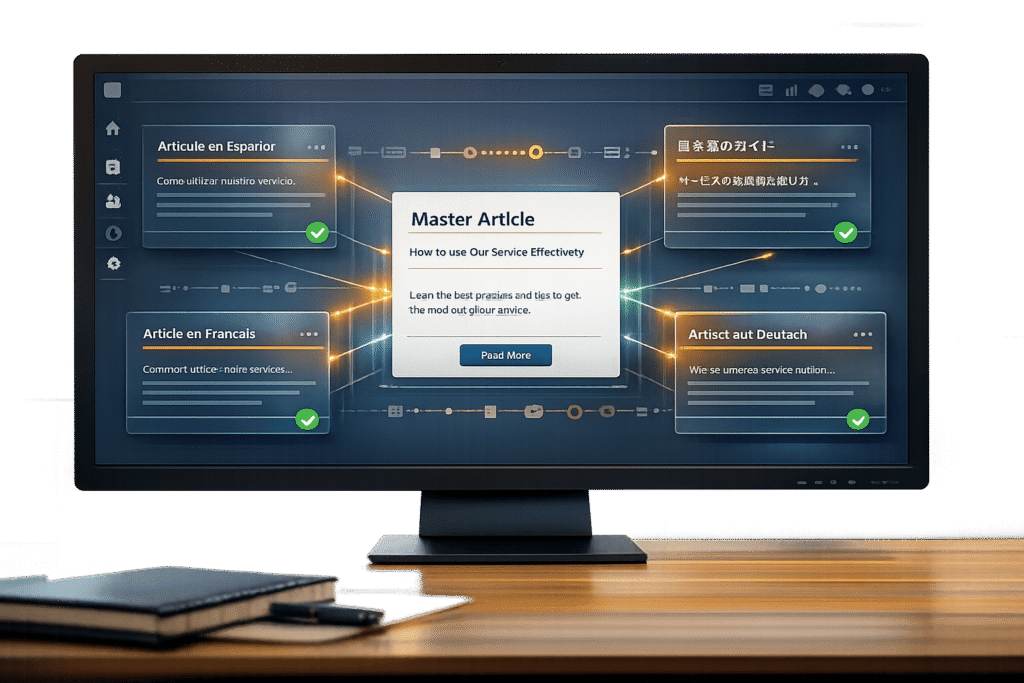
- Centralize your content: Maintain one master version of each article to simplify updates and ensure consistency across translations.
- Leverage AI tools: Automate translations, sync updates, and use AI to handle routine tasks while reserving human review for sensitive content.
- Streamline workflows: Link translations to master articles, set fallback languages, and use glossaries for consistent terminology.
- Configure your portal: Add language selection options, localize formatting (dates, currency, units), and adapt self-service tools for multi-language support.
- Automate updates: Use AI-powered workflows to detect and apply changes across translations, reducing manual effort and errors.
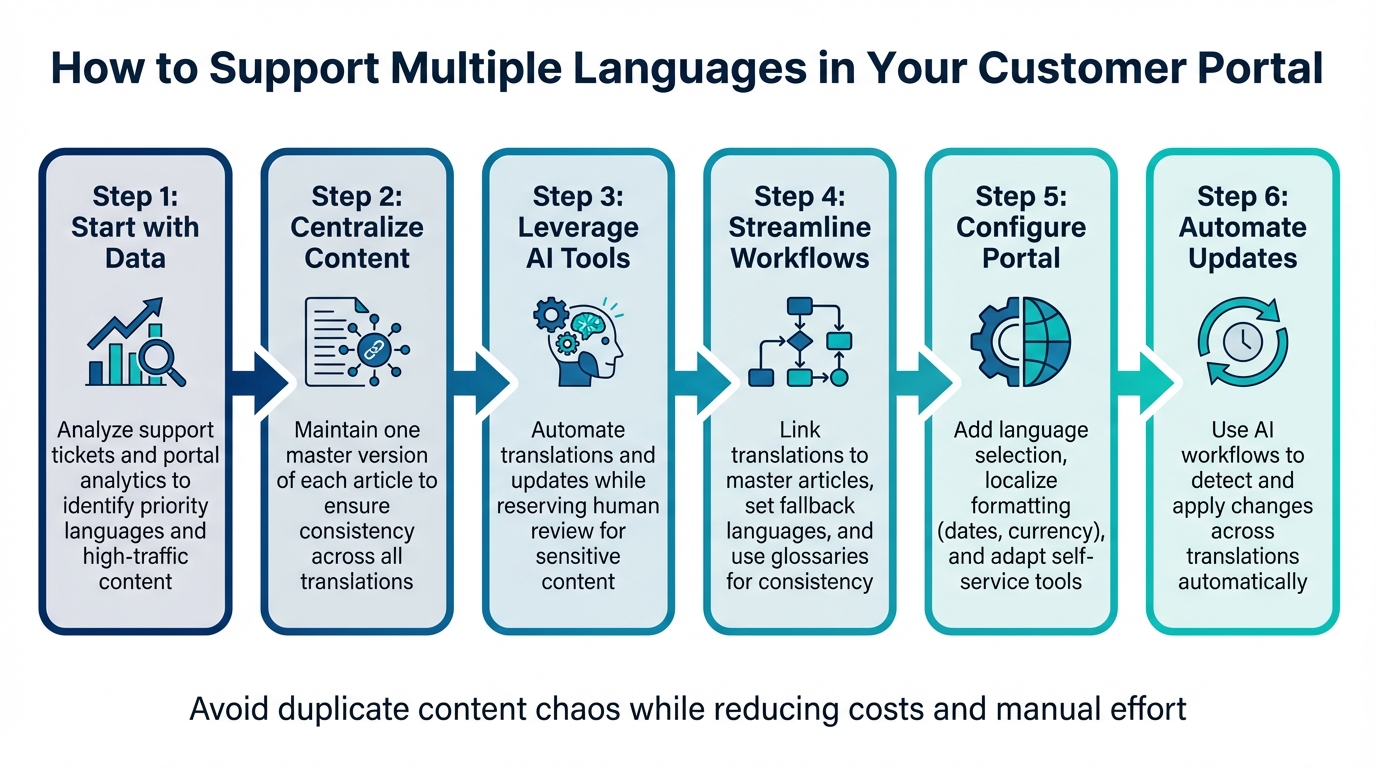
6-Step Process for Supporting Multiple Languages in Customer Portals
Assess Your Language Requirements and Content Duplication Risks
Before diving into translations, it’s important to figure out which languages are truly necessary and which content deserves the effort. Translating everything at once not only increases the workload but also creates an ongoing challenge of keeping all versions updated as your original content evolves. To streamline this, start by analyzing your customer data and auditing your existing content.
Analyze Customer Data to Prioritize Languages
Customer data holds the key to deciding which languages to prioritize. Begin with your support ticket data. If you notice a high volume of tickets in a language other than your primary one, it’s a clear sign of a language gap. Addressing this gap can improve customer satisfaction. Additionally, check your portal analytics to identify which articles are most effective at resolving issues. These high-performing articles should top your translation list [1]. Pair these insights with market growth projections to align your language strategy with your business expansion goals.
| Metric to Analyze | Purpose for Language Prioritization |
|---|---|
| Support Ticket Volume | Highlights immediate language needs and gaps in live support [5]. |
| Article View Counts | Identifies high-value content that should be translated first [1]. |
| Market Growth Projections | Guides international support planning based on future opportunities [5]. |
Once you’ve identified priority languages, the next step is to trim unnecessary content to avoid wasting resources.
Map Your Current Content for Redundancies
Conduct a thorough audit of your knowledge base to spot redundant, outdated, or low-impact articles [1]. Translating content that receives little traffic or duplicates other information is inefficient. Create a list of articles that includes word counts, last update dates, and recent view counts to determine what’s worth translating and what can be retired.
Focus on evergreen content – articles that address recurring issues and remain consistently relevant. Translating outdated guides or rarely used articles is a poor use of resources [1]. For instance, if an article hasn’t been updated in over a year and sees minimal traffic, it’s likely not worth translating. Standardizing your article format, such as using a consistent "Problem-Solution-Outcome" structure, can also make AI-powered translations more reliable and simplify maintenance across languages [1].
This audit lays the groundwork for creating a centralized content system, where each topic has a single master article. This approach not only reduces duplication but also makes managing translations more efficient.
sbb-itb-e60d259
Create a Centralized Content System
After deciding which content needs translation, the next step is to establish a system that avoids duplicate content. The key is to maintain one master article per topic, with all translations linked back to this central source. This method keeps your content organized and prevents the confusion of managing multiple disconnected versions that may become inconsistent over time.
Maintain One Master Version of Each Article
Start with a single, authoritative version in your primary language. This master version acts as the base for all translations. Use automated tools to flag linked translations as "out-of-date" whenever the master version is updated [3]. This ensures your team knows exactly which translations need revisions, avoiding the mismatch of an updated master paired with outdated translations [3].
To further simplify the process, standardize the structure of your articles. A consistent format enhances the performance of AI translation tools and makes human review more efficient [1]. For example, if your billing articles follow a uniform structure, translators can quickly adapt and deliver higher-quality results across all languages.
Additionally, set new translations to an "Inactive" status until they are reviewed and approved. This prevents customers from encountering incomplete or low-quality content while still allowing access to the master version.
This structured approach naturally facilitates better linkage and fallback processes for translated content.
Link Translations and Set Fallback Languages
Using your centralized system, link each translated article directly to its master version. This setup tracks the relationships between versions and enables fallback functionality. If a translation is missing or inactive, your system should automatically display the master version. This avoids errors or leaving users without the information they need.
Incorporate dynamic content placeholders (e.g., {{dc.item_name}}) to automatically insert the correct language variant. This reduces the need for redundant business rules and simplifies content management [3].
Finally, maintain a centralized glossary for product names, technical terms, and brand-specific language. A shared translation memory ensures terms like "dashboard" or "API key" are translated consistently across help articles, chat responses, and email templates [3]. Consistency is especially crucial in technical documentation, where accuracy builds trust and credibility.
Use AI for Translation and Content Adaptation
AI tools, when integrated into a centralized system, can automate the process of updating multilingual content. This setup ensures that all language versions remain synchronized. By leveraging large language models (LLMs), modern AI localization can process entire paragraphs, maintaining context and ensuring translations are natural and accurate [6].
Automate Translation with AI Tools
AI-powered workflows can streamline multilingual content creation by automatically generating translations every time master articles are updated. With continuous syncing, the system identifies changes in the source content and triggers translations only for the updated sections, eliminating redundant work and keeping all versions aligned [3][1]. For instance, in January 2026, Polhus successfully localized 1.6 million words, achieving 75% human-approved translations while saving both time and money [6].
To further enhance efficiency, implement risk-based routing: let AI handle routine translations while directing high-stakes content, such as billing policies, to human reviewers [3]. Additionally, use confidence thresholds to flag low-confidence translations for specialist review, ensuring quality without slowing down the process.
Detect Sentiment and Adjust Content by Language
AI can evaluate customer sentiment in different languages and fine-tune content tone to align with local expectations. By providing metadata like brand voice, audience profiles, and glossaries, you can ensure translations reflect the desired tone [3][6]. For example, set specific styles for different channels: adopt a "Fluid" style for live chat to maintain a conversational tone, and a "Faithful" style for help center articles and legal documents to prioritize precision [3].
Ajax Systems demonstrated the power of AI localization in November 2025, reporting that integrating AI workflows made content production twice as fast and three times cheaper than traditional methods [6]. A key factor was providing AI with the right context. When Crowdin translated its Enterprise UI into Japanese in 2025, the use of AI-generated context for each string resulted in a 71% accuracy rate on the first pass, with proofreaders approving all those strings without further edits [6].
These sentiment-based adjustments enhance the consistent tone established by centralized systems, ensuring multilingual content feels natural and reliable. Beyond translations, AI can also transform customer support cases into ready-to-publish multilingual articles.
Convert Support Cases into Multilingual Articles
Building on a centralized content strategy, AI can convert resolved support tickets into structured knowledge base articles in multiple languages. For high-volume issues, AI analyzes the bilingual transcript of the ticket conversation and generates an article using a "problem-solution-outcome" template [1][3]. By injecting context – such as product details, policies, and tone – AI ensures the article is tailored and avoids sounding like a literal, machine-generated translation [3].
Focus on analytics to prioritize content creation. For example, identify common issues like login errors or billing questions and use AI to create multilingual articles for these topics first [1]. For sensitive subjects, such as refunds or legal matters, AI can draft the initial version, but human review should be required before publication [3]. Platforms like Supportbench simplify this process by allowing agents to turn case histories into multilingual help articles with just one click, eliminating manual duplication.
"Customer support is one of the fastest ways to lose trust in a new market. A strong AI translation workflow helps you reply quickly in the customer’s language while keeping tone, terminology, and escalation rules consistent." – Valeria Sagnotti, AI Translation Specialist, Lara Translate [3]
Configure Your Portal for Multiple Languages
After setting up your AI translation workflows, the next step is to make your portal accessible in multiple languages. This means adding language selection options, aligning regional formatting with local norms, and customizing self-service tools for each language. These adjustments complement your centralized content and translation processes, creating a seamless multilingual experience.
Add Language Selection and User Preferences
Once your content is ready, configure your portal to display multilingual information smoothly. Start by enabling automatic language detection using browser headers or login details [7][8]. For logged-in users, the portal should default to the language saved in their profile, maintaining that preference across sessions.
To give users manual control, include a language switcher in your portal’s header. This can be achieved with an HTML dropdown that uses onchange logic (e.g., onchange="location = this.value;") to update the URL (e.g., adding ?l=en-US) and store preferences in a cookie [7]. Additionally, you can activate multiple languages in the backend but keep incomplete translations hidden from the public until they’re ready [8][9].
Localize Dates, Currency, and Measurements
Language is just one part of the equation – regional formatting is equally important. For U.S.-based users, use formats like MM/DD/YYYY for dates (e.g., 03/24/2026), USD ($) for currency, and imperial units (feet, pounds, °F) for measurements. To ensure accuracy, store timestamps in UTC and convert them on the frontend based on the user’s location. Use IETF BCP 47 language tags (e.g., en-US for American English or en-CA for Canadian English) to manage these regional differences effectively.
Set Up Language-Specific Self-Service Options
Lastly, adapt your self-service tools to meet the needs of users in different languages. Implement AI chatbots that can detect a user’s language and provide context-aware responses in over 45 languages [2]. The importance of this is clear: by 2019, 1 in 5 people in the U.S. spoke a language other than English at home, nearly three times the rate from 1980 [2]. Use analytics to identify and prioritize translating FAQs and articles that generate the most support tickets [1]. When creating help articles, stick to a consistent "problem-solution-outcome" format to ensure translations remain clear and easy to follow across all languages [1].
Automate Content Updates Across Languages
Once your portal supports multiple languages, the real challenge lies in keeping translations up to date as your source content evolves. Relying on manual updates can lead to delays and inconsistencies, with some languages falling behind while others stay current. Exporting and re-importing content manually not only slows things down but also increases the risk of outdated information across your global platform [11]. By setting up automated workflows aligned with your portal’s configuration, you can ensure all language versions stay synchronized.
Create AI-Powered Translation Workflows
AI-driven workflows are designed to detect changes in your source content and push updates automatically. For example, when a source article is updated, API connectors and webhooks can send only the modified strings to the translation queue [11]. To make this process even more efficient, you can tag new or updated content keys with a date-based marker (e.g., ai-task-2026-03-24). This allows the AI to focus solely on the changed strings, avoiding unnecessary retranslation of the entire document [10]. These workflows integrate real-time content management with translation processes, ensuring your global content remains consistent.
Automatically, these workflows can classify updates by their level of risk. For minor changes to copy, updates can be published immediately. However, updates involving policies or other high-risk content are flagged for human review [3]. Once an AI task is completed, a "task.closed" webhook can download and push the updated content back to your portal – eliminating the need for manual intervention [10].
Identify and Fix Missing Translations
Even with automated updates, it’s crucial to maintain translation quality through regular audits. Gaps can still emerge. Weekly AI-powered audits can help identify missing, outdated, or inconsistent translations [3]. Additionally, analyzing search query data from your portal may uncover missing keywords in certain languages, pointing to localization gaps that need attention [3].
To streamline this further, you can set confidence thresholds. High-confidence, low-risk updates can auto-publish, while low-confidence or high-risk changes are routed to human reviewers [3]. Workflows can also be configured to tag completed tasks (e.g., ai-task-complete) to avoid redundant processing in the future [10].
"A strong workflow solves three operational problems: speed, consistency, and scalability" [3].
Test and Scale Your Multilingual Operations
Once you’ve set up a centralized system and automated updates, the next step is to thoroughly test and scale your multilingual operations. With your automated translation workflows in place, it’s time to validate how well your portal performs with real-world content. Don’t rely on idealized samples – use actual support tickets and chat transcripts. This will help you uncover potential issues like formatting glitches, missing variables, or inconsistent tone that could affect your customer experience [12].
"Evaluating AI is not about asking whether it works. It is about asking whether it works well enough, often enough, for your business, your brand, and your customers."
– Craig Stewart, Phrase [12]
Make sure your portal operates seamlessly in every language, monitor its performance closely, and use AI-driven data to strategically expand your language support.
Test Portal Features in Each Language
Conduct detailed QA testing across all supported languages. This includes verifying accurate search results, smooth navigation, correct form inputs, and responsive content display. Pay close attention to confidence thresholds and glossary compliance. For instance, high-confidence translations can be sent directly to customers, while lower-confidence ones should be routed to human agents.
Perform weekly audits on translated samples to catch recurring issues in tone, terminology, or style, and use these insights to refine your glossaries and macros. For high-risk content – like refunds, legal terms, privacy policies, or safety-related topics – prioritize human reviews. On the other hand, automate testing for low-risk queries, such as password resets [3].
Track Performance with AI Analytics
Use AI analytics to monitor key performance metrics by locale, such as First Contact Resolution (FCR), response times, re-open rates, and escalation rates. For example, if a particular language shows low CSAT scores coupled with high escalation rates, it could indicate problems with tone or terminology in translations.
Additionally, track how often agents edit AI-generated translations. A high edit rate might signal the need to adjust your glossary or tone guidelines. Analyze search queries that yield no results to identify gaps in your localized knowledge base. Comparing ticket volumes before and after localization efforts can also help you measure the effectiveness of your ticket deflection strategies [3][1].
Expand Language Support with AI Automation
Leverage analytics to decide which languages to add next, focusing on customer demand and business priorities. Start by translating your top 20 search queries and the most critical articles, such as those addressing onboarding, billing, and login issues [3]. Many teams see a noticeable drop in ticket volumes within 30 days of publishing localized help center content [4].
As your audience grows, AI automation allows you to scale language support without a proportional increase in costs. Tools like DeepL and Google Translate offer affordable solutions, with pricing around $25 per month for 500,000 characters or $20 per 1 million characters [4]. You can also implement change detection tools to automatically identify updates in source articles, triggering partial re-translations to keep your content current across all languages [3][4].
Conclusion
Running a multilingual customer portal doesn’t have to mean drowning in duplicate content or skyrocketing expenses. The secret lies in maintaining a single master version of each article and using AI-powered workflows to detect updates and automatically apply them across all translations. This streamlined approach simplifies content management, eliminates the hassle of tracking multiple versions, and ensures your messaging stays consistent in every language.
With these strategies in place, AI automation and sentiment analysis can help you expand language support without needing to drastically increase your team size or translation budget. By adopting risk-based resource allocation, you can automate routine tasks like password resets while reserving human oversight for complex issues like refunds or legal concerns. This ensures efficiency without compromising your brand’s reputation. AI-driven translation workflows also allow you to respond quickly in the customer’s preferred language, maintaining a consistent tone and terminology across all regions.
The cost savings are undeniable. Modern translation tools make supporting multiple languages far more affordable than traditional methods. Change detection technology further cuts expenses by updating only the modified parts of an article rather than retranslating the entire piece.
Focus on high-traffic content first, using confidence thresholds to flag and improve low-quality translations. Start by optimizing your top 20 search queries and most-visited articles to maximize ticket deflection. Writing master content in plain, straightforward language ensures AI can produce accurate, clear translations across all your supported languages.
FAQs
Which languages should we support first?
To begin, focus on the languages your customers use most often and where demand is strongest. Dive into your website analytics, support tickets, and customer inquiries to pinpoint the top languages. By concentrating on the top three to five languages, you’ll address the largest customer groups first, leaving room to add more as your needs grow. This method not only saves resources but also delivers a better experience for your audience.
How do we keep translations in sync with the master article?
AI-powered translation tools can simplify the process of keeping localized content up to date whenever the master article changes. By leveraging automation and APIs, you can ensure that updates are applied efficiently across all language versions.
Key features like glossaries and excluded terms play a crucial role in maintaining consistent terminology, ensuring your brand voice and messaging remain uniform across different languages. These tools also allow for greater control over the translation process, avoiding errors or mismatched phrasing.
With AI-driven workflows, changes in the source content can be automatically detected, triggering retranslation and routing the updated content for review. This approach keeps all language versions aligned, minimizing delays and cutting down on inefficiencies often associated with manual updates.
When should humans review AI translations?
AI translations can be incredibly helpful, but there are situations where a human touch is absolutely necessary. For example, when dealing with refunds, legal matters, safety concerns, or escalations, accuracy isn’t just important – it’s non-negotiable. A small error in these areas could lead to misunderstandings, financial losses, or even legal complications.
Human review becomes even more critical when handling complex or sensitive topics. These often require a precise tone, carefully chosen terminology, and a deep understanding of context. Machines, while powerful, can sometimes miss the subtleties that ensure quality communication and prevent misinterpretation.