
Upselling is cheaper than acquiring new customers. Support teams are sitting on a treasure trove of data that can drive growth. Every ticket, email, or chat contains subtle signals that customers may need an upgrade – like hitting product limits or asking about advanced features. These signals often appear months before customers realize it themselves.
Why does this matter?
- Upselling costs $0.27 per $1 of revenue vs. $1.16 for acquiring new customers.
- Existing customers spend 31% more on average and are 8–10x cheaper to retain.
- SaaS companies can generate 25–40% of revenue from expansions, but many only achieve 12–18%.
How to act on support data:
- Identify signals: Look for tickets about feature requests, usage limits, or growing teams.
- Score accounts: Use AI to combine support sentiment, product usage, and customer health.
- Automate workflows: Tag tickets, set alerts for high-potential accounts, and sync data with CRM tools.
- Collaborate across teams: Align support, sales, and customer success to act on insights.
Support isn’t just about solving problems – done right, it can drive significant revenue growth.
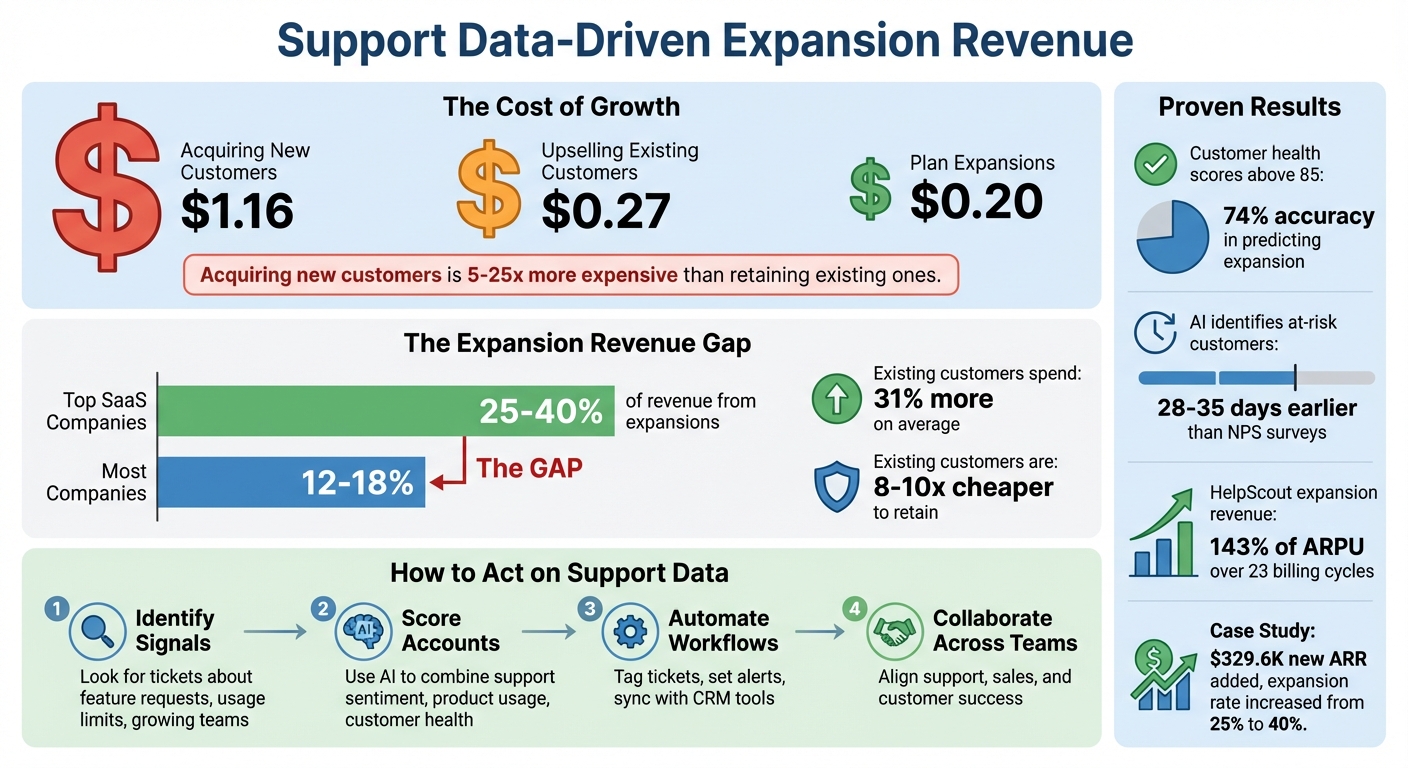
Support Data Expansion Revenue: Key Metrics and Cost Comparison
Support Tickets Generate Revenue? Here’s How Ernst & Young and HubSpot Do It
sbb-itb-e60d259
How Support Data Reveals Expansion Opportunities
Support tickets aren’t just about solving problems – they’re often a gateway to new revenue. When customers ask questions like "How do we do X?" or describe workarounds to overcome product limitations, they may be signaling that their current plan no longer fits their needs.
The numbers back this up. On average, acquiring $1 of Annual Contract Value (ACV) from a new customer costs $1.16, while upsells cost just $0.27 and plan expansions only $0.20 [3]. It can take over a year to recoup the acquisition cost for a new customer, but upselling or expanding typically pays off in about a quarter of that time [3]. For companies in the top 40% of growth cohorts, 20% to 40% of revenue often comes from expansions [3].
Support interactions are particularly valuable because they focus on addressing real customer challenges, not just selling. While many teams overlook these signals, savvy ones treat them as direct opportunities for upselling and plan expansions [1].
Finding Upsell Opportunities in Support Tickets
Support tickets often contain clear signs of upsell potential. For instance:
- API integration requests: Indicate the customer is embedding your product more deeply into their workflows [2].
- Questions about enterprise features: Inquiries about administrative controls, single sign-on, or audit logs suggest the customer is maturing and might need enterprise-level capabilities [2].
- Tickets from multiple departments: When different teams within the same company start reaching out, it often signals internal growth and cross-sell opportunities [1][2].
Here’s an example: In February 2026, a product management platform with $8M ARR introduced a system to detect these signals. By analyzing support tickets for signs like new use cases or feature adoption beyond the current plan, they identified 30 customers for targeted outreach. Over the next year, 18 of those customers expanded, with the average deal size growing from $3.5K to $7.2K. This effort added $329.6K in new ARR and boosted their gross expansion rate from 25% to 40% [1].
Other companies have seen similar success. HelpScout noticed that customers gained more value by adding team members to the platform. This insight led to a per-user pricing model, increasing their average expansion revenue to 143% of ARPU over 23 billing cycles [3]. Similarly, Wistia adjusted its pricing to scale with video-hosting volume after observing that businesses expanded their usage once they saw better conversion rates [3].
The key is to make signal detection a systematic process. Automate ticket tagging to flag mentions of "feature requests", "integration queries", or "workarounds" [2]. Set up alerts for accounts submitting multiple tickets per month about capabilities outside their current plan [1]. Pay attention to tickets that hint at interest from new teams – like Sales asking about tools typically used by Marketing [1].
Using Customer Sentiment and Feedback
Customer sentiment can refine your approach to identifying expansion opportunities. Sentiment analysis turns qualitative feedback into actionable insights, helping you predict which customers are most likely to expand. For example, high CSAT, CES, and NPS often indicate enthusiastic customers who are primed for deeper engagement [5]. When customers share positive feedback like "This saved us so much time", it’s a strong sign that your product has become essential to their operations, making them ideal candidates for expansion [4].
"Net promoter score is one of the most powerful ways to measure, ‘Do you have raving customers?’ … Are they so excited about your product that they are willing to go out of their way and refer somebody?"
- Deon Nicholas, Co-founder and CEO, Forethought [5]
Interestingly, even negative feedback can highlight opportunities. Complaints about manual workarounds or capacity issues might suggest that a customer has outgrown their current plan and needs more advanced features or higher limits [4]. Train your support team to recognize language that hints at growth, such as mentions of hiring new staff, expanding to new regions, or launching new initiatives. If a customer mentions that another department wants access to their reports, it’s worth following up to discuss a broader rollout [4].
Timing is crucial. Use sentiment analysis to identify "success stories" or moments when customers express high satisfaction in support interactions – these are often the best times to introduce expansion offers [2]. Similarly, track mentions of cross-departmental interest, as these can signal internal growth and readiness for cross-selling [4]. The ultimate goal is to address gaps between a customer’s needs and their current plan before those gaps turn into frustrations [6].
Key Metrics for Identifying Expansion-Ready Accounts
Turning support data into actionable insights can shift your approach from reactive problem-solving to proactive revenue growth.
Customer Health Scoring from Support Data
Customer health scores help categorize accounts based on their likelihood for expansion. Accounts with scores between 90–100 are ideal candidates for upselling, while scores above 85 have shown a 74% accuracy in predicting expansion potential [7]. Support data plays a critical role here, typically contributing 25% of the overall score. This is achieved by analyzing ticket sentiment and response satisfaction. AI-driven sentiment analysis quantifies subjective feedback, assigning values like +10 for positive interactions and –20 for frustrated ones. These scores can highlight expansion opportunities 14–21 days earlier than traditional methods and identify at-risk customers 28–35 days before NPS surveys would.
"We were reactive. Wait for NPS survey. Respond to low scores. By then, customer has one foot out the door. Built predictive health scoring. Now we identify at-risk customers 4 weeks early based on behavior."
- Lisa Park, VP of Customer Success at SuccessFlow [7]
Automated sentiment scoring integrates seamlessly with CRM systems through reverse ETL, providing daily alerts for sales teams. Fine-tuning these models by customer segment (e.g., adjusting for Enterprise versus SMB accounts) adds another layer of precision [7]. Once health scores are established, product usage metrics can further narrow down expansion-ready accounts.
Tracking Product Usage and Feature Adoption
Product usage data is a strong indicator of when customers may be ready to upgrade their plans. Key signals include hitting usage limits, demonstrating power-user behaviors, adopting new features, and an increase in active users. For instance, automated alerts can notify teams when accounts reach 85–90% of their usage thresholds – like seat licenses, API calls, or storage capacity [8]. An account showing a 30% rise in active users within a month could indicate growing reliance on your product and readiness for an upsell. Monitoring trends such as new user invitations, daily or weekly active user growth, and the adoption of previously unused features can provide additional clues about evolving customer needs [8]. Combining these usage patterns with sentiment analysis ensures a more targeted approach to identifying expansion opportunities.
Sentiment Analysis and Intent Detection
Sentiment analysis adds another layer of depth to customer data. Positive interactions increase health scores, while frustrated tickets result in score deductions. For example, satisfaction can be calculated as (Average Rating / 5) × 25, with points deducted for escalations (e.g., two or more frustrated tickets) [7]. A multi-dimensional scoring approach – separating "Support Health", "Product Health", and "Relationship Health" – helps teams focus their efforts on accounts that are enthusiastic about the product, rather than those that are merely stable or managing well with support. Feeding these scores into a CRM automates alerts for high-potential accounts, transforming support from a reactive role into a proactive driver of revenue growth.
Building a Support-to-Revenue Workflow
Spotting accounts ready for expansion is just the starting point. The bigger challenge lies in transforming those insights into coordinated actions that bring together support, sales, and customer success teams. Without a seamless workflow, valuable signals can get lost in disconnected systems.
Aligning Support, Sales, and Customer Success Teams
The backbone of any effective support-to-revenue workflow is a centralized data system that merges support, usage, and CRM data. This integration eliminates the tedious task of juggling multiple platforms to determine whether an account is ready for expansion [9].
"The goal is eliminating the manual work of opening five different tabs and cross-referencing spreadsheets just to understand one account’s expansion readiness."
– Datagrid [9]
Once your data is consolidated, use a tiered scoring system to prioritize accounts. For example:
- Tier A (80–100 points): These accounts need immediate attention from executives.
- Tier B (50–79 points): These accounts require targeted engagement and monitoring.
- Tier C (below 50 points): Focus on helping these accounts adopt baseline features before discussing upgrades [9].
This approach ensures that high-potential accounts get the attention they need while avoiding wasted effort on accounts that aren’t ready.
You can also create a signal-to-upsell matrix to link specific support requests to potential revenue opportunities. For instance:
| Support Signal | Customer Need | Suggested Expansion Offer |
|---|---|---|
| "Requesting SSO/SAML" | Security & Compliance | Enterprise Tier Upgrade |
| "File/Storage limit reached" | Increased Capacity | Storage Add-on Bundle |
| "Manual CSV/Data export" | Advanced Reporting | Analytics/BI Module |
| "Need Snowflake/API sync" | Data Integration | ETL/Connector Pack |
Before rolling out your scoring system, test it against historical data to confirm that Tier A accounts align with closed deals. This step ensures your scoring weights are accurate and actionable [9].
Timing and Personalizing Expansion Offers
Once you’ve identified key signals, timing and personalization are critical for turning insights into revenue. For example, if a customer consistently hits 90% of their seat licenses, storage, or API quotas for two weeks, it’s a good time to initiate an upgrade conversation [9]. Similarly, multiple "rate limit exceeded" tickets in a quarter can indicate the need for a higher-tier plan [9].
For annual contracts, monitor accounts 90–120 days before renewal. This window gives you enough time to demonstrate added value and engage key stakeholders, rather than scrambling as the expiration date approaches [10].
Personalization is equally important. AI tools can analyze support tickets to extract specific needs and tailor your outreach. For example, if a customer mentions "exporting data to Excel to merge reports", this signals a need for enhanced reporting features. Categorizing tickets into intent buckets – such as Feature Requests, Capacity Complaints, Workarounds, and Integration Questions – helps you match the right product to the right customer at the right time [9].
Measuring Revenue Impact from Support Data
To ensure your workflow drives results, track key customer service metrics that tie support signals to closed deals. Start by examining conversion rates for each priority tier. If Tier A accounts (80–100 points) aren’t converting as expected, revisit the scoring weights and adjust based on real-world outcomes [9].
Create a signal-to-revenue map to connect specific support themes with corresponding purchases. For example, if "file limit reached" tickets often lead to storage bundle sales, that signal is validated. On the other hand, if "SSO requests" rarely result in Enterprise upgrades, you may need to rethink your approach [9].
Account for seasonal trends by comparing each account’s performance to its own previous quarter rather than global averages. This minimizes false positives during slower periods [9]. Regularly review tagged tickets and account scores – weekly check-ins can reveal which signals are consistently driving revenue, allowing you to fine-tune your model [9].
To zero in on top expansion candidates, combine data points like quota usage, rate-limit tickets, daily/active user ratios, NPS scores, and growth metrics [9].
Using AI to Scale Expansion Insights
AI-native tools are transforming how companies identify and act on high-value opportunities. As your customer base grows, manually analyzing thousands of support tickets becomes impractical. The sheer volume of data increases the risk of missing potential revenue opportunities. By automating these processes, AI tools ensure your team can focus on closing deals without overlooking critical insights.
AI-Powered Customer Health Prediction
AI scoring models are a game-changer when it comes to predicting which accounts are ready to expand. These models combine support data, usage metrics, and engagement signals to rank accounts by their likelihood of upgrading. Gone are the days of relying on gut instincts or outdated spreadsheets. For example, AI can flag accounts that consistently hit 90% of their quota for two weeks straight and cross-reference this with sentiment data – like an NPS score of 9 or higher – to predict readiness for an upgrade. Specific patterns, such as inquiries about advanced workflows or SSO, further refine these predictions [9].
Before rolling out any AI scoring system, it’s essential to back-test it using historical data. This ensures the model’s weights align with actual revenue outcomes [9]. Once validated, these insights allow AI to take things a step further by categorizing support tickets in real time, making the analysis even more efficient.
Automated Ticket Tagging and Sentiment Analysis
AI doesn’t just predict – it also organizes. By analyzing ticket content as it comes in, AI tools categorize requests into intent buckets like feature requests, capacity complaints, workarounds, or integration questions [9]. For instance, if a customer mentions "exporting to Excel to merge reports", the system tags this as a workaround signal, potentially highlighting the need for an upgraded analytics module [9]. Similarly, repeated "rate limit exceeded" tickets within a single quarter can indicate product constraints, signaling an upsell opportunity [9].
To stay proactive, you can set alerts for specific patterns, such as when an account requests two higher-tier features within 30 days. This triggers immediate, targeted outreach, ensuring no opportunity slips through the cracks [9].
AI-Based Product Recommendations
AI recommendation engines take the guesswork out of offering tailored solutions. By analyzing support history and behavior, these systems suggest personalized product upgrades or bundles. For example, if an account shows a 25% quarterly increase in unique departments using your product, AI can identify it as a candidate for an enterprise-wide license or a bundle upgrade [9]. The system distinguishes between "capacity signals" (indicating limitations) and "usage acceleration" (showing growth potential), allowing for highly specific recommendations [9].
To keep these recommendations sharp, close the feedback loop by involving your sales and customer success teams. They can upvote or downvote AI-generated leads, continuously refining the model’s accuracy and reducing wasted outreach efforts. This collaborative approach ensures that AI remains a reliable tool for turning raw data into actionable insights.
Common Pitfalls and How to Avoid Them
When it comes to expansion strategies, spotting potential pitfalls is just as important as leveraging support data to drive revenue. Even the best-laid plans can stumble if critical execution details are missed. Often, success or failure boils down to three key areas: data quality, the right balance between automation and human input, and smooth coordination between teams.
Ensuring Data Quality and Completeness
Poor data quality can derail even the most promising strategies. Here’s a startling fact: only 35% of sales professionals fully trust their data[10]. Why? Scattered and incomplete customer information often leads to flawed AI insights[11]. For instance, a seemingly positive health score might be misleading if it’s based on outdated data, potentially ignoring urgent customer issues[11].
To tackle this, you need strict data quality standards. Start by maintaining null rates for critical fields below 1% and duplicate rates under 0.1% in the data feeding your models[11]. Automated metadata harvesting can help ensure AI systems work with accurate, real-time information. Additionally, tracking data freshness ensures that decisions are based on the most current insights. Companies with strong data quality programs are 45% more likely to successfully move AI projects from testing to full implementation[11].
By building a solid foundation of reliable data, you set the stage for smarter automation and better decision-making.
Balancing Automation with Human Judgment
Once your data is in good shape, the next challenge is deciding when to let AI take the reins and when to rely on human expertise. AI excels at processing massive amounts of data, like support tickets, to uncover patterns that humans might miss. In fact, Gartner estimates that AI will play a role in 50% of business decisions by 2027[12]. But that doesn’t mean humans should step back entirely. The real power lies in combining AI’s efficiency with human judgment for nuanced, critical decisions.
"Trust in AI doesn’t come from its power to act alone. It comes from its ability to act responsibly, transparently, and under human guidance." – Aaron Airmet, Lead Product Manager of AI Strategy, Vasion[12]
For example, major decisions like pricing or contract adjustments should always require human approval[13]. You can also build in checkpoints where Customer Success Managers or team leads review and validate AI-generated recommendations before they’re shared with customers[12]. To keep teams sharp, consider running periodic reliance drills that introduce test errors to evaluate how well humans monitor AI outputs[13]. This approach allows AI to flag opportunities while human oversight ensures personalized, thoughtful execution.
Coordinating Between Support and Sales Teams
Data silos and poor communication between teams can create major roadblocks. If support identifies an expansion opportunity but sales is working with a completely different set of metrics, the handoff can fall apart. This kind of misalignment can extend sales cycles by 27% and increase customer acquisition costs by 18%[16].
Fixing this requires both structural adjustments and cultural shifts. A simple RACI matrix can help clarify who owns each type of expansion opportunity[14]. Weekly alignment meetings between support operations and customer success teams ensure active opportunities are reviewed and acted on collaboratively[16]. A shared KPI dashboard, built on accurate CRM data, keeps everyone on the same page[14]. Finally, aligning compensation structures so that both support and sales teams share accountability for long-term growth and profitability can help eliminate conflicting priorities[15].
Addressing these challenges is crucial to unlocking the full revenue potential of your expansion strategy. By focusing on these areas, you can avoid common pitfalls and create a more seamless, effective approach.
Conclusion
This guide has highlighted how support data, AI-driven insights, and coordinated teamwork can open up substantial growth opportunities.
Your support team isn’t just solving problems – it’s sitting on a goldmine of growth signals. Every ticket, conversation, and feature request carries hints about which customers are ready to expand their relationship with your business. The key difference between companies that seize this revenue and those that don’t lies in how they treat their support data: as a strategic resource or just another operational expense.
Consider this: acquiring a new customer is 5 to 25 times more expensive than retaining an existing one. Meanwhile, upselling and cross-selling account for 70% to 95% of total revenue in well-established SaaS companies [2]. Despite this, mid-market B2B companies often leave $2 million to $3 million in expansion revenue on the table every year simply because they fail to track the signals hidden in their systems [17].
"Existing revenue is winnable – if you see the signals early enough to act." – Ameya Deshmukh, EverWorker [10]
FAQs
What support ticket signals predict an upgrade?
Support ticket patterns that hint at potential upgrades often revolve around increased product usage, unresolved challenges, or a noticeable rise in customer interactions. For instance, customers nearing plan limits – like reaching 90% of their storage capacity, maxing out user seats, or hitting API thresholds – can signal readiness for an upgrade. Similarly, a surge in support tickets over an extended period might indicate growing needs.
AI-powered tools add another layer by spotting subtler trends, such as a drop in sentiment or persistent unresolved issues. These insights allow support teams to proactively identify accounts that may benefit from upgrades or additional features, ensuring timely and tailored solutions.
How do we score accounts for expansion using support data?
Support teams rely on customer health scores to evaluate accounts for expansion opportunities. These scores are built using key metrics such as product usage, ticket trends, escalation rates, and customer sentiment. To make this process more efficient, AI tools gather and analyze data from CRM systems and support channels, producing dynamic, real-time scores.
These scores do more than just assess account health – they help pinpoint accounts with strong potential for growth or those at risk of churn. Beyond the basics, signals like feature adoption and usage patterns play a crucial role in spotting upsell and cross-sell opportunities, giving teams the insights they need to act strategically.
How can we safely automate support-to-expansion workflows?
To automate support-to-expansion workflows securely, leverage AI to examine customer interactions, usage trends, and support tickets. Look for indicators such as increased feature adoption or team growth. Establish clear thresholds for critical metrics – like sudden ticket volume increases or noticeable sentiment changes – and set up automated alerts to flag high-potential accounts. Integrate support data with customer health metrics to cut down on false positives. Continuously fine-tune your AI models to boost accuracy and reduce potential risks.