
Customer Success Managers (CSMs) often find themselves overwhelmed with support tasks, leaving little time for their primary role: driving customer retention and growth. This problem stems from unclear role definitions, excessive workloads, and operational inefficiencies, which force CSMs into reactive work rather than focusing on long-term customer outcomes.
Key Takeaways:
- Role Confusion: CSMs handle tasks meant for support teams, such as troubleshooting and answering "how-to" questions. This dilutes their ability to focus on renewals and account growth.
- Impact on Business: CSMs spending 60% of their time on non-strategic tasks leads to missed revenue opportunities and increased churn risks. Retaining customers is 5–7 times cheaper than acquiring new ones, and a 5% boost in retention can increase profits by up to 95%.
- Solutions:
- Define Boundaries: Separate support (reactive problem-solving) from customer success (long-term value creation). Document task ownership and escalation rules.
- Leverage AI: Automate repetitive tasks like ticket triage, meeting summaries, and health scoring to save 10–15 hours per week per CSM.
- Segment Customers: Prioritize high-touch efforts for enterprise accounts while using automation for smaller accounts.
- Track Metrics: Measure support teams on efficiency (e.g., response time) and CSMs on retention and revenue growth (e.g., NRR, churn rate).
- Run Business Reviews: Use data to showcase ROI and align with customer goals.
By automating routine tasks and clearly defining roles, businesses can empower CSMs to focus on customer relationships, leading to higher retention, expansion, and overall profitability.
The Ultimate Guide: Customer Success vs Customer Support
sbb-itb-e60d259
Why CSMs End Up Doing Support Work
It all starts with leadership – or rather, the lack of clear boundaries set by leadership. When leaders fail to define responsibilities, CSMs often end up taking on any customer-related task that comes their way. As Dione Hedgpeth, former Chief Customer Officer at Sumo Logic, aptly puts it: "The CSM role today is broken and not because of the CSMs. It’s a leadership failure" [1].
This absence of role clarity has given rise to what industry insiders call the "Unicorn CSM" myth. Essentially, companies hire highly skilled professionals and expect them to juggle three distinct roles: managing complex renewals, overseeing project timelines, and troubleshooting technical issues. That’s three demanding jobs rolled into one [1]. With so much on their plate, CSMs are forced to prioritize urgent support tickets over long-term strategic work. When everything feels like a priority, the immediate tasks always win.
The problem only grows as companies scale. Many CSMs are responsible for 50 or more accounts while being bombarded with constant notifications from communication and CRM tools. This operational overload not only drains their mental energy but also leaves them little room for the strategic thinking and active listening their role demands [5].
Support vs. Success: What’s the Difference?
At its core, the distinction between Customer Support and Customer Success is straightforward: Support is reactive, while Success is proactive.
Support teams focus on resolving immediate issues. They troubleshoot bugs, answer "how-to" questions, and aim to minimize downtime. Their mission? Solve technical problems as quickly as possible [7].
Customer Success Managers (CSMs), on the other hand, take a broader, forward-looking approach. Their role is about aligning the product with the customer’s business goals. They aim to drive adoption, achieve key performance indicators (KPIs), and identify opportunities for growth. While Support asks, "How do I fix this?" Success asks, "How can we help you achieve your goals?" [7][3].
Here’s a quick breakdown of the differences:
| Feature | Customer Support | Customer Success |
|---|---|---|
| Approach | Reactive (Problem-solving) | Proactive (Outcome-driven) |
| Primary Goal | Fix immediate technical issues | Drive value, retention, and growth |
| Time Horizon | Short-term (Immediate fix) | Long-term (Lifecycle focus) |
| Key Metrics | Response time, resolution rate | Churn rate, net revenue retention (NRR), customer health scores |
| Focus | Product features and bugs | Business KPIs and ROI |
When these boundaries blur, CSMs end up answering support tickets instead of focusing on strategic customer relationships. This role confusion not only diminishes the quality of support but also undermines the long-term success of the customer relationship. Ultimately, neither goal is met effectively, and the business pays the price.
What Role Confusion Costs Your Business
The financial consequences of unclear roles are hard to ignore. Acquiring a new customer costs 5–7 times more than retaining an existing one [3]. When CSMs are bogged down with reactive tasks, they miss opportunities to spot expansion signals or address potential churn risks, making it harder to retain customers and grow accounts [3].
Retention is where the numbers get even more compelling. Increasing customer retention by just 5% can boost profits by 25% to 95% [3]. Yet, when CSMs are stretched too thin, they can’t focus on identifying at-risk accounts or nurturing relationships to prevent churn.
The toll isn’t just financial – it’s personal, too. 36% of CSMs report feeling burned out "often" or "constantly" due to overwhelming workloads and the inability to disconnect [9]. Many of these skilled professionals eventually leave, frustrated that they’re stuck handling administrative tasks instead of leveraging their expertise [1]. As Hedgpeth warns, "If you define the role as everything, you end up delivering very little" [1].
And then there’s the reputational damage. 48% of customers who have a bad experience will share it with 10 or more people [8]. When CSMs can’t deliver consistent, proactive value because they’re buried in reactive work, customers notice – and they talk. This not only hurts individual accounts but also tarnishes the company’s broader reputation.
Fixing these issues is essential for creating a clear distinction between support and strategic customer success. Understanding the costs – both financial and human – is the first step toward redefining roles and refocusing on what truly matters.
How to Split Support and Success Work
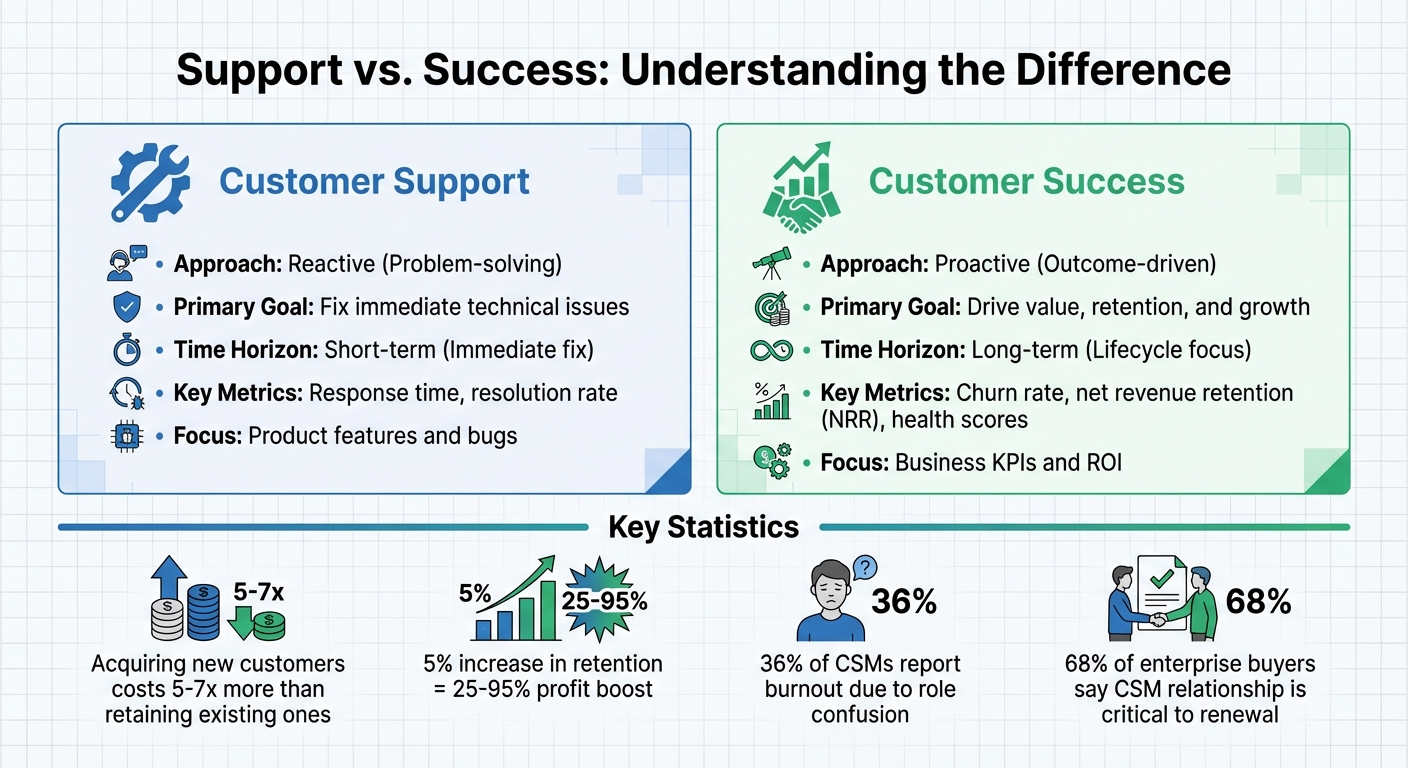
Customer Support vs Customer Success: Key Differences and Metrics
To address the challenges of role confusion, it’s essential to clearly divide support and customer success responsibilities. By setting clear boundaries between reactive support tasks and proactive customer success initiatives, each team can focus on what they do best.
Set Clear Task Ownership
Start by clearly documenting which tasks belong to support and which to customer success.
- Support teams handle reactive tasks like answering "how-to" questions, resolving technical bugs, resetting passwords, and addressing immediate product issues.
- Customer Success Managers (CSMs) focus on proactive efforts such as identifying feature gaps, aligning product usage with business goals, conducting strategic reviews, and spotting opportunities for account expansion.
Establish specific escalation rules to ensure smooth collaboration. For example, escalate to a CSM when:
- A high-risk account shows signs of churn.
- A primary contact changes at an enterprise customer.
- A technical issue highlights a strategic misalignment with the customer’s goals.
These guidelines prevent CSMs from being bogged down by routine support tasks while ensuring they are involved when the relationship with a customer could be at risk.
Additionally, leverage AI to streamline routine tasks like meeting summaries, CRM updates, and health monitoring. This can save CSMs 10–15 hours a week, enabling them to focus on strategic activities. By automating 80% of Tier 1 customer interactions, companies can reduce cost-per-customer by 40% while allowing CSMs to concentrate on driving renewals and growth [10].
"AI handles volume; humans handle value" [10]
Segment Your Customer Portfolio
Organizing customers based on revenue potential, growth opportunity, and risk allows CSMs to maximize their impact.
- Enterprise accounts (high revenue, strategic importance): These accounts benefit from high-touch engagement, including executive alignment sessions and tailored quarterly business reviews conducted by dedicated CSMs.
- Mid-market accounts (moderate revenue, growth potential): A hybrid approach works best here, combining automated health monitoring with targeted CSM outreach when specific triggers occur.
- SMB and self-serve customers (high volume, lower individual value): These accounts are managed primarily through AI-driven automation, such as onboarding nudges, self-service knowledge bases, and automated re-engagement campaigns.
Since 68% of enterprise buyers say a trusted CSM relationship is critical to renewal decisions [10], focusing CSM resources on accounts where human relationships are most impactful helps ensure retention and expansion.
Automated health scoring is another essential tool. It flags at-risk accounts in real time, triggering immediate CSM intervention. For example, the system might alert a CSM when:
- A customer’s product usage drops by 40%.
- Sentiment in support tickets turns negative.
- Engagement patterns suggest disengagement.
This approach ensures no high-value customer slips through the cracks while sparing CSMs from manually monitoring hundreds of accounts. By segmenting customers effectively, you create a foundation for precise, strategic interventions and set the stage for integrating AI-driven support in future processes.
Use AI to Handle Support Tasks
AI tools are transforming customer support by taking over routine tasks, allowing Customer Success Managers (CSMs) to focus on more impactful work. As AgentiveAIQ puts it: "AI handles volume; humans handle value" [10].
By automating Tier 1 interactions, AI can cut costs per customer by 40% [10] and save CSMs 10–15 hours per week. This extra time can be redirected toward building stronger customer relationships. Plus, with 73% of customers preferring self-service for simple issues [10], AI-driven automation not only lightens workloads but also boosts customer satisfaction.
AI Features That Lighten the Support Load
AI tools come equipped with features designed to handle repetitive tasks, giving CSMs more time to focus on strategic priorities.
- Ticket Triage and Troubleshooting: AI can classify incoming requests, route them to the right team, and address FAQs. This reduces response times and ensures CSMs only handle cases that require deeper expertise [2].
- Meeting and Communication Automation: AI eliminates the need for manual note-taking by summarizing calls, capturing key moments, and outlining next steps. Since 30% to 35% of a CSM’s workload involves meeting prep and follow-ups [13][14], this feature helps teams resolve issues 44% faster while saving 45% of the time spent on calls [14].
- Proactive Risk Detection: By analyzing customer behavior, ticket sentiment, and engagement patterns, AI can flag early signs of dissatisfaction. This is especially useful since 90% of enterprise data is unstructured, and AI excels at extracting insights from this data [2][10].
- Autonomous Task Execution: AI tools can handle tasks like CRM updates, preparing Quarterly Business Reviews (QBRs), and creating handoff packets. These automated processes save hours of manual work [4].
- Support for "Long-Tail" Customers: AI-powered digital CSM agents can manage onboarding, routine check-ins, and proactive nudges for smaller accounts. This ensures all customers receive timely support while CSMs focus on larger, high-impact accounts [11].
| Feature | Traditional Playbooks | AI Agent Execution |
|---|---|---|
| Data Entry | Manual, CSM-dependent | Automated, with enriched data [4] |
| Churn Detection | Reactive, lagging indicators | Proactive, multi-signal analysis [4] |
| QBR Preparation | Hours of manual work | Auto-generated from live data [4] |
| Implementation | 6+ month cycles | Minutes to deploy (AI-native) [4] |
With these tools in place, integrating AI into your support operations allows CSMs to shift their focus to proactive strategies that drive real results.
How to Implement AI in B2B Support
To successfully integrate AI into your support framework, follow these steps:
- Start with Low-Touch Segments: Begin by deploying AI for self-service or SMB customers, where automation delivers the clearest returns [10].
- Embed AI in Current Workflows: Select tools that seamlessly integrate with systems like Slack, Gmail, or your CRM to minimize disruption [4][10].
- Focus on Data Quality: Clean and up-to-date CRM data is essential for AI to function effectively [12].
- Adopt a Phased Approach: Roll out AI gradually over six months. Start with internal pilots – like automating meeting summaries or health scoring – before introducing customer-facing features like chatbots [13].
- Maintain Transparency: Let customers know when they’re interacting with a bot, and always offer an easy way to connect with a human CSM for more complex issues [13].
Cost is another key consideration. Traditional tools can cost over $500 per user per month [4]. Over three years, a 100-user team might spend $789,000 on a legacy stack, compared to roughly $68,000 for an AI-native platform [4]. Companies that adopt AI in customer-facing roles report an average of 3.5x return on investment [13][3], showing that AI doesn’t just reduce workload – it reshapes the economics of customer success.
Track the Right Metrics for Each Role
Once support tasks are automated, it’s crucial to ensure the time freed up for Customer Success Managers (CSMs) is used wisely. Without clear scorecards, CSMs might end up falling back into reactive habits.
What to Measure for CSMs vs. Support
Support teams and CSMs have very different objectives, and their metrics should reflect that. Support focuses on resolving issues efficiently, while CSMs are responsible for driving revenue and long-term customer value. Setting the right metrics ensures accountability for these distinct goals.
For support teams, key performance indicators include:
For CSMs, the focus shifts to retention and revenue growth. Monitor metrics like:
- Gross Revenue Retention (GRR)
- Net Revenue Retention (NRR)
- Churn rate
- Time to Value (TTV) [4]
Top-performing SaaS companies aim for NRR above 110% and an annual churn rate below 5% for enterprise accounts [4]. Additionally, tracking expansion revenue from upsells and cross-sells, along with customer health scores – based on usage patterns, login frequency, and sentiment – provides a deeper view of performance [3][15].
"The ‘happiness department’ label is officially dead. CSMs are now measured on gross revenue retention, net revenue retention, and expansion targets."
- Brandon Cestrone, CS Insider [15]
This evolution is significant: 93.7% of organizations that track Customer Success impact tie it directly to revenue goals [15]. When CSMs are held accountable for renewals and growth, they naturally focus on strategic priorities rather than just putting out fires.
Role-Specific Metrics for Performance Tracking
| Metric Category | Support Teams | Customer Success (CSMs) |
|---|---|---|
| Primary Goal | Issue resolution & ticket deflection [4] | Retention, expansion, & value realization [4] |
| Key Metrics | Response time, resolution time, CSAT [2][4] | NRR, GRR, churn rate, TTV [4] |
| Orientation | Reactive [4] | Proactive [4] |
| Data Source | Support tickets, FAQs [2] | Usage trends, ROI signals [3][2] |
Tracking outcomes is only half the battle. It’s equally important to understand how CSMs spend their time to maintain a proactive approach to customer success.
Monitor Time Allocation with Dashboards
Dashboards are more than just tools for tracking results – they also show how CSMs allocate their time using customer management tools. Research indicates that high-performing teams dedicate 60%–70% of their time to direct customer engagement, rather than administrative tasks or support-related activities [17]. If CSMs spend less than 50% of their time on customer engagement, it’s a red flag for inefficiency.
To maintain the right balance, monitor the proactive-to-reactive ratio. Ideally, CSMs should aim for at least a 70:30 split, prioritizing proactive tasks like business reviews, strategic planning, and expansion discussions over reactive firefighting [17]. A shift toward more reactive work may signal that CSMs are drifting into support roles.
Time-tracking data can highlight inefficiencies. For example, if dashboards reveal that CSMs spend 10 hours a week on CRM updates and meeting notes, it’s time to implement AI-driven automation to free up that time for more impactful activities [3][10].
"The future of Customer Success isn’t about working harder. It’s about working smarter – with precision, intention, and insight."
Lastly, keep an eye on cost-to-serve by customer segment. Dashboards should indicate whether high-touch CSM efforts are concentrated on high-value accounts or spread thin across lower-revenue customers. For perspective, in B2B SaaS, acquiring a new customer costs $1.78 for every dollar of Annual Contract Value (ACV), compared to just $0.61 for expansions and upsells [15]. This ensures resources are directed where they deliver the most value.
Connect CSM Work to Customer Results
Once you’ve established clear metrics, the next step is making sure every CSM action directly contributes to measurable customer success. Without this alignment, even the most well-meaning CSMs can fall into a reactive cycle, focusing on requests instead of proactively driving outcomes.
Build Engagement Around Customer Goals
CSMs should position themselves as strategic partners, aligning every interaction with the customer’s business objectives – from onboarding to renewal. For example, onboarding plans should aim to achieve an early milestone. Why? Because even a small 5% improvement in retention can increase profits by up to 95% [3]. Frame outcomes in terms of business impact: instead of saying, “We enabled three new integrations,” emphasize, “We saved your team 40 hours per month and avoided $25,000 in manual processing costs” [3].
A great example of this is Dropbox. By focusing on early file uploads as a key metric, their automated onboarding process boosted paid conversions by 20% and reduced early churn [18].
Mutual Action Plans are another tool to keep everyone on track. These structured frameworks ensure both the CSM and the customer stay accountable, tracking progress toward goals throughout the relationship. When CSMs understand a client’s financial and industry challenges, they can clearly link product value to measurable results [22].
"If you’re waiting until a customer is obviously struggling, you’re already too late. The best Customer Success teams use data to detect subtle, early warning signs – like reduced product engagement or longer response times – to step in before customers even realize they have a problem."
- Lincoln Murphy, Customer Success Strategist [18]
To solidify this value, scheduled business reviews offer a structured way to showcase the impact delivered.
Run Regular Business Reviews
Business reviews shouldn’t be routine check-ins. They’re opportunities to present value, demonstrate ROI, and identify growth opportunities.
One effective approach is using a Value Scoring Methodology to quantify the business outcomes delivered [19]. Comparing the customer’s results to industry benchmarks can reveal areas for improvement and potential expansion. This shifts the focus from technical updates to tangible results, like faster financial reporting or streamlined hiring processes.
Include a "Before & After" snapshot in every review. This could be a simple table highlighting 2–3 key metrics, comparing the baseline before implementation to the current state [20]. Add financial details like the initial investment, monthly savings, payback period, and annual ROI percentage. This “Show Me The Money” approach is especially persuasive when justifying renewals to finance teams and CFOs.
AI tools can simplify these reviews, cutting preparation time from five hours to just 45 minutes per client [10].
It’s also crucial to equip the customer champion – the internal advocate for your solution – with the data they need to prove ROI to their executives [19][21]. Since 68% of enterprise buyers say a strong CSM relationship influences their renewal decision [20][10], these reviews are a prime opportunity to strengthen that bond.
"I like my CSM, but I’m not renewing… the question of value was never answered and wasn’t equitable to your measurement of the human capital side."
While showcasing value is essential, aligning internal teams around customer outcomes ensures long-term success.
Work Across Teams for Better Results
CSMs can’t deliver success in isolation. Achieving lasting results requires collaboration across sales, product, engineering, and support teams – all working toward shared customer goals. This level of coordination is becoming a core part of the CSM role [22][10].
Start with a smooth sales-to-CS handoff. AI can automate this process, creating detailed handoff packets that capture pain points, stakeholder maps, and feature requests from the sales cycle. This ensures the CSM can immediately focus on delivering value.
CSMs also act as a bridge to the Product team, advocating for customer needs in roadmap discussions and providing feedback on adoption challenges [3][10]. Establish formal feedback loops between CS, Sales, Product, and Marketing to make sure customer insights reach the right people [4]. This collaboration is vital for maintaining the strategic shift and avoiding role confusion.
This approach is especially relevant as 42% of CMOs are reallocating budgets toward lifecycle marketing to support customer retention [23].
Intercom provides a great example of cross-team alignment. By adopting a data-driven CS model that uses health scores to flag at-risk customers and leveraging AI for personalized outreach, they reduced churn by 30% and increased upsell success rates by 25% [18].
"The CSM of the future will be the ultimate conductor of a sophisticated, AI-powered orchestra designed to deliver perfect harmony in the customer experience."
- Mohammed Alqaq, Founder, Customer Success Middle East [22]
Conclusion
The success of a Customer Success Manager (CSM) hinges on well-defined roles, manageable workloads, and access to the right tools. Dispelling the myth of the "unicorn CSM" helps prevent burnout and ensures teams can deliver real value [1]. With AI automation stepping in to handle repetitive tasks – like logging meeting notes or updating CRM systems – human CSMs can concentrate on fostering trust and providing strategic guidance.
When roles are clarified and AI takes over routine responsibilities, the financial benefits become undeniable. For instance, improving customer retention by just 5% can lead to a profit increase of 25% to 95% [3]. Additionally, companies leveraging AI for personalization see up to 40% higher revenue compared to those that don’t [10]. On top of that, AI automation can save up to 15 hours per week, freeing up CSMs to engage more deeply with customers [10].
"CS isn’t adjacent to revenue anymore. It is revenue."
- Grace Gupta, Senior Copywriter and Content Lead, Customer Success Collective [6]
By focusing on the right metrics – like health scores, sentiment analysis, and time management – teams can move from reactive problem-solving to proactive customer success. When CSMs prioritize strategic customer outcomes, they align every interaction with the customer’s business goals. This shift transforms them into trusted advisors rather than reactive responders. Notably, 68% of enterprise buyers state that a strong relationship with their CSM is crucial to their renewal decisions [10].
Blending human expertise with AI-powered automation is the key to transforming customer success. This partnership enables CSMs to excel at what they do best: building relationships, tackling complex challenges, and driving measurable revenue growth. With this approach, Customer Success evolves from being a cost center to becoming a strategic driver of revenue.
FAQs
How do we decide what belongs to Support vs. a CSM?
Support teams manage reactive responsibilities such as troubleshooting, handling technical escalations, and resolving urgent problems. Meanwhile, Customer Success Managers (CSMs) concentrate on proactive efforts like onboarding, encouraging product adoption, and overseeing renewals to promote lasting customer success. Defining these roles clearly ensures there’s no overlap: Support tackles technical challenges, while CSMs focus on strategic goals. This separation allows both teams to work within their strengths and provide the best outcomes.
What’s the fastest support task to automate with AI first?
The fastest support tasks to tackle with AI are ticket triage, FAQs, and troubleshooting. Automating these processes can significantly reduce response times and free up your team to concentrate on more complex, high-priority work. By taking these repetitive tasks off your team’s plate, businesses can streamline operations and deliver a better overall experience for customers.
How many accounts should a CSM manage by customer segment?
The number of accounts a Customer Success Manager (CSM) should handle hinges on your business model and how complex your customers’ needs are. Generally, industry guidelines recommend assigning 20 to 50 accounts per CSM. However, this range isn’t set in stone – it depends on your unique circumstances and available resources. The key is to strike a balance that allows CSMs to maintain proactive interactions with customers while delivering measurable results.