
Losing customers can cost millions in recurring revenue. The good news? Support data can help spot renewal risks early – without frustrating your Customer Success (CS) team. Forget slow, manual processes or relying on gut instincts. By leveraging AI and real-time support metrics, you can predict risks with 91% accuracy, cut analysis time by 86%, and improve retention rates by up to 12%.
Here’s how it works:
- Track key metrics: Monitor response times, ticket volume, sentiment shifts, and predictive satisfaction scores.
- Use AI for insights: AI flags risks like rising ticket volume or negative sentiment, summarizing issues and suggesting actions.
- Prioritize accounts: Group customers by risk level (low, medium, high) and focus on high-value accounts.
- Automate workflows: Set up alerts and predefined playbooks to address risks efficiently.
- Refine weekly: Use dashboards and feedback to improve predictions and interventions.
This approach saves time, reduces escalations by up to 45%, and ensures your CS team focuses on what matters – keeping your customers happy.
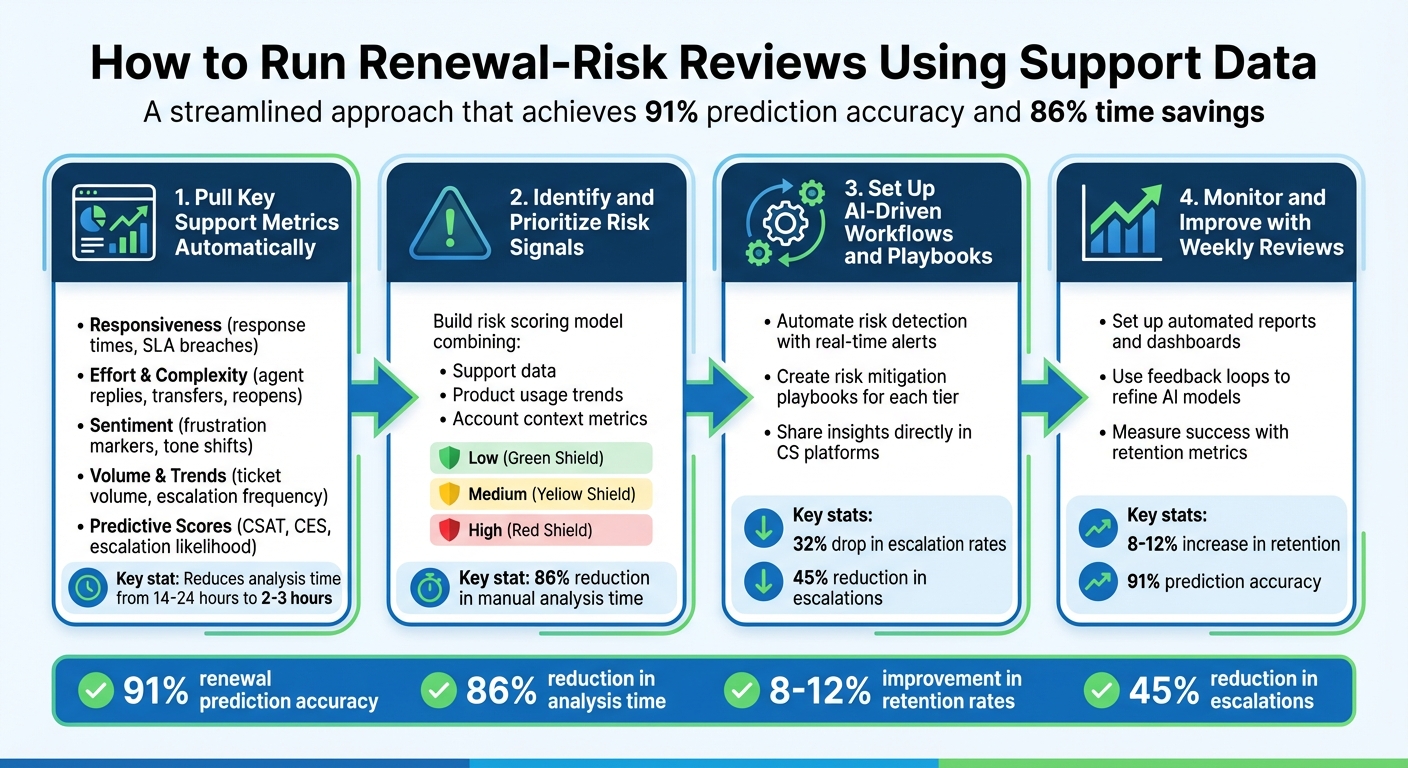
4-Step Process for Running Renewal-Risk Reviews Using Support Data
Step 1: Pull Key Support Metrics Automatically
Which Support Metrics to Track
To get started, focus on tracking a handful of essential support metrics. These fall into five main categories:
- Responsiveness: Metrics like time to first response and SLA breach status.
- Effort and Complexity: Includes agent replies, transfers, and reopen counts.
- Sentiment: Tracks frustration markers, negative keywords, and tone shifts.
- Volume and Trends: Covers ticket volume per account, escalation frequency, and resolution time.
- Predictive Scores: Predictive CSAT, Predictive CES, and escalation likelihood.
Together, these metrics provide a broad view of account health and retention. For example, responsiveness shows how quickly your team addresses issues, while effort reveals how much work customers must do to get help. Sentiment captures their emotional state, volume uncovers unusual trends, and predictive scores fill in the gaps for the majority of customers who don’t respond to surveys.
Why are predictive scores so important? Traditional CSAT surveys often have response rates below 20%, leaving most customer experiences unmeasured. As Eric Klimuk, Founder and CTO of Supportbench, puts it:
"Customers who take the time to respond are typically either delighted or deeply frustrated, leaving the vast middle ground – the lukewarm, the mildly inconvenienced, the quietly dissatisfied – largely unheard."
AI-powered predictive analytics address this gap by analyzing interaction content, metadata, and agent behaviors. These tools generate satisfaction scores for every customer interaction, offering a clearer picture of overall customer sentiment. These metrics form the backbone for AI-driven summaries, which we’ll dive into next.
Using AI to Summarize Data Automatically
AI doesn’t just collect data – it makes it actionable. Instead of sifting through lengthy transcripts to figure out why a health score dipped, AI-generated summaries highlight problem areas instantly. Predictive CSAT and CES models analyze interaction data to forecast sentiment, giving managers a quick snapshot of emerging risks.
The impact of AI on workflows is hard to ignore. It reduces analysis time from 14–24 hours to just 2–3 hours, lowers escalation rates by 32%, and improves CSAT scores by 18%. By turning raw data into actionable insights, AI helps teams detect risks early. And the best part? These insights can be embedded directly into your helpdesk or agent queues, so supervisors can monitor sentiment in real-time without jumping between platforms.
Eliminating Manual Data Collection
Manual data collection is a time sink. Switching between your CRM, helpdesk, billing system, and product analytics tools not only slows things down but increases the chances of missing critical signals.
AI agents solve this problem by integrating with over 100 data sources, pulling metrics automatically and continuously. Automated workflows can trigger real-time alerts for negative sentiment, high escalation risks, or declining health scores. For instance, you can set up alerts that create CRM tasks for cases flagged as "Predicted Dissatisfied" or "Predicted High Effort". This eliminates the manual effort while ensuring your team has the insights they need to tackle renewal risks effectively – without annoying your customers in the process.
sbb-itb-e60d259
Step 2: Identify and Prioritize Risk Signals
Top Risk Signals in Support Data
Support data offers a wealth of information, but not all signals carry the same weight when it comes to predicting risk. Sentiment and tone often stand out as strong indicators. AI tools can sift through ticket language to detect frustration, negative sentiment shifts, or urgency keywords like "outage" or "cannot log in", even if the customer doesn’t explicitly mark the issue as urgent. As Nooshin Alibhai, Founder and CEO of Supportbench, puts it:
"AI determines priority not just based on a selected field or a single keyword, but by analyzing a confluence of factors: sentiment analysis, urgency keywords, customer value, and interaction patterns."
Operational signals also play a big role. For instance, tickets that are reopened multiple times, passed between agents frequently, or stuck in aging backlogs often indicate unresolved issues that frustrate customers. A flurry of rapid follow-ups from a customer is another red flag, signaling growing dissatisfaction and a potential churn risk. SLA breaches and slow response times are additional markers of renewal challenges tied to support performance. On the technical side, repeated bug reports or sudden spikes in error-related tickets highlight deeper issues that may prevent customers from realizing the product’s value. By combining these signals into a quantifiable risk score, teams can take more targeted action.
Building a Risk Scoring Model
An effective risk scoring model combines support data with product usage trends and account context metrics. The secret lies in dynamic weighting – adjusting the importance of certain signals as an account nears its renewal date. For example, SLA compliance might be weighted more heavily during a critical renewal window. AI models excel in this area, offering high predictive accuracy to guide timely interventions.
The model should clearly outline the factors driving risk. For instance, it could flag, "Feature X adoption dropped 60% + 3 unresolved bugs" as a key risk combination. Tailoring these risk factors by customer segment – such as company size, industry, or subscription tier – ensures the model remains accurate across a diverse customer base. AI-driven escalation predictions have already proven their value, reducing escalation rates by 45%. Similarly, proactive actions based on risk signals can lead to an 18% boost in customer satisfaction (CSAT) for high-risk tickets. Once the scoring system is in place, organizing accounts into actionable tiers becomes much simpler.
Organizing Accounts by Risk Level
With risk scores calculated, the next step is to group accounts into low, medium, and high-risk categories. Each tier should have clear action plans – such as "Save", "Nurture", or "Expand" – and corresponding SLAs to guide the team’s response. High-risk accounts, for example, should trigger immediate alerts to account owners, complete with a breakdown of risk drivers and suggested playbooks for intervention. For cases where scores are less clear, routing them for manual review can help prevent unnecessary automated actions.
Support teams leveraging AI to analyze risk patterns report an impressive 86% reduction in time spent on manual analysis. This efficiency gain allows teams to focus more on proactive measures, ensuring that at-risk accounts receive the attention they need.
Step 3: Set Up AI-Driven Workflows and Playbooks
Automating Risk Detection and Alerts
After building your risk scoring model and prioritizing signals, the next step is embedding AI-driven workflows for real-time risk management. The key is ensuring your model runs efficiently without overwhelming your Customer Success (CS) team. Smart automation highlights only the most critical issues. For instance, AI workflows can use Natural Language Processing (NLP) to auto-tag cases, accurately recognizing product names, issue types, and sentiment – even when keywords are missing or misspelled.
To refine this process, use context-aware prioritization to trigger alerts only when multiple risk signals align. High-value or ambiguous cases can be routed for human review before initiating significant interventions. When an alert is triggered, it should provide specific risk drivers, suggested playbooks, and relevant details, enabling account owners to take immediate action. Companies that leverage AI for support prioritization have reported a 32% drop in escalation rates and a 28% improvement in Mean Time to Resolution.
Creating Risk Mitigation Playbooks
Predefined playbooks turn risk alerts into actionable strategies, helping CS teams focus on impactful interventions. Each risk tier – low, medium, high – should be paired with specific "save plays" and clear service level agreements. For example, a high-risk account flagged for feature gaps might trigger an automatic roadmap alignment call, while signs of financial stress could prompt executive outreach. The most effective playbooks include "Next Best Action" recommendations directly within your CS platform. These can feature outreach templates, resource allocation plans, or coordinated specialist efforts for technical challenges.
To ensure success, assign due dates to alerts and track their completion to measure effectiveness. Continuously refine the AI model based on the outcomes of these interventions. Teams using this closed-loop approach have seen an 86% reduction in manual renewal analysis time, cutting the process from 14–24 hours to just 2–3 hours. Always include the AI’s reasoning behind each recommendation so Customer Success Managers (CSMs) understand the logic behind suggested actions.
Sharing Insights with CS Teams
Once your risk detection and playbooks are in place, it’s crucial to ensure these insights are easily accessible to your CS team. Integrate AI-driven risk scores, renewal timelines, and customer health metrics directly into your existing CS platforms. This way, insights are available on demand without disrupting workflows. Automated alerts sent via Slack, email, or CRM tasks should always include full context – what triggered the alert, the appropriate playbook, and all details necessary for effective customer communication.
To streamline collaboration, establish shared ownership between Customer Success, Revenue Operations (RevOps), and Sales. A centralized decision intelligence layer can help align everyone on the same customer health scorecard. With well-integrated AI workflows, teams can achieve 91% accuracy in predicting renewals and reduce escalations by 45%. The goal here isn’t to replace human judgment but to give your CS team the insights they need to act proactively, long before a renewal window closes.
Step 4: Monitor and Improve with Weekly Reviews
Setting Up Automated Reports and Dashboards
Once your AI-driven workflows are in place, the next step is to keep a close eye on performance and make adjustments as needed. Combine a variety of data – support metrics (like sentiment trends, ticket volume, and resolution patterns), product usage stats, and contract details – to create a unified health score ranging from 0 to 100%. Pay attention to the 30-day average sentiment and deviations from historical patterns to catch early signs of strained relationships.
Set up automated reports to flag specific patterns in your data. For example, a threefold spike in support tickets over seven days could point to onboarding issues, while 60+ days of inactivity might signal disengagement. Dashboards should go beyond surface-level data, revealing the root causes behind risk scores. For instance, a drop in the use of a key feature or ongoing problems with core modules can give your customer success (CS) team the insights they need to act quickly. To avoid overwhelming your team, prioritize alerts based on account value – flagging urgent notifications for negative sentiment in accounts with annual recurring revenue (ARR) over $100,000, while applying standard protocols for smaller accounts. This ensures your team focuses on the most impactful issues without burning out.
Using Feedback to Improve the Process
Incorporate a feedback loop into your system by allowing customer success managers (CSMs) to mark alerts as either "accurate" or "not relevant" directly within the dashboard. Conduct weekly reviews of outlier cases to fine-tune AI thresholds. For high-value accounts or cases where the AI’s risk predictions are less confident, route alerts to CSMs for manual validation before initiating major actions.
Every action taken to address an alert – whether it’s executive outreach, additional training, or issuing goodwill credits – should be tagged and linked to the outcome. This way, you can track which strategies are most effective. To keep your system aligned with changing customer behaviors, schedule quarterly updates for your AI models. These updates should incorporate new sentiment trends, shifts in product usage, and the latest renewal data. This approach has been shown to save organizations up to 92% of the time they would otherwise spend on manual reviews.
Measuring Success with Retention Metrics
Evaluate the effectiveness of your process by tracking prediction accuracy, which typically ranges between 88–91%. Financially, this can lead to an 8–12% increase in retention rates and a 15–30% improvement in account save rates. Additionally, monitor a reduction in escalations, which can decrease by 32–45%.
| Metric Category | Key Performance Indicator | Strategic Use |
|---|---|---|
| Accuracy Metrics | Renewal Prediction Accuracy (88–91%) | Confirms whether at-risk accounts are being correctly identified. |
| Financial Impact | Contract Retention Rate Uplift (8–12%) | Shows the ROI of the risk review process. |
| Operational Efficiency | Time Saved per Analysis Cycle (~86%) | Highlights the benefits of automating data collection and analysis. |
| Support Quality | Escalation Rate Reduction (32–45%) | Demonstrates whether proactive reviews are addressing issues before they escalate. |
| Customer Health | Reduction in At-Risk CLV (20–40%) | Quantifies the revenue preserved through early intervention. |
Focus on leading indicators like declining active users, gaps in feature adoption, and sentiment from support tickets rather than lagging signals like contract expiration dates. This proactive approach allows your team to intervene before problems escalate.
Conclusion
Key Takeaways for Support Leaders
Support data holds the power to provide real-time insights into customer health – often before those scheduled check-ins even happen. By transitioning from reactive problem-solving to proactive retention strategies, support leaders can identify early warning signs, like shifts in customer sentiment or sudden spikes in ticket volume, long before they predict customer churn and take action to prevent it. With AI-driven tools, this shift becomes even more efficient, cutting manual analysis time by 86%, delivering 91% accuracy in predicting renewals, and improving retention rates by 8–12%.
Another critical step is consolidating support and customer success data. When both teams share a unified view of account health, they can collaborate seamlessly on intervention strategies without duplicating efforts or stepping on each other’s toes. Start by implementing tiered alert systems that prioritize high-value accounts (as outlined in Steps 3 and 4) and creating standardized playbooks that clearly define roles and responsibilities when risk indicators arise.
As Nooshin Alibhai, Founder and CEO of Supportbench, explains:
"AI is revolutionizing the operational backbone of support by bringing intelligence and context-awareness to ticket routing and prioritization. This isn’t just about incremental improvement; it’s about fundamentally optimizing how support work gets done".
Next Steps for Implementation
Here’s how to turn these strategies into action. Begin by auditing your data integration systems to ensure the customer success team has easy access to support history and sentiment analysis. Clearly define thresholds for critical signals, such as high ticket volume or negative sentiment, tailored to specific customer segments. Then, outline precise intervention steps for each risk trigger.
Start small – launch one or two high-impact workflows, like alerts for negative sentiment in high-value accounts or inactivity flags for clients who’ve been silent for over 60 days. Finally, establish a feedback loop where customer success managers can validate alerts, marking them as accurate or irrelevant. Use this feedback to refine your thresholds and playbooks quarterly, ensuring your processes evolve and improve over time.
Get Quick Insights & Easily Predict Customer Churn: AI & ML Classification
FAQs
How can AI help predict which customers are at risk of not renewing?
AI enhances renewal risk predictions by processing vast amounts of data from various sources, such as customer behavior patterns, product usage statistics, and support interaction history. It pinpoints critical warning signs – like reduced engagement, unresolved support issues, or negative feedback – that could signal a risk of churn.
Through advanced machine learning, AI generates real-time health scores and estimates the likelihood of renewal. These models improve over time as they learn from new data, offering increasingly precise predictions. Armed with these insights, customer success teams can take proactive steps to address potential risks and prioritize retaining key accounts.
What support metrics are most important for spotting renewal risks?
To spot renewal risks effectively, pay attention to key support metrics that reveal customer health. These include ticket trends, escalation rates, sentiment analysis, and response times. On top of that, keeping an eye on product usage patterns and engagement levels can shed light on potential churn risks.
By digging into these metrics, you can tackle problems early and enhance the customer experience. This not only helps streamline the renewal process but also strengthens collaboration with your customer success team.
How can automated workflows make renewal-risk reviews easier for the Customer Success team?
Automated workflows take the hassle out of renewal-risk reviews by managing repetitive tasks and analyzing support data in real-time. They can handle massive amounts of information – like unresolved tickets, sentiment trends, and escalation patterns – much faster and with greater precision than manual processes. This means the Customer Success (CS) team can quickly pinpoint at-risk accounts and concentrate on what truly matters: proactive outreach and strategic account management.
With AI-powered workflows, actions like updating health scores, sending follow-ups, or flagging potential issues based on set criteria can be fully automated. By cutting down on manual tasks, these tools allow the CS team to focus on high-impact work, boosting efficiency and teamwork without disrupting their flow.