80% of customers say experience matters as much as products. With $2.8 trillion in global sales at risk due to poor service and 72% of customers switching brands after one bad interaction, improving customer service is non-negotiable. The good news? You don’t need a full overhaul. Small, targeted changes – like using AI tools for ticket management, speeding up response times, and improving knowledge bases – can deliver immediate results.
Here’s what you can do this month to transform your customer support:
- Automate repetitive tasks with AI: Save time with tools that handle triage, prioritization, and case summaries.
- Speed up responses: AI-powered auto-replies and sentiment detection can cut response times by 37%.
- Leverage AI analytics: Predict customer satisfaction and identify churn risks before they escalate.
- Improve knowledge management: Keep your team and customers informed with AI-generated articles and self-service tools.
- Use dynamic SLAs: Prioritize urgent cases and VIP customers automatically.
Early adopters of these strategies have cut first response times by up to 98% and improved customer satisfaction by 20%. With tools like AI copilots and predictive metrics, you can make measurable improvements in just 30 days.
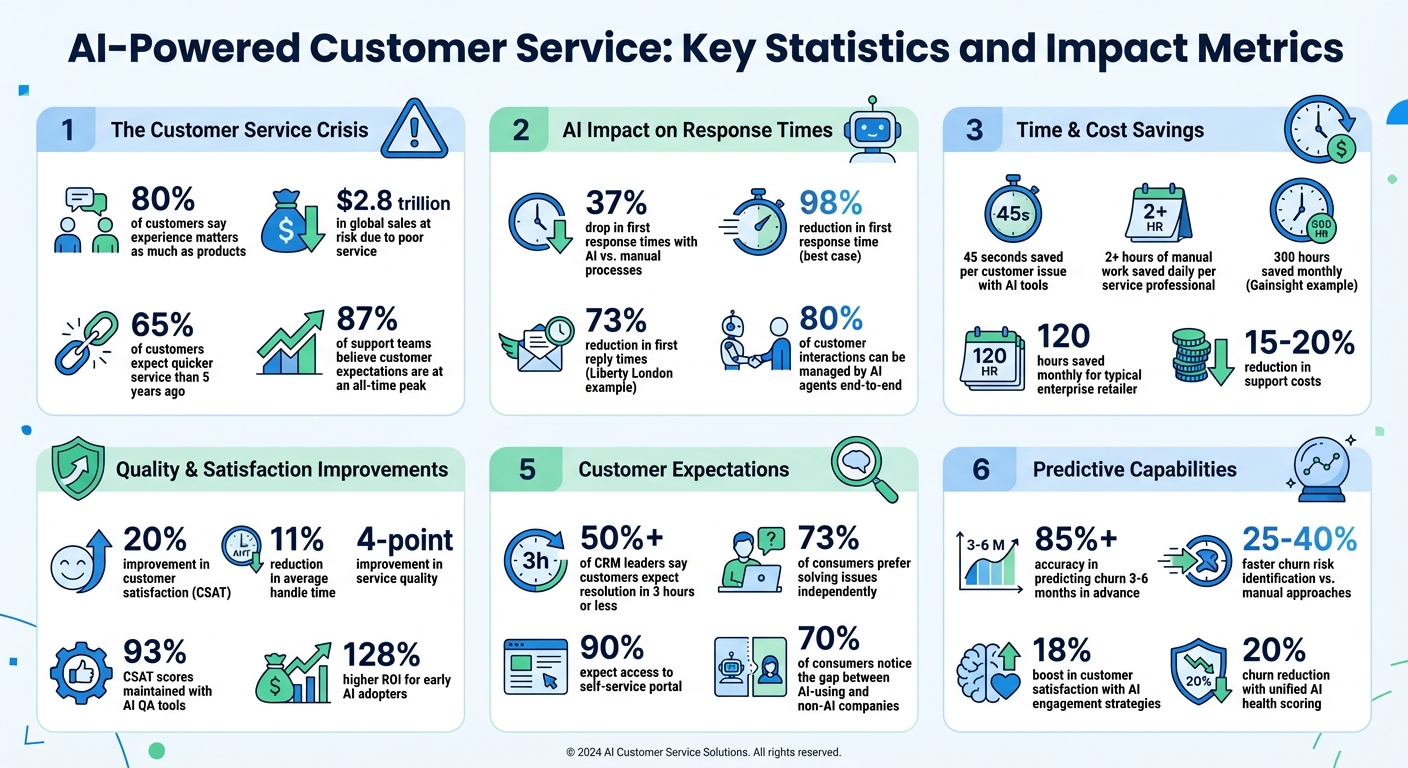
AI-Powered Customer Service: Key Statistics and Impact Metrics
1. Use AI to Improve Case Management
Sorting tickets manually and reviewing case histories can eat up a lot of time. That’s where AI-powered case management steps in, automating tasks like triage, prioritization, and gathering context. The payoff? AI tools save an average of 45 seconds per customer issue, and businesses using AI report a 37% drop in first response times compared to those relying on manual processes.
On top of that, service professionals using generative AI save over 2 hours of manual work daily. Even better, 77% of service professionals say automation lets them focus on strategic, high-value tasks instead of repetitive ones. For a typical enterprise retailer, this translates to saving around 120 hours every month. With over 50% of CRM leaders saying customers now expect issues to be resolved in 3 hours or less, integrating AI isn’t just helpful – it’s becoming the standard.
1.1. Set Up AI Auto-Triage and Prioritization
AI auto-triage works by instantly categorizing incoming requests based on intent, language, and sentiment, ensuring cases land with the right team or agent from the start. This cuts down on internal handoffs and speeds up resolution.
One of the most impactful features is sentiment-based prioritization. For instance, if a customer’s message indicates frustration or dissatisfaction, AI can automatically escalate the case to a manager or specialized team – no need for an agent to step in. This is particularly critical in B2B scenarios, where a single bad experience could jeopardize a renewal.
To get started, analyze your historical ticket data and map out the top 15-20 recurring intents. Use these insights to train your AI classification model. Set up clear escalation rules for high-risk situations, such as billing issues, churn risks, or legal disputes. You can also configure SLA timers to ensure AI monitors deadlines and bumps ticket priority as needed.
| Channel | Target First Response Time (FRT) | AI Strategy |
|---|---|---|
| Live Chat | < 2 minutes | Auto-triage and instant AI agent responses |
| Email/Tickets | < 4 business hours | Intent classification and draft generation |
| Social Media | ≤ 24 hours | Sentiment detection and routing |
| VIP/P1 Issues | < 2 minutes | Immediate escalation via priority tagging |
AI can also create case summaries on the fly, further reducing response delays by distilling the case history into actionable points.
1.2. Turn On AI Case Summaries
Long case histories can slow agents down, often requiring 10–20 minutes to review. AI-generated summaries solve this by condensing complex back-and-forth conversations into key points, highlighting the current status, the last action, and the next steps.
Activating this feature is straightforward. Enable AI tools within your helpdesk system and set up rules to trigger summarization as part of your ticket routing process. Customize the AI’s prompts to ensure the summaries align with your company’s tone, terminology, and policies. Allow agents to edit, save, or regenerate summaries to maintain accuracy. Feedback tools like thumbs-up/down ratings can help refine the AI’s performance over time.
62% of employees say they spend too much time searching for information at work. AI summaries eliminate this “context tax,” providing instant clarity. During shift changes or escalations, these summaries ensure the next agent has all the context they need, reducing handoff delays and cognitive strain.
With quick, clear summaries, agents can dive straight into resolving customer issues, enabling faster and more effective support.
1.3. Deploy AI Agent Copilot Tools
AI copilots take support to the next level by not only summarizing cases but also suggesting responses and solutions. They analyze case history, knowledge bases, and past interactions to recommend actionable steps. In B2B settings, the best copilots leverage "Agentic AI" to diagnose problems, offer solutions, and even trigger workflows autonomously.
Take Gainsight, a B2B SaaS company, as an example. They implemented TheLoops AI Agent Copilot, which saved their agents 300 hours every month by automating resolution recommendations.
"Effective AI Copilots are more than digital assistants. They’re sophisticated problem-solving partners." – Ravi Bulusu, CTO and Co-Founder, TheLoops
To roll this out, start by identifying repetitive, low-value tasks in your workflows that could benefit from AI assistance. Ensure your AI tools have access to high-quality, connected data from systems like ERP, CRM, and PIM to provide accurate, context-rich recommendations. Begin with a small pilot group to test performance, gather feedback, and make adjustments before scaling up across your organization.
2. Speed Up Response Times with AI Automation
Fast responses are no longer just a nice-to-have – they’re a necessity. 65% of customers expect quicker service today than they did five years ago, and 87% of support teams believe customer expectations have hit an all-time peak. AI automation steps in to help by drafting replies, predicting satisfaction levels, and routing cases instantly. Businesses using AI have seen a 37% drop in first response times compared to those relying on manual processes. What’s more, AI agents can manage up to 80% of customer interactions from start to finish, leaving your team free to focus on more complex, high-stakes cases. For B2B support teams handling multi-stakeholder accounts and renewal-focused relationships, this shift from reactive to proactive service can help safeguard revenue and reduce churn. By building on effective case management, these AI-driven strategies can supercharge your team’s responsiveness.
2.1. Enable AI-Powered Auto-Responses
One of the quickest ways to improve response times is by automating common interactions. AI-powered auto-responses rely on historical case data, conversation context, and your knowledge base to craft draft replies that match your brand’s tone. These systems ensure accuracy by pulling responses only from verified company documentation.
AI works best when focused on high-volume, straightforward tasks like password resets or order inquiries. To maintain quality, set confidence thresholds – for example, auto-replies are only sent when the AI is 85% confident or higher. If confidence falls below this level, the draft is routed to an agent for review. This "human-in-the-loop" system keeps interactions personalized while saving valuable time.
Integrating AI with your CRM can take personalization even further. By pulling customer-specific details – like subscription levels, recent purchases, or past issues – AI can create tailored responses. Take NEXT, a major retailer, as an example. In January 2026, they introduced AI copilot tools for email support. The results? An 11% reduction in average handle time and a 4-point improvement in service quality.
| Channel | Target First Response Time (FRT) | AI Automation Strategy |
|---|---|---|
| Live Chat | < 2 minutes | AI auto-replies with confidence thresholds |
| < 4 business hours | AI-drafted responses with human review | |
| Social Media | ≤ 24 hours | Intent-based routing to specialized queues |
For emotionally charged cases, configure sentiment-based triggers. If the AI detects phrases like "I want a manager", "cancel", or signs of frustration, the case is handed off to a human agent immediately. This ensures that sensitive issues get the empathy and attention they deserve, reducing the likelihood of escalations.
2.2. Activate AI Predictive Metrics Detection
AI can do more than draft replies – it can predict outcomes like Customer Satisfaction (CSAT) and Customer Effort Scores (CES) before a case is even closed. This allows support teams to step in early when a customer might leave negative feedback, often before they’ve voiced any complaints.
To activate predictive metrics, start by mapping common customer intents – such as billing issues, technical bugs, or product usage questions – using historical ticket data. Train the AI to identify patterns linked to dissatisfaction, such as delayed responses, multiple handoffs, or unresolved problems. Set up SLA timers by customer tier and channel, and let AI prioritize tickets nearing deadlines.
Liberty London offers a great example. By implementing AI-powered classification and routing, they matched conversations to agents based on skills and customer intent. This change eliminated bottlenecks, cutting first reply times by 73% and boosting customer satisfaction by 9%. Predicting SLA risks allowed them to prevent delays, improving the overall customer experience.
Real-time alerts can notify managers when responses are delayed or sentiment scores drop below a set threshold. AI-powered quality assurance (QA) tools can also review every interaction in real time, identifying gaps in performance, knowledge, or efficiency. For instance, Rentman, an event rental software company, used QA to analyze all customer interactions. This provided agents with detailed feedback, enabling them to maintain 93% CSAT scores and keep response times between 60 and 70 minutes. This kind of QA-driven insight ensures continuous improvement in support workflows.
To maintain accuracy, audit AI classification weekly to confirm tickets are routed correctly without unnecessary handoffs. Standardize all timestamps to a single timezone in your shared data dictionary to ensure consistent tracking across global teams. These steps ensure that AI-driven automation delivers measurable improvements in both response speed and customer satisfaction.
3. Improve SLA and Workflow Management with AI
Static SLAs just don’t cut it anymore in today’s fast-paced B2B environment. Imagine this: a customer nearing their renewal date submits a ticket. Should that ticket wait in line behind less time-sensitive issues? Probably not. Over half of CRM leaders report that customers now expect resolutions within just three hours. Yet, 61% of service professionals still struggle with outdated workflows and tools. Enter dynamic SLAs and AI-powered automation. These tools adapt response times based on real-time factors like customer sentiment, ticket urgency, and business priorities. The result? Faster resolutions, happier customers, and reduced churn. Let’s break down how to make this happen.
3.1. Configure Dynamic AI-Driven SLAs
Dynamic SLAs leverage AI to adjust response and resolution targets based on the specifics of each case. For instance, if a customer’s renewal date is around the corner, the system can automatically shorten the SLA to prioritize their case. Similarly, if sentiment analysis detects frustration or urgency in a message, the ticket can be escalated immediately – even if it wouldn’t normally rank as high priority.
To stay on top of deadlines, set alerts at 25%, 75%, and 90% of the SLA timer. This gives your team plenty of time to act before a case breaches its deadline. For VIP or enterprise customers, create special routing rules that send their tickets straight to senior agents. Combine this with workload-aware assignment, which factors in an agent’s current capacity, to ensure SLAs are met even during busy periods.
Another must-have feature is pause/resume settings. AI can automatically pause SLA timers when a ticket is in a "waiting on customer" or "third-party dependency" state, resuming them only when the required response is received. This keeps your metrics honest by reflecting active work time rather than idle periods. Additionally, pausing timers outside of business hours – like on weekends or holidays – prevents false breaches that could undermine team morale.
3.2. Create AI Automation Rules for Workflows
Dynamic SLAs are just the beginning. AI automation takes things further by streamlining repetitive tasks like tagging, routing, and escalating tickets. The best part? Many platforms now offer no-code automation builders, so you don’t need to be a tech wizard to set up complex workflows. For example, you can automate ticket assignment by intent – whether it’s billing, technical support, or renewals – to save time and boost efficiency.
Start by mapping out the top 15 ticket intents and creating routing rules for them. A good strategy is to begin small: automate a few common, low-risk tasks (like password resets) before tackling more complicated issues. For critical cases, consider "swarming" triggers. These bring together a team of experts – spanning product, engineering, and customer success – into a shared workspace the moment a high-priority issue arises.
AI can also handle dynamic escalations. If a ticket is nearing 90% of its SLA time without progress, automation can escalate it to a senior agent or manager. To avoid dropped balls, set up fallback routing for tickets that remain unassigned. For example, critical issues could be rerouted to a secondary queue or on-call agent after 15 minutes. Before going live, test new automation rules on historical data to fine-tune them and predict their impact.
"77% of service professionals report that AI automation allows them to concentrate on higher-value responsibilities." – Salesforce
Tools like Supportbench include AI-driven features that prioritize cases, auto-assign issue types, and auto-tag tickets. This frees up agents to focus on solving complex problems. Supportbench also offers Dynamic SLAs that adapt in real time – tightening deadlines as renewals approach – to ensure every customer gets the attention they need. By combining dynamic SLAs and AI automation, you can build a more responsive, customer-focused support system that delivers consistent results.
sbb-itb-e60d259
4. Build Better Knowledge Management and Self-Service
In today’s AI-driven support operations, having an up-to-date knowledge base is no longer optional – it’s critical. A well-maintained knowledge base doesn’t just reduce ticket volume; it also speeds up resolutions and empowers customers to find answers on their own. And the stats don’t lie: 73% of consumers prefer solving product or service issues independently, while 90% expect access to a self-service portal. Yet, many B2B support teams struggle to keep their documentation current, especially when information is scattered across outdated systems or buried in old articles. This is where AI steps in, automating content creation, spotting gaps, and enabling agents to update resources in real time.
When AI is integrated into your knowledge base, it becomes a central hub for everything – from automated customer responses to agent support tools. The impact? A 33% faster resolution rate. Plus, a well-maintained system can automate as much as 80% of customer interactions. By improving knowledge management, you directly enhance case resolution and SLA compliance. Below, we’ll explore how AI can transform your knowledge management process.
4.1. Enable AI Knowledge Base Article Creation
Creating and maintaining knowledge base articles can be a time-consuming task, and outdated content quickly becomes a problem. AI simplifies this process by automatically generating first drafts from resolved case histories, conversation logs, and internal product updates. Your team can then review, edit, and publish these drafts much faster than starting from scratch.
Start by identifying common customer issues or frequently asked questions. AI can take resolved cases and turn them into structured articles, while also flagging documentation gaps. For example, if customers repeatedly inquire about a feature that lacks proper documentation, AI highlights this as a priority. Regularly review these drafts – weekly for new content and monthly for outdated material. To ensure accuracy when AI retrieves information, keep articles concise, ideally between 100 and 500 words.
While AI speeds up article creation, it also enhances the agent experience by embedding these resources directly into their workflow.
4.2. Give Agents AI Activity Helpers
AI activity helpers act as copilots for support agents, delivering relevant, up-to-date articles based on the specific ticket they’re handling. This reduces the time agents spend searching for information and makes onboarding smoother by guiding new team members through complex cases.
One standout feature is AI-powered reply drafting. Using the full case history, past interactions, and knowledge base content, AI can draft polished responses directly within the ticket interface. This is especially valuable for email support, where tone and clarity are crucial. Agents can also refine their own drafts with AI, ensuring responses are professional, clear, and aligned with your brand voice.
Adopting a Knowledge-Centered Service (KCS) approach takes this a step further. Agents can flag errors or update articles directly from their workspace, ensuring the knowledge base stays accurate and evolves alongside customer needs. For instance, platforms like Supportbench use AI-powered tools that allow agents to rewrite content, draft responses, or even create new knowledge base articles from case histories – all within the same activity editor. With these tools, you can reduce handling time, improve response consistency, and build a knowledge base that truly meets your customers’ needs.
5. Get Better Insights with AI-Driven Analytics
Many support teams operate without a complete picture of their customers’ needs. Surveys typically capture only about 5% of customer feedback, leaving a vast amount of valuable insights untapped. Yet, 84% of customer support leaders agree that data and analytics are essential to achieving organizational goals. This gap between what you measure and what you need to know can cost you both customers and revenue. AI-driven analytics changes the game by analyzing every interaction – emails, chats, and calls – uncovering sentiment, intent, and health signals in real time. This shift allows support teams to move from reactive problem-solving to proactive strategies that help prevent churn before it happens.
By harnessing AI to analyze customer interactions, businesses can identify patterns that human teams would otherwise miss. Brands that leverage this approach report 20% higher CSAT scores, and AI-driven analytics can cut support costs by 15% to 20% through improved efficiency. The result? You gain actionable insights that allow you to predict and mitigate customer issues months in advance, eliminating guesswork.
5.1. Apply AI Sentiment and Intent Analysis
AI sentiment and intent analysis digs deeper than simply tracking open or closed cases – it reveals customer emotions and motivations. Sentiment analysis categorizes customer emotions as positive, neutral, or negative, while intent analysis pinpoints the purpose of each query, such as "request refund", "cancel subscription", or "troubleshoot feature." These insights enable smarter routing, prioritization, and proactive interventions that prevent frustration from escalating into churn.
For example, you can set up real-time sentiment alerts for supervisors. If a live chat or call takes a negative turn, the system can escalate the issue immediately or invite a supervisor to step in and provide real-time coaching. This is especially critical in B2B contexts, where a single dissatisfied stakeholder can jeopardize a renewal. AI can also infer CSAT scores for 100% of customer calls by analyzing tone and resolution patterns, giving you a comprehensive view of customer satisfaction instead of relying solely on survey respondents.
Intent analysis goes a step further by identifying areas ripe for automation. If the AI detects that "refund requests" consistently rank among the top three support drivers, you can prioritize automating that workflow. For instance, iFit used intent analysis to review a year’s worth of tickets and identified three high-volume workflows – refund requests, membership cancellations, and equipment issues. Automating these tasks freed agents to focus on more complex customer needs.
"Before Discover, we didn’t have a system in place to understand the top drivers on our member center… Now, I can easily understand which topics are most common and missing from our knowledge articles." – Dustin Auman, Operations Manager at iFit
Another success story comes from Q4 Inc., which reduced first response time by 98% and improved CSAT by 20% by using intent analytics to automatically route 6,000–9,000 monthly support emails based on urgency and content. Intent analysis also helps identify gaps in your knowledge base, ensuring your self-service resources stay relevant and up-to-date as customer needs evolve.
By combining sentiment and intent analysis with advanced health scoring, you can take your customer retention strategies to the next level.
5.2. Track Customer Health Scoring
AI-driven customer health scoring offers a powerful way to predict retention risks and refine support strategies. These models analyze case interactions, sentiment trends, and engagement patterns to provide a holistic view of customer health. With AI, you can predict churn 3 to 6 months in advance with over 85% accuracy, giving your team the opportunity to act before issues escalate.
Health scoring works by assigning weights to key factors like product usage, sentiment, business metrics, and relationship health, based on their correlation with retention. For example, AI can use Natural Language Processing (NLP) to evaluate the tone of emails, support tickets, and meeting transcripts, identifying dissatisfaction even before it shows up in usage data. If a customer’s support ticket volume spikes, sentiment drops, and product logins decline, the system flags the account as at-risk and triggers an automated response – such as assigning a Customer Success Manager (CSM) or launching a retention campaign.
In May 2025, Waystar unified fragmented data sources with AI-powered health scoring, enabling them to identify at-risk accounts faster and reduce churn by 20%. Similarly, a European energy provider used AI-driven engagement strategies to boost customer satisfaction scores by 18%. Companies that adopt predictive health scoring often see retention rates double, and AI models can identify churn risks 25–40% faster than manual approaches.
To get started, identify the top three data sources that best predict churn for your business – such as sentiment in support tickets, product login frequency, or contract renewal timelines. Set thresholds for health scores, and link them to automated workflows. For instance, if a health score drops below 30, the system can escalate the account to a senior CSM or trigger a retention campaign. Regularly audit your scoring model to ensure it reflects changes in customer behavior or new product launches. Platforms like Supportbench simplify this process by integrating sentiment analysis, case data, and surveys into a unified, real-time view of account health – no custom IT work required.
Conclusion
Enhancing customer service doesn’t require years of planning or massive budgets. The 15 AI-driven strategies discussed here – like auto-triage, case summaries, and sentiment analysis – can be rolled out within 30 days. The results speak for themselves: early adopters have seen a 128% higher ROI, and 70% of consumers notice a clear gap between companies using AI and those that aren’t. These numbers highlight just how impactful these changes can be.
The best way to begin is by targeting specific bottlenecks. For instance, AI-powered triage can slash First Response Time (FRT) by up to 98%, while automation can handle 18% to 40.7% of ticket volume. This frees up your team to focus on more complex, high-value tasks. Take NEXT, for example: in early 2026, they revamped their customer experience by equipping agents with AI tools for email support. The result? They reduced average handle time by 11% and improved service quality by 4 points.
Platforms like Supportbench make adopting AI straightforward and cost-effective. Unlike older systems that tack on AI features at an extra cost, Supportbench integrates AI directly into case management, knowledge creation, and customer insights – all starting at just $32 per agent per month. With features like AI copilots, predictive CSAT, dynamic SLAs, and health scoring included from day one, it’s a solution designed for immediate impact.
Companies that have already embraced AI are set to lead the pack by 2026. You can join them by starting small. Run a pilot program – apply AI to 20% of your traffic and measure its effect on key metrics like CSAT and resolution time. Monitor results closely, refine your approach, and expand what works. With 73% of CX leaders emphasizing the importance of scaling AI to remain competitive over the next five years, there’s no better time to take action.
FAQs
How does AI help reduce first response times in customer service?
AI is transforming customer service by drastically improving response times. One way it achieves this is through AI-powered chatbots that provide instant, round-the-clock replies. These bots ensure customers get immediate acknowledgment and can handle common questions without needing a human agent, cutting down on wait times.
AI also streamlines ticket management. It can automatically sort and assign tickets to the right agents, eliminating the delays that come with manual handling. On top of that, intelligent self-service tools – like searchable knowledge bases and automated solutions for frequent issues – allow customers to quickly find the answers they need. This not only reduces the workload for support teams but also ensures faster resolutions, leading to happier customers and smoother operations.
What are dynamic SLAs, and why are they important for customer support?
Dynamic SLAs (Service Level Agreements) are performance benchmarks that shift in real time, adapting to factors like customer requirements, issue complexity, and operational data. Unlike static SLAs, which stick to a fixed framework, dynamic SLAs give support teams the flexibility to adjust response and resolution times as conditions change. This ensures a more personalized and efficient approach to customer service.
One major advantage of dynamic SLAs is their ability to help teams prioritize tasks intelligently while managing customer expectations. For example, they can assign quicker response times to urgent cases or extend thresholds for more complex issues. This approach ensures that critical tasks are addressed without compromising overall service quality. By staying responsive to real-time needs, dynamic SLAs help reduce delays, avoid SLA violations, and improve customer satisfaction.
How can AI-powered sentiment analysis improve the customer experience?
AI-driven sentiment analysis transforms customer experience by identifying emotions like frustration or dissatisfaction during interactions. This enables support teams to act swiftly, resolving issues before they escalate. The result? Happier customers and stronger loyalty.
By examining tone, language, and context, these tools can pinpoint urgent concerns, organize workflows, and make customers feel genuinely understood. This leads to quicker resolutions and tailored support, creating a smoother and more satisfying experience for everyone involved.