Tired of “Where is my ticket?” emails flooding your support inbox? You’re not alone. These repetitive inquiries waste time and frustrate both your team and your customers. The solution? Portal automation.
Here’s the gist:
- Self-service portals let customers track ticket statuses in real-time, cutting down on unnecessary emails.
- Automated notifications proactively update customers when ticket statuses change.
- AI tools simplify updates, summarize ticket progress, and flag potential issues early.
How Portal Automation Reduces Status Inquiry Emails
Portal automation shifts the control over ticket updates from your support agents to your customers. By logging into a portal, customers can instantly check the status of their tickets. This not only gives them immediate access to updates but also cuts down on the repetitive "status update" emails your team has to handle.
Self-Service Portals for Real-Time Ticket Tracking
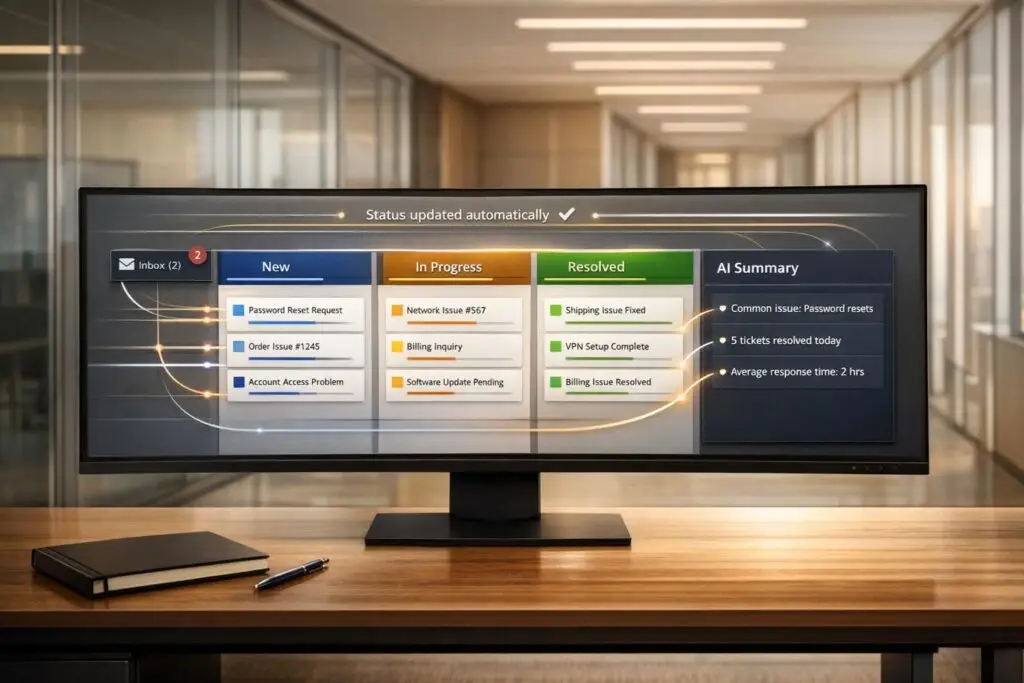
With a self-service portal, customers can view their ticket status in one place without needing to contact support. The portal pulls data directly from your backend tools and presents it in a format customers can easily understand. For example, when a ticket status changes – say from "Pending" to "Resolved" – the update appears in the portal automatically. This seamless sync eliminates the need for customers to email, asking, "What’s the latest on my ticket?"
To make this work smoothly, configure your portal to sync key details like Status, Comments, and Attachments. Using sync queues ensures that data flows accurately between your internal systems and the customer-facing portal.
Automated Notifications and Status Updates
Automated notifications take things a step further by proactively sending updates to customers before they even think to ask. When a ticket reaches a milestone like "In Progress" or "Resolved", the system can send an email update and post the same information to the portal. This approach offers customers multiple ways to stay informed without needing to reach out.
AI-driven systems make this process even more efficient. As Micah Johnson from Client Portals Help Center explains:
"Streamline your project communications by automatically generating status updates from your project data. These updates are emailed to your clients and also appear on your client portal when they’re signed in. No more manual progress reviews!" [2]
AI tools also combine smaller updates into a single, clear summary, reducing notification fatigue while keeping customers in the loop. Once these automated updates are sent, AI workflows continue to ensure transparency by keeping all parties informed.
AI-Driven Workflows for Better Transparency
AI further improves transparency by simplifying complex ticket histories into easy-to-read summaries. It pulls context from public comments, internal discussions (like Slack threads), and emails to create concise updates that focus on what the customer needs to know. These summaries follow a clear structure – such as Request, Resolution, and Root Cause – making them quick to scan.
You can also configure AI prompts to generate customer-friendly versions of updates, avoiding internal jargon. Set up triggers to automatically create and share these summaries whenever a ticket status changes. This keeps the portal up-to-date without requiring manual effort, ensuring customers always have a clear picture of their request’s progress. These AI-powered improvements help deliver efficient and transparent customer support while reducing operational costs.
sbb-itb-e60d259
How to Implement Portal Automation for Ticket Tracking
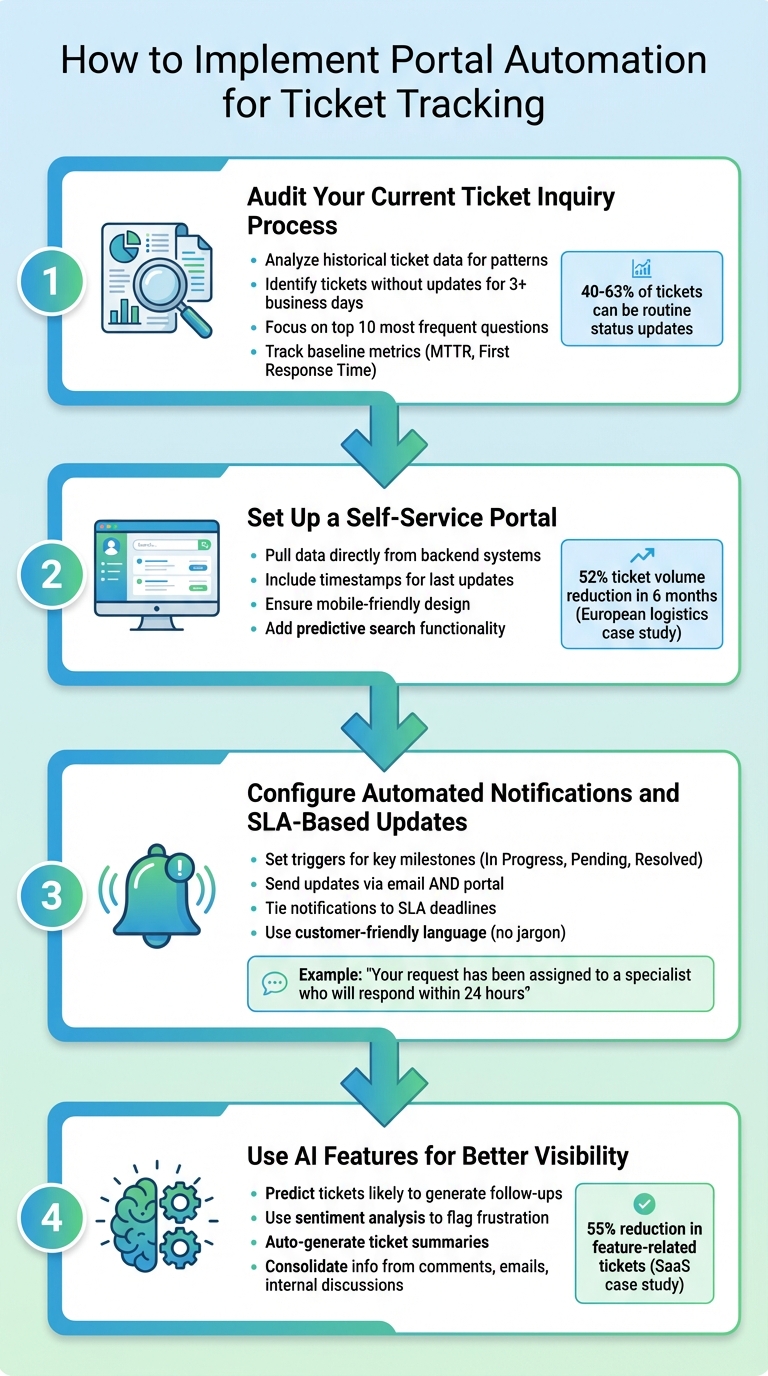
4-Step Process to Implement Portal Automation for Ticket Tracking
Streamlining your ticket tracking process with portal automation can save time and reduce repetitive inquiries. The key is to take a structured approach, starting with a clear understanding of your current process and gradually building a system that keeps customers informed at every step. Here’s how to make it happen:
Step 1: Audit Your Current Ticket Inquiry Process
Before diving into automation, take a close look at where your "where is my ticket?" inquiries are coming from. Use historical ticket data to identify patterns and categorize the most common types of follow-ups. Pay particular attention to tickets that have gone more than three business days without an update – these are often the ones prompting additional emails [3].
Focus on the top 10 most frequent questions that take up the most time for your team [4]. If a significant portion of your tickets – say, 40% – are related to simple status updates or order inquiries, those are clear priorities for automation.
Don’t forget to track your current metrics. Record your Mean Time to Resolve (MTTR) and First Response Time so you can measure improvements after automation. Studies show that customer portals can cut routine ticket volume by 40% to 63% [4]. With this groundwork laid, you’re ready to move on to building a self-service portal.
Step 2: Set Up a Self-Service Portal
A well-designed self-service portal should pull data directly from your backend systems and present it in a way that’s easy for customers to understand. Include timestamps showing when tickets were last updated – this simple feature can significantly reduce follow-up inquiries [1].
Make sure the portal is mobile-friendly. Use tappable buttons, legible text, and simple navigation to ensure customers can access it without frustration [4]. Adding predictive search functionality is another game-changer. As customers type their questions, the portal can suggest relevant articles or updates, often resolving issues before a ticket is even submitted.
Here’s an example: In 2025, a European logistics company introduced an AI-powered portal with real-time shipment tracking and proactive delay alerts. By allowing customers to check statuses and reschedule deliveries themselves, they reduced ticket volume by 52% in just six months [4].
Step 3: Configure Automated Notifications and SLA-Based Updates
Set up automated triggers to notify customers when their tickets hit key milestones like "In Progress", "Pending Customer", or "Resolved." These updates should be sent via email and also appear in the portal, giving customers multiple ways to stay informed.
Tie these notifications to your SLA deadlines. For instance, if a ticket is close to breaching its SLA or has been pending for more than two business days, send an automatic update to reassure customers that their issue is being addressed.
Clarity is essential here. Avoid using internal jargon in your updates. Instead of saying something like "Ticket escalated to L2 support", opt for customer-friendly language like "Your request has been assigned to a specialist who will respond within 24 hours."
Step 4: Use AI Features for Better Visibility
AI tools can take your automation to the next level by predicting which tickets are likely to generate follow-up inquiries. Sentiment analysis, for example, can flag early signs of customer frustration [5][6], allowing your team to step in proactively.
AI can also help summarize tickets by consolidating information from public comments, emails, and internal discussions. These summaries should follow a clear structure, making them easy to scan. Configure AI tools to automatically generate and share these updates whenever a ticket’s status changes. This builds on the automated notifications from Step 3, offering customers a more comprehensive view of their ticket’s progress.
For instance, a mid-sized SaaS company discovered that 40% of their support tickets were tied to the same ten questions about feature setup. By creating an in-app knowledge base with AI-powered suggestions and tooltips, they reduced tickets related to those features by 55% in just three months [4].
Common Mistakes in Portal Automation and How to Avoid Them
Portal automation can cause more harm than good if not implemented thoughtfully. Let’s look at some common pitfalls and how to sidestep them.
Poor User Experience in Portal Design
If a portal is frustrating to use, customers will quickly abandon it for more familiar options like email. One major issue is inconsistent interaction patterns – for example, mixing popups, inline edits, and varying navigation styles. This inconsistency makes the portal feel unpredictable and difficult to use [7]. To avoid this, stick to a unified design system that allows users to learn and navigate the interface easily.
Another common mistake is relying on generic layouts that fail to guide users toward completing key actions. As Daniel Herman explains, "Customer portals that simply mirror your marketing website with a login gate – but no clear paths for tasks – tend to underperform" [8]. Instead, design your portal around specific tasks customers need to complete, such as tracking tickets or downloading invoices.
Mobile usability is another critical factor. Ensure the portal is easy to navigate on smaller screens, with tappable buttons and readable text. While 88–89% of customers expect an online self-service portal [8], only about 14% of customer service issues are fully resolved through self-service [8]. This gap often stems from poor design choices. Always provide an easy-to-find option for contacting human support when self-service falls short.
Failing to Connect Automation with Existing Workflows
A well-designed portal is only part of the equation – seamless integration with your existing systems is just as important. Automation that doesn’t sync with tools like your CRM, billing platform, or ticketing system can create more frustration by showing outdated or incomplete information. To avoid this, ensure your portal uses API-first integration so customers always see up-to-date data.
"The integration of generative AI with workflow automation isn’t just a technological upgrade – it’s a strategic shift in how work gets done." – Dileepa Wijayanayake, FlowWright [10]
When automation can’t resolve an issue, the transition to a human agent should be smooth. This means including the full transcript and any data collected so customers don’t have to repeat themselves. Start by automating high-volume, straightforward tasks like password resets or shipping status inquiries that follow clear decision paths [11][4].
Skipping Regular Performance Reviews
Even after addressing design and integration, ongoing performance reviews are essential to maintain and improve your portal. Portal automation isn’t a “set it and forget it” project. Without regular reviews, you risk overlooking outdated content, missing gaps in coverage, and failing to adapt to new customer needs. For example, monitoring “searches with no results” can help identify topics that require new articles or automation flows [9][4].
It’s also important to review escalation reasons to pinpoint and address weaknesses. Outdated information can erode trust faster than no information at all, so flag any help articles or responses older than 12 months for review. Keeping content fresh and relevant can improve Net Promoter Scores (NPS) by up to 20% [4].
| Metric | What to Watch For | Action to Take |
|---|---|---|
| Ticket Deflection Rate | Low rates despite portal traffic | Increase portal visibility through awareness campaigns |
| Escalation Rate by Topic | High rates for specific issues | Simplify automation flows or add a human review step |
| CSAT for Self-Service | >15-point gap compared to agent CSAT | Refine automation and improve content quality |
How to Measure Success: Key Metrics for Reduced Inquiry Emails
Measuring customer service metrics is critical for understanding how well your system is performing and identifying areas for improvement. The goal isn’t just to reduce support tickets – it’s about improving the customer experience while keeping support costs down.
One key metric is the Ticket Deflection Rate, which shows the percentage of routine inquiries resolved through your portal. To calculate this, subtract the number of routine tickets submitted after implementing the portal from the number submitted before, then divide by the total ticket volume [4]. For instance, successful implementations have seen ticket volumes drop by as much as 50% [4]. Additionally, keep an eye on the Portal Adoption Rate – this measures how many customers prefer self-service over traditional support methods. Another important metric is the Ticket-after-Portal Rate, which tracks cases where customers visit the portal but still submit a ticket. This can highlight usability gaps or areas where content needs improvement [4]. Together, these metrics provide insight into both operational efficiency and customer satisfaction.
Beyond deflection, it’s crucial to measure customer experience. Metrics like Customer Satisfaction (CSAT) and Net Promoter Scores (NPS) reveal whether automation is actually improving the customer journey. CSAT captures immediate satisfaction after specific interactions, while NPS measures long-term loyalty [13][4]. For example, companies with effective self-service tools have reported a 20% boost in NPS [4]. If portal adoption is high but CSAT scores are low, it’s worth investigating which popular articles are underperforming in satisfaction and prioritizing updates to those resources. Automating follow-up actions – such as flagging low CSAT scores in Slack or creating high-priority tasks for review – can help address issues quickly [13]. Higher satisfaction not only builds loyalty but also frees up agents to handle more complex challenges.
You should also evaluate Agent Productivity and Resolution Times to measure operational improvements. When routine inquiries like "Where is my ticket?" are resolved through the portal, agents can focus on more complex tasks. For example, a mid-sized SaaS company implemented an in-app knowledge base to address their ten most common setup questions. Over three months, this effort led to a 55% reduction in related tickets, allowing agents to dedicate more time to technical issues and customer success projects [4]. An increase in complex tickets indicates that routine inquiries are being successfully diverted. To calculate ROI, you can use the formula: (Tickets Deflected per Month × Cost per Ticket). On average, resolving a ticket via email costs between $2 and $15 [4].
"Research shows that customer portals can cut customer service workload by 63%."
– SupportBee [4]
Lastly, compare these metrics against historical data to establish realistic success benchmarks [12]. By monitoring these indicators monthly, you can identify potential problems early and adjust your strategy to align with evolving customer needs.
Conclusion
Portal automation does more than just reduce email traffic – it reshapes the way your support team operates and enhances the customer experience. With features like real-time ticket tracking, automated updates, and instant answers through self-service, both customers and support teams reap the rewards. Your team can shift focus from handling repetitive inquiries to tackling complex challenges that require a human touch.
Customer portals have been shown to lower service workloads by up to 63% and reduce routine ticket volumes by 40% to 63% [4]. Considering that 67% of customers prefer self-service options over contacting an agent [4], the demand for quick, transparent, and accessible support solutions is undeniable. By applying the strategies outlined in this guide – like auditing your processes and integrating AI-powered workflows – you can meet this demand while significantly cutting costs. Automating routine updates allows your team to concentrate on critical tasks that drive customer success.
To make this shift, it’s essential to choose a platform designed for modern B2B support. AI-native platforms like Supportbench offer the comprehensive tools needed to automate the ticket lifecycle seamlessly, without requiring costly add-ons or disjointed integrations. These platforms provide features like predictive search, automated status updates, AI-powered summaries, and knowledge base creation, ensuring your portal works proactively to meet customer needs.
Start by identifying frequent status inquiries and launching a real-time self-service portal. Configure automated notifications to keep customers informed, and then track metrics like ticket deflection rates, CSAT scores, and agent productivity to measure success. For example, deflecting 200 tickets per month at $5 each can save $12,000 annually [4], while enabling your team to focus on strengthening customer relationships. These tangible results pave the way for a more efficient and future-focused support strategy.
FAQs
What ticket details should my portal show?
Your portal should present crucial information that allows customers to easily monitor their tickets. Key details to include are:
- Ticket Status: Clearly indicate whether the ticket is open, in progress, or resolved.
- Ticket Number or ID: Provide a unique identifier for easy reference.
- Last Update Date and Time: Show the most recent activity to keep customers informed.
- Brief Issue Description: Offer a concise summary of the problem for quick context.
To improve transparency and cut down on follow-up inquiries, consider adding the communication history and the assigned support agent’s name. These features help customers stay informed without needing to reach out for updates.
How often should automated status updates go out?
When determining how often to send automated status updates, it’s important to align the frequency with the severity and complexity of the issue. For critical problems, aim to provide updates every 30–60 minutes. For less urgent situations, longer intervals are acceptable.
Establish a clear update schedule from the beginning, but remain flexible enough to adjust it based on progress – or the lack of it. Even if there’s nothing new to report, consistent updates go a long way in maintaining transparency and earning customer trust.
How can AI prevent follow-up emails before they happen?
AI takes the hassle out of follow-up emails by automating workflows that ensure issues are addressed and ticket statuses are updated. For example, it can handle initial responses, send follow-up messages to confirm if a problem is resolved, and automatically mark tickets as "Solved." This process keeps customers in the loop while cutting down on the need for them to send extra inquiries. The result? Smoother communication and a more transparent experience for everyone involved.
Related Blog Posts
- How do you reduce “where is my ticket?” follow-ups with proactive updates?
- Slack vs. The Customer Portal: Why Enterprise Clients Demand a Proper Dashboard
- Customer portal vs email support: when self-service helps and when it backfires
- How to show ticket status updates to customers without creating confusion