Want faster customer support without sacrificing quality? Here’s how AI makes it possible:
- AI-powered tools improve ticket categorization, routing, and summaries, saving agents time and effort.
- Faster response times directly increase customer satisfaction and retention, especially in B2B settings.
- Dynamic routing ensures tickets go to the right agents based on expertise and urgency, avoiding delays.
- AI copilots draft responses and suggest solutions, cutting handle times by 30–50%.
- Self-service AI tools empower customers to solve common issues, reducing ticket volume by up to 60%.
- Dynamic SLAs and prioritization focus resources on high-impact tickets, ensuring critical issues are resolved promptly.
The results? Companies using AI have cut resolution times by 73%, improved customer satisfaction by 28%, and reduced costs by 68%. This isn’t about choosing speed over quality – it’s about achieving both.
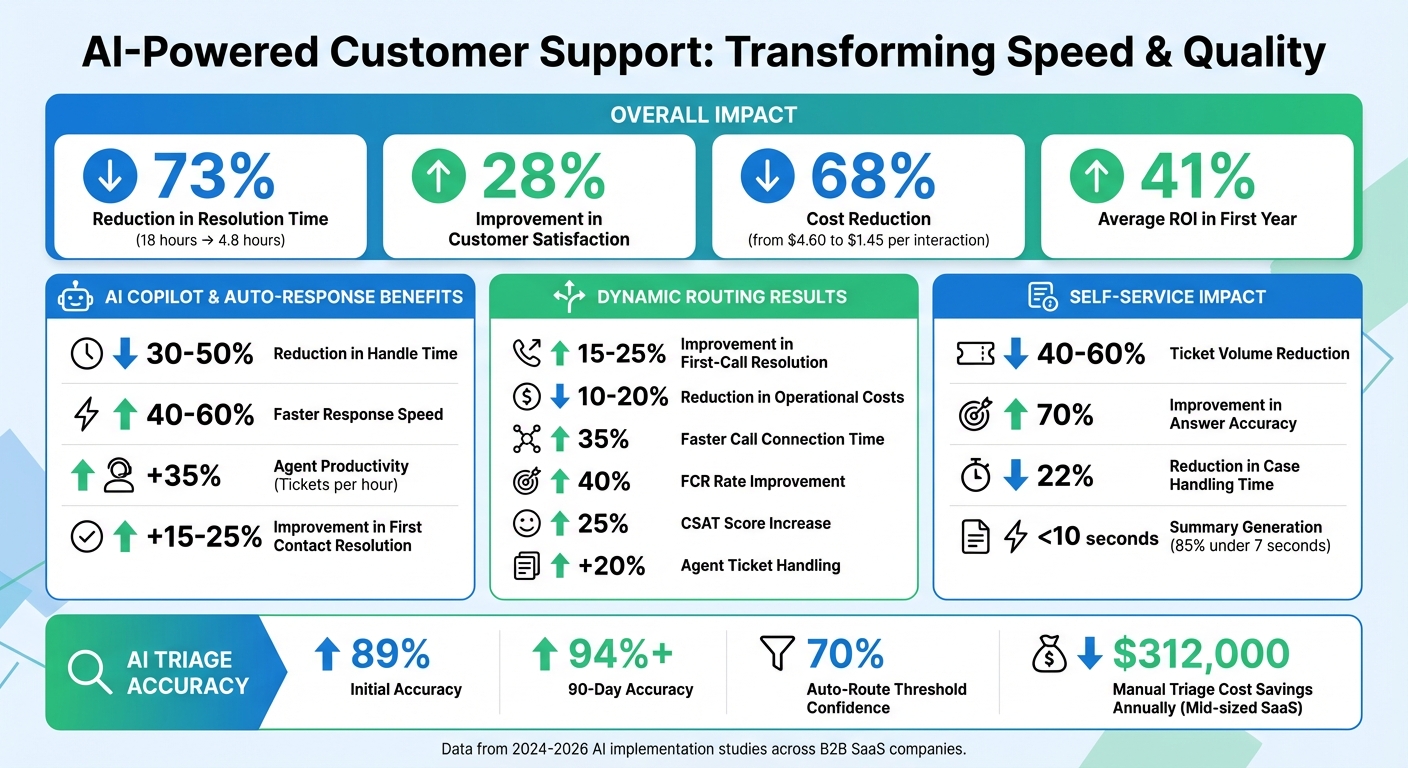
AI-Powered Customer Support: Key Performance Metrics and Improvements
Step 1: Improve Ticket Triage and Routing with AI
One of the biggest challenges in customer support is figuring out what each ticket needs and getting it to the right person. When done manually, this process forces agents to sift through tickets, guess the issue, assign a priority, and then decide where to send it. For a mid-sized SaaS company, this can cost as much as $312,000 annually [2]. AI steps in to solve this problem, handling classification and routing in seconds, not hours, and turning a time-consuming process into something much more efficient.
Take the example of Saksham Solanki, who implemented an AI triage system in March 2026 for a 90-person B2B SaaS company managing over 400 tickets weekly. The system used three layers: an intake layer to standardize data from multiple sources like email and chat, a large language model (LLM) layer (Claude) for intent and priority classification, and a business-rule-driven routing layer. Built in just 11 days, the system reduced resolution times from 18 hours to 4.8 hours – a 73% improvement – and cut first response times from 2.3 hours to just 47 seconds. Accuracy started at 89% and climbed to over 94% within 90 days, thanks to continuous feedback [2].
Solanki emphasizes the importance of keeping classification and routing separate:
"The LLM handles classification. Business rules handle routing. Mixing these two responsibilities is the number one reason AI triage systems fail in production" [2].
This separation ensures tickets are categorized correctly while routing decisions account for factors like agent availability, customer importance, and service-level agreements (SLAs). For B2B teams managing complex accounts, this approach is essential. AI can identify the problem, but your business logic determines the best way to address it.
AI-Driven Triage for Accurate Categorization
Unlike traditional systems that rely on keywords, AI uses natural language processing to understand the intent behind a ticket. For instance, a customer describing a bug might not even use the word "bug" – they might say something like "the dashboard froze after I uploaded a file." AI can still recognize the issue and categorize it properly [2].
The three-layer approach – intake, LLM, and routing – improves accuracy significantly. The intake layer organizes data from different channels, boosting classification accuracy by 10-15% [2]. The LLM then determines the ticket’s intent (e.g., bug report, feature request, or billing issue) and priority, while the routing layer applies specific business rules to assign the ticket to the right team or agent.
To maintain reliability, AI assigns a confidence score to each classification. Tickets above a set threshold (usually 70%) are routed automatically, while lower-confidence tickets are flagged for human review [2][3]. This "confidence gating" ensures tricky cases are handled appropriately. AI also pulls key details – like order IDs or error codes – and creates concise summaries, making it easier for agents to process tickets [4].
AI doesn’t just classify tickets; it also identifies urgency. By analyzing text cues (e.g., "production is down") alongside customer data like account value or SLA deadlines, AI ensures critical issues are prioritized without manual intervention [4].
Dynamic Routing for Faster Resolutions
Once tickets are classified, dynamic routing speeds up resolutions by matching tickets with the best-suited agent. This goes beyond simple round-robin assignments. AI evaluates factors like agent expertise, workload, customer history, and even sentiment to make the best match [6][7]. For example, a frustrated customer with a complex technical issue might be routed to a senior engineer trained in de-escalation, while a straightforward billing inquiry could go to a junior agent.
The results speak for themselves. Companies adopting intelligent routing in 2026 saw 15-25% improvements in first-call resolution (FCR) rates and a 10-20% reduction in operational costs within the first year [7]. AI-driven routing also cut average call connection times by 35%, and FCR rates improved by 40% when tickets were sent to agents with the right skills and context [9]. Customer satisfaction (CSAT) scores increased by 25%, and agents handled 20% more tickets when matched with issues aligned to their expertise [9].
Dynamic routing also eliminates the frustrating "ping-pong effect", where tickets bounce between teams before landing in the right hands. By integrating with tools like CRM, billing systems, and product logs, AI gives agents a complete view of the customer – account value, purchase history, and previous interactions – so they can resolve issues on the first try [6][8]. This is especially critical for B2B teams, where a single misrouted ticket can delay resolving a high-value client’s issue, risking trust and increasing churn.
Platforms like Supportbench make this process even easier, offering built-in AI tools for prioritization and tagging. With dynamic SLAs that adjust based on factors like customer tier or renewal dates, high-priority accounts get the attention they need. By combining AI-powered triage with smart routing, B2B support teams can drastically cut response times while maintaining the personalized service that complex accounts demand.
sbb-itb-e60d259
Step 2: Use AI Summarization to Speed Up Case Handling
Building on accurate ticket routing, AI summarization gives agents instant access to the context they need, helping them resolve cases faster. For B2B support teams, these summaries save time and improve accuracy by delivering key information right when it’s needed.
In traditional workflows, agents often spend 5–10 minutes per interaction switching between systems to gather details. AI summarization eliminates this inefficiency by producing concise, source-linked summaries in less than 10 seconds, cutting handling times by 22%. Impressively, 85% of cases can be summarized in under 7 seconds. When paired with AI-powered ticket routing, first contact resolution rates see an 11% boost [10]. This means agents can focus on resolving the issue rather than piecing together the context.
Automating Customer Activity Summaries
Every time a customer sends an email, starts a chat, or fills out a web form, AI can create a summary that captures the issue and its context. Instead of wading through long email threads or chat logs, agents receive a concise, five-bullet summary. This includes a timeline, risk flags, and links to the original sources. The AI pulls key details – like customer IDs, order statuses, warranty terms, and even sentiment – and combines data from various platforms such as ERP systems, CRMs, and telephony logs into a single, clear view [10].
For instance, if a customer mentions a billing issue in one email and a product bug in another, the AI identifies both problems, flags the more urgent one, and surfaces account details like contract terms or renewal dates. Tools like Supportbench offer AI Customer Activity Summaries as a standard feature, ensuring agents always have the latest information without needing custom integrations. This leads to faster responses and fewer mistakes – critical in B2B environments where overlooked details can harm customer trust. As the case progresses, the summary updates automatically, keeping everything current.
Creating Real-Time Case Summaries
AI doesn’t stop at initial summaries – it also provides real-time updates as new activity happens [10]. Instead of rereading the entire case history, agents get a refreshed overview showing what’s changed, what’s resolved, and what still needs attention. The AI tracks updates like new emails, internal notes, or status changes, ensuring summaries stay consistent across handoffs. This eliminates the need for lengthy catch-up sessions.
For B2B teams managing multiple open cases involving different products, contacts, and service-level agreements, this feature ensures high-value accounts get the personalized attention they expect. Agents no longer have to act as case historians, freeing them up to focus on delivering solutions.
Step 3: Increase Agent Productivity with AI Copilots and Auto-Responses
After streamlining triage and summarization, the next step focuses on speeding up agent responses using intelligent drafting tools. Once tickets are routed, the challenge shifts to composing replies. AI copilots and auto-response tools step in here, suggesting solutions and drafting responses. The impact? Handle times drop by 30–50%, response speed jumps by 40–60%, first contact resolution improves by 15–25%, and ticket throughput rises by 35% [12].
AI Agent Copilots for Smarter Suggestions
AI copilots simplify the support process by pulling data from emails, chats, customer profiles, product information, and logs. Using semantic vector search, they provide agents with real-time, accurate insights. This eliminates the need for agents to switch between systems, saving time and ensuring they have the right details at their fingertips.
For instance, Palo Alto Networks introduced an AI copilot to support its hybrid workforce, saving an impressive 351,000 hours of manual work by automating tasks like onboarding and system access requests [11]. These tools are essential in B2B scenarios where speed and accuracy can directly influence customer loyalty. Maria Rodriguez, a Senior Support Agent, shared her perspective:
"The best AI copilots feel like having an expert colleague who never gets tired, always remembers everything, and is constantly learning from our successes. But I’m still the one making the decisions and building relationships with customers." [12]
To ensure accuracy, Retrieval-Augmented Generation (RAG) is used to ground AI responses in verified company data – like official documentation and knowledge bases – rather than relying solely on general AI model knowledge [12][13].
AI-Powered Auto-Responses for Common Inquiries
Auto-responses take things further by drafting complete replies based on prior interactions and knowledge base content. Agents review these drafts to confirm their accuracy and tone before sending them. This method works best for the most common inquiries – like password resets, order updates, or warranty questions – which often make up 80% of support requests [5].
To roll out auto-responses effectively:
- Start in shadow mode for 3–5 days to test and fine-tune the system.
- Gradually deploy for low-risk categories before expanding usage.
- Optimize knowledge base articles with clear headers, consistent formatting, and relevant keywords to help the AI generate more accurate responses.
Transparency is also crucial. Customers should know when they’re interacting with AI, and there must always be an option to escalate to a human agent. This is especially important when frustration is detected through sentiment analysis or when the AI’s confidence is low [5]. Platforms like Supportbench make this process seamless by offering AI-powered auto-responses as a standard feature. These tools analyze past interactions to draft the next logical reply, cutting first response times by up to 80% while maintaining a personalized experience.
| Metric | Traditional Support | AI-Powered Support | Typical Improvement |
|---|---|---|---|
| Handle Time | Baseline | 30–50% lower | 30–50% |
| Response Speed | Baseline | 40–60% faster | 40–60% |
| Agent Productivity | Baseline | +35% tickets/hour | 35% |
| First Contact Resolution | Baseline | +15–25% | 15–25% |
Step 4: Automate Prioritization and Adjust SLAs Dynamically
Once advanced triage and summarization are in place, the next step is to ensure your team focuses on the most urgent and impactful tickets. This involves automating prioritization and dynamically adjusting SLAs (Service Level Agreements). By doing so, support teams can tackle critical issues swiftly while maintaining thorough, high-quality resolutions. The result? A shift from reactive problem-solving to a more proactive, strategic approach.
AI Automation for Prioritization and Tagging
AI-powered triage systems go beyond simple keyword matching. Using natural language processing, they interpret the meaning and intent behind a ticket. These systems also analyze metadata – like plan tier, account value, and contract terms – to recommend priority levels based on urgency and potential impact [2][14].
One key to success here is separating the processes of classification and routing. When these functions are combined, it often leads to inefficiencies and errors [2]. In this setup, AI is responsible for identifying the ticket’s content, while pre-defined business rules determine its routing and urgency.
To ensure accuracy, implement confidence-based thresholds. For example, tickets with classification scores above 70% can be auto-prioritized, while those scoring lower should be flagged for human review [2]. Regularly tracking metrics like weekly priority override rates will help refine the system over time [2][14]. Tools like Supportbench’s AI automation can handle prioritization and tagging seamlessly, categorizing tickets and assigning issue types so agents can focus on solving problems instead of administrative tasks.
This automated prioritization lays the groundwork for dynamic SLA adjustments tailored to each ticket’s urgency and value.
Dynamic SLAs for Complex B2B Scenarios
Static SLAs often fall short in meeting the demands of complex B2B environments. For example, a ticket from a customer nearing their renewal date may need faster response times compared to one from a satisfied, long-term client. Dynamic SLAs address this by adjusting in real time based on factors like customer health scoring, renewal timelines, and workload spikes [15].
Organizations that implement well-structured SLOs (Service Level Objectives) and SLAs report a 20% boost in customer satisfaction and a 15% reduction in downtime [15]. AI-driven SLA management can also cut service costs by up to 30% while maintaining high service quality [15]. This approach includes tiered alerts – such as warnings at 80% and critical alerts at 95% – to prevent breaches before they happen [16].
You can also set error budgets to balance reliability with innovation [15][17]. For instance, planned maintenance or deployments can be excluded from SLA calculations to ensure performance metrics reflect actual service quality [17]. Additionally, monitoring key indicators like accuracy (e.g., aiming for a 95% accuracy rate) ensures that speed doesn’t come at the expense of resolution quality [15].
Supportbench’s dynamic SLA feature adapts agreements based on the specifics of each case. For example, if a renewal is approaching, the system tightens the SLA automatically to prioritize the customer’s needs. This kind of contextual adjustment ensures high-value or high-risk tickets get the attention they require, all without manual effort.
Step 5: Improve Self-Service with AI Knowledge Base Tools
After streamlining triage and agent support, the next logical step is empowering customers to solve their own issues. Self-service tools can cut down on ticket volume by allowing customers to find answers instantly, without needing to reach out to support. AI-powered knowledge base tools take this to the next level by turning static documentation into a dynamic, intelligent system that understands customer needs and delivers precise answers. This approach not only lightens the workload for agents but also builds on earlier AI optimizations to enhance customer experience.
AI-Assisted Knowledge Base Article Creation
Traditionally, creating knowledge base content has been a tedious and inconsistent process. While support agents deal with customer issues daily, they often don’t have the time or structure to document solutions effectively. AI changes the game by automatically generating articles based on resolved cases, capturing key details while they’re still fresh.
AI systems analyze past cases to create actionable knowledge base articles. They break down the problem, outline solution steps, and generate metadata like keywords and categories. This process turns everyday support insights into searchable, reusable content – without adding extra work for your team.
To make the most of these tools, it’s important to structure content for AI retrieval rather than traditional human browsing. Instead of lengthy, multi-topic articles, the focus should be on smaller, metadata-rich units. Each unit should address a single issue and include clear tags for product version, audience type (e.g., admin or end-user), and related topics [18]. This approach ensures that AI doesn’t mix unrelated information when providing answers.
Supportbench simplifies this process with its AI knowledge base article creation feature. With just one click, agents can turn a resolved case into a structured article. The system automatically fills in details like the subject line, summary, and keywords, and even suggests categories based on the issue type. This eliminates the usual barriers that prevent support teams from keeping their documentation current.
Customer-Facing AI Bots for Ticket Deflection
Once you’ve built a strong, AI-powered knowledge base, the next step is deploying AI bots to deliver those solutions directly to customers. Unlike basic FAQ bots that rely on keyword matching, advanced AI bots use natural language processing to understand customer intent and provide conversational, accurate answers pulled from multiple sources [18].
Between 2024 and 2025, Emma App, a fintech company, implemented an AI chatbot to manage weekend and overnight inquiries. Despite a 127% jump in monthly conversation volume (from 3,500 to 7,200 messages), the company maintained its five-person support team without adding new hires. The AI bot handled 100% of weekend messages and tripled resolution speeds [19].
These AI bots go beyond answering questions. They can execute multi-step tasks like resetting passwords, updating subscriptions, or tracking orders by integrating with CRMs and billing systems [19]. Additionally, they monitor unresolved queries to identify content gaps in the knowledge base [18].
Supportbench’s customer QA AI bot leverages your AI-optimized knowledge base to answer questions directly through a website widget. If the bot can’t confidently resolve an issue, it escalates the query automatically. Over time, it learns from these escalations, helping you pinpoint areas where your documentation needs improvement.
"The true return on AI investment is not how many tickets you resolve, it’s how many you never have to handle at all." – Crisp [19]
Companies that adopt AI-driven knowledge bases have reported cutting ticket volumes by 40–60%. Some even see a 70% improvement in answer accuracy by synthesizing information from multiple sources rather than relying on simple keyword matches [18]. This leads to faster self-service resolutions while maintaining – or even enhancing – the quality of support, ensuring customers get detailed, relevant answers instead of generic responses.
Common Pitfalls to Avoid When Reducing Response Times
When using AI to speed up response times, it’s easy to fall into traps that prioritize speed over the actual customer experience. While faster responses look good on paper, they can sometimes mask deeper issues, leaving customers frustrated and unsatisfied.
Over-Reliance on Automation Without Oversight
One frequent misstep is relying too heavily on automation to hit performance metrics, like response time dashboards, without ensuring these automated actions genuinely help customers. For instance, an automated acknowledgment might make metrics look good but fail to move the case forward in any meaningful way. This issue, often referred to as "superficial metric boosting", happens when success is measured by quick but shallow responses rather than by effective problem resolution [20].
Take the metric "Time to First Touch" as an example. While it measures how quickly a customer gets an initial response (often automated), it doesn’t account for the "Time to First Meaningful Response", which is what truly matters for customer satisfaction and retention. Focusing on averages alone can also hide the struggles of customers in the 90th percentile, who may be waiting far longer than the reported average.
Another common problem is unclear ownership of cases, which leads to them being passed around between teams. This not only delays resolution but also inflates response times for high-priority cases [22]. To avoid this, consider using confidence-based escalation. For example, when an AI system’s confidence in handling a case drops below 80–90%, it should automatically hand the case off to a human agent – along with the full conversation history – so nothing gets lost in translation [22]. These challenges highlight the importance of thoughtful AI integration and oversight.
Neglecting Training for AI Adoption
Even the best AI tools won’t succeed without proper training and alignment with your team’s workflows. Gartner estimates that 40% of AI-driven projects will fail by 2027 due to reliability issues and poor risk management [22]. Without adequate training and integration, AI systems can become more of a liability than an asset.
Kristi Cantor from P3 Adaptive puts it well:
"AI is akin to a highly capable intern who still requires guidance to understand your business processes." [21]
Start small when introducing AI, with human oversight in the early stages, and provide regular feedback to help the system learn and improve [5]. A good practice is to dedicate time – say, an hour each week – to review AI performance, update knowledge bases, and fine-tune response prompts. Implementing knowledge-centric support ensures these updates translate into faster, more accurate resolutions. These feedback loops are essential for long-term success.
Finally, keep a balanced approach to automation. Let AI handle repetitive tasks, but reserve human involvement for situations requiring empathy or complex decision-making [23]. This way, you can achieve both speed and quality in your support operations, creating a better experience for your customers and your team.
Measuring Success: Key Metrics and Benchmarks
To ensure that faster response times actually lead to better outcomes while maintaining quality, it’s essential to track specific metrics. These benchmarks help validate the effectiveness of AI-driven strategies.
Tracking First Contact Resolution (FCR) Rates
First Contact Resolution (FCR) is a crucial metric to avoid falling into the "speed over quality" trap. It measures whether customer issues are resolved in a single interaction, without requiring follow-ups or escalations. Research shows that a 1% improvement in FCR leads to a 1% increase in customer satisfaction, making it a clear indicator of support quality[25].
AI-assisted agents outperform their unassisted counterparts, achieving 25% higher FCR rates thanks to instant access to knowledge base data and verified solutions[24]. For B2B support teams, the target FCR rate should range between 60–80% for AI-handled tickets and above 80% for human agents supported by AI copilots[25]. To ensure these resolutions are effective, keep an eye on reopen rates – this confirms that quick fixes are also durable solutions[25].
Predictive CSAT and CES Analysis
Modern tools now enable real-time evaluation of support quality, thanks to AI enhancements. Platforms like Supportbench offer AI-powered Predictive CSAT and CES features that analyze case interactions as they happen, flagging potential dissatisfaction for immediate action[5]. This proactive approach replaces the traditional reliance on delayed survey feedback.
In conventional quality assurance, only 1–5% of tickets are reviewed, which often leaves systemic problems undetected. AI-driven QA, on the other hand, evaluates every interaction for tone, accuracy, and compliance, providing complete oversight[26]. This comprehensive analysis links dips in CSAT to specific issues, making it possible to address and improve satisfaction scores directly[26].
Sentiment analysis tools further enhance this process by identifying frustration or anger in customer messages. When these signals are detected, they can trigger immediate escalation to human agents, preventing satisfaction scores from dropping[5]. Tracking the accuracy of these escalations ensures that human expertise is deployed when truly needed, balancing speed with quality[5].
Conclusion: Achieving Faster, High-Quality Support with AI
In today’s B2B landscape, cutting response times while maintaining high support quality is no longer optional – it’s the expectation. Companies using AI-driven triage systems have seen resolution times drop by an impressive 73%, coupled with a 28% boost in CSAT scores [2]. This isn’t about choosing between speed and quality; it’s about using AI to achieve both.
The five-step framework highlighted here – AI-powered triage and routing, case summarization, agent copilots, dynamic prioritization, and enhanced self-service – offers a clear path to building a scalable and efficient support operation. Real-world examples show how businesses can thrive with the right AI tools in place.
But success requires more than just deploying AI. To truly deliver consistent results, teams must establish confidence thresholds for AI decisions, implement feedback loops to fine-tune accuracy, and monitor key metrics like First Contact Resolution rates and predictive CSAT scores. These practices align with earlier steps like triage, summarization, and prioritization. As Jessica Hannes, Director of Support at Esusu, puts it:
"AI chatbots streamline workflows by handling routine inquiries instantly, allowing agents to focus on complex cases. This approach maintains response quality while significantly reducing wait times" [1].
There’s also a compelling financial upside. AI adoption can slash the cost of customer interactions by 68%, bringing it down from $4.60 to $1.45, while delivering an average ROI of 41% within the first year [2]. For B2B teams managing intricate accounts and long-term cases, platforms like Supportbench integrate AI customer support features such as triage, summarization, predictive analytics, and agent copilots to simplify operations.
The real question isn’t whether to embrace AI in support operations – it’s how quickly you can roll it out strategically. As expectations evolve, customers will demand faster responses without sacrificing the quality they trust. The time to act is now.
FAQs
What’s the safest first AI use case to reduce response time?
One of the best starting points for leveraging AI to speed up response times is through an AI triage system. This type of system automates the process of prioritizing support tickets by analyzing factors like urgency, sentiment, and overall business importance. By removing the delays caused by manual sorting, teams can focus on addressing critical issues more quickly without sacrificing the quality of their resolutions. In fact, some implementations have reported up to a 73% reduction in resolution times, which is a game-changer for efficiency and customer satisfaction.
How do you set confidence thresholds for AI triage and replies?
To establish confidence thresholds for AI handling tasks like triage and replies, you’ll need to determine the minimum confidence score required for the AI to either respond to or route inquiries. Typically, these thresholds fall between 50% and 70%, offering a balance between automation and accuracy.
Here’s how to approach it:
- Evaluate your tolerance for errors: Decide how much risk you’re willing to accept when it comes to incorrect responses. This will guide your threshold setting.
- Set a threshold: For example, you might choose a starting point of 60% confidence, ensuring the AI only acts when reasonably certain.
- Track and refine: Continuously monitor the AI’s performance. Use metrics like accuracy rates and customer feedback to fine-tune the threshold over time.
This process ensures the AI remains effective while minimizing potential errors that could impact user experience.
Which metrics prove speed gains didn’t hurt resolution quality?
Metrics such as First Response Time (FRT), Average Resolution Time (ART), and First Contact Resolution (FCR) highlight how speed and quality can go hand in hand. Better performance in these areas shows that support teams can respond faster without sacrificing resolution quality.