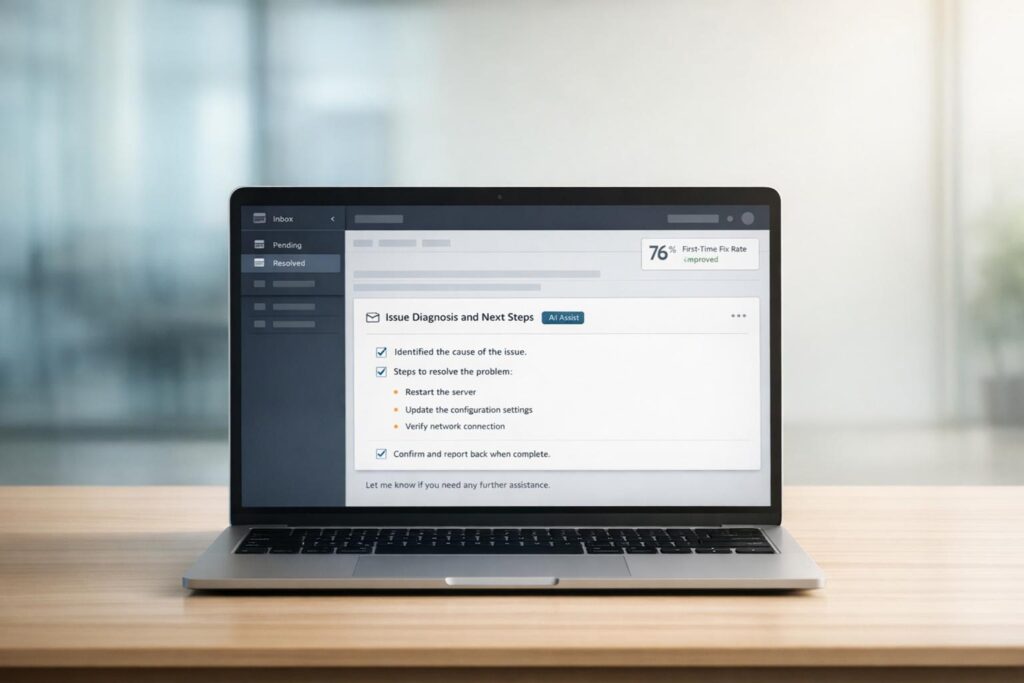
Tired of endless email ping-pong in customer support? The "one-message diagnosis" method can save time, reduce frustration, and improve customer satisfaction. Here’s the gist:
- The problem: Back-and-forth emails slow down resolutions, frustrate customers, and waste agents’ time.
- The solution: Send one detailed email upfront that asks all the necessary diagnostic questions and includes possible solutions.
- Why it works: This approach cuts delays, reduces repetitive tasks, and increases first-response resolution rates.
By bundling all key questions and scenarios into one email, you can streamline communication, avoid redundant follow-ups, and meet customer expectations for faster resolutions. Tools like AI can assist by summarizing case histories, drafting responses, and predicting customer needs, further speeding up the process.
Want to stop wasting time and start solving problems faster? Let’s dive in.
What is the ‘One-Message Diagnosis’ Method?
The one-message diagnosis method, also known as "one-touch triage", is a strategy where support agents send a single, well-rounded response that includes all necessary diagnostic questions and potential solutions upfront [1]. Instead of the back-and-forth exchange where agents ask one question at a time, this method consolidates everything needed to address the issue in one message.
For B2B support, this requires a diagnostic-first mindset before hitting send. Agents must thoroughly review the ticket thread to pinpoint the core issue, understand the customer’s setup (like operating system, app version, or browser), and check what troubleshooting steps have already been attempted. Then, they craft a response that tackles multiple scenarios in one go [2]. Rather than sending separate emails asking for error messages, reproduction steps, and browser details, the agent requests all that information – along with screenshots and logs – in a single, structured reply.
This proactive approach not only helps resolve issues faster but also reduces the mental strain on agents and minimizes the effort required from customers [1]. As Samuel Chenard, Co-founder of LobsterMail, emphasizes:
"Every sentence should move the ticket closer to resolution." [2]
A good diagnostic-first response answers four key questions: What is the customer experiencing? What is their environment? What have they already tried? What is the business impact? [2]. By following this framework, the initial reply either resolves the issue outright or collects all the necessary details for escalation without requiring follow-ups.
Why Back-and-Forth Email Responses Don’t Work
Traditional email exchanges often lead to context-switching chaos for support teams. When agents send one question, wait for a reply, and then send another, they constantly need to reorient themselves to the ticket’s context. This back-and-forth not only wastes time but also increases the risk of missing critical details [1].
The problem worsens when agents skim through threads rather than reading them thoroughly. Important information – like error codes, version numbers, or past troubleshooting attempts – gets overlooked. This can result in agents offering solutions the customer has already tried, damaging credibility and wasting time on both sides [2].
In B2B settings, these conversations often involve multiple stakeholders, technical logs, and screenshots. The core issue can get buried under layers of irrelevant information. When agents react to the latest message without understanding the full context, they risk asking redundant questions or suggesting fixes that have already been ruled out.
How Diagnostic-First Responses Improve Support Outcomes
A diagnostic-first approach flips the script. By addressing multiple scenarios in one response, agents can significantly improve first-response resolution rates – closing more tickets with a single reply [2]. This approach aligns with customer expectations, as 82% of service professionals report that customers now expect issues to be resolved "immediately", typically within three hours [1].
The method also delivers measurable efficiency gains. AI-powered tools that support this approach can reduce average handle time by 30-50% for standard tickets [2]. Generative AI integrations can save users approximately 25% of their time on email, translating to around three extra hours per week [1]. This isn’t just about faster resolutions – it’s also about reducing burnout for support teams.
Another benefit is improved escalation quality. When a ticket requires engineering support, it arrives with a complete summary of the customer’s environment and the business impact. Engineers can start working immediately, instead of wading through a 15-message thread for context [2]. This structured handoff prevents critical details from being lost along the way.
| Metric | Impact of Diagnostic-First Method |
|---|---|
| First-Response Resolution | Higher rates as initial replies address all variables upfront |
| Average Handle Time | Reduced by eliminating repetitive reading and follow-ups |
| Escalation Quality | Enhanced with comprehensive context for engineers |
| Customer Confidence | Boosted when agents act as problem-solvers, not obstacles |
Lastly, this method adapts to different audiences. For developers, it provides technical details and timelines. For non-technical customers, it uses plain language and clear explanations [2]. By structuring information to match the user’s expertise, agents can ensure their responses are both effective and easy to understand. This adaptability sets the stage for implementing the method in your support workflow.
sbb-itb-e60d259
How to Implement the ‘One-Message Diagnosis’ Method
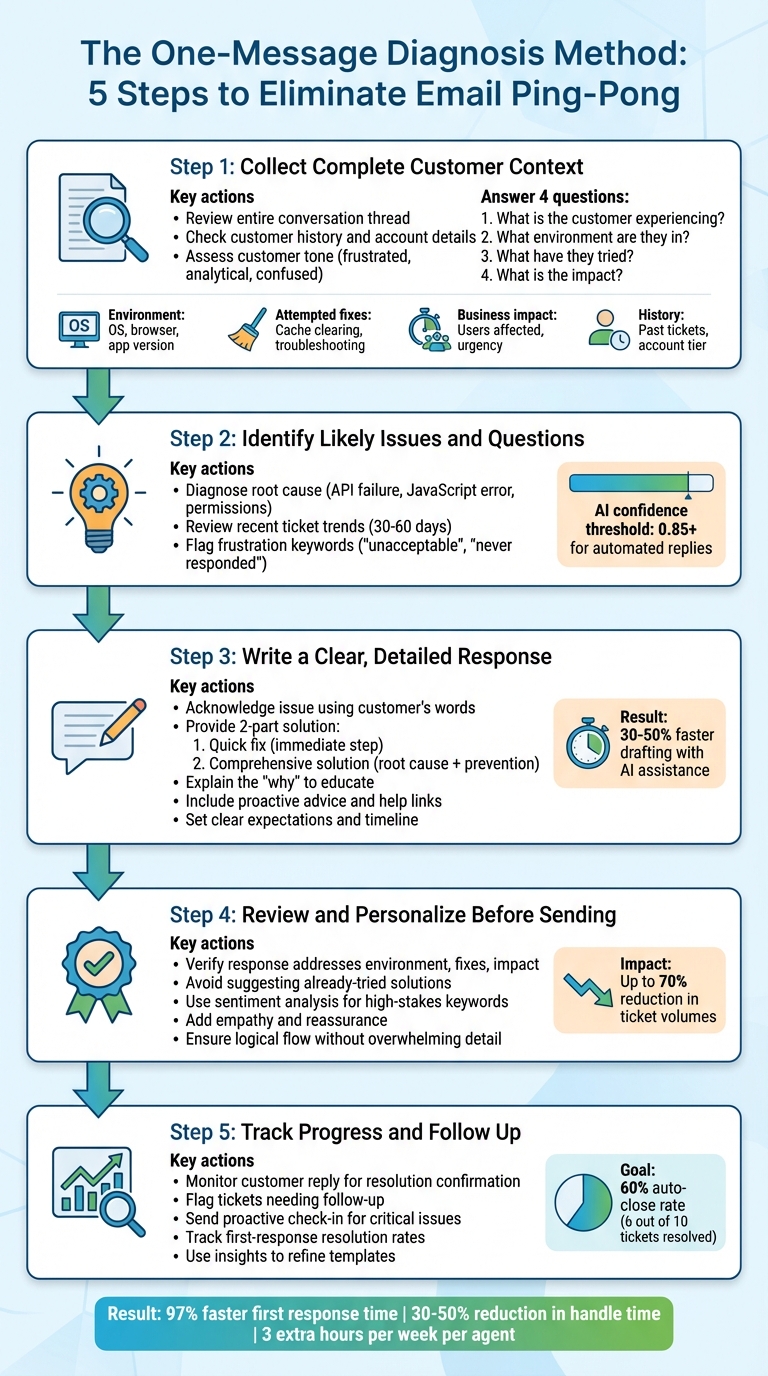
5-Step One-Message Diagnosis Method for Customer Support
The ‘one-message diagnosis’ method reshapes how support agents handle tickets. Instead of reacting with endless back-and-forth questions, it focuses on proactive problem-solving. Here’s how to integrate this approach into your daily workflow.
Step 1: Collect Complete Customer Context
Start by reviewing the entire conversation to understand the situation fully. Samuel Chenard, Co-founder of LobsterMail, highlights the importance of this step:
Good summarization starts with a full read. Not a deep literary analysis. Just a single pass where you’re looking for three things: what’s broken, what they’ve tried, and what they expect to happen next.
This single pass lets you pinpoint technical details and avoid redundant suggestions. Reviewing the customer’s history – such as previous tickets, purchase records, or account details – adds a personal touch to your response. Additionally, assess their tone (e.g., frustrated, analytical, or confused) to tailor your reply accordingly [6][7].
AI tools can speed up this process. For instance, SAP’s "Joule Agents" system, launched in October 2025, analyzes logs to identify root causes and link to relevant resources. This approach boosted first-contact resolution rates for automated responses by 40% [5]. Before drafting your reply, create a concise internal summary addressing these four points:
- What is the customer experiencing?
- What environment are they in?
- What have they tried?
- What is the impact?
| Context Element | Purpose | Key Details to Collect |
|---|---|---|
| Environment | Identify technical causes | OS, browser version, app version, environment (staging/production) |
| Attempted Fixes | Avoid redundant steps | Cache clearing, incognito mode, prior troubleshooting efforts |
| Business Impact | Prioritize urgency | Number of users affected, financial consequences, blocking status |
| History | Personalize the response | Past tickets, account tier, similar issues |
Step 2: Identify Likely Issues and Questions
Once you’ve gathered the context, focus on diagnosing the problem. Instead of simply noting "the page is blank", determine if it’s due to a failed API call, JavaScript error, or permissions issue [2]. Reviewing recent ticket trends (from the last 30–60 days) can help identify recurring problems [8].
Pay attention to frustration keywords like "unacceptable" or "never responded", as they often signal potential escalations. Negative sentiment usually means the customer will expect extra reassurance and reliability [7].
In February 2026, LobsterMail’s AI-driven triage system achieved notable success, handling 68% of general inquiries autonomously while escalating only 10% of technical issues. These escalations included structured summaries that significantly reduced response times [4]. When using AI tools, stick to a confidence threshold of 0.85 or higher for automated replies. Anything lower may require human intervention to address unique nuances [4].
Step 3: Write a Clear, Detailed Response
With your diagnosis in hand, craft a response that acknowledges the issue and offers clear solutions. Start by reflecting the customer’s own words to show you understand their concerns [2]. Then, provide a two-part solution:
- A quick fix: An immediate step to get them back on track.
- A comprehensive solution: A deeper explanation to resolve the root problem and prevent future issues [7].
Explain the "why" behind the issue to educate the customer, turning your response into a learning opportunity. For complex problems, consider using video messages or screen recordings to demonstrate steps [7].
Even if the customer hasn’t asked for it, include proactive advice, such as links to relevant help articles or tips to avoid similar issues. Always set clear expectations by outlining the next steps and providing a timeline for updates [2]. AI tools can speed up drafting by 30–50%, but always review these drafts for tone, accuracy, and nuance before sending [2].
Step 4: Review and Personalize Before Sending
Before hitting "send", double-check that your response addresses the customer’s environment, attempted fixes, and the impact of the issue [2]. Avoid suggesting solutions they’ve already tried.
Use sentiment analysis to identify high-stakes keywords like "three times" or "never responded." Adjust your tone to be empathetic and include reassurance about the next steps. As DocsBot AI puts it:
Fixing the technical issue is only half the battle; addressing the human element is what creates lasting loyalty.
Empathy-driven first-contact resolutions can reduce ticket volumes by up to 70% [7]. Ensure your response flows logically, includes all necessary details, and avoids overwhelming the customer with excessive information.
Step 5: Track Progress and Follow Up When Needed
After sending your response, monitor the customer’s reply to confirm resolution or gather more details. Use workflows to flag tickets that need follow-up based on the customer’s response – or lack thereof [8]. For critical issues, send a proactive check-in a few days later to ensure the fix is holding up [7].
Track metrics like first-response resolution rates to evaluate how well the method is working. A robust macro library can help achieve a 60% auto-close rate, resolving six out of ten tickets without further back-and-forth [8]. Use these insights to refine your templates and identify areas where agents might need extra training. AI analytics can also highlight patterns in successful resolutions, helping you improve your diagnostic process over time.
Using AI to Support the ‘One-Message Diagnosis’ Method
Bringing AI into your support processes enhances the one-message diagnosis approach by automating repetitive tasks and ensuring all relevant context is available in a single response. With AI tools, routine diagnostic tasks become more efficient, giving support agents the freedom to focus on judgment calls and personalizing interactions. The aim here isn’t to replace human expertise but to reduce the time spent on repetitive context-gathering, allowing agents to concentrate on solving problems. Teams that use AI for drafting and summarization have reported a 30–50% reduction in average handle time for routine tickets [2].
AI for Case History Summaries
AI co-pilot tools can analyze conversation threads and condense lengthy email chains into actionable summaries. These summaries give agents a clear overview of the customer’s issue, their environment, attempted fixes, and the overall impact – helping to quickly translate technical symptoms into potential root causes [2].
When cases are escalated, AI steps in to create structured hand-offs, including a summary and suggested next steps. This means the next engineer doesn’t have to sift through the entire thread to get up to speed [2][4]. Samuel Chenard, Co-founder of LobsterMail, highlights the importance of this clarity:
A good escalation summary that says "I don’t know what’s causing this, but here’s everything I’ve gathered" is more useful than a guess.
AI can also categorize and process emails in seconds [4]. However, agents should always double-check critical technical details – like error codes or environment data – against the original thread before finalizing a response [2]. These efficient summaries make way for AI-assisted drafting, which further boosts productivity.
AI-Assisted Response Writing
AI tools can draft responses by pulling data from knowledge bases, past cases, and customer records. In fact, AI-driven systems have successfully managed 70% of incoming support inquiries without human intervention [4]. However, the best results come from a human-in-the-loop approach. As Chenard explains:
The best teams use AI to get 80% of the way there, then have the agent review, adjust, and send. Average handle time drops because the agent isn’t writing from scratch. Quality stays high because a human is still making the judgment calls.
For automated replies, it’s wise to set a high confidence threshold – 0.85 or higher – to ensure accuracy [4]. Anything below this should be flagged for manual review to catch any nuances the AI might miss. For example, while AI might craft a technically correct response, it may fail to detect the frustration of a customer who has contacted support multiple times. Agents can step in to adjust the tone and add empathy before sending the final reply.
AI for Predicting Customer Needs
AI doesn’t just assist in drafting responses – it also predicts customer needs and helps prioritize tasks. Using intent detection, AI can sort incoming emails into categories like billing, technical support, or general inquiries, and assign urgency levels. This allows agents to focus their diagnostic efforts where they’re needed most [4]. Sentiment detection is another helpful feature, flagging emails from frustrated customers for immediate human escalation, regardless of the technical issue [4].
AI also uses historical data to predict likely solutions and draft responses, often completing 80% of the diagnostic work before an agent steps in to review [2]. Confidence scoring ensures the system can gauge the reliability of its own suggestions. Low-confidence cases are automatically flagged for human attention to avoid incomplete or incorrect replies [4]. Additionally, weekly digests can highlight areas where AI struggled, helping teams identify and document new customer needs before they become widespread [4].
Common Mistakes and How to Fix Them
Mistakes in support communication can derail the efficiency of one-message diagnosis, leading to the exact back-and-forth exchanges this method is designed to avoid. Even teams familiar with the approach can stumble into a few common errors.
One typical misstep is over-explaining. Agents may overwhelm users with lengthy paragraphs, burying the solution in too much detail. The remedy? Keep technical responses concise – three to four sentences for expert users. For everyone else, follow a structured format: acknowledge the issue, share findings, outline the next step, and set clear timing expectations [2]. This streamlined approach reduces unnecessary follow-ups, cutting down on delays and email cycles.
Another mistake is sending generic replies. Customers receiving templated responses often feel dismissed, and 73% of consumers will switch to a competitor after multiple bad experiences [10]. The solution isn’t to scrap templates but to modularize them. Create a library of small, interchangeable blocks – like greetings, diagnoses, next steps, and sign-offs – so replies can be customized. Echoing the customer’s own phrasing can make responses feel personal and relevant [2]. If AI tools are part of your process, establish a "Don’t List" to avoid overused phrases like "circle back" or "touch base", which can come across as robotic [9]. Regardless of the wording, every response should end with actionable steps.
A third common issue is missing follow-up steps. Without clear instructions, customers are left guessing, leading to unnecessary back-and-forth. Always conclude emails with a specific action – whether it’s what the agent will do next or what the customer needs to do. For critical issues, go a step further by sending a proactive follow-up a few days later to confirm the problem is resolved [7].
| Mistake | Impact | Practical Fix |
|---|---|---|
| Over-explaining | Confuses customers; solution gets lost. | Keep responses to 3–4 sentences for experts [2]. |
| Generic Replies | Erodes trust; feels like a template. | Personalize replies using modular templates and the customer’s language [2]. |
| Missing Next Steps | Causes unnecessary follow-up emails. | End every email with a clear action for the agent or customer [2]. |
Conclusion
The one-message diagnosis method, rooted in a diagnostic-first approach, delivers clear and measurable improvements. By collecting all necessary diagnostic details in a single message, it eliminates the need for endless email exchanges, aligning with modern customer support expectations. This not only streamlines communication but also reduces the burden on agents, sparing them from repeatedly combing through ticket histories for context [1].
The results speak for themselves. In November 2024, CloudSync, a B2B file synchronization company serving 220 customers, implemented diagnostic responses alongside AI automation. The impact was striking: their first response time plummeted from 7.2 hours to just 14 minutes – a 97% improvement. Agents increased their daily ticket handling from 5.3 to 9.8, while the cost per ticket dropped from $26 to $10.40. Additionally, their queue depth fell dramatically from 65 tickets to just 8, and agent satisfaction soared by 35% as repetitive tasks became a thing of the past [3].
AI tools further enhance this method by taking on 80% of the work involved in summarization and drafting. This allows agents to focus on precision, judgment, and maintaining the right tone [2]. By reducing the time spent on routine tasks, AI-assisted drafting cuts ticket handling time by 30–50% and gives agents back approximately three hours each week [1][2]. When combined with diagnostic thinking, AI co-pilots create a robust three-tier system: automated responses for simple issues, AI-drafted replies for more complex cases, and human intervention reserved for the most challenging edge cases.
FAQs
When should we NOT use one-message diagnosis?
Avoid relying on a single-message diagnosis when dealing with complex issues, situations with multiple potential causes, or problems that demand detailed, step-by-step troubleshooting. This approach also falls short during ongoing investigations, technical challenges requiring iterative updates, or cases needing quick escalation. A single message can often leave out critical details or fail to provide the clarity needed for an effective resolution.
What questions should every first reply include?
When responding to a customer’s initial inquiry, it’s crucial to ask questions that clarify the issue, gather necessary context, and establish expectations. This not only helps you understand the problem better but also minimizes unnecessary back-and-forth, allowing for a quicker resolution.
Here are some key questions to include in your first reply:
- "Can you describe the issue in detail?" This provides a clearer picture of the problem and ensures nothing important is overlooked.
- "When did the problem start?" Understanding the timeline can help pinpoint potential causes.
- "What steps have you already tried?" Avoids redundancy and allows you to focus on unexplored solutions.
- "Are there any error messages or symptoms?" Specific details like error codes can guide troubleshooting efforts.
- "Has anything changed recently that might be related?" This could uncover triggers, such as software updates or new configurations.
By including these questions, you create a more efficient and effective support experience for both the customer and your team.
How do we use AI safely without wrong answers?
To make sure AI delivers accurate responses, focus on a few key practices: transparency, data security, and ongoing monitoring. Be upfront about AI’s role in customer interactions, safeguard customer information through encryption, and routinely review AI outputs to catch errors or biases. Additionally, training AI with a wide range of datasets can help lower the chances of inaccuracies and reduce bias. By combining these steps, you can reduce risks and create a safer, more dependable AI experience for customer support.