
Switching from JSM (Jira Service Management) is more than a technical migration – it’s a chance to rethink how your support system works. JSM’s rigid rules and keyword-based triage often lead to inefficiencies, missed priorities, and customer dissatisfaction. This article walks you through how to rebuild SLAs and queues to create a smarter, AI-driven system that improves response times, prioritization, and routing.
Key Takeaways:
- Audit your current setup: Identify inefficiencies in SLA timers, queue logic, and priority settings. Document everything, from SLA rules to queue filters.
- Design smarter workflows: Use AI to analyze customer sentiment, intent, and urgency. Replace static rules with dynamic, event-driven SLAs.
- Optimize queues for efficiency: Implement skill-based routing to assign tickets to the right agents. Group queues by priority or team function to reduce clutter.
- Test and migrate carefully: Run parallel tests, freeze changes during migration, and monitor performance post-launch to ensure a smooth transition.
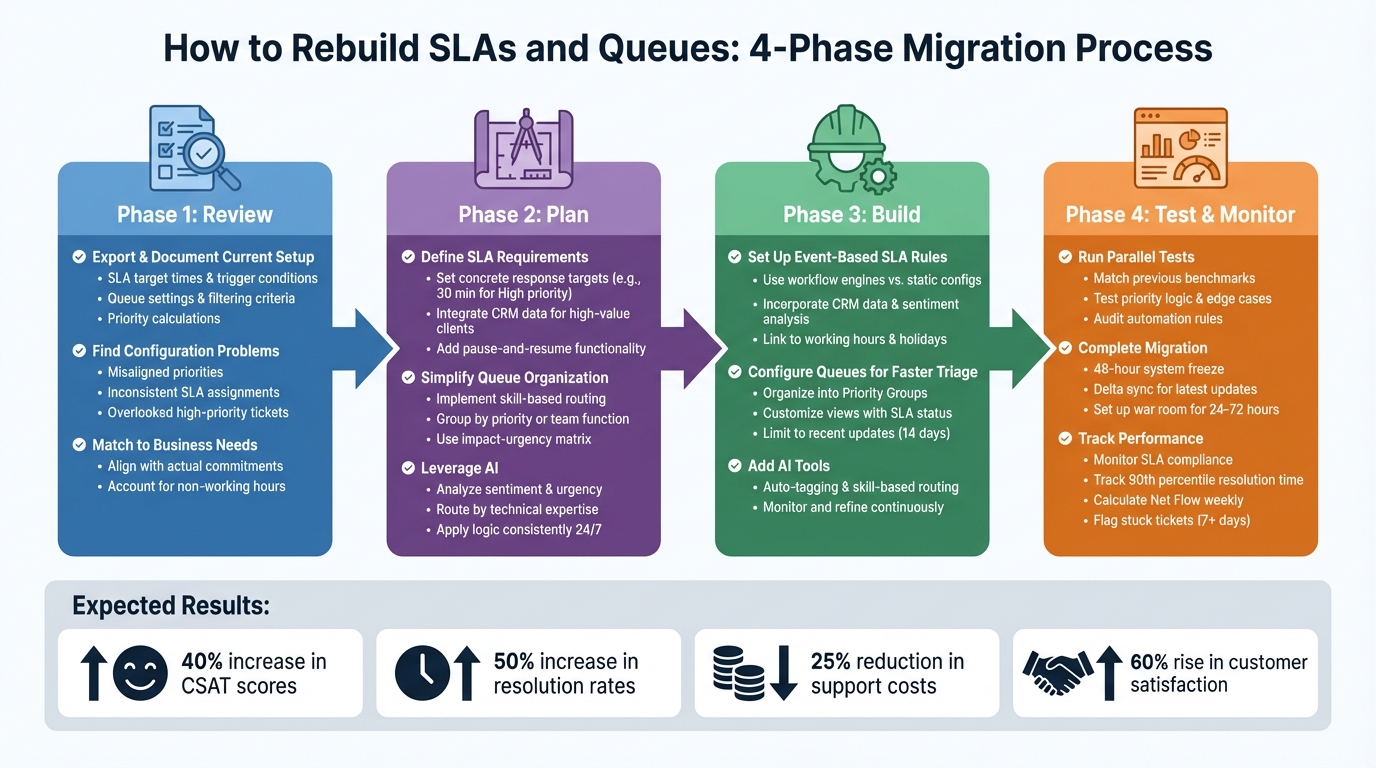
4-Phase Process for Rebuilding SLAs and Queues When Migrating from JSM
Review Your Current SLAs and Queues
Take a close look at your SLAs and queues to spot outdated rules, misaligned priorities, or workflows that no longer fit your business needs. Over time, many support teams find their JSM setup has become overly complicated and disconnected from how the business actually operates. This review isn’t about simply replicating your current setup – it’s about identifying and fixing issues so you don’t carry them into your new system. Once you’ve pinpointed the problems, thoroughly document your settings to identify inefficiencies before redesigning your workflows.
Export and Document Your Current Setup
Start by extracting every detail from your JSM configuration. This includes SLA target times, trigger conditions (start, pause, stop), and any JQL strings tied to these rules. Be sure to document SLA calendars, such as working hours, holiday schedules, and time zones, as well as your active queue settings, including grouping logic and filtering criteria. For example, you might have JQL statements that filter tickets by "Platinum" support levels or specific geographic regions.
Also, capture how priorities are calculated, whether through impact-urgency matrices or AI-powered ticket routing and automation rules. Pay attention to workflow transitions that interact with SLA timers, like status changes that stop a "Time to resolution" clock. JSM’s allowance of up to 90 goals per SLA means this documentation process can be time-consuming, but it’s critical for understanding the system’s limitations before moving to a more adaptable setup.
Find Problems in Your Current Configuration
Misaligned priorities and SLA setups can waste valuable time. Check whether your SLA allocations and priority calculations align with your actual support needs. When SLAs are incorrectly assigned, work items may fall under the wrong category, leading to missed targets or inappropriate response times.
To avoid inconsistent prioritization, standardize how urgency and impact are defined. Allow for manual adjustments to prevent skewed metrics. If you’re relying solely on default queues instead of creating customized, group-based, or priority-driven queues, high-priority tickets may be overlooked. Once these issues are identified, you can align your configuration with your business needs, setting the stage for a more efficient support process.
Match SLAs and Queues to Business Needs
Your SLAs should be tailored to reflect your business commitments, not just default settings that may no longer apply. For example, you can set shorter targets for high-priority items and organize queues based on department or work type. Use SLA calendars that account for non-working hours and holidays to prevent timers from running unnecessarily.
Clearly define the conditions for starting, pausing, and stopping SLA timers to ensure your metrics accurately measure agent performance. Design queues to align with how specific teams – like IT, HR, Legal, or Finance – prefer to handle their tasks. Transitioning away from JSM gives you the chance to eliminate inefficiencies and create workflows that support AI-driven automation and smarter routing.
sbb-itb-e60d259
Plan Your New SLA and Queue Structure
Once you’ve pinpointed the flaws in your current setup, it’s time to design a more modern, AI-driven support system. Instead of simply copying your old methods, focus on building workflows that align with how support actually operates today. This approach eliminates the hassle of maintaining rigid, rule-based systems.
Define SLA Requirements and Build in Flexibility
Your SLA framework should be tailored to meet actual business needs. For example, set concrete response targets – like responding to "High" priority tickets within 30 minutes – and use event-based rules tied to critical milestones such as "Target First Response" or "Close".
To make SLAs smarter, integrate CRM data. This allows tickets from high-value clients or customers nearing renewal to automatically trigger tighter SLAs. Add pause-and-resume functionality to account for customer actions, such as pausing the SLA clock when waiting for a response. Make sure your SLA calendars reflect real working hours, holidays, and time zones. Also, allow manual overrides for unique cases, like when a client experiences unforeseen delays or personal issues.
Once you’ve established clear and adaptable SLAs, shift your focus to reorganizing your queue structure to match these priorities.
Simplify and Streamline Queue Organization
Instead of building a maze of queues for every product variation, simplify using skill-based routing. AI can assess the required expertise – like "API Specialist" or "Billing" – and direct tickets to generalized queues where only the right agents can access them. This reduces clutter and keeps agents focused on tasks they’re equipped to handle.
Group queues by priority or team functions, such as IT, HR, Legal, or Finance. Use an impact-urgency matrix to automate ticket prioritization, ensuring tickets land in the correct queues with the appropriate SLAs. During ticket submission, require customers to select "Impact" and "Urgency" levels, providing the data needed for automated prioritization rules. This setup minimizes unnecessary internal transfers and speeds up resolution times.
Leverage AI for Smarter Routing and Prioritization
With streamlined SLAs and queues in place, AI can take your routing and prioritization to the next level. NLP-powered AI can interpret the context and content of tickets, moving beyond rigid, rule-based systems. Nooshin Alibhai, Founder and CEO of Supportbench, highlights this capability:
"AI determines priority not just based on a selected field or a single keyword, but by analyzing a confluence of factors".
AI tools can analyze language to detect urgency and sentiment. For instance, strong negative language might flag an issue as urgent, even if the customer doesn’t explicitly label it as such. Similarly, AI can identify technical terms like "API", "SSO", or "SAML" and route tickets directly to the appropriate specialist teams, boosting First Contact Resolution (FCR).
Unlike manual systems, AI applies routing and prioritization logic consistently around the clock. It considers factors like agent workload, language skills, and technical expertise to assign tickets optimally. Automated tagging ensures every interaction is categorized accurately, providing clean, actionable data for reporting and product development.
Build and Configure Your New SLAs and Queues
Once you’ve completed your review and planning, it’s time to rebuild your SLAs and queues to create a responsive support system for your post-JSM environment. The goal is to design a dynamic system that adapts to real-world scenarios, moving away from rigid, static rules.
Set Up Event‑Based SLA Rules
Supportbench takes a modern approach to SLAs, relying on workflow engines instead of static configuration screens. To get started, navigate to the configuration menu, select "New Workflow" for Cases, and activate the "On SLA Calculation" rule. This allows the system to dynamically set response goals whenever a case is created or updated.
Use the "Requirements" dropdown to define priority-specific rules. For instance, you could set "Priority is High" to trigger a 30-minute response target. To make your SLAs even smarter, incorporate CRM data to prioritize high-value customers, use sentiment analysis to escalate cases with signs of customer frustration, and enable manual overrides for unique situations, such as when a client is unavailable.
"AI is revolutionizing the operational backbone of support by bringing intelligence and context‑awareness to ticket routing and prioritization."
– Nooshin Alibhai, Founder and CEO, Supportbench
You can also configure rules to flag cases with multiple rapid follow-ups as urgent and adjust SLA status automatically. Link SLA timers to your team’s working hours, holidays, and breaks, ensuring that time is only counted when your team is actively available.
Once your SLA rules are in place, the next step is to align your queues with these dynamic triggers.
Configure Queues for Faster Triage
Efficient queue configuration is essential for faster triage and better agent focus. Start by organizing your queues into Priority Groups based on factors like team relevance, urgency, or impact. Use dynamic filters to display work items that are specifically assigned to the viewing agent.
Customize queue views to show critical data such as SLA status, priority levels, and request types. This way, agents can quickly gauge urgency without opening each ticket. To improve system performance, limit queue results to recent updates, such as items modified within the last 14 days. Avoid overly complicated workflows – clear status names and transitions help agents navigate tasks without confusion.
For teams handling issues across multiple departments or service desks, cross-project queues provide a unified view of all relevant cases. Encourage agents to star their most-used queues, ensuring they appear at the top of the sidebar for quick access. Additionally, automation rules can apply labels or components during ticket creation, reducing the need for manual searches later.
With streamlined queues in place, you can further boost efficiency by incorporating AI tools.
Add AI Tools to Support Agent Workflows
AI tools can significantly improve agent productivity during the resolution process. Features like AI-powered auto-tagging and skill-based routing help assign tickets based on content, agent workload, language skills, or specific expertise, such as "API Specialist" or "Billing".
Keep in mind that AI systems need ongoing monitoring and refinement. Support leaders should regularly review the accuracy of AI categorization and provide feedback to improve routing logic. This ensures workflows remain aligned with changing customer needs and keeps your operations ahead of static, outdated management systems.
Test, Migrate, and Monitor Your New System
Once your new system is configured, the next step is to test it thoroughly and transition smoothly. Careful validation of your SLAs and queues is crucial to avoid data loss or workflow issues during migration.
Run Parallel Tests Before Going Live
Match your new system’s targets with previous benchmarks. For example, if "High" priority tickets required a 30-minute response time, ensure the same target is configured in the new system. Use tools like an impact-urgency matrix to automatically calculate ticket priorities, ensuring cases are routed to the appropriate SLA and queue without manual effort.
Test the priority logic from your existing system and cover edge cases. Confirm that features like pause timers, extensions for complex issues, and queue filters accurately display high-priority or pending SLA tickets.
Audit automation rules to ensure breach notifications are triggered correctly and that tickets automatically move from "Resolved" to "Closed" after a set period, such as three business days. This prevents backlog accumulation. Before migrating data, enable compliance and security settings across the platform to safeguard customer information in the new environment. These steps help create a solid foundation for a smooth migration process.
Complete the Migration with Minimal Disruption
Start with a 48-hour system freeze: halt code deployments, app installations, and workflow changes. Set JSM to read-only mode by disabling email forwarding and API endpoints, and use a UI banner to notify agents not to create new tickets in the old system.
Perform a final "delta" sync to transfer only the tickets and updates created since the last full migration. This ensures your new system is fully up-to-date at the time of cutover. Temporarily disable automation rules during this sync and re-enable them after verifying the migration.
"A single misstep can lead to data loss, extended downtime, and chaos for your support team."
– ClonePartner
Have all agents log into the new system before going live to confirm their credentials and permissions are functioning correctly. Set up a "war room" in Slack or Microsoft Teams for the first 24–72 hours to quickly address bugs or discrepancies. Finally, update DNS records and email forwarding to officially redirect traffic to the new platform.
Track Performance After Migration
Migration is just the beginning – ongoing performance monitoring ensures the new system meets your business needs over time. Create dashboards to track SLA compliance, ticket volume, and urgent issues. Focus on metrics like the 90th percentile of resolution time instead of averages. This approach provides a more accurate view of performance and highlights outliers that could distort the data.
Calculate Net Flow weekly by subtracting newly created tickets from resolved ones and dividing by the number of weeks in your reporting period. A negative result indicates your team may be falling behind. Monitor for "bounced back" tickets – those that regress in status, such as moving from "Done" to "In Progress" – as these can signal issues in triage or premature resolutions.
Keep an eye on overloaded assignees by flagging agents with three or more concurrent open cases. Use Load per Assignee metrics to identify resource gaps and prevent burnout. Additionally, flag tickets that remain in the same status for seven or more days as "stuck" to ensure nothing gets overlooked. Companies that execute well-planned migrations and maintain strong post-launch monitoring often see up to a 40% boost in customer satisfaction scores and better returns on IT investments.
Conclusion
Revamp your SLAs and queues by replacing outdated processes with AI-powered automation. By doing so, you’ll enable a deeper, more nuanced understanding of customer needs, shifting your support model from reactive problem-solving to proactive issue resolution. This change sets the stage for more efficient queues and smarter ticket routing.
Simplifying queue organization and adopting skill-based routing can deliver real results. Instead of structuring work around product teams, group tasks into 3 to 6 core categories based on problem types. This method not only reduces unnecessary escalations but also strengthens agent expertise and avoids knowledge silos. Pair this with skill-based routing – matching tickets to agents based on their specializations, language skills, and workload – and you’ll see fewer internal transfers and less "ticket tennis".
The impact of these optimizations is clear. Streamlined help desks report a 25% drop in support costs and a 60% rise in customer satisfaction. AI-driven systems go even further, achieving a 40% boost in CSAT scores and a 50% increase in resolution rates. As Nooshin Alibhai, Founder and CEO of Supportbench, puts it:
"For support leaders aiming to optimize their operations, embracing intelligent automation is no longer optional; it’s essential".
To get started, set automated SLA alerts at 75% elapsed time and automate triage for your top 10 most common ticket types. Incorporate AI-driven sentiment routing to prioritize frustrated customer cases quickly. Keep in mind that AI and queue structures need regular fine-tuning – monitor categorization accuracy and adjust configurations as your business evolves.
FAQs
What SLA rules should we redesign first after leaving JSM?
When rethinking SLA (Service Level Agreement) rules for response and resolution times, the key is to tailor them to ticket severity and priority. Here’s how to approach it effectively:
Start with Clear SLA Goals
Define measurable objectives using key metrics like First Response Time (FRT) and Resolution Time. These metrics help track how quickly your team acknowledges and resolves issues, ensuring accountability.
Segment SLAs by Severity and Customer Tiers
Not all tickets are created equal. Break down SLAs based on:
- Issue Severity: High-impact issues (like system outages) should have tighter response and resolution times compared to minor requests.
- Customer Tiers: Prioritize premium or enterprise customers with stricter SLA timelines, while offering more flexible terms for standard customers.
Automate SLA Monitoring and Alerts
Use automation tools to track SLA compliance in real time. Automated alerts can flag potential breaches, giving your team a chance to act before deadlines are missed. This adds a safety net to ensure critical tickets are addressed promptly.
Align Policies with Team Capacity and Customer Expectations
Set realistic SLA rules that match your team’s resources while meeting customer needs. For high-priority tickets, ensure your team has the bandwidth to deliver on faster response and resolution times without compromising quality.
By refining these elements, you can create SLA rules that are fair, efficient, and customer-focused, all while maintaining operational balance.
How do we keep queue counts low without missing urgent tickets?
To keep queue counts manageable while tackling urgent tickets effectively, AI-powered triage and routing systems come into play. These tools evaluate incoming tickets by analyzing factors like urgency, intent, and sentiment. By doing so, they can prioritize and direct tickets to the right teams, ensuring that high-priority issues are escalated without delay.
On top of that, dynamic SLAs (service level agreements) adjust response times based on variables like the importance of the customer. AI also steps in to predict potential SLA breaches, triggering proactive escalations before deadlines are missed. This approach streamlines workflows and ensures critical tickets get the attention they need right away.
How can we verify AI routing is accurate and fair?
To keep AI routing both precise and balanced, it’s important to regularly monitor its outcomes and compare them against established benchmarks. For predictions with low confidence, a manual review can provide valuable insights. Incorporating fairness metrics is essential to identify potential biases or inconsistencies in the system. Periodic audits can further refine its performance.
Additionally, feedback from both agents and customers plays a crucial role in improving the system. By leveraging this input, you can enhance accuracy and fairness while staying aligned with core performance goals like accuracy, fairness, and customer satisfaction.
Related Blog Posts
- How do you migrate Freshdesk automations (rules, triggers, SLAs) to a new platform?
- How do you recreate Kayako automations, SLAs, and routing in a modern platform?
- How do you validate a Kayako migration (sampling, parity checks, and go-live readiness)?
- How do you migrate HappyFox SLA policies and escalation rules correctly?