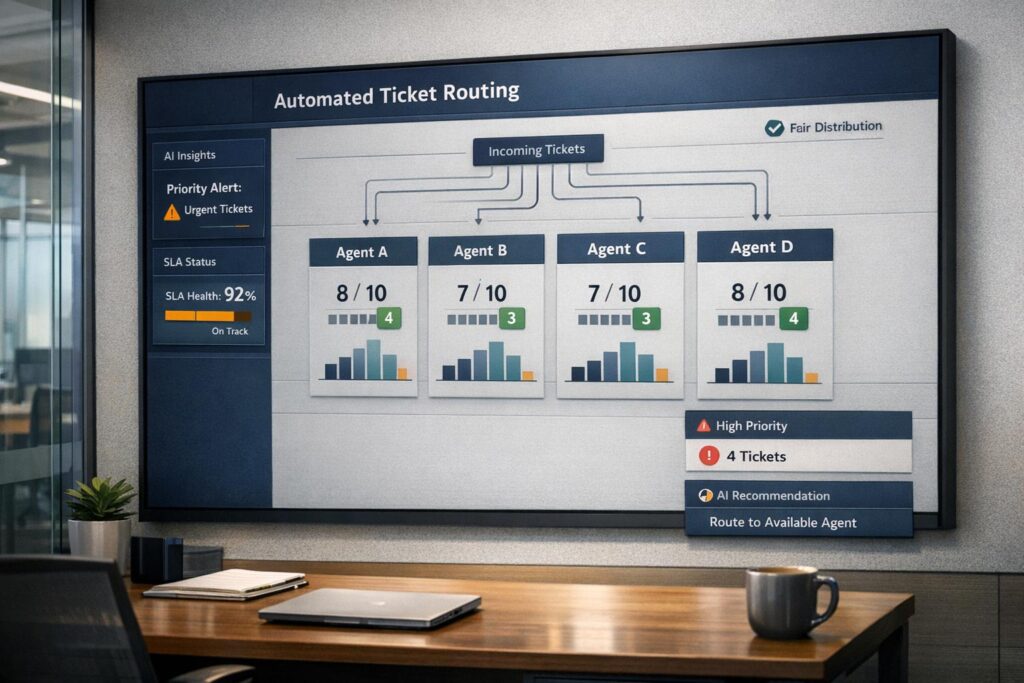
Cherry-picking in support teams creates uneven workloads, disrupts workflows, and leads to poor customer experiences. Agents often avoid complex tickets, focusing on easier ones to meet performance metrics. This behavior slows resolution times, risks SLA breaches, and causes team friction.
Key solutions include:
- Automated ticket routing (e.g., round-robin, skills-based, or AI-driven) to fairly distribute workloads.
- Dynamic SLA rules to prioritize urgent or high-value tickets.
- Real-time monitoring to track agent performance and prevent cherry-picking.
- Revised KPIs that reward handling complex cases instead of just volume.
- Training and incentives to build confidence and motivate agents to take on challenging tickets.
Automation tools and clear policies help streamline ticket management, balance workloads, and improve customer satisfaction.
How Cherry-Picking Affects B2B Support Operations
What Cherry-Picking Looks Like
Cherry-picking in support operations follows a predictable pattern. Agents skim through ticket queues, gravitating toward subject lines like "Quick Question" or "Password Reset" while steering clear of more challenging cases – think API errors, integration issues, or production outages. This behavior often leads to "ticket tennis", where complex tickets bounce between agents multiple times, forcing customers to repeat their concerns over and over [2][4].
As a result, support managers are stuck manually sorting through queues, trying to match tickets with the right agents instead of focusing on more strategic initiatives [5].
The ripple effects don’t stop there. Rushing through easy tickets to meet volume-based KPIs leads to sloppy tagging or inconsistent categorization, making it hard to track trends or spot recurring problems [2]. Meanwhile, critical issues – like system outages hidden behind vague subject lines – get overlooked because agents prioritize tickets that are easier to resolve quickly [2][4].
These patterns not only increase operational costs but also degrade the overall quality of service.
Business Impact of Cherry-Picking
The financial and operational toll of cherry-picking can escalate quickly. Take Wolseley Canada, for example. Their support team once relied on manual email sorting, which led to missed critical messages and masked workload distribution issues. After switching to Supportbench’s automated ticket routing – designed to match cases with the right agents based on type and client profile – the company was able to resolve long-overdue tickets that had been neglected for far too long [3]. Eilis Byrnes, Customer Service and Process Improvement Manager at Wolseley Canada, summed it up:
The ticketing system assisted us in resolving instances that were long overdue and in providing the staff with a smooth platform experience [3].
Cherry-picking also disrupts workload balance. High-performing agents often bear the brunt of escalated cases, leading to burnout and friction within teams [2][3]. Nooshin Alibhai, Founder and CEO of Supportbench, highlights the risks here:
Routing high-priority tickets to the same experts can cause burnout and create resolution delays [3].
The damage isn’t limited to internal operations. For B2B clients, repeated follow-ups and redundant explanations create a frustrating experience. This increased customer effort is a major driver of churn, especially when critical issues like production outages miss SLAs. Such failures can erode the trust needed to secure contract renewals [2][3]. The imbalance in ticket handling underscores the importance of equitable distribution.
Why Agents Cherry-Pick Tickets
To understand why agents cherry-pick, it’s important to look at the bigger picture. The behavior is often driven by systemic issues rather than individual shortcomings. Misaligned KPIs that prioritize ticket volume over resolution quality push agents toward easier tasks. Poorly organized queues that mix simple password resets with complex technical problems make it tempting to focus on the "low-hanging fruit."
A lack of proper training also plays a role. Without the skills to handle difficult cases, agents avoid them altogether. As Stevia Putri, Marketing Generalist at eesel AI, explains:
Automatic assignment gives a ticket an owner, which is great, but it does nothing to solve the underlying problem. The overall workload remains unchanged, only redistributed [5].
When escalation processes or skills-based routing are missing, agents default to self-preservation – sticking to what they know and leaving tougher cases for others. Fixing these systemic flaws is essential for adopting AI-driven tools that ensure fair and efficient ticket distribution.
3 Rules to Automate Ticket Routing
Setting Up Fair Ticket Distribution Rules
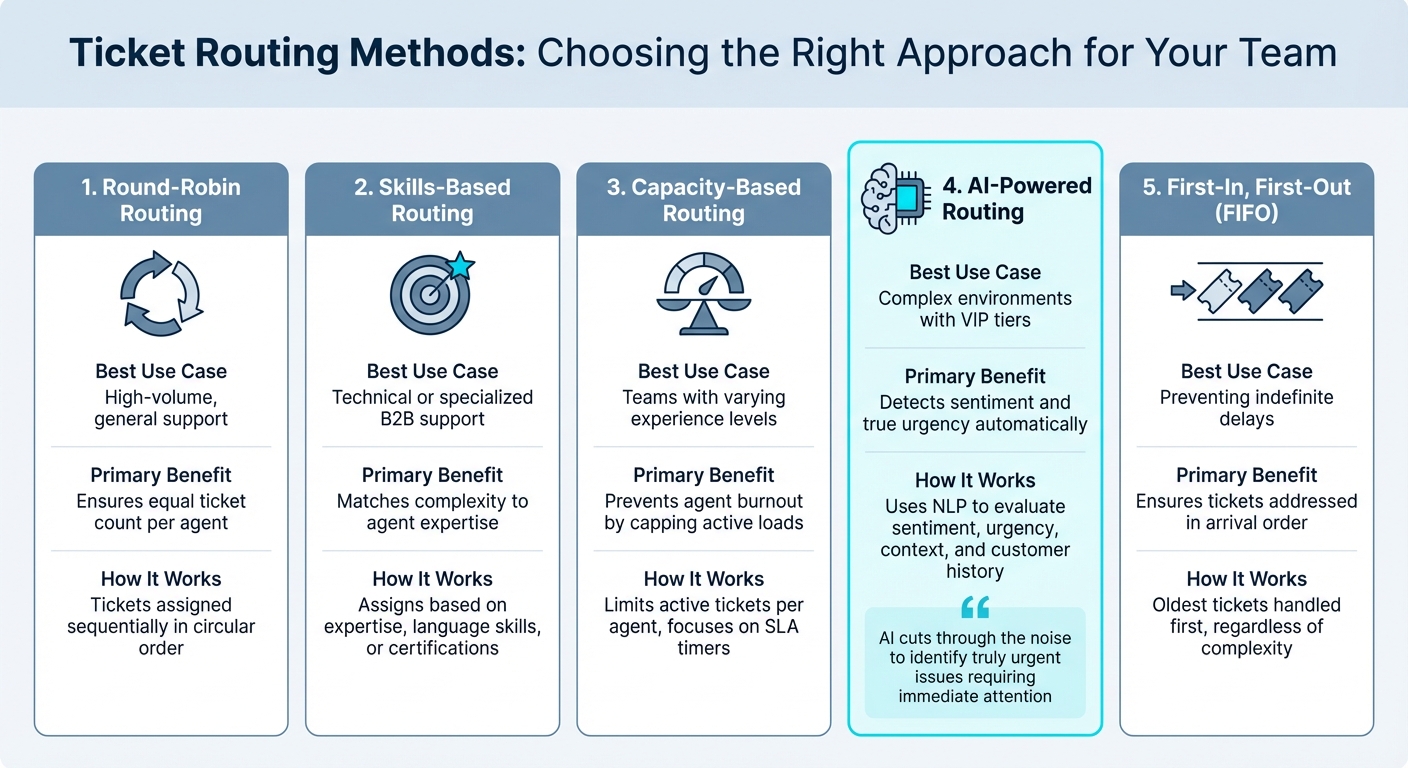
Ticket Routing Methods Comparison: Benefits and Best Use Cases
Avoid cherry-picking by automating ticket routing using clear and objective criteria like workload or skill level.
Selecting a Ticket Routing Method
Choose a routing method that aligns with your team’s structure and the type of support you provide.
- Round-Robin Routing: Tickets are assigned sequentially to available agents in a circular order, ensuring an even workload distribution.
- Skills-Based Routing: Assigns tickets based on agents’ expertise, language skills, or certifications. This ensures complex issues go directly to the most qualified agents.
- Capacity-Based Routing: Limits the number of active tickets per agent, focusing on those with active SLA timers. This prevents agents from overloading their queues with low-priority tasks.
- AI-Powered Routing: Uses natural language processing to evaluate sentiment, urgency, and context. It identifies critical issues by analyzing tone, keywords (e.g., "outage" or "cannot log in"), and customer history. As Nooshin Alibhai, Founder and CEO of Supportbench, explains:
AI cuts through the noise to identify truly urgent issues requiring immediate attention, regardless of how poorly the initial request might have been phrased [2].
- First-In, First-Out (FIFO): Ensures tickets are addressed in the order they arrive, preventing indefinite delays.
| Routing Method | Best Use Case | Primary Benefit |
|---|---|---|
| Round-Robin | High-volume, general support | Ensures equal ticket count per agent [6] |
| Skills-Based | Technical or specialized B2B support | Matches complexity to agent expertise [3] |
| Capacity-Based | Teams with varying experience levels | Prevents agent burnout by capping active loads [6] |
| AI-Driven | Complex environments with VIP tiers | Detects sentiment and true urgency automatically [2] |
Once you’ve chosen a routing method, set up queues to support it and reduce the chances of cherry-picking.
Structuring Queues to Prevent Cherry-Picking
A well-structured queue system ensures tickets are handled fairly and efficiently.
- Workload Caps: Limit the number of tickets agents can handle at once, discouraging them from stockpiling easy cases.
- FIFO Enforcement: Pair workload caps with FIFO rules to ensure the oldest tickets are addressed first, regardless of complexity.
- Fallback and Overflow Queues: Route tickets that don’t meet specific criteria (e.g., from a new client without an assigned manager) to secondary queues to avoid leaving them unassigned.
- Queue Manager: Assign someone to oversee the queue, manually handling sticky or complex tickets during the transition to automated systems.
- CRM Data Integration: Automatically prioritize tickets from high-value clients, ensuring they reach senior agents. Configure SLA-based routing so only tickets with active SLA timers count toward an agent’s workload, preventing low-priority tasks from clogging the system.
With queues in place, you can implement dynamic SLA rules to further streamline ticket handling.
Setting Up Dynamic SLA Rules
Static SLAs often fall short in the fast-paced world of B2B support. Dynamic SLAs use AI to adjust priorities in real time based on factors like sentiment, urgency keywords, and customer value, ensuring a balanced workload across the team.
- Predictive Triage: Analyzes backlog trends and agent skills to predict which tickets are at risk of breaching SLAs. Automated rerouting can address these issues before they escalate. Michael Grillo of MyMobileLyfe explains:
Predictive routing turns signals you already have into anticipatory action so issues are addressed before they become SLA breaches [7].
Fallback paths, such as escalating tickets not picked up within a set timeframe, help maintain balance. Sentiment analysis can tighten SLAs for tickets flagged with frustration or negative language. Additionally, monitoring metrics like "touches per ticket" can highlight if agents are prioritizing simpler tasks over more challenging ones, ensuring fair distribution of effort.
Using AI and Automation for Fair Ticket Assignment
Automation simplifies ticket assignment by removing human bias, while AI takes it a step further. By analyzing factors like sentiment, urgency, and account value in real time, AI ensures tickets are routed to the best-suited agent at just the right time.
Setting Up Push-Next or Claim-Next Workflows
Push-next workflows automatically assign tickets in the queue to the least-burdened agent, following a First-In, First-Out (FIFO) approach. This ensures older tickets are handled before newer ones, regardless of complexity. The system keeps tabs on each agent’s workload, focusing only on tickets with active SLA timers, and assigns new cases to agents with available capacity. To avoid overloading agents, you can set limits, like capping active tickets at five per agent. This balance helps maintain consistent response times [9].
Claim-next workflows, also known as "Play Mode", give agents some control. When an agent clicks "Play", the system delivers the next ticket in the queue. A stricter variation, Guided Mode, requires agents to log a reason if they skip a ticket, creating an audit trail for compliance [10]. For example, Wolseley Canada adopted automated ticket routing with Supportbench in 2025 to manage 7,000–8,000 monthly support emails. By automating the process based on case type and client profile, they resolved long-standing issues and improved SLA tracking. Eilis Byrnes, their Customer Service and Process Improvement Manager, shared:
The ticketing system assisted us in resolving instances that were long overdue and in providing the staff with a smooth platform experience [3].
Automating Ticket Assignment with AI
AI builds on structured workflows by analyzing ticket details in real time to refine the assignment process.
Using natural language processing (NLP), AI scans the subject line and message body of incoming tickets to identify key information like product names, keywords, and issue types – eliminating reliance on customer-selected categories. Sentiment analysis picks up emotional cues, such as frustration or anger, ensuring critical tickets are escalated even if urgency isn’t explicitly stated. This approach ensures no high-priority issues slip through the cracks [2].
Skills-based auto-routing matches tickets to agents based on expertise, certifications, and even language skills, ensuring complex problems are sent directly to the right person. Meanwhile, predictive priority scoring evaluates factors such as SLA deadlines, customer value, sentiment, and historical data to fairly prioritize high-stakes cases, especially in B2B environments. As Joshua Silvia from EverWorker explains:
AI uniformly applies prioritization rules, ensuring fairness and consistency across all customer interactions [8].
When implemented, AI-driven ticket prioritization and routing can boost SLA compliance or First Contact Resolution (FCR) rates by 20–30% [8]. AI also evolves over time, adapting its logic as your support environment changes.
| AI Feature | Function in Assignment | Impact on Workload |
|---|---|---|
| Sentiment Analysis | Flags frustrated customers for immediate attention | Prevents critical tickets from stalling |
| Skills-Based Routing | Directs complex issues to qualified agents | Reduces reassignments and back-and-forths |
| Load-Balancing | Assigns tickets to agents with fewer active cases | Distributes workload fairly, avoiding burnout |
| Predictive SLA | Prioritizes tickets nearing deadlines | Ensures compliance and avoids penalties |
Creating Skip Rules and Logging Exceptions
AI-driven systems can also incorporate skip rules, allowing agents to bypass tickets in justified cases while maintaining accountability.
Sometimes agents need to skip tickets – whether due to technical limitations, language barriers, or conflicts of interest. Skip rules outline when this is acceptable and require agents to log their reasons for management review [10].
Tracking skip patterns can uncover valuable insights. For example, if an agent frequently skips "Billing Issue" tickets, it may signal a need for additional training. Similarly, if multiple agents skip the same ticket, it could indicate unclear information or missing details that need to be addressed before reassignment.
To prevent skipped tickets from falling through the cracks, establish fallback paths. For instance, if a ticket is skipped multiple times or remains unassigned for too long, escalate it to a senior agent or queue manager to ensure timely resolution.
sbb-itb-e60d259
Tracking and Correcting Cherry-Picking Behavior
Even with automated routing in place, keeping an eye on agent behavior is crucial to ensuring fair ticket distribution. Automation helps a lot, but some agents might still find ways to cherry-pick easier tasks, transfer tough ones, or simply avoid more demanding cases. Spotting these habits early and addressing them is essential to maintain team morale and keep customers happy.
Key Metrics That Reveal Cherry-Picking
Certain metrics can act as red flags for cherry-picking. For example, if an agent’s median first reply time is much faster than their peers, it could mean they’re steering clear of time-intensive tickets. Similarly, an agent with a high solved ticket volume compared to others with a similar level of experience might be opting for simpler cases.
Another telltale sign is the reassignment rate – frequent transfers or “ticket tennis” suggest that an agent is passing off challenging tickets instead of addressing them. CSAT scores can also be revealing. While high scores are generally a good thing, consistently high ratings might indicate that the agent is sidestepping difficult or unhappy customers.
Metrics like ticket age in queue can expose situations where older, more complex tickets are left untouched while newer, easier ones are being resolved. Lastly, tracking workload (SLA-ON tickets) can highlight if an agent consistently operates below capacity while their teammates are maxed out. These indicators help managers step in before cherry-picking becomes a bigger issue.
| Metric | What It Indicates |
|---|---|
| Median First Reply Time | Much lower than the team average, suggesting avoidance of complex tickets |
| Solved Ticket Volume | Higher than peers, often linked to selecting simpler tasks |
| CSAT Score | Consistently high, possibly due to avoiding tough or frustrated customers |
| Reassignment Rate | Frequent transfers or "ticket tennis" |
| Ticket Age in Queue | Older or harder tickets left unaddressed while newer ones are prioritized |
| Workload (SLA-ON) | Agent consistently under capacity while others are overloaded |
Using AI for Real-Time Workload Monitoring
AI does more than just route tickets – it can also monitor workloads in real time. By automatically classifying ticket complexity and sentiment, AI tools make it easier to spot patterns of imbalance. For instance, AI can tag tickets with labels like "API issue" or "frustrated customer", helping managers identify if certain agents are avoiding harder tasks.
Real-time metrics like load-balanced assignment and "last ticket assigned time" ensure that work is distributed evenly among team members. Wolseley Canada’s use of Supportbench is a great example of this in action. The company gained real-time visibility into workloads, SLA compliance, and resolution trends, which helped them tackle long-overdue support issues and improve overall efficiency.
Regular audits of manual assignments are also important to ensure tickets are being distributed fairly.
Building Dashboards to Track Workload Distribution
Dashboards provide a comprehensive view of workload and performance metrics, making it easier to track and address cherry-picking. During weekly team reviews, focus on three main areas: workload (tasks per person, volume by channel), efficiency (average handling time, resolution speed), and quality (CSAT, reopen rates, sentiment).
Also, keep an eye on capacity metrics, such as hours spent above capacity and the balance between active and idle time. This helps prevent both burnout and underutilization. For example, high reopen rates might suggest that agents are rushing through tickets instead of fully resolving them.
As Alyssa Joyce from Teramind explains:
A balanced workload distribution promotes a culture of fairness… an overwhelmed team works slower and makes more mistakes [11].
The stakes are high. Burnout doesn’t just hurt productivity – it drives employees away. Burned-out workers are 2.6 times more likely to look for a new job and 63% more likely to call in sick. Considering the average cost per hire is $4,683, addressing cherry-picking isn’t just about fairness – it’s about protecting your team and managing costs effectively [11].
Creating Policies That Discourage Cherry-Picking
Metrics and automation can only do so much – real change comes from policies that promote fair ticket handling. These policies should steer agents away from gaming the system and toward genuinely helping customers. To make this shift work, proper training and meaningful incentives are key to keeping agents motivated and confident when tackling tougher cases.
Adjusting KPIs to Encourage Fair Practices
Common KPIs like solved ticket volume often unintentionally reward cherry-picking. For instance, an agent who clears 50 simple tickets might look more productive than one resolving 20 complex cases, even though the latter provides more value. To address this, consider tracking the reassignment rate, which can reveal patterns of agents avoiding difficult tickets by sending them back into the queue [3]. Pairing volume metrics with Customer Effort Scores can also highlight agents who excel in managing complex cases effectively [2].
Another approach is skill-based routing, which matches tickets to agents with the right certifications and experience. This not only reduces the anxiety that might lead to cherry-picking but also ensures tickets land with the most capable agents [3].
Recognizing Agents Who Take on Tough Tickets
Changing KPIs is just one part of the solution – offering incentives for handling complex tickets can make a big difference, too. Agents who take on challenging cases deserve recognition beyond standard performance evaluations. Introducing a complexity bonus or a monthly recognition program can reward those who manage high-priority or difficult tickets without excessive transfers. Tangible rewards, coupled with public acknowledgment, can motivate agents to view tough tickets as opportunities for growth rather than obstacles. A well-thought-out incentive program can turn handling complex cases into a career advantage.
Equipping Agents to Handle Difficult Cases
Revised metrics and rewards should go hand-in-hand with strong training programs. Often, agents avoid complex tickets because they fear failure. To combat this, AI-assisted training tools can provide real-time insights into ticket complexity, helping agents feel more prepared [2]. Historical tickets can also be run through simulation mode, allowing agents to practice realistic scenarios without the pressure of live customer interactions [5].
A centralized training system linked to up-to-date knowledge bases ensures agents always have access to technical documentation when they need it. For new agents, graduated workload limits – using "Max Ticket" settings – can prevent them from feeling overwhelmed as they build their skills [1]. Encouraging agents to flag misrouted tickets and suggest routing improvements further engages them in the system, reducing frustration and fostering a sense of ownership [3].
Conclusion
Cherry-picking becomes a thing of the past when smart routing, AI-driven automation, and fair policies work together. By automating ticket assignment based on agent skills and availability, the system removes any chance for gaming the process. At the same time, KPIs that prioritize complexity over sheer volume discourage agents from chasing easy tasks.
This blend of policy and technology can completely reshape support operations. Take Wolseley Canada, for example. By moving from manual sorting to automated routing based on case type and client profile, they eliminated triage bottlenecks and addressed long-standing support issues across 7,000 to 8,000 monthly emails [3].
AI-native platforms like Supportbench amplify every aspect of ticket management. From routing tickets based on sentiment – ensuring frustrated, high-value clients are prioritized – to monitoring workloads in real time to prevent burnout, these tools make a huge difference. As Nooshin Alibhai, Founder and CEO of Supportbench, puts it:
AI ensures rules and logic are applied consistently 24/7, reducing variability based on individual dispatcher judgment or agent workload pressures [2].
The goal of fair ticket distribution is to foster a support culture where agents feel ready to handle any challenge. When automation is paired with effective training and meaningful incentives, even the most complex tickets become opportunities for growth. The result? Balanced workloads, happier agents, and a seamless customer experience that strengthens long-term B2B relationships.
FAQs
How do I prove cherry-picking is happening?
To spot cherry-picking, pay attention to patterns like agents regularly handling simpler tickets, uneven workload distribution, or noticeable differences in reply and resolution times. Metrics such as first reply time, ticket resolution time, and workload balance can expose skipped or avoided tickets. If certain agents consistently outperform peers with similar skill levels or achieve unusually high satisfaction scores without an obvious explanation, these could also be signs of cherry-picking.
Which routing method should we start with?
The most effective routing method to kick things off is automated ticket routing, particularly when powered by AI. This approach delivers quicker, more precise, and scalable ticket distribution. Plus, it cuts down on manual work and avoids issues like cherry-picking.
If AI isn’t an option right away, you can opt for rule-based routing methods. Options like skill-based routing or round-robin assignment help keep ticket distribution fair and consistent, ensuring workloads are balanced and boosting team morale.
What KPIs stop cherry-picking without hurting morale?
To keep cherry-picking in check while ensuring team morale stays intact, focus on tracking key metrics like workload distribution, ticket age, and resolution times. Keeping an eye on ticket age helps ensure that older, more challenging issues get the attention they need. Fair workload distribution promotes a sense of equality among team members, while monitoring resolution times across different ticket types encourages agents to approach all tickets fairly. Together, these metrics create a sense of transparency and accountability, making it easier to curb cherry-picking while maintaining a positive team atmosphere.