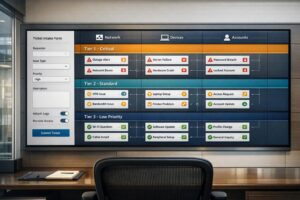
Managing multiple clients as an MSP comes with risks, especially cross-client data leaks. These leaks occur when sensitive data from one client is exposed to another due to misconfigurations, weak access controls, or human error. The consequences? Loss of trust, compliance violations, and significant financial damage.
To prevent these risks, MSPs should focus on:
- Role-Based Access Controls (RBAC): Limit permissions to the least necessary for each technician.
- Data Loss Prevention (DLP): Monitor and block unauthorized data movement.
- Regular Audits: Review access controls and workflows quarterly.
- AI Tools: Detect unusual access patterns, automate access controls, and assess risks in real time.
These steps, combined with careful planning and oversight, ensure client data remains secure and isolated in multi-tenant setups.
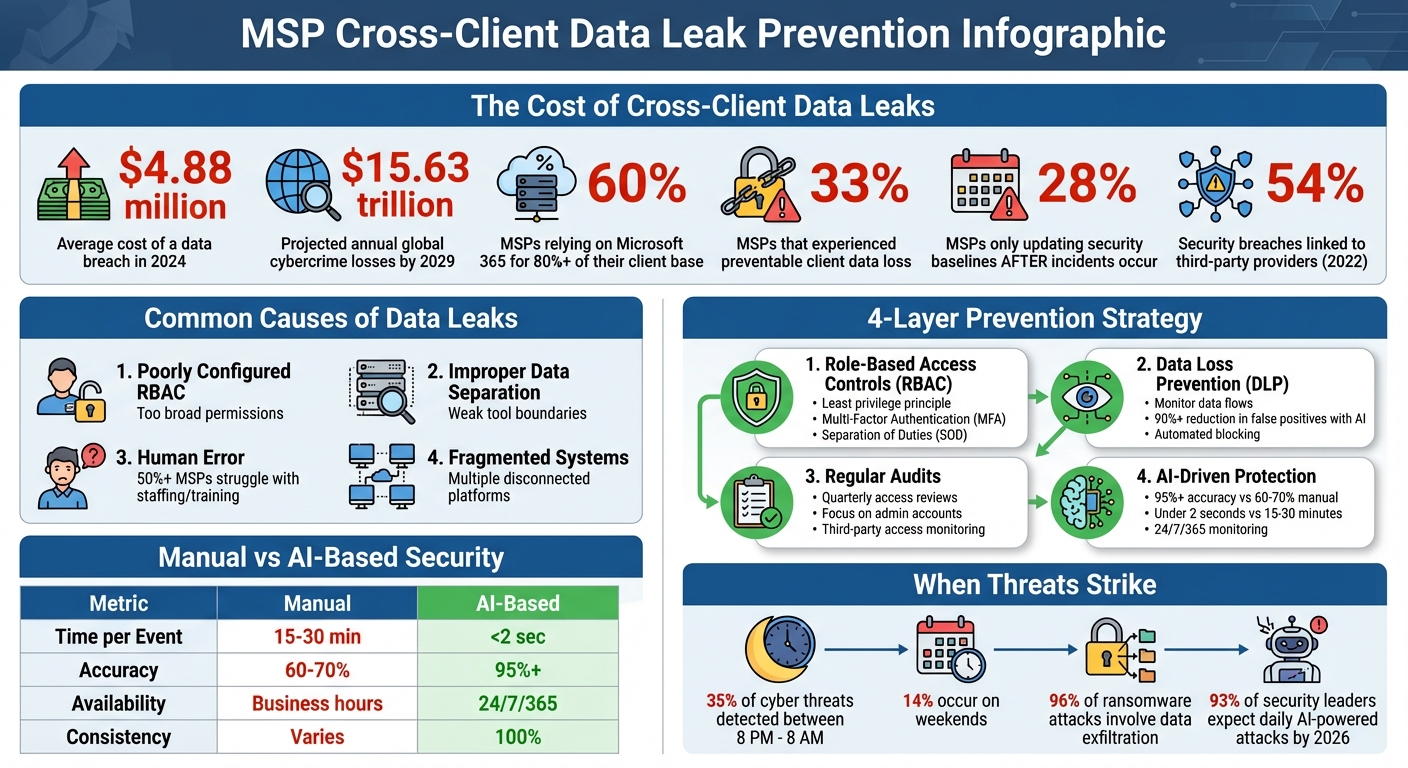
MSP Data Leak Statistics and Prevention Framework
Common Causes of Cross-Client Data Leaks
To address the risks mentioned earlier, it’s crucial to understand the common causes of cross-client data leaks. For Managed Service Providers (MSPs), these issues often stem from three key areas: misconfigured access controls, improper tool setup, and human error. Each of these creates opportunities for sensitive information to cross client boundaries, leading to potentially serious consequences.
Poorly Configured Role-Based Access Controls
One major issue lies in how role-based access controls are set up. When roles are too broadly defined, technicians may gain access to all client accounts, meaning a single compromised credential could expose sensitive data across multiple organizations. On top of that, fragmented systems force technicians to juggle between different dashboards, making it harder to enforce consistent security practices [2].
The statistics paint a worrying picture. 28% of MSPs only review or update their Microsoft 365 security baselines after a security incident occurs [2]. This reactive approach treats security as a one-time task instead of an ongoing responsibility. Considering that 60% of MSPs rely on Microsoft 365 for more than 80% of their client base, a single misconfiguration in this environment could have far-reaching effects [2].
Michael George, CEO of Syncro, highlights this challenge:
MSPs are still grappling with fragmented tools and manual workflows that leave critical gaps in both data and identity protection [2].
These gaps in access control can easily lead to larger data separation failures.
Improper Data Separation in Tool Setup
Another contributing factor is the way tools are configured. Many tools designed for single organizations fail to account for the complexities of multi-client setups. When MSP-specific features are added as an afterthought, they often lack the robust data boundaries needed to keep client information separate [1].
Improper API and webhook mapping during tool setup is another weak point. For example, if automated alerts aren’t correctly linked to specific client IDs in your PSA or RMM tool, sensitive breach notifications could end up in the wrong client’s ticket queue [1]. Similarly, bulk operations – while useful for scaling – can inadvertently apply security policies or alerts to the wrong client domains if not carefully configured [1].
Even customer portals can become a source of leaks. If users can view tickets beyond their own organization, the support tool itself becomes a vulnerability. Alarmingly, nearly 33% of MSPs have experienced client data loss that could have been avoided with better backup and identity coverage [2].
Staff Errors and Insufficient Training
Human error is another major factor in data leaks. Technicians often work across multiple disconnected systems, such as ticketing, RMM, and chat platforms. This constant switching increases the likelihood of mistakes, such as losing context or mixing up data [3]. Eric Klimuk, Founder and CTO of Supportbench, explains:
When platforms don’t talk to each other, agents waste time toggling between systems… This slows down response times and creates inconsistency across the customer experience [3].
Training gaps and understaffing only make matters worse. Without specialized expertise, staff are more likely to misconfigure tools or overlook security protocols. In fact, over 50% of MSPs reported difficulties in completing tasks on time or hiring qualified technical staff, according to a 2020 Global MSP Benchmark Survey [3]. These staffing challenges often lead to agent fatigue, which is directly tied to slower response times and lapses in security [3].
Budget constraints can also play a role. Sales teams may present critical security measures as "optional" to meet client budgets, leaving gaps in protection that could have prevented data leaks [4]. Carissa Johnson, Product Marketing Manager at Axcient, warns:
When an MSP’s client suffers a data loss incident, service providers face more than just recovery. Fines and penalties are one thing, but a public record of a breach under your watch is another [4].
sbb-itb-e60d259
How to Prevent Cross-Client Data Leaks
Preventing cross-client data leaks requires a combination of careful planning, consistent oversight, and proper configuration. Most leaks can be avoided by treating security as an ongoing process rather than a one-time setup. These steps align with earlier discussions on misconfigurations, helping ensure strong data isolation across client environments.
Set Up Role-Based Access Controls Correctly
Role-based access controls (RBAC) are key to maintaining data separation. The principle of least privilege should guide your setup – give each technician only the permissions they absolutely need. Broad access roles can lead to significant risks, as a single compromised account could expose sensitive data across multiple clients.
To minimize errors, use predefined role templates like Admin, Manager, Help Desk, or Read Only [5]. For managed service providers (MSPs) handling complex structures, hierarchical RBAC can simplify management by automatically assigning permissions based on roles within the organization. For instance, executives might have broader access compared to supervisors or frontline technicians [6].
For added security, implement Separation of Duties (SOD) for sensitive tasks, requiring multiple people to approve or complete certain actions. This approach prevents any individual from transferring data between client environments without oversight [6]. Centralized RBAC systems can also help enforce compliance across distributed environments [5].
Pair RBAC with Multi-Factor Authentication (MFA) and Single Sign-On (SSO) to strengthen authentication [5] [7]. Additionally, connect your access controls to HR systems to automate permissions revocation during employee offboarding. This prevents issues like "orphaned accounts", which can leave security gaps [8].
Configure Data Loss Prevention Policies
Once access controls are in place, enforce Data Loss Prevention (DLP) policies to monitor and block unauthorized data movement. DLP tools track the flow of sensitive information, identifying its origin (e.g., a client’s CRM system) and how it moves through your environment, such as from a support ticket to cloud storage [11].
Start by mapping your data flows to understand where sensitive information resides and how it travels [11]. Initially, deploy DLP policies in detection mode to fine-tune settings before enabling active blocking [11].
Tailor your policies to specific roles and behaviors. For example, if a junior technician tries to copy a large number of client records to an external device, the system should block the action immediately. On the other hand, a senior engineer exporting a single ticket for escalation may be allowed [11]. Use templates designed for compliance standards like GDPR, HIPAA, or PCI-DSS to speed up the setup process [9] [12].
Modern AI-driven DLP tools can reduce false positives by over 90% compared to traditional keyword scanning [12]. Once your policies are optimized, enable automated responses such as revoking public sharing links, quarantining files, or redacting sensitive information in real time [11] [12]. Jacob Kralt, Product Owner for Office 365 Compliance at Rabobank, highlights the benefits of integrated tools:
We’ve found that Microsoft gets closer to the data than any other vendor. We benefit from getting our business apps, security, and DLP tooling from the same source because they all work together seamlessly [10].
Audit Permissions and Workflows Regularly
Even the most secure systems require regular maintenance to remain effective. Conduct quarterly reviews of access controls or whenever an employee’s role changes to ensure they only have the permissions they need [16] [17]. The financial stakes are high – data breaches cost an average of $4.88 million in 2024, making these audits a wise investment [14].
Focus on high-risk areas, such as administrative accounts and cloud service consoles, to identify unnecessary or compromised privileges [15]. Use centralized logging to monitor security events and schedule regular reviews [16]. For MSPs, quarterly workspace hygiene reviews can help archive completed projects and update instructions for active workspaces, reducing the risk of technicians accidentally accessing the wrong client environment [17].
Third-party access also needs attention. Regularly audit external access and use Just-in-Time elevation for temporary high-level privileges. In 2022, 54% of security breaches were linked to third-party providers [13].
To enhance monitoring, consider AI-driven Security Information and Event Management (SIEM) tools. These tools are particularly valuable during off-hours, as 35% of cyber threats are detected between 8 p.m. and 8 a.m., with 14% occurring on weekends [13]. As AccountableHQ emphasizes:
Consistency and evidence are what turn policies into audit-ready practice [16].
Using AI to Improve Data Protection in MSP Support Tools
While RBAC (Role-Based Access Control) and regular audits are essential for securing data, AI adds an active layer of protection that tackles threats as they arise. In fast-paced MSP (Managed Service Provider) environments, manual oversight often falls short of keeping up with evolving risks. AI-powered tools step in by analyzing patterns, enforcing access controls, and spotting potential issues before they escalate. Below, we’ll explore how AI enhances anomaly detection, automates access control, and evaluates risks in real time.
AI for Detecting Unusual Access Patterns
AI systems monitor access behavior across your MSP ecosystem to identify anything out of the ordinary that might indicate a security threat. Instead of sticking to fixed rules, these systems learn what "normal" activity looks like for each technician and client setup. For instance, if a help desk agent suddenly accesses a high-value client account they’ve never worked with before, the system flags it immediately.
Modern platforms combine technical data with behavioral signals to detect insider threats well before data loss occurs [18].
"AI already correlates low-level signals, such as repeated failed logins or unusual access attempts, to identify high-priority incidents. This reduces noise and directs analysts to the events that matter most."
Real-time outbound monitoring adds another layer of security. AI examines data flows as they happen, detecting when attackers try to mimic legitimate network activity – a tactic known as traffic shaping [19]. Considering that 96% of ransomware attacks now involve data exfiltration [19], this capability is crucial for MSPs handling sensitive client information.
Automated Data Access Control and Routing
AI can streamline ticket routing and access permissions, ensuring technicians only access data they’re authorized to handle. Traditional manual triage can take 15–30 minutes per ticket and only achieves 60%–70% accuracy. In contrast, AI-driven systems complete the same task in under 2 seconds with over 95% accuracy [20].
To maintain security, AI embeds client-specific context into every transaction. Automated processes consistently enforce tenant isolation, using machine identities and narrowly defined credentials to uphold least privilege access [21][22].
Confidence scoring adds another layer of control. Actions with high confidence (≥85%) are processed automatically, medium-confidence events (70%–85%) are flagged for review, and human intervention is required for anything below 70% [20]. This ensures sensitive data isn’t mistakenly routed to the wrong technician.
Additional safeguards include binding API keys to authorized IP ranges and implementing tenant-aware rate limiting to prevent one client’s workload from overwhelming the system [21].
"Tenant isolation is not a feature you add to a working system – it is a constraint that must be threaded through every layer from day one."
These measures create a secure, proactive environment where risks are managed efficiently.
AI-Based Risk Assessment
AI also plays a key role in continuously assessing risks across MSP environments. By analyzing patterns, it identifies vulnerabilities before they lead to data breaches. Predictive risk scoring evaluates early warning signs and escalation paths, enabling intervention before a threat materializes [18]. This is particularly important as 93% of security leaders anticipate daily AI-powered cyberattacks by 2026 [19].
AI can detect specific threats like "Confused Deputy" attacks, where agents might be tricked into misusing elevated credentials, or "Prompt Injection" attempts aimed at extracting data across tenant boundaries [21]. Additionally, it monitors credential usage, invalidating sessions immediately if it detects duplicate refresh token activity – a clear sign of credential theft [21].
| Metric | Manual Risk Assessment | AI-Based Risk Assessment |
|---|---|---|
| Time per Event | 15–30 minutes | Under 2 seconds |
| Classification Accuracy | 60%–70% | 95%+ |
| Availability | Business hours | 24/7/365 |
| Consistency | Varies by administrator | 100% consistent |
To further secure operations, configure AI systems to handle high-confidence actions automatically, flag medium-confidence events for review, and require human oversight for lower-confidence cases [20]. For webhook delivery and API integrations, validate IP addresses against blocklists to prevent SSRF (Server-Side Request Forgery) attacks that could expose internal systems [21]. These proactive measures ensure data remains isolated and secure across client environments.
Conclusion
To prevent cross-client data leaks, you need a multi-layered security approach that combines proper configuration, human oversight, and intelligent automation. Start by implementing Zero Trust principles, least-privilege access, and network segmentation. These measures ensure that a single failure won’t jeopardize the entire system.
Regular audits are essential. This includes quarterly access reviews, vulnerability assessments, and automated log monitoring. These practices not only strengthen security but also provide the evidence needed for regulatory compliance. Remember, penalties for non-compliance can be steep – HIPAA fines can exceed $2 million, and GDPR violations often result in fines averaging over €2 million [14]. As NordPass wisely puts it:
Security is invisible when it works, so make it visible [24].
Incorporating security scorecards into client reviews is a proactive way to highlight the value of your preventative measures.
AI-driven oversight is another key layer. By detecting threats in real time, AI monitoring reduces human error and enhances your defenses. This kind of precision is critical in today’s threat landscape.
The stakes are high: the average data breach costs $4.88 million, and global cybercrime losses are expected to hit $15.63 trillion annually by 2029 [14][23]. By combining strong configurations, continuous audits, and AI-powered monitoring, your MSP can protect client data, ensure compliance, and earn the trust that distinguishes your services from the competition.
FAQs
How do I prove client data is truly isolated in our support tools?
To ensure client data remains isolated, enforce strict access controls that limit visibility to authorized personnel only. Clearly outline and document policies that define how each client’s data is kept separate and protected from unauthorized access. Incorporate AI-driven monitoring tools to detect anomalies, such as attempts to access data across clients. Additionally, conduct regular audits and maintain detailed access logs to confirm that segregation practices are followed consistently. These measures collectively reinforce the integrity of data isolation.
What’s the fastest way to find and fix RBAC mistakes across all tenants?
The fastest way to fix RBAC errors is by setting up an automated review process. Start by auditing access controls tailored to each tenant, leveraging per-tenant indices, and enforcing strict security rules. Keep a close eye on audit logs to monitor data access and spot any misconfigurations. To minimize mistakes, build multi-tenant systems with document-level security and dedicated indices to maintain proper data isolation.
How can AI reduce cross-client misrouting without increasing false alerts?
AI reduces cross-client misrouting by leveraging natural language processing (NLP) and machine learning to interpret the intent and urgency behind support requests. This helps route tickets to the right destination while cutting down on false alerts.
On top of that, AI tools can analyze sentiment to identify and flag potential misrouting early, allowing for quick corrections. These systems also learn from past outcomes, refining their accuracy over time to ensure smooth and efficient routing without unnecessary mistakes or escalations.