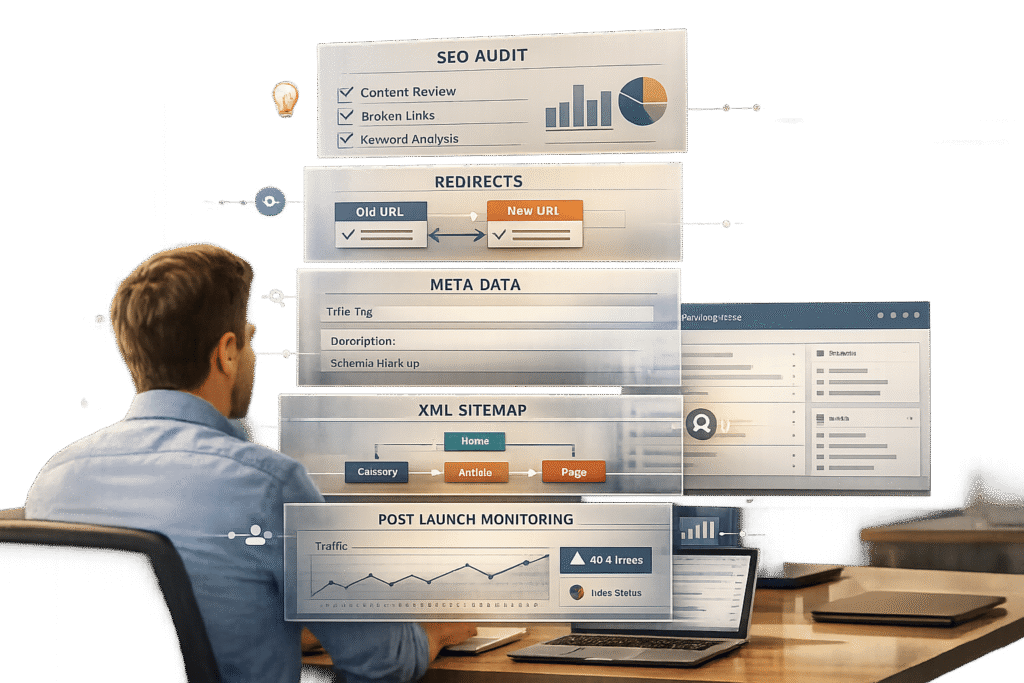
When moving your knowledge base to a new domain or platform, improper SEO planning can lead to massive traffic losses and revenue impacts. A poorly executed migration often causes ranking drops, broken links, and user frustration. Here’s how you can avoid these pitfalls and protect your SEO value:
- Plan Ahead: Conduct a detailed SEO audit of your current site. Document key metrics like traffic, keyword rankings, and backlinks. Identify high-value pages and fix broken links before migration.
- Redirect Strategy: Create a 1-to-1 URL redirect map to ensure every old URL points to a relevant new page. Avoid redirect chains and irrelevant redirects to the homepage.
- Preserve Metadata: Transfer titles, meta descriptions, schema markup, and internal links to the new platform to maintain rankings and search visibility.
- Post-Migration Monitoring: Track traffic, rankings, and crawl errors daily for the first few weeks. Quickly fix issues like 404 errors or missing redirects to minimize disruptions.
A successful migration requires collaboration between SEO experts, developers, and stakeholders. With proper preparation and execution, you can retain your rankings and even improve them over time.
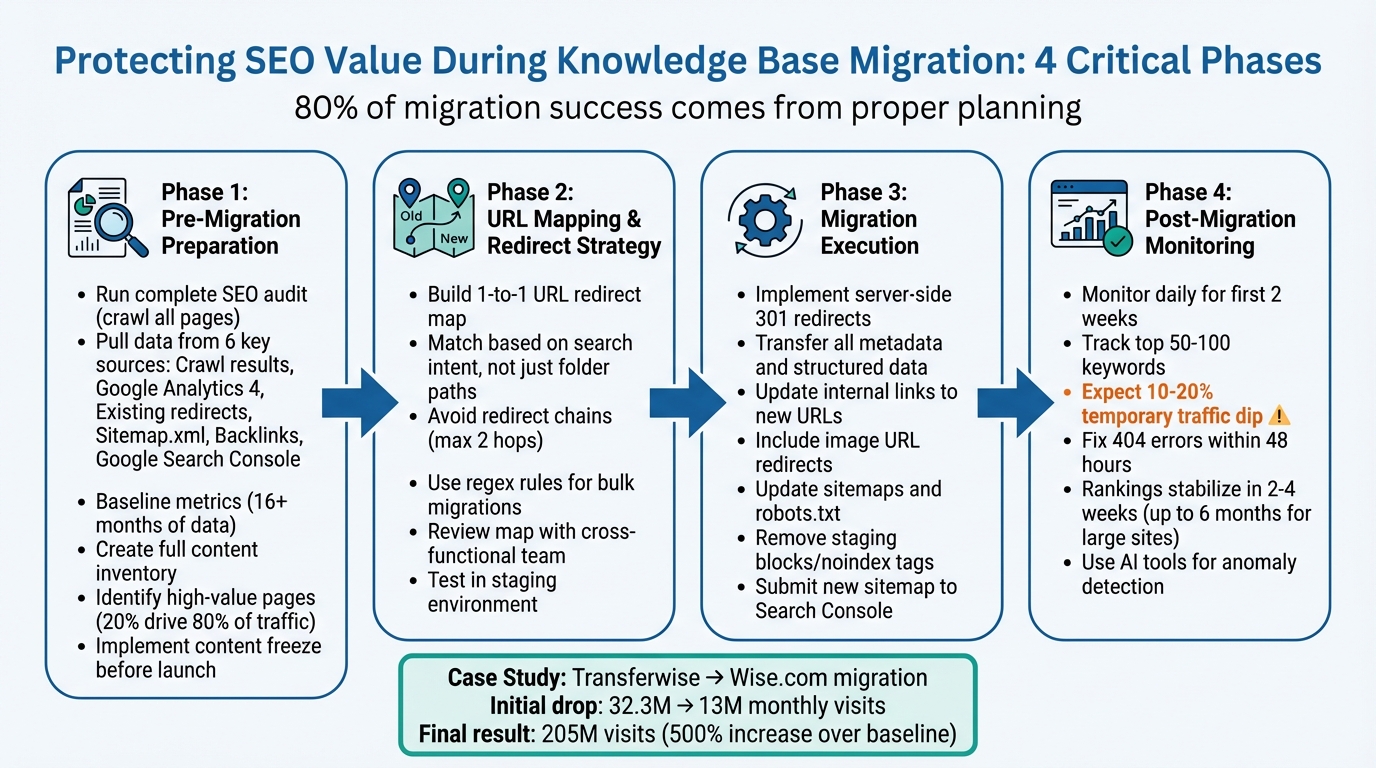
4-Phase Knowledge Base Migration SEO Checklist
A CMS Migration Guide: Move Your Site without Losing Traffic
sbb-itb-e60d259
Pre-Migration Preparation
Before diving into code changes or redirect setups, take the time to thoroughly document your current website setup. This documentation acts as your safety net. As Zoe Ashbridge, Senior SEO Writer, explains:
"Building an effective audit and performance benchmarks isn’t just about preparing for things to go wrong… It helps to prove the value of SEO. After the migration, you can point to the before and after and show the outcome of your SEO work"[11].
The risks are real. Consider this: In May 2025, Transferwise transitioned from Transferwise.com to Wise.com. The result? Their organic traffic plummeted from 32,335,584 monthly visits to just 12,985,402 immediately after launch. Thanks to meticulous planning and documentation, they eventually rebounded to 205,063,620 monthly visits – a staggering 500% increase over their original traffic baseline[11]. On the flip side, WooCommerce’s attempt to migrate from woocommerce.com to woo.com in December 2024 ended in disaster. Severe ranking losses forced them to revert back to their original domain[13].
Research indicates that 80% of migration success stems from the planning phase[9]. The steps you take now will determine whether your traffic thrives or collapses.
Run a Complete SEO Audit
Start by crawling your entire site with tools like Screaming Frog or Sitebulb. Crawl all linked HTML pages with unlimited depth and bypass robots.txt to ensure no page is overlooked[10]. This gives you a clear picture of your current technical setup.
Pull data from six key sources:
- Crawl results
- Google Analytics 4
- Existing redirects
- Sitemap.xml
- Backlinks (via Ahrefs or Semrush)
- Google Search Console
Cross-referencing these sources ensures you capture everything, including orphan pages – those listed in your sitemap but not linked anywhere on the site.
Baseline performance metrics are critical. Collect data from at least the last 16 months to account for seasonal trends[11]. Focus on metrics like organic sessions, keyword rankings for high-value terms, conversion rates, indexed page counts, and backlink profiles. Export keyword rankings and tag your most important transactional keywords to monitor closely post-migration[11].
Document key technical elements such as title tags, meta descriptions, H1-H3 structures, canonical tags, and schema markup. These must be replicated on the new platform to maintain rankings[4][9]. Additionally, benchmark Core Web Vitals – Largest Contentful Paint, First Input Delay, and Cumulative Layout Shift – on your top 20 landing pages to ensure the new platform performs as well or better[4][9].
Address broken links before migrating[2][6]. Use tools like Google Search Console to identify crawl errors, 404s, and redirect chains. Look at the last three months of data to spot pages gaining traction – these "rising stars" deserve extra care during the migration[12].
Finally, consolidate all findings into a detailed content inventory to guide the migration process.
Create a Full Content Inventory
Using your audit data, build a comprehensive content inventory to map out migration priorities. Create a spreadsheet that includes each URL along with its HTTP status, title, meta description, H1 tag, canonical tag, and internal link count[9][10]. This becomes your migration blueprint.
Focus on value, not quantity. Generally, 20% of your pages drive 80% of your organic traffic[6]. Use Google Analytics to pinpoint high-traffic pages and cross-check with backlink data to identify those with external authority. These "money pages" are crucial – they drive customer engagement and reduce support inquiries.
Don’t forget non-text assets. Catalog everything: category hierarchies, images, attachments, tables, tags, authorship data, timestamps, and user comments[1]. During this process, you may find that 20% to 30% of your content is either redundant or irrelevant[1]. Use this opportunity to clean house and remove low-value pages that don’t need to be migrated.
Standardize URL formats to prevent errors. Normalize protocols, domains, and cases to avoid issues with old bookmarks and external links[10]. Even small inconsistencies can lead to 404 errors.
Finally, implement a content freeze during the last week before migration. This ensures no new changes are made, keeping your redirect map accurate and avoiding last-minute surprises[1].
URL Mapping and Redirect Strategy
Now that you’ve completed your content inventory, it’s time to transform that groundwork into a well-structured redirect plan. This step is critical because incomplete URL mapping is the leading cause of ranking drops after a migration [9]. Missteps in this process can result in significant traffic losses.
Build a 1-to-1 URL Redirect Map
A redirect map is essentially a spreadsheet that pairs each old URL with its new destination. At a minimum, your map should include these columns: Old URL, New URL, Redirect Type (usually 301), Priority Level, and Mapping Notes to document your reasoning [6].
Focus on the URLs that bring in the most organic traffic. To do this, use tools like Google Analytics for traffic data and platforms like Ahrefs or Semrush to evaluate backlink authority [6][16].
Ensure redirects align with content relevance and search intent. As Jared Bauman, Co-Founder of 201 Creative, points out:
"Semantic redirect mapping is how you match old URLs to new ones based on meaning and search intent, not just folder paths" [17].
For example, if your old /blog/customer-service-automation page is now part of a broader guide at /guides/ai-support-automation, map it there – even if the structure is entirely different.
Avoid the common mistake of redirecting unrelated pages to your homepage. Search engines might disregard these as irrelevant, causing you to lose link equity [6][9]. Instead, map each URL to the closest related page, such as a parent category or a relevant guide.
For massive knowledge bases with thousands of articles, regex or wildcard rules can simplify the process. For instance, if you’re moving all URLs from /support/ to /help/, a single regex rule can handle the transition without manually mapping every URL [15][18].
Clean up your URL list before finalizing. Eliminate duplicates and unnecessary parameters to ensure every old URL points directly to its final destination. Avoid redirect chains (Old URL → Intermediate URL → Final URL), as they dilute link equity and slow down page loading times [6][15].
Review the Map With Your Team
Your redirect map isn’t just a technical document – it’s a strategic business tool. Before handing it off to developers, get approval from key stakeholders, including content owners, product managers, and customer success teams [8]. They can identify potential issues, such as redirecting two articles that serve distinct audiences into one.
Terrence Ngu from Hashmeta emphasizes:
"The solution lies in treating migration as a cross-functional project that requires collaboration between developers, SEO consultants, content strategists, and business stakeholders" [8].
Host a review session where stakeholders can validate that the redirects maintain user intent. Share your spreadsheet, complete with detailed Mapping Notes, to explain decisions like consolidating /old-article-a and /old-article-b into /new-comprehensive-guide. This transparency helps avoid last-minute objections and ensures alignment across teams.
Have your development team verify the technical feasibility of the redirect map. Some servers or CDNs may limit the number of redirect rules or the complexity of regex patterns. Addressing these constraints early prevents launch-day surprises [8].
Finally, test the full redirect map in a staging environment that mirrors your production setup. Use tools like Screaming Frog in "List Mode" to confirm that every old URL returns a 301 status and lands on the correct new destination [6][10][15]. Fix any errors before going live. With the map validated by your team, you can move forward with confidence as you execute the migration.
Migration Execution
With your redirect map in place and your team on the same page, the next step is executing the technical migration with precision. A single misstep – like a poorly configured redirect – can severely impact your site’s visibility in search engines. These steps are designed to protect your SEO efforts, ensuring minimal disruption to organic traffic and link equity.
Implement 301 Redirects
Start by setting up server-side 301 redirects for every old URL. Tools like Apache’s .htaccess or Nginx configurations are ideal because search engines handle these redirects more reliably than JavaScript-based ones [14]. Properly configured 301 redirects pass nearly all link equity, which makes them essential for maintaining your rankings [14].
Make sure each redirect points directly to its final destination. For instance, if URL A redirects to URL B, and URL B redirects to URL C, simplify the chain so both A and B go straight to C. Google recommends keeping redirect chains to no more than two hops, as longer chains can cause crawling issues [10].
Don’t forget to address URL variations. Differences in "www", trailing slashes, capitalization, or protocol (http vs. https) can lead to 404 errors if not accounted for [10]. Include image URLs in your redirect plan too – images have their own indexed URLs, and failing to redirect them could cost you traffic from image searches [11][2].
Update all internal links to point directly to the new URLs. This reduces unnecessary server requests and ensures efficient crawling [10][11]. Before going live, test your redirects in a staging environment using tools like Screaming Frog in "List Mode." This will confirm that every old URL correctly redirects to its new destination with a 301 status code [6][10].
With redirects in place, turn your attention to preserving on-page SEO by transferring metadata and structured data.
Transfer Metadata and Structured Data
Before migrating, use crawling tools to extract all meta titles, descriptions, H1 tags, image alt texts, and schema markup from your current site [5][20][19]. The goal is to replicate this metadata on the new platform exactly as it exists now.
For large-scale migrations, manual copying isn’t practical. Instead, use RESTful APIs to push metadata – such as tags, authorship details, and SEO fields – programmatically into the new system [1]. This approach ensures accuracy and saves time.
Pay close attention to structured data. Maintain consistent schema markup for elements like Organization and Article to retain rich search result features [5][19]. Update "SameAs" links in your schema, as well as on key profiles like LinkedIn, G2, and GitHub, to reflect the new URL structure [19]. As the Document360 team emphasizes:
"Image metadata is rated highly in terms of ‘useful content’ for web crawlers, giving you that much more of a boost in your rankings" [2].
Preserve original author profiles and publication dates to maintain content credibility and authority [1]. For high-traffic pages, visually inspect metadata to ensure special characters transferred correctly [1]. These details are critical for both search engine optimization and user trust.
Once your metadata and redirects are ready, the final step is updating your sitemaps and robots.txt.
Update Sitemaps and Robots.txt
Before launching, review your robots.txt file to confirm that Googlebot can access all critical sections of your site. Remove any staging blocks or noindex tags that could accidentally hide your live site from search engines [6][19]. As BrightKeyword points out:
"I’ve seen migrations fail because developers forgot to update robots.txt on launch day. The entire site stayed blocked for weeks" [6].
Generate a new XML sitemap that lists only the final, live URLs. Exclude staging URLs, broken links, and any intentionally removed pages [5]. Ensure the sitemap is accessible at standard locations like /sitemap.xml so search engines can locate it easily [6].
It’s also a good idea to keep a temporary sitemap of the old URLs for a few weeks after launch. This encourages search engines to crawl the old addresses and process your 301 redirects faster [6][19]. On launch day, submit the new sitemap to Google Search Console and Bing Webmaster Tools to expedite re-crawling [5][19]. Finally, use Google Search Console’s URL Inspection tool to verify how search engines are interpreting your new pages [5].
Post-Migration Monitoring
Once the migration is complete, keeping a close eye on performance is critical to ensure your SEO efforts stay intact. Even with a well-executed migration, a temporary dip in traffic – around 10% to 20% – is normal. As SEO consultant Hassan points out:
"Google does not penalize migrations – but it reacts brutally to broken signals" [21].
Monitor Traffic and Rankings
Right after launch, monitor Google Search Console daily for the first two weeks. Pay attention to index coverage, crawl errors (especially 404s), and impressions to confirm your pages remain visible in search results [5]. Compare these metrics to your pre-migration baseline and keep an eye on your top 50 to 100 ranking keywords. If you notice sustained declines beyond the two-week mark, it could signal deeper structural issues [21].
Track branded versus non-branded traffic patterns. A drop in non-branded searches might suggest a loss of topical relevance, while a decline in branded traffic could point to broader authority issues. Also, keep tabs on Core Web Vitals – performance setbacks can delay ranking recovery even if redirects are correctly implemented [5][22]. Typically, rankings stabilize within two to four weeks, but larger sites with extensive content may need up to six months for full authority recalibration [5][21]. These observations will help guide any necessary adjustments.
Fix Errors Immediately
Addressing errors quickly is essential to protecting your SEO investment. Early 404 errors, for example, can significantly hurt rankings. Fix these issues based on their business impact – prioritize high-revenue pages or those with valuable backlinks. Aim to resolve these within 48 hours to avoid prolonged visibility losses [4].
Consider this cautionary tale: a hospitality brand failed to map 180 location-specific landing pages that accounted for 15% of its organic sessions. The delayed response to this oversight caused a "traffic crater" that persisted for weeks, even after proper 301 redirects were applied [4].
Use a crawler to audit your redirects and ensure they are efficient – one hop per redirect is ideal for preserving link equity [21][22]. If your indexed page count drops by more than 20%, check for leftover "noindex" tags or pages unintentionally blocked by robots.txt [5]. Submit your updated XML sitemap to Google Search Console and Bing Webmaster Tools, and keep a temporary sitemap of old URLs available for several weeks to help search engines process the changes faster [19][22][5].
Use AI to Maintain Content Quality
In addition to monitoring and fixing errors, AI tools can simplify quality assurance and help sustain search performance. AI can identify content gaps, flag ranking anomalies, and optimize underperforming pages. For example, Supportbench’s AI tools can analyze customer behavior and highlight frequently searched topics, ensuring your content remains relevant. AI-driven anomaly detection can also alert you to ranking shifts of more than five positions [4].
If a page loses visibility in AI-generated search summaries after migration, consider using generative AI to restructure its content or update its FAQ schema to regain credibility with search engines [3].
Real-time AI log analysis can track bot behavior, catching issues like Googlebot encountering 404 errors or redirect loops before they impact indexation [3]. As BrightEdge emphasizes:
"Search isn’t just about rankings anymore. It’s about how you appear in AI-generated answers, summaries, and recommendations" [3].
Looking forward, maintaining "AI equity" – structured signals and schema that ensure your content is featured in AI-driven search results – will become just as important as traditional link equity [3].
Conclusion
To keep your SEO intact during a knowledge base migration, focus on four key steps: thorough pre-migration preparation, precise 1-to-1 URL mapping, proper implementation of 301 redirects, and consistent post-migration monitoring. As Yani from Servmask aptly states:
"The difference between losing rankings and preserving them comes down to preparation, execution, and monitoring" [7].
This structured approach ensures you retain high-value pages, maintain link equity, and address errors before they become major issues.
When executed correctly, migrations typically recover search rankings within 2 to 4 weeks. While a temporary 10% to 20% traffic dip may occur in the first week, resolving issues within 48 hours can prevent more significant losses [5][7][4]. These strategies establish a solid foundation for incorporating AI into post-migration efforts.
AI-powered tools simplify and enhance the process by automating error-prone tasks. For instance, Supportbench’s AI solutions handle real-time content syncing, metadata mapping, and link integrity checks, reducing manual work and minimizing SEO risks. AI can also detect anomalies like ranking drops or crawl errors early, while automated redirect systems ensure old URLs point directly to their new destinations, avoiding redirect chains [7][19].
Beyond the technical aspects, successful migrations should also account for the role of AI in search visibility. Ensuring your content appears in AI-generated search summaries and citations is becoming just as important as traditional rankings [3]. Platforms with integrated AI capabilities help maintain structured data and schema markup during transitions, ensuring your content remains optimized for both current and emerging search technologies. This seamless integration not only safeguards your SEO but also positions your content for future search trends.
FAQs
How long does SEO recovery take after a migration?
SEO recovery times depend on how complex the migration is and the measures taken to safeguard rankings. If precautions aren’t in place, visibility can take a sharp hit in just weeks. On the flip side, with thorough planning, precise execution, and continuous monitoring, SEO performance usually levels out within a few months. Fixing problems like broken redirects or missing metadata is key – and in some cases, businesses even experience a boost in traffic once these issues are resolved.
Which pages should I prioritize for redirects first?
When tackling a site migration, it’s smart to prioritize the pages that matter most for SEO and traffic. Here’s where to focus your efforts:
- High-traffic and top-performing pages: These pages are already driving significant organic traffic, so preserving their rankings is crucial.
- Pages with strong backlinks: Backlinks contribute to your site’s authority, and maintaining these links helps retain valuable link equity.
- Indexed URLs with existing rankings: Protect these pages to avoid any ranking drops during the migration.
- Critical pages: Think of your homepage, key product pages, or essential support articles – these are the backbone of your site.
By carefully mapping and redirecting these pages, you can safeguard your SEO efforts and keep your traffic intact throughout the migration process.
How can AI help catch migration SEO issues faster?
AI streamlines the process of spotting migration-related SEO problems by automating time-consuming tasks. It can rapidly identify issues like broken links, incorrect redirects, and missing metadata. Additionally, AI tools can scan extensive websites for crawl errors, canonicalization problems, and schema markup issues – jobs that could take days if done manually. This speed allows for quicker fixes, reducing the risk of traffic loss and helping to preserve search rankings during site migrations.