
Portal ticket deflection helps customers solve issues independently while keeping human support easily accessible. The challenge is balancing efficiency with customer satisfaction. Here’s how to do it effectively:
- Analyze Support Data: Review 3–6 months of ticket history to identify common issues that can be addressed with self-service tools.
- Improve Self-Service Content: Write clear, searchable articles with action-oriented titles like "How to reset your password." Use visuals like screenshots or videos to simplify instructions.
- Leverage AI Tools: Use features like predictive FAQs, intent-based routing, and pre-submission article suggestions to guide users to solutions.
- Maintain Contact Visibility: Always display contact options alongside self-service tools to avoid frustrating customers.
- Refine Escalation Processes: Ensure bots transfer full context to agents for seamless handoffs when issues require human intervention.
- Measure Performance: Track metrics like deflection rate, self-service success rate, and customer effort score to identify improvement areas.
The goal isn’t just reducing ticket volume – it’s about empowering customers while ensuring those who need help can quickly connect with support.
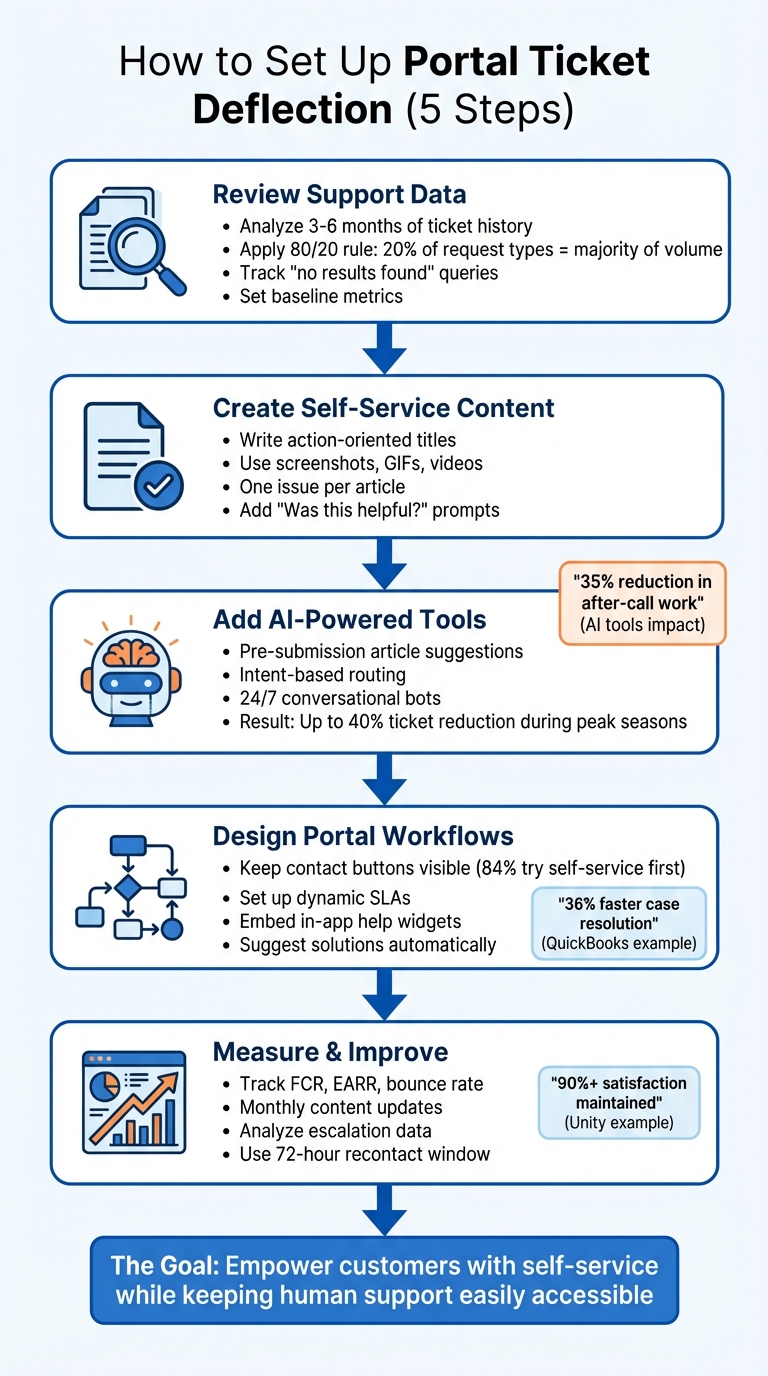
5-Step Portal Ticket Deflection Implementation Process
Step 1: Review Support Data to Find Deflection Opportunities
Start by examining 3–6 months of ticket history to uncover recurring customer issues. Focus on ticket categories, the channels customers use, and average resolution times. This analysis will help you identify where your support team is spending the most time and effort. From there, look for patterns that reveal opportunities to reduce ticket volume through self-service options.
Review Ticket History for Patterns
Use the 80/20 rule as your guide: 20% of request types often account for the majority of support volume. Generate reports that break down ticket frequency by category, subject line, or tags. Keep an eye out for repetitive issues with straightforward solutions, such as password resets, billing inquiries, feature clarifications, or account setup instructions. These common problems are ideal candidates for self-service content since they follow predictable patterns and can be addressed with clear, consistent guidance.
Assess the Effectiveness of Your Knowledge Base
Your help center might already contain helpful articles, but are customers actually using them? One way to find out is by tracking "no results found" search queries in your knowledge base. These queries highlight what customers are searching for but not finding. Also, pay attention to search term variations – for example, a customer might search for "receipt" while your article uses "invoice", or they might type "cancel subscription" instead of "terminate service." These mismatches can point to gaps in your content or misaligned terminology.
Another key metric to monitor is the Self-Service Success Rate, calculated as successful resolutions divided by total self-service attempts. If customers are viewing help articles but still submitting tickets, it might mean the content is unclear or doesn’t fully address their needs.
Set Deflection Goals and Establish Baseline Metrics
Before moving forward, document your current metrics to establish a baseline. Record data like monthly ticket volume, average handle time, and self-service usage rates. Additionally, measure your current deflection rate and agent costs to better understand your return on investment (ROI) down the line. These numbers will be crucial when integrating AI tools and evaluating their impact.
| Metric | Formula / Definition | Purpose |
|---|---|---|
| Ticket Deflection Rate | (Self-Service Resolutions ÷ Total Support Interactions) × 100 | Tracks the percentage of issues resolved without creating a ticket. |
| Self-Service Success Rate | (Successful Resolutions ÷ Total Self-Service Attempts) | Evaluates how well your help content solves customer problems. |
| Customer Effort Score (CES) | Survey-based score on ease of finding information | Measures how easy it is for customers to resolve issues on their own. |
sbb-itb-e60d259
Step 2: Create and Improve Self-Service Content
Develop self-service content that directly addresses customer issues. Use the deflection opportunities identified earlier to guide your content creation. Focus on crafting articles that are easy to locate, simple to follow, and address one issue at a time. Stick to action-oriented titles like "How to reset your password" rather than vague ones like "Account Access."
Write Clear and Easy-to-Find Knowledge Base Articles
Structure articles for quick scanning. Start with the solution at the top, use clear headings, and break instructions into numbered steps. Incorporate annotated screenshots, GIFs, or short videos to help users navigate complex tasks. Use the same language your customers use in their queries – if they search for "receipt" and your article says "invoice", they may not find what they need.
Each article should tackle one specific issue. If you catch yourself adding phrases like "additionally" or "you can also", consider breaking the content into separate pages. Tools like Supportbench can simplify this process by using AI-driven KB article creation to extract problems and solutions from resolved tickets for review and publication. Include a "Was this article helpful?" prompt at the end of each article to gather feedback, and assign Content Owners to keep documentation accurate as product features evolve.
Use AI for Predictive FAQs and Article Recommendations
AI tools can analyze customer search intent through semantic search, offering relevant articles in real-time as users type into a chat or portal. Unlike basic keyword matching, AI understands natural language, enabling it to recommend the right content even when phrased differently from your article titles. Use AI analytics to identify search queries that yield no results and prioritize creating content to fill those gaps. While AI improves content suggestions, always provide customers with a clear path to human support.
Display Contact Options Next to Self-Service Content
Make contact options easy to find alongside search results to ensure customers can reach support when needed. As Paulina Major from Capacity highlights, "Modern SaaS support teams aren’t just solving tickets anymore. They’re also managing expectations, scaling operations, and trying not to burn out" [2]. When AI provides an automated response, include a confidence score. If the confidence is low, proactively suggest escalating the query to a human agent [1]. This approach balances AI-powered solutions with transparent access to live support, maintaining customer trust while managing ticket volumes effectively.
Step 3: Add AI-Powered Deflection Tools
Incorporate AI tools that actively reduce ticket volume while keeping support channels accessible. Conversational AI excels at resolving issues by grasping subtle nuances and emotions, making it a powerful tool for customer support [3].
Set Up Pre-Submission Article Suggestions
Configure your support portal to suggest relevant knowledge base articles as customers start describing their issues. This feature uses natural language processing (NLP) to interpret intent rather than simply matching keywords. For instance, a company reduced ticket volume by 40% during peak seasons by using AI to recognize queries like "Where is my order?" and providing instant answers. This approach also helped them cut seasonal hiring costs [3].
Take it further by enabling AI to securely handle tasks such as password resets, order status lookups, or account updates by integrating it with your CRM and billing systems. Use secure methods like magic links or OAuth for identity verification directly within the bot interface [5]. This method ensures that customers receive immediate solutions, not just information, significantly enhancing the deflection process.
Once you’ve implemented pre-submission suggestions, focus on refining routing and escalation strategies for even smoother issue resolution.
Turn On Intent-Based Routing and Escalation
Leverage AI to identify both the purpose of customer inquiries and their emotional tone, then route cases to the most suitable resource. Intent-based routing uses NLP to categorize issues, ensuring that inquiries are handled by the right specialist instead of being misdirected. Many of these inquiries can be resolved automatically, easing the workload on support agents [2].
Set up triggers to detect frustration or critical issues like fraud or billing disputes. When AI identifies such cases, it should immediately escalate them to a senior agent or specialized team, providing all relevant context.
"Bots that bluff erode customer trust. Bots that escalate build it" [6].
Effective escalation includes a detailed summary – covering intent, relevant details like order IDs, and steps already attempted – so customers don’t have to repeat themselves [5]. This ensures a smoother transition and a more satisfying customer experience.
To complete the process, integrate your AI tools with workflows that guarantee seamless handoffs to human agents when necessary.
Connect Knowledge Base Bots with Escalation Paths
Deploy conversational bots to handle 24/7 troubleshooting while maintaining a clear option for human support. Ensure that when bots escalate cases, they transfer the full conversation history, attempted solutions, and sentiment analysis to the agent. This streamlines follow-up and avoids frustrating customers with repetitive questions [6][7].
Avoid dead ends where bots simply respond with "I don’t understand." Instead, design graceful handoffs that preserve context and provide agents with summaries and recommended next steps. This approach keeps customers informed and maintains trust throughout the process [6][7].
A real-world example: In 2025, Intuit QuickBooks integrated an AI-powered knowledge base into Slack for both support teams and customers. This allowed users to search across channels and access conversational answers, leading to 36% faster case resolution, higher Net Promoter Scores (NPS), and greater confidence among representatives [8]. Similarly, platforms like Supportbench use AI QA bots to read structured FAQ content and answer questions intelligently. When the bot can’t find an answer, it automatically creates a case and starts a chat session with an agent, ensuring no customer is left without support.
Make it a habit to review escalated tickets regularly to reduce redundant information requests from agents [5]. Keep in mind that containment metrics can be misleading – if your bot can’t authenticate users, take meaningful actions, or close tickets, it may appear effective while actually increasing costs through repeated interactions [5].
Step 4: Design Clear and Easy-to-Use Portal Workflows
After establishing solid self-service content and AI strategies, the next step is to focus on designing workflows that make your portal intuitive while keeping live support readily available. Why does this matter? Because 84% of customers try to solve problems on their own before contacting support[9]. However, they still want the reassurance that help is just a click away if they need it. The trick is to create workflows that encourage self-reliance without leading to frustrating dead ends.
Keep Contact Buttons Visible at All Times
Make contact options easy to find – whether on your homepage, product pages, or dedicated contact pages[9]. A clearly visible "Contact Support" button reassures customers that human help is available, which can actually boost their confidence in trying self-service first.
Take it a step further by embedding in-app help widgets directly into your product interface. This keeps support tools right where users need them, eliminating the hassle of navigating away from their task[9]. Another helpful feature? Show article suggestions as customers type into the contact form. This can resolve issues before they even submit a ticket[2][9]. Just make sure these suggestions appear alongside the contact form, not as a replacement.
Set Up Dynamic SLAs for Escalated Cases
Dynamic service level agreements (SLAs) can transform how you handle escalated cases. For instance, if a customer has already tried multiple solutions and still needs help, their case should be prioritized over a standard first-contact inquiry. These SLAs adapt based on the context of the customer’s self-service attempts, recognizing the added complexity or frustration involved.
To make this work, ensure your workflows pass complete context to agents. Include details like attempted solutions, sentiment indicators, and conversation history so customers don’t have to repeat themselves. One organization cut resolution time by over 90% by combining dynamic SLAs with contextual data.
Use AI to Suggest Solutions Automatically
AI can step in at critical moments – like during checkout or on complex configuration pages – to suggest solutions before customers even think to hit the support button[4][10]. These proactive prompts address issues right where they happen, without blocking access to human support.
With 79% of customers expecting businesses to offer self-service tools[9], configure your AI to suggest relevant articles or workflows while keeping the option to escalate to live support crystal clear. The goal is simple: solve problems quickly, whether through automation or a human agent. And when automation isn’t enough, customers should have no trouble reaching a person who can help.
Finally, train your support team to reference knowledge base articles during live interactions[9]. This not only resolves the immediate issue but also highlights the value of self-service for future needs.
These workflow improvements set the stage for tracking and optimizing deflection performance, which we’ll explore in the next section.
Common Mistakes and How to Avoid Them
When rolling out AI-driven deflection features, it’s easy to stumble into a few common traps that can derail your efforts. Even well-meaning strategies can backfire if they aren’t executed carefully. The upside? These mistakes are avoidable if you know what to watch for. Let’s dive into the most frequent errors and how to address them effectively.
Mistake: Hiding Contact Options
The problem: In an attempt to boost deflection rates, some teams make it unnecessarily difficult for customers to find contact options. This often leads to what Arnas Jonikas, Founder of Helpview, describes as a "dead end" experience – customers attempt self-service, hit a wall, and can’t figure out how to escalate their issue to a human[11].
The fix: Always include a "Still Stuck?" section at the end of every knowledge base article. This should clearly explain how to escalate the issue and provide guidance on what information (like screenshots or error codes) to include when reaching out for help[11][1].
Mistake: Relying Only on AI Without Human Backup
The problem: Solely depending on AI can create frustrating dead ends when bots misinterpret queries, deliver outdated answers, or fail to recognize when a customer is upset. Complex issues – like billing disputes or unique policy exceptions – require human judgment, empathy, and creativity. Without these, customer trust can erode quickly[6].
The fix: Use AI for straightforward tasks like password resets or order tracking, but set up clear triggers for human intervention. For example, implement sentiment analysis to detect frustration in real time and route those cases to agents before customers decide to leave your brand[6].
Mistake: Poor Content Quality or Hard-to-Find Articles
The problem: Outdated screenshots, broken links, or deeply buried articles frustrate customers trying to find answers. When customers encounter these issues, the effectiveness of your self-service tools takes a hit[11][1].
The fix: Regularly audit "zero result" searches to spot content gaps, and update articles to reflect the latest product changes. Use clear, action-oriented titles like "Reset your password" or "Download invoice" to align with how customers search[11][12]. When building a knowledge base, keep your help center structure simple – no article should be more than two clicks away from the homepage[11]. This not only improves customer satisfaction but also strengthens your deflection efforts.
| Mistake | Consequence | Fix |
|---|---|---|
| Deep Nesting/Hierarchy | Users get lost; high bounce rates | Keep structure shallow (no more than two levels deep)[11] |
| Static/Outdated Content | Loss of trust in self-service tools | Weekly reviews of top searches and updates based on product changes[11][1] |
| Forced "Tool Travel" | Low adoption of self-service | Embed help widgets directly within apps or workflows[1] |
| AI-Only Support | Complex issues go unresolved; trust erodes | Enable seamless escalation with full context transfer to live agents[2][12] |
Step 5: Measure and Improve Deflection Performance
Setting up deflection workflows is just the first step. The real test lies in keeping track of performance to figure out what’s working and what’s not. Without regular measurement, it’s impossible to know if your self-service tools are solving issues effectively or leaving customers frustrated. Tracking performance ensures your AI-driven deflection strategy continues to balance efficient self-service with seamless access to human support when needed.
Key Metrics to Monitor for Self-Service Success
Start by keeping an eye on First Contact Resolution (FCR), which measures whether issues are resolved on the first attempt. This tells you if your self-service tools and content are hitting the mark with customers. Another critical metric is Search Effectiveness – the percentage of queries that return relevant results. This metric helps you determine if your portal is aligned with what users are searching for [1].
Next, track the Effective AI Resolution Rate (EARR). This metric subtracts AI-caused recontacts (tickets submitted within 72 hours of an AI-resolved session) from total resolutions. It’s a great way to spot when AI might be confusing users instead of helping them [14]. For example, Xero, a cloud accounting software company, saw a 20% drop in search sessions requiring extra support after implementing Coveo’s Relevance Generative Answering in October 2023. Xero’s Piper explained, "Every time someone asks a question, every time we solve an opportunity for someone, they become sticky on our platform. They stay, and that’s a really great experience for us" [13].
"Traditional ‘deflection’ often means the user didn’t reach a human. That’s not the same as the issue was actually resolved."
- Thinking Loop [14]
Another important metric is the Bounce Rate, which measures the percentage of users who quickly leave a help article. High bounce rates often indicate that the content isn’t meeting user expectations [2]. A great example of improvement comes from Unity, a video game development company, which used AI-powered self-service tools to cut its average IT issue resolution time from three days to under one minute – all while maintaining an employee satisfaction rate above 90% [1].
By consistently tracking these metrics, you’ll have the insights needed to make regular improvements.
Monthly Updates to Content and AI Tools
Set a monthly schedule to review and update your top-performing help articles. As products evolve and new ticket trends emerge, these updates will ensure your content stays relevant. Use intent-based analytics to group customer interactions into categories like "Refund request" or "API limit", rather than just tallying raw numbers [14].
AI tools can also help reduce after-call workloads by an average of 35%, saving about 5.8 minutes per call [2]. To gather real-time feedback, include proactive prompts like “Did that solve your issue?” at the end of AI interactions [4]. These small adjustments can make a big difference in improving escalation patterns and overall responsiveness.
Use Escalation Data to Spot Gaps and Improve Processes
The data you collect from escalations can highlight weaknesses in your self-service content. Pay attention to your Escalation Grace Score, which measures the percentage of high-risk or emotionally charged issues correctly handed off to a human agent. This ensures your AI knows when to step aside [14].
"Calm is knowing the system knows its limits."
- Thinking Loop [14]
Dive into user clickstream data to see where customers abandon self-service workflows [4]. If you notice repeated escalations for the same issue – like password resets – it might be time to simplify your instructions or streamline the process. Track every AI response, handoff, and user rating to get a full picture of how your system is performing [14]. Also, use a 72-hour recontact window as a benchmark: if customers reach out again about the same issue within three days, consider the initial deflection attempt unsuccessful [14].
| Metric | What It Measures | Why It Matters |
|---|---|---|
| First Contact Resolution (FCR) | % of issues resolved at the first touchpoint [1] | Shows how effectively self-service tools address customer needs |
| Effective AI Resolution Rate (EARR) | Total resolutions minus AI-caused recontacts [14] | Identifies when AI might confuse users |
| Escalation Grace Score | % of high-risk intents correctly handed to humans [14] | Ensures critical issues are escalated to a human promptly |
| Bounce Rate | % of users quickly leaving help articles [2] | Highlights content that isn’t meeting user expectations |
| Search Effectiveness | % of queries returning relevant results [1] | Measures how well your portal aligns with customer intent |
Conclusion
Creating an effective portal ticket deflection system is all about offering faster and smarter self-service options while ensuring human support is always within reach. Start by analyzing your support data to uncover deflection opportunities, then develop clear and up-to-date self-service content that directly addresses common customer challenges. Tools powered by AI, like pre-submission article recommendations and intent-based routing, can efficiently handle routine inquiries while passing complex or sensitive cases to your support team.
Even with robust self-service and AI tools, it’s crucial to maintain easy access to human support. Keep contact options prominently visible, and don’t force customers to jump through multiple steps just to speak with a real person. Striking the right balance between deflection and accessibility is key – high deflection rates only matter if customers are still satisfied with their overall experience. Use tools like sentiment analysis on deflected interactions and follow-up prompts like “Did this solve your issue?” to spot and address any lingering frustrations.
For AI to make a meaningful impact, it must work with up-to-date content and clear escalation paths. Embedding support tools directly into popular communication platforms can also reduce friction and align with modern customer support trends.
FAQs
How do I keep ‘Contact Support’ visible without increasing tickets?
To keep the ‘Contact Support’ option visible without overwhelming your support team, it’s all about finding the right balance between self-service tools and direct support access. Make sure ‘Contact Support’ is always easy to find, but pair it with resources like FAQs, knowledge bases, and AI-powered tools to guide users toward quick solutions.
Leverage AI-driven tools such as predictive FAQs that anticipate common questions and sentiment-aware triggers to address potential frustrations before they escalate. This way, users can resolve their issues independently when possible, while still having the option to reach out for help when needed. The result? Users feel supported, and your team avoids a flood of unnecessary tickets.
Which metrics prove deflection is actually solving issues?
Metrics that showcase successful deflection include case deflection rates, which measure the percentage of customer questions resolved through self-service options, and a noticeable drop in support ticket volume, reflecting fewer tickets being submitted thanks to effective AI-driven solutions. These indicators reveal how well deflection strategies are working to keep issues from reaching support agents.
When should AI escalate to a human agent?
AI systems should transfer the issue to a human agent when they struggle to interpret context, address complex or unclear problems, or manage highly specific scenarios. Escalation is equally important in situations that demand empathy, reassurance, or advanced problem-solving skills. This approach ensures customers get the appropriate support when needed, balancing AI’s efficiency for routine tasks with a smooth handoff to human agents for more nuanced interactions.