
Your support portal’s taxonomy can make or break user experience. The right structure helps customers find answers fast and equips your team with data for better decision-making. The challenge? Balancing simplicity for users with the depth needed for operations. Here’s how categories, tags, and custom fields fit in:
- Categories: Organize content into broad, hierarchical groups (e.g., "Billing" > "Refunds").
- Tags: Add flexible, non-hierarchical labels for cross-referencing (e.g., "Urgent", "API").
- Custom Fields: Store detailed metadata (e.g., "Customer Tier", "SLA Level") for routing and analytics.
Each serves a distinct purpose. Categories provide structure, tags add flexibility, and custom fields capture specifics. Used together, they improve ticket routing automation and reporting.
Quick Comparison
| Feature | Categories | Tags | Custom Fields |
|---|---|---|---|
| Structure | Hierarchical (Parent/Child) | Flat (Non-hierarchical) | Metadata (Key/Value) |
| Best For | Broad topics | Keywords, trends | Specific data (e.g., IDs) |
| Flexibility | Low | High | Medium |
| Query Speed | Fast | Fast | Slower |
| Maintenance | Moderate | High | Low |
A well-designed taxonomy improves efficiency and supports AI-driven systems. Start with clear categories, enhance with tags, and refine with custom fields for smarter content management.
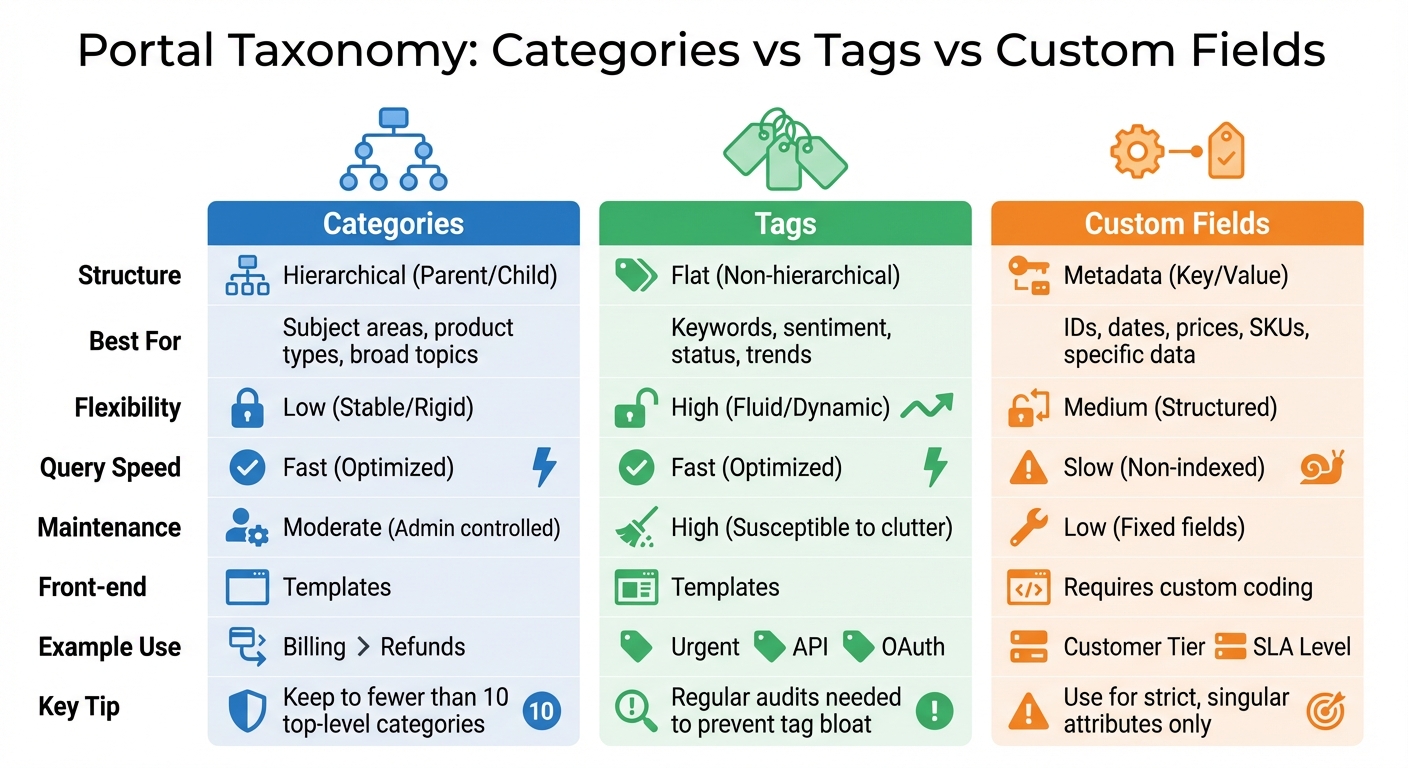
Portal Taxonomy Comparison: Categories vs Tags vs Custom Fields
1. Categories
Categories are the backbone of your support portal, creating a clear and efficient structure through parent-child relationships. Each category is designed to represent a distinct topic, ensuring no overlap with others.
Hierarchy and Structure
A well-designed category system follows a two-tier model: a mandatory Tier 1 "Topic" and an optional Tier 2 "Subtopic". Your Tier 1 categories should be stable, mutually exclusive, and relevant to all content. Aim for fewer than 10 categories at the top level – any more can overwhelm your agents and complicate navigation [2].
A useful framework for structuring categories is the RUF model, which organizes content into three main areas: Reliability (errors and performance issues), Usability (how-to guides and navigation), and Functionality (feature requests) [2]. This approach ensures a clean, scalable foundation that minimizes the need for frequent restructuring.
Flexibility and Scalability
When designed thoughtfully, categories can handle growth seamlessly. Flat taxonomies may work for small-scale operations but often fail as volume increases. Hierarchical structures allow you to add new subtopics without overhauling the entire system [8]. However, this requires careful planning upfront to anticipate how your content might evolve over the next few years.
Consistency in terminology is critical. Stick to a single term for each concept – choose "Billing", "Payments", or "Invoicing", but not all three. This avoids what Jake Bartlett refers to as "synonym chaos" [2]. To ensure consistency, document one-sentence definitions for each category in an internal glossary, so agents interpret and apply them uniformly.
AI Integration and Automation
AI tools have revolutionized the way categories function in support operations. By defining your taxonomy in plain language, AI can automatically sort tickets into the correct categories [2]. This eliminates the inconsistencies that often occur with manual tagging, ensuring a uniform logic across all tickets.
Categories also improve query speed, thanks to optimized database indexing [3]. For AI systems managing large toolsets, hierarchical categories are especially useful. Instead of loading a flat list of 50 tools (which can consume 20,000 to 25,000 tokens), a hierarchy ensures only the necessary information is loaded into the context window [9].
Maintenance Effort
Regular maintenance is essential to keep your categories effective. Conduct audits quarterly or bi-annually to review usage, consolidate similar terms, and remove unused categories [2]. Avoid using catch-all labels like "Other" or "General Inquiry", as they quickly become dumping grounds, making trend analysis nearly impossible [2].
Keep in mind that most systems won’t let you delete a category if it contains active articles. Before removing a category, you’ll need to reassign or archive its content [7]. This highlights the importance of getting your initial structure right – restructuring later can be a time-consuming process.
Next, we’ll look at how tags can enhance these structured categories.
sbb-itb-e60d259
2. Tags
Tags are flat, non-hierarchical keywords designed to connect related content across your portal [1]. Unlike categories, which divide content into broad topics, tags focus on specific attributes. For instance, an article about API authentication might fall under the "Integration" category but include tags such as "OAuth", "Security", and "Developer Tools."
Flexibility and Scalability
Tags shine because of their adaptability. They allow agents to assign relevant labels without strict rules [6]. For example, a tag like "Billing Error" can link articles in both "Payments" and "Account Management" categories, creating connections that a hierarchical system might miss [1]. While a flat tag structure works well for hundreds of monthly tickets, managing thousands might require introducing some hierarchy to keep reporting organized [8].
AI Integration and Automation
As content volume grows, manual tagging can become inconsistent or neglected when agents are pressed for time. AI-driven automated tagging solves this by applying tags quickly and uniformly, much like AI-powered ticket routing [8]. Take the example from March 2024, when Xcentium implemented an AI-powered tagging system using ChatGPT and Azure AI services for Sitecore-based content. This system analyzed blog posts, extracting text and mapping it to a predefined taxonomy. It automatically added tags like "XM Cloud", "Development Efficiency", and "Best Practices." For video content, it used YouTubeTranscriptApi to process transcripts, generating tags such as "Commerce" and "Customer Experience" [11].
Maintenance Effort
Tags need more frequent upkeep compared to categories because many systems lack robust management tools [6]. Without regular audits, you risk "tag bloat", where duplicate tags (e.g., "plugin" and "plugins"), synonymous terms, or unused tags clutter the system and confuse search engines [10]. Routine cleanups help consolidate redundant tags and remove unused ones, ensuring a streamlined, effective set of tags that improve both discoverability and organization [10].
Next, we’ll look at how custom fields can bring more structure to your taxonomy.
3. Custom Fields
Categories and tags are great for organizing and labeling content, but custom fields take things a step further by logging detailed metadata. This metadata is essential for advanced routing, analytics, and AI-driven support systems. While categories focus on broad organization and tags highlight specific attributes, custom fields record the fine details that make operations smarter and more efficient.
Custom fields can store metadata like customer segment (e.g., Enterprise vs. SMB), product line, urgency levels, or SLA tiers. This data helps uncover patterns, such as which product features lead to the most support tickets, without overloading your category system [2].
Hierarchy and Structure
A two-tiered model is a practical way to structure your system. Start with a stable Tier 1 (like "Technical Issue", "Billing", or "Feature Request") and add an optional Tier 2 for more specific details ("Login Problem" or "Refund Request"). Custom fields then layer on metadata to support routing, reporting, and filtering [2].
"If a tag doesn’t change how you handle a ticket or how you understand your support data, it’s adding noise instead of clarity." – Jake Bartlett, Writer, Swifteq [2]
Flexibility and Scalability
Custom fields shine when it comes to flexibility. They allow for faceted filtering, which means you can sort content by multiple dimensions at once – like Product × Audience × Region – rather than being stuck with a rigid hierarchy [14]. For example, Grundfos used structured metadata to manage over 750,000 reusable content topics. This approach cut their translation time for documentation updates from seven weeks to under an hour in November 2024 [12]. By organizing content along independent axes, custom fields make your system scalable and adaptable.
AI Integration and Automation
Modern platforms take custom fields to the next level with AI Fields. These fields automatically generate structured data – like sentiment analysis, summaries, or categorization – using ticket details like names, descriptions, and comments [13]. For instance, Palo Alto Networks implemented AI-driven workflows with metadata-rich taxonomies in 2024, boosting SEO web traffic and reducing manual updates [12]. Automations can also populate new tickets with relevant data and refresh field values every 20 minutes to ensure accuracy [13].
Maintenance Effort
Keeping custom fields effective requires careful management. Too many fields can lead to "field sprawl", where agents get overwhelmed or fields become outdated [4]. To avoid this, start with a small, core set of fields and expand only when analytics show a clear need [4]. Reserve custom fields for strict, structured attributes – like ID numbers, priority levels, or revenue figures – instead of fluid, multi-value data [4].
"Use Custom Fields for attributes that are strict, singular, or structured (e.g., ID numbers, Priority levels, Revenue, SKU)." – ejayr, Enthusiast, Front Community [4]
Advantages and Disadvantages
When it comes to organizing content with categories, tags, and custom fields, each option has its strengths and weaknesses. Here’s a closer look at how they compare:
Categories work well for broad, hierarchical organization. They shine in scenarios requiring structured navigation and offer fast query performance, but their rigidity makes them less suitable for multi-dimensional cross-referencing [1][3]. Tags, on the other hand, are non-hierarchical and highly flexible, making them ideal for fluid attributes like workflow stages or sentiment. However, without regular upkeep, they can quickly lead to clutter and "tag bloat" [2][4]. Custom fields are perfect for storing strict, singular metadata – such as ID numbers or revenue figures – and are essential when sorting posts numerically. The downside? They can slow down query speeds significantly when applied to large datasets [3][5].
| Feature | Categories | Tags | Custom Fields |
|---|---|---|---|
| Structure | Hierarchical (Parent/Child) | Flat (Non-hierarchical) | Metadata (Key/Value) |
| Query Speed | Fast (Optimized) | Fast (Optimized) | Slow (Non-indexed) |
| Flexibility | Low (Stable/Rigid) | High (Fluid/Dynamic) | Medium (Structured) |
| Best For | Subject areas, product types | Keywords, sentiment, status | IDs, dates, prices, SKUs |
| Maintenance | Moderate (Admin controlled) | High (Susceptible to clutter) | Low (Fixed fields) |
| Front-end | Templates | Templates | Requires custom coding [3] |
Practical Considerations
Each of these tools comes with specific challenges. For example, misusing custom fields for filtering or grouping content can lead to serious performance issues. As Tom J Nowell, a WordPress Core Contributor, explains:
"Some people store a post meta flag and then do a meta query, incurring a disastrous performance penalty. Just use a taxonomy instead… [it] can be hundreds of times faster than a custom field." [5]
Overusing generic categories like "Other" or "General Inquiry" can also create problems. These catch-all labels obscure meaningful data patterns, making trend analysis and insights and AI-driven routing less effective [2].
To streamline navigation and improve efficiency, it’s recommended to limit top-tier categories to fewer than 10. This ensures a focus on the most common scenarios – covering roughly 80% of cases – while avoiding unnecessary complexity [2]. The Front Community offers this simple guideline:
"Use Tags for attributes that are fluid, visual, or multiple (e.g., Status, Topic, Workflow stage). Use Custom Fields for attributes that are strict, singular, or structured (e.g., ID numbers, Priority levels, Revenue, SKU)" [4]
Regular maintenance is also key. Quarterly audits can help consolidate synonyms – like merging "Billing" and "Payments" into one term – and remove unused tags to keep your system organized and efficient [2][4].
These strategies lay the groundwork for a well-thought-out taxonomy design, ensuring clarity and efficiency in content management.
Conclusion
Creating an effective taxonomy for B2B customer support portals requires a thoughtful mix of categories, tags, and custom fields. Categories help group content into broader, structured topics. Tags, on the other hand, allow for cross-referencing with keywords like "Bug" or "Urgent." Meanwhile, custom fields step in to capture specific metadata that standard tools can’t handle – think of attributes like "Customer Tier" or "SLA Level."
The real trick lies in understanding when and how to use each of these tools. For support teams, this often means assigning each ticket to a primary category while using multiple tags to highlight finer details, such as the workflow stage, customer sentiment, or product version. This method not only makes data organization more efficient but also sets the groundwork for AI to take taxonomy to the next level.
Today, AI-driven automation plays a crucial role in maintaining taxonomy consistency at scale. Advanced platforms can now classify incoming tickets, apply tags uniformly across different channels, and reduce the manual effort that often leads to errors or an overwhelming number of tags [11]. Sergey Yatsenko, a Sitecore Technology MVP, explains:
"AI-powered content tagging is no longer just a nice-to-have – it’s becoming essential for organizations dealing with large amounts of content across multiple channels" [11].
That said, as Rebecca Schneider, Executive Director of Content at AvenueCX, aptly points out:
"Garbage in, garbage out" [15].
The foundation of a successful taxonomy lies in a clear and well-defined hierarchy. Once that structure is in place, AI can handle the rest with precision and efficiency.
FAQs
How do I decide between a tag and a custom field?
Tags and custom fields serve different purposes, and knowing when to use each can make organizing and retrieving data much easier.
- Tags are great for flexible, multi-value categorization. They allow for quick filtering and can include broad or detailed descriptors. Think of them as dynamic labels that adapt to your needs. For example, you might tag a support ticket with terms like "urgent", "billing", or "feature request" to make it easier to find later.
- Custom fields, on the other hand, are designed for structured, single-value data. These are perfect for critical information that requires strict controls, such as mandatory entries or specific data types. For instance, you might use a custom field to record a customer’s account number, the date of a request, or the priority level of a ticket.
The best approach? Combine both. This hybrid method creates a well-rounded taxonomy, allowing for both flexibility and standardization in modern support workflows.
What’s the fastest way to fix messy tags without breaking reports?
To tidy up messy tags without throwing your reports into chaos, take a systematic approach to review and clean them. Start by consolidating duplicates and removing tags that no longer serve a purpose. Next, simplify your taxonomy by merging similar labels to avoid redundancy. Most platforms offer bulk editing tools – use these to update tags quickly and reduce the chances of mistakes. Keeping tags short and well-organized not only improves reporting accuracy but also makes it easier for users to find your content.
How can AI auto-classify tickets if our categories aren’t consistent yet?
AI can automatically sort tickets, even when categories are inconsistent, by leveraging machine learning to detect patterns and improve over time. With natural language processing (NLP), it examines ticket content and predicts the most relevant categories. This reduces the need for manual sorting. Plus, as AI processes more data and incorporates feedback, its accuracy improves, helping fine-tune your category structure and making workflows smoother while ensuring classifications stay consistent.
Related Blog Posts
- How do you standardize ticket categorization so reporting is accurate (and consistent)?
- How do you build a taxonomy that Product, Support, and Success can share (one language)?
- Building a Support Taxonomy: How to Tag Tickets for Product Insights
- How to create a portal category model that scales past 20 categories