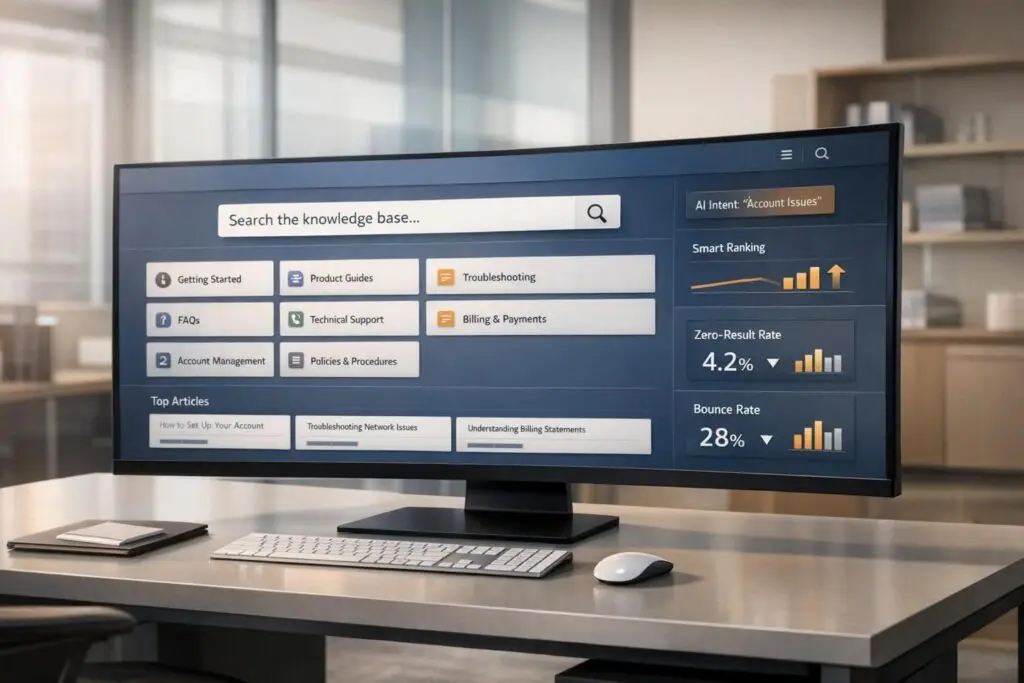
Your knowledge base search might be costing you more than you think. Users struggle to find answers, leading to irrelevant results and increased support tickets. This guide simplifies how to fix that by focusing on:
- Organized content: Use clear categories, tags, and templates to make articles easy to find.
- AI tools: Leverage intent recognition and natural language processing to match user queries with the right results.
- Search optimization: Add features like auto-suggestions, fuzzy matching, and internal links to improve accuracy.
- Performance tracking: Monitor metrics like zero-result rates and bounce rates to identify and fix issues.
Key takeaway: A clean, well-structured knowledge base combined with AI-driven search can reduce support costs, improve user satisfaction, and help users find answers faster. Start by organizing your content, optimizing for search, and using AI to enhance relevance.
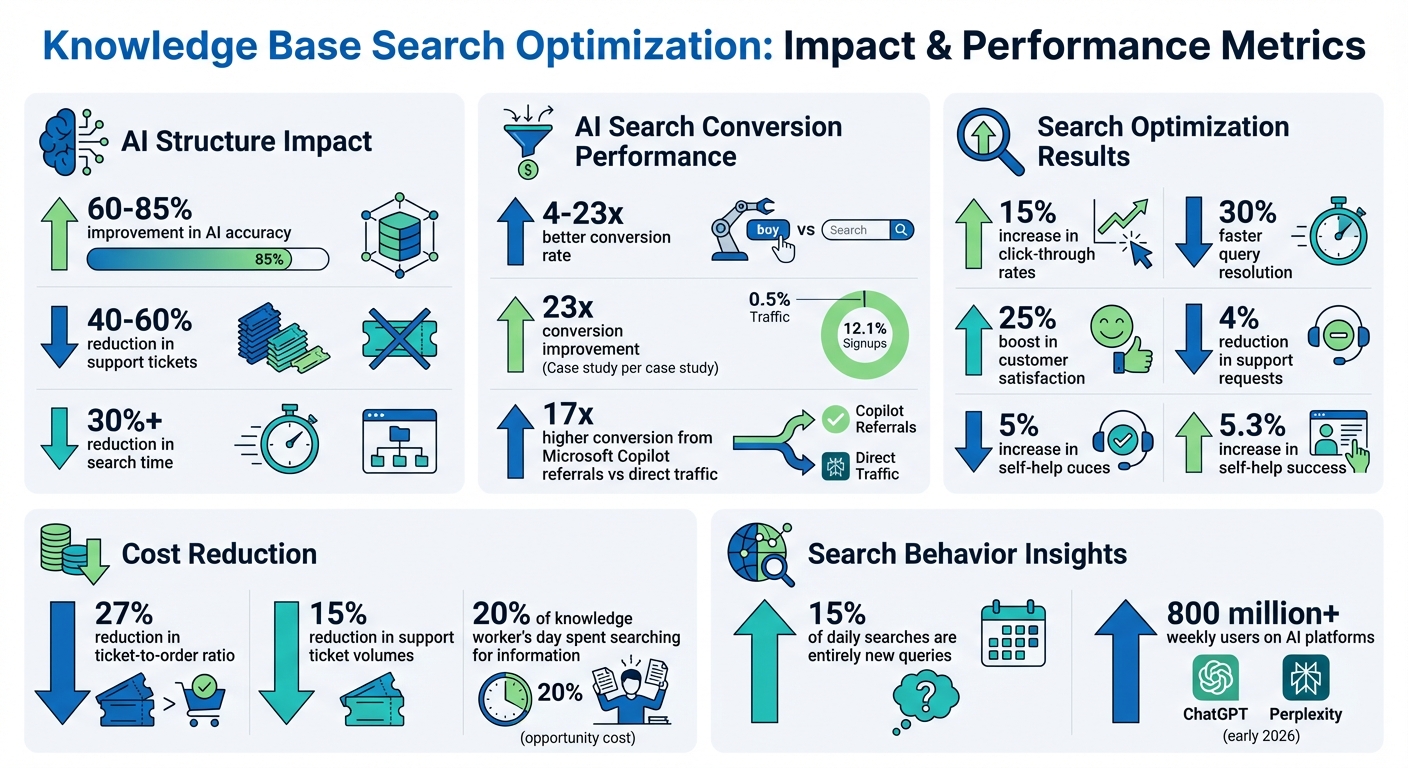
Knowledge Base Search Optimization: Key Statistics and Performance Metrics
How to optimize your knowledge base search
sbb-itb-e60d259
Structure Your Knowledge Base for Better Search
A messy knowledge base can wreck your search functionality. If your articles are scattered across unclear categories or hidden under confusing labels, even the best AI tools won’t save you. Search algorithms – whether traditional or AI-driven – depend on a clear structure to connect content with user queries. Without this, delivering accurate search results becomes a challenge.
Dana Hrušková from Product Fruits highlights that well-structured knowledge bases improve AI accuracy by 60% to 85% and can cut support tickets by 40% to 60% [3]. AI search engines work by breaking content into chunks and creating vector fingerprints. When content is neatly categorized and focused on specific topics, AI can retrieve the right information. However, misplaced articles or documents covering multiple topics confuse the system, leading to irrelevant results.
Let’s explore how to organize and build a knowledge base effectively.
Use Categories, Tags, and Standard Templates
Categories and tags act as essential search filters. To create a user-friendly experience, structure your content around 5–10 main categories with descriptive tags. This allows for faceted search, where users can refine results by criteria like product, audience, or content type [1].
Start by crafting broad, intuitive top-level categories that align with how users think about their problems. For example, terms like "Getting Started", "Troubleshooting", or "Billing & Payments" are far more user-friendly than internal jargon like "Product Diagnostics" [5]. Within these categories, add subcategories to group related content. Keep the hierarchy simple – no more than three levels deep (Category > Sub-category > Article) – to ensure users can quickly find what they need [4].
Tags add depth to your organization. Use labels that reflect user language, not internal team names. For example, tags like "End-user", "Developer", or "Admin" help users find relevant content. Similarly, tagging by content type – such as "How-To Guide", "FAQ", or "Troubleshooting" – makes filtering easier. Displaying result counts next to each tag also helps users gauge the relevance of their filters [1].
Templates improve readability and search accuracy. A consistent format, such as Problem > Cause > Solution for troubleshooting articles, helps users quickly find the information they need. It also makes it easier for search engines to index your content [4][5]. Avoid combining unrelated topics into a single article. Instead, focus each piece on solving one specific problem to improve search relevance [3].
Once your categories and tags are in place, navigation aids can further streamline the search experience.
Add Breadcrumbs and Hierarchical URLs
Breadcrumbs are essential for both users and search engines. A breadcrumb trail like "Home > Billing > Payment Methods > Adding a Credit Card" instantly shows users where they are and provides context for search engines [4]. This simple feature makes backtracking easy and enhances navigation.
Descriptive URLs boost search performance. Use keyword-rich slugs to improve both search engine rankings and AI comprehension. For example, a URL like /billing/payment-methods/adding-credit-card is far more effective than something generic. When linking to other articles, use descriptive anchor text like "Learn more about cloud storage security" instead of vague phrases like "click here" to provide additional context for search algorithms [6].
Ajay Chadha from PHPKB emphasizes:
"A well-designed hierarchy can help users find the information they need quickly and easily and can make it easier to maintain and update your content over time." [5]
Streamlined information architecture can cut search time by over 30% [4]. Considering that the average knowledge worker spends about 20% of their day searching for information [4], a well-organized system not only boosts user satisfaction but also reduces support costs.
Optimize Content for Search Results
A well-organized knowledge base is only as good as its language. If your content doesn’t speak in terms your customers understand, it’s likely to fall flat. Optimizing content for search not only improves the user experience but also reduces costs and enhances AI-powered support. With the rise of AI-driven search, this becomes even more essential. Liam Dunne, a growth marketer specializing in AI search, highlights that AI-referred traffic converts 4 to 23 times better than traditional search traffic [7]. For example, at Ahrefs, just 0.5% of visitors from AI search drove 12.1% of signups, converting 23 times better than organic search visitors [7]. Your support documentation contains exactly what AI systems crave: concise answers, technical details, and troubleshooting steps.
Research Keywords Based on User Intent
Dive into monthly search data to uncover how users phrase their queries, including common mistakes and overlooked topics. Most knowledge base platforms track search queries, including those that yield no results. These failed searches are goldmines for understanding how your customers articulate their problems.
It’s not just about what users are searching for, but why. For instance, someone typing "reset password" likely wants step-by-step instructions, while "password requirements" points to a need for policy details. This concept, known as intent alignment, ensures users get the right content, avoiding a mismatch where a tutorial seeker ends up on a product page [8]. Digital Applied emphasizes:
"Search volume alone is no longer sufficient… Target Zero Search Volume (ZSV) long-tail queries from Reddit, support logs, and Perplexity Related Questions" [8].
Adopt the "Golden Answer" format to increase AI citations. Place a concise 40-word answer directly after an H2 heading [8]. This approach boosts the likelihood of being cited by AI platforms like ChatGPT and Perplexity, which now cater to over 800 million weekly users as of early 2026 [8]. With 15% of daily searches being entirely new queries [8], optimizing for natural language variations is more important than ever.
Align keywords with the customer journey. Each keyword should reflect the user’s stage – whether they’re building awareness, considering options, or making a decision [8].
Enhance your search backend with fuzzy matching to account for typos and misspellings [1]. Features like autocomplete and "Did you mean" suggestions can guide users to the right content before they hit a dead end [1]. When no results are found, offer alternatives such as links to popular articles or direct support options [1].
Once your keywords are in place, use internal links to strengthen the connections between related content, making navigation easier for users and AI alike.
Add Internal Links and Related Articles
Internal links do more than connect pages – they clarify relationships and help search systems understand your content structure. In AI-driven search, these links act as signals, showing how your organization’s knowledge is organized [9]. Every link sends a message about which pages are connected and which ones hold authority.
Where you place these links matters. Links within explanatory text signal that the destination is essential, while links in footers or sidebars suggest optional resources [9]. WebTrek.io explains:
"Internal links graduate from navigation tools to interpretive language once a page sits inside an AI context window" [9].
Use descriptive anchor text to make your links more effective. Avoid generic phrases like "click here" or "learn more." Instead, use specific terms like "configure single sign-on settings" or "troubleshoot API authentication errors" [9]. Consistent anchor text helps both users and search engines associate key phrases with the right destinations. For example, repeatedly linking "API integration guide" to the same documentation reinforces its relevance.
Create a clear content hierarchy through directional linking. Foundational "pillar" pages should link to detailed guides, while those guides should circle back to the main concepts [9]. For instance, a "Security Overview" page might link to guides on "Two-Factor Authentication Setup" and "Password Policy Configuration", while those guides link back to the overview. This creates a "semantic cocoon", signaling topic expertise to search engines [8].
Don’t overdo it with links. Limit links to 2-3 per paragraph to avoid overwhelming users and confusing AI systems [9]. Articles with fewer than two internal links are less likely to be crawled frequently by bots, reducing their visibility in search results [7]. Use links strategically to clarify ambiguous terms, like linking "visibility" to a page on "AI search visibility", ensuring the correct context is indexed [9].
Finally, implement FAQPage schema using JSON-LD to help AI platforms like ChatGPT and Perplexity understand and cite your content [7]. Make sure all answers are visible in the static HTML source – avoid hiding them behind JavaScript-heavy elements, as many AI crawlers can’t process JavaScript [7]. The difference between good content and AI-friendly content often comes down to structure and schema [7].
Use AI to Improve Portal Search
With a solid, keyword-optimized knowledge base in place, AI can take search functionality to the next level by understanding user intent.
AI doesn’t just match keywords – it interprets what users actually mean, even with natural language queries. For instance, if someone searches "can’t access my account", AI identifies this as an authentication issue rather than focusing solely on the words themselves. Tools like BERT (Bidirectional Encoder Representations from Transformers) analyze entire sentences in context, allowing AI to grasp subtle differences in meaning based on surrounding text [11]. One global e-commerce company saw this in action when they introduced NLP-based intent detection into their support system in November 2024. The results? A 30% faster query resolution rate and a 25% boost in customer satisfaction, thanks to better categorization of inquiries like order tracking, returns, and product-related questions [12].
The benefits extend beyond customer service. AI-driven traffic has been shown to convert at rates 4 to 23 times higher than traditional organic search [7]. For example, at Ahrefs, visitors arriving via AI-enhanced search converted 23 times better than those from organic search, with just 0.5% of traffic accounting for 12.1% of total signups [7]. This success comes from AI’s ability to personalize results by factoring in user context, such as location, time of day, device type, and past searches [11].
JPMorganChase showcased the power of intent recognition in May 2025 by implementing an agentic LLM framework for their AI assistant. They expanded their taxonomy from 36 generic user intents to 278 specific ones using a technique called "Topic Gap Bridging." This improvement raised their topic coherence score from 0.266 to 0.575 [14]. By delivering content tailored to both the query and the user’s needs, they reduced support costs while increasing satisfaction.
Apply AI for Intent Recognition and Natural Language Processing
AI focuses on understanding the meaning behind queries rather than just matching words. Intent recognition identifies whether a user is looking for information, navigation, or completing a transaction [11]. Queries are classified across dimensions like question type (e.g., procedural, comparative), complexity, and user expertise [13].
Natural language processing (NLP) enhances this by using semantic analysis to understand how concepts relate to one another. Techniques like knowledge graphs and word embeddings transform words into mathematical representations that capture their meanings [11][12]. For example, a query like "reset credentials" might lead to an article titled "Password Recovery Procedures" because AI recognizes the conceptual connection.
"The future of search is about understanding people, not just information." – Jo Priest, SEO Scientist, Geeky Tech [11]
Contextual awareness further sharpens results by considering factors like location, time, device, and search history, ensuring users see the most relevant content [11]. Implementing AI-driven intent prediction can also lead to a 15% increase in click-through rates [10].
To make the most of AI, structure your knowledge base with clear entities and concise answers. Use the "Bottom Line Up Front" (BLUF) approach by summarizing key points in 2–3 sentences at the start of each article [7]. Additionally, employ FAQPage schema using JSON-LD to define questions and answers explicitly for AI crawlers, and ensure critical content is accessible in raw HTML to avoid JavaScript-related issues [7].
These capabilities naturally pave the way for auto-suggestions and smarter ranking, creating a more intuitive search experience for users.
Enable AI Auto-Suggestions and Smart Ranking
AI can predict user needs and rank results based on behavior patterns and content quality. Auto-suggestions begin as soon as users focus on the search bar, offering popular queries or recent searches even before typing starts [1]. As users type, suggestions adapt, combining direct content matches, popular queries, and curated FAQs [1].
Smart ranking involves a two-step process. First, a standard keyword-based algorithm like BM25 identifies potential matches. Then, an AI-powered re-ranking process refines these results using deep learning to better understand intent and context [15][2]. This hybrid approach balances exact terminology with conceptual relevance, often using a weighted system – typically 70% semantic relevance and 30% keyword matching.
The Azure Customer Support Experiences Team demonstrated this approach between 2020 and March 2023 by integrating AI-powered auto-suggestions across 35 Azure products. Using Azure Cognitive Search and Semantic Search, they reduced support requests by 4% and increased Self-Help Success by 5.3% [16].
"The task of understanding our customers’ intent and providing the right solution can be challenging… we’re able to overcome this obstacle through the Autosuggest feature in the Azure portal… which presents us with suggestions to capture the customer’s true intent accurately." – Vinay Kumar, Microsoft Principal Program Manager, Commerce Engineering Operations [16]
Some systems also use "Adapters" – lightweight, customer-specific layers added to a universal AI model – to enable tailored search experiences without retraining the entire model [2]. Regularly analyzing and fine-tuning ranking thresholds can help filter out irrelevant results [16]. Features like fuzzy matching, which catches typos and offers "Did you mean?" prompts [1], and training techniques like Inverse Propensity Scoring based on click data [2], ensure the search system evolves with user behavior, delivering better results over time.
Monitor and Improve Search Performance
Once you’ve optimized your content structure and incorporated AI tools, the next step is ongoing monitoring to keep your search functionality effective. Even the best search systems can lose their edge without regular upkeep. User behavior changes, new products are introduced, and outdated content lingers, creating gaps between search queries and the available results. By keeping an eye on key metrics, you can pinpoint where your search system is falling short and address those issues quickly. These monitoring efforts work hand-in-hand with earlier strategies, ensuring your search engine remains efficient over time.
Start by focusing on four essential metrics: Search Success Rate (how often searches return results), Click-Through Rate (CTR) (how often users click on results), Zero-Result Rate (searches that yield no results), and Bounce Rate (when users see results but take no action) [17]. Another useful metric is Ticket Deflection, which tracks how many searches prevent users from opening support tickets. Your goal? Boost success rates, CTR, and deflection while cutting down on zero-result and high-bounce searches.
Track Search Data and Fix Zero-Result Queries
If you’re not actively tracking search data, zero-result queries can slip through the cracks. Generate weekly reports highlighting the most common searches, failed queries, and cases where users searched but still reached out to support [18]. Instead of analyzing each failed query individually, group them into broader categories like "billing", "login issues", or "integrations." This approach helps you identify trends and prioritize fixes based on their overall impact.
To rank your backlog of issues, use this formula: Impact score = (4-week query volume) × (search failure rate) ÷ (effort weight) [18]. For failure rates, assign a value of 1.0 to zero-result queries, 0.7 to low CTR searches, and 0.4 to high-bounce searches [18]. This calculation helps you identify which problems are causing the most frustration relative to the effort required to fix them.
"If you don’t know what people searched for, what they clicked, and where they gave up, you can’t prioritize the right fixes." – fitgap [18]
Once you’ve identified the most pressing issues, take targeted action. For zero-result queries, create a concise article that addresses the user’s goal, outlines the steps, and describes the expected outcome. If an article exists but isn’t appearing in search results, revise the title to use terms your customers are likely to search for and include "also known as" phrasing in the introduction. If users are finding the article but still bouncing or submitting tickets, consider adding a clear summary or a troubleshooting section at the top [18].
High bounce rates are a sign of intent mismatches. A bounce happens when users see results but don’t engage – they might clear the search or close the page [17]. If a specific keyword has a high bounce rate, it’s likely that the titles or descriptions don’t align with what users are looking for. Fix this by updating the meta-description or the article’s opening paragraph to better match user expectations [17]. As Document360 advises:
"Aim to keep No result found searches as low as possible to improve the overall search success rate" [17].
After resolving these issues, refresh your search index to ensure users see the most up-to-date results.
Update Content and Refresh the Search Index
Outdated content and stale search indexes make it harder for users to find what they need. To avoid this, ensure that new or updated articles are indexed immediately. Address any API delays and make sure all file types – like PDFs and Word documents – are included in the index [19]. Using metadata tags like article:published_time and article:modified_time (from Open Graph or Schema.org) can help your search engine prioritize recent content [19].
Providing a sitemap.xml file is another way to help crawlers quickly find and index new pages [19]. For static websites, web crawlers are usually sufficient. For dynamic sites with frequently changing content, APIs are a better option to keep the index current [19]. Additionally, enriching your search index with extra data – like product ratings or inventory levels – can improve the relevance and ranking of results [19].
"A snappy search is a successful search." – Jon Silvers, Director of Digital Marketing, Algolia [19]
Regularly update your synonym dictionaries based on search analytics so users can find content even if they don’t use the exact technical terms [1]. Enable features like fuzzy matching and stemming (so "run" matches "running") to account for typos and variations [1]. To improve indexing, mark navigational and footer content with specific HTML tags so search engines focus on the main content [19].
Set a weekly routine: export logs, group queries into intent categories, and update 5–10 articles based on the most pressing issues [18]. This consistent effort ensures your search system stays responsive to user needs.
Conclusion
Let’s recap the key takeaways to solidify your next steps.
Creating an effective portal search requires careful organization, smart technology, and regular updates. By structuring your knowledge base with clear categories, tags, and semantic HTML, you set the stage for an efficient experience for both users and AI systems. Adding AI-driven features like intent recognition and smart ranking takes search beyond simple keyword matching, enabling it to understand what users are truly looking for. Keeping an eye on search data and addressing zero-result queries ensures your system stays aligned with actual user needs.
The benefits go far beyond just making things easier for users. A well-structured knowledge base, combined with AI insights, can significantly reduce operational costs and improve conversion rates. For example, AI-powered knowledge bases can lower the ticket-to-order ratio by up to 27%, while advanced search features can cut support ticket volumes by as much as 15% [21]. Faster answers not only save money but also enhance user satisfaction. Visitors using AI search tools are up to 23 times more likely to convert compared to traditional organic search users, and referrals from AI assistants like Microsoft Copilot convert 17 times more often than direct traffic [7].
As Liam Dunne from Discovered Labs explains:
"The technical gap between ‘well-written content’ and ‘AI-citable content’ comes down to structure, schema, and systematic validation" [7].
The distinction between good content and AI-compatible content lies in its structure, consistent use of schema, and routine updates. Your knowledge base acts as the core resource for your AI search tools [20]. Keeping it clean, up-to-date, and well-organized not only streamlines support but also reduces costs and improves user satisfaction, freeing your team to focus on more complex challenges.
FAQs
What should I fix first if my portal search isn’t working?
To get started, confirm that the search index is set up correctly and that the query is configured to pull results from your knowledge base. If you’re using an AI-powered search, double-check that the AI components and algorithms are properly integrated. Also, take a close look at the design of the search experience – things like filters, facets, and autocomplete. These elements might be causing performance issues or confusing users, so addressing them could make a big difference.
How can I measure if knowledge base search is improving?
To gauge how well your knowledge base search is performing, keep an eye on a few key metrics. Start with user engagement, search success rates, and the drop in support tickets – these give a clear picture of how effectively users are finding what they need.
Dig deeper by analyzing search data, like click-through rates and the accuracy of auto-suggestions. This data can reveal whether users are landing on relevant content quickly or struggling to find answers.
By regularly reviewing these metrics, you can spot opportunities to fine-tune the system, ensuring users have a smoother experience and access the right information faster.
When should I use AI search instead of keyword search?
When it comes to improving how users find information – especially when they’re using complex or conversational language – AI search can be a game-changer. Unlike traditional keyword-based search, AI search goes beyond matching exact words. It focuses on understanding what users mean, recognizing synonyms, and picking up on subtle contextual clues.
This makes AI search perfect for knowledge bases or platforms where users often phrase questions in unique ways. Features like intent recognition, smart auto-suggestions, and relevance ranking work together to deliver more accurate, helpful results. The result? A smoother, more intuitive search experience that minimizes frustration.