
Your knowledge base (KB) is only as useful as it is accurate. Without a clear governance process, outdated content can lead to incorrect advice, poor customer experiences, and AI errors. To prevent this, focus on four key areas:
- Ownership: Assign specific individuals (not teams) to manage content updates and accuracy.
- Reviews: Set regular review schedules based on the risk level of content (e.g., 30–60 days for high-risk topics like billing or security).
- Expiry: Use automated alerts to flag outdated articles for updates or removal.
- Archiving: Retire irrelevant content while keeping it accessible for internal use or compliance.
A structured approach to KB governance reduces costs, improves productivity, and ensures both agents and AI systems rely on accurate, up-to-date information. Start small by piloting these steps with high-risk articles, then scale using automation tools like Jira or AI-driven platforms to streamline processes.
Good Knowledge Starts with Good Governance | 5 Stages + 6 Pillars Explained
sbb-itb-e60d259
Assigning Knowledge Base Ownership Roles
When no one is clearly responsible for a knowledge base (KB), content updates often stall until something goes wrong. Many organizations have governance structures for knowledge management, but they falter when ownership is treated as a formality rather than an active responsibility [1].
"Ownership cannot be ceremonial. Assign clear content owners by domain and by workflow, with measurable SLAs for updates and reviews." – Dhruv Kapadia, Coworker [1]
A tiered approach to ownership works best, with three key roles. At the top, the Knowledge Management Process Owner – typically an IT manager, Operations manager, or Enablement manager – oversees the entire process, ensuring it aligns with organizational needs and has the necessary resources [5][6]. Next, the Knowledge Manager takes charge of daily operations, including implementing processes, training contributors, and tracking performance [5]. Lastly, Knowledge Champions act as team-level leads, approving new content and promoting KB use within their specific areas [5][6].
What KB Owners Do
KB owners are tasked with keeping content accurate, approving updates, and ensuring articles align with business objectives. They manage issue lists to prioritize updates or new content creation, maintaining consistency across the knowledge base. This role demands strong project management skills, technical know-how with cloud-based CMS and AI search tools, and the ability to analyze usage data to ensure accountability [4][6].
Avoid assigning responsibility to entire departments. For example, if "the support team" owns an article, accountability can become unclear. Instead, designate a specific individual to oversee the content. Even if this person delegates the writing, they remain responsible for ensuring it stays current.
Working with Contributors and Subject Matter Experts
Contributors – such as support agents and other staff – play a crucial role in identifying gaps. They often notice missing or outdated documentation during their daily interactions and can suggest updates or new topics while details are still fresh. Subject Matter Experts (SMEs) step in to validate the technical accuracy of content, especially for high-risk or complex topics like security, billing, or legal compliance [1].
When contributors flag an issue, the KB owner steps in to prioritize it, assign tasks, draft content, and then have it reviewed by an SME before final approval. In some cases, KB owners may interview experts or observe workflows to document knowledge that isn’t yet formalized [6]. To maintain quality, use a tiered review process: low-risk articles might only need contributor updates, while high-risk content requires SME validation [1].
A strong accountability framework is essential to support this collaboration, as outlined in the next section.
Creating Accountability Systems
Accountability often breaks down when tasks are buried in email threads or chat messages. To avoid this, use a ticketing system like Jira to create a centralized triage queue where tasks are visible, assignable, and trackable [2]. Maintain a master index of all articles, including ownership details, risk levels, and review schedules [2].
Set clear Service Level Agreements (SLAs) based on content type. For instance:
- High-risk policy changes: 2 business days
- Standard how-to guides: 5 business days [2]
Each article should also include an accuracy header that lists the owner’s name, the last review date, the next review date, and any upstream sources [2].
| Review Frequency | Content Type | Risk Tier |
|---|---|---|
| 30–60 Days | Policy, Billing, Security, Legal | High |
| 90 Days | Core Product Workflows, Setup Guides | Medium |
| 180 Days | Evergreen Concepts, General FAQs | Low |
Incorporate KB updates into your product release checklist to ensure documentation is part of the "Definition of Done" for any merged code [7][8]. Assign a rotating weekly triage lead to handle incoming requests and alerts, preventing bottlenecks [1]. Additionally, make it a practice for new hires to update one outdated article during onboarding. This "knowledge rescue" task introduces them to the KB system while encouraging a culture of continuous improvement [1].
These steps create a structured and efficient review process, ensuring the knowledge base remains accurate and relevant.
Setting Up Review Schedules
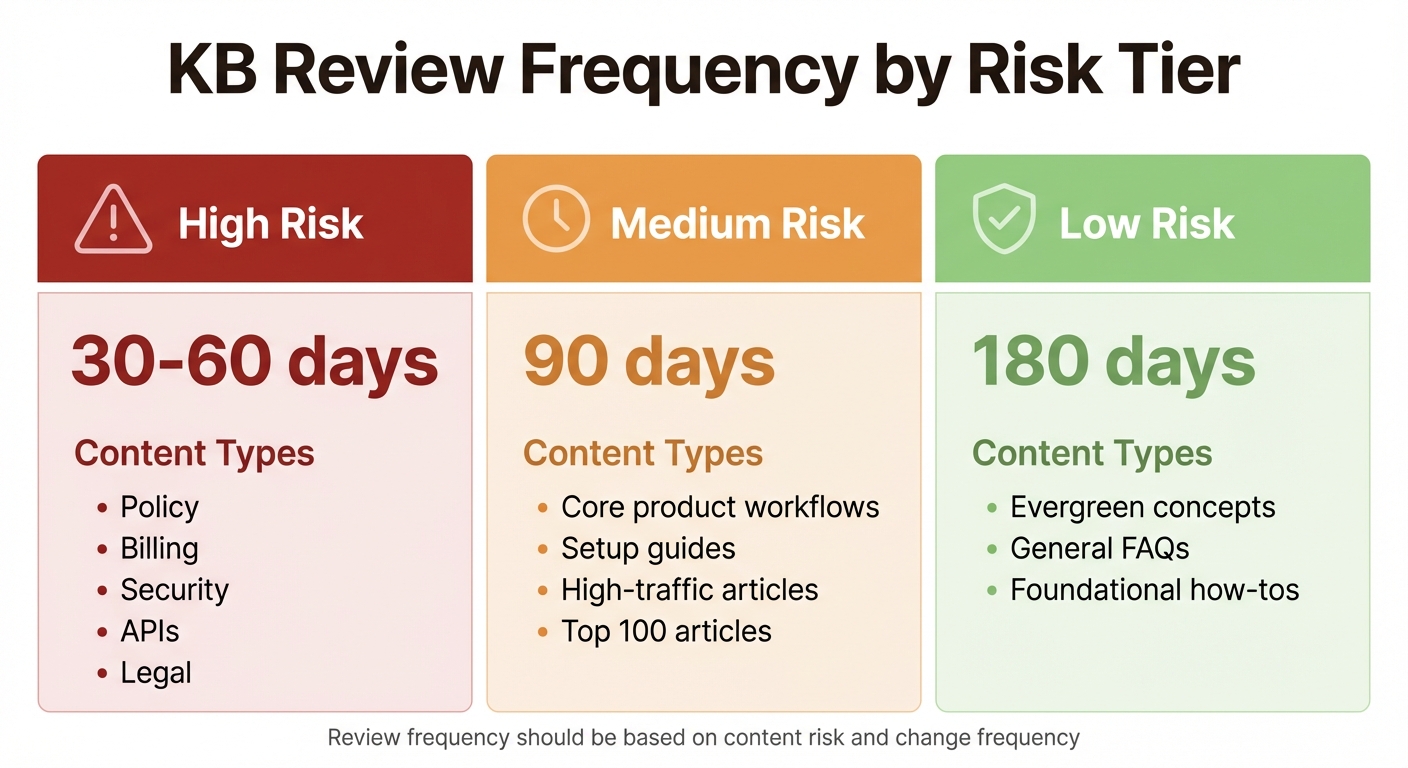
Knowledge Base Review Frequency by Content Risk Level
Keeping your knowledge base (KB) accurate is essential for smooth support operations, and a well-structured review schedule is key to achieving this. Instead of relying on fixed dates, review schedules should be triggered by content changes. Fixed-date schedules often lead to burnout and missed updates, while change-driven reviews ensure critical updates are addressed as they happen [2].
"Review cadences fail when they are calendar-driven instead of change-driven." – fitgap [2]
The best strategy combines automated change detection as the primary trigger with calendar-based reminders as a backup. Tools like Visualping can monitor changes in pricing, release notes, and policies, immediately flagging the need for a review [2]. At the same time, calendar-based prompts ensure content that hasn’t been updated in 90 or 180 days doesn’t fall through the cracks.
Determining Review Frequency
The frequency of reviews should depend on the level of risk associated with the content. For example:
- High-risk content (e.g., policy, billing, security, APIs) should be reviewed every 30–60 days. Errors in these areas could harm revenue, compliance, or customer trust [2][3].
- Medium-risk content (e.g., core workflows, high-traffic articles) benefits from reviews every 90 days.
- Low-risk content (e.g., evergreen topics like foundational concepts) can be reviewed every 180 days [2].
| Risk Tier | Content Type | Review Frequency |
|---|---|---|
| High Risk | Policy, Billing, Security, APIs | 30–60 days |
| Medium Risk | Core workflows, Top 100 articles | 90 days |
| Low Risk | Evergreen concepts, General how-tos | 180 days |
Content that changes frequently, like API endpoints or pricing details, should have shorter review cycles. Meanwhile, stable guides that rarely change can have longer intervals. This tiered approach ensures your team focuses on what matters most, avoiding wasted effort while catching crucial updates before they cause problems.
Automating Review Reminders
Manual reminders are inefficient and prone to errors. Instead, use automated systems to schedule review tasks and track their progress. Centralized tools like Jira can help manage these tasks with built-in SLAs [2]. Escalation workflows ensure no review deadlines are missed, even as your KB scales.
For AI-driven platforms like Supportbench, automated workflows are invaluable. They keep governance processes running smoothly, even when managing hundreds or thousands of articles [2][3].
"Static documentation drifts within weeks; automation keeps answers accurate." – Inkeep [9]
Combine real-time alerts (via webhooks) with scheduled syncs for routine maintenance [9]. This ensures urgent changes are addressed immediately, while regular updates stay on track. Once reminders are in place, the focus shifts to ensuring the quality of each review.
Checking Quality During Reviews
Every review should assess accuracy, relevance, and readability. Start by confirming the article reflects current product behavior, pricing, and policies. Look for outdated screenshots, broken links, or references to features that no longer exist. Cross-check content with upstream sources like release notes, internal wikis, or policy documents to ensure alignment [2][3].
To standardize quality checks, use a Knowledge Freshness Index (KFI). This scoring system evaluates articles based on:
- Recency (35%)
- Correctness (25%)
- Coverage (20%)
- Usage (10%)
- Localization parity (10%) [3]
Teams aiming for high standards should target an overall KFI of 85+ and 95+ for high-impact content [3]. Articles scoring below these thresholds should be flagged for immediate updates or escalated to subject matter experts.
Make sure every update is documented with revision notes that detail what changed, why it changed, and the source that prompted the review [2]. This creates an audit trail, helping future reviewers understand the article’s history and preventing conflicting updates. Additionally, run "contradiction reports" to identify and resolve inconsistencies across different pages [2].
Managing Content Expiry
Keeping content up-to-date is essential. Without a clear process for retiring or updating old articles, outdated information can mislead users and damage trust in your knowledge base. The challenge lies in finding a balance: you can’t manually monitor every piece of content, but letting outdated material linger can harm your self-service outcomes.
"An outdated knowledge base is worse than no knowledge base. A customer who follows outdated steps and breaks something has a much worse experience than one who finds nothing." – Wilson Wilson, Founder, Ferndesk [7]
The solution? Set risk-based expiration dates based on the importance of the content. For example:
- High-risk content (e.g., billing, policies, or security) should expire every 30–60 days, prompting a review or retirement.
- Medium-risk content (e.g., workflows or how-tos) can be reviewed every 90 days.
- Evergreen content might last up to 180 days before needing attention [2][10].
Traffic is another key factor. Articles with high traffic often require quarterly checks, while low-traffic reference pieces might need only an annual review [10]. If an article has no views for 90 days and addresses outdated features, consider archiving or deleting it [7].
When Content Should Expire
Tie expiration dates to changes in upstream processes and usage metrics. For instance, if your billing policy changes on April 1, 2026, any related articles should expire that same day, ensuring outdated information doesn’t linger.
Usage metrics also play a role. Export articles with minimal views over the past quarter and evaluate them for removal to declutter your knowledge base and improve search results [7]. Articles with screenshots should be prioritized for review since frequent UI updates can quickly render visuals obsolete [7]. When retiring content, decide whether to archive it or delete it outright, and always set up redirects to preserve SEO and user experience [3][7].
Automating Expiry Notifications
To stay on top of content reviews, automate alerts based on defined expiration triggers. Manual tracking becomes impractical as your content library grows. Instead, route automated notifications to a centralized ticketing system like Jira, with clear deadlines – e.g., 2 days for policy-related updates and 5 days for general how-tos [2]. Avoid sending these alerts to personal inboxes where they might get lost.
AI tools like Supportbench can streamline this process. By monitoring upstream signals such as Git commits, release notes, and API updates, these platforms can flag affected articles and suggest updates or archival actions [11]. For example, one implementation reduced the Mean Time to Update (MTTU) from 9 days to just 6 hours [11]. Automated reminders can also be set to trigger 48 hours before a review is due, escalating to team leads if deadlines are missed [11].
Avoiding Knowledge Gaps
Once your expiry alerts are in place, focus on preventing gaps in your knowledge base. Ensure that every retired article is replaced with updated content. Use quality gates to block product releases if essential documentation isn’t current [3]. Regularly review search analytics to identify queries that return no results – these highlight missing content that users need [7]. Additionally, check weekly top support tickets; if a recurring question isn’t addressed by an existing article, prioritize creating one [7].
A Knowledge Freshness Index (KFI) can help maintain content quality. Automate tasks when a document’s health score drops below a set threshold – 85 for most articles and 95 for high-impact ones [3]. For multilingual content, pause AI-generated answers in specific languages if the source document has been updated but the translation hasn’t, preventing inaccurate responses [3].
Properly managing content expiry not only avoids misinformation but also ensures your knowledge base remains a reliable resource for users while streamlining long-term content maintenance.
Creating Archiving Workflows
Archiving ensures outdated content remains accessible for internal use while keeping it hidden from customer searches. Crafting an effective archiving workflow involves deciding whether to archive or delete, organizing archived materials for easy access, and leveraging AI to make smarter decisions about content management.
When to Archive vs. Delete
Deciding whether to archive or delete content depends on its future value and potential risks. Content should be archived if it holds historical importance, supports legacy customers, or satisfies audit and compliance requirements [12]. For instance, if some customers are still using Version 1.0 of your software, the related documentation must stay accessible, even after launching Version 2.0. Similarly, materials like policy documents or billing procedures might need to be retained for legal reasons.
On the other hand, content should be deleted if it poses legal risks, creates compliance issues, duplicates existing information, or contains harmful inaccuracies [12]. For example, outdated security protocol articles that could endanger users are better off removed. Usage data can also guide decisions – content with a sharp drop in page views or search appearances is often ready for archiving [12]. When archiving, use 301 redirects to guide users to updated versions or include clear banners on legacy pages, such as:
"This documentation covers Version 1.0, which is no longer supported. Click here for the latest information on Version 2.0" [12].
"Knowing when to archive knowledge base pages is as crucial as knowing when to create them. Outdated information doesn’t merely take up space. It actively undermines trust in your knowledge management system." – Vikas Tiwari, B2B Marketing Professional, AllyMatter [12]
Organizing Archived Content
Proper organization is key to ensuring archived content remains useful. Start with metadata tagging. Each archived piece should include details like its original publication date, last update date, archival date, reason for archiving, and links to replacement documents [12]. This makes it easier to retrieve content for audits or legacy support.
Create a dedicated "Archive" section within your knowledge base and establish consistent tagging standards. Implement vector tagging based on product area, audience type, or lifecycle stage to keep archived content searchable without interfering with active customer results [13][3]. For industries with strict regulations, retain original metadata and formatting to prove when and by whom the content was created. This is especially important for meeting FOIA and NARA compliance requirements [14].
Using AI for Archival Decisions
AI tools can significantly improve the efficiency of archiving workflows by automating decision-making processes. Tools like Supportbench can identify content ready for archiving by spotting contradictions between documents, outdated terminology (e.g., "deprecated" or "sunset"), and patterns of user abandonment [12]. AI can also monitor upstream sources – such as pricing pages, release notes, or API documentation – and flag articles that need review [2].
Set up keyword triggers to automatically flag content with phrases like "breaking change" or "no longer supported" [2]. AI can also assign low freshness scores to outdated content, prompting archival reviews. This approach reduces "review fatigue", where content owners might approve unchanged pages without proper evaluation. By combining AI-driven triggers with automated review systems, you ensure that content updates are purposeful and justified [3].
A well-executed archiving strategy strengthens your knowledge base governance by keeping outdated information under control and ensuring only relevant content remains visible.
Building and Monitoring Your Governance Process
Think of each article in your knowledge base (KB) as its own little system – complete with an assigned owner, regular review dates, triggers for updates, and a clear decision log. To keep governance running smoothly, centralize everything – ownership, review schedules, expiry dates, and archiving – into a single KB index.
Connecting All Governance Components
Start by creating a centralized KB index. This becomes your go-to resource, listing every article along with its owner, risk level, review deadlines, and any upstream URLs that need monitoring for changes [2]. You can use a spreadsheet or a Confluence table to manage this. Bring all governance elements – like change-triggered reviews, routine review schedules, and expiry alerts – into one triage system. Tools like Jira can help you manage this with defined service-level agreements (SLAs). For example, you might set SLAs of 2 business days for policy updates and 5 business days for how-to guides [2]. Automation tools such as Zapier can also simplify the process by automatically creating "review needed" tickets when articles hit their review dates.
To ensure transparency, include an accuracy header in your KB index that shows ownership and review status at a glance. Automated change detection can trigger reviews, shifting your focus from calendar-driven reviews to change-driven governance. This approach helps avoid "review fatigue", where content might get rubber-stamped without proper evaluation.
Measuring Governance Performance
Once your governance system is up and running, it’s important to measure its effectiveness. Use a mix of operational metrics and business impact indicators to assess performance. For operational metrics, track SLA compliance (how quickly owners respond to review triggers) and overdue reviews by risk tier [2]. On the business side, look at how KB quality impacts customer outcomes. Research shows that organizations with strong knowledge management practices can cut support costs by 50% and resolve customer issues 70% faster than those without structured documentation [8].
Metrics like Average Handle Time (AHT) can reveal whether improved KB content is helping agents respond more quickly. Self-serve deflection rates can show whether customers are finding and using the KB effectively. In fact, 91% of customers say they would use a knowledge base if it meets their needs [8].
| Metric Category | Specific Metric | Purpose |
|---|---|---|
| Operational | SLA Compliance | Tracks how quickly owners respond to review triggers [2] |
| Operational | Overdue Reviews | Highlights gaps in governance schedules by risk tier [2] |
| Business Impact | Average Handle Time (AHT) | Measures whether accurate KB content speeds up agent responses [2] |
| Business Impact | Self-Serve Deflection | Assesses whether customers trust and rely on the KB [2] |
Scaling Your Governance Process
As your organization grows, manually tracking governance tasks can become overwhelming. Start small by piloting the process with about 20 high-risk articles. Assign ownership, set review schedules, and monitor how changes unfold in real time [2]. This pilot phase will help you fine-tune your approach before rolling it out on a larger scale. To minimize unnecessary disruptions, establish a rulebook for automated change detection. For example, routine updates like copyright changes shouldn’t trigger a full review [2].
AI-powered platforms like Supportbench can help you scale efficiently. These tools automate workflows for creating and updating articles, analyze search data to identify gaps in your KB, and tailor content delivery to specific user roles [15]. By 2025, organizations using AI for knowledge management are expected to improve operational efficiency by 25% compared to those relying on traditional methods [8]. AI platforms also ensure consistent taxonomy, maintain audit trails, and speed up review cycles – shrinking them from days to just hours as your KB expands. These strategies make sure your governance process grows in step with your organization.
Conclusion
Building a reliable knowledge base doesn’t happen by accident – it’s the result of defined ownership, responsive review processes, structured expiry policies, and careful archiving. These steps ensure your content stays relevant and avoids becoming outdated or misleading. Ownership assigns accountability and prevents content from being neglected [2]. Reviews that respond to real-world changes keep your knowledge base aligned with current needs, avoiding unnecessary bureaucratic steps [2]. Expiry policies act as a safety net for overlooked content, while archiving removes outdated materials before they cause confusion – especially for AI systems, which can’t distinguish old information from new [16]. Together, these practices create a governance process that supports efficiency and scalability.
Strong knowledge management practices can deliver measurable results, like cutting support costs by 50% and speeding up issue resolution by 70% [8]. By 2025, companies leveraging AI for their knowledge management could see a 25% boost in operational efficiency compared to those using traditional methods [8]. To achieve these outcomes, it’s essential to focus on consistency, automation, and continuous monitoring.
"Automation is only as good as the knowledge it sits on." – Enjo.ai [16]
Start small by improving key articles, automating review triggers with tools like Zapier or Jira, and keeping an eye on indicators like increased "zero result" searches [2][13]. As your knowledge base expands, lean on smarter workflows and AI-driven decision-making rather than adding more staff. By 2026, a well-governed knowledge base will be more than just a support tool – it will serve as the foundation for cost-effective, AI-driven customer support operations [16]. This approach ensures your business remains efficient and future-ready.
FAQs
How do I choose the right owner for each KB article?
Assigning responsibility for keeping an article accurate and up-to-date is crucial. Ownership Groups – linked to specific teams or departments – are a great way to ensure transparency and accountability. These groups should include subject matter experts or individuals with authority in their field, as they are best equipped to conduct regular reviews and updates. To keep everything running smoothly, knowledge administrators should manage these assignments, ensuring responsibilities are clear and governance is effective.
What should trigger a KB review besides a calendar date?
Keeping your knowledge base accurate and relevant means reviewing it whenever something changes. This could include policy updates, UI label changes, pricing adjustments, or the addition of new product features. To stay ahead, monitor upstream sources and set alerts for any updates. This approach keeps your content fresh and reliable without depending only on fixed review schedules.
When should an article be archived instead of deleted?
Archiving an article is a better choice than deleting it when the content is outdated or no longer relevant but could still serve a purpose in the future. Archiving keeps the material accessible for records or potential reuse, whereas deletion erases it permanently. For instance, content that has become obsolete due to policy updates or product changes can be archived to aid in audits or offer historical context.
Related Blog Posts
- How do you keep your knowledge base from becoming outdated and ignored?
- How do you manage knowledge governance (ownership, review cycles, and “KB debt”)?
- How do you run a content review process for KB articles (owners + SLAs + audits)?
- Knowledge Governance: Keeping Your KB from Becoming a Dumpster Fire