
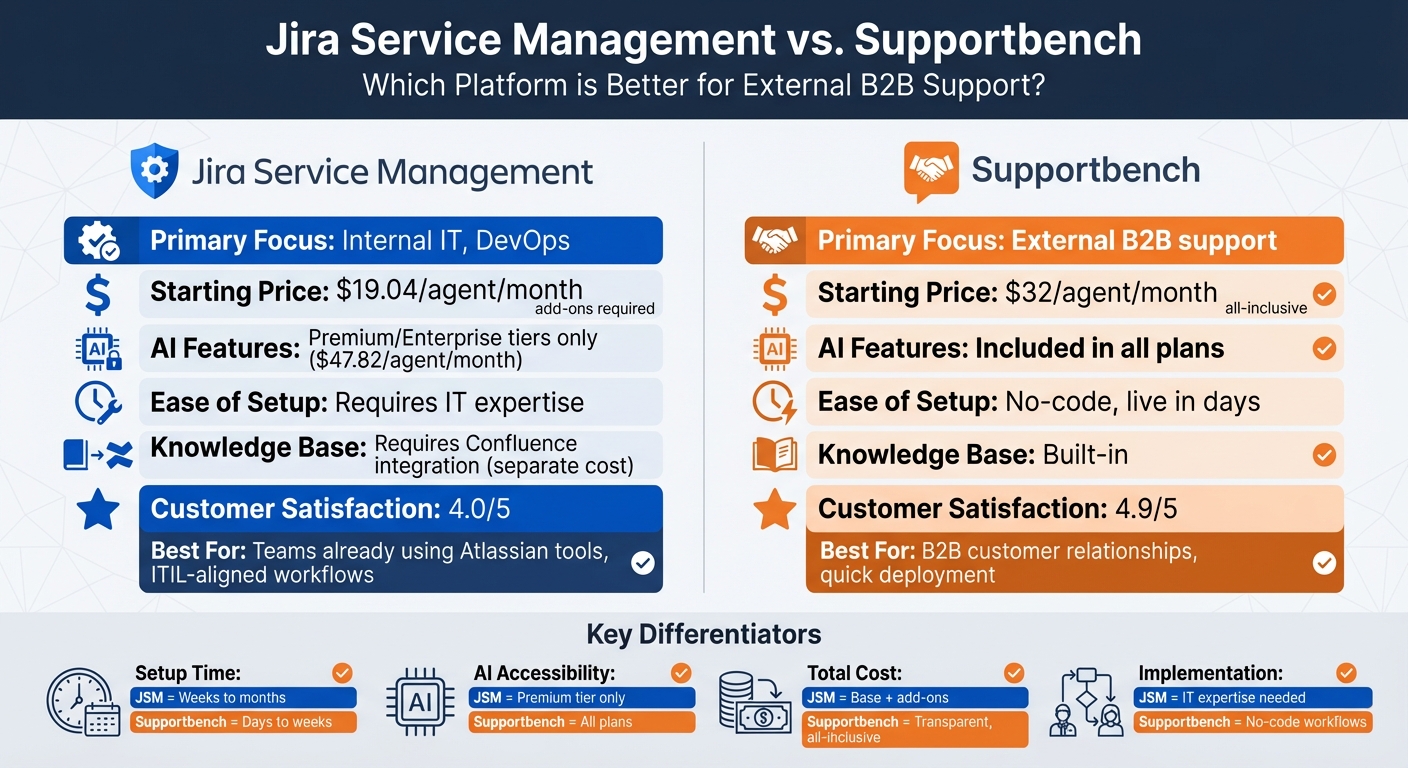
When deciding between Jira Service Management (JSM) and Supportbench for external B2B customer support, the choice largely depends on your team’s needs and priorities. Here’s a quick breakdown:
- Jira Service Management: Best for teams already using Atlassian tools or managing internal IT workflows. It offers strong ITIL-aligned features and integrates well with Jira Software and Confluence. However, its external support capabilities are limited, and advanced AI features require costly upgrades to Premium ($47.82/agent/month) or Enterprise tiers.
- Supportbench: Designed specifically as a B2B helpdesk for external support. It focuses on long-term customer relationships, offers built-in AI tools (included at $32/agent/month), and simplifies setup with no-code workflows. It provides dynamic SLA management and consolidated customer views, making it ideal for teams prioritizing client success over IT operations.
Quick Comparison
| Criteria | Jira Service Management | Supportbench |
|---|---|---|
| Primary Focus | Internal IT, DevOps | External B2B support |
| AI Features | Premium/Enterprise tiers only | Included in all plans |
| Ease of Setup | Requires IT expertise | No-code, live in days |
| Pricing | Starts at $19.04/agent/month, add-ons required | $32/agent/month, all-inclusive |
| Knowledge Base | Requires Confluence integration | Built-in |
| Customer Satisfaction | 4.0/5 | 4.9/5 |
Key Takeaway
For external B2B support, Supportbench offers more tailored features, simpler setup, and predictable pricing. If your team prioritizes IT workflows or already uses Atlassian tools, JSM may be a better fit, but expect higher costs and increased setup complexity.
Jira Service Management vs Supportbench: Feature and Pricing Comparison for B2B Support
Platform Overview: Jira Service Management vs. Supportbench
Jira Service Management: Core Features
Jira Service Management (JSM) is designed to support IT service desks, DevOps teams, and enterprise service management, aligning with ITIL standards. Its strength lies in handling structured workflows like incident, change, and problem management – key processes for technical teams working in ITIL-compliant setups. One of its standout features is its seamless integration with the Atlassian ecosystem, connecting tools like Jira Software and Confluence.
In September 2025, Atlassian introduced a Customer Service Management app aimed at external support teams. Wayne Tombo, Atlassian’s Global Head of Customer Support and Services, highlighted a dramatic improvement after its implementation, stating that ticket resolution times dropped from 8 days to just 9 minutes, along with a 6-point boost in CSAT scores. Additionally, the platform now incorporates AI features through Atlassian Intelligence, though these advanced capabilities are typically locked behind Premium or Enterprise tiers, starting at approximately $47.82 per agent per month.
JSM’s approach to external support reflects its IT-focused roots. For example, its "Teamwork Graph" connects data across Atlassian tools, which is highly beneficial for technical teams but could add unnecessary complexity for external support teams. Matt Ingersole, CIO at Leadership Circle, shared how JSM’s AI capabilities reshaped their customer support process, enabling his team to assist customers in 21 different languages.
While JSM has expanded its scope, its IT-centric design may not be the best fit for external B2B support, where Supportbench takes a more tailored approach.
Supportbench: Strengths
Supportbench is purpose-built for external B2B support, focusing on relationship management and the long-term interactions that define B2B customer support. It consolidates multiple communication channels into a single workspace, making it well-suited for managing complex, relationship-driven support scenarios.
Unlike JSM, Supportbench includes AI capabilities in its standard pricing of $32 per agent per month (billed annually). These features include ticket summarization, sentiment analysis, and AI-driven knowledge base article creation – tools that JSM restricts to its higher pricing tiers. Eric Klimuk, Founder and CTO of Supportbench, explained, "Supportbench doesn’t try to be everything for everyone. It’s focused on helping support teams deliver faster responses… at a predictable cost". The platform also boasts a 4.4/5 satisfaction rating in the help desk category, compared to JSM’s 4.0/5.
Supportbench’s no-code design allows support teams to configure workflows, SLAs, and automations without needing IT administrators. This flexibility is critical for B2B teams that must quickly adapt SLAs based on factors like renewal dates or account risk. For instance, in 2025, Wolseley reported improved customer satisfaction and smoother email management after adopting Supportbench.
While JSM offers robust tools for IT teams, Supportbench’s focus on external B2B support makes it a strong choice for businesses prioritizing relationship-driven customer service.
sbb-itb-e60d259
Feature Comparison: Evaluation Criteria
Side-by-Side Comparison Table
When choosing a platform for external B2B support, the differences between Jira Service Management (JSM) and Supportbench become apparent in several key areas. Below is a comparison of both platforms based on factors that influence daily operations, cost predictability, and scalability.
| Criteria | Jira Service Management | Supportbench |
|---|---|---|
| Ease of Implementation | Moderate to high; requires IT setup and ITIL knowledge | Low; no-code workflows, live in days or weeks |
| AI Features | Available only in Premium ($49.35/agent/month) and Enterprise tiers | Included in all plans starting at $32/agent/month (billed annually) |
| AI Triage & Routing | Focused on ticket summarization and requiring manual setup | Automated auto-tagging, smart routing based on sentiment and customer data |
| Escalation Management | Standard SLAs focused on IT response times | Dynamic SLAs sensitive to renewals and account risk |
| Cost Transparency | Complex; critical features locked behind higher tiers, add-ons for Confluence and Opsgenie | All-inclusive pricing; no hidden fees or feature gating |
| Knowledge Base | Requires separate Confluence integration (additional setup/cost) | Native and built-in; one-click article creation from resolved tickets |
| Primary Focus | Internal IT, DevOps, and ITIL-aligned service desks | External B2B support and customer success |
| Customer Satisfaction | 4.0/5 on Cuspera | 4.9/5 on G2 and Capterra |
Let’s break down what these differences mean for B2B support teams.
JSM locks its AI features behind Premium and Enterprise tiers, making them inaccessible to smaller teams unless they upgrade. In contrast, Supportbench includes AI capabilities in every plan, starting at $32 per agent per month. For teams scaling from 10 to 50 agents, this difference can amount to tens of thousands of dollars annually.
Supportbench also stands out with its no-code workflows, allowing teams to go live in just days or weeks. JSM, on the other hand, relies on IT expertise and ITIL knowledge, which can slow down implementation.
When it comes to automation, Supportbench’s smart routing and dynamic SLAs adapt to account-specific risks and renewal periods. This is a step ahead of JSM’s rule-based ticket management, which requires more manual setup and oversight.
"Supportbench embeds AI into daily support actions, making it practical for customer-facing teams to save time and improve outcomes." – Eric Klimuk, Founder and CTO of Supportbench
Pricing transparency is another area where Supportbench excels. Its all-inclusive model avoids hidden fees, while JSM’s reliance on add-ons like Confluence can lead to unexpected costs. As one review put it, "The Helpdesk solution [JSM] has a limitation for the number of agents supported under a basic subscription plan", emphasizing the platform’s tiered feature access.
For B2B teams looking for flexibility, cost efficiency, and AI-powered tools, Supportbench offers a more accessible and adaptable solution compared to JSM.
What to Consider When Choosing a Platform
Implementation and Setup Requirements
The time it takes to set up a support platform can significantly impact your team’s productivity. Supportbench offers quick deployment – often within days – thanks to its no-code workflows and built-in AI, eliminating the need for IT involvement. On the other hand, Jira Service Management (JSM) requires a more complex setup process, often needing ITIL expertise and additional integrations like Confluence.
For instance, to create a knowledge base with JSM, you must integrate Confluence separately, adding another layer of configuration. Faster setup with Supportbench also means you can start benefiting from AI-driven tools more quickly. These differences in setup directly affect how efficiently your team can operate and manage costs over time.
Supportbench is ideal for non-technical B2B teams that need a platform up and running quickly. In contrast, JSM is better suited for organizations already using Atlassian tools.
AI Features and Efficiency Gains
AI has the potential to speed up ticket resolution, but only if it’s user-friendly and seamlessly integrated into daily workflows. Supportbench includes AI tools like sentiment scoring, smart routing, and resolution suggestions in all plans starting at $32 per agent per month (billed annually). These features are built directly into agent workflows, requiring no extra setup.
JSM’s AI offering, "Atlassian Intelligence", is only available with Premium ($47.82 per agent per month) and Enterprise tiers. Atlassian claims their AI can reduce ticket resolution times from 8 days to 9 minutes while improving CSAT scores by 6 points. However, these capabilities come with higher-tier subscriptions and additional customization requirements.
Supportbench’s AI is designed for ease of use, offering sentiment-based routing and escalation prediction without needing manual setup or training data. JSM, on the other hand, focuses more on ITIL-aligned processes, providing AI tools for administrators rather than customer-facing agents. If your goal is immediate efficiency for customer support teams, Supportbench offers ready-to-use AI. For managing intricate IT workflows within the Atlassian ecosystem, JSM may be the better option.
Pricing Models and Cost Transparency
Pricing structures highlight the differences between these platforms, reflecting their intended audiences and operational needs. Supportbench uses an all-inclusive pricing model, bundling AI tools, ticket management, SLA tracking, and a built-in knowledge base without hidden fees or extra charges for modules. JSM’s Standard tier starts at $19.04 per agent per month, but essential features like advanced SLA management and AI are only available in higher tiers. Additionally, JSM often requires other Atlassian products, such as Confluence for a knowledge base or Opsgenie for incident management, which can increase overall costs.
| Platform | Starting Price (per agent/month) | Add-Ons Required? | Scalability Pricing |
|---|---|---|---|
| Jira Service Management | $19.04+ (basic features) | Yes (Confluence, Opsgenie) | Costs increase sharply with tiers |
| Supportbench | $32 (all-inclusive) | No | Transparent, scalable |
For B2B teams considering total cost of ownership, Supportbench offers predictable pricing as your team grows. While JSM’s entry-level price is lower, the additional costs for necessary add-ons and tier upgrades can quickly add up. Supportbench is a better choice if you don’t have dedicated IT resources for platform maintenance. JSM is a stronger fit if you already use Atlassian tools and need ITIL-aligned workflows.
Scalability and Long-Term Fit for B2B Support
Managing Complex B2B Scenarios
In the world of B2B support, managing complex customer relationships requires more than just basic ticketing. It demands a comprehensive view of customer data, seamless coordination across multiple stakeholders, and tools that integrate critical account details. Supportbench addresses this head-on with its Customer 360 views, which bring together contracts, licensing details, and product usage data – all accessible directly within the ticket interface. This means agents can quickly check renewal dates, review contract terms, or dig into account history without juggling multiple systems.
On the other hand, Jira Service Management (JSM) is primarily designed for ITIL-aligned workflows, making it a better fit for internal IT processes like incident, problem, and change management. While JSM can be configured for external support, its IT-focused origins make it less suited for managing the relationship-driven demands of B2B customer service.
Supportbench also shines when it comes to scaling. It leverages AI tools like sentiment scoring and summarization to help teams handle higher communication volumes without needing to hire additional staff. By contrast, JSM’s AI features are more geared toward platform setup and backend optimization, which may not directly benefit customer-facing teams. These differences highlight why Supportbench is better aligned with the needs of external support environments, especially for businesses looking at long-term growth.
Limitations and Innovation Gaps
While Supportbench is built for scalability, JSM faces some hurdles that could affect its flexibility over time. For instance, JSM’s setup and maintenance often require IT or DevOps expertise, which can slow down teams that need to adapt quickly to changing customer demands. Its building a knowledge base functionality also depends on integrating with Confluence, adding another layer of complexity.
A major concern for JSM users on the Data Center version is Atlassian’s evolving roadmap. Starting in March 2026, Atlassian will stop introducing new features for Data Center, with full support ending by March 28, 2029. This shift toward cloud-hosted solutions – already chosen by over 99% of new Atlassian customers – means organizations still using Data Center face a ticking clock for migration and a lack of future updates.
Supportbench, in contrast, maintains high user satisfaction ratings, including a 4.9/5 on platforms like G2 and Capterra. Its focus on quick deployment and minimal reliance on IT teams makes it a strong choice for B2B organizations. Many businesses can go live with Supportbench in just weeks, compared to the months often required for intricate ITSM setups. For companies that prioritize agility and customer-focused tools, these factors make Supportbench a compelling option for long-term scalability and support.
Conclusion: Choosing the Right Platform for External B2B Support
Main Points
Selecting the right platform depends on the core focus of your customer support needs. Supportbench is tailored for external B2B customer relationships, emphasizing account context and customer success alongside ticket resolution. With an impressive 4.9/5 rating on G2 and Capterra, users frequently highlight its quick value delivery and relationship-centered approach.
On the other hand, Jira Service Management (JSM) is a solid choice for teams already invested in the Atlassian ecosystem, especially those requiring formal compliance tracking. However, when it comes to external support, JSM’s setup complexity and tiered pricing – where advanced AI features are locked in the Premium tier at $47.82 per agent/month – can slow down operations.
Recommended Next Steps
Use the comparison above to determine which platform aligns with your support strategy. Start by identifying whether your priority lies in external customer support tools or internal IT operations. For B2B accounts requiring intricate relationship management, Supportbench’s Customer 360 views and AI tools provide fast, effective solutions. Alternatively, if ITIL modules and seamless integration with Jira Software and Confluence are critical, JSM might be the better fit – just factor in the additional setup time and premium costs.
For teams seeking cost-effective, AI-enabled solutions without compromising on enterprise-level capabilities, Supportbench offers a compelling option. Assess your specific needs carefully, but remember: external B2B support comes with its own set of challenges, best addressed by tools designed with those demands in mind.
How to Use AI to Streamline B2B Client Management (Real GPT Example)
FAQs
What should I prioritize when choosing a B2B support platform?
When choosing a B2B support platform, it’s important to prioritize efficiency, growth potential, and AI-powered features like intelligent routing and escalation prediction. Key features to look for include CRM integration, dynamic SLA management, omnichannel support, and customizable workflows. These tools are essential for managing complex accounts effectively. Opt for platforms that support proactive customer engagement, simplify operations, and can grow with your business without driving up costs, ensuring a strong foundation for long-term success in external B2B support.
How do I estimate total cost per agent beyond the base price?
To figure out the total cost per agent beyond the base price, you’ll need to account for extras like tiered features, AI tools, security measures, and support levels. Some platforms bundle AI tools into their base pricing, while others may tack on additional fees for premium features, integrations, or advanced capabilities. Take a close look at the features your team needs and confirm whether they’re part of the base price. This will help you gauge potential long-term costs as your team grows.
Which AI features matter most for external B2B ticket handling?
When it comes to managing external B2B ticket handling, three AI-driven features stand out: triage, routing, and escalation prediction.
- Triage: This feature streamlines ticket prioritization by automating the process. It ensures tickets are quickly assigned to the appropriate teams, minimizing delays and improving response times.
- Routing: AI routing uses urgency levels or predefined rules to assign tickets efficiently. This reduces the need for manual intervention and helps avoid unnecessary hold-ups.
- Escalation Prediction: By identifying high-risk tickets early, this feature allows teams to address potential problems before they escalate. It’s especially critical in complex or high-pressure scenarios where proactive support is essential.
These tools work together to create a smoother, faster, and more effective ticket-handling process.