


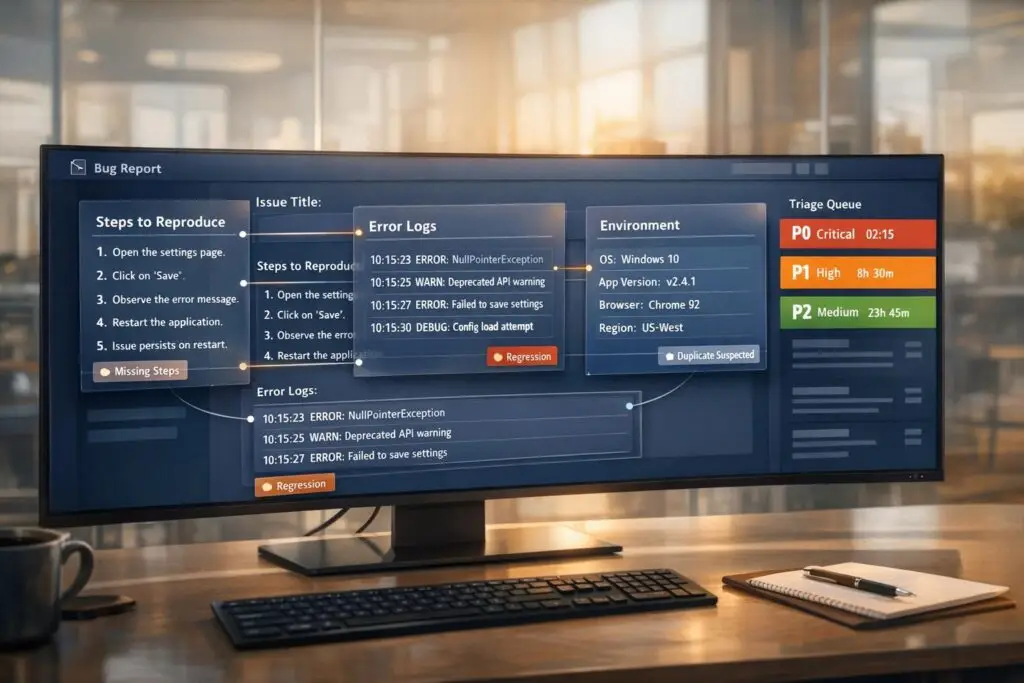
Bug triage ensures your team focuses on fixing the most critical issues first, saving time, money, and frustration. Here’s how to streamline the process:
- Screen Reports: Filter out incomplete, duplicate, or irrelevant bug submissions upfront.
- Collect Key Information: Use forms to gather detailed reproduction steps, system details (OS, browser, logs), and issue impact.
- Validate Bugs: Confirm reproducibility in the reported environment before escalating to developers.
- Categorize and Prioritize: Group issues by type (e.g., UI, performance) and severity (Critical, High, Medium, Low) to guide resolution efforts.
- Leverage AI Tools: Automate categorization, assignment, and AI case summarization to reduce manual workload.
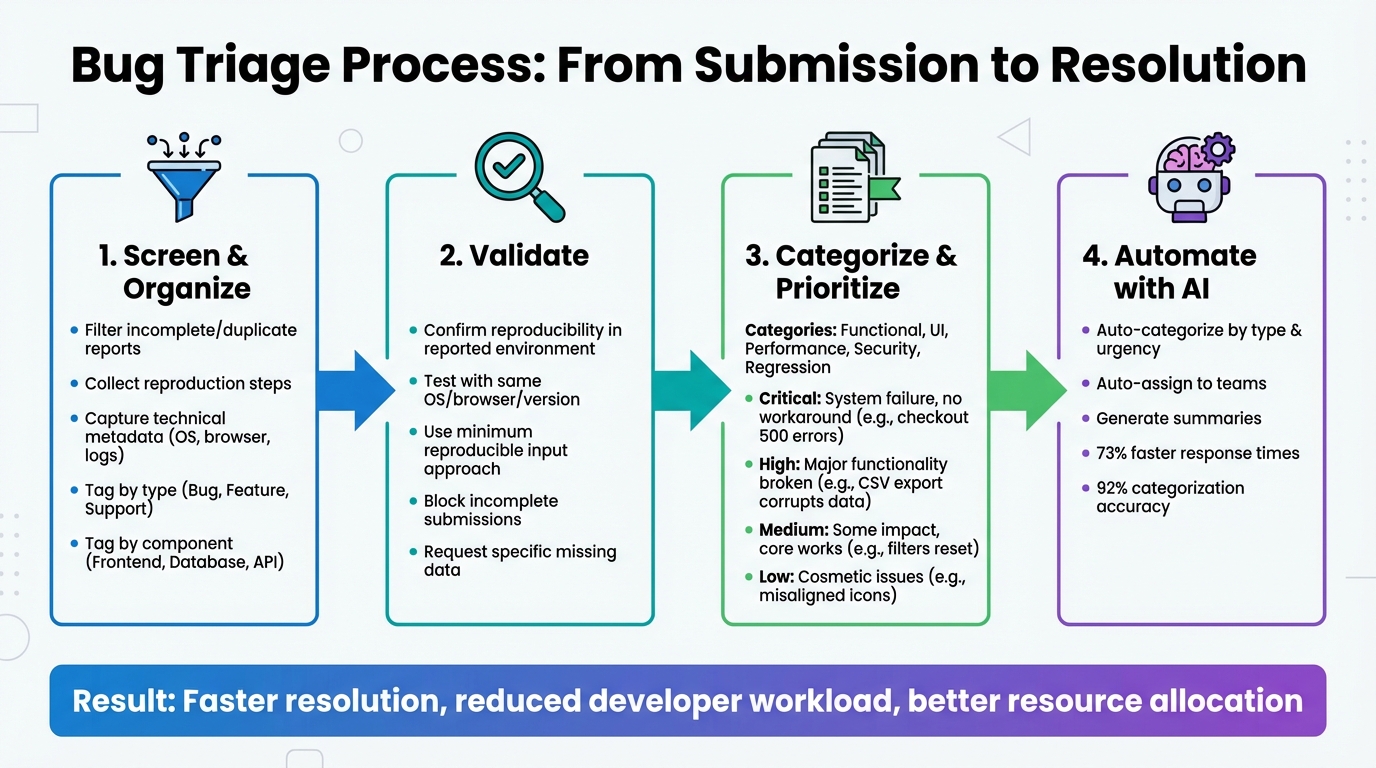
Bug Triage Process: 4-Step Workflow for Support Teams
Best Practices for Triaging Software Bugs: Bug Triaging Principles
sbb-itb-e60d259
Step 1: Screen and Organize Incoming Bug Reports
The first step in managing bug triage effectively is to implement a quality filter right at the point of submission. This means validating each report to ensure it’s a legitimate defect, can be reproduced, and isn’t a duplicate[1]. By filtering out incomplete or irrelevant submissions, you reduce the burden on engineering teams and make sure every ticket includes enough information for quick triage and resolution.
Information to Collect from Portal Forms
Your bug reporting form should require specific details to block incomplete submissions. Every report must include a clear and descriptive title that explains what went wrong, where, and when. For instance, "CART – New items added to cart do not appear" provides far more clarity than something vague like "Cart broken"[2]. Additionally, the report should outline numbered steps to reproduce the issue, including URLs and input data. Annotated screenshots or screen recordings can eliminate the need for follow-up questions about UI glitches or timing issues[5].
"Most teams don’t have a bug quality problem – they have a communication problem. A clear report with a screenshot and reproduction steps can cut resolution time in half."
– Radim Hernych, Founder, Ybug[5]
Technical metadata should also be captured automatically. This includes the user’s operating system, browser version, device type, app or build version, and logs from the console or network[5][6]. Additionally, bug reports should assess the issue’s impact – such as how often it occurs, its severity, and any available workarounds[5][6]. To keep things organized, users should be encouraged to submit only one bug per report to avoid confusion during triage[5].
Once you’ve collected complete and detailed data, the next step is categorization to ensure smooth routing.
Use Tags and Categories for Organization
Detailed and complete reports can be categorized to ensure they’re routed to the right teams quickly. Tags help distinguish between different types of issues, such as Bug, Feature Request, Support, or Duplicate. They also indicate workflow states, like Triage, Under Review, or Ready for Dev, and specify affected components, such as Frontend, Database, Payment Gateway, or Mobile App[2].
AI-driven tools can further streamline this process by automatically tagging tickets based on their content – assigning categories like "billing", "bug-report", or "account" – and routing them to the appropriate teams without manual effort[7]. Duplicates should be merged immediately to maintain a single source of truth and ensure accurate severity assessments[3]. Keeping a categorized record of past bug decisions also prevents repetitive triage of non-bug issues and aids in knowledge sharing across teams[2].
Step 2: Validate and Capture Missing Data
Once you’ve organized incoming reports, the next step is to validate them. This means confirming that each issue can be reproduced exactly as described. If a bug can’t be recreated following the provided steps, it’s not actionable. Reports that lack clear reproduction steps should be sent back to the submitter for clarification before they ever reach your development team[4][6]. This saves engineers from wasting time on problems they can’t verify.
"A bug report without steps to reproduce is not a bug report – it is a complaint."
– ARDURA Consulting[4]
Validate Reproducibility in the Reported Environment
It’s essential to test bugs in the same environment where they were reported (e.g., operating system, browser version, API version, or deployment stage)[4][8]. Even small differences in configurations can make bugs unreproducible. For example, a payment issue seen in production might not show up in staging due to discrepancies in API setups or data states. Before escalating a bug, your QA lead should check for duplicates, attach relevant logs, and determine whether the issue is linked to recent code changes or specific components[4][5].
To pinpoint the root cause, use the "minimum reproducible input" approach. This method isolates the critical variable causing the issue[6]. Additionally, ask reporters to focus on describing what they observed (e.g., "Page returns 500 error") rather than speculating on the underlying cause[5].
Reduce Back-and-Forth with Customers
To minimize back-and-forth communication, ensure your bug submission forms block incomplete entries. For example, disable the submit button when required fields are missing[3][8]. This ensures customers provide the necessary details upfront, reducing delays caused by incomplete reports.
When additional information is needed, ask specific and targeted questions. Instead of saying, "Can you provide more details?", be precise: "Please attach the browser console log from when the error occurred" or "What file format were you uploading when the issue happened?" Always provide clear instructions on how to redact sensitive data like PII, tokens, or cookies from logs before submission. This helps customers feel more comfortable sharing technical details[6].
Tracking metrics like the "percentage of issues resolved without clarification" can highlight gaps in your intake process and reveal where improvements are needed[3].
With all necessary data verified and in hand, you’re ready to move on to categorizing and prioritizing bug reports.
Step 3: Categorize and Prioritize Bug Reports
Once validation is complete, the next step is to classify bug reports by their type and urgency. Categorization helps group bugs based on their nature – like Functional (issues with behavior), UI (visual or layout problems), Performance (slowdowns or crashes), Security (vulnerabilities), or Regression (features that worked previously but are now broken). Adding tags for specific modules, such as "Checkout", "Login", or "API", ensures that the right engineering team receives the report promptly.
It’s also important to filter out reports that aren’t actionable. Only validated reports should proceed to categorization and prioritization, ensuring a smoother workflow.
Categorize Bugs by Type and Component
Use standardized forms in your bug-reporting portal to simplify categorization. Include mandatory fields like:
- Steps to Reproduce
- Expected vs. Actual Behavior
- Environment Details
You can make these forms smarter with conditional logic. For instance, if someone reports a mobile issue, the form can request the specific device model. For web-related bugs, it might ask for the browser version. This targeted approach cuts down on irrelevant information and speeds up the process of routing bugs to the right teams.
Once categorized, bugs can be automatically assigned to the appropriate team based on their component or severity. For example, bugs tagged as "Payment Gateway" could be routed to the payments team, while "Dashboard UI" issues might go to the frontend team.
Prioritize Based on Severity and Business Impact
After categorization, it’s time to decide how urgent each bug is. This involves balancing severity (the technical impact on the system) and priority (the business importance of fixing the issue). For example, a crash in a legacy feature used by only a small percentage of users might have high severity but low priority. On the other hand, a typo on a pricing page during a major product launch might be low in severity but high in priority due to its potential impact on customer trust.
To avoid overusing "urgent" labels, establish clear criteria for severity levels like Critical, High, Medium, and Low. Here’s a quick breakdown:
| Severity Level | Technical Impact Description | Example Scenario |
|---|---|---|
| Critical | Complete system failure, data loss, or a security breach with no workaround. | Users can’t complete checkout due to 500 errors on all transactions. |
| High | Major functionality is broken for many users, and workarounds are impractical. | A bulk CSV export corrupts data for files over 10MB. |
| Medium | Some functionality is impacted, but core workflows still work. | Dashboard filters reset after every page refresh. |
| Low | Cosmetic issues, minor UX friction, or rare edge-case bugs. | Misaligned icons or typos in a less-visited settings page. |
Assign roles to streamline this process: an engineering lead can assess severity, while a product manager determines priority. Factors like the number of users affected, the impact on critical workflows (like checkout), and potential revenue or compliance risks should guide these decisions.
Finally, make sure every bug has a clear resolution path after triage. Options could include fixing it immediately, scheduling it for an upcoming sprint, adding it to the backlog, or closing it with a documented reason. This clarity keeps your team focused and prevents lower-priority issues from consuming valuable time during sprints.
Step 4: Use AI for Automation and Efficiency
Sorting through bug reports manually can eat up precious time. AI steps in to handle repetitive tasks like categorizing reports, assigning them to the right engineer, and highlighting key details. This lets your team focus on actually solving bugs instead of spending hours organizing them. It’s an extension of the groundwork you’ve already laid in screening, validating, and prioritizing bug reports.
The trick here? Think of AI as your first line of defense, not the ultimate decision-maker. As Samuel Chenard, Co-founder of LobsterMail, explains: "Triage is the missing piece. Not just ‘is this billing or technical?’ but ‘how urgent is this, who specifically should handle it, and can the agent resolve it without involving anyone?’" [10]. Using AI in this way speeds up your triage process and gets bugs resolved faster.
Automate Bug Categorization and Assignment
Today’s AI tools can classify bug reports based on factors like issue type, urgency, affected components, and customer tier [10]. For instance, if a report comes from an enterprise client, AI can automatically assign it a stricter SLA – say, 30 minutes for critical issues instead of 8 hours for less urgent ones. Meanwhile, lower-priority reports can go into a general queue.
To make this work smoothly, set up a routing table that maps AI-generated categories to specific team members. For example, a report marked "Payment Gateway" and "Critical" could go directly to your on-call engineer, while something labeled "Dashboard UI" and "Medium" might head to the frontend team’s queue. To avoid errors, use confidence thresholds – if the AI’s confidence in its classification falls below 80%, the report should be flagged for a human to review [10].
AI can also integrate seamlessly with tools like Jira, Linear, or Azure DevOps. By outputting structured JSON, it can pre-fill fields like description, suspected area, and severity, cutting out the need for manual data entry. For teams handling high volumes – like 1,000+ emails daily – the cost is surprisingly low. Models like GPT-4o-mini process hundreds of emails for just a few cents [10].
AI-Driven Summarization and Insights
Once reports are categorized, AI can take things a step further by summarizing key details and providing actionable insights. It can cross-reference user input with product documentation, technical specs, and troubleshooting guides to generate detailed reproduction steps or suggest potential fixes [12]. If something’s missing – like a database schema or browser version – AI can flag the gap and even generate follow-up questions for the reporter. This reduces the back-and-forth, saving time for everyone involved.
Adding a confidence score (on a scale of 0–100) to each AI-generated summary can also help. High-confidence reports can move forward in the workflow automatically, while lower-confidence ones can be flagged for human review [12].
Some platforms, like Supportbench, come with built-in AI tools that handle tasks like auto-prioritization, issue classification, and tagging. These tools even monitor follow-up replies and update bug reports automatically to ensure they stay accurate and current [11].
However, it’s crucial to have safeguards in place. As Chenard cautions, "A triage agent that silently drops emails is worse than no triage at all" [10]. To prevent this, set up fail-safe mechanisms – like catch blocks in your automation webhooks – that redirect failed AI processes to manual review. This ensures nothing slips through the cracks.
Conclusion
Key Takeaways for Support Teams
Start your bug triage process by carefully screening submissions. Weed out non-bug reports, duplicates, and issues caused by third-party tools or services [2]. Make sure to gather comprehensive metadata – like source URLs, console logs, environment details, and session replays – to ensure issues can be reproduced consistently [2][9]. As Nathan Vander Heyden, Head of Marketing at Marker.io, says:
"Now that you know how to triage and prioritize bug reports, you’ll save more than just time and money: you’ll save your developer’s sanity" [2].
Use clear severity levels – Critical, High, Medium, Low – to help developers focus on the most impactful issues first [9]. Connect bug report forms directly to project management tools to prevent reports from slipping through the cracks [2][9]. Regular reviews of your bug backlog will also help you keep priorities aligned with current business needs [2].
These steps create a foundation for refining and improving your processes over time.
Next Steps to Improve Your Workflow
Take a closer look at your bug report forms. Add conditional logic and ensure they’re optimized for mobile, so you capture all the necessary details without making things cumbersome [9]. Consider tools that automatically collect metadata to reduce manual effort and speed up triage.
Explore AI-powered platforms that handle AI-powered ticket routing and prioritization. These tools can dramatically improve efficiency, cutting response times by up to 73% and achieving an impressive 92% accuracy in ticket categorization [13][14]. Use AI as a first line of defense to handle straightforward cases, while keeping human oversight for more complex issues.
FAQs
What fields should a bug report form include?
A well-structured bug report form should include the following fields to ensure developers can quickly identify and address the issue:
- Description of the issue: Provide a clear and concise explanation of the problem, detailing what is happening and any error messages.
- Steps to reproduce: Outline step-by-step instructions that allow others to recreate the bug reliably.
- Screenshots or visual evidence: Attach images, videos, or other visuals to help illustrate the issue.
- Environment details: Specify the browser, operating system, device, or software version where the bug occurred.
- Priority level: Indicate how critical the bug is, helping the team prioritize fixes.
- Additional context: Include any other relevant details, such as logs, settings, or related issues, to provide a fuller picture.
These fields ensure the report is thorough and actionable, saving time for everyone involved.
How do we safely collect logs without exposing sensitive data?
To ensure logs are collected safely while safeguarding sensitive data, it’s essential to anonymize or redact details such as personally identifiable information (PII), credentials, or proprietary content before sharing or analyzing them. Automated tools can help by masking sensitive fields while preserving the necessary details for troubleshooting. Alongside this, implement strict policies like access controls and encryption to secure log handling and storage during the entire triage process.
How do we use AI for triage without misrouting or dropping tickets?
AI can handle ticket triaging efficiently through confidence-based routing and by gathering detailed context. When predictions have low confidence, the system should flag them for manual review to prevent misrouting. Including environment details – like logs and customer-specific information – helps improve the AI’s decision-making. Additionally, automating data enrichment from tools like CRM or support systems reduces the chances of errors. By blending confidence scoring, enriched context, and manual checks, businesses can achieve more accurate routing while minimizing the risk of dropped tickets.






