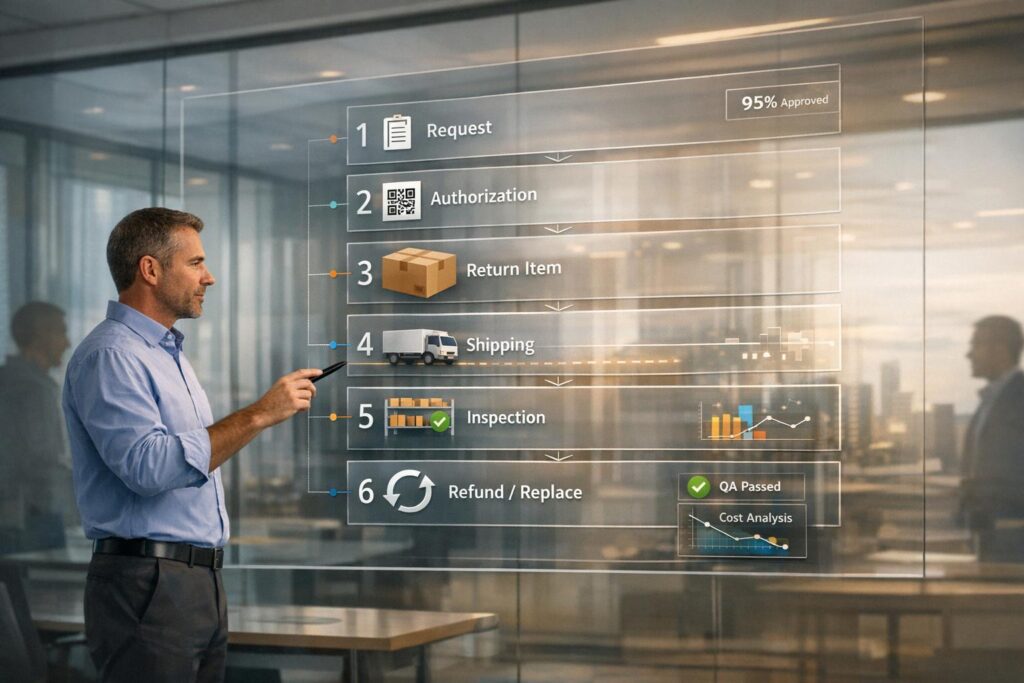
Returns, RMAs, and replacements can be expensive and time-consuming, but a well-designed portal workflow can save money, improve efficiency, and enhance customer satisfaction.
Key takeaways:
- Cost impact: Processing a single return costs $10–$30. Poor management can lead to higher costs and lost customers.
- Automation benefits: AI-powered ticket routing and automation reduce manual tasks, speed up processing, and cut costs (e.g., RTR Vehicles saved $15,000/month with a 92% auto-resolution rate).
- Customer loyalty: A smooth return process increases the likelihood of repeat business by 92%.
- Workflow stages: Successful workflows include clear steps: initiation, review, shipping, inspection, resolution, and closure.
- AI integration: Automates updates, reduces inquiries, and flags potential issues like fraud or delays.
Key Components of Returns, RMAs, and Replacements
What Returns, RMAs, and Replacements Mean
Although people often lump them together, returns, RMAs, and replacements are distinct steps in reverse logistics. Knowing the difference is essential to create workflows that actually work.
An RMA (Return Merchandise Authorization) is the starting point that sets the process in motion – whether it results in a refund, exchange, or repair. E.M. Ricchini from ReturnLogic‘s Partnerships Team puts it this way:
"Return Merchandise Authorization – or, RMA… is the first step in receiving a return request and determining its path. This could mean it will become a refund, store credit, an exchange, or even a repair." [4]
The RMA functions as a key reference point. It alerts your warehouse to expect a shipment and assigns a unique tracking number. No return should happen without an RMA number – it’s the glue that ties together customer service, warehouse operations, and accounting [4].
Returns focus on the physical movement of an item back to your facility. This step includes receiving, inspecting, and determining what to do with the returned product. While people often use "return" to describe the entire process, it specifically refers to this physical journey and the steps that follow once the item arrives [4][5].
Replacements are a specific outcome where a new or refurbished item is sent to the customer. In B2B operations, replacements often involve warranty claims or shipping errors. They require careful inventory management and priority shipping, unlike refunds, which mainly deal with financial adjustments [4][5].
In B2B scenarios, the stakes are even higher. High-value items and tight production schedules demand fast, accurate returns. For example, an industrial manufacturer can’t afford a three-week delay for a $2,400 part replacement if their assembly line is down [5].
With these definitions clarified, let’s dive into the common challenges that make these workflows so complex.
Common Problems in Managing These Workflows
Even with clear definitions, certain challenges can throw a wrench into the process. One of the biggest issues? Fragmented systems that rely heavily on email and spreadsheets. Disconnected tools leave support teams scrambling, leading to lost details, duplicated work, and poor visibility across departments. For instance, customer service might not know if the warehouse has received or inspected a return, leaving them unable to provide accurate updates to customers [5][2].
Inefficient workflows don’t just increase costs – they erode customer trust. In one case, a manual RMA process stretched out to 47 days. The result? A $120,000-per-year customer slashed their future orders by 60% and eventually switched to a competitor [5].
"While returns might represent only 2-5% of transactions, they represent moments of truth in customer relationships." [5]
Scalability is another major hurdle. A process that works for 50 returns a week can quickly fall apart when the volume hits 500, especially if it relies on ad-hoc solutions instead of clear, standardized rules [1]. Manual processing alone costs $5–$10 in labor per return, and when RMA-to-refund cycles drag past 10 days, customers start to see your company as an obstacle rather than a partner [1][2].
Visibility gaps create even more headaches. Without real-time updates, customers flood support with "where’s my refund?" inquiries. Each return generates 2–4 interactions, often requiring 1–2 full-time employees just to handle the queue [2]. These inefficiencies come at a steep cost – 15–20% of customers who have a bad return experience will cut back or stop doing business with that supplier altogether [5].
Returns may only account for 2–5% of total orders, but they consume 8–12% of operational resources and can severely damage customer relationships [5].
sbb-itb-e60d259
How to Map and Design Your Workflow Steps
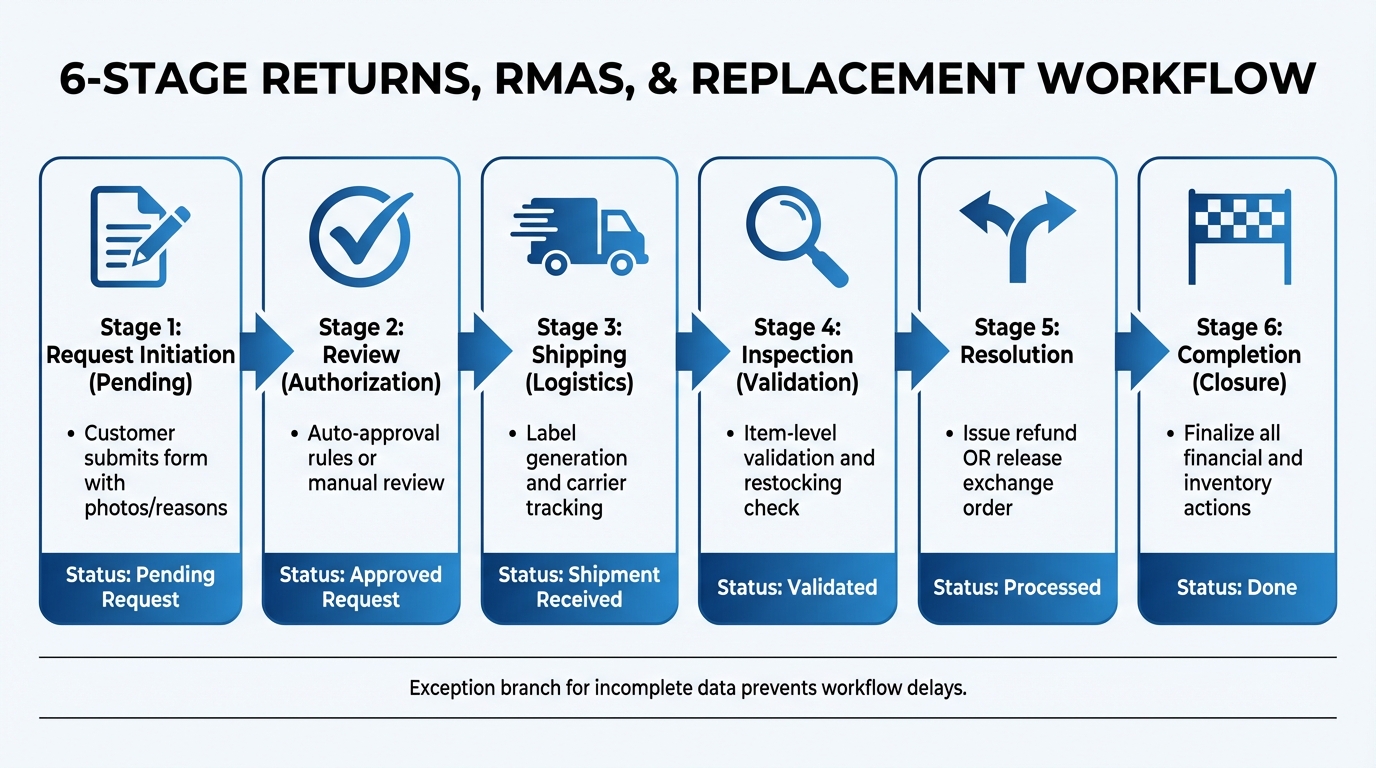
6-Stage Portal Workflow for Returns, RMAs, and Replacements
Breaking the process into clear stages ensures customers, support teams, and warehouse staff follow a predictable path from request to resolution.
Step 1: Set Up Clear Workflow Stages
Divide the return process into six distinct stages. It all starts with Request Initiation (Pending), where customers submit their return request through the portal. This step includes providing the reason for the return, attaching photos, and adding any relevant notes. At this point, you decide whether to approve, reject, or request more details.
Once approved, the status shifts to Authorization (Approved). This triggers automated tasks like generating shipping labels, sending return instructions to the customer, and alerting the warehouse about the incoming shipment. Next comes Logistics (Shipment Tracking), where you monitor the return’s progress. The best systems sync directly with carriers, updating the status to "Shipment Received" automatically upon package arrival.
The Validation (Inspection) stage follows, where your team examines the returned items to confirm their condition and decide if they can be restocked. This inspection can be done item by item or in bulk, depending on your volume. The Resolution stage then splits into two paths: issuing refunds (calculating costs, taxes, and fees to credit the original payment method) or processing exchanges (creating a new order in your eCommerce system). Finally, Closure (Done) marks the return as complete after all financial and inventory adjustments are finalized.
| Workflow Stage | Actions | Status |
|---|---|---|
| Initiation | Customer submits form with photos/reasons | Pending Request |
| Review | Auto-approval rules or manual review | Approved Request |
| Shipping | Label generation and carrier tracking | Shipment Received |
| Inspection | Item-level validation and restocking check | Validated |
| Resolution | Issue refund or release exchange order | Processed |
| Completion | Finalize all financial and inventory actions | Done |
It’s also smart to include a branch for exceptions, such as incomplete data, to avoid workflow delays [1].
Once the stages are set, the next step is designing forms that capture all necessary information upfront.
Step 2: Design Simple Intake Forms
A well-designed intake form is key to capturing the right data from the start. For B2B returns, allow bulk uploads through CSV imports for efficiency [8]. Meanwhile, B2C customers often prefer mobile-friendly forms for single-item returns.
Add validation features to the form to ensure accuracy. For example, product code and serial number validators help prevent invalid or out-of-warranty items from being submitted, reducing unnecessary admin work [8]. Include dropdown menus for consistent data entry, file upload options for supporting evidence, and clear instructions. If your customers commonly use terms like "SKUs" instead of "product codes", match their language for clarity.
Once a return request is submitted, generate a unique RMA number. This allows customers to track their request independently, cutting down on "status check" inquiries [7][8].
With accurate data in hand, you can streamline the approval process through automation.
Step 3: Automate Routing and Approvals
Manual approvals often slow things down, so use predefined ticket routing rules to automate the process. For instance, base approvals on return reasons, order values, and customer history. Top-performing operations automate over 70% of returns, leaving manual reviews for high-value items or flagged accounts [1].
Set up tiered approval thresholds. For example, automatically approve returns for wrong items, defective products, or size issues – these are straightforward and low-risk. However, for returns exceeding $200 or customers with unusually high return rates (e.g., three times the category average), route these cases to a supervisor for manual review [1].
"The difference between a scalable process and a fragile one is not complexity – it is clarity."
– David Vance, Nventory [1]
| Reason | Value | Window | Action |
|---|---|---|---|
| Wrong item received | Any | Any | Auto-approve + prepaid label |
| Defective (warranty) | Any | Warranty | Auto-approve + prepaid label |
| Size/fit issue | Any | 30 days | Auto-approve + prepaid label |
| Changed mind | < $200 | 30 days | Auto-approve + customer-paid label |
| Changed mind | ≥ $200 | 30 days | Manual review required |
| Flagged customer | Any | Any | Manual review required |
For low-value items – typically under $25–$30 – consider offering returnless refunds. The cost of return shipping and labor often outweighs the product’s value, so issuing a refund while letting the customer keep the item can save time and money [1].
Once auto-approvals are processed, generate return labels and move the workflow forward. Combining automated routing with AI insights can help speed things up and improve accuracy. The goal? To achieve an RMA-to-refund cycle time of under seven days [1].
Using AI to Improve Communication and Transparency
Leveraging clear workflow stages and automated processes, AI integration takes communication and transparency to the next level. Beyond simplifying returns, RMAs, and replacements, AI ensures real-time updates that keep customers informed. Did you know that "Where is my order?" inquiries make up 30% to 40% of e-commerce support tickets? The good news is that most of these can be handled automatically when AI is connected directly to backend systems [9].
Real-Time Status Updates and Notifications
By connecting your AI agent to your Order Management System (OMS) and shipping APIs, you can automate notifications via email or SMS at critical points – like when a return is approved, a package is received, inspection begins, or a refund is issued [1][3]. For example, in July 2025, beauty tech brand CurrentBody adopted ReturnGO‘s automated portal. This move led to a 63% drop in return-related support tickets and a 90% reduction in negative reviews tied to returns. Under the guidance of Returns Manager Jadwiga Imiela, their average refund processing time shrank from 4 weeks to just 5 days [10].
AI also steps in to address problems like carrier delays, split shipments, or incorrect addresses before the customer even has to ask [9]. This proactive transparency not only boosts customer trust but also cuts down on repeat inquiries.
Beyond tracking updates, AI delivers even more value by analyzing customer sentiment and catching errors early.
AI for Sentiment Analysis and Error Detection
With sentiment analysis, AI identifies unhappy customers early, so their cases can be escalated to a human agent before the situation escalates. AI also plays a critical role in fraud detection, scoring customer behavior and history to flag issues in real time – 13.7% of all returns in the U.S. are estimated to involve fraud [3].
For technical products, AI-driven tools like fitment and compatibility checks ensure that product specifications align with customer needs before a return is processed. In February 2026, RTR Vehicles implemented AI Genesis "Digital Hires" to handle fitment verification and order status inquiries. This resulted in a 92% auto-resolution rate across support categories and significantly lowered fitment-related return rates by ensuring customers ordered the right parts in the first place [9]. This system adheres to the zero-hallucination principle, meaning if the AI can’t verify compatibility using the database, it escalates the case to a specialist instead of making assumptions [9].
Setting Up Permissions and Escalation Paths
Streamlined communication powered by AI is only part of the equation – well-defined permissions and escalation paths are key to keeping operations smooth and secure. Start by clearly defining user roles and pinpointing when human intervention is necessary. A role-based access control (RBAC) system can help ensure everyone has the right level of access. For instance:
- Customers can initiate returns and track their status.
- Support agents validate warranty coverage.
- Warehouse staff confirm receipt and inspection.
- Finance teams handle refunds without stepping on anyone else’s toes [14][11][12].
For U.S. companies dealing with export-controlled items, workflows must also account for compliance with ITAR or EAR regulations by including permissions for "Importers of Record" [15].
Set Up Escalation Triggers
Escalation triggers should be based on specific conditions. For example:
- Automate escalations tied to deadlines, like a 30-day return shipping window or a timeline for inspection completion [11].
- Use AI confidence scoring to flag uncertain cases or sensitive tasks, such as billing disputes, for higher-priority review [6].
A practical setup might allow AI or junior staff to approve refunds under $50 but require manager approval for larger amounts or complex hardware replacements [13]. This approach keeps things moving without sacrificing oversight on critical decisions.
"When confidence is low… the Agent escalates to a human. Critically, it escalates with context: the full conversation history, the sources it consulted, and its assessment of the issue." – Inkeep [6]
Streamlining Escalations
When escalating from one team to another – like from support to engineering – or from AI to a human agent, it’s essential to include all relevant details. This might involve:
- Summarizing attempted troubleshooting steps.
- Attaching relevant documentation.
- Including account entitlements.
Doing so can reduce handling time by 30–50% [6][13]. Before fully rolling out AI-suggested triggers, validate them in shadow mode for two weeks to ensure accuracy [13].
Strategic Escalation Paths
Some scenarios require special escalation paths:
- "Executive Escalations" or "Goodwill Replacements" let leadership approve out-of-warranty coverage for key customers [11].
- Automate "returnless refunds" for low-value items or loyal customers to cut shipping and processing costs [12].
It’s also critical to clearly separate tasks that are safe for automation – like address changes with two-factor authentication – from those needing human review, such as security incidents or high-value refunds [13]. Every action, whether automated or manual, should be logged with PII redacted to maintain compliance and provide an audit trail [13].
Once these permissions and escalation paths are in place, the next step is to rigorously test and validate the processes to ensure they work as intended.
Testing and Improving Your Portal Workflow
Even a well-designed workflow needs to be tested in real situations. Start with a pilot session using a team member who isn’t involved in the project. This can help identify unclear instructions or technical glitches [19]. Next, test with at least five real customers who fit your target audience, whether they’re regular shoppers or business clients. Studies show that testing with this sample size can reveal about 85% of common usability issues [22]. Plus, investing in usability testing can pay off significantly – every dollar spent could bring returns of $10 to $100 [18]. The feedback from these tests will be crucial for making the refinements outlined below.
Running Usability Tests
Create realistic scenarios for users instead of giving them step-by-step instructions. For example, ask them to solve a problem like, “You received a damaged item and need a replacement” [17][19]. Use the think-aloud method, where users verbalize their thoughts as they navigate the portal. This can uncover frustrations or confusion that might otherwise go unnoticed. If a user is unsure about a button’s purpose, ask them, “What do you think this button does?” to understand their thought process without influencing their response [19].
Decide between moderated testing, which provides more detailed feedback, and unmoderated testing, which is quicker to execute [17][18]. Also, take advantage of preview modes to test portal settings with real orders, ensuring no live notifications are accidentally sent [23].
Tracking Workflow Performance Metrics
Once your workflow is live, keep an eye on key performance metrics to spot bottlenecks or inefficiencies. For example, First Response Time should be under 1 minute for live chat and within 24 hours for emails. A First Contact Resolution rate between 70% and 80% indicates a smooth process [20]. Pay close attention to transitions between teams – these moments, often called "compression points", are where details like troubleshooting history can get lost [16].
Track the entire RMA process, from the initial request to authorization, shipping, inspection, and final resolution [1]. If you see resolution times increasing or error rates climbing, dig into specific stages to find the problem. Regular monitoring is essential to maintaining an efficient workflow. For example, Dropbox reduced support tickets by 30% by optimizing their Help Center with predictive search [21]. Similarly, Uber’s automated ticket triage system cut resolution times by 50% [21]. Keeping a close watch on these metrics allows you to address issues early and make data-driven improvements to ensure your workflow stays on track.
Conclusion
Creating an effective portal workflow for returns, RMAs, and replacements hinges on three main principles: automation, transparency, and continuous improvement. Start by documenting your return policy, reason codes, and escalation rules before integrating AI tools [3]. Once that’s in place, adopt a tiered automation strategy. This approach should automate 70–85% of straightforward cases while reserving complex or high-value requests for human agents [2][3].
The financial benefits are undeniable. Processing returns manually costs anywhere from $10 to $30 per item, whereas AI-driven workflows can resolve requests in less than 60 seconds, compared to the usual 4–24 hours [2][3]. For instance, one automation initiative achieved a 92% auto-resolution rate, cutting processing times to under a minute [2]. Beyond cost savings, this kind of efficiency enhances customer loyalty. A smooth return experience makes customers 92% more likely to shop with the retailer again [2].
But it’s not just about speed and savings – it’s about turning returns into actionable insights. Use return reason codes and fitment data to flag product quality issues or refine misleading descriptions in real time [2][3]. AI can also send instant status updates when warehouses receive returns, reducing "where is my refund?" inquiries by up to 80% [2].
That said, automation isn’t a "set it and forget it" solution. Always offer an option for human review in cases of automated denials to maintain trust and stay compliant with regulations like GDPR and CCPA [3]. This balance between automation and human oversight forms the backbone of AI-powered B2B customer support. With American consumers expected to return over $890 billion in merchandise in 2024 – accounting for 16.9% of total retail sales – nailing this workflow is more than just operationally smart; it’s essential for protecting margins while meeting customer expectations [3].
FAQs
What data should the portal collect to prevent RMA delays?
To avoid delays in the RMA process, it’s crucial to gather essential information right from the start. Here’s what should be collected:
- Original order ID and return items: This helps confirm the purchase details.
- Return reason: Use a structured list to ensure clarity and avoid confusion.
- Customer preferences: Whether they want a refund, exchange, or store credit.
- Product photos: Necessary for claims involving defective items.
- Tracking details: To keep an eye on the return shipment’s progress.
Collecting this data upfront helps streamline the process, minimize errors, and cut down on unnecessary delays.
When should a return be auto-approved vs escalated to a human?
A return should process automatically if it ticks all the right boxes: a valid proof of purchase, falls within the return window, and complies with policies for items that aren’t damaged. However, not all cases are straightforward. Complex situations – like damaged goods, high-value items, disputes, or suspected fraud – require human intervention. By using AI-driven rules, simple returns can move quickly through the system, while exceptions are flagged for manual review. This approach ensures a balance between speed and careful oversight.
Which KPIs show the returns workflow is faster and more cost-efficient?
Key performance indicators (KPIs) to monitor include:
- Return processing time: This measures how quickly returns are handled, highlighting operational efficiency.
- Cost per return: Tracks expenses like shipping and labor involved in the return process.
- Support interactions per return: Fewer interactions typically indicate a smoother, more efficient process.
- Customer satisfaction scores: These reflect how well the return experience meets customer expectations.
Leveraging automation and AI-driven workflows can make a big difference in these areas by minimizing errors, speeding up processes, and improving overall customer service.