


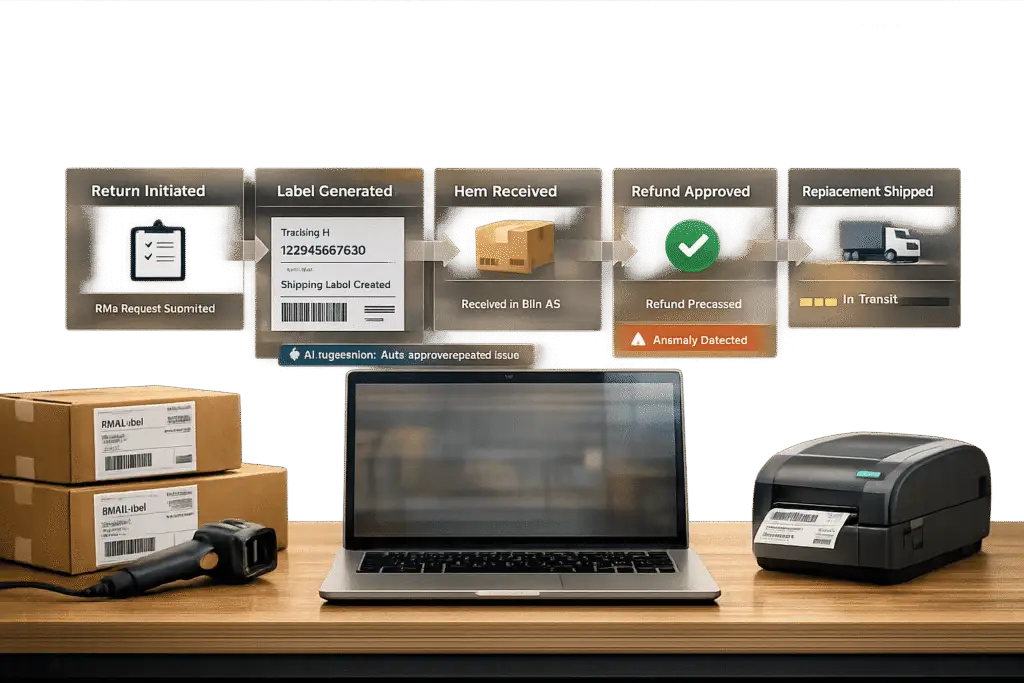
Managing returns manually is expensive and chaotic. Without an efficient system, you’re stuck with lost emails, frustrated customers, and high support costs. A well-designed RMA portal solves these problems by automating returns, improving customer transparency, and cutting manual work by up to 80%.
Here’s why you need one:
- Cost savings: Automating RMAs reduces service-related calls and emails by 90%.
- Faster resolution: Top systems complete return cycles in under 7 days.
- Customer preference: 67% of customers prefer self-service options.
To build an effective portal, focus on these steps:
- Define policies clearly: Include return reasons, warranty checks, and shipping rules.
- Automate workflows: Integrate with systems to validate data and eliminate manual tasks.
- Enable self-service: Let customers submit returns, track progress, and get updates.
- Use AI tools: Speed up claim reviews, automate entitlement checks, and improve case routing.
- Test and optimize: Simulate scenarios, track KPIs, and refine based on feedback.
An RMA portal doesn’t just streamline returns – it improves efficiency, saves money, and keeps customers happy.
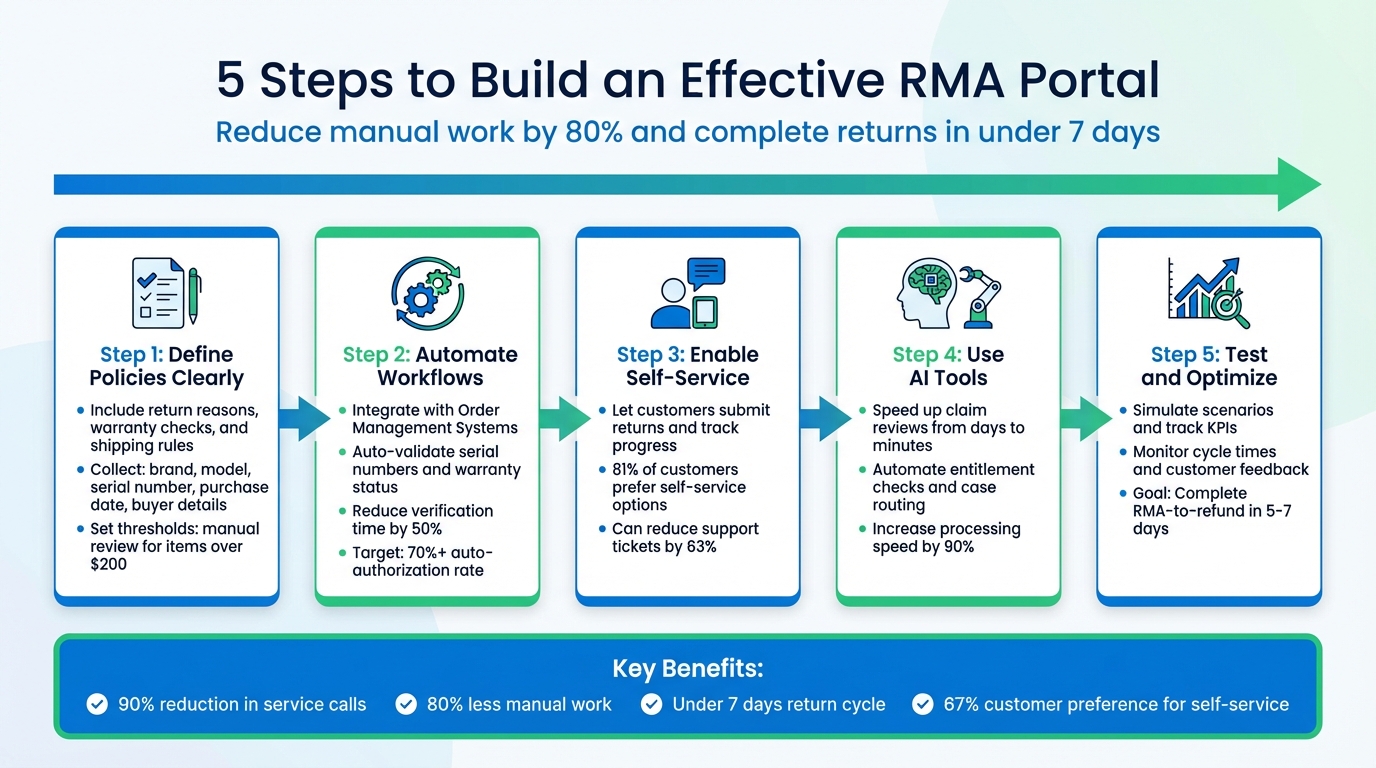
5-Step Process to Build an Effective RMA Customer Portal
Assess Your RMA Requirements
To create an efficient RMA portal, start by mapping out your process with well-defined policies, key data points, and validation rules. Without clear guidelines, your portal could end up creating more problems than it solves.
Here’s an important distinction: warranty claims focus on decision-making (determining if a failure is covered), while RMA requests deal with logistics (handling returns, shipping, and inspections) [4]. Your portal needs to address both, as they require different workflows and data fields. Companies that structure their warranty claim submissions correctly process claims 40% to 60% faster compared to those using generic ticketing systems [4].
Define Return Policies and Warranty Requirements
Start by documenting your return policies in clear, actionable terms. Identify the information your portal must collect during submission, such as:
- Brand and product line
- Model number
- Validated serial number
- Purchase date
- Original buyer details
- Place of purchase (direct or through an authorized dealer) [4]
These fields help auto-populate purchase history, confirm warranty coverage, and flag unauthorized items. To speed up root cause analysis, require specific failure descriptions like “won’t power on” or detailed error codes instead of vague problem statements [4][6].
Clearly categorize return reasons, as each triggers different policies. For example:
- Defective on Arrival (DOA): Automatically approve with prepaid shipping labels.
- Customer Remorse: May include a 15% to 25% restocking fee and customer-paid shipping [4].
For high-value returns (e.g., items over $200), set manual review thresholds to avoid errors in auto-authorization [7].
Decide if you’ll provide prepaid shipping labels or require customers to arrange shipping. Also, clarify whether you offer advance replacements (shipping a new unit before receiving the return) or cross-shipping options. Define the product’s next steps after receipt – repair, scrap, return to supplier, or part harvesting – and encode these decisions as rules in your portal to eliminate guesswork [4].
Automate wherever possible. For example, integrate your portal with your Order Management System (OMS) to instantly validate serial numbers and warranty status. This integration can reduce manual verification times from days to minutes, improving resolution speed by 50% and cutting manual effort by 80% [4]. These streamlined processes not only improve efficiency but also prepare your system for future automation enhancements.
Once your policies and rules are set, align user roles with their responsibilities to ensure consistent enforcement.
Identify User Roles and Permissions
Your RMA process involves several teams, each requiring tailored access and responsibilities. Configure your portal so users only see tasks and data relevant to their role:
- Customers: Submit and track return requests.
- Support Agents: Verify submissions and manage exceptions.
- Warehouse Staff: Update shipment statuses using barcode scanning.
- Inspectors: Assess item conditions during inspections.
- Managers: Handle escalations and override flagged cases.
- Finance Teams: Process refunds [5][6][7].
Assign ownership for each RMA stage – Request, Authorization, Shipping, Receiving, Inspection, Resolution, Disposition – and set clear SLA targets. For example, aim to acknowledge return requests within 4 hours and issue RMA numbers within 24 hours [7]. Top-performing teams complete the entire RMA-to-refund cycle in under 5 days, as delays beyond 10 days can frustrate customers [7].
Set automation goals based on risk and value. High-performing operations achieve auto-authorization rates above 70% for all returns [7]. For low-value items under $25 to $30, consider offering "returnless refunds", as the cost of shipping often outweighs the item’s value [7]. Reserve manual reviews for high-value returns, flagged accounts, or cases outside standard rules.
This role-based system ensures each team operates efficiently, cutting down on manual tasks and speeding up resolutions.
sbb-itb-e60d259
Design Core RMA Workflows
Using established policies and roles as a foundation, create workflows that guide every stage of the RMA (Return Merchandise Authorization) process. Clear workflows ensure consistency, reduce delays, and make it easier for every return to move smoothly from request to resolution.
Map the End-to-End RMA Process
The RMA process can be broken down into seven key stages: Request, Authorization, Shipping, Receiving, Inspection/Grading, Resolution Execution, and Disposition [7]. Each stage involves specific steps for data collection and collaboration between teams.
At the Request stage, customers should provide detailed information about their return. This includes selecting registered, serialized products, which can automatically populate details like installation dates, product specs, order IDs, reason codes (e.g., "wrong item received" or "defective under warranty"), resolution preferences, and defect photos [7][8]. By structuring this step, you can automate much of the process and avoid unnecessary back-and-forth communication.
During Authorization, rely on rule-based logic instead of subjective decision-making. For example, straightforward cases like "wrong item received" or "defective under warranty" can trigger auto-approvals with prepaid labels. However, high-value or out-of-warranty items should undergo manual review [7]. Top-performing systems achieve auto-approval rates above 70%, allowing the team to focus on exceptions, such as disputes over item condition or flagged accounts [7].
The Receiving and Inspection stages handle the physical return. Items should enter a "quarantine zone" and remain there until fully inspected and graded [7]. Use a standardized grading system (Grade A through D) to determine the next steps – whether to restock, refurbish, or write off the item [7]. For unexpected hardware returns, an API can auto-generate RMAs when items are scanned [9].
Set clear SLA (Service Level Agreement) targets for each stage to keep the process moving. For example:
- Acknowledge return requests within 4 hours.
- Issue RMA numbers within 24 hours.
- Complete warehouse processing within 4 hours of receipt.
- Finish inspections within 24 hours [7].
The goal is to complete the entire RMA-to-refund cycle in 5 to 7 days. Delays beyond 10 days can frustrate customers and make the process feel like a hassle [7].
Once the process is mapped, the next step is to introduce automation to handle repetitive tasks and improve efficiency.
Automate Key Workflow Stages
Automation transforms manual, time-consuming tasks into streamlined, scalable processes. Start by automating high-volume, low-risk tasks like generating RMA numbers, creating shipping labels for approved returns, and sending status updates [5][7].
For items valued under $25–$30, consider offering "returnless refunds." This means issuing a refund without requiring the customer to send the item back. For low-cost items, the expense of shipping and inspection often outweighs the product’s value, and skipping these steps can save significant time and effort [7].
Integrate your RMA portal with your Warehouse Management System (WMS) or third-party logistics (3PL) provider. This allows status updates, like "Shipment Received", to trigger automatically when the carrier confirms delivery [5]. This integration eliminates the need for manual tracking while keeping customers informed.
Reserve manual intervention for high-value returns, flagged accounts, and disputes where inspection results differ from customer claims [7]. Balancing automation with selective human oversight ensures quality while maintaining the speed customers expect. Businesses that implement automated RMA systems often see over a 90% improvement in processing speed and achieve first-contact resolution rates above 85% [7][10].
"The difference between a scalable process and a fragile one is not complexity – it is clarity." – David Vance, Nventory GN [7]
Build Self-Service RMA Features
Self-service features take streamlined workflows a step further by letting customers handle returns on their own. These tools not only reduce manual effort but also meet customer expectations – 81% of customers prefer self-service options. Plus, a well-designed self-service return portal can cut returns-related support tickets by 63% [11]. The secret is creating tools that are easy to use while gathering all the information your team needs to process returns smoothly.
Create User-Friendly Return Request Forms
A good return request form should make things simple for the customer while ensuring accuracy. For example, let the form auto-fill product details when customers input their order number and contact information. This reduces errors and speeds up the process. For hardware companies, connect the form to registered, serialized products so customers can easily pick items from a pre-populated list. This list could include details like installation dates, product specs, and warranty info [8][6].
To make forms even better, break them into clear, step-by-step sections like:
- Product Details
- Contact Info
- Purchase Info
- Problem Description
- File Upload [6]
Instead of vague text boxes, use specific prompts such as "What is the issue?", "When did it begin?", or "What have you already tried?" to collect actionable data [6]. For defective hardware claims, require photo or video uploads. This allows technicians to assess the problem remotely, saving time and reducing fraud. Be sure to note accepted file types (like JPG, PNG, or PDF) and file size limits right next to the upload button. Also, make sure the form is mobile-friendly so customers can snap and upload photos directly from their phones [6].
A great example of this approach is beauty tech company CurrentBody. In July 2025, they introduced a self-service portal to replace their manual returns process. Under the leadership of Returns Manager Jadwiga Imiela, the portal automated RMA workflows and delivered impressive results:
- 63% fewer support tickets
- 90% drop in negative reviews
- Refund processing times shrank by 82%, from 3–4 weeks to just 5 days
- Ineligible return submissions (16% of total returns) were eliminated entirely [11]
"Customers were frustrated with the lack of transparency and the long wait times for refunds. It was a major pain point for us, and we knew we needed a more efficient solution." – Jadwiga Imiela, Returns Manager, CurrentBody [11]
Once customers submit their requests, real-time tracking ensures they stay informed every step of the way.
Enable Real-Time Status Tracking and Notifications
A tracking dashboard can be a game-changer. It should let customers monitor their RMA progress at a glance, showing details like the RMA number, request date, current status, and shipping info (including labels or QR codes) [5]. Use simple, customer-friendly labels like "Received", "Under Review", or "Action Needed" instead of confusing technical terms [6].
Set up automatic notifications via email or SMS for key milestones, such as when the request is approved, the shipment is received, or the item is validated [5][1]. Integrate with shipping carriers to provide live updates directly in the portal. For example, when a package is delivered, the system can automatically update the RMA status to "Shipment Received" [5]. This level of transparency cuts down on support inquiries.
Include a chronological activity log that tracks every automated and manual action related to the RMA. This gives customers a clear timeline of what’s happening, removing the need to contact support for updates [5]. For eligible returns, use auto-approval to move requests from "Pending" to "Approved" instantly, complete with shipping instructions [5].
Digital Monitoring Products offers a great case study. Over two years ending in 2026, they implemented an automated RMA system led by Lee Scanlon, Director of Corporate Quality. The results were striking:
- 80% reduction in process cycle time
- Over 5X return on investment from lower labor and material costs
The system’s high visibility into the return process was a standout feature.
"The level of visibility that the system affords our customers has been a giant step forward for us." – Lee Scanlon, Director, Corporate Quality, Digital Monitoring Products [2]
Use AI to Improve RMA Workflow Efficiency
AI streamlines manual tasks in the RMA (Return Merchandise Authorization) process, cutting review times from hours to mere minutes. For instance, AI chat assistants can instantly verify return eligibility by cross-checking serial numbers with warranty databases and interpreting vendor policies [12][6]. This means customers no longer have to wait for a support agent to research their claims – they get answers on the spot.
AI also improves efficiency by intelligently filtering and triaging claims. It identifies incomplete submissions – like missing serial numbers, expired warranties, or unreadable proof-of-purchase documents – and automatically requests the necessary information. This prevents invalid claims from piling up in your review queue. For distributors handling multiple hardware brands, AI can interpret various vendor policies, ensuring every claim aligns with specific manufacturer requirements [12].
Document and image processing further eliminates the need for manual data entry. AI extracts details from emails and receipts, instantly classifying items for repair, restocking, or scrapping. A standout feature is RMA splitting, where a single return shipment is divided in the system: salable items update inventory immediately, while defective components are routed for repair [12].
Dynamic case routing takes assignment rules to the next level. AI evaluates factors like product type, issue category, urgency, and customer priority to determine the best course of action. For example, safety-related issues with industrial equipment are escalated to senior reviewers, while simpler consumer defects are handled by general support [6]. The financial benefits are clear: just one $500,000 write-off from poor returns processes requires $12.5 million in new sales to recover the loss [12]. By automating routing and vendor returns, AI helps protect profit margins and ensures compliance with manufacturer policies.
The next sections will explore how AI can automate entitlement checks and optimize case routing.
Automate Entitlement Checks and Case Routing
Warranty verification has traditionally been a manual process, requiring agents to cross-reference serial numbers with spreadsheets and policy documents. AI eliminates this bottleneck entirely. When a customer submits an RMA, the system automatically checks the serial number against warranty databases and applies the correct vendor policy [12][6]. This is especially useful for hardware companies with complex warranty tiers, such as varying coverage periods for commercial and consumer products.
At the receiving dock, AI image recognition immediately classifies the condition of returned hardware. This allows the system to route items for repair, scrap, or restock without requiring manual inspection [12]. For distributors, AI can also automate Return to Vendor (RTV) processes by interpreting vendor-specific policies, generating RTV approvals, and following up as needed [12]. This level of automation not only speeds up credit reconciliation but also minimizes financial losses.
Plain-language updates, such as "Waiting for proof of purchase" or "Under technical review", replace internal technical jargon, making the process more transparent for customers [6]. The time savings are substantial: AI automation can reduce RMA processing times from several days to just a few minutes [12].
Use Predictive Analytics for Escalations and CSAT
Predictive analytics becomes a game-changer when it pulls data from various sources. By consolidating signals – like support ticket history, product usage data, sentiment analysis, and return patterns – you can create a unified health score for each RMA [13][14]. This gives you a clear picture of potential risks before a customer escalates their issue.
Embedding these predictions directly into workflows is critical. For example, predictive models in healthcare have reduced readmissions by up to 52% [13]. Applied to RMAs, similar models can assign a probabilistic escalation score to each case, factoring in past return frequency and sentiment in the request [13][15].
"The organizations seeing the highest returns in 2026 are those that have embedded model outputs directly into the workflows where decisions are made."
– LatentView Analytics [13]
Predictive analytics can also flag high-value accounts at risk of disengagement, allowing you to take proactive steps to retain them [13]. For RMA workflows, this means prioritizing cases from key customers or those expressing frustration, ensuring they are routed to senior specialists immediately.
Natural Language Processing (NLP) enhances this further by analyzing incoming RMA text and photos for signs of urgency or frustration, automatically prioritizing these cases [15][12]. For hardware companies, this can lead to proactive troubleshooting – identifying recurring defects and sending out preemptive solutions, like firmware updates or guides, before customers even initiate an RMA [16][12].
Using Explainable AI (XAI) ensures that agents understand why certain cases are flagged as high-risk, fostering trust in the system and improving decision-making [13]. Additionally, AI-driven next-best-experience tools can boost customer satisfaction by prioritizing interactions that are most likely to increase lifetime value [13].
Beyond routing and escalation, AI can also assist with content management, creating tailored responses and documentation.
AI-Driven Knowledge Base and Auto-Responses
AI doesn’t just answer questions – it creates the answers. AI systems can generate new knowledge base articles based on unique case histories and improve existing resource libraries [17]. For example, when an agent resolves a complex RMA issue, the system can convert that case into a polished knowledge article, complete with a summary and relevant keywords [17].
AI-powered chat assistants provide 24/7 support, answering questions about return eligibility and warranty policies [12]. This reduces the number of basic inquiries reaching your support team. For more complex cases, real-time AI assistance drafts responses for agents to review and customize, saving significant time [17].
"AI chat assistants instantly answer return eligibility and policy questions."
– Alex Witcpalek, CEO, Continuum [12]
Automated case summaries further lighten the documentation load for support teams. Instead of manually recording every interaction, AI generates a chronological summary of all touchpoints – receiving, inspection, repair, and shipping [17]. This is particularly helpful for hardware RMAs with multiple steps involved.
Sentiment analysis scans customer communications for indicators of frustration, allowing teams to prioritize sensitive cases [17]. The results are impressive: AI-powered RMA systems can increase processing speeds by 90% and reduce total refunds by 35% through smarter return criteria [10]. AI can even convert up to 15% of refunds into new revenue by suggesting exchanges or store credits based on customer behavior [10].
To ensure accuracy and ethical compliance, maintain human oversight for all AI-generated actions and responses [17]. Start small – pilot these tools with a single product line or region to refine workflows before scaling up [6]. These capabilities set the stage for testing and optimization, where you can measure success against your key performance indicators (KPIs).
Test, Launch, and Optimize the Portal
Simulate RMA Scenarios for Testing
Before you launch, it’s essential to put your portal through two key testing phases. Start with preview mode, which allows you to see how the portal looks and functions. You can test different resolution options – like refunds, exchanges, and store credits – without creating real RMAs or triggering customer emails. This step ensures the user interface and workflows are functioning as intended without impacting live data.
To validate the entire process, create a test order in your connected eCommerce platform and mark it as "Fulfilled." This lets you experience the full customer journey, including automated email notifications for every status update. Be sure to test both fulfilled and unfulfilled orders. Fulfilled orders check the refund and exchange workflows, while unfulfilled orders ensure "Cancel Order" resolutions are working. Push the system further by intentionally entering incorrect data – like missing phone numbers or invalid serial numbers – to confirm it flags these RMAs for manual review.
If your portal integrates with a carrier or third-party logistics provider, verify that tracking information updates automatically. For manual processes, check that warehouse staff can properly mark items as "Shipment Received" and that inventory levels update correctly when the restock toggle is used. During testing, session analytics can be a goldmine of insights. For example, if users frequently abandon the process at the photo upload stage, consider simplifying or clarifying those requirements.
Once testing is complete, shift your attention to monitoring performance and iterating based on feedback.
Monitor KPIs and Use Feedback for Iteration
To keep your RMA workflows running smoothly, track key performance indicators (KPIs) and use customer feedback to fine-tune the portal. Look at return activity trends and product-specific return rates to identify items with high failure rates or gaps in your processes. Pay close attention to how long it takes for RMAs to move from "Pending" to "Done" to ensure your team stays on top of service-level agreements (SLAs).
Session analytics can reveal valuable insights, like where customers drop off during the return process. For instance, if a large number of users abandon the request form at a particular step, it’s a clear signal to simplify that part of the workflow. Financial metrics – such as refunds, store credits, and gift card usage – can help you understand the overall impact returns have on your revenue. Simple feedback tools, like "Was this article helpful?" buttons in your knowledge base, can highlight content gaps and improve your self-service options [18].
One of the clearest signs of success is a reduction in support ticket volume. A well-designed portal should lighten the load for your customer support team [3]. Regularly review user roles and permissions to ensure customers have access to the information they need without being overwhelmed. And don’t forget to maintain brand consistency by using white-labeling features [3].
Conclusion
An RMA portal can turn returns into an opportunity rather than just a cost. By following the steps in this guide, you can create a system that handles everything – from the first return request to final financial reconciliation – with minimal manual involvement.
Companies using AI-driven automation are already seeing impressive results. For instance, in 2025, footwear brand Pajar automated nearly 50% of its customer service inquiries, saving the equivalent of two full-time employees [19]. Similarly, Audien Hearing reduced its overall return rates by nearly 5% after adopting an automated platform [19]. As highlighted earlier, integrating self-service tools and AI-driven processes is essential for achieving these kinds of outcomes.
Start with well-defined policies and scale up with smart automation. Clearly outline your return policies and user permissions, and map out your entire RMA workflow before automating. Focus on building self-service tools that genuinely simplify the process, rather than shifting the burden to the customer. Then, incorporate AI to handle repetitive tasks like entitlement checks, case routing, and status updates, freeing your team to focus on complex cases and customer engagement.
Top-performing businesses aim for an auto-authorization rate above 70% and an RMA-to-refund cycle time of less than 7 days [7]. With AI cutting processing times from days to minutes [12] and responding to inquiries up to 10x faster than human agents [19], these goals are achievable when your portal is guided by clear and efficient processes. Use these strategies to assess your current system and build an AI-powered RMA solution tailored to your needs.
FAQs
What systems should an RMA portal integrate with first?
Integrating an RMA portal with the right systems is crucial for smooth returns and efficient operations. Here’s where to focus:
- Customer support systems: These handle authentication and account management, ensuring customer interactions are seamless.
- Order management or CRM systems: They provide access to order details and manage return requests efficiently.
- Inventory systems: These track returned items and facilitate inspections, keeping the inventory process accurate.
By connecting these systems, you can simplify the return process and improve how returned goods are managed.
How do I decide which RMAs can be auto-approved safely?
To ensure the safe auto-approval of RMAs, start by setting up clear, rule-based eligibility criteria. Focus on factors like the product’s condition, the reason for the return, warranty status, and the customer’s history. Implement AI-driven automation to apply these rules consistently and flag qualifying RMAs for automatic approval.
It’s important to regularly review and adjust these criteria using historical data. This helps maintain accuracy and reduces potential risks. By automating repetitive tasks, you can strike a balance between compliance and operational efficiency.
Which RMA KPIs should I track after launch?
To effectively manage your return merchandise authorization (RMA) process, focus on tracking these key performance indicators (KPIs):
- First Response Time: How quickly your team acknowledges return requests.
- Resolution Rates: The percentage of return cases successfully resolved.
- Customer Satisfaction (CSAT): A measure of how happy customers are with the return process.
- Support Cost as a Percentage of Revenue: Tracks how much your support operations cost compared to revenue.
- Escalation Rates: The frequency at which return cases require management or higher-level intervention.
Additionally, keep an eye on return request acknowledgment times, approval times, and shipment tracking accuracy. Together, these metrics provide a clear picture of your process efficiency, customer experience, and operational costs. By consistently analyzing these KPIs, you can pinpoint areas for improvement and refine your return handling approach to boost customer satisfaction.






