Organizations are increasingly turning to helpdesk tools built outside the US to address regional compliance, data sovereignty, and hosting needs. This shift is driven by strict laws like GDPR in the EU and PIPEDA in Canada, alongside operational requirements such as private cloud options and AI capabilities that protect sensitive data.
Here are three helpdesk platforms developed outside the US that meet these needs:
- TOPdesk (Netherlands): Focuses on IT service management with GDPR compliance and on-premises hosting.
- Zoho Desk (India): Offers advanced AI features and global data centers but is cloud-only.
- Supportbench (Canada): Combines strong AI tools with PIPEDA compliance and flexible hosting options.
Quick Comparison
| Criteria | TOPdesk | Zoho Desk | Supportbench |
|---|---|---|---|
| Region | Netherlands | India | Canada |
| Compliance | GDPR | GDPR, HIPAA, CCPA | PIPEDA |
| AI Features | Limited | Advanced (Zia assistant) | Extensive (AI Co-Pilot) |
| Hosting Options | On-premises available | Cloud-only | Flexible (cloud/on-prem) |
| Pricing | Custom quotes | $0-$40/user/month | $32-$125/agent/month |
Each platform has distinct strengths, so your choice should align with your compliance needs, AI priorities and ROI, and hosting preferences.
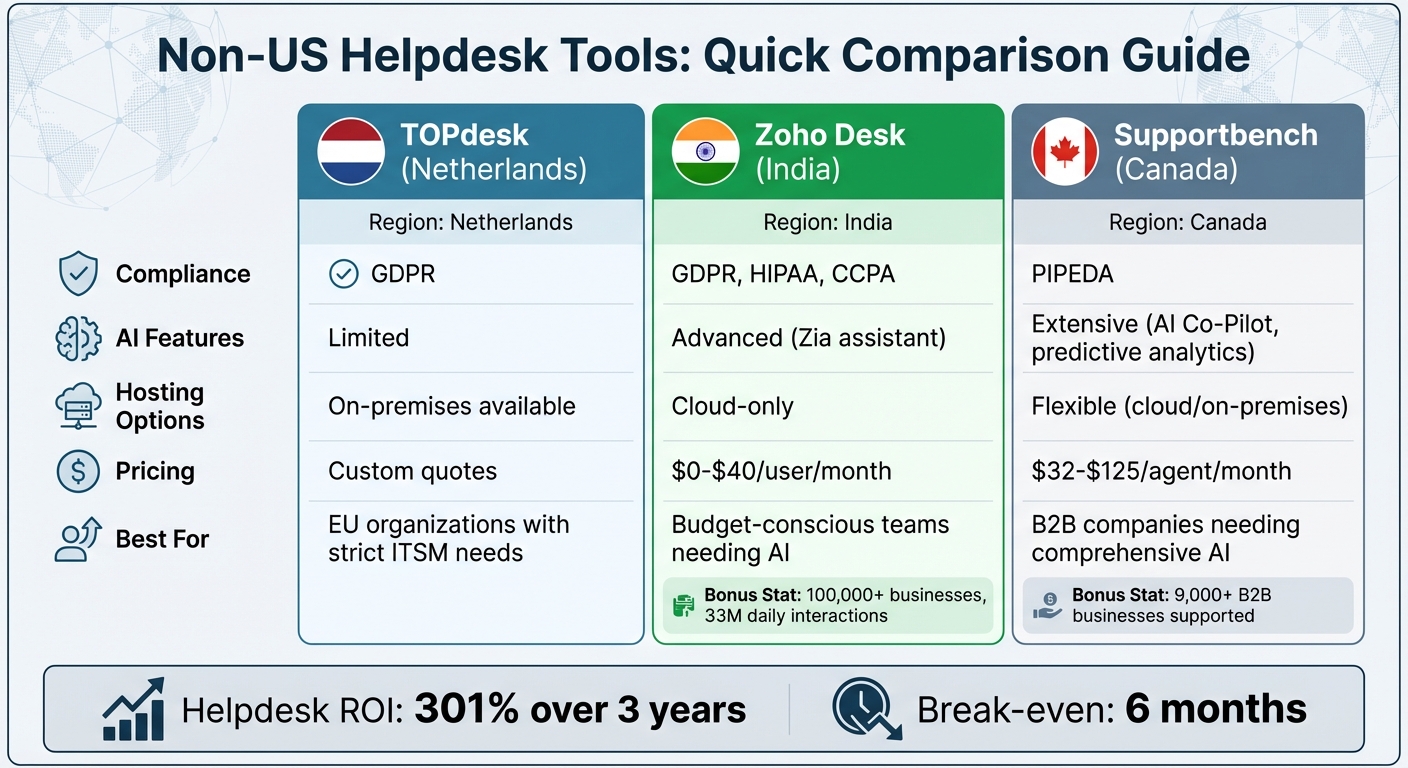
Comparison of Non-US Helpdesk Tools: TOPdesk vs Zoho Desk vs Supportbench
7 Best Helpdesk Software & Ticketing Systems for 2025 (Ranked by Best Use Cases)
1. TOPdesk
TOPdesk is a customer support management system and ITSM solution based in the Netherlands, designed to align with EU data protection laws.
Regional Compliance
To comply with GDPR, TOPdesk uses tools like Cookiebot for managing cookie consent. It also employs Cloudflare Turnstile and Google reCAPTCHA to differentiate between real users and bots. Alongside its compliance measures, TOPdesk incorporates AI to improve support processes.
AI Features
TOPdesk includes chat sessions that track devices using unique IDs, ensuring session continuity. It also uses session tracking through "SnapABug" aliases for better user interactions. However, there are no additional advanced AI features mentioned.
Pricing
TOPdesk does not publicly share its pricing. To get a quote, you’ll need to contact their sales team, as pricing depends on factors like user count and deployment needs.
2. Zoho Desk
Zoho Desk, created by Zoho Corporation (based in Chennai, India), is a helpdesk platform widely used across the EU and beyond. Supporting over 100,000 businesses globally, it processes an impressive 33 million customer interactions every day.
Regional Compliance
Zoho Desk prioritizes data privacy with adherence to GDPR, HIPAA, and CCPA regulations. With its own network of global data centers and a strict no-third-party tracker policy, the platform ensures user data isn’t exploited for advertising. This setup allows businesses in the EU and UK to maintain greater control over customer data storage.
AI Features
Zoho Desk’s AI assistant, Zia, offers a range of advanced tools like sentiment analysis, automated ticket tagging, and response suggestions based on historical trends. It also identifies unusual ticket patterns, provides generative AI to draft quick replies, and delivers predictive insights through its AI dashboard. These features are included in the Enterprise plan, priced at $40 per user per month.
Integration Capabilities
The platform integrates seamlessly with over 200 third-party apps, including Slack, Microsoft Teams, Jira, and Salesforce, alongside more than 50 native Zoho apps like CRM, Books, and Mail. Additionally, its Blueprint feature simplifies multi-step support workflows, improving operational efficiency.
"I believe that what we’ve achieved in collaboration with the Zoho Desk team has made a huge impact on how efficiently we can resolve complex requests for our clients, and it has been a major improvement for our customer experience."
- Jason Nichol, Vice President of Product at Feedonomics
Pricing
Zoho Desk provides four pricing tiers, billed per user per month:
- Free: Supports up to 3 users at $0
- Standard: $14
- Professional: $23
- Enterprise: $40
The free plan includes basic ticketing and a knowledge base, while the Enterprise plan adds advanced features like Zia AI, live chat, and multi-brand help centers. Zoho Desk also boasts implementation speeds that are reportedly 50% faster than many other customer service platforms.
sbb-itb-e60d259
3. Supportbench
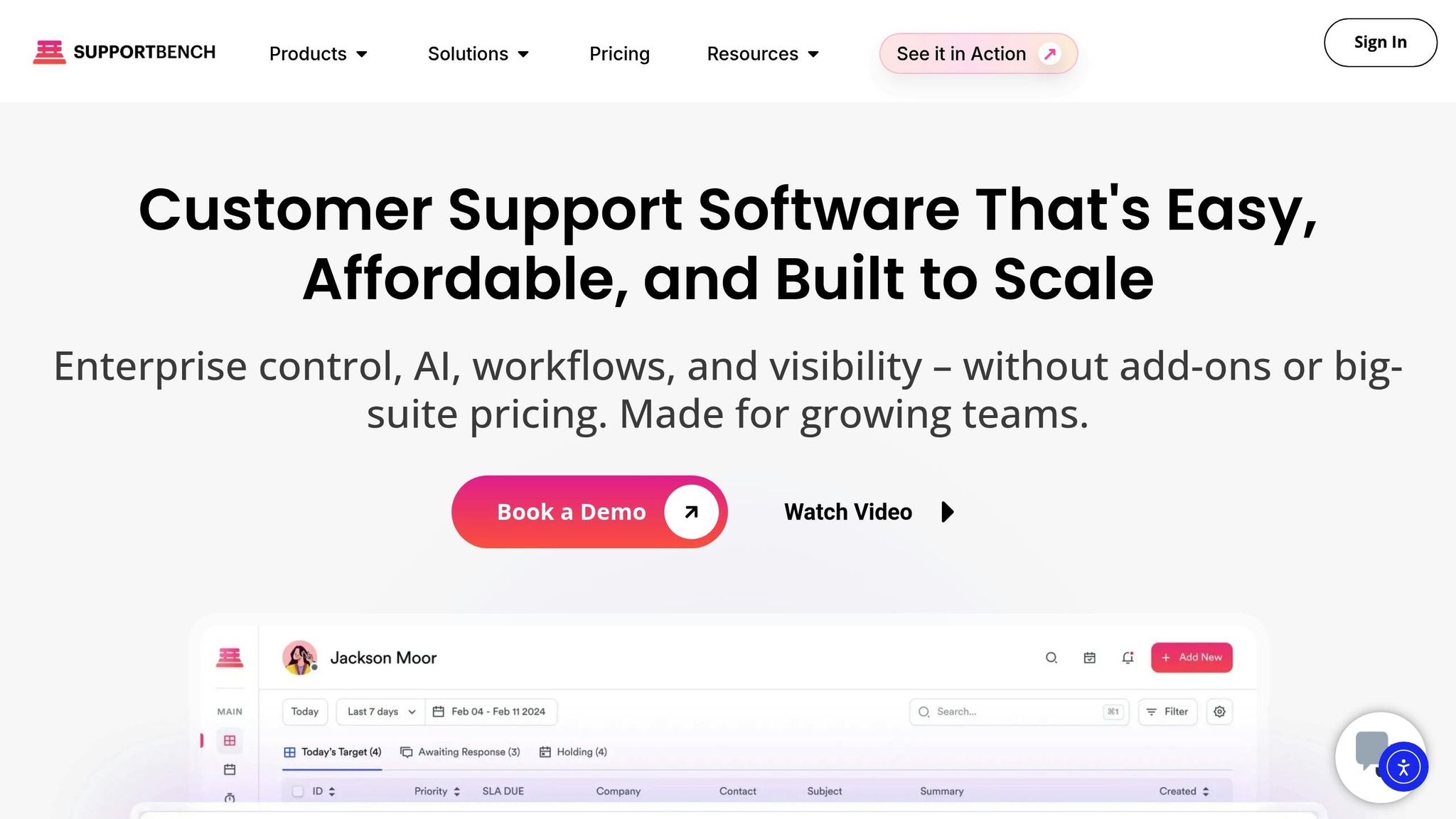
Supportbench, headquartered in Vancouver, Canada, supports over 9,000 B2B businesses worldwide and places a strong emphasis on data sovereignty. Designed specifically for modern B2B support operations, it balances regulatory compliance with AI-powered efficiency.
Regional Compliance
Supportbench helps companies meet regional data requirements through flexible customer policies. These policies allow organizations to manage various data profiles tailored to different customer tiers. Every system modification is fully auditable, ensuring accountability and data integrity. Role-Based Access Control (RBAC) adds an extra layer of security for sensitive information, while its customizable customer portal provides clarity across different regulatory frameworks. Beyond compliance, the platform incorporates advanced AI tools to streamline workflows and improve support processes.
AI Features
AI is deeply integrated into Supportbench’s functionality, with GPT-4o powering its knowledge base and FAQ bots. The AI Co-Pilot enables agents to use natural language to search through the knowledge base, ticket history, and customer data, accelerating issue resolution. The platform also automates key tasks, such as summarizing customer activities and ticket resolutions. Predictive analytics offer insights into customer satisfaction (CSAT) and customer effort scores (CES), even if surveys are left incomplete, helping businesses gauge sentiment and identify potential churn risks.
Other AI-driven features include:
- Automated article creation from resolved cases.
- Smart prioritization of tickets based on language and predefined rules.
- AI-powered reporting that generates detailed reports from simple queries like, “Who are the top three customers creating tickets this month?”.
- Sentiment analysis that tracks customer communications and integrates these insights into agent dashboards and health scoring systems.
"Supportbench is amazing in how it gets things done compared to other success and case executives arrangements I’ve used and IMO incomparably superior when it comes to resolving end-user difficulties."
- Caitlyn Langston, Chief Technology Officer
Integration Capabilities
Supportbench offers seamless integrations with CRM, RMM, product management, data enrichment, and time management systems. These integrations function as built-in extensions, eliminating the need for external plugins. Additionally, its deep Power BI integration gives users complete control over reporting, without requiring expertise in complex table structures. The platform’s 360-degree customer view consolidates data from all integrated sources, displaying performance metrics, product details, and contract renewal information in one place. These features are complemented by a pricing model designed for scalability.
Pricing
Supportbench offers two pricing tiers, billed per agent per month:
- Professional Plan: $32 per agent/month (billed annually) or $40 per month (billed monthly). This plan includes Intelligent Support AI, ticketing, health scoring, and survey tools.
- Enterprise Plan: $100 per agent/month (billed annually) or $125 per month (billed monthly). This plan adds features like sandbox environments, white labeling, SSO, and dedicated success management.
For teams with more than 15 agents, the cost increases by $2.50 per additional agent, capped at $150 per agent. Teams with 60 or more agents are automatically upgraded to the Enterprise plan. Supportbench also claims to help businesses boost revenue by 25% by cutting operational costs and reducing customer churn.
Comparison: Strengths and Limitations
Each platform approaches compliance, AI integration, connectivity, and cost differently, reflecting the challenges of balancing regulatory and operational needs. Here’s how TOPdesk, Zoho Desk, and Supportbench stack up on key aspects:
| Criteria | TOPdesk | Zoho Desk | Supportbench |
|---|---|---|---|
| Regional Compliance | Designed for strict regulatory needs, with on-premises deployment available for highly regulated industries. | Meets GDPR, HIPAA, and CCPA requirements. Relies on proprietary global data centers, but its cloud-only model limits options for organizations needing sovereign hosting. | Based in Canada, it complies with PIPEDA and offers flexible policies to help customers meet local regulatory demands. |
| AI Capabilities | Focused on structured ITSM workflows, though native AI features are limited. | Includes Zia Agents for autonomous support tasks, predictive ticket triaging, sentiment analysis, and context-aware responses. Supports over 40 languages and integrates with external language models. | Features AI throughout the platform, including a co-pilot for agents, predictive scoring, and automated article creation, all aimed at improving support efficiency. |
| Integration & Localization | Strong ITSM integrations tailored for IT-heavy environments, though less connectivity with CRM and product management tools. | Integrates seamlessly with Zoho’s ecosystem (CRM, analytics, etc.) and offers a versatile third-party app marketplace. Implementation is generally quick but can extend for larger enterprises. | Provides deep integration with CRM and product management tools, creating a unified customer view without requiring complex configurations. |
| Pricing & Scalability | Positioned at a higher price tier, reflecting its enterprise ITSM focus. Pricing is provided via custom quotes. | Offers a free plan for up to 3 users, with paid plans starting at $14 per user/month (Standard) and scaling to $40 per user/month (Enterprise). AI features are included at no extra cost. | Transparent pricing starts at $32 per agent/month (billed annually), with enterprise-level features for all. Discounts are available for startups and non-profits. |
Key Trade-Offs
- TOPdesk is ideal for organizations focused on structured ITSM workflows but lacks advanced AI capabilities for automation.
- Zoho Desk delivers strong AI integration at competitive pricing but may not suit those needing on-premises or sovereign hosting options.
- Supportbench combines Canadian data sovereignty with robust AI features and a transparent pricing model that supports scalable growth.
Ultimately, organizations must weigh deployment flexibility, total ownership costs, and AI depth to align with their regulatory, budgetary, and automation priorities.
Conclusion
In the fast-evolving world of AI-driven support, choosing the right helpdesk tool boils down to a few key factors: your data storage requirements, the level of AI automation you need, and, of course, your budget.
Here’s a quick snapshot of the regional options: If you’re navigating strict EU data regulations, TOPdesk stands out with its EU origins and GDPR compliance. For those looking for affordability paired with AI functionality, Zoho Desk delivers with its AI assistant, Zia, starting at just $14 per user/month. For more intricate B2B support scenarios, Supportbench is a solid option, offering enterprise-grade AI features and PIPEDA compliance. Based in Canada, it provides transparent pricing starting at $32 per agent/month and includes tools like an AI co-pilot, predictive CSAT scoring, and automated knowledge base creation – all designed to work right out of the box, minimizing the need for heavy IT support or pricey implementations.
Cost efficiency is another critical factor. Research shows that helpdesk investments typically break even within six months. Plus, AI-powered platforms boast an impressive average ROI of 301% over three years. To maximize your investment, look for platforms that include AI as a standard feature rather than charging extra for it.
For organizations operating in multiple regions, it’s essential to ensure that your chosen platform has data centers in the necessary locations and provides clear sub-processor lists. This helps avoid legal headaches down the line. Ultimately, aligning the platform’s flexibility, AI features, and total ownership costs with your regulatory needs and growth plans is the best way to make an informed choice.
FAQs
What compliance advantages do non-US helpdesk tools offer?
Non-US helpdesk tools stand out for their ability to align with regional data privacy laws, such as the GDPR in the EU and PIPEDA in Canada. These tools often provide greater control over where data is hosted, ensuring that sensitive customer information is stored and managed within the required jurisdictions.
What sets them apart is their focus on meeting the specific regulatory needs of their regions. For businesses operating across borders, this can simplify compliance processes while maintaining high standards for data security and privacy in customer support operations.
How do the AI features of TOPdesk, Zoho Desk, and Supportbench compare?
The AI capabilities of TOPdesk, Zoho Desk, and Supportbench bring unique strengths to the table, each addressing specific support needs.
TOPdesk, originating from the Netherlands, integrates AI into its IT Service Management (ITSM) platform. Its focus is on simplifying workflows and automating repetitive IT tasks, making it a strong choice for organizations emphasizing IT operations and efficiency.
Zoho Desk, developed by a global team in India, features an AI assistant called Zia. This tool is designed to boost agent efficiency by automating responses, offering predictive insights, and managing interactions across multiple communication channels.
Supportbench, built as an AI-native platform, is tailored for B2B customer support. It prioritizes operational efficiency, ensures compliance with regulations like GDPR and PIPEDA, and handles the complexities of demanding support environments.
Each platform brings something different: TOPdesk excels in IT automation, Zoho Desk shines with its omnichannel AI tools, and Supportbench focuses on scalable, compliant B2B support.
What should I consider when selecting a helpdesk tool for my organization?
When choosing a helpdesk tool, it’s essential to think about how well it fits your organization’s specific needs and compliance requirements. One of the first things to examine is the tool’s regional origin. This is particularly important if your business operates in regions like the UK, EU, Canada, or Australia, where data privacy laws such as GDPR or PIPEDA come into play. Tools developed in these areas often emphasize data security and sovereignty, making them a better fit for businesses bound by strict privacy regulations.
Next, take a close look at the features that match your support requirements. Key functionalities to consider include multi-channel support, automation, self-service portals, and multi-language capabilities. These features can streamline operations and enhance customer experiences, especially if your business handles global or complex support needs.
Lastly, don’t overlook practical considerations like integration options, scalability, and whether the vendor offers local support. A tool that aligns with regional compliance standards while also supporting your business’s growth is crucial for long-term success. By focusing on these aspects, you can select a helpdesk solution that balances operational efficiency with security and compliance.