


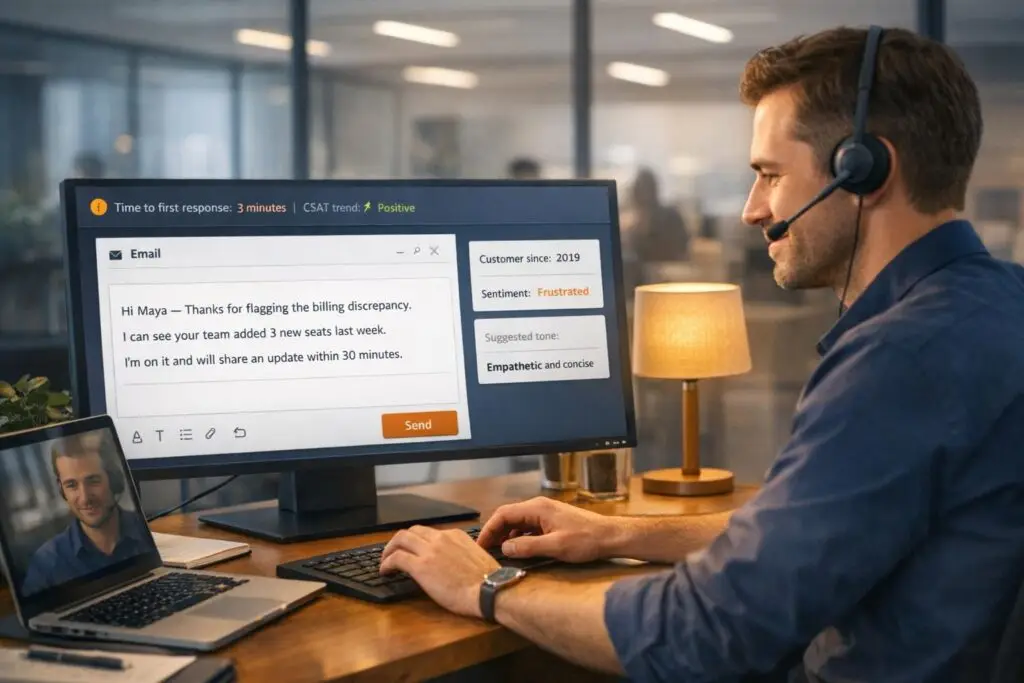
When responding to B2B support tickets, your first reply sets the tone for the entire process. It’s not just about speed – though 90% of customers expect a response within 10 minutes – but also about showing empathy, clarity, and professionalism. Generic, robotic replies can erode trust, especially in high-stakes B2B scenarios where multiple stakeholders are involved.
Here’s what a great first response does:
- Acknowledges the issue to reduce customer anxiety.
- Outlines clear next steps to avoid confusion.
- Personalizes the reply to show that your team understands the customer’s specific situation.
The article provides 7 tailored templates for common B2B challenges, like managing delays, resolving technical issues, or addressing outages. These templates balance professionalism with a human touch, ensuring clients feel valued.
AI tools for customer support can further enhance these responses by pulling in customer-specific details and adjusting tone based on context. By combining AI and human oversight, support teams can deliver faster, more personalized, and effective first replies.
B2B Customer Support First Response Statistics and Impact
Why Generic First Responses Hurt B2B Support
When B2B clients receive a scripted reply, it immediately sends the wrong message. It suggests their issue hasn’t been thoroughly reviewed or that the person handling it might lack the expertise to solve it. In the high-stakes world of B2B relationships, this can quickly escalate frustration into doubts about your company’s ability to deliver. Let’s break down how these missteps affect trust and operational efficiency.
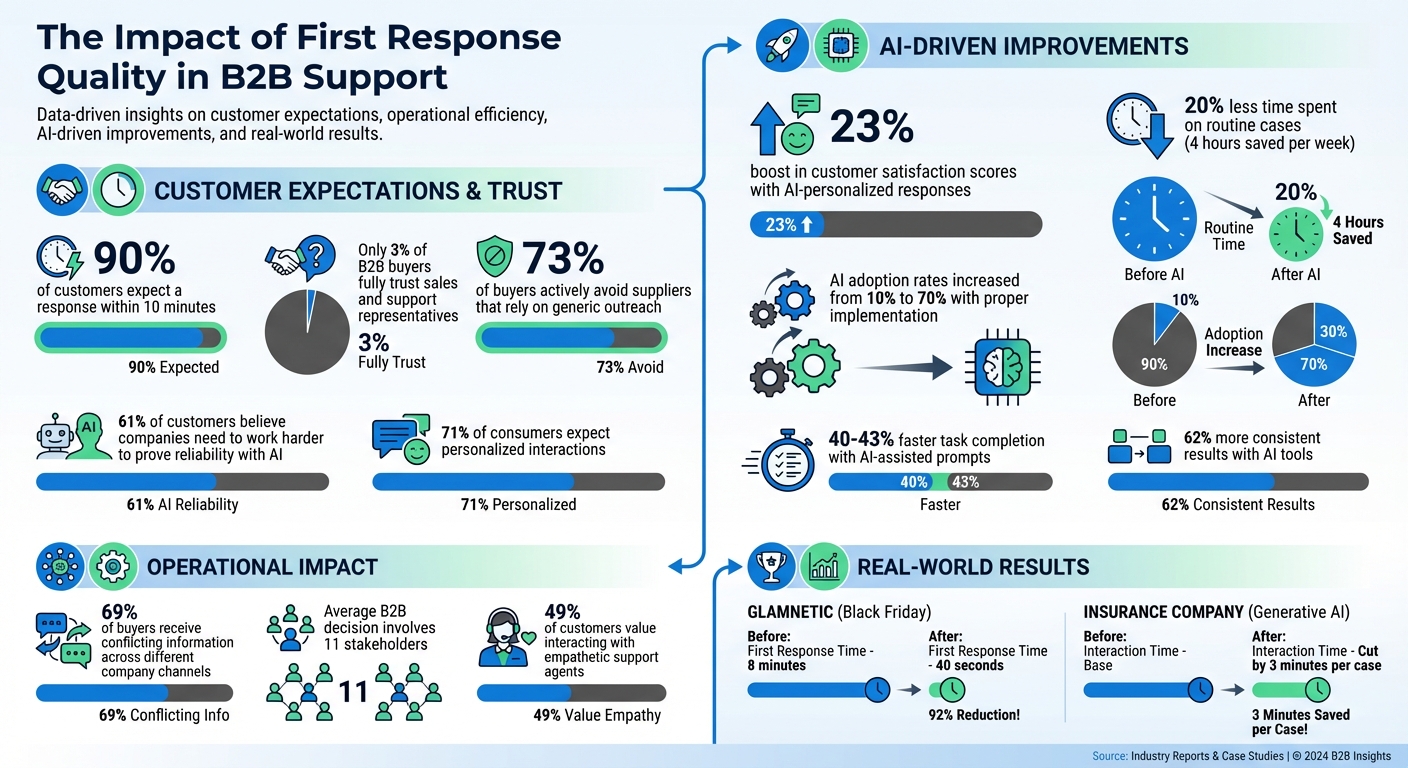
The trust gap in B2B interactions is striking. Only 3% of B2B buyers fully trust sales and support representatives, while a massive 73% actively avoid suppliers that rely on generic outreach [6]. Adding to this, 61% of customers believe that with the rise of AI, companies need to work even harder to prove they’re reliable [6]. A robotic response reinforces the fear that the client is just another number, damaging the relationship before it even begins.
"The moment your outreach reads like a generic template, you confirm the buyer’s fear that they’re just another row in a spreadsheet." – SalesHive [6]
The operational fallout of generic responses is just as troubling. These replies often lead to escalations across multiple channels, resulting in duplicate tickets and an increased workload for support teams [4]. Worse, 69% of buyers report receiving conflicting information when dealing with different company channels [6]. This inconsistency only adds to their frustration.
B2B decisions are rarely straightforward. On average, they involve 11 stakeholders, each with unique priorities and communication preferences [6]. A one-size-fits-all response often misses the mark – either drowning an executive in jargon or providing an engineer with insufficient technical detail. Vague updates like "we’re looking into it" leave clients without the information they need to align internally, stalling progress [5].
However, businesses that leverage AI to personalize their responses are seeing real results. These companies report a 23% boost in customer satisfaction scores compared to those sticking to static templates [7]. And it’s not just about happier customers – it’s about faster resolutions, fewer escalations, and better long-term retention. When your first response feels impersonal, you risk more than just irritation; you risk confirming the client’s belief that your company doesn’t truly understand their needs. This makes personalized communication a critical area to address, paving the way for AI-driven solutions to reshape support, as we’ll explore next.
sbb-itb-e60d259
7 First Response Templates for B2B Customer Support
To avoid the pitfalls of generic replies, these tailored templates focus on empathy and clarity. Think of them as starting points you can personalize. Each template incorporates three key elements: acknowledgment of the issue, an immediate action plan, and a clear timeline for the next update [5]. Personalization is crucial – 49% of customers value interacting with empathetic support agents [9].
The structure of these templates is straightforward: a personalized greeting using the customer’s name, acknowledgment of their specific concern, a clear action step, and a realistic timeline with a definitive deadline (e.g., "by 4:00 PM EST on 04/07/2026") [3]. This approach ensures professionalism while avoiding a robotic tone.
"The biggest mistake I see support teams make with complaint templates is being vague about next steps. ‘We’re looking into it’ means nothing to a frustrated customer." – Jonathan Bar, Founder, Corebee [5]
These templates work best when customized. For technical issues, include specific environment details or ticket references. For escalations, name the specialist handling the case. In outage scenarios, link to a live status page and commit to regular updates [3]. Also, avoid overusing the customer’s name in short responses – it can feel overly scripted [3]. AI tools can further refine these templates to match the customer’s language and context by analyzing sentiment.
Here are seven sample templates designed to tackle common B2B support challenges with a human touch.
Template 1: Acknowledging Multi-Stakeholder Delays
Subject: Re: [Specific Issue] – Coordinating with [Department Names]
Hi [Customer Name],
Thank you for bringing this up – I understand you’re waiting on input from both our engineering and billing teams regarding [specific issue]. I’ve already involved Sarah Chen from Engineering and Marcus Rodriguez from Billing to provide a complete answer.
I’m coordinating their responses and will share a consolidated update by [specific time, e.g., 2:00 PM EST on 04/08/2026]. If any clarification is needed about [specific detail customer mentioned], I’ll reach out before then.
Best,
[Your Name]
[Your Role], Supportbench
Why this works: This template names the involved departments and explains the delay, helping the customer understand the process without feeling dismissed [5].
Template 2: Responding to Long-Running Technical Issues
Subject: Re: [Ticket #12345] – Status Update on [Specific Error]
Hi [Customer Name],
Your [error/bug] affecting [specific workflow] since [date] remains a top priority. Our engineering team has pinpointed the root cause and is currently testing a fix in our staging environment.
I’ll update you on the test results and deployment timeline by [specific date and time, e.g., 10:00 AM EST on 04/09/2026]. Meanwhile, if you need workaround steps, they’re attached here: [single link].
Thanks,
[Your Name]
[Your Role], Supportbench
Why this works: By explaining the root cause, this template positions your team as knowledgeable and transparent problem-solvers [10].
Template 3: Handling Renewal-Related Escalations
Subject: Re: Your Renewal Concerns – Let’s Address This
Hi [Customer Name],
I understand you have concerns about [specific issue, e.g., pricing, features, or support]. I want to make sure we address these well before your renewal date on [specific date]. Your feedback is important, and I’d like to learn what would make this right for you.
I’ve escalated your concerns to our Customer Success Manager, [Name], who will reach out by [specific time, e.g., end of business today, 04/06/2026] to discuss options. If there’s a specific outcome you’re looking for, please reply here so [CSM Name] has that context before the call.
Best,
[Your Name]
[Your Role], Supportbench
Why this works: This template creates accountability by naming the person handling the case and emphasizes the effort to retain the customer [3].
Template 4: Addressing Supply Chain Disruptions
Subject: Re: Delayed Shipment [Order #67890] – Your Options
Hi [Customer Name],
I understand you were expecting [product/component] by [original date], and I apologize for the delay caused by [specific supply chain issue, e.g., a delay at our supplier’s facility in Ohio]. The revised delivery estimate is now [new date].
To make this right, you have two options: we can hold your order and ship it on [new date] at no additional cost, or we can process a full refund today so you can reorder when inventory stabilizes. Let me know which option works best for you, and I’ll handle it right away.
Thanks,
[Your Name]
[Your Role], Supportbench
Why this works: Offering clear choices restores the customer’s sense of control, which is critical when delays disrupt their plans [9].
Template 5: Responding to MSP Infrastructure Outages
Subject: [URGENT] Infrastructure Outage Update – [Service Name]
Hi [Customer Name],
I understand your team is unable to access [specific service/system], and this is being treated as a Priority 1 issue. Our infrastructure team identified the cause at [time, e.g., 9:15 AM EST] and is actively working on a solution.
I will provide updates every two hours until this is resolved, even if there’s no new information, so you don’t need to follow up. The next update will be at [specific time, e.g., 11:15 AM EST]. You can also monitor our live status page here: [single link].
Thanks,
[Your Name]
[Your Role], Supportbench
Why this works: Regular updates reduce the need for customers to chase for information, minimizing frustration during critical outages [2].
Template 6: Handling Manufacturing Downtime
Subject: Re: Production Line Downtime – [Equipment/System Name]
Hi [Customer Name],
I understand your [specific production line or equipment] has been down since [time], impacting [specific business outcome, e.g., daily output]. I’ve escalated this to our senior technical team, who are reviewing the diagnostic logs you provided.
Based on the error codes, we’re prioritizing [specific action, e.g., a firmware patch or on-site technician visit]. I’ll share a concrete plan and timeline by [specific time, e.g., 3:00 PM EST today, 04/06/2026]. If you need a loaner unit to minimize downtime, let me know, and I’ll arrange it promptly.
Best,
[Your Name]
[Your Role], Supportbench
Why this works: This template shows an understanding of the operational impact and offers proactive solutions to minimize disruption [3].
Template 7: Following Up on Logistics Cases
Subject: Re: Shipment Tracking [Tracking #ABC123] – Status Update
Hi [Customer Name],
Following up on your shipment scheduled for delivery on [original date]. Our logistics partner confirmed the delay was caused by [specific reason, e.g., weather conditions in the Midwest or customs clearance]. The updated delivery window is now [new date range].
I’ve flagged this shipment for priority handling and will send you daily tracking updates at [specific time, e.g., 9:00 AM EST] until the issue is resolved.
Thanks,
[Your Name]
[Your Role], Supportbench
Why this works: Transparency about the delay and proactive updates reduce the need for the customer to follow up, building trust and confidence.
How AI Personalizes First Responses
AI has reshaped the way first response templates work, turning them into highly personalized and empathetic communications. Instead of relying on generic scripts, AI tailors responses by analyzing the customer’s context before an agent even opens the ticket. Using advanced Natural Language Processing (NLP), it can pick up on emotional cues like frustration, confusion, or satisfaction. For instance, it adjusts the tone to be empathetic for an upset customer or professional and efficient for neutral inquiries. This means a template can shift dramatically depending on whether a customer writes, "This is unacceptable!" or "Just checking on status" [1].
Supportbench’s AI tools take this a step further by pulling in real-time account data. These features automatically insert details like plan tiers (e.g., "Growth plan"), time zones, order numbers, and even previous troubleshooting attempts [5]. By referencing specific customer information – such as their name, browser version, or ticket history – the AI ensures that responses feel tailored rather than one-size-fits-all [5].
AI also simplifies technical jargon for non-technical customers, translating complex language into plain English. On the flip side, it can take raw bug reports and format them into structured templates for engineering teams, using fields like "Steps to Reproduce" and "Environment" [11]. For high-value B2B accounts, the system can even tweak the tone of responses to align with specific preferences, applying a VIP approach when needed [11]. This level of customization allows support teams to save time – agents spend 20% less time on routine cases, freeing up about 4 hours per week [5].
The best strategy for 2026 is a hybrid model: AI drafts the response, and humans review and finalize it [5]. Including source citations and confidence labels in AI-generated drafts has made agents more likely to use these suggestions, increasing adoption rates from 10% to over 70% [5]. This method reduces repetitive tasks while maintaining the human element that customers value.
"The right prompt turns a slow, inconsistent ticket queue into a predictable, high-quality support operation." – Kamil Banc, Founder, Right-Click Prompts [11]
With these advancements, teams no longer need to maintain countless static macros. Instead, they can rely on a smaller set of well-crafted knowledge base snippets, which AI uses as references to draft responses [5]. This approach scales with technology rather than requiring additional staff, making it especially useful for B2B teams handling complex cases with multiple stakeholders.
Measuring the Impact of Better First Responses
To gauge how effective your first response templates are, focus on tracking key metrics. One of the most important metrics is Time to First Meaningful Response – this measures how quickly a reply actually advances the case. Examples include providing a clear answer, asking for specific missing details, or setting a defined ETA. Auto-acknowledgments don’t count here [14]. When analyzing this, use the median First Response Time instead of the average, as averages can be misleading due to outliers [13].
It’s also worth monitoring P90 and P95 percentiles to spot extreme wait times that could lead to customer churn [14]. Real-world examples highlight how improving these metrics can lead to noticeable results.
For instance, in November 2024, beauty brand Glamnetic leveraged an AI agent during Black Friday Cyber Monday. This reduced their First Response Time from 8 minutes to just 40 seconds, enabling nearly instant, meaningful replies [15]. Similarly, a Deloitte study found that an insurance company used generative AI for call summarization and real-time assistance, cutting interaction times by about 3 minutes per case [12].
"Treat TFR [Time to First Response] like a financial control, not a service vanity metric. A delayed first reply increases churn probability, refund demand, and public escalation." – Teammates.ai [14]
These examples drive home the importance of both speed and accuracy in retaining customers.
Another critical metric is First Contact Resolution (FCR), which measures whether an issue is resolved in the first reply. AI-driven responses, especially when pulling from robust knowledge bases, can significantly boost FCR rates [13][5]. It’s also important to track template usage and edit rates. If templates require frequent edits, they may feel too robotic or lack sufficient context [3]. Additionally, if certain templates repeatedly lead to follow-up questions, it could indicate gaps in the initial information provided [8].
To refine your approach, segment metrics by customer tier and communication channel. This ensures high-value accounts get the attention they deserve [13][14]. Another useful tool is hour-of-day heatmaps, which overlay ticket arrival rates with team capacity. These heatmaps help identify "saturation windows" when response times tend to spike [14].
Platforms like Supportbench simplify this process by using AI tools to automatically track these metrics. They offer weekly performance reports summarizing ticket volume, SLA breaches, and CSAT trends – no manual data pulls required. This aligns perfectly with an AI-driven strategy for streamlining support operations.
Conclusion
In B2B support, first impressions carry significant weight. A robotic or overly scripted initial response can quickly turn customers away [5]. When a client faces high-stakes issues like a manufacturing line shutdown or an MSP infrastructure outage, they need assurance that you grasp the urgency and business impact – not just confirmation that their ticket was received. A thoughtful, personalized first response can ease tensions and set a positive tone for the entire support journey [2][11].
Advances in response technology are reshaping how support teams operate, boosting efficiency and strengthening customer trust. Today’s platforms can analyze ticket history, pull relevant insights from knowledge bases, and draft replies that incorporate specific customer details – all while maintaining a human touch [5]. Teams leveraging AI-assisted prompts have reported completing tasks 40–43% faster and achieving 62% more consistent results [11]. These numbers highlight how technology and empathy can complement one another.
With 71% of consumers expecting personalized interactions and 90% prioritizing immediate responses [5], B2B support teams can’t afford to come across as impersonal. Tools like Supportbench help scale personalization by blending AI-generated drafts with a unified view of customer context. This approach ensures that every first response feels timely, relevant, and genuinely helpful – leading to quicker resolutions, higher satisfaction scores, and the ability to scale operations without losing the human touch.
As AI and empathy converge, think of templates as a foundation. Let AI take care of personalization’s heavy lifting, while human oversight ensures each response is tailored to the complexities of B2B relationships [5].
FAQs
What makes a first reply feel “human” in B2B support?
When responding to a B2B customer, the first reply sets the tone. It’s not just about addressing the issue – it’s about making the customer feel heard and valued. Start by acknowledging their concerns sincerely. A simple statement like, “I understand how frustrating this must be,” can go a long way in showing empathy.
Next, personalize the response. Use their name, reference specific details from their message, and avoid generic or overly formal language. For example, instead of saying, “Your issue is being processed,” you could write, “Hi [Name], I see you’re experiencing [specific issue], and I’m here to help resolve this quickly.”
Finally, offer clear next steps. Let them know what will happen next and provide any actionable information they might need. A balance of professionalism and warmth reassures customers that you’re not just solving their problem – you’re genuinely invested in their experience.
How can I personalize templates without slowing down my team?
Using a handful of 5–6 core templates can make customer interactions both efficient and personal. These templates should be simple to customize with details like the customer’s name or order ID using variables such as {{customer_name}}. While AI can assist in drafting responses, it’s crucial to review them to maintain a natural, conversational tone. This method ensures quick replies without sacrificing quality or empathy in customer communication.
Which metrics prove our first responses are actually helping?
Metrics like first response time and first response rate measure how well your team handles initial customer interactions. Quick acknowledgment of inquiries often boosts customer satisfaction while streamlining support processes. These metrics showcase your team’s ability to respond promptly and with empathy, ensuring concerns are addressed swiftly and professionally.






