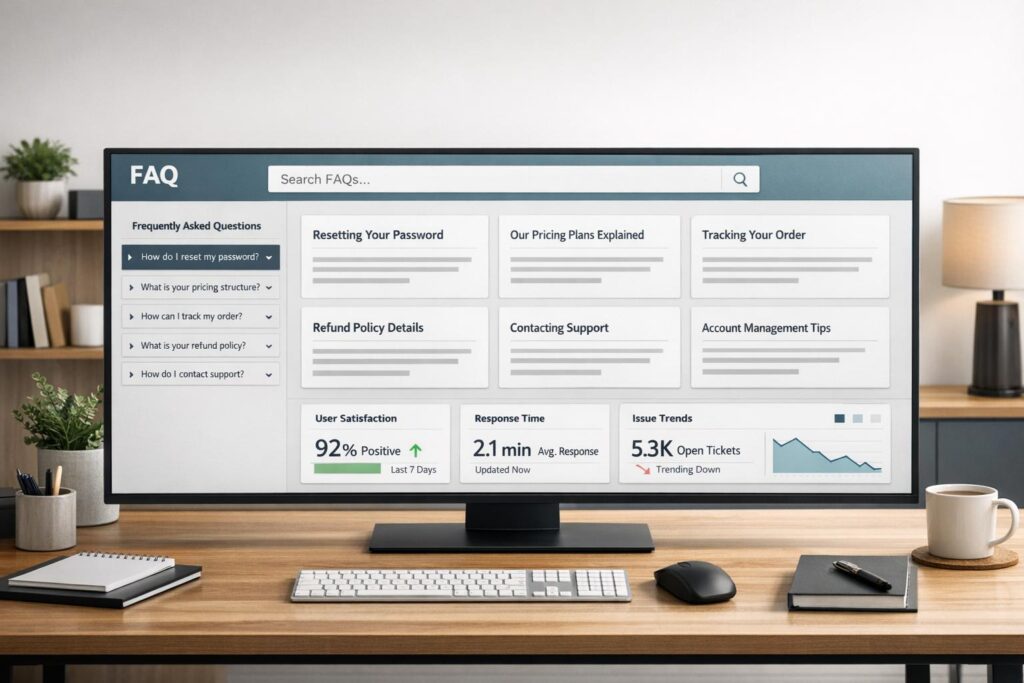
When your support team spends too much time answering repetitive questions, an FAQ page can be a game-changer. A well-designed FAQ page can resolve up to 50% of customer queries and reduce support tickets by 25-40%. It’s not just a time-saver – it’s where 66% of customers go first before contacting support.
Here’s what makes a great FAQ page for B2B support:
- Easy Navigation: Use search bars with autocomplete and group questions by categories like Billing or Technical Setup.
- Mobile-Friendly Design: Ensure responsive layouts with touch-friendly elements and readable fonts.
- Regular Updates: Keep content fresh by reviewing FAQs quarterly and adding answers to recurring customer questions.
Top FAQ Layouts:
- Search Bar with Filters: Ideal for 50+ questions; lets users search by keywords or categories.
- Accordion-Style Layout: Best for 10-50 questions; keeps the page clean and easy to scan.
- Grid Layout: Works for smaller libraries or as a visual entry point for complex topics.
Quick Setup Tip:
Start with a search bar, organize questions into 4-6 categories, and use collapsible sections for clarity. Add feedback options and links to escalate issues if needed.
A strong FAQ page doesn’t just save time – it helps customers find answers faster and reduces costs. Regular updates and AI tools can make it even more effective.
What Makes a Good B2B FAQ Page
A strong B2B FAQ page goes beyond being a simple list of questions – it’s a powerful tool designed to reduce customer support tickets while enhancing user experience. By focusing on intuitive design, cross-device functionality, and regular updates, you can create an FAQ page that not only answers questions but also builds trust and efficiency.
Easy Navigation and Search
An effective FAQ page makes finding answers simple and fast. A search bar with features like predictive autocomplete and intelligent keyword matching ensures users can get the same results for variations like "API integration" and "connecting our API". Additionally, grouping questions by intent (e.g., Billing, Technical Setup) helps users locate relevant answers more efficiently.
To cater to diverse audiences, consider using persona-based segmentation, tailoring content to specific user groups. Accordion-style layouts are also a smart choice – they keep the page clean by showing only the question headers until users click for the answers. This way, visitors can quickly scan through multiple topics without feeling overwhelmed by large blocks of text.
And don’t forget: this seamless design must work just as well on all devices.
Mobile and Desktop Compatibility
With 73% of users preferring digital self-service over phone support, ensuring that your FAQ page works flawlessly on both mobile and desktop is non-negotiable. A fully responsive design is key. This includes touch-friendly elements (at least 44×44 pixels) and font sizes that are easy to read (minimum 16px) across smartphones, tablets, and desktops.
Testing your FAQ page on various devices is crucial to ensure features like collapsible sections and search bars function smoothly everywhere. A seamless experience across platforms makes your FAQ page far more effective.
Regular Content Updates
Keeping your FAQ page current is just as important as its design. Outdated information can damage customer trust, and for businesses relying on AI-powered support tools, stale content can lead to widespread errors. Regular updates ensure accuracy and relevance, which are critical for maintaining user confidence.
To stay on top of changes, schedule quarterly reviews to verify policies, refresh visuals, and remove outdated material. Use AI tools to analyze support tickets and chat logs for recurring questions or emerging trends. If your team frequently answers the same question, it’s time to add that topic to your FAQ.
For example, Reverb revamped its FAQ strategy and reduced per-agent customer contacts by 50% in just seven months. Regular updates not only improve self-service but also enhance AI-driven support outcomes.
Here’s a quick guide to when and how to update your FAQ content:
| Update Trigger | Action Required |
|---|---|
| Product Launch | Add new setup guides and feature FAQs |
| Policy Change | Update shipping, return, or security details |
| High Bounce Rate | Clarify articles or include visual aids |
| Recurring Tickets | Turn common resolutions into FAQ entries |
| Seasonal Trends | Add holiday deadlines or seasonal promotions |
Best FAQ Page Layouts for B2B Support
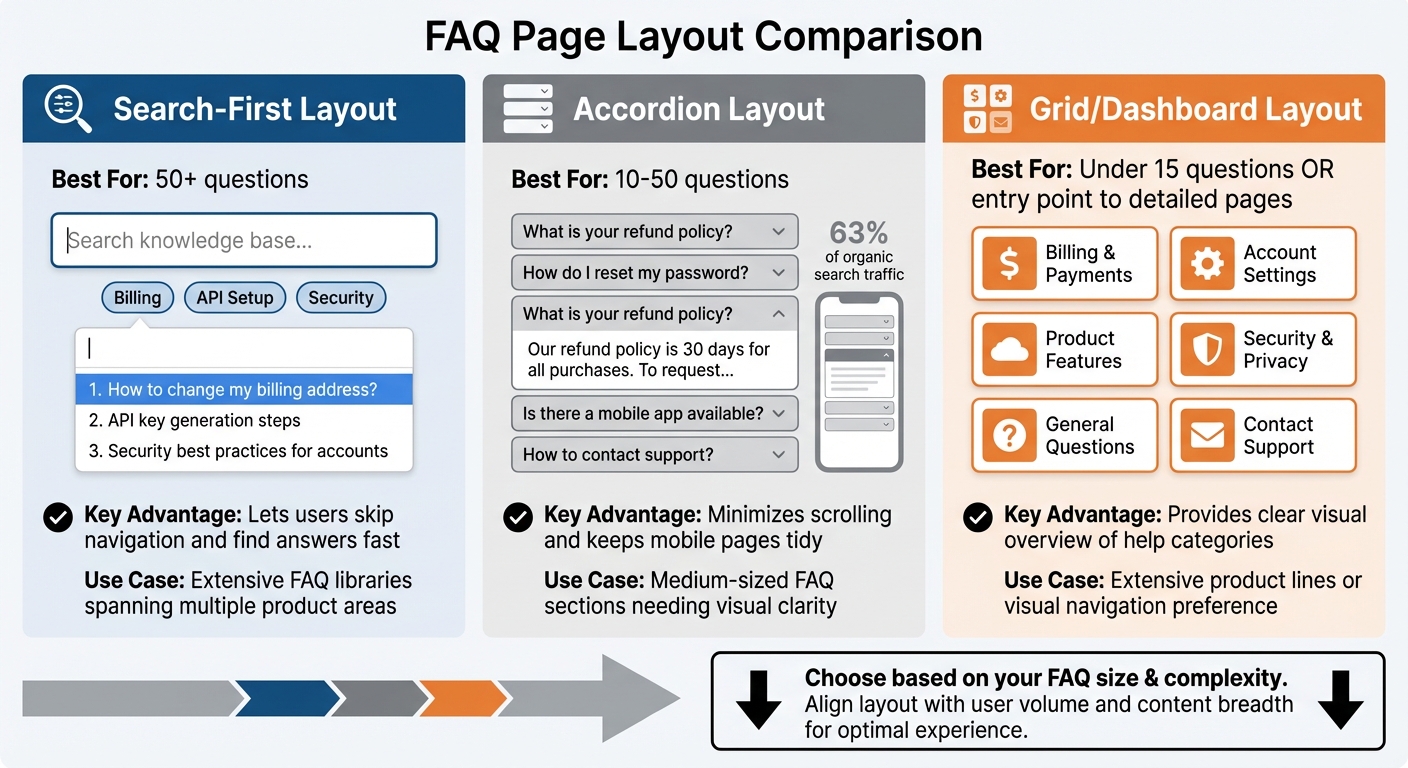
FAQ Page Layout Comparison: Search-First vs Accordion vs Grid
Picking the right layout for your B2B FAQ page can make all the difference in managing customer queries and explaining complex technical details. The ideal layout strikes a balance between being easy to scan and efficiently using space, especially when dealing with a wide range of questions across various products.
Here, we’ll explore three proven layouts that cater to different needs based on the size of your FAQ library, the complexity of your topics, and user behavior.
Search Bar with Category Filters
If your FAQ library is extensive – think 50+ questions spanning areas like billing, integrations, security, and troubleshooting – a search-first layout is a must. This design puts a large, prominent search bar at the very top, letting users skip traditional navigation and go straight to the answers they need.
What makes it even more effective? Role-based category filters. These filters allow users to sort content by topics like Account Management, API Setup, or Security, or even by their role, such as Administrators, Developers, or End Users. Predictive search adds another layer of convenience, suggesting relevant articles as users type.
"Understanding how your customers describe their issue makes it likelier that you’ll get your FAQ in front of them via search." – Madison Hoffman, Director of Self-Service and Automation, Zendesk
For the best user experience, combine the search bar with real-time filtering and a sticky sidebar that allows users to jump between sections without losing their place.
Accordion-Style Layout
When your FAQ section includes 10 to 50 questions, keeping things visually clean is key. This is where an accordion layout shines. In this design, only the question headers are visible until users click to expand the answer, cutting down on visual clutter.
Accordion layouts are especially effective on mobile devices, which now account for 63% of organic search traffic.
"Accordions list your FAQs in a vertical stack, allowing your users to expand each question to reveal the answer. They make it easier for site visitors to see all the questions at once and find the exact one they’re looking for without having to scroll through a ton of content." – Dan Magill, Marketing Specialist, WooCommerce
This approach, known as progressive disclosure, helps users focus on what they need without being overwhelmed by too much information at once. To make it even more intuitive, group your questions into four to six main categories and consider keeping one frequently asked question open by default as a visual guide.
For broader product ranges, you might want to consider a grid layout for better organization.
Grid Layout with Top Questions
A grid layout is ideal for giving users a quick visual overview, especially when dealing with a variety of product lines. This design uses tiles or cards, often paired with icons, to organize content into broad help categories. It’s an intuitive way for users to spot the area they’re interested in at a glance.
Grid layouts work well for highlighting common questions and guiding users toward more detailed sections. They’re particularly useful for simplifying navigation when your product offerings are complex. That said, this layout is best suited for smaller FAQ collections (under 15 questions) or as an entry point to more detailed pages featuring accordion or search-based layouts.
For larger libraries, consider combining a grid for high-level categories with search or accordion sections for more in-depth answers.
| Layout Pattern | Best For | Key Advantage |
|---|---|---|
| Search-First | 50+ questions | Lets users skip navigation and find answers fast |
| Accordion | 10–50 questions | Minimizes scrolling and keeps mobile pages tidy |
| Grid/Dashboard | Extensive product lines | Provides a clear visual overview of help categories |
sbb-itb-e60d259
Copy-Paste FAQ Structure for B2B Support Teams
Here’s a ready-to-use FAQ template designed to simplify customer support. It’s optimized for AI-powered search tools and proven to cut support tickets by 25% to 40%.
Header with Search Bar and Welcome Text
Start with a prominent search bar at the very top – make sure it’s at least 48px tall for mobile users. Below it, add a short, welcoming message like: "Find answers to common questions about [Your Product]. Can’t find what you need? Contact our support team."
Include a direct link to your contact form or live chat so customers can quickly escalate their issues if they can’t find what they’re looking for.
Collapsible Question Categories
Group your questions into four to six main categories based on how your customers typically interact with your product. For B2B teams, these categories often include:
- Onboarding & Getting Started
- Features & Integrations
- Technical Troubleshooting
- Security & Compliance
- Billing & Contracts
Use accordion-style collapsible sections for each category. Write questions in 6–10 words using customer-friendly language, and keep answers short (25–40 words). For more detailed topics, include a link like "Read full guide" to direct users to in-depth documentation.
At the end of each category, offer feedback options and clear next steps for further assistance.
Feedback and Contact Options
Wrap up each FAQ category with a "Was this helpful?" feedback button and a "Still have questions?" link. These tools help identify which answers need improvement while guiding users to additional support.
For escalation, add clearly visible buttons like "Submit a Ticket", "Chat with Us", or "Schedule a Call" at the bottom of each category. Research shows that top-performing B2B support teams are 76% more likely to provide multiple self-service options, so make it easy for users to switch from self-service to direct support when needed.
Conclusion
A thoughtfully crafted FAQ page can be a game-changer for your business. It not only trims costs but also boosts efficiency, making a noticeable impact on your bottom line. There are countless examples of companies successfully deflecting thousands of support tickets, saving millions in operational expenses, and allowing their teams to focus on more complex, high-priority accounts.
Starting with a solid structure is key. Use an accordion-style layout, include a prominent search bar, and organize content into four to six clear categories. These elements are essential for catering to the 67% of customers who prefer finding answers on their own.
Taking it a step further, integrating AI tools can elevate your FAQ page into a powerful support resource. AI-driven search capabilities can automate up to 80% of routine inquiries, freeing up your support team to handle more intricate B2B issues. Predictive search, AI insights to identify content gaps, and feedback loops for continuous improvement are all tools you can use to make your FAQ page smarter and more effective.
To measure your success, calculate the ROI of ticket deflection by multiplying avoided tickets by the average cost per ticket. Regular updates – ideally every quarter – based on support logs and emerging customer issues will keep your FAQ relevant and useful. Businesses that excel in B2B support are 76% more likely to offer robust self-service tools. By following this roadmap, you can transform your FAQ page into a modern, AI-powered solution that aligns with today’s customer support demands.
FAQs
How often should I update my FAQ page to keep it useful?
You should update your FAQ page frequently to keep it accurate, useful, and relevant for your customers. Make it a habit to revisit the page whenever you roll out new products, services, or policies, or if you spot recurring customer questions that aren’t already covered.
To stay on top of things, consider scheduling regular reviews – maybe every quarter or twice a year. This ensures your content stays up-to-date with customer needs, helping to resolve issues faster, cut down on escalations, and boost overall satisfaction.
What is the best way to design a B2B FAQ page?
The most effective B2B FAQ pages prioritize clarity, efficiency, and user-friendly navigation. They’re designed to help users find answers quickly, with a layout that groups related questions into categories. Features like collapsible sections or anchor links can cut down on unnecessary scrolling and save time.
Keep the language straightforward and concise. Each answer should address the question directly, with links to detailed resources for more complex topics. Adding visual elements – like icons or simple illustrations – can make the page more appealing and easier to skim.
To keep the FAQ useful, update it regularly with new questions and insights from customer feedback. A well-organized, easy-to-use FAQ page doesn’t just enhance the user experience – it can also reduce the need for support requests, making it a smart tool for streamlining B2B operations.
How can AI improve the effectiveness of my FAQ page?
AI tools can transform your FAQ page into a smarter, more user-friendly resource. With AI-powered chatbots, you can provide instant, tailored answers to common questions, cutting down on the need for human support and speeding up response times. These chatbots use natural language processing (NLP) to understand and respond effectively to a wide range of queries, even when they’re complex or phrased in unexpected ways.
Beyond just answering questions, AI can keep your FAQ content up-to-date by analyzing customer behavior, search trends, and emerging concerns. This means your FAQ page stays relevant and delivers accurate information when users need it. On top of that, AI-driven data can boost your FAQ’s search engine optimization (SEO) by identifying the most important keywords and frequently asked questions, making it easier for users to find helpful information quickly. By incorporating AI, your FAQ page becomes a proactive tool that not only improves customer satisfaction but also grows alongside your business.