AI-powered email parsing transforms messy, unstructured emails into clean, structured data in seconds, saving companies millions annually in manual effort and errors. Support teams can cut response times from hours to minutes and reduce repetitive work by 45%, thanks to tools that extract key details like order numbers, payment terms, and customer sentiment.
Key Takeaways:
- AI Parsing Benefits: Automates email processing, reducing manual effort and errors.
- How It Works: Extracts data from email bodies, headers, and attachments, then routes cases to the right teams.
- Parsing Methods: Rule-based (fast but rigid), template-based (precise but limited), and AI-powered (flexible for unstructured content).
- Challenges Solved: Handles variable formats, missing fields, and attachments like PDFs or images.
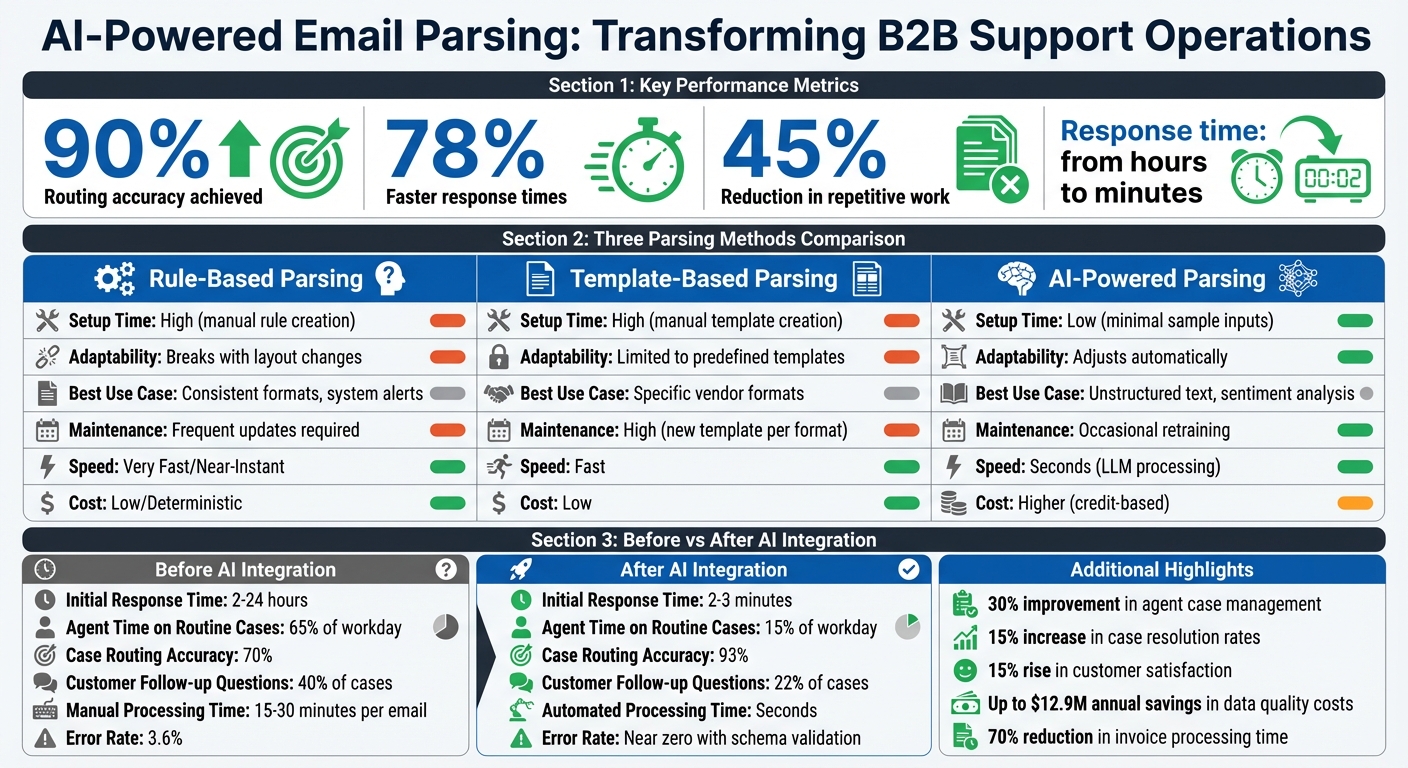
- Proven Results: Companies report 90% routing accuracy and 78% faster response times.
AI-powered systems are reshaping B2B support, making email management faster, more accurate, and less reliant on manual work.
AI-Powered vs Traditional Email Parsing: Performance Comparison
How Email-to-Case Parsing Works
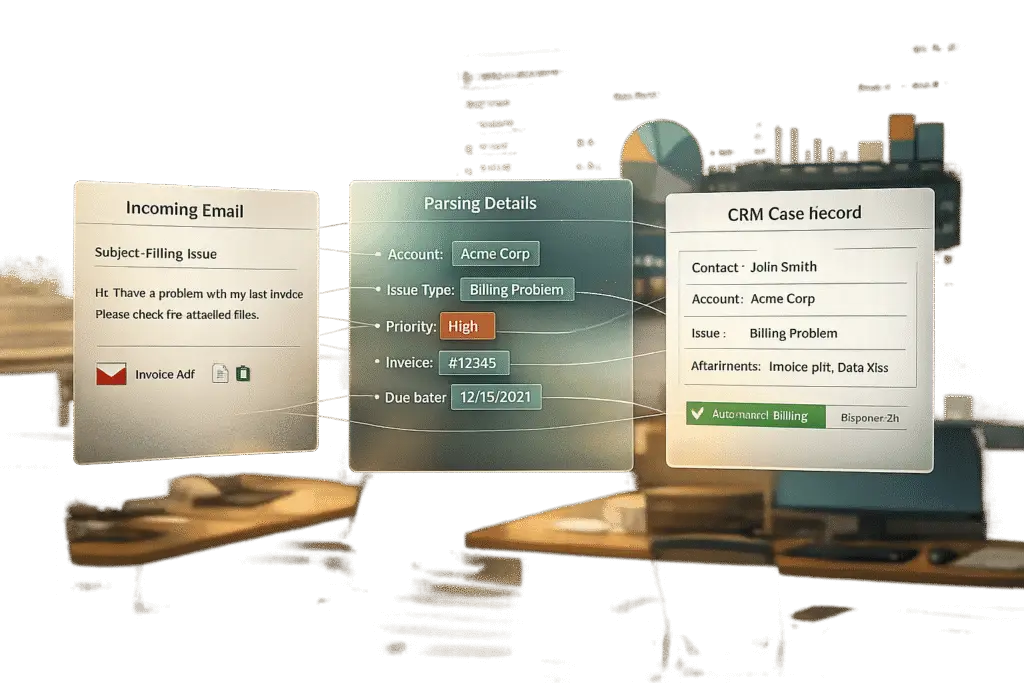
Email-to-case parsing transforms unstructured emails into structured CRM records, taking the hassle out of manual data entry. It pulls essential details – like customer names, order numbers, and priority levels – from incoming emails and assigns the case to the right team member for follow-up [2][3].
Here’s how it works: when an email is sent to a dedicated support address or synced Gmail/Outlook account, the system gets to work [9][3]. Using predefined rules or AI models, the parser scans the email’s headers, body, and attachments to identify critical details [2]. Some advanced systems even detect emotional cues, such as frustration or urgency, to prioritize cases that need immediate attention [8][5]. Before the data is sent to your CRM, it’s validated against business rules or JSON schemas to catch errors [2]. The entire process takes just 10–15 seconds [5].
The Email-to-Case Process
This workflow generally follows five steps:
- Inbound Processing: Emails are received through SMTP or API gateways [2].
- Content Decoding (MIME): The system extracts the email’s body, headers, and attachments [2].
- Data Extraction: Key fields – like order IDs or payment terms – are identified using anchors, delimiters, or AI models [2][10].
- Validation: Extracted data is checked against predefined schemas to ensure accuracy, flagging incomplete or incorrect records [2].
- Case Creation and Routing: The CRM is updated with the extracted data, and cases are assigned to the right agent or queue based on factors like expertise and workload [6][5].
For cases where AI confidence scores fall below acceptable levels, the system triggers human review to ensure only accurate data is passed along [6][2]. Additionally, real-time SLA tracking can send alerts if response deadlines are at risk, keeping teams on schedule [8].
3 Parsing Methods: Rules-Based, Template-Based, and AI-Powered
Parsing methods vary depending on the complexity of the email content. Here’s a breakdown of the three main approaches:
Rules-based parsing uses predefined instructions, such as anchors (“Order ID:”) or delimiters (colons, line breaks), to locate data. This method is effective for machine-generated emails with consistent layouts, like shipping notifications. However, it struggles when formats change, even slightly [10][7].
Template-based parsing creates a specific visual template for each email format. While this approach provides precise results, it becomes difficult to scale when dealing with emails from a wide range of senders [10][7].
AI-powered parsing leverages Natural Language Processing and Machine Learning to interpret context and intent rather than relying on fixed positions. It excels at handling unstructured text, variable layouts, and format changes without manual intervention. AI parsers can also assess sentiment and urgency, enabling smarter prioritization. However, periodic retraining and schema validation are necessary to maintain accuracy [7].
| Feature | Rule-Based / Template-Based | AI-Powered Parsing |
|---|---|---|
| Setup Time | High; manual rule creation needed | Low; minimal sample inputs |
| Adaptability | Breaks with layout changes | Adjusts automatically |
| Best Use Case | Consistent formats, system alerts | Unstructured text, sentiment analysis |
| Maintenance | Frequent updates required | Occasional retraining |
Hybrid solutions are becoming more common, combining rules for simple, repetitive tasks with AI for complex inquiries or multi-language emails [10][7]. For example, in 2025, Securex teamed up with Tekst to process millions of annual emails. By adopting an AI-powered system, Securex boosted its email routing accuracy to 90% within weeks. Christophe Lapeau, their Product Owner, shared:
"Managing millions of emails annually was a monumental task until we partnered with Tekst. Their AI-powered solution improved our email routing accuracy to 90% in just weeks, streamlining our operations and enhancing customer satisfaction" [12].
This blend of automation and intelligence is reshaping how customer support teams handle email inquiries, making data extraction from even the most complex formats a seamless process.
sbb-itb-e60d259
Real-World Scenarios for Complex Email Formats
Parsing emails gets tricky when customers send free-form messages, attach scanned documents, or mix in multiple languages. These scenarios demand advanced techniques to make sense of emails that don’t follow the structured formats traditional systems rely on.
Extracting Data from Unstructured Email Content
Unstructured emails, like customer complaints, warranty claims, or product inquiries, often lack clear fields or consistent layouts. For instance, when a customer writes, "I need this by next Friday," the parser has to interpret the context rather than relying on a clear "Delivery Date" label [13].
Traditional systems depend on static markers, like "Order ID:" or specific line positions. But natural, free-flowing language doesn’t follow those rules. AI-powered parsers, using Large Language Models (LLMs), process the entire email to extract meaningful data based on context and semantics [10][14]. For example, they can pinpoint an order number in a sentence like, "I’m calling about order #4829 from last week," without needing a rigid template.
However, LLMs come with risks, like "hallucination", where the AI fabricates data to fill gaps [2]. To avoid this, modern parsers use schema-guided extraction. This method enforces a strict JSON schema, ensuring the AI only outputs validated fields. If the system isn’t sure about a value, it flags the email for human review rather than guessing [2][13]. Tobias Rehfeldt, Senior Data Scientist at Flowtale, explains:
"The real challenge… is converting this free-form text into structured data that can seamlessly integrate with internal systems – capturing not just specific entities, but also understanding context, intent, and relationships" [13].
Cost is another factor. Structured one-shot extraction – where the AI processes the entire email in a single API call – costs about $0.10 per email. By comparison, many-shot methods, which require multiple API calls for different fields, can cost up to $0.40 per email. For businesses processing thousands of emails daily, this difference adds up [13].
Processing Attachments: PDFs, Images, and Multiple Files
Emails often come with attachments like invoices, shipping labels, or handwritten forms, adding another layer of complexity. These files – whether PDFs, JPEGs, or scanned documents – are beyond the capabilities of traditional text parsers.
Modern AI parsers tackle this through multimodal extraction. This approach combines vision engines (which interpret layout structures) with text engines for digital files [2][15]. For example, a vision engine might identify the total amount in the corner of an invoice, even if the layout changes. Specialized processors handle different file types efficiently: lightweight LLM parsers manage digital PDFs, while high-accuracy Document AI services handle scanned images or handwritten forms, typically charging per page.
Take Suzano International, a global pulp and paper company, as an example. In August 2025, they implemented an AI-powered workflow to process purchase orders in various formats, including PDFs, direct emails, and scanned spreadsheets. By using a system that didn’t rely on rigid templates, they reduced processing time by 90% [16].
Managing Inconsistent Formats and Multiple Languages
Global email communications bring unique challenges. Formats differ by region – dates, currencies, and character sets vary widely. For instance, a German customer might write, "Liefertermin: 15.03.2026," while a U.S. customer might say, "Ship by: 3/15/2026." Both refer to the delivery date, but traditional parsers could see them as entirely different data points.
LLM-driven parsers handle these variations by focusing on the meaning behind the text rather than rigid patterns [2]. They standardize outputs, such as converting dates to a uniform YYYY-MM-DD format or stripping out currency symbols for consistency [16]. For businesses handling massive multilingual email volumes, this efficiency is a game-changer. In 2025, Asian Paints automated data extraction from purchase orders and delivery notes across a network of over 22,000 vendors. Their system flagged inconsistencies within their SAP platform, allowing the accounts team to manage high volumes without manual input [16].
| Feature | Rule-Based/Template Parsing | AI-Powered/LLM Parsing |
|---|---|---|
| Setup | High (manual rules for each format) | Low (uses pre-trained models or prompts) |
| Flexibility | Breaks with layout changes | Adapts to variations |
| Handling Language | Limited to fixed keywords | Handles context and multiple languages |
| Best Use Case | Consistent vendor invoices | Unstructured customer emails |
To handle inconsistencies, a "schema wall" is essential. This strict JSON schema validates every extraction, ensuring that even unfamiliar formats or languages produce clean, structured data. If the AI struggles, it flags the case for manual review rather than risking errors [2]. This approach ensures reliable results across diverse formats and languages.
Setting Up Advanced Parsing Workflows
Start by organizing your email workflow. Filter incoming messages using keywords or domains (e.g., vendor-specific addresses). Then, define a JSON schema to extract only the fields you need. Choose your extraction method based on the email’s structure – structured approaches work well for predictable formats like invoices, while AI-based methods are better for varied messages, such as customer inquiries where details might appear anywhere.
Set up conditional routing to ensure emails reach the right teams. For instance, urgent emails or those mentioning specific products can go directly to specialists, while general inquiries are sent to broader support teams. Use Retrieval Augmented Generation (RAG) to integrate knowledge bases, letting AI suggest or even automate responses by pulling relevant information. This technology also powers AI chatbots in customer support, providing instant assistance alongside automated email workflows. Testing is key – simulate emails to fine-tune your setup. This kind of automated routing improves efficiency and supports smooth case management.
For emails with low-confidence AI predictions, include a human review step. Simulate diverse scenarios – like unclear inquiries or typos – to refine parser accuracy. Christophe Lapeau, Product Owner at Securex, highlights the impact of such systems:
"Their AI-powered solution improved our email routing accuracy to 90% in just weeks, streamlining our operations and enhancing customer satisfaction." [12]
When ready, connect your inboxes to the parser and use webhooks to send structured data directly to your CRM or database. This real-time integration ensures cases are processed within seconds, complete with all relevant details. A support director described it best:
"It’s like having an AI intern that handles the routine stuff but knows when to escalate to the experts." [1]
Finally, adapt your parser configurations for different email sources to maintain consistent accuracy.
Configuring Parsers for Different Email Sources
Emails come in all shapes and sizes, and your parser needs to handle them accordingly. For vendor invoices, which usually follow standard layouts, rule-based parsers work well by identifying markers like "Invoice #" or "Total Amount." On the other hand, customer support emails are less predictable, requiring AI-powered parsers that can grasp context.
When setting up AI parsers, write clear instructions for the model. For example:
"Extract the customer’s order number, requested delivery date, and any mentioned product issues. Flag the email as urgent if the customer expresses frustration or mentions a deadline within 48 hours."
Combine these prompts with JSON schemas to enforce specific data types and required fields.
Handling attachments requires careful planning. Use OCR engines for scanned images or handwritten documents, while lighter parsers can handle digital PDFs. For sensitive environments, anonymize any personal information before sending data to external AI models.
Test your parser with real email samples from each source. A small batch of 10–20 emails can help ensure the system extracts the right information. Adjust prompts, schemas, or routing rules as needed before scaling up to full production.
Testing and Measuring Parsing Accuracy
Testing is crucial to ensure your parser works as intended. Create a test suite with 10–20 sample emails that reflect the variety of formats, languages, and scenarios your system will encounter. Include edge cases like typos or missing information. Run the parser on these samples and compare the results to manually verified data.
Measure performance using precision and recall. For instance, if the parser correctly extracts 95 out of 100 order numbers, both metrics would be 95%. Analyze these metrics for different data types, as some fields may be harder to extract accurately.
Beyond accuracy, keep an eye on operational metrics like processing speed and cost per email. For example, track how much it costs to process each email or attachment page. Regularly evaluate 1–5% of production traffic to catch quality issues early, such as model drift or data inconsistencies. When accuracy dips below acceptable levels, flag those cases for review and adjust your configurations.
Stress-test the parser using simulated scenarios, like emails with frustrated tones, errors, or vague requests. Organizations that follow structured testing have reported up to 60% fewer production issues and faster deployment cycles – up to five times quicker [17].
Once you’ve validated accuracy and performance, move on to real-time deployment and monitoring.
Deploying and Monitoring Parsing Systems
Deploying your parser in production requires a focus on reliability and performance. Use webhooks for real-time data ingestion, avoiding delays caused by periodic mailbox polling. For platforms like Gmail or Microsoft 365, set up push notifications to enable near-instant responses while staying within API limits.
Manage traffic spikes with backpressure and retry logic. For example, implement exponential backoff to avoid throttling during high-traffic periods. Queue emails to ensure no data is lost, even if the parser temporarily falls behind.
Set up a QA interface for agents to review low-confidence cases. If the AI struggles to extract or categorize key details, route those emails to human reviewers. Feed their corrections back into the system to improve future performance. This human-in-the-loop approach balances automation with quality control.
Track SLA compliance by monitoring how quickly cases move through the system. AI can flag cases nearing deadlines based on priority levels. Alerts for parsing errors or sudden drops in confidence let you address issues quickly, especially when email formats change unexpectedly.
Before sending data to your CRM, validate extractions using business rules. For example, confirm that invoice line items add up correctly or that required fields like customer IDs are properly formatted. This step prevents errors from affecting downstream processes or customer interactions.
Finally, monitor costs as your volume grows. Some parsers charge per email processed, while others bill per page for document-heavy tasks. Compare these costs to the benefits – like faster response times, higher routing accuracy, and reduced manual work. For many organizations, these systems can cut first-response times by 78% and reduce manual workload on routine cases by 45% [1].
| Metric | Before AI Integration | After AI Integration |
|---|---|---|
| Initial Response Time | 2–24 hours | 2–3 minutes [1] |
| Agent Time on Routine Cases | 65% of workday | 15% of workday [1] |
| Case Routing Accuracy | 70% | 93% [1] |
| Customer Follow-up Questions | 40% of cases | 22% of cases [1] |
Common Parsing Problems and How to Fix Them
Advanced parsing techniques are essential for managing the complexities of modern B2B customer support operations. These systems must handle changing email formats, missing data, and high-volume workloads – all while minimizing manual intervention. Let’s dive into some common challenges and practical solutions.
Handling Variable Email Structures
One of the biggest challenges with traditional rule-based parsers is their rigidity. If a vendor changes a label from "Order ID:" to "Order Number:", the parser may fail entirely. This leads to constant rule updates and potential gaps in case creation [7][10].
AI-powered parsers, on the other hand, excel at adapting to format changes because they rely on context rather than exact text matches. However, they can sometimes produce unexpected or "hallucinated" results. A strict JSON Schema can mitigate this issue by ensuring the parser only returns the necessary data types and fields [2].
Forwarded emails, with their signatures and threaded content, often confuse parsers [18]. To address this, use non-space delimiters like the pipe character ("|") for clearer data formatting, and place each parsed item on a separate line. If HTML layouts are causing instability, switching the parser to text mode can help reduce errors [19].
When dealing with email sources that use multiple templates, create a set of templates with fallback logic. Start with the most detailed template and, if that fails, revert to simpler ones. This layered approach ensures minor layout changes don’t disrupt the entire system [19].
But variability in email structure isn’t the only challenge – missing or conflicting data can also derail workflows.
Dealing with Missing or Conflicting Data
Missing fields are a common issue. Traditional parsers often fail entirely if even one required field is absent [19]. AI parsers can handle this better by using a schema wall – a strict JSON Schema that enforces the inclusion of required fields. Any incomplete extractions can be flagged and routed to a human review queue, ensuring they don’t enter the system unnoticed [2].
Conflicting data, like mismatched invoice totals or inconsistent currency codes, requires additional checks. Logical consistency checks – such as verifying that line items add up correctly – can catch these errors early. Visual debugging tools can also help pinpoint pattern mismatches, speeding up the troubleshooting process [19].
A human-in-the-loop system adds another layer of quality control. Staff can manually correct problematic extractions through a dedicated QA interface, and these corrections can feed back into the system for future improvements. Importantly, modern tools ensure that sensitive customer data used during this review phase is not incorporated into AI training, maintaining compliance [11].
To further reduce errors, avoid using dynamic data like timestamps as anchors in templates. Instead, rely on static labels that remain consistent across emails. Additionally, set up automatic email forwarding to maintain the original HTML structure, as manual forwarding often alters it and can disrupt parsers [19].
While handling variability and missing data is crucial, high email volumes bring their own set of challenges.
Maintaining Performance at High Volume
Processing thousands of emails daily requires a mix of strategies. Rule-based parsers are faster and more cost-effective for consistent formats, while AI-powered parsers are better suited for complex, unstructured content. Combining these methods ensures a balance of speed, cost, and accuracy [10][2].
Using real-time ingestion tools like Postmark or SendGrid, which convert SMTP to JSON and send it to webhooks, can streamline processing. For attachments, route scanned images to OCR engines and text-based PDFs to lighter parsers to optimize performance [2].
Confidence scoring is another key technique. Assign high confidence to accurate results that can be processed automatically, while flagging low-confidence fields for manual review. This ensures errors are caught before they impact customers [4].
| Parsing Method | Speed | Cost | Best Use Case |
|---|---|---|---|
| Rule-Based | Very Fast / Near-Instant | Low / Deterministic | Machine-generated forms, system alerts |
| AI-Powered | Seconds (LLM processing) | Higher (Credit-based) | Unstructured emails, varying vendor invoices |
Automation significantly outperforms manual data entry, which can have error rates as high as 3.6%. Tasks that take humans 15–30 minutes are completed by automated parsers in seconds [4]. To handle traffic spikes, implement exponential backoff and idempotent processing. These measures help manage provider quotas and ensure no emails are lost, even during temporary delays [2].
What’s Next for Email Parsing Technology
Email parsing technology is evolving rapidly, with new advancements in natural language processing (NLP), computer vision, and self-learning systems transforming how businesses manage support operations.
Better Natural Language Processing and AI Models
Today’s NLP models go beyond basic text matching – they understand context. For example, they can recognize that phrases like "Net 30" and "payment due in one month" mean the same thing, even if the wording is different. This deeper understanding also enables AI to detect emotions like frustration or urgency, helping prioritize and route emails more effectively [20][4].
Schema-guided extraction has taken accuracy to a new level, reaching 99%. This allows free-form text to be converted into structured JSON data in seconds, drastically cutting down on manual errors. Businesses using these systems report a 70% reduction in invoice processing time, with average email handling times dropping from 4.5 minutes to just 1.5 minutes per message [4].
"AI email parsing solves this problem by automatically reading emails, extracting structured information, and pushing that data directly into ERP systems without human intervention." – MindStudio [4]
The time savings are staggering. Tasks that once required 15 to 30 minutes of human effort are now handled in seconds, saving companies up to $12.9 million annually in data quality costs [4].
But the advancements don’t stop at text – there’s also progress in visual document analysis.
Computer Vision for Document Structure Recognition
Using Large Vision Models (LVMs), modern systems can analyze attachments by visually inspecting elements like checkboxes, signatures, highlighted fields, and tables [26]. These tools don’t just digitize documents – they interpret them, understanding the relationships between labels and values based on layout.
"Document parsing is becoming the bridge between unstructured knowledge and structured action. It’s no longer about digitizing paper; it’s about transforming documents into living, machine-readable intelligence." – LlamaIndex [27]
These multimodal systems work seamlessly across text, images, and diagrams, using reasoning loops to verify data. For instance, they might identify a date, determine whether it applies to shipping or billing, and confirm its format before finalizing extraction [26]. Some systems even integrate external tools, like calculators for summing totals or search engines for verifying vendor tax IDs [26].
Although this level of document analysis can increase processing time and costs, the accuracy it delivers significantly reduces the need for manual review.
Self-Learning Parsers That Improve Over Time
Self-learning models are making email parsing more adaptable. These systems can handle unfamiliar inputs – like a new invoice format – by assigning uncertainty scores and prioritizing learning without requiring complete retraining [21][23][25].
By using memory pools and feedback loops, these parsers continuously improve their accuracy and speed. Unlike rigid template-based systems, they understand the semantic meaning of data, not just its position on a page [22][24]. This flexibility helps businesses respond faster, with some reporting a 40% improvement in deal win rates and saving over 10 hours per week by automating data extraction [24].
"The term agentic underscores autonomy, goal‑orientation, and learning capability, often integrated into workflow automation systems. Unlike classic rule‑based or OCR systems that react to instructions, agentic systems act proactively." – Parseur [26]
However, there are challenges. Self-learning models scored significantly lower (21.3%) on safety benchmarks compared to traditional methods (66.7%) when trained on unverified web data. This highlights the importance of implementing guardrails and involving humans in sensitive workflows [21].
These advancements are paving the way for faster, more accurate, and cost-efficient email-to-case processing, aligning with the needs of modern B2B support operations.
Conclusion
AI-powered advanced parsing is reshaping the way high-volume B2B support operations function. By moving away from rigid, rule-based systems to more dynamic, AI-driven workflows, businesses are solving persistent issues like incomplete comments, duplicated entries, and the burden of manual triage.
The results speak for themselves. Companies using advanced parsing have reported a 30% improvement in agent case management, a 15% increase in case resolution rates, and a 15% rise in customer satisfaction and retention [28]. With AI stepping in to handle routine inquiries and smartly route cases, agents now spend just 15% of their workday on repetitive tasks – down from a staggering 65% [1].
"Standard Email-to-Case gets the job done, but Email-to-Case Advance (E2CA) takes it to the next level." – Grazitti Interactive [28]
This quote highlights the rapid progress in email parsing technology. The advancements don’t stop there. Sentiment-aware prioritization ensures that frustrated customers get attention faster. Schema-guided extraction turns messy, unstructured emails into precise, structured data. Meanwhile, self-learning parsers adapt seamlessly to new formats without needing full retraining, and computer vision models analyze attachments based on layout and context, not just the text they contain.
FAQs
How do I prevent AI from inventing missing fields?
To keep AI from creating non-existent fields during email parsing, it’s essential to set up strict validation mechanisms. Ensure the AI sticks to actual email headers and metadata, such as Message-ID and In-Reply-To. Establish well-defined schemas that outline required fields and enforce validation rules.
In addition, use rule-based checks to confirm all necessary data is present. If any records are incomplete, flag them for manual review. By combining strict input validation with fallback procedures, you can maintain reliable data accuracy in customer support workflows.
What’s the best way to parse PDFs and scanned images?
When it comes to extracting information from PDFs and scanned images, AI-powered OCR (Optical Character Recognition) and document parsing APIs are your best bet. These tools are designed to tackle even the toughest challenges – think complex layouts, handwritten text, dense tables, or irregular formats – with impressive precision.
AI models, including Large Language Models (LLMs), shine in processing a wide range of document types, especially when traditional methods fall short. To get the best results, select a parser that aligns with your document’s complexity, your accuracy needs, and your budget.
How do I measure parsing accuracy in production?
To assess parsing accuracy in a real-world setting, compare the parser’s results against a dataset that has been manually labeled. Use metrics such as precision, recall, or the F1 score to quantify performance. Keep an eye on parsing errors or misclassifications over time to identify trends or issues.
Another effective approach is to establish a feedback loop. In this system, agents review parsed cases, flag any inaccuracies, and provide this feedback to improve the models. Regular audits, especially after updates, can help maintain consistent accuracy and ensure the parser continues to perform as expected.