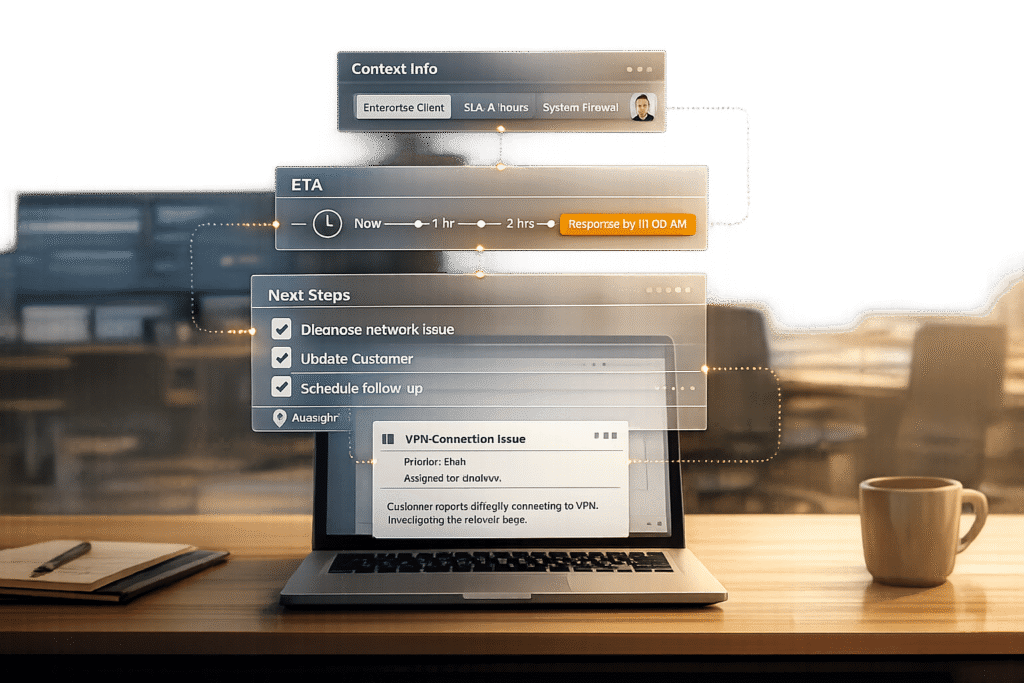
A strong first response in B2B support isn’t just about speed – it must address the customer’s specific needs, set clear expectations, and move the issue forward. Here’s the key takeaway: a vague acknowledgment won’t cut it for high-value accounts or complex issues. Instead, your first reply should:
- Acknowledge the issue and provide realistic timelines.
- Show understanding of the customer’s context (like their contract, history, or urgency).
- Offer next steps or initial triage to demonstrate progress.
Why does this matter? Poor first responses can lead to churn, especially for enterprise clients. On the flip side, businesses that respond within 1–4 hours with meaningful replies see better retention rates and fewer escalations. AI tools can help by summarizing customer history, prioritizing tickets based on urgency, and even drafting tailored responses.
The bottom line: Your first response sets the tone for resolution and customer trust. Use it to reassure customers, protect revenue, and avoid escalation risks.
What Makes B2B Support Tickets Complex
B2B support tickets come with unique challenges that set them apart from consumer support. While consumer tickets often involve a single person submitting a request and waiting for a resolution, enterprise tickets are a different beast. They frequently require input from multiple departments – Support, Billing, Engineering, and Onboarding, to name a few. Each department has its own priorities and communication methods, leading to what’s known as "ownership lock." This happens when a ticket bounces between teams without a clear owner, dragging out response times and frustrating customers[2].
Adding to the challenge is the technical and contractual complexity of these tickets. Unlike consumer issues that can often follow a script, B2B tickets span multiple systems, involve specific contract terms, and can take weeks – or even months – to resolve. For instance, a billing issue might require a compliance review, or a bug might need logs from a custom integration to reproduce the problem. These extra steps, or "workflow gates", slow down meaningful responses and make resolution more intricate[6]. The root of this complexity often lies in the involvement of fragmented stakeholders.
Multiple Stakeholders and Extended Resolution Times
When a single ticket involves multiple stakeholders, communication becomes scattered. Conversations might take place over email, chat, or even social media, leaving data fragmented and hard to track. This lack of centralized information means the agent handling the ticket often doesn’t have the full context, delaying progress even further[1].
In B2B support, delays are common. A ticket that takes several days to resolve can’t rely on a generic acknowledgment as its first response. Instead, the initial reply needs to set clear expectations and actively move the process forward. As Teammates.ai puts it:
"A fast acknowledgement that does not answer the question, verify identity, or set an ETA is not revenue protection. It is optics."[2]
But communication hurdles are only part of the problem. High-value accounts bring another layer of complexity.
High-Value Accounts and Customer History
For high-value clients, the stakes are even higher. These customers often have strict service-level agreements (SLAs) requiring responses within 15 minutes for critical issues[7]. Agents are expected to know their contracts, product tiers, and past support history inside and out[6]. If the first response doesn’t reflect this level of familiarity, it can give the impression that the support team is unprepared, which can quickly lead to customer support escalations – or worse, churn.
Here’s why this matters: 59% of customers will abandon a brand after three or fewer bad experiences, and 67% of B2B customers are willing to pay more for outstanding support[8]. For clients paying six or seven figures annually, a vague or uninformed first response can be a dealbreaker. On the flip side, companies that respond to inquiries within two hours see a 40% boost in customer retention rates[7]. However, speed alone isn’t enough. The response must also demonstrate a deep understanding of the customer’s specific needs and history. Without this, even the fastest reply can fall flat and escalate the risk of losing the account.
sbb-itb-e60d259
What Defines a Good First Response
In B2B support, a strong first response isn’t just about acknowledging a ticket – it’s about taking meaningful action that moves the case forward. A thoughtful reply can help safeguard high-value accounts by addressing concerns effectively. In complex B2B scenarios, a solid first response should do three key things: acknowledge the issue with achievable timelines, show understanding of the customer’s unique situation, and provide clear next steps. Each of these steps builds trust and sets the stage for resolution.
Acknowledge the Issue and Set Realistic Timelines
A simple “we’ve received your message” email doesn’t cut it in professional B2B support [4][5]. A good first response goes further by addressing the query, requesting any missing details, or confirming the next steps – complete with an estimated time of arrival (ETA) [2]. For enterprise B2B SaaS, the gold standard for response time is under one hour, though one to four hours is still considered acceptable [5].
If resolving the issue requires input from other teams, such as engineering or operations, be upfront about it. Clearly communicate when the next update will come – whether that’s in two hours, by the end of the day, or within 48 hours. Research shows that about 33% of customers expect an email response within an hour [4]. Tools powered by AI can help agents quickly evaluate the complexity of tickets and provide accurate ETAs based on historical data, ensuring promises are realistic – even for challenging cases.
Show Understanding of Customer Context
Acknowledging the issue promptly is important, but showing that you understand the customer’s specific context takes it to the next level. AI tools can summarize a customer’s history, offering agents a quick overview of key details like their contract, service tier, recent tickets, and past escalations [1][4]. Sentiment and intent detection can also gauge the urgency and tone of the request, helping agents prioritize effectively [1].
When your response reflects this level of preparation, it reassures the customer that their concerns are being taken seriously. To achieve this, support platforms must consolidate all relevant customer data – like email threads, chat logs, and ticket histories – into a single, accessible view [1][4]. After reviewing this context, your reply should immediately outline the next steps, reinforcing your commitment to resolving their issue.
Offer Initial Triage and Clear Next Steps
Once you’ve established the context, guide the customer by laying out the next steps. For more complex issues that can’t be resolved immediately, conduct an initial triage. Explain what has been identified so far, outline the process for resolution, and clarify what will happen next [2][3]. If a permanent fix will take time, offer a temporary workaround to help the customer maintain operations [9].
Accountability is crucial. Assigning clear ownership of the case – even when multiple departments are involved – helps avoid the frustrating “ownership lock” scenario, where tickets bounce between teams with no resolution [2]. This proactive approach not only builds customer confidence but can also reduce overall ticket volume by as much as 60% to 70% [9].
How to Measure First Response Quality
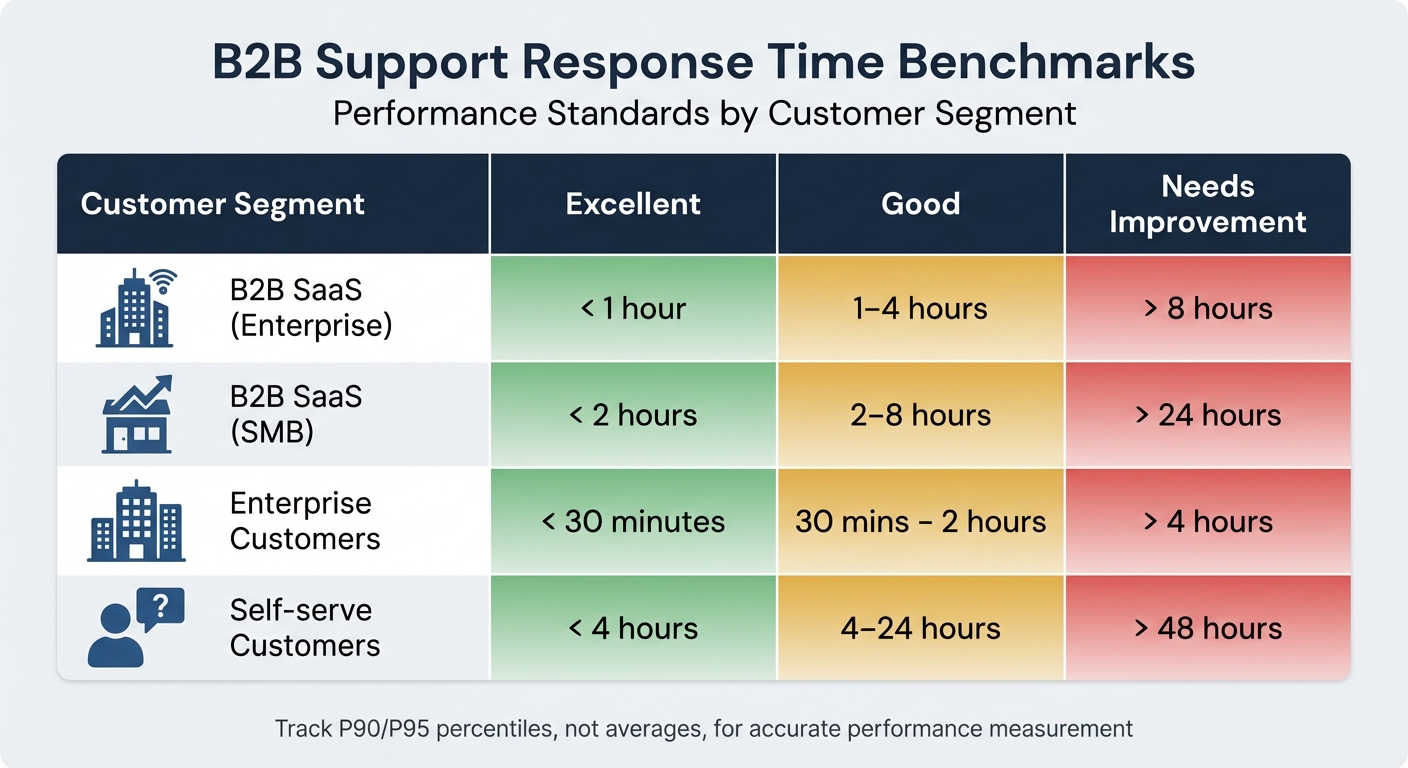
B2B Support Response Time Benchmarks by Customer Segment
Tracking the quality of your first response is just as important as defining what a good first response looks like. Effective measurement ensures that responses not only meet speed expectations but also address customer needs in a way that protects revenue. In B2B support, both speed and the substance of the reply are key. Metrics should reflect how quickly you respond and whether your response moves the issue closer to resolution. Two areas to focus on are response time benchmarks and quality indicators like sentiment analysis and first contact resolution (FCR) potential.
Response Time Targets for B2B Support
Measuring response time means looking at how quickly an agent provides a meaningful reply – whether it’s answering the question, requesting more details, or confirming next steps with an estimated time of resolution [2].
For B2B SaaS teams, response time benchmarks depend on the customer segment and the support channel. Enterprise customers often expect email replies within 1–4 hours, while top-performing teams aim for under an hour [5]. For live chat or urgent sales inquiries, the goal is typically under 60 seconds [2]. For SMB customers, excellent response times are under two hours, while good performance ranges from 2–8 hours [5].
Here’s a breakdown of response time expectations across different B2B segments:
| Segment | Excellent | Good | Needs Improvement |
|---|---|---|---|
| B2B SaaS (Enterprise) | < 1 hour | 1–4 hours | > 8 hours |
| B2B SaaS (SMB) | < 2 hours | 2–8 hours | > 24 hours |
| Enterprise Customers | < 30 minutes | 30 mins – 2 hours | > 4 hours |
| Self-serve Customers | < 4 hours | 4–24 hours | > 48 hours |
When measuring response times, avoid relying on averages. As Teammates.ai explains:
"If you report average TFR, you are measuring the wrong thing. Customers experience the tail, not the mean" [2].
Instead, use the Median (P50) to understand the typical experience for most customers. For worst-case scenarios, track the P90 or P95, which show how long it takes to respond to the slowest 10% or 5% of cases. These metrics are especially important for high-risk queues like payments, identity verification, or enterprise accounts, where delays can lead to silent churn [2].
While speed is crucial, the quality of the response is just as important in ensuring customer satisfaction.
Quality Metrics: Sentiment Analysis and FCR Potential
Fast responses mean little if they fail to address the customer’s concerns. A reply that arrives in 30 minutes but doesn’t solve the problem is less effective than one that takes two hours but provides a clear solution or next steps. This is where sentiment analysis and FCR potential come into play.
Sentiment analysis helps identify potential risks early. AI tools can flag words like "cancel", "chargeback", or "legal", prompting urgent escalation to a senior agent [2]. This ensures that at-risk customers or high-value accounts receive immediate attention. Tools like Supportbench’s AI automation can analyze sentiment, intent, and emotional tone to prioritize tickets based on urgency without requiring manual intervention.
FCR potential measures whether the first response includes everything needed to resolve the issue – or at least sets up the next interaction to close the case. This involves checking if the agent asked the right clarifying questions, provided a known solution, or offered a temporary workaround. Tracking FCR potential separately from response time gives a clearer picture of whether your team is truly making progress or just meeting a time target. AI-driven tools can analyze case history to determine if an issue was resolved on the first contact, helping to clarify this often tricky metric.
Using AI to Improve First Responses
AI tools are transforming B2B support by automating complex tasks like analyzing ticket context, detecting urgency, and drafting responses. This frees up agents to focus on problem-solving while AI handles the groundwork. In the intricate, data-heavy world of B2B tickets, these tools streamline processes by automating triage, summarizing ticket history, and generating response drafts. While AI takes care of these tasks, humans step in for critical decision-making. Let’s dive into how AI simplifies context gathering with ticket summaries.
AI Ticket Summaries for Quick Context
B2B support often involves long email threads, multiple stakeholders, and cases that span weeks. It can take agents several minutes just to piece together the full story. AI-generated ticket summaries solve this by condensing threads into concise overviews that highlight the main issue, key stakeholders, and pending actions. According to a Deloitte study, generative AI tools for call summarization reduced interaction times by about 3 minutes per case [1]. For enterprise teams, this time savings adds up quickly across numerous high-priority tickets.
Supportbench’s AI automatically generates summaries when a ticket is opened and keeps them updated as new activities occur. This means agents can jump right into the case without having to sift through every prior interaction. The system also flags unresolved issues and gaps in information, helping agents ask the right follow-up questions from the start.
Sentiment and Intent Detection for Better Prioritization
Once the context is summarized, AI steps in to enhance ticket prioritization using sentiment analysis. Not all tickets demand the same level of urgency – a routine billing question is far less critical than a frustrated enterprise client’s issue. AI sentiment and intent detection evaluates ticket language to identify cases that require immediate attention. Layer 8 Labs emphasizes the importance of this step:
"First response sets the tone for the entire support experience. When initial triage is slow or inaccurate, ticket quality drops, queues get noisy, and resolution times stretch" [10].
Supportbench’s AI takes this further by analyzing emotional tone and business impact, assigning priority levels automatically. High-confidence cases are routed directly, while low-confidence or emotionally sensitive tickets are flagged for human review [10][11]. This ensures that urgent matters are addressed promptly and appropriately.
AI-Generated Response Drafts
In B2B support, speed and precision are equally important. AI-generated response drafts help agents strike this balance by creating tailored replies that agents can review and refine before sending. By pulling information from ticket history, knowledge base articles, CRM data, and entitlement records, the AI crafts responses specific to the customer’s issue [6][11].
The benefits are clear: using tools like autocomplete and snippets has been shown to cut first response times by 35% and reduce handle time by 10% [12]. With a human-in-the-loop approach, agents ensure the drafts are accurate and appropriately polished before sending. Supportbench’s AI agent copilot even allows real-time adjustments to tone and length, making it easier to match the customer’s expectations [13].
Predictive CSAT and FCR Metrics
Traditionally, response quality has been measured after the fact. But predictive CSAT and FCR metrics allow teams to address potential issues before they escalate. AI analyzes responses to predict whether customers will be satisfied or whether the issue is likely to be resolved on the first contact. For example, Supportbench’s predictive CSAT feature displays a score for each case, indicating customer satisfaction – even if no survey is completed.
Similarly, AI-driven FCR detection uses case history to assess whether the issue was resolved on the first attempt, a metric that has historically been challenging to track manually [14]. These predictive tools provide managers with real-time insights into response quality, helping identify agents who may need additional coaching or tickets that require follow-up. Monitoring follow-up frequency as a stand-in for FCR can also reveal whether the initial response was thorough enough [14].
Tracking and Improving First Response Performance
To ensure the benefits of AI-enhanced first responses are long-lasting, it’s crucial to focus on continuous performance tracking. By monitoring key metrics, using AI to analyze patterns, and adjusting SLAs dynamically, teams can maintain high-quality first responses even as ticket complexity and team dynamics shift.
Measuring First Response Time (FRT)
First Response Time (FRT) is calculated by dividing the total time taken for the first meaningful reply by the number of tickets. But here’s the catch – averages alone don’t tell the full story. As Teammates.ai points out:
"If you report average TFR, you are measuring the wrong thing. Customers experience the tail, not the mean." – Teammates.ai [2]
Instead, focus on metrics like the median, which reflects the typical customer experience, and the 90th or 95th percentiles (P90/P95) to identify the most challenging cases. These higher percentiles are especially useful for high-stakes queues, such as billing issues or enterprise accounts, where nearly all tickets must meet strict service goals. Breaking FRT into stages – like ticket creation to assignment, assignment to first view, and first view to outbound message – can help pinpoint where delays occur.
AI QA Tools and Case History Analysis
AI-powered quality assurance tools can reveal patterns in past cases that manual reviews might miss. For example, Supportbench’s AI QA features analyze historical interactions to identify issues such as vague responses, unclear timelines, or missing customer details. These tools also generate quality scores for individual agents and flag cases where sentiment analysis suggests unresolved customer dissatisfaction.
By comparing effective first responses with those that required follow-up, managers gain actionable insights to improve training and refine response templates. These insights can also guide dynamic SLA adjustments, ensuring alignment with real-world challenges.
Adjusting SLAs Based on Account Priority
Not every ticket requires the same response speed, and dynamic SLA adjustments help prioritize critical cases. For instance, enterprise customers with high ARR (Annual Recurring Revenue) should have stricter response times compared to SMB accounts.
Supportbench’s dynamic SLA engine integrates seamlessly with AI-driven practices, tightening response timelines when specific conditions arise – like an upcoming renewal, multiple open cases for a customer, or a ticket flagged as a cancellation risk. To maintain the integrity of SLA metrics, pauses should only be allowed for audited reasons, such as "awaiting vendor" or "compliance hold" [2]. Additionally, using an 8-week baseline per cohort to monitor P90 trends can help account for natural variations in ticket complexity while identifying real performance issues [2]. This ensures SLAs are tied to actual business risks rather than arbitrary benchmarks.
Conclusion
Crafting an effective first response for complex B2B tickets hinges on clarity, context, and actionable guidance. The gap between a generic auto-reply and a meaningful, forward-moving response can be the difference between keeping an account stable and losing it to silent churn.
By applying the principles outlined earlier – establishing clear criteria, setting precise benchmarks, and utilizing AI-driven support tools – you can ensure every initial reply protects your revenue. Combining tools like AI ticket summaries, sentiment analysis, and predictive CSAT allows your team to provide thoughtful, contextual responses, even during high-demand periods or after-hours. The result? Faster resolution times, happier customers, and stronger account retention.
In the B2B world, first response time isn’t just another metric – it’s a financial safeguard [2]. A single delayed reply can increase churn risk or lead to refund disputes, making the stakes incredibly high. By prioritizing the quality of that first interaction and leveraging AI for scalability, you can position your support team as a key driver of competitive advantage and revenue growth.
The strategies, tools, and benchmarks are already in place. Implement them to elevate your support processes, protect your bottom line, and ensure that every customer interaction – no matter how complex – starts on the right note for a successful resolution.
FAQs
What should a first response include for complex B2B tickets?
When handling complex B2B tickets, the first response sets the tone for the entire interaction. It’s important to acknowledge the issue upfront, show empathy for its complexity, and clearly outline the next steps. This initial communication should include essential details like ticket information, key stakeholders involved, and any preliminary findings or actions already taken.
Using AI tools can help ensure responses are both timely and accurate, which is critical in high-pressure situations. A well-crafted reply demonstrates attentiveness and reliability, helping to build trust. By outlining a clear plan for resolution, you can reduce frustration and provide reassurance, even in high-stakes scenarios.
How can we score first-response quality beyond response time?
When evaluating the quality of a first response, it’s not just about how quickly it’s delivered. Factors like clarity, relevance, and effectiveness in addressing the customer’s concern are just as important. Key metrics to measure this include First Contact Resolution (FCR), customer satisfaction (CSAT), and sentiment analysis.
An effective first response should aim to do one of three things: resolve the issue, properly triage it to the right team, or set clear expectations for the next steps. It should also offer actionable information that helps the customer move forward.
Using AI tools can take this process a step further by improving the precision of responses and personalizing them to better meet customer needs. This not only boosts the quality of the interaction but also enhances the overall customer experience.
How can AI improve first responses without risking accuracy?
AI streamlines initial responses in complex B2B support by swiftly categorizing tickets, directing them to the right teams, and offering relevant information to boost both speed and consistency. To minimize errors, it relies on verified data from reliable sources such as CRMs and internal documentation. Additionally, AI can draft response templates for agents, complete with clear references, allowing agents to review and fine-tune replies. This approach ensures accurate communication without sacrificing efficiency.