



Deciding what content in your knowledge base (KB) to make public versus customer-only impacts user experience, security, and operational efficiency. Here’s the gist:
- Public Content: FAQs, setup guides, and general tutorials should be open to everyone. These help reduce support tickets, improve SEO by ranking for search queries, and make your product more discoverable.
- Customer-Only Content: Sensitive materials like internal SOPs, compliance documents, and advanced guides should stay gated. This ensures security and provides a premium experience for paying customers.
- Hybrid Content: Some resources, like API documentation or enterprise deployment guides, can be gated but accessible to specific customer tiers.
To decide, classify content by sensitivity and audience needs. Use tools like AI to automate classification and manage permissions effectively. Public content boosts organic traffic and ticket deflection, while customer-only content protects proprietary information and offers tailored support.
| Factor | Public KB Content | Customer-Only KB Content |
|---|---|---|
| SEO Impact | High; boosts search visibility | None; hidden from search engines |
| Security Risk | Higher; open access | Lower; restricted access |
| User Friction | Low; no login required | High; login required |
| Ticket Deflection | High | Moderate |
Balancing these considerations, many teams adopt a hybrid model to optimize both accessibility and security.
How to Decide Which KB Content Should Be Public or Customer-Only
Deciding who gets access to your knowledge base (KB) content requires a clear plan. It’s all about understanding your audience and balancing the benefits of open access with the risks of exposing sensitive information. Let’s break it down.
Define Your Audiences and Their Needs
Your KB serves three main groups, each with unique expectations:
- Prospects: They use your KB to evaluate your product. They need resources like setup guides, feature overviews, and troubleshooting basics to assess whether your product meets their needs.
- Customers: They rely on self-service tools to resolve issues quickly. Think password resets, advanced configuration guides, and other problem-solving resources.
- Internal Teams: These users need operational documents, such as escalation playbooks, compliance procedures, and internal standard operating procedures (SOPs), to keep things running smoothly.
Each group requires tailored access. For example, prospects shouldn’t face login barriers to access general information, while sensitive internal content must be restricted to authenticated users. Start by mapping your existing content to these groups and determining which pieces genuinely need gated access.
Then, organize your content into categories based on sensitivity to refine access further.
Categorize Content by Sensitivity Level
After identifying your audiences, sort your articles into three categories: Public, Private, and Hybrid.
- Public Content: This includes FAQs, general setup guides, and product tutorials. These materials help reduce support tickets without exposing proprietary information.
- Private Content: Internal SOPs, IT configurations (like VPN setup instructions), pricing strategies, and compliance-related materials fall here. These articles should remain behind authentication to avoid security risks.
- Hybrid Content: Items like advanced API documentation or enterprise deployment guides fit this category. These resources are for paying customers or partners and shouldn’t be indexed by search engines.
"A surprising but common scenario: prospects evaluating your product visit your knowledge base to gauge maturity. If it’s gated, they may assume documentation is thin – or worse, hidden because it’s weak." – HelpSite [1]
When deciding whether to gate content, ask yourself: "Does restricting access to this information reduce risk more than it increases support ticket volume?" If you’re unsure, it’s often better to make it public to maximize ticket deflection.
Once your content is categorized, consider its broader role in your strategy, especially when weighing visibility against competitive risks.
Weigh Competitive Risks Against SEO Benefits
After organizing your content, think about the trade-offs between boosting your organic reach and protecting sensitive information. Public content can be a powerful tool for growth. Articles optimized for long-tail search queries – like "reset password in [product name]" – can drive a huge portion of organic traffic, with long-tail searches making up 70% of all search traffic [1].
But there’s a downside. Making product roadmaps, unreleased feature details, or pricing strategies public could give competitors a peek into your plans. Strike a balance: keep universal help content public to improve SEO and reduce support tickets, but gate anything that might reveal your competitive edge.
Use tools like Google Search Console to monitor the impact of gating on organic traffic. If restricting access significantly reduces search visibility, it may be worth revisiting your approach. Keep in mind, gating content doesn’t guarantee secrecy, but it adds enough friction to discourage casual competitor snooping on sensitive information like feature rollouts or future plans.
Public vs Customer-Only KB Content: Pros and Cons
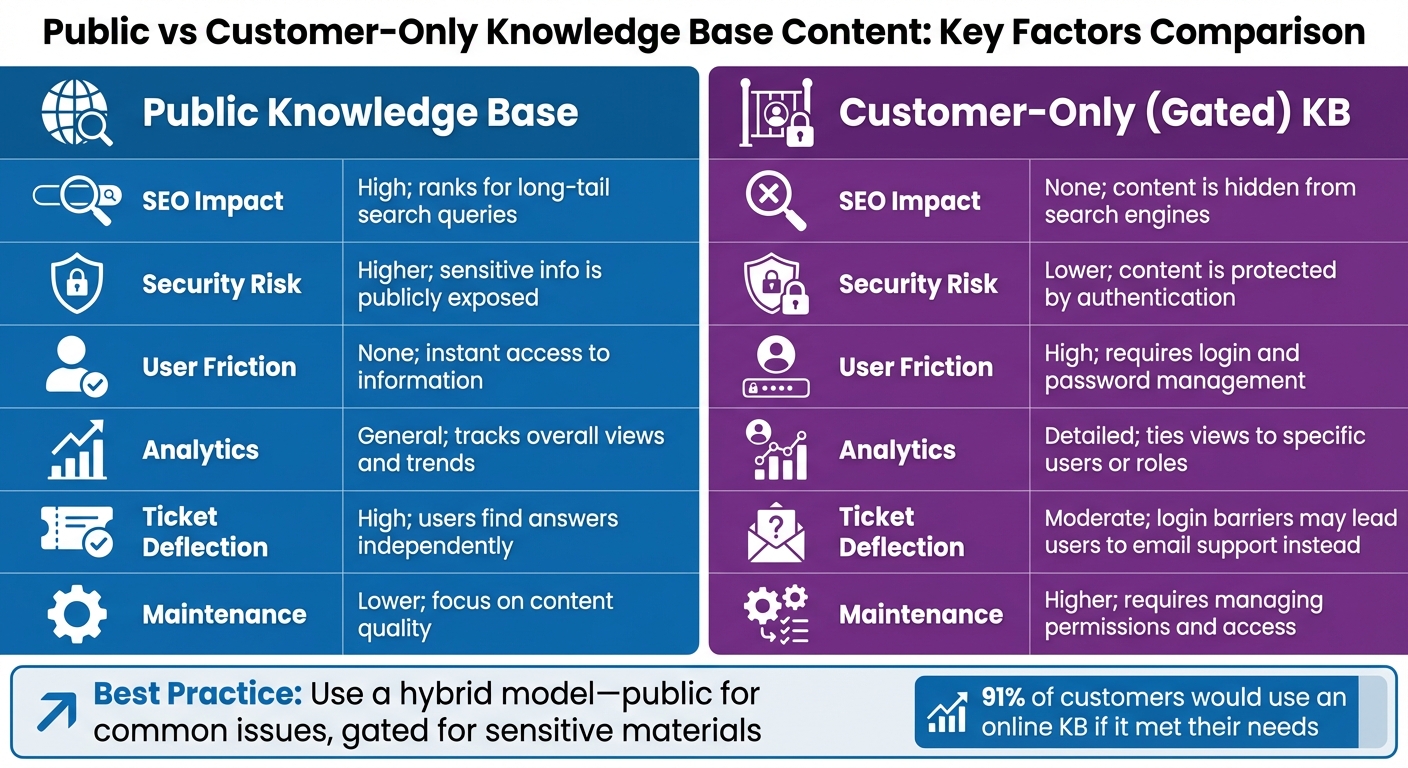
Public vs Customer-Only Knowledge Base Content Comparison
Now that you’ve organized your content, let’s dive into the upsides and challenges of each approach.
Benefits of Public Knowledge Base Content
Public knowledge base (KB) content can be a powerhouse for SEO and ticket reduction. Every article you make public has the potential to attract long-tail search queries. For example, articles like "how to reset password" can rank in search engines and help users resolve issues without ever reaching out to your support team.
The impact on ticket deflection is hard to ignore. 91% of customers say they would use an online knowledge base if it met their needs [1]. By removing login barriers, you make it easier for users to find the answers they’re looking for.
Public documentation also acts as a trust builder for potential customers. When evaluating your product, many prospects will check your help center to assess your company’s transparency and readiness. A gated KB might give the impression that your documentation is incomplete or poorly maintained – even if that’s not the case.
While public KBs maximize visibility and accessibility, gating certain content can provide added security and better analytics.
Benefits of Customer-Only Knowledge Base Content
Unlike public KB content, customer-only content focuses on security and tailored insights.
A gated KB is ideal for safeguarding sensitive information. Think about internal SOPs, IT configurations, HR policies, or industry-specific materials for sectors like healthcare or finance. Keeping these behind authentication helps meet regulatory requirements and protects proprietary processes.
It also offers detailed usage analytics. By gating content, you can track which users or accounts access specific articles. For instance, if an enterprise client frequently views your API troubleshooting guide, your customer success team can step in with proactive support.
Although gating doesn’t completely prevent competitors from accessing your content, it adds enough friction to deter casual monitoring of your roadmaps or feature updates. Plus, it positions your KB as a premium resource – a perk for paying customers that reinforces the value of your support.
Comparison Table: Public vs Customer-Only KB Content
| Factor | Public Knowledge Base | Customer-Only (Gated) KB |
|---|---|---|
| SEO Impact | High; ranks for long-tail search queries. | None; content is hidden from search engines. |
| Security Risk | Higher; sensitive info is publicly exposed. | Lower; content is protected by authentication. |
| User Friction | None; instant access to information. | High; requires login and password management. |
| Analytics | General; tracks overall views and trends. | Detailed; ties views to specific users or roles. |
| Ticket Deflection | High; users find answers independently. | Moderate; login barriers may lead users to email support instead. |
| Maintenance | Lower; focus on content quality. | Higher; requires managing permissions and access. |
The choice between public and gated KB content depends on your goals. General troubleshooting guides and FAQs are best kept public, while compliance-related documents and internal workflows should stay behind authentication. Many support teams find that a hybrid model works best – offering open access for common issues while gating advanced or sensitive materials.
sbb-itb-e60d259
Using AI and Supportbench to Manage KB Content Access
AI tools have transformed how knowledge base (KB) content is classified and distributed. Sorting through countless articles to decide which should be public and which should remain gated is both time-consuming and prone to mistakes. With AI-powered workflows, this process becomes seamless, as these tools automatically classify content and apply access rules based on your specific criteria.
AI-Powered KB Article Creation and Auto-Classification
Supportbench’s AI takes resolved support cases and turns them into draft KB articles automatically. By analyzing case details, conversation threads, and resolutions, it generates a complete article that includes a subject line, summary, and relevant keywords.
Building on the sensitivity-based categorization mentioned earlier, the AI tags each article as public or customer-only depending on its sensitivity and your pre-set rules. This ensures that sensitive information is directed to the right audience from the beginning [2].
Once articles are tagged correctly, the system enforces access rules using role-based permissions.
Role-Based Permissions for Content Access Control
To balance user accessibility with data protection, Supportbench uses role-based security controls in a "create once, distribute safely" workflow. This setup automatically adjusts content access as customer statuses change [5]. You can fine-tune access based on customer type (e.g., enterprise vs. trial), account status (active vs. churned), or specific user roles. For instance, advanced troubleshooting guides can be reserved for premium customers, while trial users only see basic FAQs.
If a customer’s account status shifts – such as moving from active to churned – their access to private KB content is automatically revoked, eliminating the need for manual updates.
Custom Knowledge Base AI Bots for Different Audiences
Adding another layer of efficiency, Supportbench offers AI bots tailored to distinct user groups. The Customer QA AI Bot focuses on external-facing articles, answering questions for public users. Meanwhile, the Custom Knowledge Base AI Bot provides personalized responses by pulling information exclusively from the knowledge hubs each user is authorized to access [3].
For agents, the Agent Knowledgebase AI Bot scans all articles, helping them resolve issues faster. These bots not only reduce ticket volume but also maintain strict security standards. Considering that 81% of customers prefer self-service options powered by AI agents [4], this approach strikes a balance between accessibility and protection.
Conclusion
Determining which knowledge base content stays public and which is reserved for customers hinges on three main goals: protecting sensitive information, creating a smooth customer experience, and reducing support costs. Public articles help boost SEO and handle common questions, while customer-only content keeps proprietary details secure and offers tailored guidance for specific user needs.
As your knowledge base grows, relying on manual classification becomes inefficient – especially when employees spend an average of 9.3 hours a week just searching for information [7]. This is where AI-driven processes step in to streamline operations.
Supportbench’s AI tools simplify this challenge by automatically classifying content, applying role-based permissions that adapt to customer status, and deploying targeted AI bots. These tools ensure your knowledge base evolves dynamically, keeping up with the demands of a growing repository.
"A knowledge base cannot be a static resource. The team of writers and editors will have to continuously make new additions to articles, remove dated content, and improve articles that do not provide the right solutions" [6].
Conducting regular audits helps fine-tune your access strategy, ensuring your knowledge base remains both efficient and effective.
FAQs
How do I decide if an article is too sensitive to publish publicly?
Deciding whether an article is suitable for public access involves carefully assessing its content for security risks, confidentiality concerns, and potential operational impacts. Articles containing sensitive customer information, proprietary methods, or details about security protocols should be restricted. Similarly, internal-use materials, such as confidential workflows, should stay private. If releasing the content could jeopardize privacy or security, it’s best to classify the article as either customer-only or for internal access.
What’s the best hybrid model for public vs customer-only KB content?
A well-designed hybrid model blends public and restricted knowledge bases with customized access controls. Public content – like FAQs or troubleshooting guides – provides quick self-service options for users. On the other hand, sensitive information, such as internal policies or premium support details, is securely limited to authenticated customers.
By configuring visibility at the article or collection level, businesses can maintain flexibility. This approach strikes a balance between openness and security, improving both the customer experience and operational efficiency in today’s support systems.
How can AI automate KB access control without creating security gaps?
AI simplifies knowledge base (KB) access control by blending rule-based systems with AI-powered workflows to enhance security. Rule-based automation takes care of straightforward tasks like compliance tracking, while AI adjusts access levels based on the sensitivity of the content and specific user roles. Administrators can fine-tune permissions with options like "inherit from parent" or "no AI access", creating a flexible and secure system that balances compliance needs and reduces potential risks.






