



Customer support automation uses technology like AI and machine learning to handle repetitive tasks such as ticket routing, password resets, and order tracking. This allows human agents to focus on complex issues that require personal interaction. It’s especially useful for B2B companies, where clients expect precise and reliable support.
Key Takeaways:
- What It Does: Automates routine inquiries, prioritizes tickets, and drafts responses.
- Why It Matters: Saves time, reduces costs, and improves efficiency without replacing human agents.
- How It Helps: Speeds up response times, reduces workload, and ensures 24/7 availability.
- B2B Benefits: Handles high-stakes, complex client needs at scale.
Modern tools like AI copilots and chatbots enhance support by providing context-aware assistance and self-service options. Companies using automation report faster resolutions, lower costs, and higher customer satisfaction. However, it’s essential to balance automation with human involvement for sensitive or complex issues.
We Automated 80% of Customer Support With One AI Agent (No Code)
sbb-itb-e60d259
Core Components of Customer Support Automation
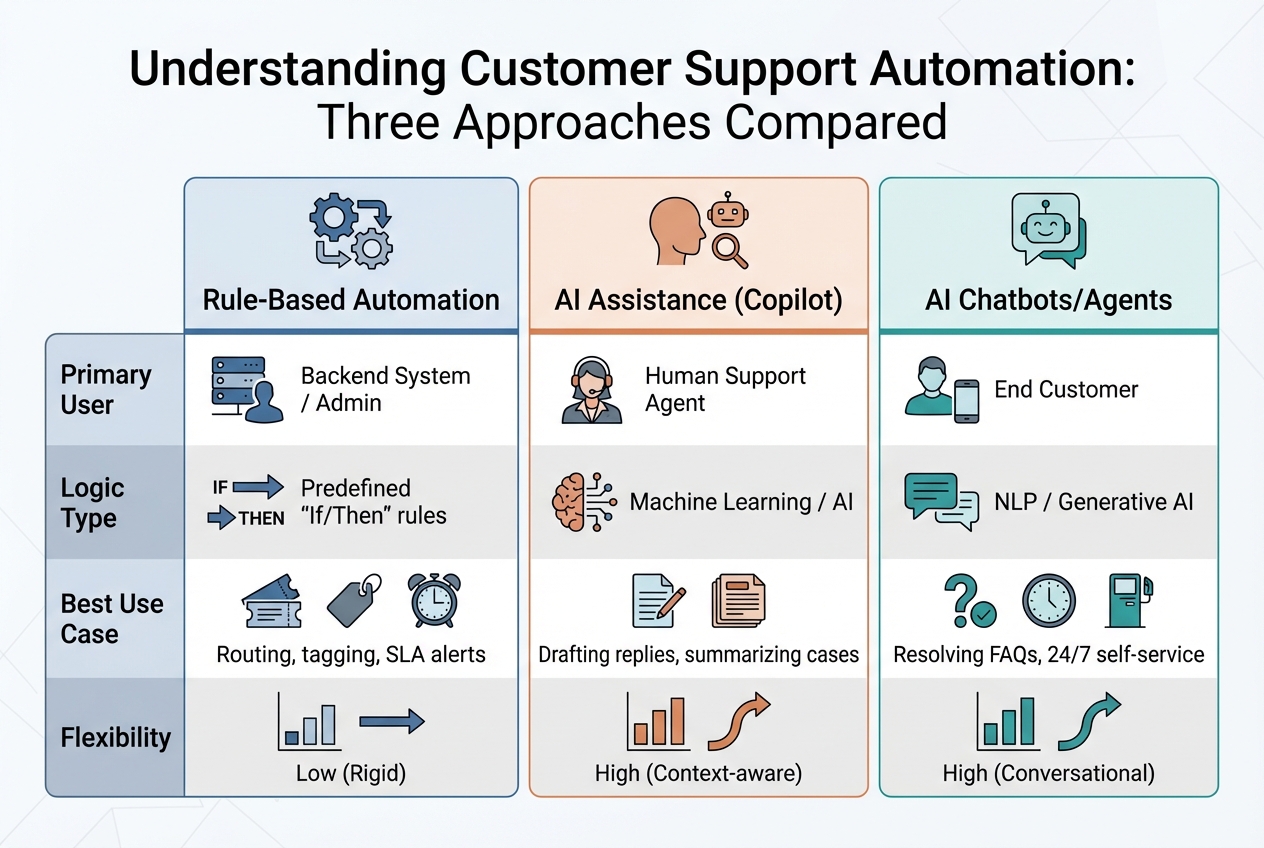
Customer Support Automation Types: Rule-Based vs AI Assistance vs AI Chatbots Comparison
Automation vs. AI Assistance vs. Chatbots
Understanding the differences between these tools is key to choosing the right one for your needs.
Rule-based automation relies on straightforward "if/then" logic to handle tasks like ticket routing, tagging, and SLA alerts. While efficient for repetitive processes, it’s rigid and depends on specific keywords or conditions to function.
AI assistance, often referred to as Agent Assist or Copilot, is designed to complement human agents rather than replace them. It provides real-time support by offering reply suggestions, summarizing emails, and surfacing relevant knowledge base articles, enabling agents to tackle complex issues more efficiently. One example: a customer success leader reclaimed 20–25% of their workweek thanks to AI assistance.
Chatbots and AI agents engage directly with customers. Unlike traditional chatbots that follow pre-written scripts, modern AI agents use Natural Language Processing (NLP) and Generative AI to understand a customer’s intent, sentiment, and context. AI21 Labs, for instance, achieved 82% efficiency in support automation, allowing them to maintain a lean team.
| Feature | Rule-Based Automation | AI Assistance (Copilot) | AI Chatbots/Agents |
|---|---|---|---|
| Primary User | Backend System / Admin | Human Support Agent | End Customer |
| Logic Type | Predefined "If/Then" rules | Machine Learning / AI | NLP / Generative AI |
| Best Use Case | Routing, tagging, SLA alerts | Drafting replies, summarizing cases | Resolving FAQs, 24/7 self-service |
| Flexibility | Low (Rigid) | High (Context-aware) | High (Conversational) |
Next, let’s look at which tasks automation handles best.
Which Support Tasks Work Best with Automation
Ticket routing and triage are perfect for automation. By assigning cases based on factors like issue type, urgency, language, or customer tier, companies can speed up response times. For example, Wolseley Canada implemented automated routing tailored to case type and client profiles in June 2025. The result? An 81% reduction in time to first response and a 35% drop in resolution times for 7,000–8,000 monthly support emails.
Routine inquiries, such as password resets, order status updates, and account verification, are well-suited for chatbots and self-service portals. These tasks are repetitive and high in volume but require minimal complexity. Interestingly, 62% of customers prefer self-service options over speaking with a human agent.
SLA management and prioritization ensures teams meet response time goals by automatically tagging and prioritizing tickets. AI can also draft initial replies, summarize conversations for smooth handoffs, and suggest relevant knowledge base articles to expedite resolutions. Proactive measures, like notifying customers of known issues before they reach out, further reduce inbound support volume.
Eilis Byrnes, Customer Service and Process Improvement Manager at Wolseley Canada, shared, "The ticketing system assisted us in resolving instances that were long overdue and in providing the staff with a smooth platform experience".
When starting with automation, focus on high-impact areas, like VIP escalations or product-specific inquiries, rather than attempting a full-scale overhaul. Always ensure customers can escalate to a human agent for emotionally sensitive issues, billing disputes, or complex technical problems.
These examples highlight how automation can streamline operations while maintaining quality.
How AI Improves Automation Accuracy
Traditional rule-based systems struggle with varied phrasing, as they rely on strict keyword matches. AI, on the other hand, uses Natural Language Processing to grasp intent and context. For instance, it can recognize that "I can’t log in", "Login broken", and "Unable to access my account" all describe the same issue.
Retrieval-Augmented Generation (RAG) takes this a step further by generating responses exclusively from your verified knowledge base, rather than pulling from the open internet. This minimizes inaccuracies (or "hallucinations") and keeps responses aligned with your brand. Help Scout’s AI Answers feature, for example, achieves a 70% average resolution rate using this method.
AI also maintains a full view of customer context across channels by recalling past interactions from your CRM. Rule-based systems, by contrast, treat each case as a standalone event. Additionally, dynamic triage uses real-time sentiment and urgency analysis to prioritize tickets, moving beyond the basic first-come, first-served approach.
Service professionals using generative AI save over 2 hours per day on average, and businesses implementing AI automation report a 37% reduction in first response times.
These advancements set the stage for even greater efficiency gains in customer support.
Benefits of Customer Support Automation
How Automation Improves Agent Productivity
Automation eliminates the repetitive tasks that often bog down customer service agents. By managing high-volume, straightforward tasks like password resets, order tracking, and account verification, automation allows agents to focus on more complex challenges that demand critical thinking and personal interaction. Companies using AI automation have reported a 37% decrease in first response times compared to those relying solely on manual processes.
AI-powered tools, like Copilots, take productivity a step further by drafting replies and summarizing lengthy conversation threads. Instead of combing through countless emails, agents are provided with instant context and suggested responses they can quickly fine-tune. For example, Neptune Flood introduced an AI assistant to handle routine claims and policy questions between 2024 and 2025. Within just one year, the company saw a 78% drop in cost per ticket, a 92% reduction in resolution times, and saved over $100,000 in operational costs.
Intelligent ticket routing is another game-changer. AI can analyze ticket intent and sentiment to direct inquiries to the most suitable agent, eliminating the need for manual triage and speeding up response times. HSBC implemented AI-driven routing in 2024–2025 and achieved impressive results: a 48% drop in abandonment rates, a five-minute reduction in average handle time per call, and a 30% decrease in call transfers, all while giving supervisors back two hours of productive time daily.
By boosting efficiency, automation creates a system where human expertise takes center stage, supported by technology rather than replaced by it.
Keeping Human Agents at the Center
The goal of automation isn’t to replace human agents – it’s to empower them. By offloading routine Tier 1 tasks, automation allows agents to focus on more meaningful, high-value interactions, particularly in B2B settings where relationships matter most.
In fact, 79% of agents say that AI tools, like Copilots, enhance their ability to provide better service. These tools can surface relevant knowledge base articles, recall past customer interactions from integrated CRMs, and offer data-driven insights, all while ensuring that agents retain control over the final decision-making process.
"AI isn’t primarily eliminating the need for skilled agents; instead, it’s fundamentally transforming their role, automating the routine to elevate the human contribution towards higher-value activities".
Modern automation systems are designed with clear escalation paths, ensuring that complex, sensitive, or emotionally charged issues are seamlessly handed off to human agents with all the necessary context. For instance, Zoom Video Communications used an AI chatbot to resolve 97% of customer interactions, while ensuring that more nuanced cases were escalated to human agents. This balance is particularly critical in B2B support, where each interaction can make or break a relationship. It’s worth noting that 65% of customers will switch to a competitor after just one or two poor support experiences.
By combining automation with human expertise, companies can enhance service quality while also achieving measurable financial benefits.
Reducing Costs While Maintaining Service Quality
Automation offers a clear path to cutting operational costs while maintaining, or even improving, service standards. AI-powered support solutions can lower service costs by 25% to 35%, and 90% of CX leaders report a positive return on investment after adopting AI tools for their teams. These savings align perfectly with broader B2B goals, enabling scalable and efficient customer support.
The cost difference between automated and manual channels is striking. Automated chat responses cost only a few cents, while a live agent phone call can cost upwards of $15. Great Southern Bank, for example, used AI routing to reduce wait times to under 30 seconds and halved staff attrition to less than half the industry average. Considering that replacing a single agent can cost around $20,000, these efficiencies are significant.
Lowe’s offers another compelling example. By implementing an Employee Engagement Manager tool to automate scheduling and reduce overstaffing, the company saved over $1 million in just eight months while also improving supervisor satisfaction. Similarly, Nexo now closes 62% of cases automatically using AI, saving thousands of staff hours. These examples highlight how automation not only reduces costs but also creates the capacity for teams to scale and focus on building the customer relationships that drive loyalty and revenue.
Common Automation Mistakes and How to Avoid Them
While automation offers plenty of advantages, it’s important to understand the common missteps that can derail its potential.
The Problem with Rigid Rule-Based Systems
Traditional rule-based automation relies on predefined scripts and straightforward if/then logic. While this approach works for basic tasks like collecting names or email addresses, it often falls apart when faced with the complexities of B2B customer support. These systems typically rely on keyword matching, which means they struggle to handle nuanced questions or variations in phrasing. For example, a customer asking the same question in a slightly different way might find themselves stuck in an endless loop, with no way to reach a real person.
AI-native platforms provide a more dynamic solution. Instead of sticking to rigid rules, they use Natural Language Processing (NLP) to understand customer intent. These systems can pull information from multiple sources, such as knowledge bases, historical tickets, and CRM data, making them much better equipped to handle the intricate, multi-layered issues common in B2B interactions.
Integration Problems and Scalability Issues
Using separate omnichannel support tools for triage, chat, and email might seem like a quick fix, but it often creates bigger problems down the line. These disconnected systems can lead to fragmented customer data, making it harder for agents to get the full picture. As a result, agents may waste valuable time transferring information manually, and customers might get frustrated by having to repeat themselves across different channels. Additionally, older platforms often require costly add-ons to enable even basic automation features, and they can break during updates, requiring extra IT support.
The better option? Unified platforms that seamlessly integrate automation into support workflows. These systems provide a single source of truth, streamlining operations and reducing the risk of data silos. However, while integration challenges can disrupt workflows, over-automation comes with its own set of risks.
When Automation Removes Too Much Human Contact
Over-automation can alienate customers, especially in B2B contexts where relationships are key. While automation is great for routine tasks, relying on it for emotionally sensitive issues – like billing disputes, cancellations, or complaints – can backfire. These situations demand empathy and human judgment, not canned responses.
"The biggest disadvantage that might arise is the loss of a personal touch and the mark that it leaves on a customer." – IBM Think
The solution lies in striking the right balance. Use automation for high-volume, straightforward tasks like password resets or order tracking, where speed is critical. For more complex or emotionally charged issues, let AI play a supporting role by offering real-time suggestions, case summaries, or quick access to relevant information. At the same time, ensure human agents stay in control of the final response. Always provide clear escalation options, and use sentiment analysis to identify when a customer is frustrated and needs to speak with a live agent. In B2B support, where every interaction can impact renewals and customer satisfaction, keeping human involvement in complex cases is essential for preserving trust and loyalty.
How to Measure Automation Success
Measuring the success of automation isn’t just about tracking numbers – it’s about ensuring your automation efforts actually improve efficiency and customer experience. Start by setting benchmarks for key metrics like cost per case, handle time, and first-contact resolution before introducing automation. Without these baselines, it’s nearly impossible to determine whether your automation is making a difference. These benchmarks act as a bridge between implementation and achieving operational excellence.
Key Metrics to Track
One of the most important metrics is the auto-resolution rate, which shows the percentage of cases resolved entirely by AI. Advanced AI systems often reach auto-resolution rates of 60%–80%. Another critical metric is first-contact resolution (FCR), which measures whether an issue is resolved in a single interaction, either by automation or the first human agent. High FCR rates are linked to reduced operational costs and improved customer satisfaction.
You’ll also want to monitor average handle time (AHT), which tracks how long each interaction takes. But don’t just focus on speed – balance AHT with the customer effort score (CES), which evaluates how easy it is for customers to resolve their issues. The goal of effective automation is to simplify the process, not add extra hurdles. Keep an eye on the escalation rate as well – this measures how often automated sessions require human intervention. A high escalation rate can signal flaws in your automation’s logic or knowledge base.
Additionally, predictive CSAT and CES scores can provide valuable insights. By analyzing sentiment and interaction data, AI can predict satisfaction levels even when customers don’t complete surveys. For B2B teams, the ticket deflection rate is another useful metric. This measures how many cases are avoided by offering self-service options before a customer submits a request. Together, these metrics ensure automation complements human expertise rather than replacing it.
Calculating ROI and Operational Impact
Once you’ve established your metrics, calculating ROI becomes more straightforward. Start by tracking cost per case, which is calculated by dividing total support costs by the number of cases handled. Automation should ideally lower this cost. To stay on top of performance, monitor daily KPIs like first response time and case volume. Efficiency metrics, such as FCR and resolution time, should be reviewed weekly, while satisfaction metrics like CSAT and NPS are best tracked monthly.
For deeper insights, segment your metrics by intent, channel, and customer group. For example, if your automation handles password resets seamlessly but struggles with billing inquiries, that’s a clear area for improvement. Always compare your key performance indicators before and after implementing AI to measure its true impact.
Platforms like Supportbench can simplify this process by integrating tools like AI-based predictive CSAT and CES scores directly into case management systems. Features such as AI-detected first-contact resolution give support leaders instant insights into the performance of their automation – all without the need for manual reporting. This kind of visibility makes it easier to fine-tune your automation strategy and maximize its benefits.
Conclusion
Customer support automation allows human agents to shine by taking repetitive, low-complexity tasks – like ticket routing and password resets – off their plates. This gives teams the freedom to concentrate on the meaningful, relationship-driven conversations that define effective B2B support. In fact, 99% of service professionals say automation helps them save time, reduce errors, and focus on more critical tasks. Similarly, 79% of support employees report that AI improves their jobs by eliminating mundane tasks.
The advantages don’t stop there. AI-powered automation not only accelerates response times but also delivers substantial time savings across support operations. And it’s not just about speed – automation helps maintain service quality without sacrificing the personal touch. As Matt Lewis, Head of User Operations at AI21 Labs, explains: "This increased efficiency allows us to maintain a healthy culture of highly professional individuals, instead of a churning system of junior support agents".
Automation also brings clarity to chaos by unifying scattered data into a single, accessible view. AI copilots step in with real-time suggestions and summaries, so agents can respond with confidence without sifting through multiple systems. This doesn’t just cut costs – it reduces burnout, boosts retention, and turns support into a strategic asset.
To make automation work seamlessly, start by automating customer support workflows for high-volume, low-complexity tasks, ensure clear escalation paths to human agents, and treat AI as a collaborative tool rather than a replacement. With 71% of support leaders planning to invest in automation by 2026, the real question isn’t whether to automate – it’s how to do it in a way that enhances your team’s strengths. When implemented thoughtfully, automation scales your B2B support while keeping the human connections that drive long-term success intact.
FAQs
How can companies balance automation with human interaction in customer support?
Achieving a balance between automation and human interaction starts with viewing AI as an assistant, not a substitute. AI is great for handling repetitive tasks like ticket triage, status updates, and drafting responses. This frees up agents to focus on more complex issues that require empathy and critical thinking. For instance, if a request involves detailed decision-making or falls outside an AI’s confidence range, it should immediately escalate to a live agent. This approach ensures the high-quality, personalized service that B2B customers expect.
To maintain this balance, automation should be designed to enhance human-centered interactions. AI can assist by suggesting next steps, pulling up relevant information, or flagging urgent tickets. However, agents should always review and finalize responses, particularly for sensitive or complicated issues. Tracking metrics like first-response time, customer satisfaction (CSAT), and escalation rates can help companies ensure that automation complements, rather than undermines, the customer experience.
It’s also important to avoid rigid, overly rule-based automations that frustrate both agents and customers. Instead, opt for flexible, AI-driven platforms that adapt to real-world interactions and allow quick updates for new scenarios. Clearly defining which tasks can be automated (e.g., password resets, order tracking) and which require human oversight is key. This approach strikes a balance between cost efficiency and maintaining a personalized touch.
What are the most important metrics to evaluate customer support automation success?
To gauge how well customer support automation is working, it’s essential to focus on metrics that balance efficiency with the customer experience. One key metric is the Automation Rate, which indicates the percentage of issues resolved without needing human assistance. This helps highlight cost savings and how effective the system is. Another important measure is First Contact Resolution (FCR), which tracks how often problems are resolved during the initial interaction. A higher FCR reduces repeat contacts and boosts customer satisfaction.
Metrics like Customer Satisfaction (CSAT) and Customer Effort Score (CES) provide insight into how customers feel about their interactions with automated systems. On the efficiency side, Average Handling Time (AHT) and First Response Time (FRT) are critical for assessing how quickly and efficiently issues are addressed. Lastly, the Containment Rate measures the percentage of interactions fully resolved within the automated system, minimizing the need for human agent involvement.
By monitoring these metrics, support teams can pinpoint areas for improvement, measure return on investment, and ensure automation delivers both operational efficiency and a better customer experience.
What are some common mistakes to avoid when using customer support automation?
To make the most of customer support automation, steer clear of these common mistakes:
- Replacing human agents entirely: Automation shines when managing repetitive tasks like ticket routing or sending status updates. However, for complex and personalized interactions, human agents are irreplaceable. Striking this balance ensures a smoother and more satisfying customer experience.
- Automating tasks that need human judgment: Automation isn’t suited for handling nuanced or complicated issues. Stick to automating straightforward, repetitive processes to avoid frustrating customers and creating extra work.
- Using rigid workflows: Systems that rely on strict rules can crumble when faced with unexpected situations, leading to misrouted tickets or unresolved requests. Opt for modern AI tools that are more flexible and better equipped to handle surprises.
- Neglecting performance tracking: Without keeping an eye on metrics like response times or customer satisfaction (CSAT), it’s tough to gauge how well your automation is working. Regularly review and tweak your system to ensure it continues to add value.
- Ignoring the quality of your knowledge base: Automation relies heavily on having accurate and up-to-date information. If your knowledge base is outdated or incomplete, it can lead to incorrect responses, eroding customer trust.
Avoiding these pitfalls can help you boost efficiency while still delivering the personalized service your customers expect and deserve.






