



Customer satisfaction surveys are essential for improving customer experiences and reducing churn. They help businesses identify problems, validate decisions, and track metrics like CSAT, NPS, and CES. These surveys provide actionable insights into customer needs, allowing teams to address issues quickly and improve retention. Here’s what you need to know:
- Key Metrics:
- CSAT: Measures satisfaction with specific interactions.
- NPS: Tracks long-term loyalty and likelihood of recommendations.
- CES: Identifies friction points and customer effort levels.
- Timing:
- Send surveys immediately after interactions (e.g., support tickets).
- For onboarding, follow up within the first week or month.
- Use milestone-based or periodic surveys for long-term feedback.
- Survey Design:
- Keep questions clear, concise, and unbiased.
- Avoid combining multiple ideas in one question.
- Use a mix of closed-ended and open-ended questions.
- Deployment:
- Automate survey triggers for timely feedback.
- Use email, in-app prompts, or chat for delivery.
- Avoid survey fatigue by limiting frequency.
- Analysis:
- Leverage AI tools for trend detection and sentiment analysis.
- Integrate survey data with CRM for a complete customer view.
- Close the feedback loop by addressing issues and notifying customers of improvements.
Surveys are a powerful tool to build better customer relationships and drive business success. By using the right metrics, timing, and design, you can transform feedback into meaningful actions.
10 Best Practices for Customer Surveys
sbb-itb-e60d259
Setting Survey Objectives and Selecting the Right Metrics
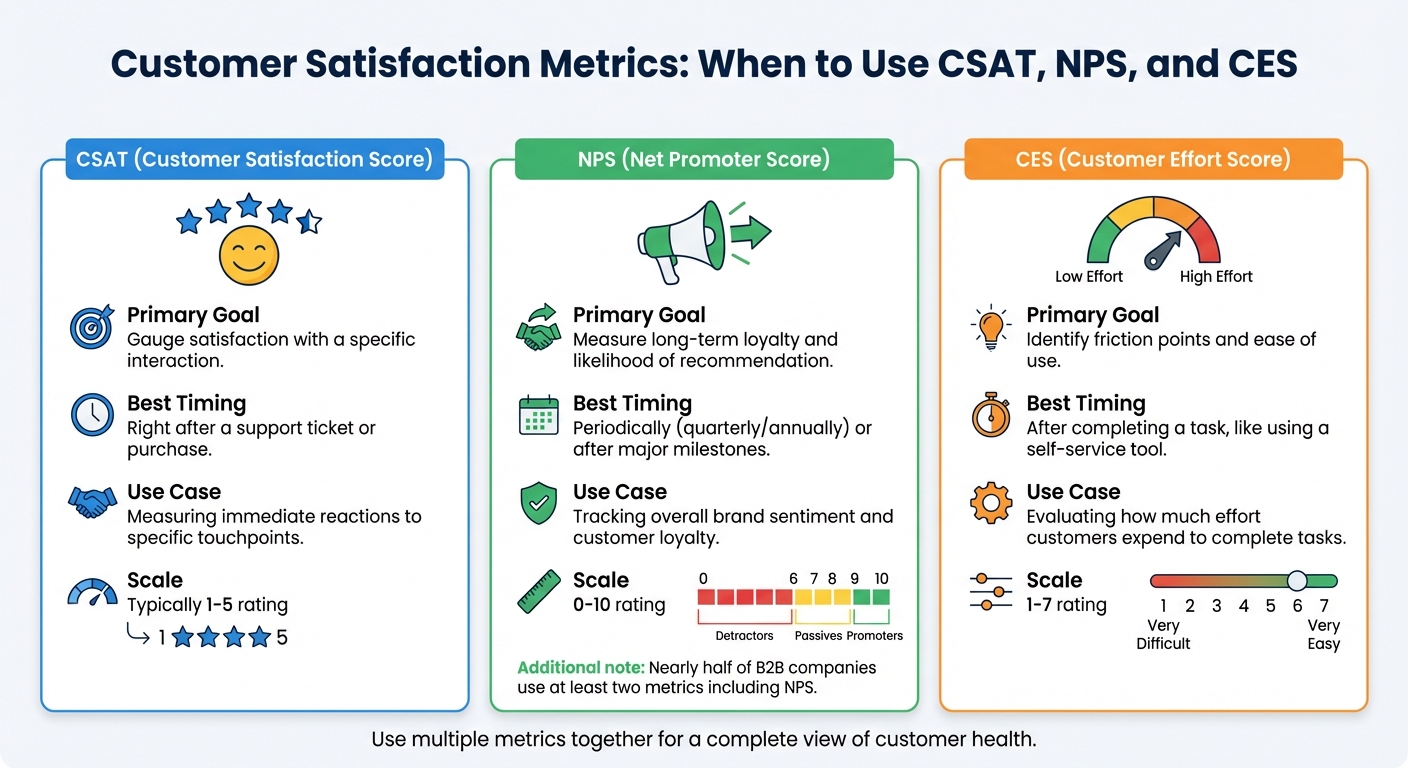
CSAT vs NPS vs CES: Customer Satisfaction Metrics Comparison Guide
Before launching a survey, it’s crucial to define clear and specific objectives. Broad goals like "improve customer experience" won’t cut it. Instead, focus on pinpointing exact knowledge gaps, such as identifying underperforming features or understanding why support tickets are spiking from key accounts. When your objectives are precise, the feedback you gather becomes actionable, helping you tackle real business challenges.
Connecting Survey Goals to Business Outcomes
Your survey goals should always tie back to core business outcomes like retention and revenue. Consider this: 73% of customers will switch providers after multiple bad experiences, and over half will leave after just one unsatisfactory interaction. That’s why surveys are essential – they help you spot and address issues before they lead to churn.
Surveys can also validate big decisions, such as changes to your product roadmap or investments in self-service tools. For example, you might ask whether customers would prefer a new feature or faster response times from agents. This ensures your investments align with actual customer needs.
Additionally, surveys can highlight which team members need extra coaching and who deserves recognition. By tracking satisfaction scores at the agent level, you can identify performance gaps and reward top performers based on objective customer data rather than subjective impressions. This shifts evaluations from gut feelings to measurable insights.
Once your goals are clear, the next step is choosing the right metrics – CSAT, NPS, and CES – to gather the insights you need.
When to Use CSAT, NPS, and CES
The metrics you select should align with your objectives. Using CSAT, NPS, and CES together can provide a well-rounded view of customer health:
- CSAT measures satisfaction with specific interactions, making it ideal for capturing immediate reactions.
- NPS assesses long-term loyalty and the likelihood of customer recommendations, making it great for periodic check-ins or milestone events.
- CES evaluates how much effort customers expend to complete tasks, helping you identify friction points that could lead to churn.
In B2B settings, NPS is particularly popular, with nearly half of companies using at least two metrics to gauge both transactional satisfaction and overall relationship health. For example, after a customer uses your knowledge base, you might send a CES survey to see if self-service tools are reducing effort. Later, you could follow up with an NPS survey on a quarterly basis to track loyalty trends.
| Metric | Primary Goal | Best Timing |
|---|---|---|
| CSAT | Gauge satisfaction with a specific interaction | Right after a support ticket or purchase |
| NPS | Measure long-term loyalty and likelihood of recommendation | Periodically (quarterly/annually) or after major milestones |
| CES | Identify friction points and ease of use | After completing a task, like using a self-service tool |
Selecting the Right Audience and Survey Timing
Once you’ve defined your objectives and chosen your metrics, timing becomes critical. To ensure accuracy, send surveys while the experience is still fresh – within hours of a support interaction or immediately after onboarding. Timely feedback captures genuine impressions.
For more complex B2B products, following up within the first week post-purchase can uncover technical frustrations before they escalate into major issues. Segment your audience by lifecycle stage and role to gather more relevant insights. For instance, onboarding customers and long-term enterprise clients have very different needs. Similarly, a CEO may care about strategic alignment, while a finance team member is focused on billing accuracy. Using the same survey questions for both groups won’t yield useful results.
Exit surveys are another valuable tool, helping you uncover the root causes of customer churn. Meanwhile, high-CSAT customers are ideal for testing new features since they’re more likely to provide constructive feedback.
To boost response rates, personalize survey invitations using CRM data. Reference specific interactions, like a ticket number or a recently used feature. This approach makes customers feel valued, a sentiment shared by 61% of respondents. Keep your surveys concise – 3 to 5 questions that take less than seven minutes to complete – to avoid survey fatigue.
Writing Survey Questions That Produce Useful Data
The quality of your survey data depends heavily on how you phrase your questions. Every question should have a clear purpose – if it doesn’t, it’s just adding clutter. Questions that are merely "nice to know" can make your survey unnecessarily long, which often leads to higher dropout rates. To ensure you’re gathering meaningful insights, design each question to be focused, clear, and unbiased.
How to Write Clear Survey Questions
Keep your language simple and avoid industry-specific jargon. Each question should address a single topic – don’t combine ideas into one question. For instance, avoid asking, "How satisfied are you with our price and quality?" This forces respondents to evaluate two separate things with one answer, which can muddy your data.
Stick to neutral phrasing to avoid leading respondents. For example, asking, "How much did you enjoy our award-winning service?" subtly nudges people toward a positive response. A better alternative would be, "How would you rate your recent support experience?" Additionally, steer clear of absolutes like "always" or "never", as they limit flexibility and may not reflect respondents’ true experiences.
Use a mix of question types. Closed-ended questions are great for gathering measurable data, but sprinkling in a few open-ended ones can reveal the "why" behind the numbers. Consistency is also key: if a rating of 1 means "Strongly Disagree" in one section, make sure it means the same in every other section.
Survey Design Mistakes to Avoid
Even well-crafted questions can lose their value if your survey falls into common design traps. Ambiguous or biased wording can lead to unreliable responses. Poorly organized surveys can frustrate participants, causing them to give low-effort answers just to finish quickly – a phenomenon known as satisficing.
Be mindful of biases like acquiescence bias, where respondents tend to agree with statements regardless of their actual opinions. Similarly, social desirability bias can lead people to overstate positive behaviors or downplay negative ones to present themselves in a favorable light.
The order of your questions can also influence responses. For example, in October 2003, Pew Research found that 45% of respondents supported legal agreements for same-sex couples when the question followed one about same-sex marriage. However, only 37% supported it when the question was asked independently. Another example from January 2003 showed that 68% supported military action in Iraq "to end Saddam Hussein’s rule", but this dropped to 43% when the question included the phrase "even if it meant that U.S. forces might suffer thousands of casualties".
Avoid overly complicated formats like matrix grids, especially for mobile users, as they can be difficult to navigate. Randomizing answer options in closed-ended questions can also help reduce order bias.
Testing and Adapting Surveys for Different Audiences
Once your questions are written, test your survey to ensure it resonates with your audience. Pilot testing on various devices can help identify issues like hidden biases or technical glitches. Use skip logic to guide respondents past irrelevant sections, keeping the survey concise and relevant.
For B2B respondents, focus on professional metrics such as company size, job role, or industry. For B2C audiences, center your questions on personal experiences. When asking sensitive questions about topics like income or age, use ranges (e.g., $31,000–$60,000) rather than exact figures. For questions about gender or orientation, provide inclusive options like "Prefer to self-describe."
Visual elements, like stars or emojis, can make rating scales more intuitive and appealing, especially for diverse audiences. To streamline the process, pull in existing demographic data from your CRM rather than asking respondents to repeat information. If you must include sensitive demographic questions, explain clearly how the data will be used – this builds trust and can help reduce survey abandonment rates.
Deploying Surveys to Maximize Response Rates
Designing clear, unbiased survey questions is just the starting point. To truly capture valuable feedback, you need to deploy those surveys strategically. Timing, channels, and frequency all play a huge role in ensuring customers respond. Poor timing or bombarding customers with too many surveys can frustrate them and hurt response rates. On the other hand, thoughtful deployment can provide the actionable insights you need to refine your operations.
When to Send Surveys During the Customer Journey
Timing is everything when it comes to surveys. The most effective feedback comes when the experience is still fresh in the customer’s mind. For example, post-support surveys should be sent right after a ticket is resolved or a conversation ends.
When it comes to onboarding, give customers enough time to fully explore your product. For B2B customers, this is usually one to three months after they’ve converted. This ensures their feedback reflects a well-rounded experience with your product and support.
For ongoing feedback, milestone-based surveys are a great tool. SaaS companies, for instance, can send an initial survey one month after a subscription starts and follow up every three to six months. In eCommerce, surveys sent three to seven days after a product is delivered tend to capture post-purchase impressions effectively.
Event-triggered surveys are another powerful option. These surveys are sent immediately after specific actions, like attending a webinar, using a new feature, or completing a training. Relationship surveys, like NPS, should be sent less frequently – quarterly or twice a year – to measure overall brand sentiment without overwhelming customers.
| Business Type | Timing | Frequency |
|---|---|---|
| B2B | 3 months post-conversion | Every 3–6 months |
| SaaS | 1 month post-subscription | Every 3–6 months |
| eCommerce | 3–7 days post-delivery | Quarterly or biannually |
| Support | Immediately post-interaction | Per-ticket (with throttling) |
Once timing is nailed down, finding the right frequency is your next step.
Finding the Right Survey Frequency
Survey fatigue is real. If you send too many surveys, customers will stop responding – or worse, they’ll feel annoyed. To avoid this, automate throttling so that each customer only receives one survey within a set timeframe. This applies to email, in-app prompts, and chat follow-ups.
It’s also important to distinguish between transactional surveys and relationship surveys. Transactional surveys, like CSAT, can be sent after individual interactions, while relationship surveys, such as NPS, are better suited for quarterly or biannual check-ins. Keep surveys concise – ideally under 10 questions – and aim for a completion time of three to five minutes. Surveys that take longer than seven minutes often see higher abandonment rates.
For email surveys, timing matters. Send them between 6:00 AM and 9:00 AM on Mondays or Tuesdays to maximize open and response rates. And once a customer responds, remove them from follow-up reminders to avoid irritation.
Once you’ve established the right frequency, focus on measuring customer service by choosing the best delivery channels.
Choosing the Right Delivery Channels
Email remains a go-to for relationship surveys and follow-ups after interactions. To boost open rates, make sure your email domain is authenticated with CNAME records. This ensures surveys come from your company’s address instead of a third-party tool.
In-app widgets are perfect for gathering real-time feedback while customers are actively using your product. For instance, in 2024, Asana used in-app surveys at the top of its user interface to collect high-context feedback without disrupting users. Similarly, Help Scout implemented quick two-question surveys after support interactions and a five-question Typeform survey during onboarding.
Live chat surveys are another great option. Deploy them immediately after a conversation ends to capture fresh impressions. Also, don’t overlook mobile users – ensure all survey delivery methods are mobile-friendly. Poor mobile experiences can significantly lower participation rates.
Finally, use API triggers to automate survey deployment. For example, you can send surveys automatically after a ticket is resolved or a purchase is completed. This eliminates manual work and ensures surveys reach customers at the perfect moment.
Analyzing Survey Data and Taking Action
Turning survey feedback into meaningful improvements starts with effective analysis.
Using AI to Spot Trends in Survey Responses
AI tools, powered by natural language processing (NLP) and sentiment analysis, can process large volumes of open-ended survey responses to uncover customer needs and emotions at scale.
Automated tagging organizes qualitative feedback into clear themes like "product quality", "response time", or "agent knowledge." This makes it easier to identify recurring issues and prioritize solutions that impact the most customers. Predictive analytics can also highlight critical moments in the customer journey and forecast loyalty trends based on current feedback patterns.
Platforms like Supportbench take this a step further with AI-driven predictive CSAT and CES scoring. These tools flag interactions likely to generate negative feedback before surveys are even sent, allowing support teams to step in proactively and reduce churn.
With these insights, integrating feedback into your support processes becomes seamless and actionable.
Connecting Survey Feedback to Support Workflows
Survey responses become far more impactful when tied directly to your support workflows. By integrating survey data with your CRM, agents can view feedback alongside a customer’s history, providing valuable context for future interactions. This ensures every team member has a complete picture of the customer experience.
Automating survey triggers at key moments – like when a case is closed or after onboarding – ensures timely feedback collection. Segmenting responses based on customer type, tenure, or satisfaction levels can further refine follow-ups. For instance, customers with consistently low CSAT scores might receive tailored surveys or quicker follow-ups from a customer success manager.
Sharing survey insights across departments like marketing, sales, and product teams prevents data silos and keeps everyone aligned on customer-focused goals. Considering that 80% of customers believe the experience a company provides is as important as its products or services, cross-team collaboration is essential.
This integration lays the groundwork for continuous improvement through a closed-loop feedback system.
Building a Closed-Loop Feedback System
To close the feedback loop, transform insights into measurable actions. Address negative feedback promptly, as 70% of consumers are more likely to return if their complaints are resolved well on the first attempt.
Go beyond surface-level complaints by conducting root cause analyses. For example, if customers frequently mention long wait times, investigate whether staffing, inefficient workflows, or unclear self-service options are at fault. Assign specific teams or individuals to address each issue to ensure accountability. Tools like an "Impact vs. Effort" matrix can help prioritize changes that are easy to implement but deliver significant results.
Set clear goals, such as "Increase CSAT scores for Product X by 15% within three months". Use follow-up surveys and metrics to measure the success of these changes and refine your approach over time. When feedback leads to tangible improvements, notify the customers who provided it through personalized emails or in-app updates. This not only shows their input was valued but also reinforces trust in your brand.
Customer Satisfaction Survey Templates
Survey templates can be a game-changer when it comes to gathering customer feedback efficiently. They not only save time but also help you gather insights that can shape proactive support strategies and improve key customer interactions.
Onboarding and Setup Survey Templates
These surveys are best sent right after onboarding to capture first impressions about the process and the product’s usability.
Key questions to include:
- "How satisfied are you with our onboarding experience?" (1–5 scale)
- "Does the product help you achieve your goals?" (Yes/No with an option to add comments)
- "How easy do you find our product to use?" (1–5 scale)
Keep these surveys short – three to five focused questions are ideal. For feedback on specific interactions, check out the next template.
Post-Support Interaction Survey Templates
Timing is everything with these transactional surveys. Send them within 5 to 30 minutes of resolving a ticket to ensure the experience is still fresh in the customer’s mind. Research shows that feedback collected immediately is 40% more accurate.
Key questions to ask:
- "How easy was it to resolve your issue today?" (1–7 CES scale)
- "Did our support team completely resolve your issue?" (Yes/No)
- "Please rate your customer service representative" (1–5 stars)
For voice or IVR channels, stick to quick keypad-based scales. For email or chat, you can include more detailed questions or even open-ended ones like, "Would you use [insert channel] again based on your experience?".
Looking to gather feedback on specific features? The next template has you covered.
Product and Feature Feedback Survey Templates
These surveys should be triggered right after a customer uses a specific feature. They’re perfect for identifying pain points and understanding what’s working well.
Questions to consider:
- "What is your favorite tool or portion of the product?" (Open-ended)
- "What points of friction have you encountered while using the product?" (Open-ended)
- "Which product feature do you consider the most valuable?" (Multiple choice or open-ended)
Using branching logic can make these surveys more personalized by displaying questions based on previous answers.
For long-term customer relationships, renewal surveys are essential.
Renewal and Account Health Survey Templates
These surveys are designed to measure long-term satisfaction and should be sent quarterly or several months after a transaction.
Essential questions to ask:
- "How satisfied are you with [Company Name] as a business partner?" (1–5 scale)
- "How likely are you to recommend our company to a colleague?" (0–10 NPS scale)
- "How likely are you to hire our company again?" (1–5 scale)
- "Do you believe our services offer value for the price?" (Yes/No with an option to comment)
Since 91% of customers are likely to recommend a brand after a positive experience, tracking NPS at this stage can help you predict renewal rates.
Finally, let’s talk about tailoring surveys to specific support channels.
Support Channel Survey Templates
Each support channel comes with its own dynamics, so it’s important to customize your surveys accordingly. For chat and email, you have room for more detailed questions. For phone support, simpler and shorter scales work best.
Sample questions include:
- "How satisfied were you with the support you received?" (1–5 CSAT scale)
- "How well did we understand your concerns?" (1–5 scale)
- "Would you use [Chat/Email/Phone] again based on your experience?" (Yes/No)
While chat and email allow for more in-depth feedback, phone surveys should stick to concise formats for efficiency.
Conclusion
Customer satisfaction surveys are more than just tools for gathering opinions – they’re key to improving efficiency and building long-term customer relationships. When your survey strategies align with specific business objectives, you can transform raw data into meaningful actions that improve retention, reduce churn, and strengthen support efforts. The difference between surveys that sit unused and those that spark real change lies in having a clear purpose: knowing exactly what you want to learn, how you’ll act on it, and how success will be measured.
The importance of this alignment is backed by data. Studies show that a single bad experience can push a customer to leave, while improving customer satisfaction can nearly double revenue within three years. This is why modern B2B support teams increasingly rely on surveys as proactive tools. They help identify at-risk customers before they churn and pinpoint friction points that might otherwise go unnoticed.
AI has dramatically expanded what can be achieved with survey data. Take Unity’s experience as an example: in 2025, they deployed an AI agent integrated with their knowledge base, which handled 8,000 support tickets and saved the company $1.3 million. AI doesn’t just speed up data analysis; it also identifies patterns in customer interactions that human agents might miss. It flags critical issues in real time, giving teams the chance to address problems before customers decide to leave.
These AI-driven insights are directly tied to the strategies outlined in our survey templates. By using these templates, you can seamlessly incorporate survey feedback into your support workflows. As detailed in the section on analyzing survey data, syncing feedback into your CRM offers a full view of customer health, while AI can organize qualitative responses into actionable themes. Most importantly, address negative feedback quickly – 70% of consumers are likely to return if their complaint is resolved effectively the first time. When customers see their feedback leading to real improvements, it fosters loyalty that lasts.
FAQs
What’s the best way to create unbiased customer satisfaction survey questions?
When crafting customer satisfaction survey questions, it’s important to use neutral, straightforward language that steers clear of leading or emotionally charged terms. Keep the phrasing clear and specific to ensure respondents easily understand what you’re asking. Provide a balanced set of response options that cover the entire spectrum of opinions, ensuring no perspective is left out. Additionally, consider randomizing the order of response choices to reduce potential bias. These practices help you collect feedback that’s both accurate and genuinely useful.
When is the best time to send different types of customer satisfaction surveys?
The timing of customer satisfaction surveys plays a crucial role in gathering useful feedback, and it largely depends on the type of survey and where the customer is in their journey with your business.
For transactional surveys – like those aimed at collecting feedback after a support interaction – it’s best to send them immediately or within a few hours of the experience. This approach ensures the details are still fresh in the customer’s mind, leading to more accurate and relevant responses.
On the other hand, relationship surveys, which focus on broader metrics such as overall satisfaction or customer loyalty, are better suited for specific intervals. These could be tied to key milestones or scheduled on a weekly, monthly, or quarterly basis. However, it’s essential to strike a balance and avoid overwhelming customers with too many requests, as this can lead to survey fatigue.
To sum up, time transactional surveys close to the interaction and plan relationship surveys at thoughtful intervals that align with your customer engagement patterns.
How can AI improve the way we analyze customer satisfaction survey data?
AI tools are reshaping the way businesses analyze customer satisfaction survey data, making the process faster and more insightful. Instead of spending hours manually sifting through responses, AI can quickly identify patterns and trends that highlight what customers care about most. For example, it can analyze open-ended feedback to extract key themes and sentiments, offering a clear picture of customer priorities.
Beyond just sorting through survey results, AI can also connect the dots between feedback and other data, like customer support interactions or purchase history. This allows businesses to anticipate future customer behavior or satisfaction levels. With such insights, potential problems can be addressed before they escalate. By automating these processes, AI not only speeds up analysis but also improves accuracy, empowering support teams to focus on enhancing customer experiences.






