


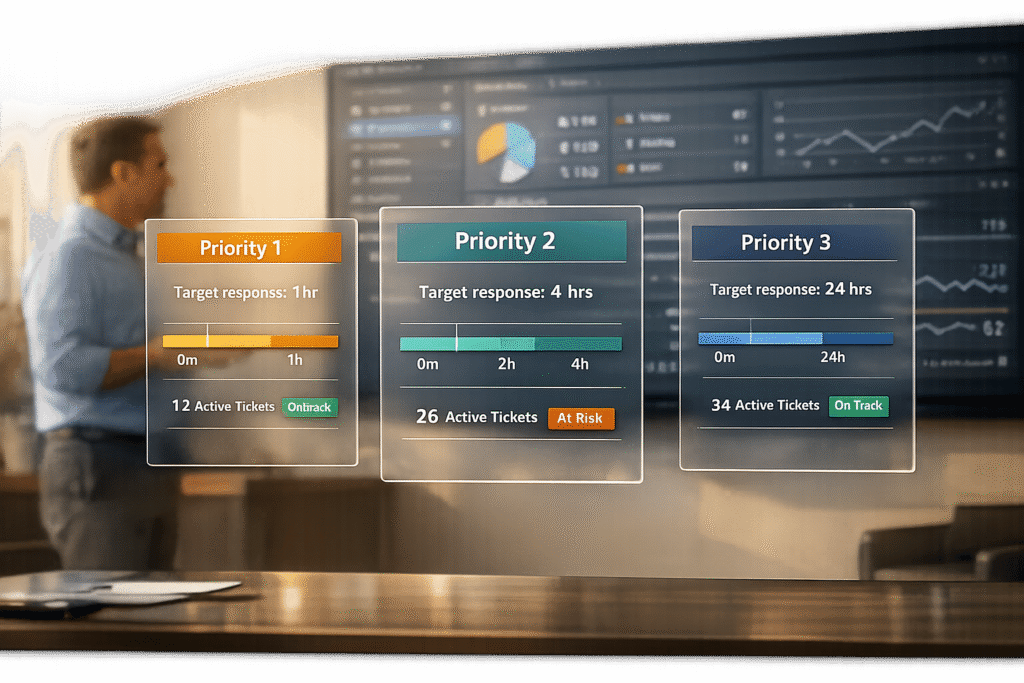
When setting SLA expectations in your customer portal, clarity and realism are key. Overpromising can damage trust, lead to SLA violations, and harm your reputation. Instead, focus on achievable targets based on your team’s capabilities and historical data. Here’s how to get it right:
- Set Realistic SLA Targets: Use past performance data to determine achievable response and resolution times. Differentiate between urgent and non-urgent issues to prioritize effectively.
- Define Priority Levels: Create clear categories (e.g., P1 for critical issues, P4 for low-priority requests) with specific response and update timelines.
- Communicate Transparently: Use straightforward language to explain response times, avoid absolute guarantees, and outline escalation paths for unresolved issues.
- Leverage AI Tools: Automate SLA tracking, customer updates, and dynamic prioritization based on real-time factors like ticket urgency or customer sentiment.
- Regularly Review SLAs: Conduct quarterly audits, gather customer feedback, and adjust SLA targets as operations evolve to ensure they remain realistic and effective.
How to Set Achievable SLA Targets for B2B Support
When setting SLA targets, it’s crucial to base them on what your team can actually deliver rather than on overly ambitious benchmarks or competitor claims. Aligning targets with your team’s capabilities and customer needs helps you avoid unnecessary violations and maintain trust.
Review Historical Support Data
Start by analyzing your past support performance. Dive into at least three months of ticket data to establish a realistic baseline. Focus on key metrics like average response times, resolution times, and variations based on ticket priority and customer tier. Tools such as timetoreply can help you uncover patterns, like when ticket volumes spike or where staffing gaps may exist, that influence your ability to meet SLAs [2].
Consider using percentile-based targets to reflect common scenarios. For instance, an 80th percentile response time of 2 hours for urgent tickets provides a more accurate benchmark than aiming for the absolute fastest response time. Also, distinguish between "active" support time (when your team is working on the issue) and "pending customer" time (when you’re waiting on the customer). Your SLA should only account for the time your team actively spends resolving the issue [4][5].
Match SLAs with Business Priorities
Your SLA response times should align with the urgency of the ticket, taking into account factors like customer tier, renewal timelines, and the severity of the issue. For example, a system outage affecting an Enterprise customer nearing renewal deserves a far quicker response than a standard-tier customer’s feature request.
To manage this effectively, define clear priority levels with specific criteria. For example:
- Priority 1: System outage affecting multiple users, requiring a 15-minute response time and a 4-hour resolution goal.
- Priority 2: Degraded performance, with a 1-hour response time and a 24-hour resolution target [3].
This structure ensures that critical issues are addressed promptly while preventing every ticket from being labeled "urgent." It also provides a clear framework to justify when faster responses are necessary.
Implement Dynamic SLAs for Context-Based Flexibility
Static SLAs don’t account for changing circumstances. Dynamic SLAs adjust automatically based on real-time context, such as escalation status, a customer’s health score in your CRM, or their proximity to a renewal date. For instance, if a ticket remains unresolved for too long, the system can automatically elevate its priority and tighten the SLA.
Integrate your support portal with your CRM to make these adjustments seamless. For example, a low-priority ticket from an at-risk customer should receive quicker attention than one from a consistently healthy account. This approach ensures that high-value customers don’t slip through the cracks simply because their issue doesn’t meet a rigid "critical" definition.
sbb-itb-e60d259
How to Map Priority Levels and Response Times in Portals
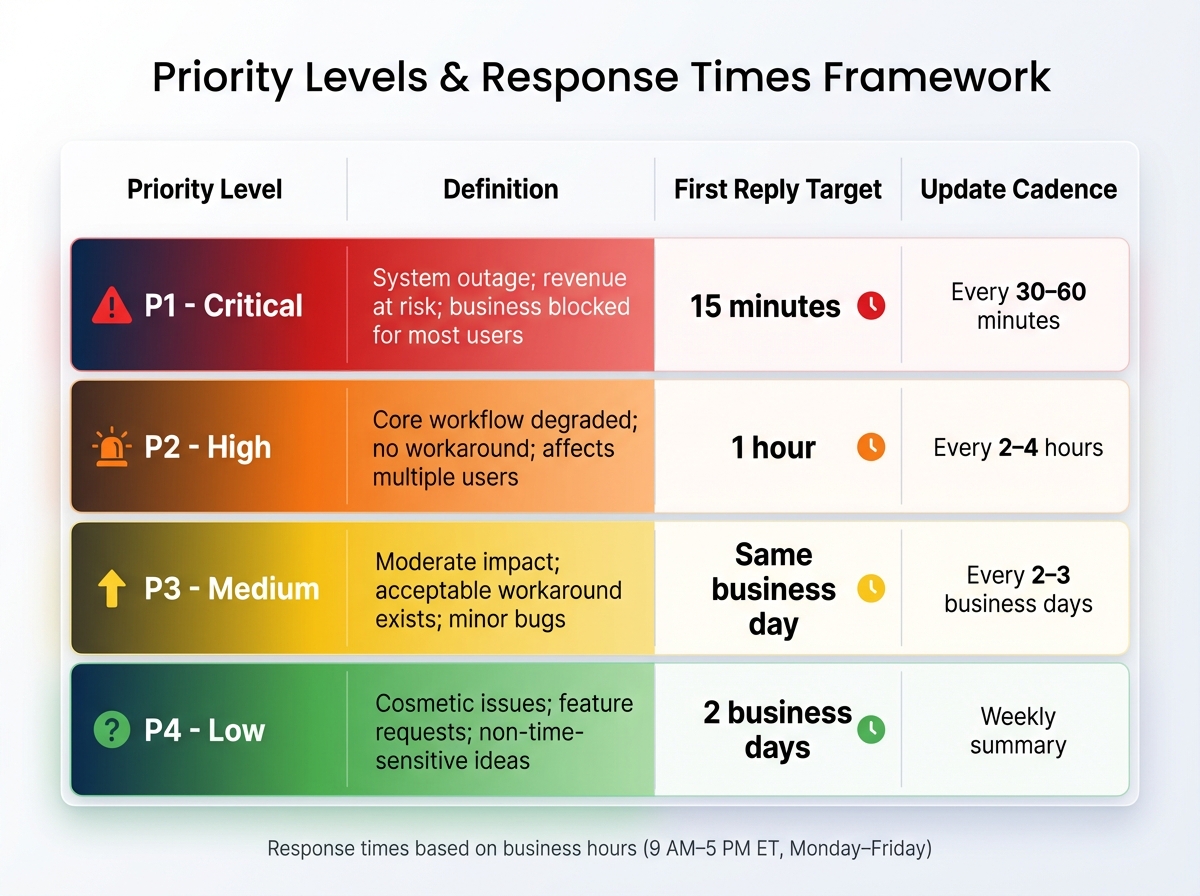
Customer Support Priority Levels and SLA Response Times Framework
Once you’ve set realistic SLA targets, the next step is breaking them down into a framework that’s easy for both your team and customers to follow. A good way to do this is by distinguishing between severity – how broken something is – and priority – how quickly it needs to be addressed based on its business impact. Different situations demand different responses, and this structured approach makes ticket routing and prioritization clear and actionable, strengthening your overall SLA strategy.
Define Ticket Priority Categories
Using a straightforward four-level priority system (P1 through P4) can simplify the process. As Support Oasis explains, "A simple P1 to P4 ladder keeps triage fast and reporting clean" [6]. Each level should be clearly defined and tied to the business impact, rather than just technical symptoms. Align these categories with your SLA framework to ensure consistency throughout your support process.
| Priority Level | Definition | First Reply Target | Update Cadence |
|---|---|---|---|
| P1 – Critical | System outage; revenue at risk; business blocked for most users | 15 minutes | Every 30–60 minutes |
| P2 – High | Core workflow degraded; no workaround; affects multiple users | 1 hour | Every 2–4 hours |
| P3 – Medium | Moderate impact; acceptable workaround exists; minor bugs | Same business day | Every 2–3 business days |
| P4 – Low | Cosmetic issues; feature requests; non-time-sensitive ideas | 2 business days | Weekly summary |
To help customers assign the correct priority, include brief descriptions in the ticket submission form. For example, under P1, add: "Select only if the entire team is blocked and revenue is at immediate risk." Conduct weekly reviews of closed tickets to ensure priorities were assigned accurately and refine your definitions as needed.
Display Escalation Paths in the Portal
Customers feel more confident when they know how their case will be handled. Make the escalation workflow visible in your portal so they understand what happens if their issue requires special attention. For example, P1 tickets could go straight to senior engineering, while P2 cases might be routed to a Tier 2 support lead after initial triage.
In your first response, confirm ownership by naming the person or team managing the case and providing a clear timeline for the next update. As Support Oasis highlights, "Short, dependable updates calm worried users faster than heroic promises you cannot meet" [6]. Showing escalation details upfront helps set the right expectations and supports smoother communication for complex cases.
Set Response Times for Complex Cases
For more challenging issues, focus on SLAs that guarantee regular updates (e.g., every 30–60 minutes for P1, every 2–4 hours for P2) rather than promising quick resolutions.
Leverage AI tools, like sentiment analysis, to adjust SLA priorities dynamically. For instance, if a customer’s tone shifts from neutral to frustrated, the system can escalate the ticket and shorten response times. Use real-time dashboards to track ticket status against SLA goals and trigger alerts when deadlines approach. This level of transparency can help sustain trust, even when resolving an issue takes longer than anticipated.
How to Communicate SLA Expectations Without Overpromising
Once you’ve established clear, achievable targets, the next step is to communicate these expectations in a way that builds trust. The way you phrase your commitments, present information, and offer flexibility can significantly impact how customers view your reliability. Be specific and transparent to ensure your communication aligns with what you can deliver.
Write Clear SLA Descriptions
Use straightforward language to set clear expectations about time frames and actions. For example, instead of saying, "We guarantee fast responses", go for something like, "We typically respond within 4 hours during business hours (9:00 AM–5:00 PM ET, Monday–Friday)." This approach helps customers understand your process without overpromising.
Break down the experience into tangible milestones, such as "initial assessment within 2 hours" or "assignment to an expert by the end of the business day." These details give customers a roadmap of what to expect. As Eric Klimuk, Founder and CTO of Supportbench, explains:
"SLAs are no longer static, bureaucratic documents, but dynamic tools that can lead to improved customer experiences and satisfaction" [8].
It’s also important to address what happens if targets are missed. For instance: "If we miss our first response target, your case will be escalated to a senior team member, and you’ll receive a status update within 30 minutes." This level of transparency reassures customers that you’re prepared to handle delays responsibly.
Add Visual SLA Progress Indicators
Visual tools like real-time progress bars or countdown timers can make SLA expectations more tangible. These indicators can display the current status, time remaining, and any upcoming escalation steps. AI-powered tools ensure accuracy by adjusting timelines when ticket volumes spike or cases become more complex. Additionally, sentiment analysis can flag frustrated customers and escalate their cases automatically [7].
Set up automated alerts for approaching SLA deadlines. These alerts can notify both your team and the customer, helping to manage expectations by addressing potential delays before they escalate into bigger issues.
Avoid Absolute Guarantees
Avoid using terms like "guaranteed" or "always." Instead, opt for phrases such as "typically", "our target is", or "we aim to." Absolute promises can create unnecessary pressure, leading to rushed resolutions or poor-quality service [10]. A more flexible approach aligns with dynamic SLA strategies, allowing you to provide realistic updates while maintaining high standards.
Be clear about what your SLAs don’t cover. For example, exclude scenarios like scheduled maintenance, third-party service dependencies, or issues caused by customer-side equipment failures [9][11]. Think of SLAs as a baseline – they set the minimum acceptable standard, while your broader goal should always be to exceed expectations [9].
You can also complement technical response metrics with outcome-based indicators like CSAT, CES, and NPS. Research shows that customers who rate their experience highly are likely to spend 140% more than those who don’t [8]. By focusing on the overall quality of service rather than just speed, you can build trust even in situations where resolution takes longer than expected.
Using AI to Monitor and Automate SLA Management
Bringing AI into SLA management takes the framework you’ve built and makes it more efficient by automating critical monitoring and update processes. Manual SLA tracking often leaves room for error – missed tickets, delayed alerts, and time-consuming updates. AI changes the game by offering real-time performance tracking, automating updates, and identifying actionable trends to keep your system running smoothly.
Track SLAs in Real Time with AI
AI keeps an eye on the predicted time-to-first-touch compared to the remaining SLA window. When predictions show potential deadline breaches, tickets are flagged as "at risk", helping teams shift from reactive to proactive management and avoid last-minute chaos.
You can also set tiered alert thresholds to manage notifications effectively. For instance, a "Warning" alert might trigger at 80% of the SLA threshold, while a "Critical" alert kicks in at 95% [12]. This ensures timely action without overwhelming your team. Plus, AI can use sentiment analysis to pick up on frustration or escalation language in tickets, bumping their priority – even if they weren’t urgent initially [14].
With tools like natural language processing, AI categorizes requests by urgency and complexity, ensuring they’re routed to the right agent. Forrester highlights this shift:
"The future of service management shifts from reactive reporting to proactive assurance – using AI and automation to prevent issues before they impact users." [14]
Organizations that adopt AI automation often see a 25-35% drop in administrative overhead [13]. These real-time capabilities also pave the way for automated customer updates.
Automate Customer Status Updates
AI can sense when a ticket is at risk of breaching its SLA and send proactive updates to customers before the deadline hits [14]. By setting up AI workflows, you can automate these updates – whether on a regular schedule or triggered by escalations – keeping customers informed with clear status updates and next steps.
AI also simplifies the process of creating customer-facing updates by summarizing internal progress and communication history into concise reports. This reduces the workload for agents while ensuring transparency [7][14]. It’s crucial, however, to include a way for customers to reach a human agent for critical or high-priority issues. As EverWorker emphasizes:
"Automation should carry empathy at scale, not erase it." [14]
Analyze SLA Performance with AI Reporting
AI doesn’t just alert you to potential issues; it helps you understand why delays occur. Large language models analyze historical ticket data to assign dynamic risk scores, such as predicting a "70% chance to breach in 12 hours" [15]. These insights allow teams to move from reacting to problems to proactively addressing them with predictive alerts.
AI-powered reporting consolidates data from CRMs, telephony systems, and ticketing tools into a single, comprehensive view. This eliminates "SLA blind spots" and improves resource allocation by predicting case volumes and identifying high-risk queues [15].
Tools like Supportbench use AI to instantly classify, prioritize, and assign tickets to the right team members based on intelligent analysis [7]. As Dataplatr puts it:
"Closure isn’t just a metric, it’s a competitive advantage." [15]
How to Review and Refine Your SLA Strategy
Keeping Service Level Agreements (SLAs) up-to-date is essential to ensure they align with both your team’s capabilities and your customers’ evolving expectations. Without regular reviews, you risk overpromising and underdelivering, which can lead to unhappy customers and a demotivated team. Regular refinement of your SLA strategy helps maintain service consistency and reliability.
Run Quarterly SLA Audits
Conducting quarterly SLA audits allows you to evaluate how well your agreements are performing. Focus on analyzing response times and their impact on customer satisfaction, moving beyond technical metrics to adopt a more customer-focused approach. Look for patterns in past performance, identify frequent breaches, and flag at-risk customer segments. It’s also a good time to assess how well AI predictions and automation are supporting SLA compliance.
Eric Klimuk, Founder and CTO at Supportbench, highlights the evolving role of SLAs:
"Service Level Agreements (SLAs) are no longer static, bureaucratic documents, but dynamic tools that can lead to improved customer experiences and satisfaction."
Consider introducing metrics like "time to first meaningful response", which provides a clearer picture of what truly influences customer satisfaction [8].
Use Customer Feedback to Improve SLAs
Customer feedback is a goldmine for refining SLAs. After resolving a ticket, send quick surveys to capture insights about the process. Use CSAT surveys for immediate feedback and CES surveys for more complex, multi-step resolutions. Keep these surveys short – less than 30 seconds – to encourage higher participation rates, as only about 30% of customers tend to provide feedback in 2026.
Frame your questions around key areas like speed, clarity, and completeness. For instance, ask, "What is one thing we could have done to resolve this faster?" Linking survey responses to ticket IDs and SLA metrics can help you identify specific areas needing attention. Radu, Head of Digital Transformation at BlueTweak, underscores the importance of leveraging feedback:
"When you treat feedback as fuel for operations, SLAs recover faster, FCR rises, and satisfied customers become loyal customers."
Close the loop with your customers by sharing updates like "You said, we did", showing them how their feedback has led to tangible improvements [16].
Adjust SLAs When Operations Change
SLAs need to evolve alongside changes in your tools, team structures, or business priorities. Whenever these shifts occur, update SLA targets promptly to maintain transparency and realistic expectations. A well-designed SLA framework should include a clear process for making these updates, ensuring that your agreements remain relevant and achievable.
Use historical performance data to set new targets and prevent unnecessary breaches, which can frustrate both staff and customers [18][19][20]. When tackling bottlenecks, identify their root causes, involve key stakeholders, and establish clear milestones – such as implementing automation within a specific timeframe. Regular monitoring of new KPIs can help ensure success. Companies that actively manage their SLAs often see benefits like a 20% increase in customer retention and a 15% reduction in dispute resolution times [20].
Joe Hertvik, Owner of Hertvik & Associates, advises:
"Whenever an IT service is designed or changed, its accompanying SLA should also be reviewed and modified to make sure it is fair, enforceable, and realistic."
To maintain the integrity of your SLA documents, adopt a structured update process that includes version control and detailed change logs [17][20].
Conclusion
In an AI-driven B2B support setting, aligning achievable SLAs with automated monitoring is essential for maintaining both efficiency and customer confidence. Setting realistic SLA targets fosters trust by offering clear and attainable response expectations. For example, basing response times on historical data, using visual progress indicators to communicate status, and steering clear of absolute guarantees help establish expectations your team can reliably meet. One MSP’s tiered SLA system – handling Critical tickets within 30 minutes and Standard cases within a few hours – demonstrates how well-defined parameters can prevent overpromising [1].
AI tools transform SLA management from a reactive process into a proactive one. Real-time monitoring identifies potential breaches before they occur, automated updates keep customers informed, and intelligent reporting highlights recurring issues with specific ticket types. This data-driven approach ensures that the expectations displayed in your portal align with your actual operational capabilities, avoiding unrealistic promises. By leveraging AI, you not only prevent SLA breaches but also create opportunities for continual improvement.
Refining your SLA strategy is an ongoing effort. Conducting quarterly audits and gathering customer feedback helps ensure your SLAs remain aligned with your team’s capacity. Treating SLAs as evolving guidelines rather than static policies allows you to balance customer expectations with operational realities. This approach protects your team from burnout, avoids overpromising, and strengthens customer trust. When your portal showcases clear and attainable SLAs, it becomes a powerful asset – demonstrating professionalism while keeping your operations sustainable.
FAQs
How do I pick SLA targets that match our real capacity?
To align SLA targets with what your team can realistically handle, start by taking a close look at your current operations. Review metrics like ticket volume, agent workload, and any recurring bottlenecks that slow down resolution times. Historical data is your best friend here – it helps you set response times that are reasonable and avoid making commitments your team can’t keep.
Focus on prioritizing issues based on their severity and consider streamlining your SLA tiers to make them easier to manage. Once you’ve outlined new targets, test them in a 30–60 day pilot period. This trial run allows you to see if the targets are practical and adjust as needed. By following this process, you can create SLAs that are both achievable and sustainable for your team.
What should we do when a ticket risks missing its SLA?
When a ticket is close to missing its SLA, it’s crucial to take action early. Use automated alerts, AI insights, and efficient workflows to stay ahead of potential issues. For instance, set up alerts at critical points – like 25%, 75%, or 90% of the SLA time – to ensure your team responds promptly. AI tools can help evaluate the urgency of tickets and redirect high-risk ones to the right team. Additionally, automating processes like escalations or reassignments can help avoid SLA breaches and keep customers happy.
How can we show SLAs in the portal without “guaranteeing” outcomes?
To present SLAs effectively without making unrealistic promises, start by setting clear and achievable expectations that align with both your customers’ needs and your team’s capabilities. Incorporate measurable metrics, such as response or resolution times, to provide clarity. You can also tailor SLAs by customer tiers or the severity of issues, ensuring fairness and prioritization.
Make sure to communicate the scope of your SLAs, including details like operating hours and any conditions that might impact timelines. Using AI tools can help you track adherence to SLAs and keep customers updated proactively. This approach fosters transparency and builds trust, without committing to guarantees that may be difficult to fulfill.






