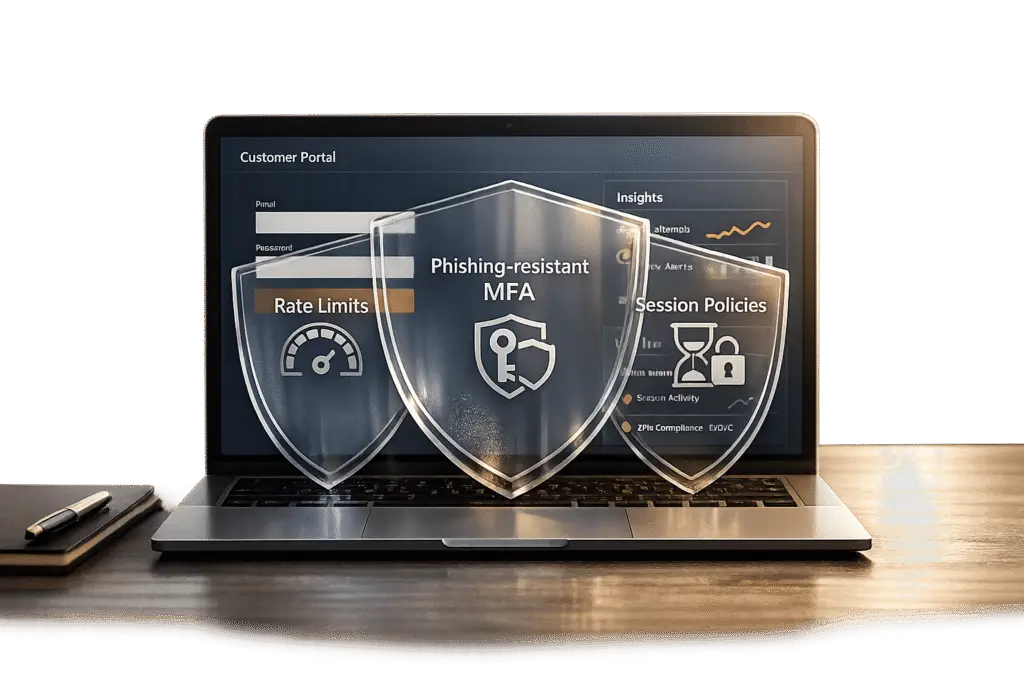
Your customer portal is at risk. Cyberattacks targeting login endpoints, API abuse, and session hijacking are on the rise, fueled by advanced bots and AI-powered credential theft. The stakes? Financial losses averaging $4.88 million per breach as of 2024, with small businesses losing around $149,000 per incident. Protecting your portal isn’t just about IT – it’s about safeguarding trust and critical client relationships.
Key solutions to strengthen your portal:
- Rate Limits: Prevent brute force and credential stuffing with smart request throttling.
- Multi-Factor Authentication (MFA): Add an extra security layer to block compromised accounts.
- Session Policies: Control session lifetimes to minimize risks from stolen tokens.
These measures, combined with adaptive security tactics, can block 99.9% of automated account attacks while maintaining usability for legitimate users. Let’s dive into how to implement these defenses effectively.
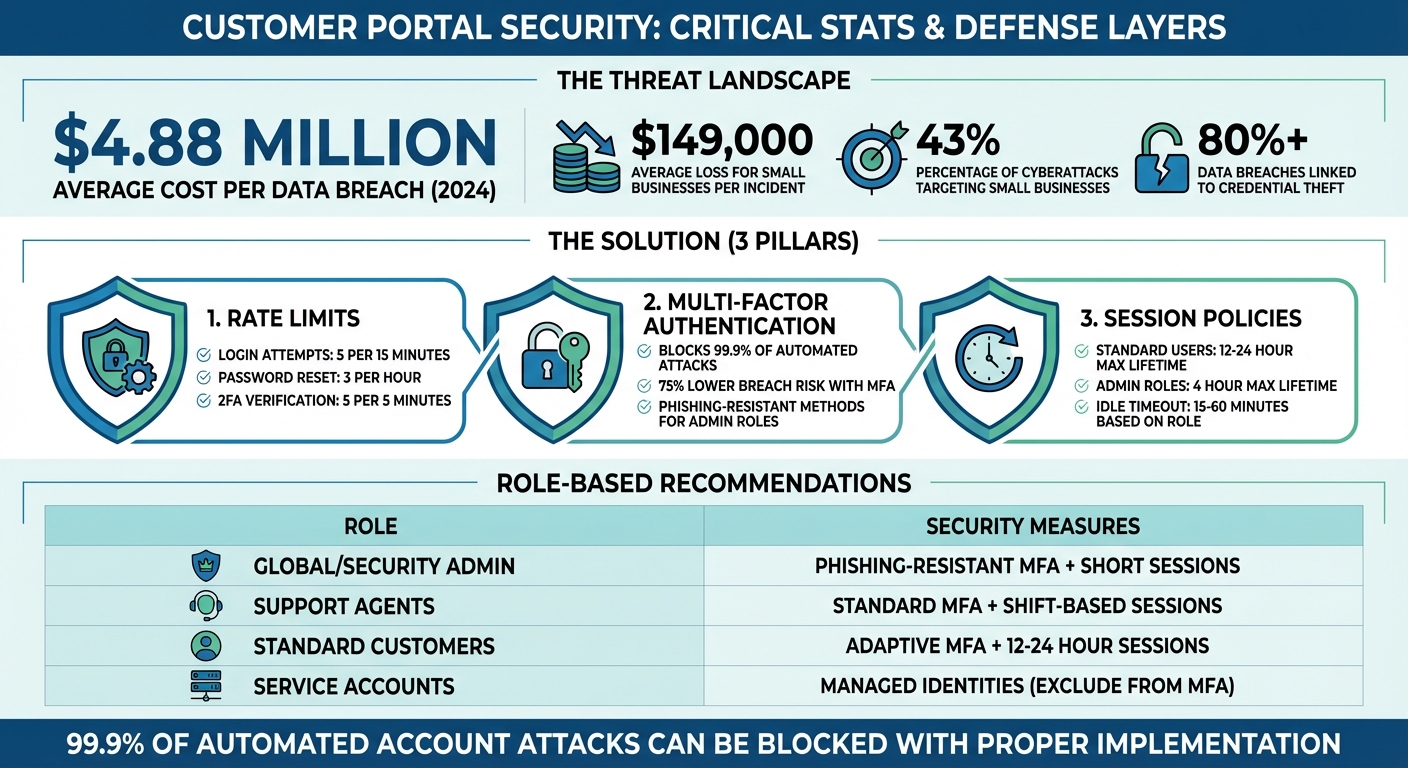
Customer Portal Security: Key Statistics and Implementation Guidelines
Server hardening: 100 days to secure your environment – Episode 9
sbb-itb-e60d259
Implementing Rate Limits to Prevent Abuse
Rate limits serve as a network-level shield, stopping attackers from overwhelming your authentication endpoints before they can cause damage [5]. By limiting how many requests a user, IP address, or API key can make within a set timeframe, you establish an essential layer of security. Without this safeguard, your system becomes an easy target for brute force attacks, credential stuffing, and automated data scraping – threats that saw a sharp spike in early 2026 [1].
The tricky part in B2B environments is striking the right balance. If limits are too restrictive, legitimate users – especially those sharing corporate IPs or using NAT configurations – might get blocked. Too lenient, and attackers could slip through. As Nawaz Dhandala from OneUptime aptly said:
"Too strict breaks legitimate users, too loose fails to protect" [6].
A multi-layered defense is the answer, with rate limits applied at three levels: the Edge (via CDN or WAF) to handle large traffic spikes, the Gateway (API layer) for per-key restrictions, and per-Identity (user or account) for finer control [1].
How to Configure Rate Limits
Start by identifying security-critical endpoints – places like login pages, password resets, and 2FA verification routes, which are frequent attack targets. For login attempts, follow industry recommendations: 5 attempts every 15 minutes, keyed by both IP address and username [6]. Password reset endpoints require stricter limits, such as 3 attempts per hour, based on patterns observed during credential stuffing attacks in early 2026 [1].
When setting up rate-limiting algorithms, choose the right tool for the job:
- Token bucket: Ideal for general API endpoints, as it allows short bursts while maintaining a steady long-term rate [5].
- Sliding window: Better for high-security endpoints like login or OTP verification, as it prevents spikes at the edges of time windows [5].
For B2B portals, base limits on Tenant ID or API Key rather than just IP addresses. For authenticated traffic, the most robust approach combines tenantID:userID:routeID [5]. To ensure consistent enforcement across multiple application instances, use Redis or a similar distributed store for counters – local in-memory storage can lead to inconsistencies in multi-node setups [5][6].
Another smart tactic is assigning varying token costs based on request load. For example, assign 5 tokens to resource-heavy operations and just 1 token to lightweight GET requests. This protects your backend from overload while still allowing frequent, low-impact actions.
Don’t forget to return standard rate-limit headers like X-RateLimit-Limit, X-RateLimit-Remaining, and Retry-After. These headers let clients manage their request frequency programmatically, reducing support tickets and improving the developer experience [5][6].
For workflows like Supportbench, consider dynamic throttling tied to customer health scores. A tenant with a higher risk profile might face tighter limits or more adaptive challenges (like MFA step-ups) compared to a trusted account with a strong track record [1].
Common Mistakes to Avoid
One of the most common pitfalls is relying solely on IP-based limits. In B2B environments, many users may share a single office IP due to NAT configurations. Blocking that IP could inadvertently lock out an entire client organization [5][6]. Instead, layer IP-based controls with user-level or tenant-level identifiers to ensure precision without disrupting legitimate access.
Another frequent error is mismatched rate limits and backend policies. For instance, if your Active Directory locks accounts after 10 failed attempts but your portal allows 15, users could hit the lockout threshold before your rate limiter intervenes. To avoid this, align your portal’s rate limits with backend policies – e.g., set the portal to 9 attempts to maintain control [7].
Uniform request weighting is another misstep. Treating all requests equally can overwhelm your backend, as resource-heavy operations like report generation consume the same quota as simple queries. Assigning different weights based on request complexity helps prevent this [5][1].
Absolute lockouts are also problematic. Instead, use progressive delays with exponential backoff. For example, introduce a 500ms delay after 3 failed attempts, 2 seconds after 5 failures, and so on. This approach slows down attackers while allowing legitimate users to recover from minor errors without contacting support. As Vaults.Cloud noted during their analysis of 2026 attacks:
"Early 2026 attacks showed coordinated abuse of password resets and credential stuffing, forcing defenses to scale horizontally and become risk-adaptive" [1].
Lastly, decide whether your system should fail open or fail closed if the rate-limiting service (like Redis) becomes unavailable [6].
| Endpoint | Recommended Limit | Window | Key Strategy |
|---|---|---|---|
| Login Attempts | 5 | 15 min | IP + Username [6] |
| Password Reset | 3 | 1 hour | Email/Identifier [6] |
| 2FA Verification | 5 | 5 min | User ID [6] |
| API Key Creation | 5 | 24 hours | Tenant ID [6] |
| Search Queries | 30 | 1 min | User ID [6] |
Enforcing Multi-Factor Authentication (MFA)
Adding to the protection provided by strong rate limits, Multi-Factor Authentication (MFA) acts as a critical security layer for B2B portals. Even if an attacker gains access to a password through phishing or a data breach, MFA stops unauthorized access by requiring an additional verification step. As Alex Weinert, Director of Identity Security at Microsoft, puts it:
"Your account is more than 99.9% less likely to be compromised if you use MFA" [14].
MFA is crucial for safeguarding sensitive information and ensuring the reliability of a portal. However, in B2B settings, it’s important to strike a balance between security and user experience. Requiring MFA for every login can frustrate users, while making it optional creates vulnerabilities. A smarter approach is adaptive MFA, which only prompts for extra verification when a login appears questionable. Examples include logins from unfamiliar devices, impossible travel scenarios, or suspected bot activity [9].
MFA Policy Options
When setting up MFA, there are three primary policy levels to consider:
- Don’t force: Makes MFA optional.
- Force: Requires MFA for all users.
- Force except enterprise SSO: Ensures MFA for direct portal users while allowing clients with their own identity providers (via SAML or OIDC) to rely on corporate SSO, which typically enforces MFA already [9].
The last option works well in B2B environments where clients manage their own authentication systems.
Choosing the Right MFA Methods
To balance security with usability, authenticator apps using TOTP (e.g., Google Authenticator or Microsoft Authenticator) are a solid choice. These apps are more secure than SMS, which is vulnerable to SIM swapping, and are easier to use than hardware keys [12]. For accounts with higher privileges, implement phishing-resistant MFA options like FIDO2/WebAuthn. These methods use built-in biometrics (e.g., Touch ID, Windows Hello) or physical security keys like Yubikeys [11][12]. Email-based OTP should only serve as a backup option due to its lower security [12].
For users managing multiple B2B accounts, MFA enforcement on one account applies to all, following a "strictest rule wins" principle. This approach reduces security gaps, but clear communication during onboarding is essential to avoid confusion [9].
Best Practices for MFA Implementation
To ensure a smooth rollout of MFA, follow these steps:
- Verify email configurations: Before enforcing MFA for local accounts, confirm that your system can deliver QR codes or tokens. If not, users may get locked out [13].
- Offer multiple MFA options: Not all users have smartphones or prefer the same method. Providing alternatives like hardware keys ensures accessibility [9].
- Enable persistent browser sessions: For trusted, low-risk devices, this reduces the need for repeated MFA prompts. Research from Microsoft shows that frequent credential requests can lead to risky user behavior, like blindly entering credentials into phishing sites [8].
- Use managed device tokens: For managed devices, enable Primary Refresh Tokens (PRT) through systems like Microsoft Entra join. This allows seamless access to multiple apps without frequent MFA prompts [8].
- Exclude emergency access accounts: These "break-glass" accounts should bypass MFA to prevent total lockouts during system issues or MFA provider outages [10].
- Prepare recovery options: Ensure users can quickly reset and re-enroll in MFA if they lose access to their verification device [9][12].
- Throttle MFA attempts: Protect MFA endpoints by limiting 2FA code submissions to 5 attempts every 5 minutes per user ID to block brute-force attacks [7].
Role-Based MFA Policies
Customizing MFA requirements based on user roles adds another layer of security. At a minimum, require MFA for roles with extensive access, such as Global Administrators, Security Administrators, Helpdesk Administrators, and User Administrators [11]. For these roles, enforce phishing-resistant MFA methods like FIDO2 or certificate-based authentication [11][14]. Standard customer accounts can use authenticator apps (TOTP), while low-risk users can rely on adaptive MFA triggers based on their login behavior.
In tools like Supportbench, you can establish a baseline MFA policy for all users and apply stricter policies to specific roles, such as Helpdesk or Billing Administrators. These stricter policies protect sensitive activities like refunds or account deletions while avoiding unnecessary friction for everyday users [11][14].
For service accounts or programmatic access, exclude them from user-scoped MFA policies. Instead, secure these accounts with managed identities or API keys that follow regular rotation schedules [11]. Applying MFA to service accounts can disrupt automation and increase support demands.
| Role Type | Recommended MFA Policy | Recommended Session Policy |
|---|---|---|
| Global/Security Admin | Phishing-resistant MFA (Required) | Short sign-in frequency; no persistent session |
| Helpdesk/Support Agent | Standard MFA (Required) | Sign-in frequency tied to work shift |
| B2B Customer (Standard) | Adaptive MFA or "Force except SSO" | Persistent browser session on managed devices |
| Service Accounts | Exclude from MFA (Use Managed Identities) | N/A (Non-interactive) |
Setting Up Session Policies
Session policies work hand in hand with MFA to manage how long sessions last and when users need to re-authenticate. Without these policies, a hijacked session could give attackers access to sensitive data. As security expert Nawaz Dhandala notes:
"A stolen session that expires in 4 hours is significantly less dangerous than one that lasts indefinitely" [19].
The challenge is finding the right balance between security and usability. If sessions time out too quickly, users get frustrated with constant logins. But if sessions last too long, attackers have more time to exploit compromised credentials. The key lies in configuring settings like idle timeouts, absolute session lifetimes, and real-time context-aware revocation.
Key Session Policy Configurations
There are four main settings that shape session behavior:
- Inactivity Timeout (Idle Expiration): This logs users out after a set period of inactivity, such as when they close their browser or stop interacting with an app. For portals handling sensitive data like financial or personal information, a timeout of 15–30 minutes is recommended [17]. For less critical customer portals, 1–2 hours may work better.
- Maximum Lifetime (Absolute Expiration): This forces users to re-authenticate after a fixed period, regardless of activity. For standard users, 12–24 hours is typical, while higher-risk roles like billing administrators should be limited to 4 hours. Emergency access accounts (break-glass accounts) should have a maximum lifetime of just 1 hour [19].
- JWT Access Token Expiration: Short-lived access tokens should expire after about an hour, with a minimum of 5 minutes to avoid issues like clock skew or excessive refresh requests [16]. For server-side applications, store these tokens in HTTP-only cookies to prevent client-side access.
- Concurrent Session Limits: Limiting the number of active sessions per user (usually 1–10) reduces the risk of account sharing and minimizes exposure if credentials are compromised. For example, CyberArk Identity defaults to a 12-hour session length, with an optional 48-hour "Keep me signed in" setting [18].
One important note: Google Chrome enforces a hard 400-day limit on cookie Max-Age, meaning users will be signed out within that timeframe regardless of your session settings [15].
| Access Level | Portal Session | Recommended Idle Timeout | Absolute Lifetime |
|---|---|---|---|
| Standard B2B Customers | 12 hours | 30–60 minutes | 12–24 hours |
| Support Agents | 8 hours | 15–30 minutes | 8 hours (shift-based) |
| Billing/Admin Roles | 4 hours | 15 minutes | 4 hours |
| Break-Glass Accounts | 1 hour | 10 minutes | 1 hour |
These settings provide a strong foundation, but dynamic controls can fine-tune security based on real-time risk.
Dynamic Session Controls
Static settings are a good start, but they don’t account for varying risks, such as whether a user logs in from a secure office or a public Wi-Fi network. Dynamic controls adapt session behavior to these factors.
- Risk-based Session Shortening: This reduces session lifetimes when users log in under less secure conditions. For instance, if a user skips MFA or logs in from an unfamiliar IP address, the system might cut the session duration in half or require re-authentication for sensitive actions [17].
- Contextual Revocation: This monitors for signs of session hijacking, like changes in IP address or device fingerprint. As Auth0‘s Nelson Matias explains:
"The difference between
api.access.deny()andapi.session.revoke()is important:api.access.deny()denies access to a specific transaction but keeps the session active…api.session.revoke()fully terminates the session, requiring the user to re-enter credentials before continuing" [17].
Dynamic controls allow session management to align with the broader security strategy. For B2B portals with multiple enterprise clients, organization-specific policies can override default settings. This flexibility lets individual customers enforce stricter controls to meet their own compliance needs without affecting other users. For instance, platforms like Supportbench can link session behavior to SLAs or critical actions like account deletions, prompting re-authentication during sensitive operations while keeping routine tasks uninterrupted.
Another key feature is refresh token reuse detection. Allowing each refresh token to be used only once – with a brief grace period of about 10 seconds for network delays – helps protect against token theft [16].
For managed devices enrolled in systems like Microsoft Entra, longer session windows (up to 90 days) can be enabled, paired with Conditional Access for high-risk scenarios [8]. However, as Microsoft research warns:
"Asking users for credentials often seems like a sensible thing to do, but it can backfire. If users are trained to enter their credentials without thinking, they can unintentionally supply them to a malicious credential prompt" [8].
Persistent browser sessions should be reserved for trusted, low-risk devices. For shared workstations or jump hosts, consider scripts that revoke credentials and clear local configurations when the session ends or the browser closes [19].
Auditing and Maintaining Security
Regular audits are crucial because configurations can drift over time, leaving systems vulnerable. Chris Willow, Founder of Wayfront, highlights the stakes:
"Client portal security isn’t an IT problem. It’s a trust problem" [4].
Here’s a sobering fact: 43% of cyberattacks target small businesses, and the average data breach costs them around $149,000 [4]. For B2B support operations, even a single misstep – like making MFA optional or setting overly long session timeouts – can compromise sensitive customer data and erode trust in an instant. Routine audits act as a safety net, catching these issues before they escalate. Below, we’ll explore how to conduct effective audits to keep your systems secure.
Audit Checklist and Common Misconfigurations
To prevent cross-tenant data leaks, ensure that strict authorization is enforced across all resource boundaries [20]. For example, User A should never be able to access User B’s data, even if both belong to the same workspace. Rate limits should be layered – by user, IP, and workspace – rather than relying on a single global threshold [20][6].
Here’s a quick comparison of common misconfigurations versus secure setups:
| Feature | Common Misconfiguration | Hardened Setup |
|---|---|---|
| Rate Limiting | Global IP-based limits only | Layered limits: Per-user, per-IP, and per-workspace [20][6] |
| MFA | SMS-only or optional MFA | Enforced TOTP, WebAuthn, or Passkeys [3][21] |
| Session Policy | 24-hour fixed timeout | Inactivity timeout plus max session length with user warnings [2] |
| Cookies | Missing Secure/HttpOnly flags | Secure, HttpOnly, and SameSite=Lax/Strict enabled [3][4] |
| Error Handling | Verbose errors (e.g., "User not found") | Generic error messages to prevent account enumeration [6] |
Another critical step is ensuring immutable audit logs are in place. These logs should capture timestamps, user IDs, IP addresses, and the outcomes of all authentication events [3]. In the event of an incident, these logs can be invaluable for forensic analysis.
Simulating Attacks and Validating Security
Once configurations are hardened, it’s time to simulate attack scenarios to test your defenses. While static audits help identify obvious misconfigurations, simulated attacks provide insights into how your portal performs under real-world conditions. Breach and Attack Simulation (BAS) tools mimic actual attack techniques to evaluate your system’s resilience [24].
For example, you can test rate limits by simulating credential stuffing, flooding the login endpoint with leaked credentials to ensure it returns a 429 "Too Many Requests" response [25][5]. To validate session security, replay valid request headers and check if timestamps or signatures are invalidated [25]. For MFA, try benign phishing campaigns that lead users to fake login pages to see if they bypass prompts or share credentials [22][23].
Picus Labs describes this approach well:
"Attack simulation is a process of testing an organization’s cybersecurity by simulating real-world threats to evaluate and improve its security posture" [24].
Other tests include sending a full quota of requests at the end of one rate-limit window and another at the start of the next to test double-burst handling [5]. For AI-powered portals, simulate "token drain" attacks by sending maximum-length prompts to exhaust resources. Early models showed that 20% to 40% of usage costs stemmed from retries and abuse [20].
Maintaining Compliance in B2B Portals
Compliance requires consistent effort. For GDPR, your portal must support data deletion within 30 days ("right to be forgotten") and ensure data portability [4]. HIPAA compliance, on the other hand, necessitates a signed Business Associate Agreement (BAA) [4]. The financial risks are steep – GDPR violations can lead to fines ranging from €10,000 to 4% of a company’s annual revenue [4].
To maintain compliance, store security thresholds, challenge ladders, and policies in version-controlled formats like YAML or JSON. This ensures consistency and makes audits easier [1]. Automate compliance checks in your deployment pipelines to verify proper configuration of security headers (Secure, HttpOnly, SameSite) [3]. Additionally, schedule annual third-party penetration tests, focusing on authentication and authorization [4][3].
For managed SaaS portals, the provider handles infrastructure security and patches. However, with self-hosted solutions, you’re responsible for every potential vulnerability [4]. Bruno Aburto of Booz Allen Hamilton emphasizes:
"Most SMBs are probably not focused on security. They’re more focused on profit… we need to translate the risk of cybersecurity and get small businesses to understand that there’s financial impact" [4].
On average, small businesses spend $1,740 annually on cyber liability insurance [4], highlighting the financial realities of security breaches. By integrating security checks into CI/CD pipelines and running synthetic attack simulations in staging environments, you can identify and fix rate-limit issues before they hit production [1]. This proactive approach can save you from costly breaches down the road.
Conclusion
Protecting customer portals with strategies like rate limits, multi-factor authentication (MFA), and well-defined session policies is a must for modern B2B support systems. The numbers speak for themselves: over 80% of data breaches are linked to credential theft [26], and the average cost of a breach has climbed to $4.88 million [26]. For small businesses, the stakes are just as high, with a single breach potentially costing $149,000 [4]. On the bright side, implementing MFA can block 99.9% of automated account attacks [26], and organizations using MFA report a 75% lower risk of breaches [26].
This layered approach to security strengthens your defenses while keeping the user experience intact. Each element plays a critical role: rate limits defend your backend from resource-heavy attacks like credential stuffing, MFA provides a safety net even when passwords are compromised, and session policies guard against unauthorized access from shared devices or stolen tokens. Together, these measures create a dynamic, adaptive shield against evolving threats.
However, as AI-driven threats become more sophisticated, security strategies must adapt. Token drain, prompt injection, and bot-driven cost inflation are just a few challenges that demand attention. As Apptension aptly stated:
"If you only harden the model layer, you will still get owned through auth, billing, and retries. If you only harden the API, your model spend will still explode." [20]
This highlights the need to move beyond basic controls and invest in enterprise-grade isolation and continuous monitoring for a more comprehensive defense.
Key Takeaways
- Prioritize MFA: Use phishing-resistant MFA for privileged accounts, such as hardware security keys (FIDO2), which are more secure than SMS-based codes [26].
- Implement Multi-Tiered Rate Limits: Deploy rate limits at multiple levels – edge, gateway, and identity – to create a layered defense [1].
- Set Inactivity Timeouts: Automatically log out users after inactivity to safeguard sensitive B2B data [2].
- Use Atomic Counters: Tools like Redis with Lua scripts can help prevent race conditions during high-concurrency attacks [1].
It’s also important to address the human factor. Bruno Aburto from Booz Allen Hamilton points out:
"Most SMBs are probably not focused on security. They’re more focused on profit and just developing their business. And now we as cybersecurity professionals need to translate the risk of cybersecurity and get small businesses to understand that there’s financial impact that could happen." [4]
To further strengthen your security posture, incorporate adversarial testing into your CI pipeline, store security policies in version control, and schedule annual penetration tests. These practices can significantly cut down on breach detection and response times [26]. By taking these steps, you can build a more resilient and proactive approach to safeguarding your systems.
FAQs
How do I pick rate limits that won’t block whole customer offices?
Setting rate limits is all about striking the right balance between security and usability. Instead of applying broad, office-wide restrictions, focus on more tailored thresholds based on factors like user identity, IP address, or API credentials. This approach ensures that genuine users aren’t unnecessarily blocked while still protecting your system.
Start by analyzing typical usage patterns. From there, you can implement granular limits at the user or API key level. To make these limits more effective, consider using adaptive algorithms that can adjust dynamically based on real-time activity. For users who are approaching their limits, applying progressive delays can help reduce strain without outright denying access.
Finally, don’t let your settings become static. Regularly review and tweak these configurations to ensure they continue to provide the right balance – minimizing disruptions while keeping your system secure.
When should MFA be required vs triggered adaptively?
Multi-factor authentication (MFA) plays a crucial role in protecting accounts, but requiring it for every login can sometimes frustrate users. A smarter approach? Use MFA selectively for high-risk activities – instances such as unusual behavior, device discrepancies, or logins from unexpected locations.
This is where adaptive MFA comes in. Instead of prompting every time, it kicks in only when something seems off. For example, if a user logs in from a trusted device or a familiar location, MFA might not be necessary. However, if there’s suspicious activity – like an attempt from an unfamiliar device or a different country – MFA ensures an additional layer of verification.
This risk-based system strikes a balance: it strengthens security while reducing unnecessary interruptions, helping to prevent what’s often called “MFA fatigue.”
What session timeouts are best for long-running support work?
For tasks that require extended periods of focus, session timeouts between 30 minutes and 1 hour are often suggested. This timeframe helps maintain security while allowing users enough uninterrupted time to handle complex processes. Depending on the sensitivity of the data or the specific task at hand, you can tweak this duration to better suit your needs.
Related Blog Posts
- How do you set up a customer portal that supports role-based access and multiple customer teams?
- How do you design role-based customer portals for B2B (multiple users, permissions, reporting)?
- Customizing Portals for Strategic Accounts: Why One Size Doesn’t Fit All
- SSO and MFA for Customer Portals: Best Practices for Security