
Your customer portal’s permissions model is critical for balancing security and usability. Done well, it ensures users get only the access they need and nothing more. Done poorly, it creates security risks, operational headaches, and unhappy customers.
Here’s the core takeaway:
- Role-Based Access Control (RBAC): Simple and structured but can lead to too many overlapping roles.
- Attribute-Based Access Control (ABAC): Flexible for complex needs but harder to manage.
- Hybrid Models: Combine RBAC’s structure with ABAC’s flexibility for modern SaaS environments.
Key Practices for Success:
- Use least-privilege access – start with minimal permissions and expand only as needed.
- Regularly audit and update permissions to prevent overprivileged users.
- Design roles based on responsibilities, not edge cases, and avoid creating excessive roles.
- Use AI to automate provisioning, detect anomalies, and simplify audits.
Why it matters: A poorly designed system risks security breaches, costly fines, and frustrated users. By implementing a clear, scalable permissions model, you protect data, simplify management, and ensure a smooth user experience.
Role-Based Access Control (RBAC) Explained: How it works and when to use it
sbb-itb-e60d259
What Are Customer Portal Permissions Models?
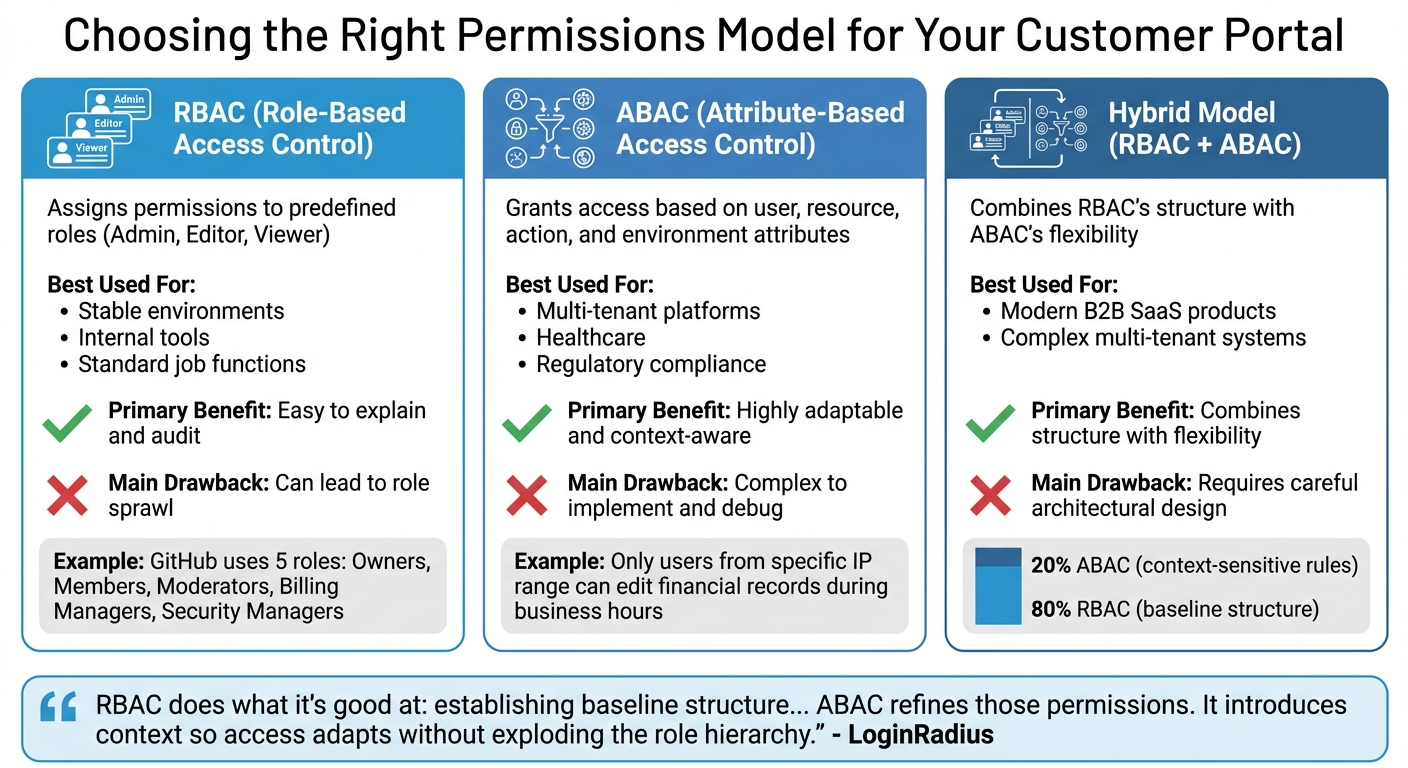
RBAC vs ABAC vs Hybrid Permissions Models Comparison
A permissions model determines who can access specific features and resources within a system. It connects users to specific actions and data, deciding if someone can, for example, view a ticket, change account settings, or invite new members. Without a clear framework, you risk either blocking users from essential features or exposing sensitive information to the wrong people.
Choosing the right model is crucial. Most B2B customer portals rely on one of three main approaches: Role-Based Access Control (RBAC), Attribute-Based Access Control (ABAC), or a hybrid of both. Each comes with its strengths and challenges. As Andrew Israel, CEO of PropelAuth, puts it: "Roles are for your users. Permissions are for your developers/code" [8]. Grasping this distinction is essential for creating a scalable system.
"The cost of getting this [permissions] wrong is not just engineering time. It is security vulnerabilities, customer escalations, and features you cannot ship because the permissions model will not support them." – Veld Systems [9]
A poorly designed permissions model can lead to customer frustration and security risks. Below, we break down each approach to help you make an informed choice.
Role-Based Access Control (RBAC): Simple and Structured
RBAC assigns permissions to predefined roles – like Admin, Editor, or Viewer – and users are then assigned to these roles. It’s straightforward: if you’re an Admin, you automatically have admin-level permissions. This simplicity makes RBAC easy to manage, explain, and audit, especially for teams with consistent access needs.
For instance, GitHub uses an RBAC model with five roles as of April 2024: Owners, Members, Moderators, Billing Managers, and Security Managers [8]. This approach works well when roles and responsibilities are stable.
However, RBAC can lead to role sprawl – the creation of numerous overlapping roles to handle exceptions, like "Admin-But-Only-For-Project-X" or "Viewer-With-Export-Rights." Over time, this can make the system harder to maintain and audit. RBAC struggles in situations where access needs vary based on context or when users require different permissions across multiple organizations.
Attribute-Based Access Control (ABAC): Flexible for Complex Needs
ABAC takes a more dynamic approach, granting access based on attributes of the user, resource, action, and environment. Instead of asking, "What role does this person have?" ABAC considers factors like, "What department are they in?", "What is the classification of this document?", or "What IP address are they connecting from?" This allows for highly specific and adaptable permissions.
For example, you could set rules like "only users from a specific IP range can edit financial records" or "managers can approve requests, but only during business hours." ABAC is particularly effective in multi-tenant systems, healthcare, and other scenarios where access decisions depend on changing factors rather than static roles.
The downside? ABAC introduces complexity. Managing detailed policies and troubleshooting access issues can be challenging. As LoginRadius explains, "Dynamic authorization exists because static permission checks can’t keep up with dynamic systems" [10]. While it offers flexibility, it also demands more effort to implement and maintain.
Hybrid Models: Combining RBAC and ABAC
Many modern B2B portals use a hybrid model, combining RBAC’s structure with ABAC’s flexibility. In this setup, RBAC provides the foundational structure – assigning broad roles like Admin or Support Agent – while ABAC adds context-sensitive rules to refine permissions. This approach prevents role sprawl while addressing complex, nuanced access needs.
Typically, RBAC covers about 80% of straightforward access scenarios, while ABAC handles the remaining 20%, which often involve resource-specific or relationship-based permissions. For example, a "Manager" role might grant general access, but ABAC rules could ensure they only edit projects they own or view data from their department. This layered approach balances simplicity with adaptability.
| Model | Best Used For | Primary Benefit | Main Drawback |
|---|---|---|---|
| RBAC | Stable environments, internal tools, standard job functions. | Easy to explain and audit. | Can lead to role sprawl. |
| ABAC | Multi-tenant platforms, healthcare, regulatory compliance. | Highly adaptable and context-aware. | Complex to implement and debug. |
| Hybrid | Modern B2B SaaS products. | Combines structure with flexibility. | Requires careful architectural design. |
"RBAC does what it’s good at: establishing baseline structure… ABAC refines those permissions. It introduces context so access adapts without exploding the role hierarchy." – LoginRadius [10]
For a hybrid model to succeed, centralized enforcement is essential. Even if policies apply across multiple microservices, the decision-making logic must remain consistent to avoid security gaps or conflicting rules. Up next, we’ll explore how these models support effective least-privilege access practices.
How to Apply Least-Privilege Access
The concept of least-privilege access is straightforward: users should have only the permissions they need to perform their job – nothing more. This principle is the backbone of secure portal design. Start with minimal access and add permissions only when specific needs arise. This reduces risks, minimizes potential damage from compromised accounts, and simplifies the auditing process.
However, implementing least-privilege access without disrupting workflows can be tricky. For example, a Capital One breach occurred due to misconfigured permissions that allowed excessive access, leading to an $80M fine and a $190M settlement [11]. Striking the right balance is key – users need enough access to work efficiently, but not so much that a single breach could cause a major security incident. Here’s how to put this principle into action.
Conduct Access Audits to Find Overprivileged Users
The first step in enforcing least privilege is to review current access rights. Regular access audits help uncover "privilege creep", which occurs when users accumulate unnecessary permissions over time. This can happen when someone changes roles but retains their old access, or when temporary permissions are never revoked. Audits can also expose overly permissive defaults, such as when every new user or organization is automatically granted an admin role [1].
Start by cataloging every action available in your system – like reading, creating, updating, deleting, or exporting data – and review which users have access to these actions. Compare these permissions to users’ current responsibilities. Pairing this process with structured logging can help detect both accidental misuse and intentional overreach [11].
"RBAC systems don’t fail because they’re poorly designed. They fail because they’re never revisited." – LoginRadius [6]
For high-risk roles, conduct audits quarterly. For standard roles, semi-annual reviews should suffice. Transparent, regular audits not only build trust but also make it easier for security teams to remove unnecessary permissions.
Define Minimum Permissions for Each Role
Before assigning any permissions, clearly define the actions users need to perform specific tasks – like viewing tickets, updating settings, or inviting team members – and group these actions into roles. This ensures roles are purpose-driven and prevents over-assigning permissions [6].
Design roles around responsibilities, not technical specifics. For instance, a "Billing Administrator" role is clear and focused, while detailing specific API or database operations is overly complex. Many major platforms simplify their role structures to avoid confusion and prevent "role sprawl."
Keep permissions granular and modular. Avoid creating a single "manage everything" permission, as it can obscure risks and lead to overprivileged access. Instead, break capabilities into specific permissions that can be combined as needed. Scoped permissions – such as limiting access to certain workspaces or organizations – can further reduce risks by preventing authority from crossing boundaries [1].
Set least-privilege defaults by ensuring new users or roles start with only the minimum access necessary. It’s easier to grant additional permissions later than to revoke them. For temporary needs, use time-bound elevation (e.g., four-hour elevated access) and maintain a clear audit trail. Regularly reviewing these permissions ensures they stay aligned with users’ current responsibilities.
Review and Update Permissions Regularly
Permissions can drift over time as users change roles, new features are added, or organizational structures shift. To stay on top of this, schedule quarterly reviews to identify and remove outdated permissions [5].
Assign role owners to manage updates whenever users join, leave, or change positions. Automating lifecycle management – such as through onboarding and offboarding workflows – ensures permissions are adjusted promptly [5].
Enforce permissions at the API or service layer, not just in the UI, to prevent users from bypassing restrictions. Keeping authorization policies declarative and external to the application code allows for updates without requiring a full system redeployment [1][11].
"Least privilege is the foundation. Default roles should grant only what’s necessary to get started, not everything that might be useful later." – LoginRadius [1]
Regular reviews aren’t just administrative tasks – they’re essential for maintaining a permissions model that’s clear, secure, and trustworthy for both users and administrators.
Managing Organizational Hierarchies and Multi-Tenant Access
When your customer portal supports multiple organizations, departments, or business units, managing permissions can get tricky. A user might have admin rights in one organization but only view access in another. Without a well-thought-out structure, critical resources could either become inaccessible or, worse, exposed to the wrong people. By combining organized hierarchies with least-privilege principles, you can ensure both effective access and security. The challenge lies in designing a system where permissions flow logically through hierarchies while keeping tenants securely isolated.
Multi-tenant environments demand tenant-aware authorization at every step. Every permission check should include a tenant_id to ensure strict separation between tenants [7]. This isn’t just a recommendation – it’s a security must-have. A single missed check could lead to a major breach, such as one customer accessing another’s data. Roles should also be tenant-specific. For example, a "Sales Admin" role in Company A should have no authority in Company B, even if the same person holds roles in both organizations.
Hierarchical structures should allow privileges to flow downward only. For instance, if someone has access at the "Company" level, they should automatically inherit access to related "Departments" and "Documents." However, permissions granted at a lower level – like a department – should never grant rights to higher-level entities [12]. This setup prevents privilege escalation and keeps the system predictable. For deeper hierarchies like Workspace > Project > Task, consider using Relationship-Based Access Control (ReBAC). ReBAC derives permissions from relationships rather than requiring manual role assignments for each asset [2][12]. This makes delegation and management much more straightforward.
Permission Delegation and Asset Ownership
Delegating permission management to department heads or team leads can ease the administrative burden, but it needs safeguards. Users should only be able to assign roles at or below their own level [13]. This prevents a mid-level manager from accidentally granting admin-level access across the organization. It’s better to delegate specific tasks rather than granting broad permissions – for example, a user-management admin shouldn’t automatically gain access to financial data [3].
Default to organizational ownership for most resources. Items like invoices, projects, and support tickets should belong to the organization rather than individual users [13]. This ensures accessibility even when employees leave or change roles. Reserve user-owned resources for personal items like drafts or private notes. When removing a user from the system, require ownership transfer of any user-owned resources – such as API keys or private documents – to prevent orphaned assets or hidden access paths.
To keep things manageable and avoid overwhelming admins with too many granular options, use permission bundles. These group related permissions into categories like billing:manage or users:invite [7]. Bundles make the admin interface easier to navigate and help avoid roles differing by just one or two obscure permissions. Providing global role templates that business units can clone or extend ensures consistency while still allowing for customization.
Preventing Permission Creep in Complex Structures
Unchecked permission creep – where users gradually accumulate unnecessary access – can become a serious problem, especially in multi-tenant setups. Use role templates to avoid role explosion. Instead of allowing every tenant to create roles from scratch, offer standardized templates (Admin, Editor, Viewer) that tenants can clone and adjust [7]. This keeps the system organized and prevents the chaos of managing thousands of unique roles.
"Role explosion is the classic trap. An edge case appears and you create a new role instead of a clearer permission or scope." – Koder.ai [13]
Stick to standard roles with scoped permissions rather than hyper-specialized ones. For example, instead of creating a "Project Editor (Own Items)" role, use a general "Editor" role but limit its scope to "own items" [13][6]. This simplifies the permission model and avoids confusion. For temporary access needs, rely on role grants with built-in expiration dates instead of creating permanent "temporary" roles [13]. This way, access automatically expires, keeping the audit trail clean.
Introduce tenant-level ACL versioning to handle caching safely. Assign a version number to each tenant’s access control list and update it whenever permissions change [7]. This ensures that cached decisions are invalidated immediately, preventing users from holding onto outdated, overprivileged access. Additionally, provide admin tools to compare roles or view "permission diffs", which help identify and merge similar roles before they multiply [7].
Using AI for Permission Management and Automation
As your customer portal grows, manually managing permissions becomes increasingly challenging. This is where AI steps in, taking over tasks like user onboarding, de-provisioning, and continuous entitlement audits. The result? Faster provisioning, stronger security, and a lighter administrative workload.
AI for Automating User Provisioning and De-Provisioning
AI simplifies the process of assigning and revoking permissions by analyzing HR data, job titles, and department roles during onboarding or when roles change [14]. Machine learning identifies permission clusters and offers tailored recommendations, making role management more efficient and reducing the strain on managers.
"AI for access administration is becoming a necessity, not a luxury." – SecurEnds [14]
In addition to provisioning, AI actively protects your system by monitoring access behaviors for unusual activity.
Detecting Unusual Access Patterns with AI
AI strengthens least-privilege access by automating user lifecycle events and spotting potential over-privilege risks. It establishes baselines for normal working hours, access locations, and commonly used resources. Any deviation from these patterns triggers real-time alerts.
For example, imagine a user who typically logs in from New York suddenly accessing sensitive billing data from an unfamiliar device in another country at 3 AM. AI can flag this as suspicious and initiate additional verification steps. In one case, an international bank avoided $42 million in potential losses thanks to AI-powered anomaly detection. Organizations using similar systems have also reported a 67% drop in undetected fraudulent transactions, an 85% reduction in false positives, and discovered that over half of conventional alerts were unnecessary [15].
After identifying anomalies, AI continues to work by enabling real-time auditing of all system actions.
Continuous Auditing and Real-Time Monitoring
AI replaces time-consuming, periodic reviews with continuous monitoring. Autonomous agents conduct control tests and track user activity to ensure duties remain properly segregated. This approach can cut audit cycle times by 40% and uncover up to ten times more anomalies compared to manual sampling [16].
Additionally, AI-powered audit trails create immutable, real-time records of system actions. This can speed up audit preparation by as much as 70% while avoiding delays caused by incomplete documentation [17]. By automating the identity lifecycle, AI prevents privilege creep and keeps your permissions model clean, compliant, and ready for audits.
Best Practices for a Secure and Scalable Permissions Model
When building a permissions model, it’s crucial to make thoughtful design decisions from the start. Begin by cataloging all actions to create clear and precise role definitions. This eliminates guesswork and helps avoid costly system overhauls down the line [6][19]. Design roles based on broad job functions – like Billing Admin or Support Agent – rather than temporary tasks or individual exceptions [6][18]. Following these best practices will help ensure your permissions model remains both secure and scalable as your organization grows.
Balance Security and Usability
Strong security measures shouldn’t come at the expense of usability. To achieve this balance, separate the user interface (UI) from backend logic. For example, hide unauthorized buttons in the UI, but always validate requests on the backend [1][11]. For high-risk actions, consider adding layers of security, such as multi-factor authentication or confirmation prompts [1]. In multi-tenant systems, use tenant scoping to ensure permissions are evaluated within the context of each organization, preventing cross-customer data leaks [1]. Role hierarchies can also simplify management by allowing senior roles to inherit permissions from base roles, reducing redundancy [6][19]. This approach ensures secure and efficient operations, especially in AI-driven B2B environments.
Documentation and Compliance
A well-documented permissions model is a key defense against security risks. Document each permission in plain language, explaining its purpose and the data it protects [4]. Assign specific owners to each role to ensure accountability and make it easier to answer questions like, "Who has access to this permission?" [6]. Use explicit junction tables in your database to map users to roles and roles to permissions. This structure allows you to respond quickly to audit requests [6]. Additionally, log every permission check, failed access attempt, and role change to maintain audit readiness [4][11].
A striking example of the consequences of poor permissions management is the 2019 Capital One breach. In this case, an attacker exploited a role with excessive permissions, exposing sensitive data from over 100 million customers. This underscores the importance of thorough documentation and monitoring [11].
Avoid Common Mistakes
Following the principle of least privilege is essential to reducing risk. Avoid granting broad "Admin" access just to solve short-term issues, as this can lead to long-term security vulnerabilities. Start each role with only the minimum access necessary – it’s far easier to add permissions later than to revoke excessive access [1][18]. Research shows that employees use just 4% of the permissions they’re granted, meaning most broad access is unnecessary [20].
To prevent role sprawl, apply the 80/20 rule: if 80% of users in a role need 80% of its permissions, the role is appropriately defined. If not, the role may be too broad or too specific. Resist the urge to create new roles for every edge case; instead, use structured hierarchies or attributes to manage exceptions [6][8].
Never rely solely on UI-based security, such as hiding buttons, without enforcing the same restrictions at the API level. Users can bypass UI measures by directly calling endpoints [1][11]. Lastly, conduct quarterly reviews of high-risk roles to identify and address "permission creep" before it becomes a compliance issue [4][6].
Conclusion
To wrap up, building a secure and scalable permissions model for a customer portal means finding the right balance between security, usability, and scalability. Start by defining detailed, granular permissions and then group them into roles for easier management [6]. While hiding buttons in the user interface can improve the experience, it’s crucial to validate restrictions at the API level to block potential exploitation [11][1].
As B2B support operations grow, nearly 70% of CX leaders are planning to increase AI investments. These technologies will help automate tasks like user provisioning and real-time anomaly detection, preventing privilege creep as roles change over time [21][22][23]. These AI-driven tools align with the secure and scalable strategies discussed throughout this guide.
"A well-designed RBAC system doesn’t draw attention to itself. It quietly does its job – granting the right access, blocking the wrong actions, and staying out of the way of everyday work." – LoginRadius [6]
From the start, embrace the principle of least privilege: give users only the permissions they need, and expand access cautiously to minimize risks [11][1]. Regular access audits are also essential for spotting and removing unnecessary permissions before they turn into compliance headaches.
FAQs
When should I use RBAC vs ABAC vs a hybrid model?
RBAC (Role-Based Access Control) is ideal for environments where roles and permissions are well-defined and don’t change often. On the other hand, ABAC (Attribute-Based Access Control) is better suited for dynamic and complex situations where access decisions need to consider multiple attributes and context-specific factors. A hybrid model merges the straightforward nature of RBAC with the adaptability of ABAC, making it a great choice for systems that require both clear role assignments and flexible, context-aware access. The right choice depends on how complex your portal is and how much control you need.
How do I prevent role sprawl without blocking users?
To tackle role sprawl without limiting user functionality, it’s important to create a well-organized role structure. A model like Role-Based Access Control (RBAC) works well here. Focus on defining roles that are specific to responsibilities while steering clear of excessive granularity or overlapping duties.
Incorporating AI tools can simplify role management by automating tasks, reducing human errors, and ensuring users have the right level of access. Regular reviews of role assignments are crucial to keeping things streamlined. This approach helps maintain a balance between security and usability, avoiding unnecessary complexity or permissions that are too restrictive.
What’s the safest way to handle multi-tenant org access?
The best way to maintain security in a multi-tenant environment is by implementing a Role-Based Access Control (RBAC) model with strict tenant isolation. Here’s how you can do it:
- Define tenant-specific roles: Create roles tailored to each tenant to ensure users only have access to what they need within their organization.
- Scope user access: Restrict access to specific tenants, ensuring that users can only interact with their own organization’s data and resources.
- Prevent permission leakage: Carefully manage permissions to avoid accidental access to other tenants’ data.
- Use tenant-aware policies: Apply policies that are aware of tenant boundaries to enforce strict segregation.
- Automate permissions: Leverage AI tools to handle permissions dynamically and reduce the likelihood of human error.
In addition, performing regular audits and monitoring is crucial. These practices help identify potential vulnerabilities, ensure compliance with security standards, and keep risks under control in multi-tenant setups.
Related Blog Posts
- How do you set up a customer portal that supports role-based access and multiple customer teams?
- How do you design role-based customer portals for B2B (multiple users, permissions, reporting)?
- How do you handle Salesforce permissions + role-based access when moving to a helpdesk portal?
- Role-Based Access Control (RBAC) for Customer Portals Explained