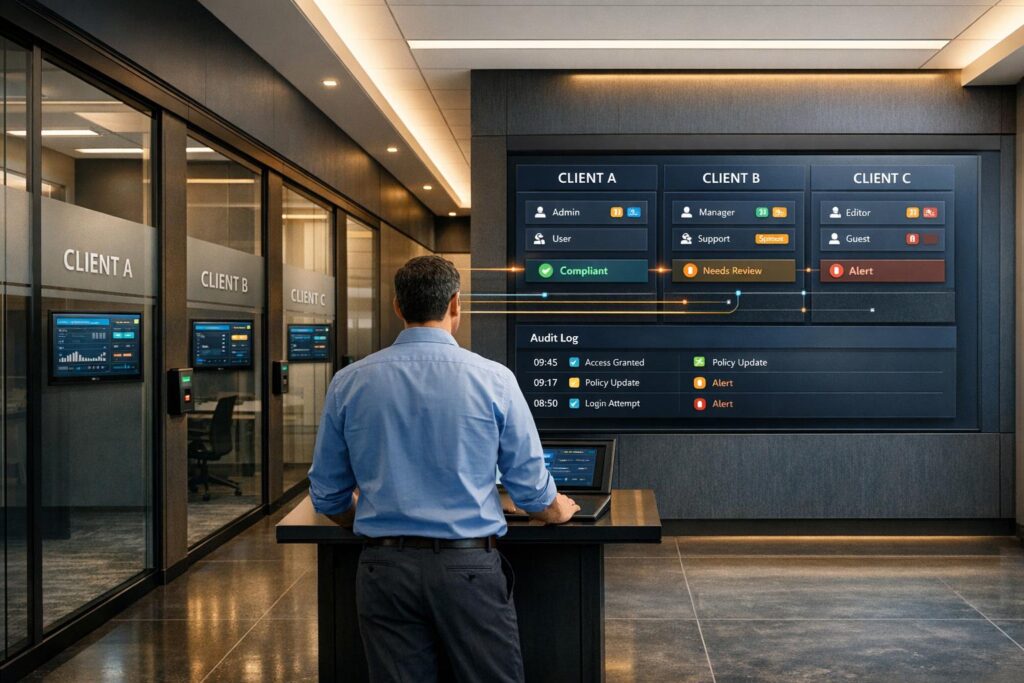
MSPs face a tough challenge: keeping client data secure while maintaining efficiency. Mishandling data can lead to breaches costing small businesses an average of $149,000. At the same time, clients expect faster service and better experiences every year. The solution? A well-designed customer portal with strict data separation and productivity-boosting tools.
Here’s what works:
- Use RBAC (Role-Based Access Control): Assign permissions based on roles (e.g., Finance Analyst or Technician) to limit data access.
- Adopt Zero Trust principles: Continuously verify users and segment data to reduce risks.
- Automate tasks with AI: Speed up workflows, organize data, and resolve up to 60% of support tickets automatically.
- Secure portals with MFA and encryption: Protect data while ensuring compliance with regulations like HIPAA or GDPR.
- Track key metrics: Evaluate efficiency with metrics like ticket resolution times and technician utilization.
These practices help MSPs scale operations, improve security, and meet client expectations – all without overloading teams. The following guide dives deeper into strategies and tools to build a secure and efficient portal.
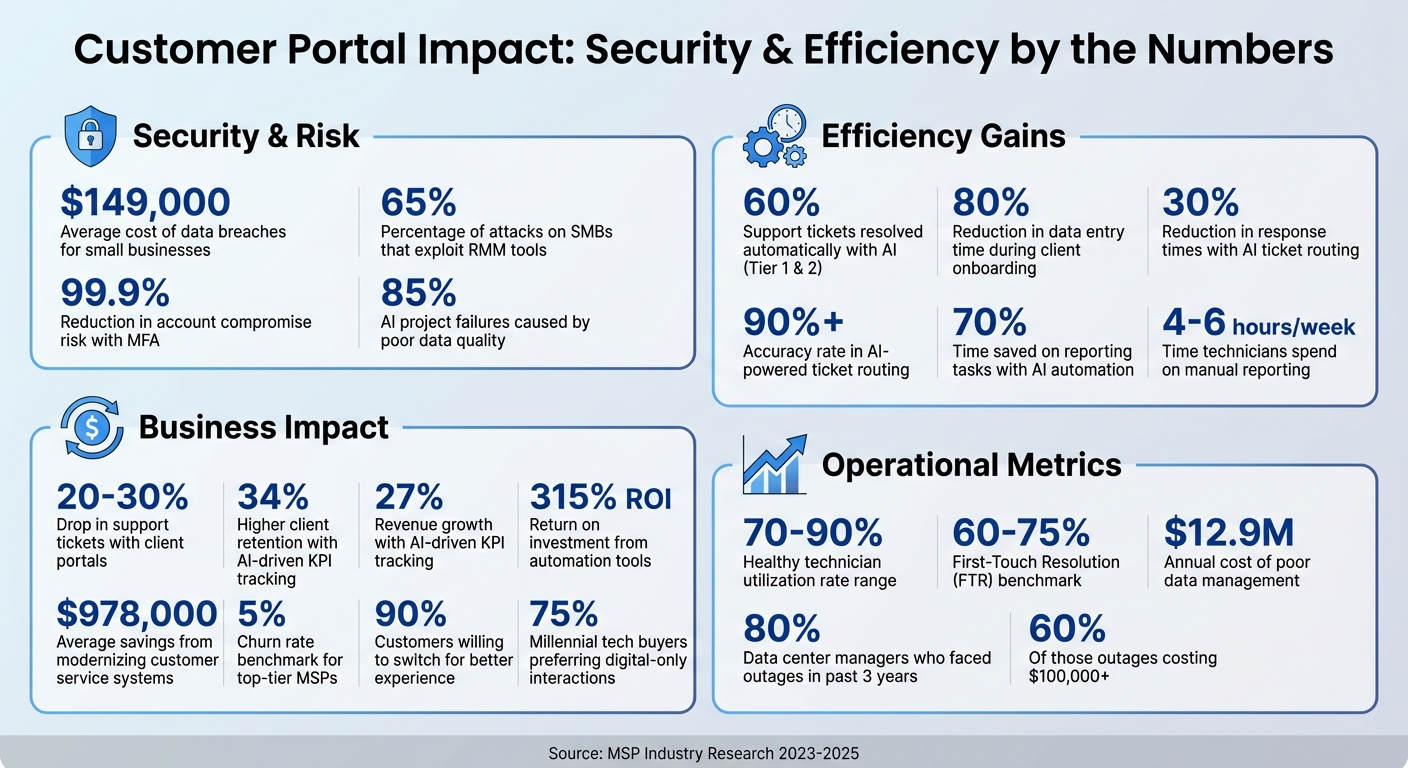
MSP Customer Portal Security & Efficiency Statistics
Setting Up Role-Based Access Control and Data Segregation
Role-Based Access Control (RBAC) acts as a critical safeguard against accidental data leaks and unauthorized access. By assigning permissions based on job roles – such as Finance Analyst or Help Desk Technician – you can limit data exposure effectively [7]. This method not only simplifies security management but also scales seamlessly as your team expands. Instead of juggling hundreds of individual permissions, you only need to manage a handful of roles.
Implementing Granular Scoping
Permissions can be assigned at varying levels to suit different needs. For instance:
- Tenant Level: Provides MSP-wide visibility.
- Environment Group Level: Suitable for regional teams.
- Individual Client Level: Ideal for specialized roles.
Take this example: a Help Desk Technician might have read-only access to all client tickets, while a Finance Analyst could be limited to viewing billing data for specific clients. This hierarchical structure mirrors real-world organizational workflows, making it easier for both employees and auditors to navigate.
"RBAC mitigates the damage that a hacker can do with a user’s account by limiting what that account can access in the first place." – IBM [8]
Platform-Specific Security Enhancements
RBAC principles can be adapted to specific ecosystems for even tighter control. For instance, in Microsoft 365 environments, transitioning from legacy Delegated Admin Privileges (DAP) to Granular Delegated Admin Privileges (GDAP) is crucial. Unlike DAP, which provides permanent Global Admin rights, GDAP enforces time-limited, least-privilege access that requires explicit client approval [10]. You can further enhance security by setting standard access durations, like 90 days for routine tasks, and enabling just-in-time elevation for emergencies. These steps significantly reduce the risk of unauthorized access.
Organizing Portal Data
To complement role-based strategies, maintain a well-structured data hierarchy in your portal: Top-Level > Customer > Category. Under "Customers", create subfolders for each client and organize them further into categories like "Servers", "Network Gear", or "Billing" [11]. Adopting standardized naming conventions – such as "ABCMfg – DC1" – ensures technicians can quickly locate the right client environment. Assign permissions to groups rather than individuals, so access updates automatically when team members change roles [11].
Real-World Example
In October 2025, Austin Capital Bank implemented a metadata-driven governance layer on Snowflake to protect sensitive data. Led by Ian Bass, the Head of Data & Analytics, the bank used advanced masking policies and RBAC to restrict access to authorized data only. This approach not only maintained compliance but also allowed the bank to roll out new products faster [9]. You can apply a similar strategy to your MSP portal, ensuring client data remains secure while streamlining operations.
sbb-itb-e60d259
Applying Zero Trust and Least Privilege Access
Using Zero Trust Principles
The Zero Trust model replaces the outdated "castle and moat" approach to security with a "never trust, always verify" philosophy. Rather than assuming that users within your network are safe, this approach continuously verifies identity and context before granting access to sensitive data[12]. This is especially important given that 65% of attacks on small and medium businesses exploit Remote Monitoring and Management (RMM) tools to gain unauthorized access, taking advantage of the assumption that internal traffic is inherently trustworthy[12].
One key feature of Zero Trust is micro-segmentation, which breaks the network into smaller, isolated zones for each client’s data. This way, if a breach occurs, attackers are limited to a single segment, reducing the overall impact. Additionally, device health checks – like ensuring Endpoint Detection and Response (EDR) tools are active – are performed before access is granted[12]. Continuous verification also allows for immediate access revocation if a device is found to be compromised.
"Zero Trust isn’t just another security measure; it’s a tactical fortress against a wide range of threats, from ransomware, malware and credential theft, to brute force attacks and phishing." – Enclave[12]
Traditional VPNs no longer offer the level of protection required in modern environments. Experts now describe this shift as an "extinction event" for VPN servers, which are increasingly viewed as security vulnerabilities rather than effective barriers. Instead, access is granted based on user identity through a single Identity Provider (IdP) like Microsoft Entra ID or Okta. Non-SMS-based Multi-Factor Authentication (MFA) is enforced across all applications to provide an additional layer of security[12].
Building on Zero Trust principles, implementing least privilege access further enhances security by limiting unnecessary permissions.
How to Implement Least Privilege Access
To protect client portals while maintaining smooth operations, apply least privilege access measures. This ensures users only have the permissions necessary for their specific roles and tasks.
Start by creating GDAP templates to standardize access configurations across all client environments. Instead of assigning permissions to individual users, assign Microsoft Entra roles to security groups. This approach simplifies management and ensures permissions automatically adjust when team members change roles[14].
For highly sensitive operations, use Just-in-Time (JIT) access with tools like Microsoft Entra Privileged Identity Management (PIM). JIT grants elevated permissions only when required and for a limited time. For example, setting access to expire after 90 days for routine tasks reduces the risk of long-term elevated privileges. Microsoft reports that accounts using Multi-Factor Authentication are over 99.9% less likely to be compromised[15]. Combining JIT access with risk-based Conditional Access policies strengthens security further by triggering extra authentication steps when unusual behaviors – like unexpected travel or password spray attacks – are detected[15].
Regular audits are essential to keep permissions aligned with current needs. Use the "Relationships" tab in your management console to track expiring access privileges and avoid service disruptions. Additionally, tools like Microsoft Graph API or PowerShell can export delegated access logs during Quarterly Business Reviews. This helps identify and remove outdated privileges that no longer align with business requirements[10]. By maintaining an ongoing audit process, you can ensure your least privilege model evolves alongside changing client needs and team structures.
Using AI for Data Organization and Workflow Automation
AI-Powered Data Organization
AI has transformed how businesses handle data by automating tasks like sorting and categorizing client information. For instance, with Natural Language Processing (NLP), incoming support tickets are automatically classified by urgency, client profile, and issue type. This eliminates the need for your team to manually decide which queue a ticket belongs in or which technician should address it [16][17].
Another game-changer is automated document processing. AI can extract key details from contracts, invoices, and configuration files, then route them to the correct client folder without human intervention [18]. Onboarding processes also see major efficiency gains, with AI reducing data entry time by up to 80%. When a new client signs up, AI can handle tasks like creating user accounts, assigning access levels, and configuring security protocols – all based on predefined settings [18].
"Setting up a new user – is ripe for task-driven automation."
- Richard Tubb, Smarter MSP [18]
Taking it further, "Agentic AI" goes beyond basic categorization. It autonomously manages ticket triage by analyzing historical data, ensuring requests are routed to the right technician based on skill set and current workload [16][19]. MSPs using this level of AI report over 90% accuracy in ticket routing, with response times reduced by up to 30% [16][19].
However, AI’s success depends on clean, standardized data. Poor data management is costly – it can drain an average of $12.9 million annually from businesses, and around 85% of AI failures stem from bad data [18]. To prepare, standardize client names, service categories, and ticket classifications across your systems. Start by automating repetitive, low-complexity tasks like password resets, then gradually move to more complex workflows [17][19]. These foundational improvements pave the way for more advanced AI-driven processes, such as dynamic access control.
Automating Access Control with AI
AI takes access control to a new level by dynamically enforcing policies based on real-time user behavior. Instead of relying on static role assignments, AI-enabled systems analyze access requests continuously. They flag and route any that violate security protocols or regulations like HIPAA, PCI DSS, or GDPR for proper approval before granting access [17]. This ensures secure and efficient operations, particularly important for modern MSP portals.
AI can also handle a significant portion of support tickets. Up to 60% of Tier 1 and Tier 2 tickets – such as password resets or account unlocks – can be resolved automatically [17].
"The more we can automate and be efficient, the more growth and clients we can take on with the same amount of staff."
- Roger Michelson, CEO, BNMC [18]
To get started, focus on automating high-volume, low-risk tasks. Review your service desk data to identify time-consuming ticket categories that don’t require advanced technical expertise. Keep human oversight for exceptions, nonstandard requests, and compliance checks [17][18]. Regularly audit your systems and review AI automation rules every quarter to ensure they stay aligned with current security standards [18].
Generating Reports and Insights with AI
AI also streamlines reporting, saving valuable time. The average MSP technician spends 4 to 6 hours each week on manual reporting tasks [19]. AI can cut this time by up to 70% by directly connecting to PSA and RMM systems via APIs to automatically pull data like ticket histories, service metrics, and billing details [20][21].
What’s more, AI generates tailored reports for different audiences. For example, executives receive high-level summaries of business impact, while IT managers get detailed technical insights – all from the same data source [20]. Real-time KPI dashboards replace static monthly reports, helping track SLA compliance, technician utilization, and agreement profitability continuously [19]. MSPs using AI-driven KPI tracking report 34% higher client retention and 27% revenue growth [19].
AI doesn’t just stop at historical reporting – it offers predictive insights. By identifying patterns, it can forecast seasonal demand spikes, predict hardware failures, and flag potential security threats early. Proactive resource management powered by AI can reduce system downtime by 30%, and it can even recommend specific actions, like archiving files when disk space runs low or resizing infrastructure to save costs [20][21].
To maximize efficiency, create modular report templates with customizable sections like executive summaries and incident analysis. Automate report generation a few days before deadlines to allow for final human review [20]. AI can also monitor client sentiment in support tickets, helping you prioritize "at-risk" clients and reduce churn [17]. Additionally, it can calculate unprofitable client contracts by comparing technician time and ticket volume against agreement margins [19].
Building Secure and Customizable Client Portals
Designing Custom Client Views
A well-designed client portal brings together multiple tools into a single, branded interface for billing, support tickets, and project updates [1]. This streamlined approach is critical because 90% of customers would switch companies for a better customer experience [1].
The secret to a great portal lies in smart, tailored design. Instead of bombarding users with irrelevant details, provide the exact help they need, right when they need it. For example:
- Show billing FAQs directly on invoice pages.
- Offer "Getting Started" guides only to new users.
- Display project-specific documentation within task views [5].
This kind of targeted design doesn’t just improve usability – it also cuts down on support requests. Agencies using client portals often report a 20-30% drop in support tickets [5].
Custom views, powered by role-based access control (RBAC), ensure users only see what’s relevant to their roles. For instance:
- A client only sees their own projects.
- A manager accesses billing and project overviews.
- A designer focuses solely on assigned tasks [4].
This approach not only simplifies the user experience but also strengthens data security by limiting access to sensitive information.
Take MINDSCAPE, a digital marketing agency, as an example. In 2023, they introduced a unified client portal to centralize reports, tickets, and training materials. Led by Project Manager Nicole Yoder, the agency encouraged portal adoption by offering faster ticket responses – 2-hour SLAs for portal tickets versus 24 hours for emails. The results? 104 hours saved annually, $10,000 recovered in unbilled work, and a HubSpot Impact Award [5].
For client admins, create specific areas where they can access infrastructure reports, dashboards, and strategic tools without exposing sensitive data to other users. This kind of segmentation is especially critical as 75% of millennial-aged tech buyers prefer digital-only interactions [1]. Self-service capabilities are no longer optional – they’re expected.
Once usability is optimized, the next step is ensuring these portals are secure against modern threats.
Securing Customer Portals
While portals improve efficiency, they must also protect client data to maintain trust and scalability. Security isn’t just a technical checkbox – it’s a cornerstone of your reputation.
Start with the basics: multi-factor authentication (MFA). Make it mandatory for all users. If clients resist, explain that it protects their pricing strategies and competitive edge, not just their login credentials [4]. With MFA in place, stolen passwords become useless.
Other key measures include:
- Encrypting data in transit (via HTTPS) and at rest.
- Conducting regular third-party penetration tests.
- Keeping detailed audit logs to track access and downloads [4].
These steps not only secure data but also reduce downtime and build the reliability needed for scaling managed services.
When choosing between SaaS and self-hosted platforms, remember the security trade-offs. SaaS platforms handle updates, patches, and compliance for you, while self-hosted solutions, like WordPress plugins, leave you responsible for vulnerabilities. A plugin might cost $20, but when you add hosting ($50+), security services ($100+), and labor for updates, the true cost skyrockets. SaaS portals, on the other hand, typically range from $129 to $1,500 per month, covering hosting, updates, and compliance [4].
For MSPs working with healthcare clients, ensure the portal is HIPAA-compliant and that the provider will sign a Business Associate Agreement (BAA). If you manage EU client data, confirm the portal supports GDPR features like data deletion within 30 days and data portability [4]. Additionally, many small businesses pay a median of $1,740 annually for cyber liability insurance, which often requires proof of MFA and regular backups [4].
Common Challenges in Data Segregation and How to Solve Them
Preventing Data Overlap and Mismanagement
Managing data manually works fine – until your client list grows beyond 10–12. At that point, things start to fall apart. Issues like account sprawl from manually tracking new client accounts, privilege creep from creating IAM roles by hand, and juggling multiple Terraform or Pulumi code repositories can lead to inconsistency and maintenance headaches [22].
The fix? Logical isolation. A "project-first" approach assigns each client an isolated workspace, complete with its own environments, identity models, and metadata. Instead of duplicating code, you can use versioned, parameterized templates deployed through form-driven interfaces. This way, you maintain consistency without tinkering with raw code [22]. Automated resource tagging also helps by stamping every asset with its project, environment, and owner, which eliminates billing overlaps. Add separate RBAC rules and distinct cloud credentials for development, staging, and production, and you’ll greatly reduce the risk of cross-contamination [22].
Another smart move is running weekly risk assessments on heavily used platforms like SharePoint or Fabric workspaces. These checks can flag links shared with "anyone" or "everyone in the organization." Pair that with auto-labeling policies that apply protection settings to sensitive data, and you’ll keep things locked down as your client base expands [23]. Together, these strategies ensure clear client boundaries and align with earlier RBAC practices.
As data isolation becomes more complex, so do the demands on your infrastructure – something we’ll dig into next under performance and scalability issues.
Handling Performance and Scalability Issues
When client data grows faster than your infrastructure can keep up, you’re bound to hit performance bottlenecks. This often happens with fragmented storage architectures that aren’t built to scale [2]. The solution? Switch to scale-out storage. This allows you to add drives or nodes to your cluster as needed, keeping pace with data growth [2].
A Cloud Management Portal (CMP) can also help. By managing multiple cloud providers and enforcing strict tenant boundaries, a CMP reduces identity provider sprawl [22]. Centralizing data protection across VMs, SaaS, and IaaS further simplifies operations, eliminating the need for separate backup tools for each client [2].
Here’s a reality check: 80% of data center managers have faced outages in the past three years, and 60% of those incidents cost at least $100,000 [2]. To avoid joining that statistic, keep an eye on client engagement. Monitoring onboarding experiences and navigation issues can highlight areas for improvement [3]. Meanwhile, tracking consumption patterns in real time and syncing with vendor portals ensures accurate, detailed billing without manual input [24]. These steps not only improve scalability but also enhance transparency and client satisfaction.
Measuring Efficiency Gains and Operational Impact
Key Metrics for Evaluating Efficiency
Tracking operational performance helps confirm whether your secure portal is boosting both productivity and client satisfaction. Start by examining technician utilization rates – a healthy range is between 70% and 90%. Falling below this range may signal underuse, while exceeding it could lead to burnout[6]. Keep an eye on the open/closed ticket ratio and Mean Time to Triage. Automation can significantly reduce triage times from 15–45 minutes to under 60 seconds[25].
Another essential metric is First-Touch Resolution (FTR), with a solid benchmark being 60–75%[25]. A high FTR indicates that technicians have immediate access to accurate client data, enabling quick issue resolution. On the client side, analyze portal engagement patterns. If clients rarely log in to check ticket statuses or view reports, it might point to gaps in your onboarding process[3]. Pair these metrics with Customer Satisfaction (CSAT) and Net Promoter Scores (NPS) to assess whether the portal’s transparency is improving the client experience[6]. Many top-tier MSPs use these insights to keep churn rates below 5%[6].
Be cautious about overemphasizing ticket closure metrics, as they can hide unresolved problems. Instead, focus on actionable data like contract profitability, dispatch accuracy (aim for over 90%), and billable utilization. Set SMART goals – Specific, Measurable, Achievable, Relevant, and Time-bound. For example: “Increase billable utilization from 60% to 75% by the end of Q2”[6].
These metrics not only highlight areas for improvement but also lay the groundwork for regular system audits to fine-tune operations further.
Running Regular System Audits
Regular audits are key to maintaining both efficiency and security. Use automated configuration audits to gather data and compare it against custom rules. For instance, flagging a failure if a specific value falls below a set threshold ensures consistent performance monitoring. Incorporate point-in-time audit trails with features like "Active Run Sync" to capture historical compliance snapshots, which are particularly useful for verifying Row Level Security (RLS) policies that enforce data separation between client tenants[26].
Stay ahead by conducting vulnerability and patch audits to locate unpatched software and weak configurations[13]. At the device level, track compliance individually rather than relying on company-wide averages, as this approach prevents individual failures from being hidden by an overall passing score[26]. Regularly review KPI reports to eliminate vanity metrics[6], and test your backups by performing restore verification and consistency checks to confirm data recovery readiness when needed[13].
Conclusion
Securing separated client data isn’t just a technical task – it’s a business priority that directly impacts profitability and client loyalty. As Mark Adams from Cloudmore notes:
"By enabling customers to handle routine tasks independently, MSPs can reduce operational costs, improve scalability, and focus their resources on more complex, high-value issues" [27].
Modernized, transparent client portals have become a must-have, especially when nearly 90% of customers are ready to jump ship for a better experience [1]. The message is clear: investing in user-friendly, secure systems isn’t optional anymore – it’s critical.
To achieve this, implement strategies like Role-Based Access Control (RBAC), zero trust frameworks, and AI-driven automation. These tools not only enhance security but also streamline operations. The numbers speak for themselves – companies modernizing their customer service with automation tools have reported a 315% ROI and saved around $978,000 by ditching outdated systems [27]. When self-service interactions cost mere pennies compared to dollars with traditional methods, the financial benefits are hard to ignore [27].
A winning approach requires a robust security plan, transparent SLAs and reporting frameworks, and ongoing monitoring of key performance indicators (KPIs). Metrics like mean ticket resolution times and system uptime reveal areas for improvement and help maintain peak efficiency. As one expert puts it:
"The more streamlined any MSP’s internal processes are, the better it can support customers and the more profits it can generate" [13].
Platforms like Supportbench offer a comprehensive solution, combining AI-powered portals, role-based permissions, workflow automation, and real-time reporting – all for $32 per agent per month. With Gen Z projected to make up 30% of the workforce by 2025 [27], these tech-savvy employees will expect seamless, digital-first self-service options. MSPs that embrace these systems can scale effectively while keeping client data secure and ensuring transparency.
FAQs
What’s the easiest way to prevent one client’s users from seeing another client’s data?
The simplest method involves implementing role-based access control (RBAC) combined with robust data segregation practices. RBAC limits user access to data associated only with their specific client account, ensuring privacy is maintained. On top of that, techniques like IP allowlisting and following compliance regulations add an extra layer of security. Together, these steps protect client data in multi-tenant setups while keeping operations clear and manageable.
How do you enforce least-privilege access without slowing down technicians?
To put least-privilege access into practice effectively, Managed Service Providers (MSPs) can rely on role-based access control (RBAC). This approach ensures technicians only have access to the tools and data necessary for their tasks – nothing more.
Using unified dashboards or a "single pane of glass" interface simplifies workflows by keeping everything in one place. This reduces the hassle of constantly switching between systems, saving time and effort.
On top of that, automated workflows and scheduled reporting help keep operations running smoothly. These tools allow technicians to stay productive while sticking to strict security guidelines.
Which portal KPIs prove security and efficiency improvements to clients?
When evaluating the performance of a portal, certain key performance indicators (KPIs) can reveal how secure and efficient it is. These metrics include:
- First response time: How quickly the portal addresses initial user requests.
- Resolution rates: The percentage of issues resolved successfully within a specific timeframe.
- Customer satisfaction (CSAT): A measure of how satisfied users are with their experience.
- Support cost as a percentage of revenue: This shows how much of the company’s revenue is spent on maintaining support services.
For security, specific metrics come into play:
- Role-based access control (RBAC): Ensuring users only access what they are authorized to.
- Compliance with standards: Adherence to regulations like HIPAA and GDPR.
- Secure access monitoring: Includes practices like IP allowlisting to control who can access the portal.
Additional tools like automated alerts, real-time reporting, and dashboards tailored to specific roles help improve transparency and overall performance. These features ensure that both security and operational goals are met effectively.
Related Blog Posts
- How do you set up a customer portal that supports role-based access and multiple customer teams?
- Customer portal permissions model: roles, organizations, and least-privilege access
- How to manage partner support access in your customer portal (resellers/MSPs)
- How MSPs should structure a customer portal for multi-client support