
Managing file retention policies for customer portals is a balancing act of compliance, cost control, and data security. Here’s what you need to know:
- Why it matters: Regulations like GDPR, HIPAA, and SOX require businesses to retain data for specific periods. Non-compliance can lead to hefty fines, such as the $2.3 billion in GDPR penalties in 2025 alone.
- Key retention periods: Financial records (7 years), healthcare records (6 years), and customer data (2 years after last use) are common benchmarks.
- Risks of poor practices: Keeping data too long increases storage costs and breach risks. Manual deletion fails 40% of the time, making automation essential.
- AI’s role: AI tools can automate categorization, retention enforcement, and secure deletion, reducing errors and saving costs by up to 60%.
- Action steps: Inventory files, classify data, align retention with legal requirements, automate deletion, and train your team.
This guide outlines practical steps to ensure compliance, reduce risks, and optimize file management.
Step 1: Inventory and Categorize Your Portal Files
List All File Types in Your Portal
Start by creating a comprehensive inventory of all files stored across your systems. This means conducting a data audit on every platform where your portal files reside – whether it’s a cloud service, on-premises server, backup system, or third-party integration. For most organizations, this process takes around 3 to 6 weeks [2].
Assemble a cross-functional team that includes members from legal, IT, compliance, and relevant business units to guide this effort. For each file, document its source, business owner, and sensitivity level [1][4]. Don’t overlook backup and archive systems, as these can often hold data indefinitely [2].
Separate your files into structured data (like databases or system logs) and unstructured data (such as documents, emails, or media files). Additionally, distinguish between active "documents" (e.g., drafts or working files) and finalized "records" (e.g., signed contracts or paid invoices) that may need to be retained for compliance purposes [6].
Once you’ve completed the inventory, classify the files based on their retention importance to simplify the next steps in policy enforcement.
Determine Which Files Matter Most
After mapping your data, group the files into categories with similar retention needs. Common categories include:
| Category | File Examples | Primary Owner |
|---|---|---|
| Customer Data | Names, emails, order history, marketing consent | Sales / Marketing |
| Support & Communications | Support tickets, chat logs, email correspondence | Customer Support |
| Financial Records | Invoices, receipts, tax filings, bank statements | Finance |
| Legal & Contracts | Signed agreements, leases, IP licenses | Legal |
| Operational Logs | Access logs, error logs, audit trails, session logs | IT / Security |
Focus on prioritizing files tied to legal requirements and customer experience. For example, financial records and contracts often have the longest retention periods, while operational logs might only need to be kept for 1-7 years, depending on industry standards [1][4].
Keep in mind that the average organization must comply with over 12 different data retention requirements across various regulations [4]. By grouping similar types of data, you can make the enforcement of retention policies far more manageable and efficient.
sbb-itb-e60d259
How to Develop and Implement a Record Retention Policy
Step 2: Review Legal and Industry Requirements
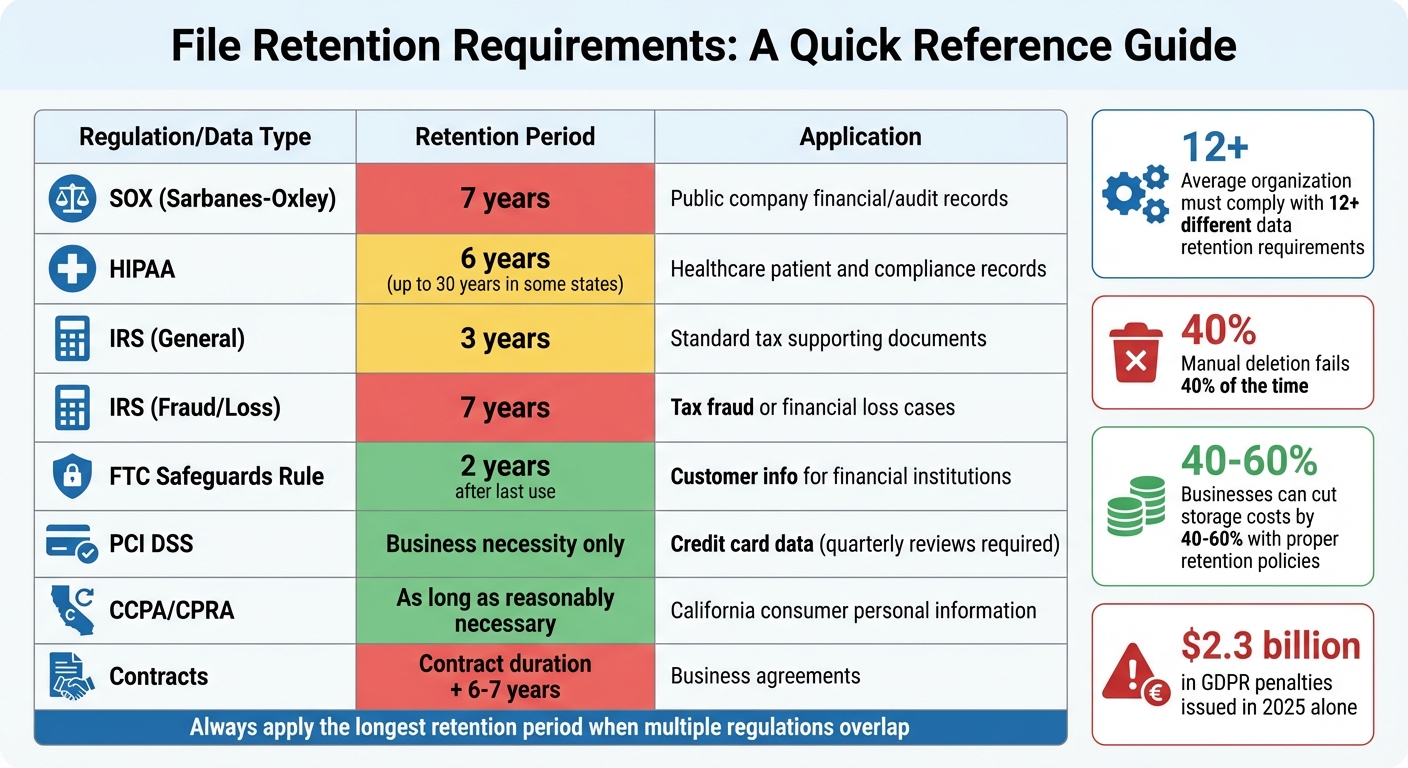
File Retention Periods by Regulation and Data Type
Know the Regulations That Apply to You
Understanding the specific legal and industry rules for data retention is crucial. Here’s a breakdown of key regulations and their requirements:
For financial and audit records, the Sarbanes-Oxley Act (SOX) mandates public companies to retain audit workpapers, financial records, and supporting documentation – like emails and memos – for at least 7 years [7][2]. The IRS, on the other hand, requires general tax records to be kept for 3 years, but this extends to 7 years in cases involving suspected fraud or financial loss [1].
If you work with healthcare data, HIPAA requires medical records and related information to be retained for a minimum of 6 years [7][2]. However, some states may require retention for up to 30 years [1].
For customer information, the FTC Safeguards Rule specifies that customer data must be disposed of within 2 years of last use unless it’s still needed [8]. When dealing with credit card transactions, PCI DSS limits cardholder data retention to the time necessary for business purposes, with periodic reviews (usually quarterly) [2].
Privacy laws, like California’s CCPA/CPRA, emphasize that personal information should only be kept as long as it is "reasonably necessary" for the stated purpose. The California Privacy Rights Act (CPRA) states:
"A business shall not retain a consumer’s personal information or sensitive personal information… longer than is reasonably necessary for that disclosed purpose." [8]
For contracts and agreements, the general practice is to retain documents for the contract’s duration plus an additional 6 to 7 years to cover potential legal claims under statutes of limitations [1][5]. For support tickets, while not strictly regulated, a retention period of about 3 years after closure is common [1].
| Regulation / Data Type | Retention Period | Primary Application |
|---|---|---|
| SOX (Sarbanes-Oxley) | 7 years | Public company financial/audit records [7] |
| HIPAA | 6 years | Healthcare patient and compliance records [7] |
| IRS (General) | 3 years | Standard tax supporting documents [1] |
| IRS (Fraud/Loss) | 7 years | Tax fraud or financial loss cases [1] |
| FTC Safeguards Rule | 2 years | Customer info for financial institutions [8] |
| PCI DSS | Business necessity only | Credit card data (with quarterly reviews) [2] |
| CCPA/CPRA | As long as necessary | California consumer personal information [8][5] |
| Contracts | Contract duration + 6–7 years | Business agreements [1][5] |
Match Legal Requirements with Business Goals
Once you’ve identified the regulations, the next step is to align these requirements with your business objectives. The aim is to retain data long enough to ensure compliance and maintain effective customer service, while avoiding unnecessary storage expenses.
Holding onto data longer than needed increases both storage costs and the risk of data breaches. By implementing clear retention policies and removing redundant data, businesses can cut storage costs by 40% to 60% [5].
A practical approach is to follow the "longest period" rule: when multiple regulations apply to the same dataset, adopt the longest retention period. For example, if SOX requires financial records to be kept for 7 years but the IRS only requires 3 years, set the retention period to 7 years.
During litigation, use legal holds to prevent data deletion. Failing to preserve data can lead to "adverse inference" sanctions if critical information is lost [2][9].
For data stored on backup tapes or other hard-to-delete formats, consider crypto-shredding. This involves encrypting the data and destroying the encryption key once the retention period expires [1].
Automation is key for enforcing retention policies and reducing errors. Manual deletion processes fail about 40% of the time [1], which can lead to compliance risks and higher costs. Automated systems ensure consistent enforcement and minimize mistakes, especially when optimizing AI in customer service operations.
Step 3: Set and Document Retention Periods
Standard Retention Timeframes by File Type
After reviewing regulations, it’s time to establish clear retention timelines for each type of file. The goal is to keep files only as long as needed to meet legal requirements and maintain operational efficiency.
Here are some common guidelines:
- Invoices and tax records: Retain for 7 years [4].
- Contracts and user agreements: Keep for 7 years after expiration [4].
- Support tickets and chat logs: Store for 2 to 3 years after closure – long enough for warranty claims and analysis without creating unnecessary clutter [10].
- Customer personal information (PII): Delete 2 years after the relationship ends to align with GDPR’s data minimization principle [1].
- System and security logs: Retain for 1 year, as recommended by PCI DSS [4].
- Employee records: Hold for 5 to 7 years post-termination to meet labor law requirements like FLSA and EEOC [4].
- Marketing consent logs: Keep for the duration of consent plus 2 years, ensuring compliance with GDPR and CCPA [1].
- Financial statements: Preserve permanently for historical reference [6].
- Temporary or API files: Can typically be deleted after 7 to 60 days, depending on operational needs [12].
For example, Daviess County Public Schools in Kentucky implemented DocuWare in February 2026 to automate retention schedules required by the Kentucky Department for Libraries and Archives. This system manages retention timelines like 20 years for attendance data and 5 years for school nurse health records, replacing manual tracking and simplifying audits [6].
| File Category | Recommended Retention Period | Primary Reason/Regulation |
|---|---|---|
| Invoices & Tax Records | 7 years | IRS guidelines, SOX [4] |
| Contracts & User Agreements | 7 years after expiration | Statute of limitations [4] |
| Support Tickets/Chats | 2–3 years after closure | Business analysis & warranty needs [10] |
| Customer PII | End of relationship + 2 years | GDPR data minimization [1] |
| System & Security Logs | 1 year | PCI DSS requirements [4] |
| Employee Records | 5–7 years post-termination | Labor laws (FLSA, EEOC) [4] |
| Marketing Consent Logs | Duration of consent + 2 years | GDPR/CCPA compliance [1] |
| Financial Statements | Permanently | Historical business record [6] |
| Temporary/API Files | 7–60 days | Operational efficiency [12] |
Write Down Why You Keep Each File Type
Properly documenting the reasons behind your retention periods is critical for legal and operational transparency. This not only protects your organization during audits or legal inquiries but also ensures consistent practices across the board.
For each file type, record key details such as:
- Category: What type of file is it?
- Purpose: Why is it being retained?
- Legal or business basis: What regulation or need justifies keeping it?
- Trigger event: What starts the retention clock (e.g., contract expiration)?
- Retention duration: How long will it be kept?
- Disposal method: How will it be securely deleted?
For instance, you might document support tickets like this:
"Category: Support Tickets | Purpose: Customer service and trend analysis | Basis: Business need | Trigger: Ticket closure | Duration: 3 years | Disposal: Automated deletion via AI workflow."
"A retention policy minimizes legal liabilities by ensuring you don’t keep data beyond its useful life. Courts recognize good-faith adherence to documented policies." – Comp AI Team [4]
Using event-based triggers (e.g., "Termination + 7 years") instead of fixed dates simplifies enforcement and keeps policies adaptable as your company scales [11]. This approach also integrates well with automated compliance systems and legal hold procedures, which temporarily pause deletion during litigation or audits [4].
Did you know that most companies hold onto 33% more data than necessary? This extra data not only inflates storage costs but also increases the risk of breaches [1]. By clearly documenting your retention policies and removing unneeded files, you can cut storage expenses by 40% to 60% [5].
Step 4: Set Up Secure Deletion and Access Controls
Automate File Deletion After Retention Periods End
Once retention periods are defined, it’s crucial to automate the permanent deletion of expired files. Manual processes often fail due to human error, making automation a better approach [1].
At the database level, you can schedule functions to delete records based on their retention_days value. This removes the need to manually track deletion dates and ensures consistent file removal, ideally during off-peak hours [1].
Different deletion methods serve distinct purposes:
- Purging permanently removes data from live databases, making it unrecoverable.
- Archiving relocates files to encrypted secondary storage, keeping them accessible if needed [13].
- For backup copies where immediate deletion isn’t feasible, use crypto-shredding. Encrypt the backups and destroy the encryption key once the retention period ends, effectively making the data inaccessible [1].
Your workflow must also include a legal hold mechanism that halts standard deletion processes if litigation is anticipated or ongoing [1][2]. This ensures critical evidence isn’t accidentally destroyed. To maintain accountability, conduct monthly retention audits to confirm automated processes are working and no data exists beyond its retention period [1].
By combining automated deletion with access controls, you can build a system that minimizes risk and ensures compliance.
| Disposal Method | Description | Best Use Case |
|---|---|---|
| Purge | Permanently removes data from live databases [13] | Expired logs, single-use files, or sensitive PII |
| Archive | Moves data to encrypted, restricted storage [13] | Financial records or data under legal hold |
| Anonymize | Strips identifying details while keeping aggregate data [1] | Analytics and long-term research |
| Crypto-shredding | Destroys encryption keys for encrypted data [1] | Retention management for backups and snapshots |
Control Who Can Access Which Files
Once deletion workflows are automated, focus on restricting file access. Role-based access control (RBAC) is an effective way to ensure that only authorized individuals can view, modify, or delete sensitive files [2][4]. For example, compliance officers or legal teams may need access to place legal holds or retrieve archived data, while others should be restricted.
Complement RBAC with audit logging to track every instance of data access, modification, or deletion [2]. These logs provide a trail for compliance audits and help identify unauthorized access attempts. Archived files should be removed from standard user interfaces and APIs, requiring specialized restoration APIs or admin-level permissions to access them [13].
For environments with heightened security needs, consider implementing a preservation lock. This feature ensures that no one – not even administrators – can disable or weaken retention policies. Such safeguards are particularly valuable during regulatory investigations or legal proceedings [14].
Step 5: Use AI to Enforce Retention Policies
Relying on manual processes for enforcing retention policies often leads to mistakes. Managing tasks like tracking expiration dates, categorizing files, and scheduling deletions becomes chaotic – especially at scale. AI steps in to solve these issues by automatically scanning files, identifying critical dates, and applying retention policies without human involvement.
Modern AI tools go beyond basic keyword searches. They can understand context, such as differentiating a contract’s signature date from its expiration date or identifying temporary debugging logs versus permanent deliverables. This level of precision helps organizations avoid keeping, on average, 33% more data than necessary[1]. With this capability, AI simplifies file organization and ensures compliance with retention regulations.
Let AI Categorize and Tag Files Automatically
For businesses that rely heavily on AI, automating retention policies isn’t just about compliance – it’s also about improving efficiency. AI-powered platforms analyze document content and metadata to pick out key details like contract start and end dates. Based on this information, the system can decide when to archive or delete files. It can even link sensitive data to specific individuals, ensuring that retention actions meet regulatory standards[15].
A great example of this in action is AGA Benefits, which adopted Lightbeam‘s AI retention tool in July 2025. This tool automated tasks that would have required hiring 10 additional staff members. Martin Parent, the company’s VP of Operations, explained:
"The alternative to not having a solution like Lightbeam would have been to hire 10 people to perform all of the functions it provides manually." – Martin Parent, VP Operations, AGA Benefits[15]
AI also distinguishes between temporary data, like reasoning logs, and permanent deliverables, such as customer emails. By applying shorter retention periods to temporary files, companies can reduce storage expenses by as much as 40% while still keeping essential records intact[15][16].
Monitor Compliance Automatically with AI
Once files are categorized, AI takes it a step further by monitoring compliance on an ongoing basis. It scans for risks like files exceeding retention limits, missing legal-hold tags, or being accessed too often. If it detects a problem, the system can take action – revoking access, archiving files, or flagging them for further review[15].
Infinite Investment Systems offers a practical example of this. They used an AI-driven tool to eliminate sensitive data that was being over-retained, which helped reduce their risk exposure. Chris O’Leary, the company’s COO, highlighted the impact:
"If a data breach occurred, it could have been a $100,000 issue. Now, using Lightbeam, the risk – and associated costs – of data breaches is effectively minimized." – Chris O’Leary, COO, Infinite Investment Systems[15]
AI compliance tools also create tamper-proof audit trails using WORM (Write Once, Read Many) storage. This ensures deletion logs remain secure until the retention period ends. Additionally, the system verifies legal-hold tags, classifications, and custom attributes to avoid accidentally deleting data needed for legal cases[15][16]. Automated archiving of redundant, obsolete, and trivial (ROT) data can cut a company’s breach risk by 50% and reduce legal vulnerabilities by 70%[15]. For support teams managing large customer portals, these AI-driven processes ensure compliance while reducing the need for additional staff or manual work.
Step 6: Train Your Team and Review Policies Regularly
Once automated deletion is in place, it’s crucial to ensure your team understands the policies and that they’re updated regularly to reflect any regulatory changes. Your staff should be clear on what data to keep, what to delete, and when to act – removing any guesswork that could jeopardize compliance.
Train Support Teams on Retention Rules
Make training on retention policies a standard part of onboarding, and schedule annual refresher sessions to cover updates and regulatory changes[2][4]. Since regulations vary across jurisdictions, clear instructions are essential for handling different scenarios[4].
Tailor the training to specific roles:
- Support teams should focus on classification procedures and handling deletion requests.
- IT staff need to understand the technical side, like implementing and monitoring systems.
- Records managers should receive detailed guidance on managing exceptions and legal holds.
Providing concise reference materials for common scenarios – such as customer deletion requests or legal holds – can save your team from memorizing complex policies[2].
Using a Learning Management System (LMS) to deliver training is an effective way to standardize the process. It allows you to track employee certifications and maintain records that are audit-ready[17]. This demonstrates to regulators that your organization prioritizes compliance. As the Comp AI Team explains:
"A retention policy minimizes legal liabilities by ensuring you don’t keep data beyond its useful life. Courts recognize good-faith adherence to documented policies."[4]
By combining targeted training with automated systems, you create a strong framework for compliance while ensuring human oversight remains consistent with AI enforcement.
Review and Update Policies Each Year
Set an annual reminder to review your retention policies for effectiveness and compliance[4]. However, be proactive – update policies immediately if new regulations emerge, your business model changes, or audits reveal gaps[2][5]. Assigning a Compliance Officer or Data Owner to oversee these updates ensures accountability[18][4].
During reviews, conduct monthly audits to confirm that files flagged for deletion have been removed and that automated systems are functioning as intended[1]. Use real-time dashboards to monitor compliance across teams, which can highlight areas needing additional training[2]. Metrics like retention compliance rates, timely deletion percentages, and legal hold response times can help measure your policy’s effectiveness[5].
Regular reviews not only keep your policies efficient but also ensure both automated and manual processes remain aligned. When updates are made, communicate them clearly to all staff. Have employees acknowledge the changes and maintain version-controlled documents to track what was updated and when[4]. This documentation shows that your organization actively manages its retention practices, rather than letting policies become outdated.
Conclusion
Building an effective file retention policy for AI-driven support operations requires more than just meeting compliance standards. By organizing your files, matching retention periods to legal mandates, automating deletion processes, and educating your team, you can create a system that lowers risks, trims storage costs, and improves customer support performance. Holding onto unnecessary data only drives up expenses and heightens the chances of data breaches.
A strong retention policy strikes a balance between three key objectives: adhering to regulatory requirements (such as 7 years for SOX or 6 years for HIPAA) [1], ensuring data is available for customer support purposes, and securely deleting it when it’s no longer needed. As the AI Gap Analysis team aptly notes:
"A data retention policy’s strength is measured not by how well it stores data, but by how defensibly it disposes of it." [3]
AI-driven tools simplify this process by automatically sorting files, issuing deletion reminders, and tracking compliance in real time. Platforms like Supportbench help enforce retention policies seamlessly, sparing your support team from additional administrative tasks.
FAQs
Which customer portal files should we delete first?
Files that are no longer necessary for compliance, legal, or operational purposes should be deleted first. This includes items like outdated documents, emails, or chat messages that have surpassed their retention period. Before deleting, double-check that these files are not needed for any legal or compliance-related reasons. To streamline the process, consider using automated AI tools to identify and organize these files for easier cleanup.
How do we handle retention when multiple laws apply?
When several laws dictate data retention requirements, it’s crucial to craft policies that comply with every applicable regulation. Start by identifying the retention periods specified by each law – like HIPAA’s one-year requirement or the four-year minimum under tax laws. Then, implement the most restrictive timeframe across your data management practices.
Leverage automation tools to streamline this process. These tools can help enforce retention rules, categorize data accurately, and ensure compliance is consistently monitored. Make it a habit to review and update your policies regularly to keep pace with changing regulations. This approach ensures data is retained only for as long as it’s legally or operationally required.
What do we do when a legal hold blocks deletion?
When a legal hold is in place, organizations must temporarily suspend their usual data retention policies to ensure critical information is preserved for legal proceedings. This process begins with issuing a legal hold notice, instructing employees to retain and avoid modifying any relevant data. The hold remains active until the legal obligation concludes, requiring consistent compliance and oversight throughout its duration. Non-compliance can result in serious legal repercussions, making thorough documentation and adherence to established procedures essential.