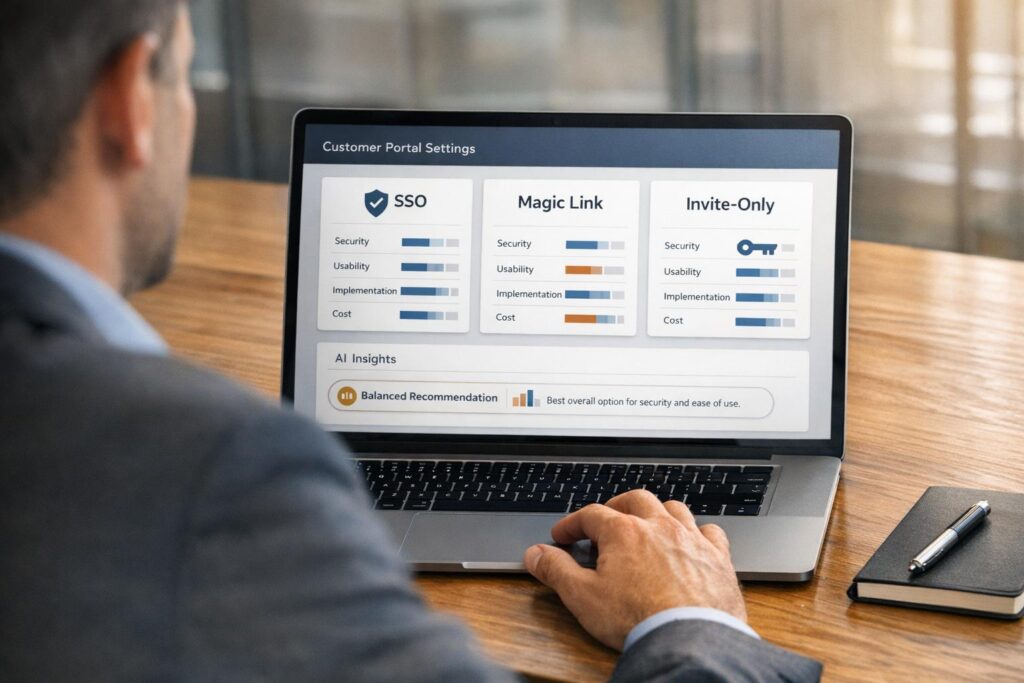
When it comes to securing your customer portal, you have three main options: Single Sign-On (SSO), magic links, and invite-only access. Each method caters to different needs, balancing security, ease of use, and implementation effort.
- SSO: Ideal for enterprise clients, allowing users to log in with existing corporate credentials like Microsoft Entra ID or Okta. It centralizes security but requires setup and maintenance.
- Magic links: A passwordless option that sends users a secure, time-sensitive email link. Best for occasional users or smaller clients without enterprise identity systems.
- Invite-only access: Restricts portal access to pre-approved users via admin invitations or domain whitelisting. Perfect for highly sensitive data or controlled environments.
Key takeaway: Choose SSO for enterprise-grade security, magic links for convenience, and invite-only access for tight control. Combining these methods can enhance both security and user experience.
| Feature | SSO (SAML/OIDC) | Magic Links | Invite-Only Access |
|---|---|---|---|
| Security | High | Moderate | High |
| Ease of Use | Very High | Very High | Moderate |
| Implementation | Complex | Moderate | Simple to Moderate |
| Best For | Enterprise clients | Infrequent users | Controlled environments |
Start by assessing your users’ needs and security requirements, then implement the method (or combination) that aligns with your goals.
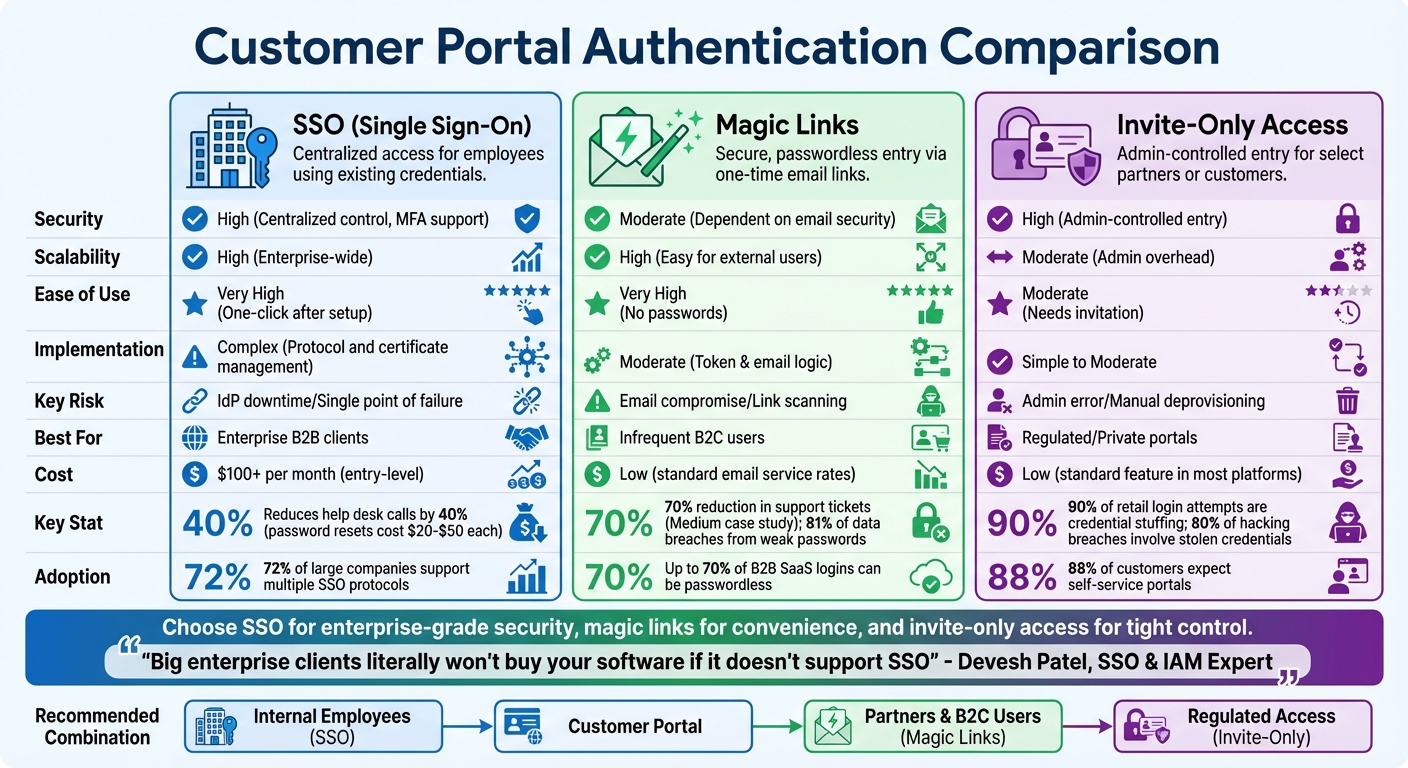
Customer Portal Authentication Methods: SSO vs Magic Links vs Invite-Only Access Comparison
1. SSO (Single Sign-On)
Single Sign-On (SSO) lets customers access your portal using their existing corporate credentials – like Microsoft Entra ID, Google Workspace, or Okta. By eliminating the need for extra usernames and passwords, SSO has become essential for B2B support teams. As Devesh Patel, an expert in SSO and Identity Access Management (IAM), puts it:
Big enterprise clients literally won’t buy your software if it doesn’t support SSO. It’s a ‘check the box’ requirement.[6]
Security Level
SSO enhances security by centralizing authentication through the client’s Identity Provider (IdP). This means the client’s existing security measures – like multi-factor authentication, password policies, and other controls – automatically apply to your portal. For instance, when an employee leaves, IT can use SCIM (System for Cross-domain Identity Management) to instantly revoke their access across all connected applications[6]. While this centralized approach strengthens security, it also creates a single point of vulnerability. If an attacker compromises the primary SSO credential, they could access all linked applications[6].
Implementation Complexity
The time to set up SSO varies – it could take as little as 30 minutes or stretch up to two weeks, depending on your platform and the protocol being used[2]. The process involves configuring the connection between your Service Provider (SP) and the client’s IdP using digital certificates. Then, you’ll need to choose between SAML 2.0, the standard for web-based SaaS, or OpenID Connect (OIDC), which is better suited for modern cloud-native apps[6].
However, implementation isn’t always straightforward. Common issues include hardcoding metadata, which could cause outages when certificates expire, and skipping Single Logout (SLO), which leaves users logged into sensitive applications. With the average organization now managing 371 SaaS applications, and 72% of large companies supporting multiple SSO protocols, these challenges can add up quickly[7].
User Experience
SSO simplifies the login process, allowing users to authenticate with a single click using their corporate credentials. This eliminates the need for password resets, which not only frustrate users but also account for 40% of help desk calls, costing $20 to $50 per reset[8]. By streamlining access, SSO improves user satisfaction and reduces the workload for support teams. It also reinforces the enterprise-grade security and control that B2B portals need to offer[3].
B2B Suitability
For mid-market and enterprise accounts, SSO is the go-to solution for access management. IT teams value the centralized control it provides, along with compliance benefits – all without the hassle of managing separate credentials[3]. From a business perspective, SSO reduces support costs, fulfills critical security requirements needed to close deals with large enterprises, and provides the audit logs required for SOC2 and HIPAA compliance[6][3].
Cost Efficiency
SSO pricing can range widely, with entry-level plans starting at under $100 per month and scaling up based on the number of connections and additional features[2]. However, there are often hidden costs, such as fees for audit log streaming ($99–$250 per month) or custom domains ($99 per month). Despite these expenses, SSO can save money in the long run by cutting down on help desk tickets for password resets and meeting enterprise requirements, where SSO is often a baseline expectation.
Next, let’s dive into another option: magic links.
sbb-itb-e60d259
2. Magic Links
Magic links are a password-free way to authenticate users by sending them a unique, secure URL via email. With just one click, users can log in without needing to remember or enter a password. This approach eliminates the hassle of app downloads or IT assistance, making access quick and simple.
When a user enters their email, the server generates a 32-byte token with an expiration timestamp, stores it securely, and sends a link containing the token to the user. Once the user clicks the link, the server checks the token’s validity, expiration, and single-use status before granting access [8]. This method shifts authentication from relying on "something you know" (passwords) to "something you have" (email access) [8], addressing many of the issues tied to traditional password systems.
Security Level
Magic links sidestep the common risks tied to passwords, such as weak credentials, reuse, and brute-force attacks, since there’s no static secret to steal or guess [10]. Considering that 81% of data breaches stem from weak or stolen passwords [4], this is a major advantage. However, the system’s security hinges on the user’s email account. If someone gains access to the email, they can log in [12].
In B2B setups, corporate email security tools like Outlook Safelinks can sometimes complicate things by pre-fetching and "clicking" links to scan for malware, which can consume single-use tokens before the user accesses them [12]. A smart workaround is to include a confirmation step – such as requiring users to click a second button on a landing page – to ensure scanners don’t accidentally use the token [12].
Implementation Complexity
Setting up magic links is simpler than implementing SSO but still requires attention to detail. You’ll need a reliable email service like Amazon SES or SendGrid, along with properly configured SPF, DKIM, and DMARC records to ensure emails get delivered [1]. The core setup involves secure token generation, hashed token storage, and validation logic to check expiration and enforce single-use.
Best practices include setting token expiration times between 5–15 minutes, applying rate limits (e.g., no more than three requests per email within 15 minutes), and validating redirect URLs against an allowlist [1] [12]. A recent 2023 security report revealed vulnerabilities in some systems where unauthenticated users could manipulate redirect URLs to send tokens to malicious sites [12]. Ensuring strict validation of redirect URLs can prevent such exploits.
User Experience
Magic links make logging in effortless – just one click and you’re in. This eliminates the need to remember passwords or deal with frustrating reset processes. For instance, Medium saw a 70% drop in support tickets after adopting a passwordless system [4]. They’re particularly helpful for mobile users, who often struggle with typing complex passwords on small screens [3].
This method is also perfect for users who log in infrequently, like clients checking invoices or ticket statuses monthly. By removing the need for password resets, magic links simplify the experience for these occasional users.
B2B Suitability
Magic links shine in B2B environments, especially for client and vendor portals where users log in sporadically. They’re a great alternative when SSO isn’t feasible, such as for smaller clients without enterprise identity providers or for external contractors and vendors [1]. In fact, up to 70% of logins in B2B SaaS platforms can be passwordless when magic links are the default [12].
For enhanced security, magic links can be paired with tools like device fingerprinting or IP geolocation tracking to flag unusual activity. They can also act as the primary login method while incorporating multi-factor authentication (MFA) for sensitive actions, such as updating payment details or downloading critical data [12].
Cost Efficiency
Magic links are cost-effective, with expenses tied mainly to standard email service provider rates. This makes them far cheaper than SMS OTPs, which can cost $0.01 to $0.05 per message [4]. Organizations using magic links report 50% fewer login issues [12], and since each password reset request can cost around $70 in lost productivity and support time [12], the savings add up quickly. Beyond cost, they also improve the user experience by reducing the need for password-related support.
Next, we’ll dive into invite-only access and how it offers more precise control over who can access your portal.
3. Invite-Only Access
Invite-only access means that only individuals who receive an invitation directly from an administrator can enter your portal. This eliminates the need for public sign-up options entirely, reducing potential vulnerabilities. Considering that 90% of login attempts on retail websites stem from credential stuffing [14], this method provides a safer, controlled approach. It pairs well with SSO and magic links, offering the highest level of user access control.
Security Level
This method stands out as the most secure of the three authentication options because it significantly reduces the attack surface. Every user account is linked to a specific invitation event, providing a clear and traceable audit trail [3]. This is especially important in B2B settings, where access is often limited to specific contractors, auditors, or clients [3][14]. When combined with magic links, invite-only access becomes even more effective at defending against credential-based attacks. This is crucial given that 80% of breaches classified as "hacking" involve stolen or brute-forced credentials [9].
To enhance security further, use invitation links that expire within 15 to 30 minutes, minimizing the risk of interception [14][8].
Implementation Complexity
Despite its security benefits, implementing invite-only access is relatively straightforward and scalable. A simple way to start is by whitelisting specific customer domains (e.g., vance.com) in your portal settings, ensuring only authorized organizations can accept invitations [15]. For embedded portals, you’ll need to set up JWT (JSON Web Tokens) on your backend with a shared secret or public/private key pair to enable secure, time-limited access [15].
Many modern B2B support platforms already include built-in invite-only features that can be configured in a matter of minutes or days, as opposed to the months required for custom-built solutions [5]. You can also set an "Email Redirection URL" to ensure invited users are directed to your branded portal rather than a generic vendor page [15]. Additionally, using the inviteIfAbsent parameter can automatically create user profiles the first time an invited customer accesses the portal, streamlining onboarding without compromising security [15].
User Experience
Invite-only access provides a seamless one-click entry experience, much like magic links, but with added administrative oversight. That said, it does require manual effort – someone has to send each invitation or set up domain-based access rules [3][14]. This trade-off is worth it for B2B portals that handle sensitive materials like financial documents, contracts, or compliance records, where security takes precedence over convenience [3].
This method works particularly well with "Customer Groups", which allow multiple employees from the same organization to access shared tickets and account data. This eliminates redundant "where is my ticket?" questions and helps support teams scale without increasing staff [5]. And since 88% of customers now expect brands to offer self-service portals [5], combining invite-only security with easy access for authenticated users strikes the right balance.
B2B Suitability
Invite-only access is ideal for scenarios where strict control over user access is essential, such as partner portals, client portals for professional services (e.g., law firms or agencies), or any environment handling sensitive information [5]. Unlike SSO, which relies on external Identity Providers like Google or Microsoft, invite-only access lets you maintain a private user list independent of corporate directories [3][13]. This control is particularly useful when working with external contractors, auditors, or clients who may not use enterprise identity systems.
"Security investment pays dividends in client trust as robust authentication signals enterprise-grade capabilities before clients even see your services." – The Moxo Team [3]
Cost Efficiency
Invite-only access is a cost-effective solution since it’s a standard feature in most modern help desk software [5]. By reducing login-related inquiries and password reset requests – which can account for up to 40% of IT help desk call volume [8] – it significantly cuts down on administrative overhead. This method also helps lower support ticket volumes [5], enabling teams to handle more customers without needing additional staff.
The primary expense is the time spent managing invitations, but this can be minimized through domain whitelisting or API-driven workflows. Compared to custom-built portals with high development and maintenance costs [5], built-in invite-only features provide enterprise-level security at a fraction of the cost.
Pros and Cons
Choosing the right authentication method requires balancing security, usability, and cost. Each option comes with its own strengths and challenges, making it crucial to align your choice with your specific needs.
SSO provides enterprise users with seamless, one-click access using existing credentials. It simplifies compliance and cuts help desk expenses by centralizing authentication. However, it does come with risks: if the Identity Provider (IdP) goes down, the entire system can be compromised. Setting up SSO also involves navigating complex protocols and configurations[7].
Magic links eliminate the issues associated with static passwords. Medium’s 2016 implementation, for instance, showed a 70% reduction in support tickets thanks to this approach[4]. They’re user-friendly, particularly for mobile users or those who log in infrequently. But, their reliance on email security introduces vulnerabilities, as compromised email accounts can be exploited. Additionally, enterprise email scanners may inadvertently invalidate the links by clicking them before users can act[11].
Invite-only access ensures tight control over who can access your platform. By restricting public registration, it minimizes exposure to attacks. That said, this method can slow down the onboarding process, as users must wait for invitations. It also requires more manual effort to manage accounts, which can add to administrative burdens.
The table below provides a snapshot of how these methods compare across key factors:
| Feature | SSO (SAML/OIDC) | Magic Links | Invite-Only Access |
|---|---|---|---|
| Security | High (Centralized control, MFA support) | Moderate (Dependent on email security) | High (Admin-controlled entry) |
| Scalability | High (Enterprise-wide) | High (Easy for external users) | Moderate (Admin overhead) |
| Ease of Use | Very High (One-click after setup) | Very High (No passwords) | Moderate (Needs invitation) |
| Implementation | Complex (Protocol and certificate management) | Moderate (Token & email logic) | Simple to Moderate |
| Key Risk | IdP downtime/Single point of failure | Email compromise/Link scanning | Admin error/Manual deprovisioning |
| Best For | Enterprise B2B clients | Infrequent B2C users | Regulated/Private portals |
Combining these methods can offer a practical solution. For instance, using magic links for initial onboarding and later introducing SSO for returning enterprise users can strike a balance between ease of use and robust security[11][3].
Conclusion
Choose authentication methods that align with your business needs. SSO, magic links, and invite-only access each address different user types and security priorities.
For corporate domains, SSO offers a reliable solution, while magic links provide a seamless experience for external users. Combining these approaches can deliver enterprise-level security without adding unnecessary complexity to the user experience [11]. This blend of strategies creates opportunities to strengthen security through automation.
AI-powered workflows are now capable of analyzing factors like device fingerprints, geo-location, and login behavior. When something unusual is detected, these systems can trigger additional verification steps. This ensures legitimate users enjoy smooth access while blocking potential attacks. For example, organizations using passkeys have seen a 77% drop in help desk calls [11].
"There is no single ‘best’ passwordless authentication method… Most production deployments combine a primary method with one or two fallbacks." – Dev Kumar, CEO, Digital Identity & IAM [11]
As the landscape evolves, it’s time to take action. With deadlines to phase out SMS OTPs and the growing adoption of passkeys, modernizing your customer portal is more important than ever. Today, 93% of major platform accounts are eligible for passkey sign-ins [11]. Start by auditing your user base: implement SSO for enterprise clients, use magic links for mobile users, and adopt passkeys for high-security needs. Build a roadmap that incorporates AI-driven risk detection into these methods, creating a portal that’s both user-friendly and secure.
FAQs
Can I offer SSO and magic links together?
Yes, it’s possible to use SSO (Single Sign-On) and magic links together, as they work well in tandem for customer portal authentication. SSO ensures smooth, centralized access across various systems, making it ideal for frequent or repeated use. On the other hand, magic links provide a quick, password-free login option via secure, time-sensitive URLs. Combining these two methods improves the user experience by offering both flexibility for ongoing access (through SSO) and a simple, credential-free solution (via magic links), which is especially helpful in complex support environments involving multiple stakeholders.
How do I stop email scanners from breaking magic links?
To keep email scanners from breaking magic links, rely on one-time, cryptographically secure tokens that have a short lifespan – ideally, 10 to 15 minutes. Make sure your email setup adheres to SPF, DKIM, and DMARC standards to boost deliverability and security.
Avoid using overly complicated link structures, as these can trigger spam filters. It’s also a good idea to educate users about checking their spam or junk folders if they don’t see your email. Finally, offer fallback options like a resend button or alternative verification methods to make the process smoother for users.
When should a portal be invite-only?
When a portal requires controlled access, making it invite-only can be a smart choice. This setup is ideal for ensuring security, managing user permissions, and restricting access to specific groups, such as new clients or internal teams. It helps safeguard sensitive information and maintain confidentiality by preventing unauthorized users from gaining entry.
Related Blog Posts
- How do you set up a customer portal that supports role-based access and multiple customer teams?
- How do you design role-based customer portals for B2B (multiple users, permissions, reporting)?
- Customizing Portals for Strategic Accounts: Why One Size Doesn’t Fit All
- SSO and MFA for Customer Portals: Best Practices for Security