A well-organized knowledge base can save your business time and money by reducing repetitive support tickets. Customers prefer solving problems themselves – 69% try self-service first, and 90% expect companies to offer it. But many knowledge bases fail because they quickly become outdated or are hard to navigate. Here’s how to create and maintain one that works:
- Identify common issues: Use ticket data and AI to find recurring questions and high-impact topics.
- Structure content for easy access: Organize articles by the customer journey, use clear templates, and tag content effectively.
- Leverage AI tools: Automate article creation, update outdated content, and predict future customer needs.
- Embed knowledge base across channels: Add it to websites, apps, and support platforms for seamless access.
- Maintain regularly: Schedule content reviews, monitor performance, and refine based on analytics.
Done right, a knowledge base can deflect up to 60–85% of tickets and improve customer satisfaction – while saving your team valuable time.
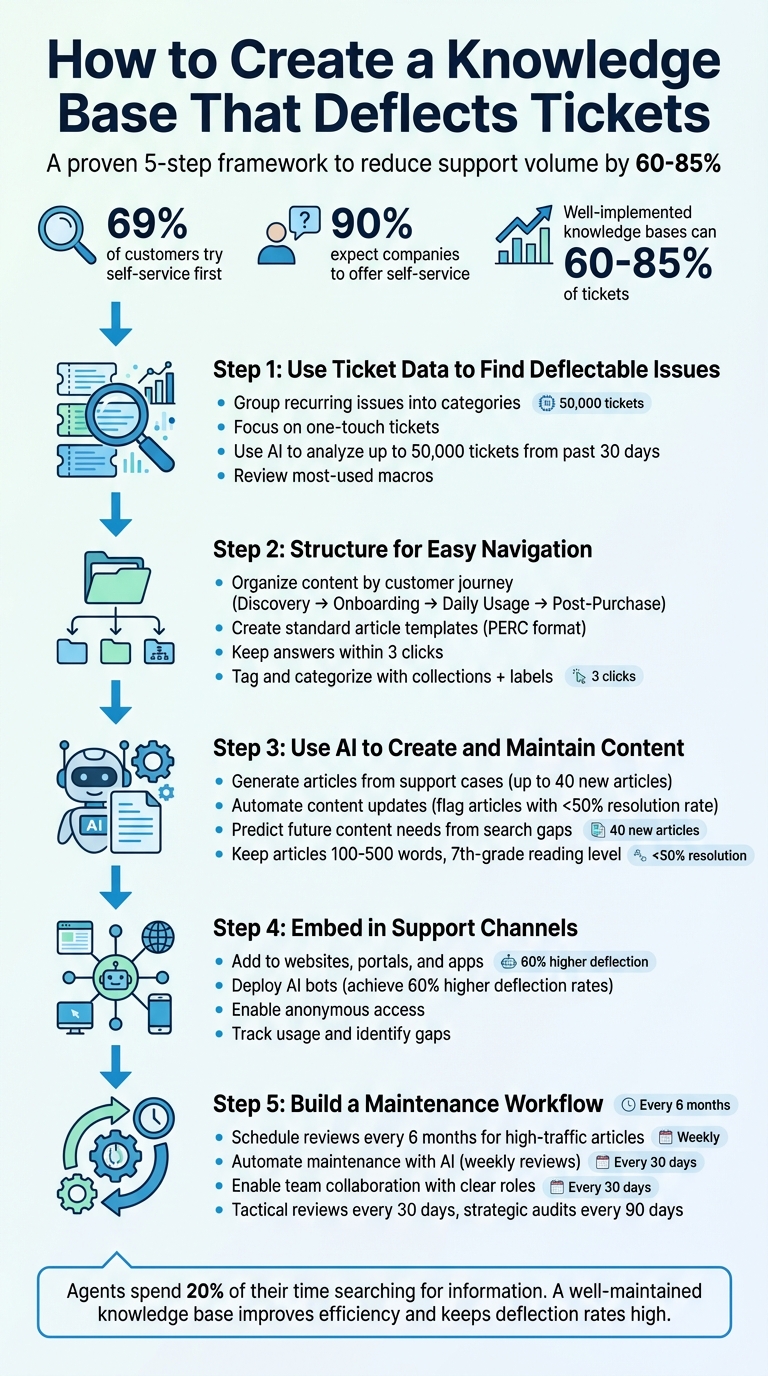
5-Step Process to Create a Ticket-Deflecting Knowledge Base
40% Ticket Deflection in 90 Days: A Playbook That Actually Works
Step 1: Use Ticket Data to Find Deflectable Issues
Support tickets are a goldmine for understanding customer pain points and identifying where your team’s time is spent. Instead of guessing what kind of content your knowledge base needs, dive into the issues your team is already addressing.
Jennifer Rowe from the Zendesk Documentation Team sums it up perfectly:
"Your tickets… are the best record of your customer issues and pain points."
The challenge lies in transforming this raw ticket data into actionable insights that can help you build a more effective self-service resource.
Group Recurring Issues into Categories
Start by adding an "About" field in your ticketing system. This dropdown allows agents to tag each ticket by topic – think categories like "Refunds", "Login Issues", or "Setup". After a few weeks of tagging, you can sort tickets into views based on high-volume categories and dig deeper to uncover recurring problems. For example, if "Billing" is a top category, you might find that many tickets involve updating payment methods – an ideal topic for a self-service article.
Focus on one-touch tickets – those resolved with a single reply. These are often repetitive questions, like password resets or tracking shipments, that are great candidates for self-service. To make the process even smoother, add a "Resolution" field where agents can flag tickets with options like "User Education" or "Documentation Fix." This helps identify issues that could have been resolved with better documentation.
Also, consider comparing ticket categories with handle time data. If certain issues take longer to resolve, they may require detailed, step-by-step guides.
Once you’ve got the basics down, bring AI into the mix to uncover patterns you might miss manually.
Use AI to Find Patterns in Ticket Data
Analyzing ticket data by hand can only take you so far. AI tools can process tens of thousands of tickets – up to 50,000 from the past 30 days – to identify trends and group them into common themes. These tools can highlight patterns you might overlook, such as spikes in inquiries after a product update, and pinpoint high-volume issues that lack proper documentation.
AI doesn’t just identify problems; it can also suggest a hierarchy of articles based on customer pain points. Just make sure any AI tool you use automatically filters out personally identifiable information (PII) to protect customer privacy.
Here’s a practical tip: Review your most-used macros (pre-written responses) from the past 7 to 30 days. These macros often address recurring questions and can be quickly turned into helpful knowledge base articles.
Step 2: Structure Your Knowledge Base for Easy Navigation
Once you’ve identified the content your knowledge base needs, the next step is making sure customers can find it quickly. A cluttered or confusing layout frustrates users and increases support tickets. Aim to organize your knowledge base so customers can locate answers in just three clicks. Once the structure is in place, focus on creating clear and consistent content.
Organize Content by Customer Journey
Instead of grouping content into broad, generic categories, align it with the stages of your customer journey. For example:
- Discovery: Articles on account setup and feature overviews.
- Onboarding: Guides for payment methods and initial setup.
- Daily Usage: Troubleshooting tips and step-by-step instructions.
- Post-Purchase: Information on returns, delivery tracking, and refunds.
This approach allows customers to pinpoint the help they need without wading through irrelevant material. For example, rather than creating one massive "Billing Guide", break it into smaller, targeted articles like "How to Update Your Payment Method" or "Understanding Your Invoice." These bite-sized pieces make it easier for users to find exactly what they’re looking for.
Create Standard Article Templates
Templates are a great way to streamline content creation and make articles easier to navigate. Jennifer Rowe from the Zendesk Documentation Team highlights the value of templates:
"A template makes it faster and easier to create content… Develop a template with designated sections to fill in, so that authors include the right information and not extraneous information."
For troubleshooting articles, try the PERC format – Problem, Environment, Resolution, and Cause. FAQs work well with a Question-Answer-Overview format, which provides the immediate answer first and then dives into additional details. Consistent formatting not only helps users find what they need but also enhances AI tools like automated replies and article suggestions.
To keep your writing user-friendly, aim for an eighth-grade reading level. Use bullet points for unordered lists, numbered steps for processes, and define technical terms or link to a glossary. Add a "Related Links" section at the end of each article to guide users to the next logical step.
Tag and Categorize Articles for Better Search
Your knowledge base needs two layers of organization: collections (visible categories) and labels (internal tags). Collections form the structure of your knowledge base and can be organized by product areas, features, or support themes. Labels, on the other hand, work behind the scenes to improve search relevance and guide AI responses.
Use action-oriented titles with keywords, such as "How to Change Your Subscription" instead of a vague title like "Account Management". To fine-tune your approach, review the top 100 tags from support tickets over the past 30 days. This data can help you prioritize the keywords your customers are already searching for.
Additionally, internal labels like "out of date" or "needs review" can help you manage content maintenance in bulk. Keeping these tags up to date ensures your search results remain accurate and relevant over time.
Step 3: Use AI to Create and Maintain Content
Creating and managing a knowledge base can be a daunting task, but AI tools can make it much easier. These tools can transform resolved cases into helpful articles, identify outdated content, and even predict what information your customers might need next.
This step focuses on using AI to streamline content creation and maintenance, ensuring your knowledge base stays relevant and up-to-date.
Generate Articles from Support Cases
AI can turn patterns in support tickets into actionable content. By analyzing data from resolved or closed tickets – typically from the last 30 days – AI identifies recurring issues and creates article drafts summarizing the solutions while removing sensitive information like PII.
For instance, machine learning can group tickets by common themes and suggest up to 40 new articles based on recurring pain points. Imagine your support team handles multiple inquiries about updating payment methods in a month. AI would flag this topic as high-priority and generate a draft using the solutions provided by agents. Tools like generative AI "Copilot" can even expand brief notes or comments into polished, professional paragraphs.
One company used AI to match customer inquiries with existing articles, achieving a 12% resolution rate for automated responses. This approach significantly reduced repetitive tickets handled by human agents.
Automate Content Updates
AI doesn’t just create content – it ensures it stays effective. By monitoring article performance, AI flags those with resolution rates below 50% for review. It also tracks escalated conversations, suggesting edits or new articles when it identifies gaps in the knowledge base.
Regular content reviews are essential. For example, scheduling reviews every six months can help verify accuracy and refine content. One case study highlighted an AI support agent achieving an 80% resolution rate after consistent updates based on performance data.
Here’s a quick look at how to manage knowledge base updates effectively:
| Knowledge Management Activity | Recommended Frequency | Average Time Required |
|---|---|---|
| Review and act on AI content suggestions | Weekly | 1 hour |
| Refresh articles older than 6 months | Monthly | 7 hours |
| Optimize underperforming content for AI | Monthly | 1 hour |
| Document new product behaviors from cases | Weekly | 3 hours |
| Act on human/agent content suggestions | Weekly | 8 hours |
Once you automate these updates, you can shift your focus to predicting future content needs.
Predict What Content Customers Will Need
AI can also help you stay ahead by identifying gaps in your knowledge base. For example, it can analyze search terms that yield no results, highlighting missing topics. By reviewing customer questions that stump AI agents, you can pinpoint areas where documentation is lacking.
Research shows that 70% of customers notice when companies effectively use AI to address their needs. Leveraging AI insights to fill content gaps and prioritize high-traffic queries can greatly improve support efficiency.
sbb-itb-e60d259
Step 4: Embed the Knowledge Base in Support Channels
To get the most out of your knowledge base, embed it across all support channels. This helps reduce the number of support tickets by making self-service a go-to option. Studies show that while 91% of customers prefer self-service when it’s available and tailored to their needs, 40% still end up contacting support after failing to find answers on their own. The issue here isn’t the quality of content – it’s how easy it is to access.
Add Knowledge Base to Websites and Portals
Once your knowledge base is ready, the next step is to make it easily accessible. Place it at every customer interaction point. For example, automated article suggestions can surface relevant content as soon as someone starts typing a support request. This proactive approach can solve issues before they turn into tickets.
Widgets are another great way to integrate the knowledge base into websites, apps, and communication platforms. You can also embed contextual help links directly into your product interface, especially during key stages like onboarding or billing.
It’s also important to allow anonymous access to the knowledge base. Requiring customers to log in adds unnecessary friction and often pushes them to contact support instead. For B2B platforms, consider integrating the knowledge base into tools like Slack or Microsoft Teams, where customers are already working. A great example of this is Unity, which in 2025 reduced IT issue resolution time from three days to under one minute by adding an AI-powered assistant to employee tools – achieving over 90% satisfaction.
Deploy AI Bots to Deliver Knowledge Base Content
AI-powered bots can make your knowledge base more dynamic, turning it into an active tool for ticket deflection. These bots don’t just match keywords – they understand intent and can pull contextual answers from your knowledge base and connected systems like CRMs. For instance, they can present tailored content or relevant articles based on the page a customer is currently viewing.
Teams using AI-driven support platforms often see impressive results: 60% higher ticket deflection rates and 40% faster response times, with first responses dropping to as little as 23 seconds.
"AI is only as powerful as the information it has access to. Without a strong knowledge base to pull from, AI won’t be able to deliver the accurate, relevant answers that actually help customers." – Zendesk
To help AI bots perform well, structure your content effectively. Keep articles between 100 and 500 words, prioritize key points in the first 75 words, and use a Q&A format that mirrors how customers phrase their questions. Aim for a 7th-grade reading level and use Markdown or HTML for clear formatting.
Once deployed, it’s critical to monitor and refine your AI bots to ensure they’re meeting customer needs.
Track Usage and Identify Gaps
Analytics can help you fine-tune your knowledge base by highlighting what’s working and what’s missing. Look at search queries that return no results to identify content gaps. Track article upvotes, downvotes, and helpfulness ratings to see which resources need updates. Reviewing the top 100 ticket tags over the past month can also reveal emerging issues, while frequently used macros may point to common problems that warrant their own documentation.
In June 2025, Republic Wireless introduced a "resolution loop" where agents created documentation based on resolved tickets. This content was then reviewed and published to improve self-service success rates. According to KCS Program Manager Ben Garris, this freed up agents to focus on more complex issues while simultaneously strengthening the knowledge base. To replicate this, establish a feedback loop so agents can flag outdated or missing content directly from the ticket interface using tags or custom fields.
| Metric | What It Measures | Why It Matters |
|---|---|---|
| Ticket Deflection Rate | (Self-Service Resolutions ÷ Total Support Interactions) × 100 | Shows how effectively the knowledge base reduces support requests |
| AI Resolution Rate | Percentage of conversations resolved by AI without human help | Evaluates the performance of your AI agents |
| Search Effectiveness | Percentage of queries returning relevant, successful results | Indicates how well your search function understands customer intent |
The average ticket deflection rate in the tech industry is 23%, but with top-tier AI implementations, this can climb to 60%–85%. Closing this gap requires ongoing monitoring and adjustments based on real usage data.
Step 5: Build a Maintenance Workflow
Once your content is organized and supported by AI tools, the next step is ensuring it stays accurate over time. A well-planned maintenance workflow is critical for keeping your knowledge base reliable. Without consistent updates, articles can quickly become outdated, leading to customer frustration and increased support tickets. The difference between a resource people trust and one they avoid often comes down to how well it’s maintained.
Schedule Regular Content Reviews
Assign a dedicated owner for your knowledge base and use tools like tags, custom fields, or a specific channel to flag outdated content. High-traffic articles should be audited every six months by filtering them based on their last updated date. Many companies use team-based workflows for maintenance, with user permissions ensuring quality while allowing agents to contribute directly.
Another key step is syncing documentation updates with product changes. For instance, Intercom ties their updates to weekly product releases, keeping their knowledge base aligned with changes. This approach has helped their AI agent, Fin, achieve an impressive 80% resolution rate.
Automate Maintenance Tasks with AI
AI can simplify the process of keeping your knowledge base current. Use AI tools to identify and flag outdated content or suggest edits. For example, Intercom’s Fin offers actionable recommendations like removing duplicates or adding new snippets based on successful agent responses.
Generative AI can also draft new articles by summarizing recent support tickets or product release notes, saving your team significant time. If a recurring issue pops up multiple times in a week, AI can consolidate those solutions into a draft article for review. Pair these automation efforts with periodic reminders for article owners to verify updates.
Consider this example: Lending Club used AI-powered tools like Answer Bot to match customer questions with relevant knowledge base articles, achieving a 12% ticket resolution rate. Andrew Jensen, Director of Payment Solutions, noted:
"We’ve found that this has been a big lift… customers don’t find Answer Bot intrusive to the borrower experience".
To ensure accuracy, review AI-generated suggestions weekly, making necessary adjustments to keep up with real-time customer needs.
| Activity | AI Automation Method | Recommended Frequency |
|---|---|---|
| Gap Detection | AI flags topics based on ticket data and failed searches | Continuous/Weekly |
| Content Drafting | Generative AI creates drafts from release notes or tickets | Weekly |
| Stale Content Review | AI identifies outdated articles or those with low resolution rates | Monthly |
| AI Optimization | AI restructures content for better bot comprehension | Monthly |
| Verification | Automated reminders sent to article owners | Periodic (e.g., 6 months) |
Enable Team Collaboration on Content
Define clear roles like Author, Approver, and Publisher to streamline the update process. Use reusable content blocks for efficiency, and archive outdated articles instead of deleting them. For smaller teams, the spreadsheet method works well: assign each team member a portion of the articles (e.g., one-fifth) to review monthly, ensuring they remain accurate and consistent with style guidelines.
Don’t overlook the importance of allocating resources specifically for maintenance. While it may not feel as urgent as handling the support queue, neglecting it can turn your knowledge base into a liability. On average, support agents spend 20% of their time searching for information to help customers. A well-maintained knowledge base directly improves team efficiency and keeps ticket deflection rates high throughout product updates.
Conclusion
Creating an effective knowledge base is like building a system that requires the right structure, tools, and regular upkeep. Start by analyzing ticket data to uncover recurring issues that drive up support costs. Use standardized templates and clear navigation to organize this content so both customers and AI tools can quickly locate answers. Make sure to embed your knowledge base directly into the support channels your customers already use, and monitor its performance to identify content gaps as they arise. This solid foundation enables ongoing AI-driven improvements across your support operations.
The key difference between a functional knowledge base and one that fails lies in how well it’s maintained. AI tools can revolutionize this process. Instead of manually reviewing hundreds of articles, AI can flag outdated content, draft new articles based on resolved tickets, and detect patterns in failed searches.
As businesses move toward AI-native support, the knowledge base becomes the core hub for AI-powered customer interactions. When properly structured, AI can handle 60–80% of high-volume issues on its own. But when neglected, it risks delivering outdated or incorrect information, frustrating customers and increasing ticket traffic.
To keep your knowledge base running smoothly, schedule tactical reviews every 30 days to fix broken links and publish new content, like feature guides. Plan strategic audits every 90 days to refresh popular articles and eliminate duplicates. Assign ownership for each article and use AI to automate reminders for content verification. Considering that agents spend about 20% of their time searching for information, a well-maintained knowledge base ensures faster, more accurate responses while reducing ticket volume.
Think of your knowledge base as critical infrastructure, not an afterthought. A commitment to regular updates and AI-powered innovation transforms it into a cost-efficient tool that grows with your business, keeps customers satisfied, and protects your bottom line as your product and services evolve.
FAQs
How can AI help keep your knowledge base accurate and up-to-date?
AI tools play a crucial role in keeping a knowledge base accurate and relevant by automating essential tasks like content creation, updates, and performance tracking. For instance, AI can examine recent support tickets to uncover recurring issues and recommend new articles, ensuring your knowledge base stays aligned with customer needs.
It can also scan existing articles to pinpoint outdated information, suggesting updates based on product changes or frequently asked questions. On top of that, AI-driven analytics can monitor how users interact with your content, identifying underperforming articles or gaps that require attention. By streamlining these tasks, AI ensures your knowledge base remains useful and up-to-date, ultimately reducing support tickets and boosting self-service success.
What are the best practices for organizing a knowledge base to keep it effective and up-to-date?
To build an effective knowledge base, begin by organizing content into clear sections or topics. This helps users quickly find what they’re looking for. Adding tags or labels can further improve search functionality and make related articles easier to access.
Keep the design straightforward and easy to navigate to encourage self-service. Assign a person or team to keep the content updated, ensuring it remains accurate and useful. Regularly review analytics and customer feedback to spot missing or outdated information and make necessary updates. A well-maintained knowledge base benefits both customers and support teams by saving time and reducing frustration.
How does embedding a knowledge base across multiple channels improve customer support?
Embedding a knowledge base across various channels makes customer support more convenient by ensuring information is available wherever customers interact – whether that’s on your website, chat platforms, social media, or mobile apps. This integration allows users to find answers quickly without needing to switch platforms or wait for help, leading to faster resolutions and better customer satisfaction.
It also guarantees consistent and up-to-date information at every touchpoint, minimizing the chances of outdated content and enabling effective self-service. When customers can solve common problems on their own, it reduces the number of support tickets, cuts operational costs, and allows support agents to concentrate on handling more complex issues. This strategy streamlines the experience for both customers and support teams, making interactions more efficient and effective.