


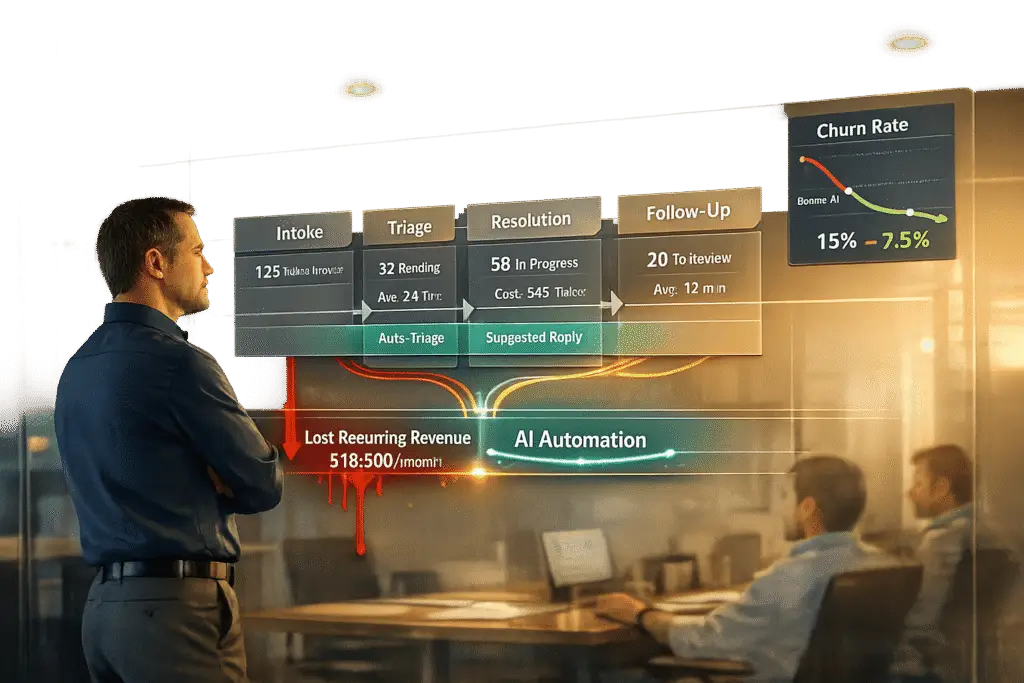
Poor customer support tools are costing businesses billions.
Here’s the breakdown:
- 37% of customer interactions end without a resolution.
- 60% of customers leave after one bad service experience.
- Replacing lost customers costs 5–25x more than retaining them.
- Inefficient tools increase operational costs, with B2B ticket resolutions costing up to $35 each.
Outdated systems frustrate customers and burn out agents, leading to churn, wasted time, and lost revenue. The solution? Invest in AI-driven tools that automate tasks, improve response times, and reduce churn. Businesses implementing these systems often see 300–400% ROI within a year, with payback in just 3–6 months.
Bottom line: Poor tools aren’t just a hassle – they’re a major financial risk. Fixing them isn’t optional if you want to keep customers and protect your revenue.
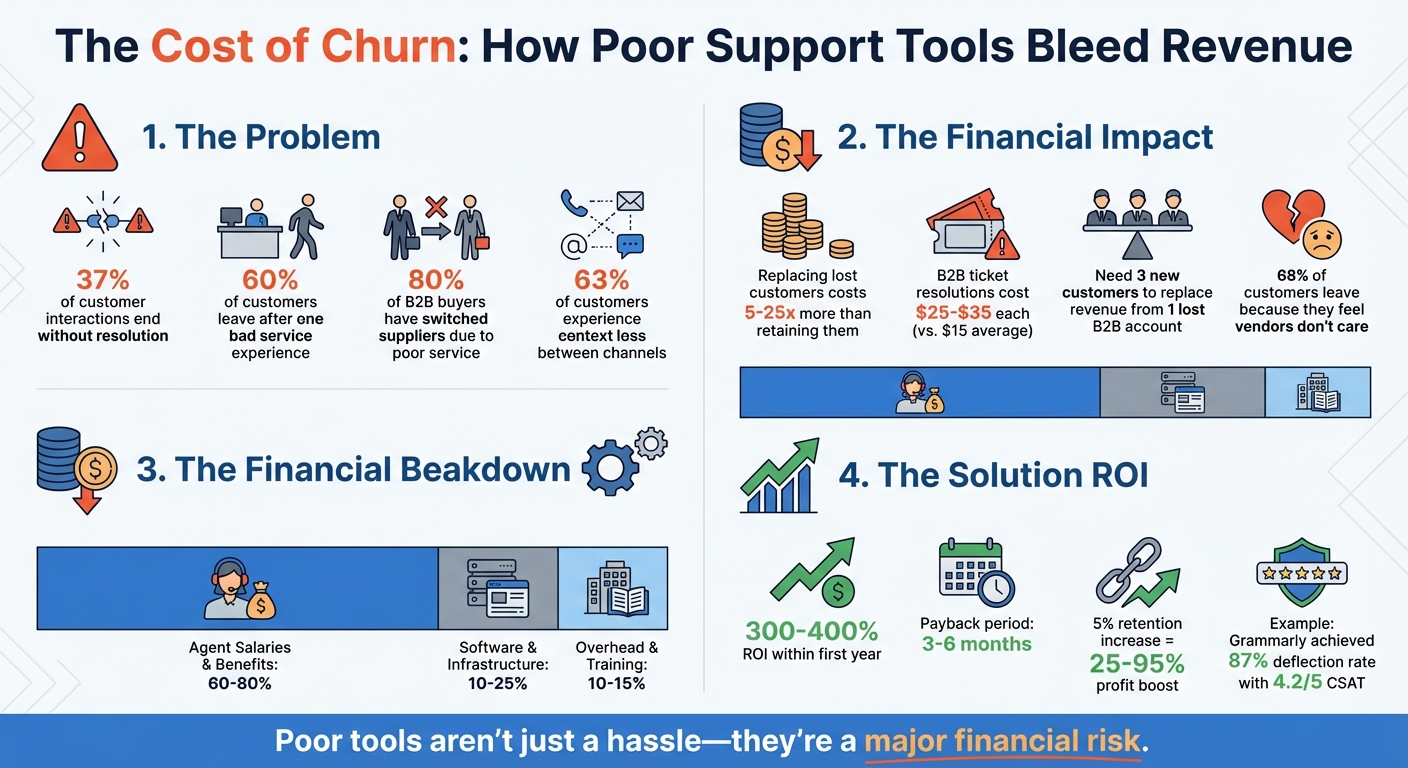
The Financial Impact of Poor Customer Support Tools on B2B Revenue
What is customer churn? And how can you prevent it? | Customer Success Explained
sbb-itb-e60d259
How Poor Support Tools Cost You Money
When your support tools fail to meet customer needs, the financial impact becomes clear in three ways: customers leave, operational inefficiencies pile up, and long-term partnerships suffer. Let’s break down how these issues drain your bottom line – from lost revenue to hidden costs and eroded trust.
Lost Revenue from Customer Churn
Every unresolved issue risks losing a customer. For B2B businesses, this is especially damaging, requiring a premium B2B support strategy to protect the bottom line. In fact, 80% of B2B buyers have switched suppliers because of poor service and support[7]. This "silent churn" happens when frustrated customers leave without even voicing their complaints.
Replacing these lost customers is costly. In B2B markets, you often need to acquire three new customers to make up for the revenue of just one lost account[6]. Add in the lengthy sales cycles and high acquisition costs, and it’s clear that churn can be a serious blow to your recurring revenue.
Poor support tools only make matters worse. When 63% of customers experience context loss between channels[1], it’s a direct result of disconnected systems. This friction not only drives customers away but also amplifies negative word-of-mouth, harming your reputation before prospects even reach you.
But churn isn’t the only financial hit. Inefficient tools also drive up your operational costs, as we’ll see next.
Hidden Costs of Inefficient Tools
Operational inefficiencies are another silent drain on your budget. The average cost per resolution stands at $15[1], but for B2B SaaS companies, this figure jumps to $25–$35 per ticket[3], thanks to the complexity of handling account configurations and integrations. When your tools can’t automatically route cases, keep context, or provide agents with customer histories, every interaction takes longer and costs more.
Here’s where the money goes:
- 60–80% of your support budget is spent on agent salaries and benefits.
- 10–25% goes to software and infrastructure like helpdesks, CRMs, and AI tools.
- 10–15% covers overhead and training costs[3].
| Support Budget Component | Share of Total Cost | What’s Included |
|---|---|---|
| Agent Salaries & Benefits | 60–80% | Base pay, taxes, benefits, management |
| Software & Infrastructure | 10–25% | Helpdesk, CRM, AI tools, LLM usage |
| Overhead & Training | 10–15% | Recruiting, QA, facilities, equipment |
When tools don’t integrate well, agents waste time on manual tasks instead of solving problems. Separate systems require extra licenses and maintenance, and training costs soar as teams learn workarounds for inefficient tools.
Beyond the direct costs, there’s also the opportunity cost. When agents are stuck handling repetitive tasks that automation could solve, they miss out on proactive customer success efforts that could drive additional revenue. These inefficiencies don’t just inflate your budget – they limit your ability to grow.
Damaged Customer Relationships Over Time
For B2B companies, support quality is a direct reflection of your professionalism. 77% of consumers say the quality of customer service shapes their perception of a brand[1]. In long-term B2B relationships, this perception can determine whether contracts are renewed or expanded.
When tools fall short, support teams often provide instructions instead of solutions. For example, if a customer needs a billing correction or account update, making them handle it themselves – or delaying the resolution – sends a clear message: their time isn’t valued. This is particularly damaging because 86% of buyers are willing to pay more for a better customer experience[4]. Poor support pushes them toward competitors who offer smoother, more efficient service.
"Support used to be a cost center. Now, it’s a brand engine." – Türkü Şimşek, Content Marketing Specialist, LiveChatAI[3]
Over time, these frustrations erode trust. Each time a customer has to repeat themselves, restart a conversation, or wait for a delayed response, they question the value of the relationship. In B2B markets, where partnerships often span years and contracts represent substantial revenue, this loss of trust is costly. Research shows that 68% of customers leave because they feel their vendor doesn’t care about them[8]. And nothing says "we don’t care" louder than forcing customers to bear the burden of inefficient systems.
Finding the Gaps in Your Support Tools
Your internal operations often hold the clues to where your support tools are falling short. These signs show up in agent complaints, customer feedback, and the inefficiencies that quietly eat away at your budget. By paying attention to these areas, you can uncover the cracks in your system and start addressing them.
Warning Signs of Tool Problems
One of the biggest red flags? A fragmented tool landscape. If agents are juggling five or more systems just to resolve a single query, that’s a clear sign something’s wrong. Research shows frontline support reps spend 17% of their time searching for information and 15% toggling between tools – time that could be spent helping customers instead[10].
Another major issue is context loss. For instance, 63% of customers have to repeat themselves when switching channels because their information doesn’t carry over[1]. Add to that scattered documentation, which can stretch new hire ramp-up times by 50%[10]. If your new employees are taking months to become fully productive, it’s likely your tools aren’t set up to support them.
Automation that’s not actionable is another pain point. AI tools that only provide instructions – like how to process refunds or update records – rather than completing tasks themselves create extra work for agents. Nearly 70% of service teams report they lack full visibility into customer interactions across departments[10], leading to poor handoffs and costly errors.
These operational issues don’t just frustrate your team – they also show up in customer feedback, reinforcing the need for better tools.
What Agent and Customer Feedback Reveals
When agents complain about repetitive tasks like entering the same data across multiple platforms or hunting down customer history, they’re signaling that your tools aren’t integrated. If they’re manually sorting tickets or acting as middlemen between systems, you’re essentially paying for work that automation could handle.
Customers, on the other hand, often voice frustration when they have to repeat their issues or when problems go unresolved. A staggering 37% of customer interactions end without a satisfying resolution[1]. This points to tools that are reactive rather than proactive – tools that deflect issues instead of resolving them.
"The problem isn’t [agent] effort or skill – it’s their ability to proactively solve problems before the customer feels frustrated." – Machielle Thomas, Forethought[1]
Take Grammarly, for example. In 2024, they faced a similar issue where their bot couldn’t handle context or follow-ups. This led to unhappy customers and overworked agents. To fix it, they developed a 70-criterion evaluation matrix to assess vendors and implemented Forethought’s agentic AI. The results were impressive: deflection rates jumped from 60% to 87%, CSAT soared to 4.2 out of 5, and the implementation process took just 1.5 weeks[2].
Examining these gaps through the lens of your B2B needs can help you pinpoint the most costly tool deficiencies.
Checking Tools Against B2B Needs
B2B support requires tools that go beyond basic ticketing systems. They need to handle complex, multi-step processes like KYC verification, billing corrections, and account updates – end to end. If your AI is only capable of giving instructions rather than taking action, it’s creating additional work for your team and leaving gaps in your workflow.
Here’s a quick checklist to evaluate whether your tools meet the demands of B2B support:
- Cross-tool synchronization: Are your CRM and ticketing systems automatically syncing, or do agents have to transfer data manually?
- Contextual visibility: Can agents access the full customer history – including attachments, logs, and prior interactions – without jumping between systems?
- Privacy controls: Do your tools allow internal discussions to remain separate from customer-facing updates?
- Integration depth: Are your systems connected to key platforms like your CRM, billing software, and internal databases for real-time validation and task execution?
Consider the example of SEKO Logistics. Their manual escalation process was eating up 338 hours annually and costing $56,000 per year. By integrating ServiceNow and Jira through Unito, they automated ticket creation and achieved a 9.79x ROI[5]. If your team is manually managing even a fraction of that workload, you’re leaving both time and money on the table.
For B2B, the key metric isn’t deflection – it’s cost per resolution. Solving one complex issue upfront can prevent hundreds of repeat tickets down the road[3]. If your tools can’t handle that level of complexity, they’re not built for the challenges of B2B support.
Using AI to Reduce Churn and Work Faster
Once you’ve pinpointed gaps in your support tools, introducing AI can transform how issues are handled. AI platforms can automate manual tasks like routing cases and identifying customers at risk of leaving. Here’s how these technologies streamline triage, enhance agent productivity, and predict potential problems before they arise.
Automated Triage and Smart Case Routing
Automated triage systems simplify the process of categorizing customer issues, which helps reduce churn. These systems analyze messages for content, intent, and urgency in just milliseconds, speeding up resolutions[12]. They can even sort vague descriptions into categories like billing, technical support, or product feedback, eliminating the need for manual sorting[11].
Sentiment detection takes this a step further by identifying frustration or anger in customer messages. When flagged, these cases are automatically escalated to senior agents or account managers, ensuring they’re handled before they spiral. For B2B support teams, this means high-value accounts get the attention they need, avoiding delays caused by misrouted tickets.
Smart routing also factors in service level agreements (SLAs) and customer importance. For instance, if a ticket is linked to an upcoming renewal, the system prioritizes it, routing it to a specialist for immediate handling. This ensures your most valuable customers get timely and accurate support.
AI Copilots That Help Agents Work Faster
AI copilots act as constant assistants for agents, pulling relevant data from past cases and internal databases so agents can focus on solving problems instead of hunting for information. These tools can also draft responses based on case history and customer tone, allowing agents to review and send them without wasting time on repetitive writing.
This boost in efficiency is no small feat. AI-assisted agents see a 14% increase in productivity[13], which translates to faster resolutions and reduced operational costs. Considering that agent attrition costs range between $10,000 and $21,000 per person[13], maintaining efficiency has a clear financial upside.
Predictive Tools for Getting Ahead of Problems
AI doesn’t just help with current issues – it also anticipates future challenges, enabling teams to act proactively and avoid customer churn. Predictive AI tools analyze fragmented data from various "silent channels" like email, Slack, and Zoom, alongside structured systems, to create a full picture of account health[14]. Given that over 60% of B2B customer interactions happen via email[14], this is a game-changer.
By examining unstructured data, these systems pick up on subtle warning signs – such as questions about contract terms, changes in executive sponsorship, pricing discussions, or shifts in sentiment during support interactions[14][15]. These insights provide teams with weeks or even months to intervene before a contract lapses.
One example highlights the impact: a company reported a 30% increase in month-over-month retention within six weeks of using a unified intelligence platform that flagged high-risk cases and generated alerts automatically[14]. Without such tools, manually tracking these issues for a 100-person team could cost around $350,000 annually in lost productivity[14].
Predictive AI also helps with staffing, forecasting ticket volume spikes so you can schedule agents accordingly. By avoiding delays that frustrate customers and reducing overtime costs, these tools cut expenses and protect your revenue – before problems escalate.
Calculating ROI and Making the Business Case
When it comes to AI-enabled support, calculating ROI is the backbone of securing future investments. To make a strong case, you need to show clear financial benefits. Start by establishing baseline metrics. Spend about 60 days collecting data on key indicators like support costs per conversation, average response times, and CSAT scores. These numbers will serve as the foundation for comparing performance before and after implementing AI tools [16].
Next, calculate your fully loaded costs. This means factoring in agent salaries, benefits, taxes, overhead, and software licenses to find out your true Cost Per Ticket (CPT). For B2B SaaS companies, support usually takes up around 8% of Annual Recurring Revenue (ARR), with human labor making up 60-80% of the total support budget [3]. Armed with these figures, you can build a solid case by focusing on four key areas: improved agent productivity, streamlined operations through automation, ticket deflection via self-service, and lower customer churn [18]. This detailed cost breakdown sets the stage for tracking improvements across financial, operational, and customer satisfaction metrics.
Metrics That Show Improvement
To measure success, focus on three categories of metrics: financial, operational, and customer experience. Financial metrics include CPT, agent hour savings, deflection savings, and the value of reduced churn [16]. Operational metrics cover Average Handling Time (AHT), First Contact Resolution (FCR), escalation rates, and agent utilization [16]. For customer experience, keep an eye on CSAT, NPS, and Customer Effort Score (CES). For B2B companies, additional metrics like engineering time saved, onboarding ramp-up time, and the accuracy of technical documentation are also important [16].
Organizations that use structured measurement frameworks often see 40-60% higher returns compared to those relying on guesswork [16]. To calculate ROI, use this formula: ROI (%) = [(Total Annual Gain – Total Annual Cost) / Total Annual Cost] × 100% [18]. Even small improvements can have a big impact – boosting customer retention by just 5% can increase profits by 25% to 95% [18], directly addressing the costs of churn.
When to Expect Returns on Your Investment
With metrics in place, map out your implementation timeline to maximize returns. Most businesses see payback within 3-6 months and an ROI of 300-400% within the first year [17]. Break the timeline into phases to set realistic goals. In the first 1-3 months, focus on quick wins like automating FAQs and basic routing, aiming for a 150-200% ROI [17]. By months 4-6, work on backend integrations and more complex workflows to target a 250-350% ROI [17]. By the 7-12 month mark, ROI can climb to 350-500% [17].
For example, in February 2024, Klarna’s AI assistant managed 2.3 million conversations in its first month, handling two-thirds of all chats. This equaled the output of 700 full-time agents, reduced repeat inquiries by 25%, and cut resolution times from 11 minutes to under 2 minutes. Klarna estimated a $40 million profit boost for 2024 as a result [16]. Similarly, since launching its AI assistant "nibby" in 2021, NIB Health Insurance has handled over 4 million member queries with a 95% understanding rate and 60% automation. This led to $22 million in operational savings and a 15% drop in customer service phone calls [16].
Conclusion
Ineffective support tools can lead to preventable customer churn, directly impacting revenue. Many customer interactions end with unresolved issues, causing "silent churn" – when customers quietly leave without voicing complaints [1]. Considering that retaining customers is far less expensive than acquiring new ones [1], these gaps in support operations can quickly become costly.
To address this, it’s crucial to identify red flags in your current system, such as high resolution costs, customers repeatedly explaining their issues, and fragmented communication across channels. The key lies in adopting AI tools that actively resolve issues rather than simply directing customers to help pages. For example, Grammarly achieved an 87% deflection rate and boosted their CSAT score to 4.2 out of 5 by using AI capable of autonomously handling refunds and solving problems [2][9].
"Systems that only answer questions but don’t resolve issues are no longer enough. Customers expect outcomes, not explanations." – Machielle Thomas, Forethought [1]
This highlights the demand for support systems that deliver solutions, not just guidance.
Investing in such tools directly impacts the bottom line. By tracking key customer service metrics like cost per ticket, first contact resolution, and retention rates, companies often see a 300-400% ROI within the first year, with payback periods as short as 3-6 months [17]. Additionally, even a modest 5% boost in customer retention can drive profit increases of 25% to 95% [18]. This approach shifts support from being a cost burden to a revenue-saving asset.
The real question isn’t whether you can afford to improve your support tools – it’s whether you can afford not to. Every unresolved issue and inefficient process chips away at your revenue. Start by calculating your true cost per ticket, identifying gaps in your tools, and implementing AI solutions designed to resolve – not deflect – customer issues.
FAQs
How do I calculate my true cost per ticket?
To figure out the actual cost of handling a support ticket, follow these steps:
- Add up all support-related expenses: This includes salaries (which usually make up 60–80% of costs), software, overhead, training, and recruitment expenses.
- Count the number of resolved tickets: Make sure to include reopened tickets in your total.
- Apply this formula: Total support costs ÷ Number of resolved tickets. For example, if your total support costs are $45,000 and you resolved 1,500 tickets, your cost per ticket would be $30.
Knowing this number can highlight inefficiencies and help make a case for increasing staff or adopting automation tools.
What are the fastest signs our support tools are causing churn?
Inefficiencies in customer support often reveal themselves through several telltale signs. These include long resolution times, repeated customer inquiries, and high ticket volumes paired with low resolution rates. When agents are forced to switch between disconnected systems, it not only slows them down but also contributes to declining customer satisfaction (CSAT) scores. Overwhelmed agents struggling to keep up with demand further highlight the problem.
These challenges don’t just affect your team – they directly impact customers. Frustration builds, responses slow down, and the overall customer experience suffers. Over time, these seemingly small issues can quietly push your customers toward competitors.
Which AI automations reduce churn the most in B2B support?
AI tools that tackle churn head-on focus on spotting problems early and keeping customers engaged. Features like sentiment analysis, topic detection, and predictive analytics help identify unhappy customers before they decide to leave. This means businesses can step in with solutions at just the right time.
AI also plays a big role in triage and escalation. By quickly resolving issues and routing problems to the right teams, these tools help reduce customer frustration. When paired with predictive insights and proactive outreach, businesses can stay ahead of potential churn, keeping customers satisfied and loyal. This approach is especially impactful in B2B environments, where retention is key.






