
Teams often leave Kayako due to challenges with scaling, inefficient workflows, and limited reporting tools. As businesses grow, Kayako struggles to support larger operations and complex needs. Here’s a quick overview of the main reasons:
- Scaling Issues: Kayako’s performance falters with high ticket volumes, and its pricing becomes expensive as teams expand. Downtime and service interruptions also frustrate users.
- Workflow Problems: The platform lacks advanced automation, customization, and integration options. Teams face inefficiencies with ticketing systems and multichannel communication gaps.
- Reporting Limitations: Reporting tools are rigid, with limited customizability and outdated analytics. Teams often rely on manual exports for deeper insights.
These issues make it hard for growing teams to maintain productivity, meet customer expectations, and justify costs. Modern support platforms address these pain points with better automation, flexible pricing, and advanced analytics.
Scaling Problems with Kayako
User Management Limitations
Kayako offers advanced user management features like custom security policies and granular permissions, but these come at a steep price. These features are only available in higher-priced tiers, starting at $395/month for 5 seats or $790/month for 10 seats. On top of that, the platform’s interface is cumbersome, and its complex customization options can make onboarding new staff a slow and frustrating process.
Performance and Stability Problems
Managing users isn’t the only challenge – Kayako’s system performance can also falter as ticket volumes grow. Some teams have experienced unpredictable performance, with downtime happening 1–2 times daily for stretches of 3 to 8 minutes. These disruptions, though brief, can annoy customers and strain support teams.
"The disruptions we were getting were 1-2 times a day, but short in duration… Although the intervals of down time were short, the frequency of the issues frustrated customers." – Kayako
In one particularly unstable week, Kayako logged 16 service interruptions. Failover processes that should have been near-instant took up to 10 minutes, leaving customers staring at "Internal server error" messages. For B2B teams bound by strict 99% uptime SLAs, this kind of instability can risk breaching contracts and damaging client trust.
Rising Costs as You Scale
Kayako’s pricing model can quickly become a financial burden. At $79 per agent per month, plus an additional $1.00 fee for every AI-resolved ticket, costs can balloon as your team grows. Compounding this issue, agents reportedly spend 35% of their time searching for information due to inefficient knowledge management. This inefficiency often forces companies to hire more agents, adding to the expense. And that’s not even factoring in the productivity hit during onboarding or the extra workload placed on existing staff .
sbb-itb-e60d259
Workflow and Operational Problems
Difficult Ticketing Systems
Kayako’s ticketing system operates on a shared inbox model, which works fine for smaller teams managing simple requests. However, as support demands grow, its limitations become clear. The platform falls short in areas like SLA management, advanced workflow automation, and customization – features larger organizations depend on to streamline operations. This lack of flexibility often leaves teams unable to adapt ticketing processes to their specific business needs, leading to inefficiencies.
Integration and Collaboration Gaps
Integration issues compound these ticketing challenges, making day-to-day operations even more complex. While Kayako supports basic multichannel communication – covering email, chat, and social media – it doesn’t offer native solutions for phone support or modern messaging platforms like WhatsApp and SMS. Without these integrations, support teams often have to manually gather context from other systems, which disrupts collaboration and slows down response times.
"Support used to ping our engineers for help constantly. It wasn’t malicious – it was just that no one else had the context… Now with Kayako pulling answers from our docs and logs, tickets get resolved before they ever hit engineering."
– Csaba Daniel, VP of Customer Solutions Engineering, Influitive
Slow Feature Updates
On top of workflow and integration issues, Kayako is increasingly seen as outdated compared to newer support platforms. It lacks advanced AI chatbots and modern automation tools. Reporting and analytics features also fall behind current industry expectations. For businesses planning to scale or manage complex workflows, these shortcomings often make Kayako an insufficient solution.
"Limited innovation compared with newer platforms"
– Orion Macapella, Cue
Reporting and Analytics Gaps
Limited Access to Advanced Reporting
Kayako’s reporting tools present a real challenge for teams aiming to make informed, data-backed decisions. Previously, users could rely on KQL (Kayako Query Language) for custom queries, but this feature has been discontinued. Now, the platform limits users to pre-built analytics dashboards within the Insights section. While these dashboards may suffice for basic reporting, they fall short for businesses with unique needs that require deeper analysis.
Adding to the frustration, custom reporting is only available on higher-tier plans. This means companies on lower-tier plans are unable to generate reports tailored to their specific KPIs, even when those metrics are vital to their success. On top of that, satisfaction ratings have been oversimplified from a detailed 1–5 scale to a simple "Good/Bad" system. This change strips away the nuance needed to truly understand customer sentiment, making it harder to distinguish between average and exceptional experiences.
Together, these limitations prevent teams from gaining a full understanding of their customer journey, leaving critical insights untapped.
Incomplete Customer Visibility
Kayako also falls short in providing the advanced analytics necessary to link support metrics with broader business outcomes. This creates difficulties for leaders trying to justify resource needs or demonstrate their team’s value to company executives. Without a clear view of the entire customer journey, teams often find themselves in a reactive mode, addressing issues only after they’ve escalated.
"I waited until backlog hit a breaking point before I even looked at our metrics. By then, customers were already leaving and I was left scrambling for answers that should have been obvious."
– Zach Hansen, Customer Support Leader
The inability to access comprehensive data makes it hard for support leaders to align operational improvements with strategic goals. Additionally, Kayako doesn’t effectively track work done outside traditional ticketing systems, such as interactions on Slack or other collaboration tools. As a result, much of the valuable work performed by teams remains invisible in standard reports, further limiting an accurate understanding of overall performance.
Weak Knowledge Management Features
The gaps in reporting are compounded by Kayako’s outdated knowledge management capabilities, which hinder self-service tracking and data accuracy. Reliable knowledge management is essential for monitoring self-service effectiveness, ticket deflection, and agent productivity. However, Kayako has retired features like "Troubleshooter" and "News subscriptions", reducing visibility into how well self-service tools are performing.
The platform’s outdated interface also slows down the process of updating knowledge articles and managing tickets, leading to incomplete data and unreliable reporting. These inefficiencies highlight the need for more modern tools. Competitors are now leveraging AI to suggest relevant knowledge base entries automatically and track search behaviors – features that Kayako’s rigid structure fails to support effectively. This lack of innovation further limits the platform’s ability to deliver actionable insights.
Kayako Review – Top Features, Pros & Cons, and Alternatives
What Modern B2B Support Platforms Offer vs. Kayako
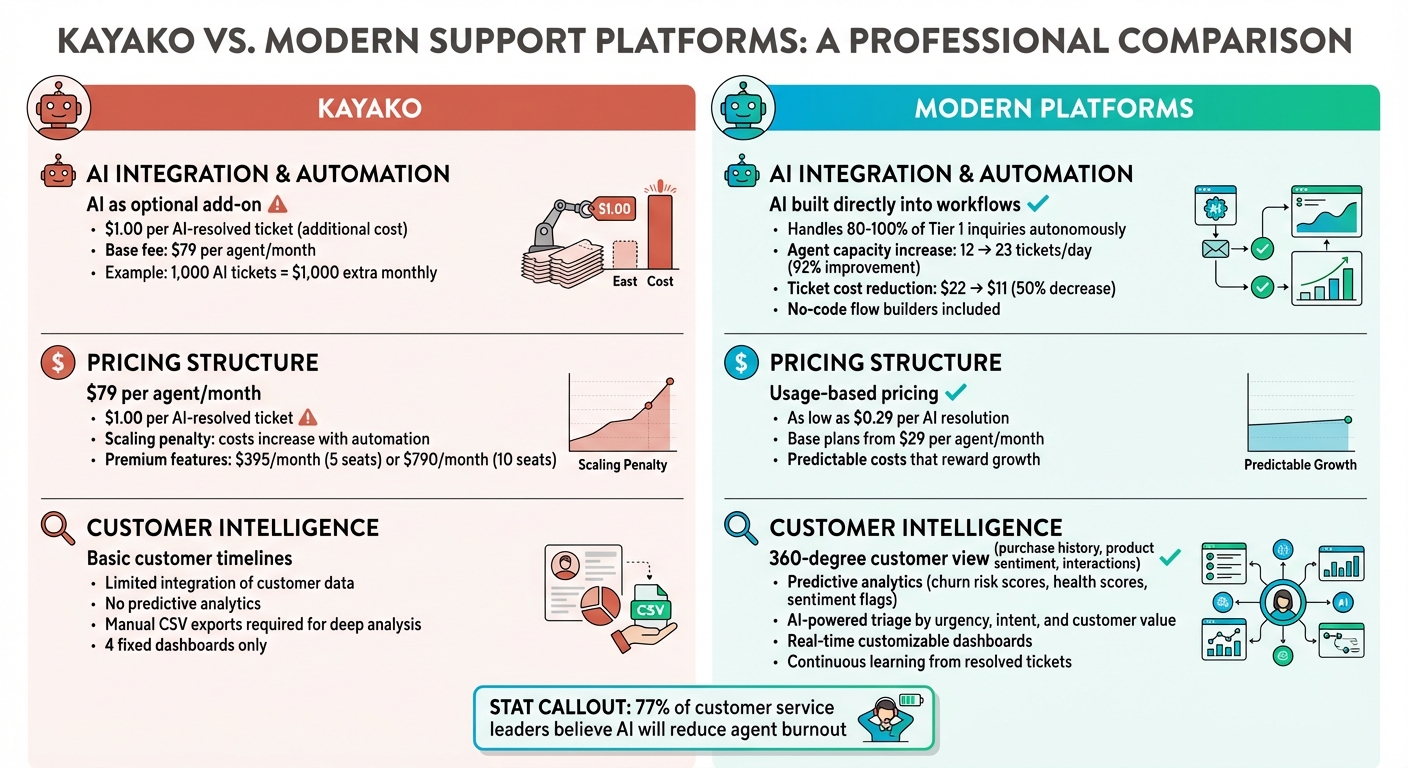
Kayako vs Modern Support Platforms: Key Differences in Pricing, Features and Performance
AI Integration and Automation
Kayako treats AI as an optional add-on, charging $1.00 per AI-resolved ticket on top of its $79 per agent monthly fee. In contrast, modern platforms build AI directly into their workflows, offering seamless customer context without additional costs.
These AI-first platforms can handle 80–100% of Tier 1 inquiries – like password resets or checking order statuses – on their own. This allows support teams to scale operations without needing to hire extra staff. With AI ticketing systems, agents can boost their daily capacity from 12 to 23 tickets (a 92% improvement) while cutting the average ticket cost in half, from $22 to $11.
Modern tools also include no-code flow builders, enabling teams to design automations using plain language. Agents can easily extract key details from tickets using conversational interfaces, further simplifying workflows.
Ultimately, the combination of advanced functionality and cost efficiency makes these platforms a smarter choice for scaling support operations.
Transparent and Scalable Pricing
Kayako claims to avoid the "Legacy Tax" associated with older platforms, but its pricing model introduces a scaling penalty. As automation increases, so do the fees – 1,000 AI-resolved tickets in a month would add $1,000 to your bill.
Modern platforms, however, offer predictable, usage-based pricing. Some charge as little as $0.29 per AI resolution, with base plans starting at $29 per agent. This pricing structure rewards growth without surprising fees. When choosing a platform, support leaders should consider their monthly ticket volumes and expected AI deflection rates to fully understand the total cost of ownership.
While predictable pricing is key, having a complete view of customer data is just as important for delivering proactive support.
Complete Customer Intelligence
Modern platforms go beyond simple customer timelines, offering a 360-degree view that integrates purchase history, product usage, sentiment analysis, and past interactions into one comprehensive profile. They also provide predictive analytics – like churn risk scores, health scores, and sentiment flags – that help teams identify and prioritize at-risk, high-value accounts before issues escalate.
AI-powered ticket routing and prioritization systems categorize tickets by urgency, intent, and customer value, ensuring that complex cases are routed to the right agents quickly. These platforms also learn continuously from resolved tickets, updating knowledge base articles and reducing training time for new agents. Operational intelligence features can uncover root causes, track topic trends, and identify policy gaps, helping support leaders shift from reactive problem-solving to strategic improvements.
In fact, 77% of customer service leaders believe AI will help reduce agent burnout by automating repetitive tasks, allowing teams to focus on more meaningful, human-centric work.
What Support Leaders Should Know
3 Main Problems with Kayako
Many teams move away from Kayako due to three recurring challenges. First, scaling limitations become apparent as businesses expand. The platform struggles to support multiple departments and lacks enterprise-level automation, leaving staff to juggle a heavier mental workload. Second, workflow gaps cause operational inefficiencies. Without a native app marketplace, teams must rely on external tools like Zapier or Tray.io, and the absence of native voice and SMS channels adds to the friction. Lastly, reporting rigidity poses a major obstacle. Kayako’s four fixed dashboards leave no room for creating custom metrics, forcing teams to resort to manual CSV exports for deeper analysis.
On top of these issues, Kayako’s pricing structure adds a financial burden. At $79 per agent monthly, plus $1 per AI-resolved ticket, costs escalate quickly. For example, resolving 1,000 tickets through automation adds $1,000 to the monthly bill. These combined challenges highlight the importance of selecting a modern support platform, which we’ll explore in the next section.
How to Evaluate a Modern Support Platform
To address these pain points, look for platforms that integrate AI, offer omnichannel support, and provide customizable reporting. Start by conducting a workflow audit. Map out every step and decision in your process. If your team has to jump between four or more browser tabs to resolve a single ticket or if routing rules rely on disconnected systems, the problem likely lies in your tools, not your team.
Choose platforms with built-in AI capabilities that go beyond assisting agents. The best options can autonomously resolve routine tasks – like password resets or order status inquiries – saving time and effort. Ensure the platform supports native omnichannel communication, including voice and SMS, to maintain a seamless customer experience.
Flexibility in reporting is another must-have. Look for real-time, customizable dashboards that eliminate the need for manual CSV exports. When evaluating costs, dig into the total cost of ownership. Hidden fees, such as pricey base plans, AI usage charges, or integration costs, can add up quickly. A focused six-week pilot with a single decision-maker and defined goals can help you avoid unnecessary complexity during the evaluation process.
Once you’ve chosen the right platform, the next step is to build operations that maximize its potential.
Building Support Operations That Scale
A modern support platform should enable intelligent automation to handle up to 80% of Tier 1 inquiries, freeing agents to focus on more complex, value-driven tasks.
Select a solution that offers comprehensive customer intelligence. Unified timelines that include purchase history, product usage, sentiment analysis, and past interactions ensure agents never have to ask customers to repeat themselves. Look for proactive tools that classify intent, predict urgency, and route tickets based on agent skills, workload, and language preferences. This shift from reactive problem-solving to proactive relationship management is especially important in B2B settings, where retaining customers and nurturing long-term relationships directly impacts revenue. As your support team grows, these capabilities become essential for scaling effectively.
FAQs
How do I know if Kayako is limiting our ability to scale?
Take a moment to assess whether your current system can efficiently manage increased support demands. Key indicators of inefficiency include:
- Lengthy Information Searches: If agents spend too much time hunting for details, it slows everything down.
- Outdated Workflows: Processes that haven’t been updated in years can be a major bottleneck.
- Limited Automation: Manual tasks where automation could step in often lead to higher handling times and operational costs.
Another red flag? Reporting tools that lack precision or require manual data extraction. This not only wastes time but also makes it harder to plan for growth.
If your platform struggles with handling volume, automating tasks, or providing actionable insights, it might be holding you back from scaling your operations effectively.
What workflows should be automated first to reduce ticket load?
Reducing ticket volume starts with automating repetitive tasks. Think about processes like order status updates, password resets, or handling FAQs – these often account for a huge chunk of support tickets. By automating these, your team can save time and focus on more pressing issues.
You can take it a step further by automating ticket routing, escalations, and follow-ups. This ensures tickets are directed to the right agents quickly, cutting down on manual effort and delays. When paired with AI-powered tools, these changes not only free up agents to tackle complex problems but also reduce response times and boost overall efficiency.
Which support metrics should an AI-native platform report in real time?
An AI-native platform must offer real-time metrics such as response time, resolution time, customer satisfaction score (CSAT), first contact resolution (FCR), and automated resolution rate (ARR). These metrics are essential for tracking support performance and maintaining top-notch customer experiences.
Related Blog Posts
- What are common reasons teams leave Service Cloud for a dedicated support platform?
- What are the biggest Freshdesk limitations for complex B2B support teams?
- Kayako alternatives for B2B support teams: what to choose and why
- How do you recreate Kayako automations, SLAs, and routing in a modern platform?