
Deciding which support channels to offer – email, chat, or phone – can be tricky. Without a clear plan, you risk overloading your team, frustrating customers, and driving up costs. Here’s the bottom line:
- Start with customer needs: Analyze how customers prefer to communicate. Use data like ticket trends, feedback, and behavior patterns to identify which channels they rely on most.
- Assess team capacity: Ensure your team has the skills, time, and resources to handle each channel effectively. Overextending can lead to burnout and inefficiency.
- Prioritize with data: Rank channels by urgency, cost, and impact. For example, phone support suits urgent issues but is expensive, while chat offers automation potential and scalability.
- Leverage AI: Use AI to automate repetitive tasks, predict demand, and route tickets efficiently. This reduces costs and improves response times.
- Track and refine: Regularly measure performance metrics like response times and customer satisfaction. Adjust your strategy based on what works and what doesn’t.
The key? Focus on what customers want, what your team can handle, and where automation can help. Start small, refine your approach, and expand your channels thoughtfully.
Understand What Your Customers Actually Need
Before making changes to your support channels, take a closer look at how your customers actually behave. On average, B2B buyers use 10 channels during their purchasing journey, and 86% of them say the experience matters just as much as the product itself. If you’re offering support options that customers don’t use, you’re wasting resources. On the other hand, if you’re not providing the channels they rely on, you’re likely losing opportunities.
Review Customer Behavior and Feedback
Start by digging into six months of ticket data. Group requests by topics like password resets, billing issues, or technical problems. Rank these categories by volume and average handle time to identify where the real demand is. Look at metadata such as product line, language, current channel, and customer history to uncover patterns. For instance, if billing questions mostly come through email, but urgent technical issues dominate phone support, you’ve uncovered clear communication preferences.
Don’t overlook self-service gaps. Keep an eye on zero-result searches in your help center to identify topics where customers are looking for answers but not finding them. If the same searches pop up repeatedly without results, it’s a strong indicator that you need a dedicated support channel for those issues. Similarly, analyze where your chatbots or voicebots fail and transfer customers to live agents. These fallback points highlight complex issues that customers prefer to resolve through live chat or phone support.
Here’s a real-world example: In June 2025, Hightouch, a data activation platform, studied its support behavior and consolidated over 300 customer Slack channels into a single workspace using Pylon. This move led to a 75% increase in customers finding answers through shared articles and saved the support team more than 100 hours per month. Around the same time, Material Security, a cybersecurity company, discovered that over 90% of their support requests came through Slack after switching from a legacy help desk system that lacked visibility. These examples prove that basing decisions on customer behavior, rather than assumptions, leads to smarter support strategies.
Use this data to group customers by their preferred communication methods.
Group Customers by How They Prefer to Communicate
Not all customers need the same level of support or use the same communication methods. Segment your customers based on account value, case complexity, and how often they reach out. For example, high-value enterprise clients with complex needs may expect phone or video support, while smaller accounts with simpler questions might be better suited for chat or email. This kind of segmentation ensures you’re using your resources where they’ll make the biggest difference.
Refine these segments using behavioral data. Look for signs of frustration, like customers who "rage click" or abandon forms, and consider offering a more direct option like live chat at those points of friction. Also, track repeat-ticket segments – if customers keep reopening the same issues, they might need real-time support. Businesses that use segmentation see customer retention rates between 75% and 85%, compared to just 60-70% for those that don’t. When you align your support channels with how different customer groups prefer to communicate, you not only reduce frustration but also improve overall efficiency.
Assess Your Team’s Capacity and Budget
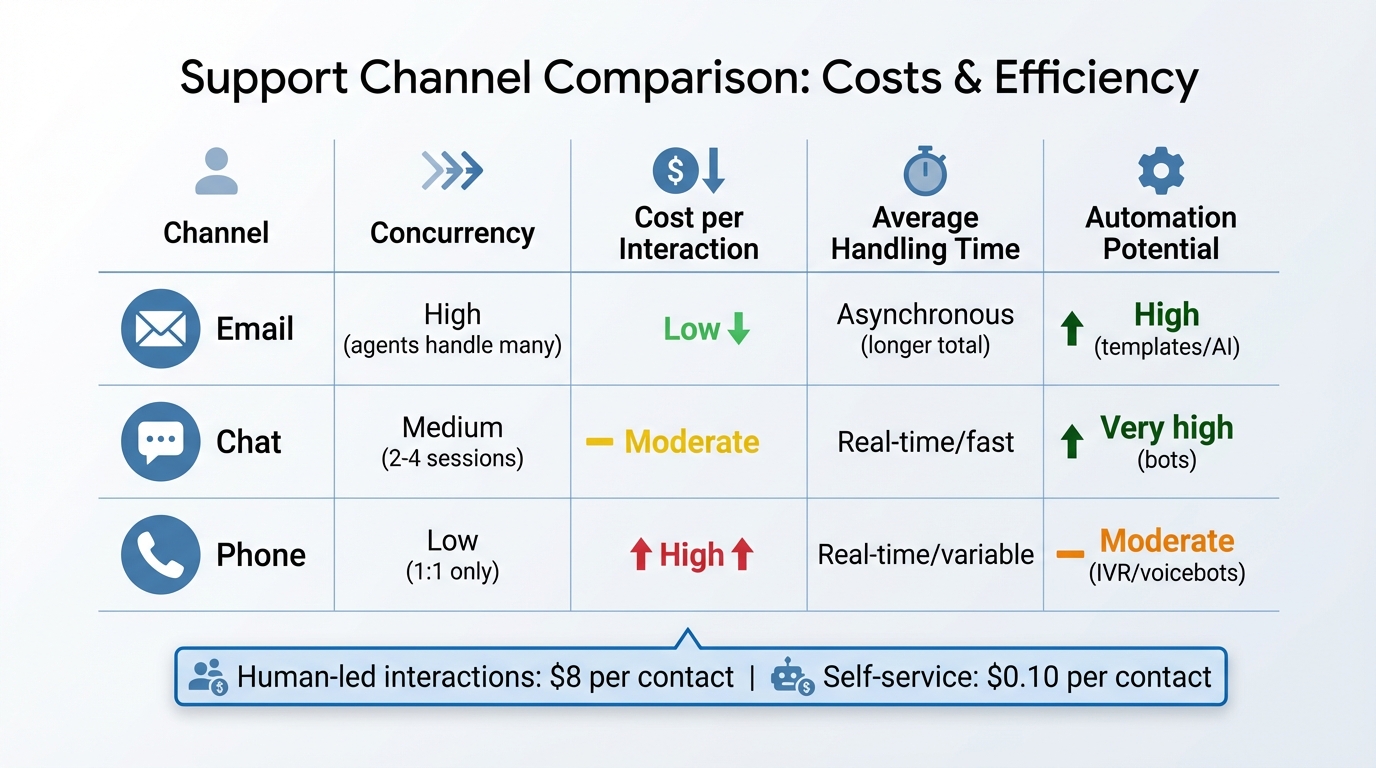
Support Channel Comparison: Email vs Chat vs Phone Costs and Efficiency
Once you’ve identified what your customers want, the next step is to determine if your team can meet those expectations. Expanding into new service channels without assessing your team’s resources can lead to overwhelmed agents and higher costs. You’ll need to evaluate two key factors: whether your team has the capacity and skills to manage the channels effectively, and whether the financials make sense as you scale.
Review Team Availability and Agent Skills
Start by analyzing your team’s availability and skill levels to ensure they can handle the demands of different channels efficiently. It’s not just about tracking average handle time (AHT); you should also measure throughput – how many resolutions an agent completes per logged-in hour. This provides a clearer picture of efficiency across channels. For instance, an agent managing five concurrent chat sessions can achieve far higher throughput than one tied to a single phone call, even if the handle times are similar.
"Throughput measures an agent’s output in a way that works for both voice and digital engagement, including asynchronous interactions." – Stephen Canterbury, Director of Customer Success Management, ASAPP
Develop a skill matrix that tracks each agent’s expertise in areas like product knowledge, technical abilities, and language proficiency. This helps ensure that complex tickets are routed to the right people, reducing the need for constant reassignments. To avoid overloading your team, establish clear ticket limits per agent. Workforce management (WFM) tools can also help by forecasting demand across channels, intent, and language, allowing you to align staffing schedules with actual customer behavior. For example, if you’re considering adding phone support, check if you have enough agents with the soft skills required for real-time, empathy-driven conversations.
Compare Costs and Growth Potential for Each Channel
Different channels come with varying costs and scalability. Phone support is the most expensive, while email and chat offer better concurrency and opportunities for automation. On average, human-led interactions cost $8 per contact, compared to just $0.10 for self-service. Automating routine inquiries can lead to huge savings. For instance, if your team handles 20,000 monthly contacts and you automate 20% of them, you could save about $16,000 per month at a variable cost of $4 per contact.
When evaluating platforms, it’s crucial to calculate the Total Cost of Operation (TCO) rather than just focusing on the per-seat license fees. Hidden expenses often include implementation time, training, third-party integrations, and add-ons for features like WFM or AI. Some platforms charge $55 to $150+ per agent per month, with additional fees of $25 to $35 for WFM and quality assurance modules. Others bundle everything into a single price, such as €65 per agent per month. Don’t forget to factor in the costs of agent burnout – 56% of customer service reps report burnout from repetitive tasks, leading to higher turnover and recruitment costs.
Use this cost breakdown to determine which channels you can support effectively, which ones might benefit from automation, and which may need to be phased out. This financial insight will help you prioritize channels as you move forward.
| Channel | Concurrency | Cost per Interaction | Average Handling Time | Automation Potential |
|---|---|---|---|---|
| High (agents handle many) | Low | Asynchronous (longer total) | High (templates/AI) | |
| Chat | Medium (2-4 sessions) | Moderate | Real-time/fast | Very high (bots) |
| Phone | Low (1:1 only) | High | Real-time/variable | Moderate (IVR/voicebots) |
Build a Framework to Prioritize Channels
When you combine customer insights with team assessments, the next step is creating a framework to prioritize your support channels. A data-driven approach ensures resources are allocated effectively, avoiding confusion for both customers and your team.
Rank Channels Using Data
Evaluate your support channels based on urgency, cost, and impact, using weighted metrics to guide decisions. Categorize channels by the speed of response they require. For example, high-priority channels like phone and live chat are ideal for urgent issues such as technical problems or security concerns. Meanwhile, medium- and low-priority channels, like email or community forums, are better suited for non-urgent requests, such as feature suggestions or general inquiries.
Operational metrics are key to understanding channel performance. For instance:
- Queue depth shows how many requests are waiting – if it’s too high, you may need to reallocate resources.
- Abandonment rate reveals when long wait times are pushing customers to give up.
- Average handle time (AHT) can identify inefficiencies or bottlenecks in interactions.
Customer segmentation also plays a role in prioritization. If your business relies heavily on high-revenue accounts, it makes sense to invest in VIP channels like fast-track queues. Additionally, tools like AI chatbots and knowledge bases can deflect tickets by resolving issues before they even reach a human agent. This scalability is crucial – especially since 38% of Gen Z and millennials will abandon support efforts if self-service options aren’t available.
Auditing your content library is another step toward enabling seamless self-service for common problems. Clearly defined response time targets – such as 30 minutes for high-priority live chat requests or 24 hours for medium-priority emails – help manage customer expectations.
Once you’ve ranked your channels, the next move is to deploy them strategically and refine your approach over time.
Test and Adjust Your Channel Mix
Begin with a high-performing channel and expand gradually. A soft launch can help you test performance without overwhelming your system or customers.
Real-time load balancing is essential during demand spikes. This allows agents to shift between channels as needed. For example:
- Set overflow rules to offer callbacks or redirect users to chat when voice queues are too long.
"Multichannel is about offering access while omnichannel is about offering continuity." – Salesforce
Keep an eye on the context switch rate – the percentage of customers who move between channels mid-journey. A high rate might signal that the initial channel isn’t meeting their needs. Companies with strong omnichannel strategies retain 89% of their customers, compared to just 33% for those with weaker approaches.
Gather direct feedback from customers after interactions on new channels to identify pain points that metrics alone might miss. A/B testing can also be valuable – experiment with knowledge base headlines or automated response templates to see what drives better self-service outcomes.
Finally, train agents to handle inquiries across multiple channels, ensuring flexibility as demand shifts. When using AI bots, set confidence thresholds to ensure they only respond when they’re certain of the solution. If not, the bot should seamlessly hand off the interaction to a human agent.
sbb-itb-e60d259
Use AI to Manage Channels More Efficiently
After refining your channel mix, the next hurdle is managing the workload effectively. AI tools can step in to automate repetitive tasks like sorting, routing, and forecasting, freeing up your team to focus on more complex challenges. Here’s how AI can simplify ticket management and workforce planning.
Automate Request Sorting and Assignment
AI can evaluate a ticket’s subject, language, and sentiment, then assign it to the most suitable agent or team – completely removing the need for manual intervention. This automated triage speeds up customer support by cutting out delays caused by manual categorization, ensuring customers are connected to the right resources faster.
For instance, Pair Eyewear reduced their first reply time by an impressive 83%, while CARET achieved a 91% average CSAT score using intelligent routing.
AI can also deflect certain requests by identifying cases that don’t require a human agent and redirecting them to self-service options. This is increasingly important given that 46% of customers expect a response within 4 hours, and 12% expect one within 15 minutes or less. Delayed or poor responses come at a steep cost, with U.S. businesses losing an estimated $1.6 trillion annually due to inadequate support.
To maintain balance, you can set confidence thresholds and capacity rules, ensuring workloads are distributed fairly.
Predict Demand Across Channels with AI
AI doesn’t just improve routing – it also helps with proactive staffing. Workforce management tools powered by AI can analyze historical data and seasonal trends to forecast agent demand across email, chat, and phone channels. This allows you to allocate resources efficiently and prevent bottlenecks before they arise.
AI systems can also prioritize tickets based on urgency, such as those nearing their Service Level Agreement (SLA) deadlines, rather than following a simple first-come, first-served approach. For high-priority customers, AI can detect frustration through sentiment analysis and escalate their cases to specialized teams or move them to the front of the queue.
"Liberty is all about delivering a personal service. I see AI enhancing that personal service because now our customers will be interacting with a human who’s being put in front of them at the right time with the right information." – Ian Hunt, Director of Customer Services, Liberty London
Companies that integrate AI into their contact centers report a 30% reduction in average response times and up to a 25% cut in operational costs. By combining demand forecasting with intelligent routing, you can maintain a well-staffed, cost-effective support operation that keeps customers satisfied and minimizes wait times. These AI-driven improvements align seamlessly with your broader support strategy, ensuring a smoother and more efficient process overall.
Track Performance and Update Your Approach
After selecting your channels and integrating AI tools, the next step is keeping an eye on performance. Regular tracking helps you spot inefficiencies and make timely adjustments to stay on track.
Measure Results for Each Channel
Don’t rely on averages – they can hide important details. For example, email response times might stretch to days, while live chat responses happen in minutes. Break down your data by channel to uncover these gaps.
Each channel has specific metrics worth focusing on. For live chat, monitor concurrent sessions and aim for a first response within 1–2 minutes. For phone support, track first-call resolution (FCR) and ensure calls are answered within 40 seconds (or about three rings). Email should aim for a 4–6 hour first response and resolution within 24 hours. Also, keep an eye on how often customers switch channels – it’s a sign their needs aren’t being met.
Customer satisfaction (CSAT) scores are helpful but don’t tell the whole story. Take NIB Health Insurance’s AI assistant, "nibby", as an example. Since 2021, it has handled over 4 million queries with a 95% understanding rate, saving $22 million in operating costs and cutting phone calls by 15%. These results came from tracking beyond CSAT, including automation rates, deflection metrics, and cost per interaction.
Make Changes Based on What the Data Shows
Review performance weekly to catch spikes or SLA breaches. Monthly reviews are ideal for updating self-service content and spotting trends, while quarterly audits provide insights into long-term patterns. These reviews help you refine channel strategies and decide when to add or drop a channel.
When you notice issues, act quickly. For example, if email resolution times are increasing, check if agents need more training or if your team is understaffed. If customers frequently move from chat to email, focus on improving chat resolution rates – this could mean better agent training or expanding chat features. Label multi-channel tickets to identify recurring problems faster.
Companies using structured measurement frameworks see 40–60% better returns on AI support systems compared to those that don’t. Set clear, channel-specific SLAs, monitor them consistently, and use automated alerts to flag potential issues before they escalate. Remember, 76.5% of customers value fast responses above all else. By keeping a close eye on performance and making quick adjustments, you’ll maintain efficient, customer-focused operations while staying aligned with the AI-driven service model.
Conclusion
Match your support channels to both customer expectations and your team’s capabilities. Begin by studying customer behavior and preferences, while keeping your team’s capacity and budget in mind. It’s worth noting that 86% of buyers are willing to pay more for an excellent customer experience. But even the best experience can crumble if your resources are stretched too thin across multiple channels.
Using customer insights and team evaluations, create a framework rooted in data to determine which channels to prioritize. Avoid relying on assumptions – let customer demographics, journey mapping, and cost-to-serve analyses guide your choices. Incorporate AI tools for routine tasks like password resets, allowing your agents to focus on more complex issues that demand empathy and creative problem-solving.
Establish specific SLAs (Service Level Agreements) for each channel and monitor their performance weekly to catch and fix issues early. For example, if customers often start on chat but later switch to email for resolution, it may signal a gap in your chat strategy that needs attention.
This approach ensures your support system grows sustainably. A strategy that works for a small team may buckle under higher volumes. By tracking metrics like first contact resolution, average handle time, and ticket deflection rates, you can scale your support operations without compromising quality. Start with 2–3 impactful channels, perfect them, and then expand carefully.
Your strategy should adapt as your business evolves. Regularly test, measure, and refine your approach based on real data. When done right, this ensures you deliver the fast support that 76.5% of customers value most, keeps your team focused on what matters, and helps you manage costs effectively.
FAQs
How can I choose the right support channels for my customers without creating confusion?
To pick the best support channels for your business, it’s important to start by understanding your customers – how they think, what they need, and the context of their interactions. Customers tend to choose a channel based on factors like urgency, complexity, and convenience. For example:
- Phone support is often the go-to for urgent or emotionally charged issues.
- Chat works well for quick, straightforward questions.
- Email is ideal for detailed, less time-sensitive inquiries.
Dive into your customer data to uncover patterns in how they engage with your support team. Pay attention to things like the types of issues they raise, the devices they use, and the times they’re most active. On top of that, surveys can give you direct insight into their preferences.
By blending data analysis with customer feedback, you can make sure your support channels align with what your customers expect. And don’t stop there – keep revisiting their preferences over time to stay in tune with their evolving needs. This approach ensures your support system remains smooth and effective.
How can AI help manage multiple support channels without creating confusion?
AI plays a key role in simplifying multichannel customer support by bringing together platforms like email, chat, and phone into one cohesive system. This integration keeps customer interactions consistent and well-organized, ensuring the context is preserved across channels and minimizing misunderstandings.
AI tools also boost efficiency by automating tasks such as routing and prioritizing requests. For example, they can assign inquiries based on urgency, agent expertise, or availability, leading to quicker responses and smarter use of resources. Features like natural language processing (NLP) and sentiment analysis further enhance support by identifying customer intent and emotions, paving the way for more tailored and proactive assistance.
By streamlining workflows and cutting down on manual tasks, AI enables support teams to manage larger volumes of inquiries without needing to expand their workforce. This makes operations more scalable while keeping the focus on delivering a better customer experience.
How can I expand support channels without overwhelming my team?
Expanding support channels while keeping your team’s workload manageable calls for careful planning. Start by assessing your team’s current capacity and predicting future demand across each channel. This will help you figure out if your team can take on the extra workload or if you’ll need to reallocate or add resources.
Use AI-powered tools to make things smoother. Features like automated triage, routing, and demand forecasting can help keep operations efficient and prevent your team from feeling overwhelmed. Keep in mind that each channel – whether it’s email, chat, or phone – comes with its own set of requirements. For instance, chat typically demands faster response times than email, which might call for a different staffing approach.
The goal is to find a balance where automation handles repetitive tasks, freeing up your team to tackle more complex customer issues. This approach not only boosts efficiency but also ensures your customers get a smooth, high-quality experience.