
A VIP portal is a specialized platform designed to prioritize your most important business accounts by offering faster, more tailored support. Instead of waiting in general queues, key customers get direct access to senior teams who understand their unique needs. This system integrates with a support CRM like Salesforce or HubSpot, automating workflows to ensure urgent issues are resolved quickly and efficiently.
Here’s what makes a VIP portal effective:
- Custom Dashboards: Provide personalized views of open cases, deadlines, and account metrics to simplify communication and keep stakeholders informed.
- Proactive Tools: Features like live chat, automated reminders, and order tracking prevent issues and ensure smooth operations.
- AI Automation: AI speeds up ticket handling, adds context for agents, such as customer notes and popups, and alerts teams about critical updates in real time.
- Step-by-Step Implementation: Identify what key accounts need, select practical features, and test thoroughly before launching.
The result? Faster resolutions, better satisfaction, and stronger relationships with your most important clients. Focus on simplicity, customer feedback, and scalability to ensure long-term success.
Core Features of a VIP Portal
A VIP portal must deliver the personalized, high-touch experience that strategic accounts demand. By incorporating the right features, businesses can ensure transparency, efficiency, and proactive engagement – key elements that separate premium support from the typical ticketing process.
Custom Dashboards for Each Account
Strategic accounts need quick, straightforward access to their support information – without sifting through endless email chains or waiting for updates. A custom dashboard provides a clear snapshot of open cases, recent activities, renewal dates, and key performance metrics. The best dashboards allow users to customize widgets, ensuring that each account can prioritize what matters most to them, whether it’s upcoming deadlines, pending tasks, or critical updates [2].
Activity logs add another layer of clarity, showing who uploaded files, completed tasks, or left comments. This is especially helpful for enterprise accounts with multiple stakeholders, keeping everyone aligned and accountable. Features like file previews, metadata access, and real-time progress updates save clients time and let them focus on their business priorities.
These dashboards set the stage for smooth, personalized communication.
Tools for Proactive Communication
Proactive communication helps prevent issues before they arise. Features like automated task reminders and instant alerts for order updates ensure that nothing slips through the cracks [2][3].
Live chat with subtle notifications provides on-demand support, while email tracking tools show whether key messages have been received and opened. This visibility helps teams gauge client engagement. Patrick Benske, Founder of Benske Agency, shared his experience:
"Sydnee turned our onboarding into a simple, repeatable process that just works" [2].
For accounts that rely heavily on supply chains, automation tools like order creation and real-time tracking reduce paperwork and minimize errors – both of which are essential for maintaining trust [3].
Beyond these tools, advanced AI capabilities elevate the VIP experience even further.
AI-Powered Insights and Automation
AI takes a VIP portal from being a static information hub to an intelligent, proactive support system. For instance, as soon as a ticket is submitted, AI can check the CRM to confirm the customer’s VIP status. It can then automatically escalate the ticket to "Urgent", ensuring priority handling based on the latest data.
Contextual enrichment is another advantage – AI can add key details like recent orders or product usage as internal notes, giving agents the context they need to respond effectively. AI-generated replies further streamline communication, maintaining high service standards while reducing response times. Notifications to dedicated Slack channels, such as #vip-alerts, keep teams informed of critical issues immediately.
Some platforms even include simulation modes, allowing you to test new escalation workflows against historical ticket data. This ensures that automation works as intended, minimizing risks for your most important accounts before any changes go live.
sbb-itb-e60d259
How to Build a VIP Portal: Step-by-Step
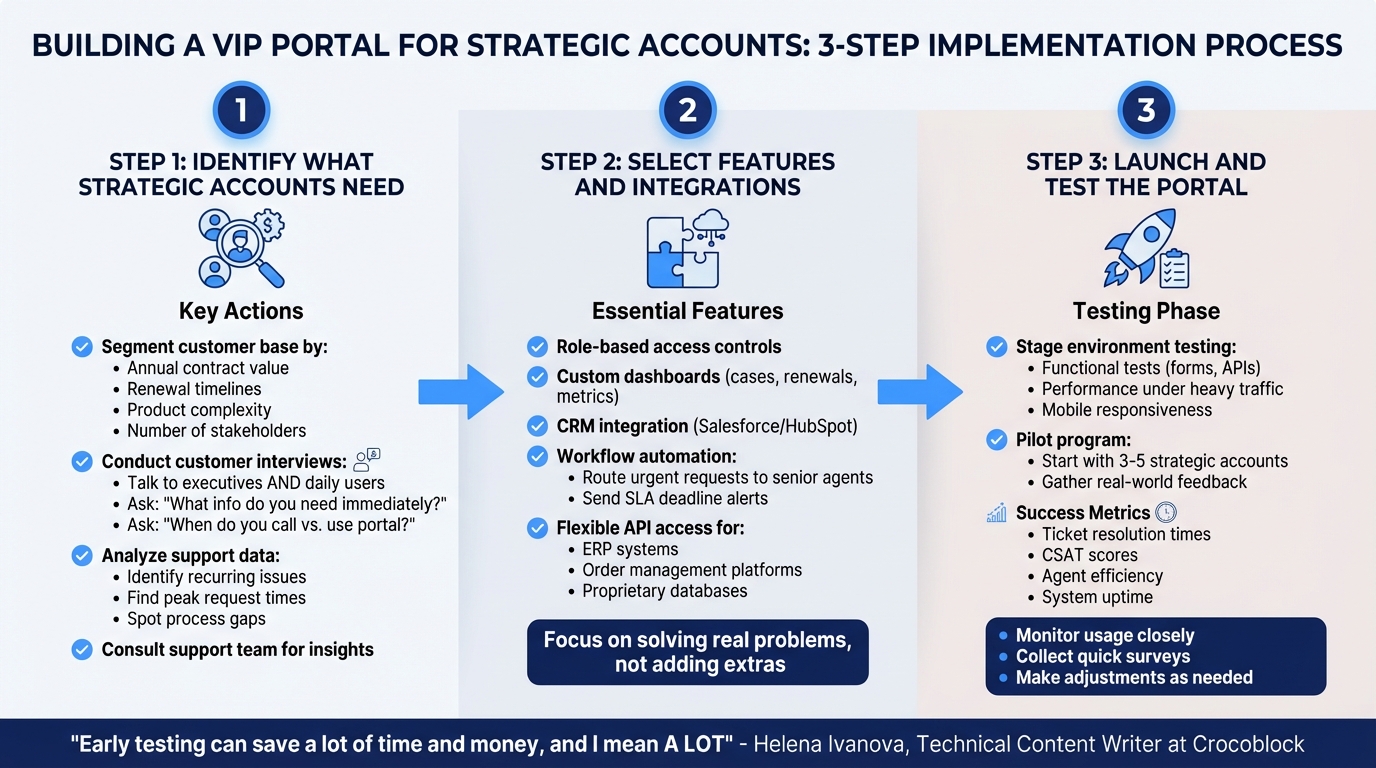
How to Build a VIP Portal in 3 Steps: Implementation Guide
Building a VIP portal requires careful planning and a clear understanding of what your key accounts need. Here’s how to approach it.
Identify What Strategic Accounts Need
To create a VIP experience, start by identifying the unique needs of your most important accounts. Segment your customer base to determine which accounts qualify as strategic. Factors like annual contract value, renewal timelines, product complexity, and the number of stakeholders can help you narrow this down. Once you’ve identified these accounts, talk to them directly. Schedule interviews not just with executives but also with the everyday users of the portal.
Ask questions like: What information do you need right away? How often do you check case statuses? What situations lead you to call support instead of using a portal? Dive into support ticket data to spot recurring issues or peak times when requests surge – these insights can reveal gaps your portal should address.
Your support team can also be a goldmine of information. They can share where current processes fail, which accounts need extra attention, and which tasks eat up the most time. Combining customer feedback, team insights, and data will give you a solid list of requirements to guide your portal design.
Select Features and Integrations
Once you’ve nailed down the needs, focus on features that address real problems instead of adding unnecessary extras. For instance, role-based access is a must – different stakeholders should see only the information relevant to them. Custom dashboards can make it easy for users to view open cases, upcoming renewals, or important metrics without having to sift through cluttered menus.
Integrating your CRM is another key step. This ensures that account information is always up-to-date. When contract terms or licensing details change, agents can see the latest details without making customers repeat themselves. Workflow automation is also a game-changer – it can handle routine tasks like routing urgent requests to senior agents or sending alerts when SLAs are nearing their deadlines.
Pick integration tools that align with your current technology stack. Features like flexible API access can connect your portal to ERP systems, order management platforms, or proprietary databases, giving you all the context you need without constant custom development.
With these features in place, it’s time to test the portal in real-world conditions.
Launch and Test the Portal
Before rolling out the portal, test it thoroughly in a staging environment to catch any issues. Helena Ivanova, Technical Content Writer at Crocoblock, emphasizes the value of early testing:
"Early testing can save a lot of time and money, and I mean A LOT" [4].
Break testing into two parts: functional tests to ensure forms work and APIs connect properly, and non-functional checks like performance under heavy traffic and mobile responsiveness [4].
Start with a pilot program involving 3–5 strategic accounts. This lets you see how the portal performs in real-world scenarios and gather honest feedback. Use benchmarks like ticket resolution times, customer satisfaction (CSAT), CES, and NPS scores, and agent efficiency to measure success [5].
When Everhance switched to a high-performance enterprise CMS in October 2025, CEO Ramsey Mohsen highlighted the importance of reliability:
"The reassurances of uptime are there. There’s no more worry of waking up at 2 a.m. to see that the site has had an outage" [5].
This kind of dependability is critical for VIP portals, where downtime can damage relationships with your top accounts. Monitor usage closely during the early stages, collect quick survey feedback, and make adjustments as needed.
Common Mistakes and How to Avoid Them
When building VIP portals, organizations often stumble into avoidable traps. Recognizing these pitfalls can help you save resources, avoid frustration, and maintain strong relationships with your most important accounts. Here’s a breakdown of common missteps and how to steer clear of them:
Adding Too Many Features
Overloading a VIP portal with features can be counterproductive. When users face a cluttered interface, they’re more likely to disengage. In fact, 57% of U.S. consumers abandon loyalty programs if earning rewards or points feels too complicated or time-consuming [7]. The same logic applies to VIP portals – simplicity is key.
Kenneth Pangan, a Writer and Marketer at eesel AI, highlights the importance of streamlining processes:
"The trick is to get this ticket routing process on autopilot so it’s fast, reliable, and works every single time without someone having to manually flag a ticket" [1].
Start small by focusing on essential features like escalation routing and customizable dashboards. Avoid overwhelming your team by limiting the scope to seven key performance indicators (KPIs) at most [8]. And don’t forget – customer feedback is just as critical as simplicity.
Skipping Customer Input
Ignoring input from strategic accounts during the design process can erode trust. Tailored features are only effective if they align with what your customers actually need. Without their feedback, you risk creating a portal that misses the mark entirely [6]. Traci Phillips, an Executive Leadership and Performance Coach, underscores the importance of understanding client expectations:
"Today’s VIP client is looking for a different tier of experience from me because they feel they’ve invested in us. That’s why it’s critical to reciprocate their loyalty" [10].
Don’t rely on assumptions about customer preferences. Instead, collect actionable insights through tools like NPS surveys and create an advisory council composed of key accounts. These steps help ensure your portal evolves to meet customer needs. If a strategic account reduces spending or leaves, conduct exit interviews to uncover gaps in their experience [10]. Keep in mind that 20% of your customers often drive 80% of your revenue [9] – their voice should shape your portal’s design.
Failing to Plan for Growth
A VIP portal that works well for a handful of accounts may falter as your customer base expands. Stagnant portals can quickly lose relevance, leading to disengagement [7]. To avoid this, your portal must scale – not just technically but also in the value it delivers over time.
Plan for growth by scheduling quarterly strategy reviews to ensure your portal adapts to market changes and evolving customer expectations [8]. Build flexibility into your design by incorporating integration capabilities that can connect with future systems. Avoid rigid, hard-coded solutions that require constant maintenance. Remember, even a 5% increase in customer retention can significantly boost profits [8]. A scalable, forward-thinking portal is an investment in your long-term success.
Conclusion
Creating a VIP portal for your strategic accounts isn’t just about adding premium features – it’s about rethinking how you manage your most critical relationships. When done right, these portals improve efficiency and reduce errors, helping your team work smarter [11][12]. They also deliver measurable financial benefits, like more accurate invoicing and quicker payment cycles, thanks to automated validation against contract terms [11].
A customized VIP portal doesn’t just streamline operations – it strengthens customer loyalty. By offering real-time data and personalized dashboards, it helps retain key clients and fosters long-term partnerships [13]. Barry Gottesman, Director of Operations at Bob Hall LLC, summed it up well:
"With VIP, our operations have become more efficient, and satisfaction has soared with our employees." [12]
To achieve these outcomes, focus on a thoughtful, phased implementation. Start with essential features like custom dashboards, proactive communication tools, and AI-driven sentiment analysis. Make sure the portal integrates seamlessly with your existing systems to maintain a unified source of truth [11][13]. Crucially, involve your strategic accounts in the design process and establish feedback loops to refine and improve the portal over time [13].
A well-executed VIP portal shifts your approach from reactive to proactive, turning important customer relationships into true partnerships. By investing in a VIP portal now, you position your organization for stronger client retention, increased revenue, and sustainable growth – laying the foundation for long-term success.
FAQs
Who should qualify as a VIP account?
VIP accounts refer to customers who bring outstanding value to a business. These individuals or entities typically stand out due to their high engagement, significant spending habits, and unwavering loyalty. Beyond their direct contributions, VIPs often act as influential advocates, spreading positive word-of-mouth that can attract new customers. Because of their outsized impact on revenue, they require tailored, premium-level support to nurture and sustain these critical long-term relationships.
How do I measure VIP portal ROI?
To evaluate the ROI of a VIP portal, focus on metrics that can be measured directly, such as cost savings, efficiency gains, and customer satisfaction. Key performance indicators to monitor include:
- Lower support costs: Track reductions in expenses related to customer support.
- Faster ticket resolution: Measure the time it takes to resolve issues and compare it to previous benchmarks.
- Customer retention: Analyze retention rates to see if the portal contributes to long-term loyalty.
- Increased engagement: Monitor user activity within the portal to gauge its effectiveness.
Leverage analytics tools to gather insights on portal usage, customer sentiment, and how escalations are managed. This data helps tie the portal’s performance to clear, measurable business outcomes.
How do I keep the portal simple as it scales?
To maintain a straightforward VIP portal as it grows, prioritize consolidating data and streamlining workflows. Start by creating account-based views that unify customer interactions, tickets, and other relevant data into a single, easy-to-navigate record. This approach cuts down on clutter and boosts efficiency.
Additionally, automate key workflows like escalation and prioritization. For example, tagging VIP customers in your CRM ensures they receive timely attention without adding unnecessary manual tasks. By blending these methods, you can keep your portal manageable and effective, even as it scales.