


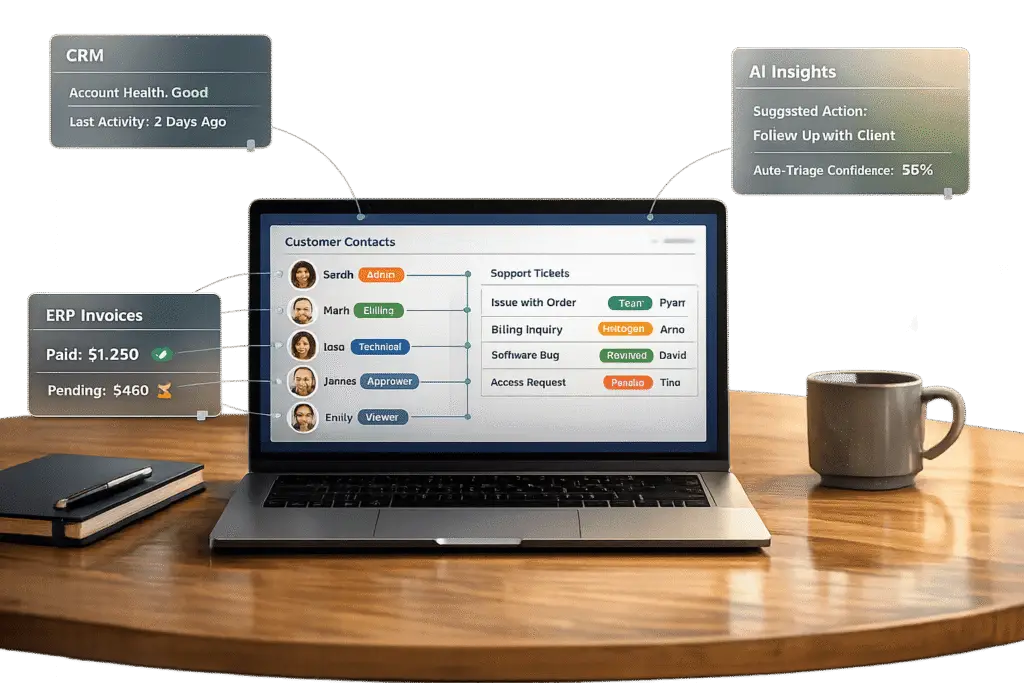
Managing multiple contacts within a single customer account can transform your B2B support process. A well-designed portal ensures seamless collaboration, tailored access, and efficient case management for teams of varying sizes. Here’s what you need to know:
- Why it matters: Traditional single-user portals lead to miscommunication, duplicate tickets, and inefficiencies. Multi-contact portals solve these issues, improving coordination and reducing churn.
- Key features: Role-based permissions, shared ticket views, and account-wide tracking are critical for secure, streamlined operations.
- How to build it: Start with a clear account hierarchy, configure shared views and automated support workflows, and integrate with CRM and ERP systems for consistent data.
- AI benefits: Automate ticket routing, generate summaries, and use predictive insights to anticipate and address issues before they escalate.
- Challenges to overcome: Managing permissions, ensuring data consistency, and balancing customization with usability are common hurdles, but careful planning and phased rollouts can mitigate them.
This approach not only simplifies support but also strengthens relationships with your customers while driving operational efficiency.
How to create a customer portal in 11 minutes (2024 Update!)
sbb-itb-e60d259
Core Requirements for Multi-Contact Support
Creating a portal that supports multiple contacts per account requires three key features. These features address the coordination hurdles often encountered in single-user portals.
Role-based permissions are essential for maintaining secure access in a multi-contact environment. By using property-based filtering, you can ensure that sensitive company data is only visible to the appropriate stakeholders. For instance, technical staff might need access to system logs, while the finance team focuses on billing details. Custom "Data Views" can further refine access, allowing specific roles to see only the tickets, activities, or surveys that are relevant to them. For enterprise-level clients, consider implementing a hierarchical structure that accommodates everything from small teams to large organizations with multiple departments and sub-groups.
Shared ticket views streamline collaboration and reduce redundant efforts. These views allow team members to see if an issue has already been reported by a colleague, preventing unnecessary duplication. Shared thread access enables multiple contacts within an organization to contribute to a single support case. It’s also important to distinguish private submissions from account-level tickets to maintain clarity. Automated notifications ensure that all authorized stakeholders stay informed about ticket updates, while account-wide tracking offers a broader perspective on ongoing support efforts.
Account-wide activity tracking consolidates all interactions, escalations, and SLA statuses into a single, centralized timeline. This feature gives authorized contacts a comprehensive view of the support history. Role-specific dashboards and KPI scorecards can be configured to meet the needs of different users – managers might focus on overall trends, while technical contacts dive into ticket details and system health scores. This proactive approach helps identify and address potential issues before they escalate.
How to Design and Build Your Multi-Contact Portal
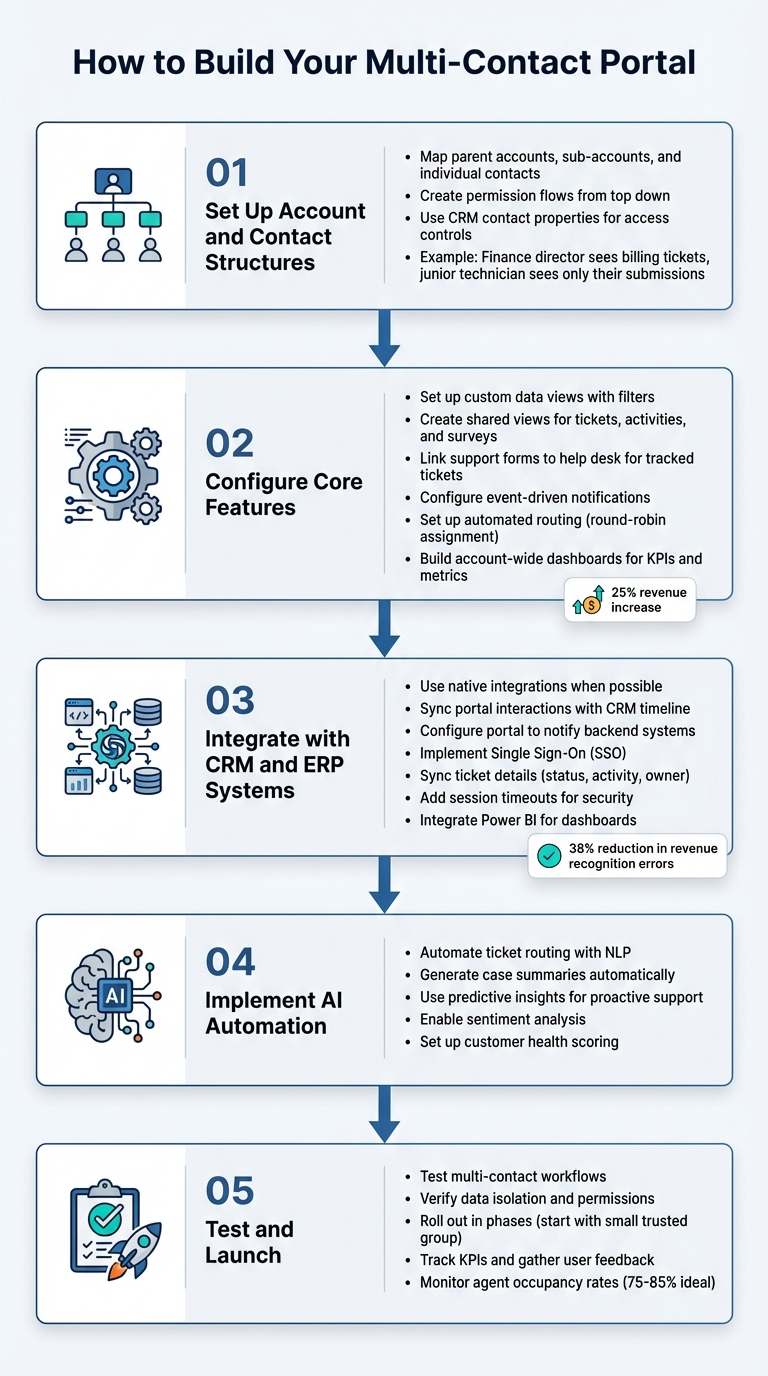
Step-by-Step Guide to Building a Multi-Contact Customer Portal
Set Up Account and Contact Structures
Start by mapping out the relationships between parent accounts, sub-accounts, and individual contacts. A well-thought-out hierarchy ensures that permissions flow smoothly from the top down, whether you’re supporting a small team of five or a large organization with hundreds of users across departments. This structure is the backbone of your portal – everything from shared views to dashboards and automated workflows depends on getting this right from the start.
Use CRM contact properties to fine-tune access controls during setup. For instance, a finance director might need access to all billing-related tickets, while a junior technician should only see the cases they’ve personally submitted. This type of filtering ensures sensitive information stays protected while still allowing transparency where it’s needed. The ultimate aim is to create a centralized view that enables both agents and customers to monitor interactions across multiple channels from one cohesive account structure.
Once your account hierarchy is in place, you can start configuring the portal’s core features to optimize your support processes.
Configure Core Features Step-by-Step
With your structure defined, it’s time to set up custom data views and automation processes to keep everything consistent for all contacts. Use filters to create shared views for tickets, activities, and surveys that can be accessed by multiple users. This helps avoid duplicate submissions and keeps everyone aligned. Link your support forms to the help desk so that every request generates a tracked ticket – this way, nothing slips through the cracks.
Set up event-driven notifications to keep stakeholders informed about ticket updates or escalations. Automated routing, like round-robin ticket assignment, ensures requests are directed to the right agents or teams, allowing for quick and efficient responses no matter who submitted the ticket. For a broader perspective, configure account-wide dashboards that display key metrics like active cases, KPIs, and overall sentiment, giving users with company-wide access the ability to monitor the organization’s health in real time.
Integrate with CRM and ERP Systems
To maximize efficiency and maintain consistent data, integrate your portal directly with your CRM and ERP systems. Opt for native integrations whenever possible to ensure the portal functions seamlessly as part of your existing help desk and CRM ecosystem. Sync all portal interactions – like messages, form submissions, and ticket updates – with the CRM timeline and conversation inbox to maintain a complete record of customer engagement. Configure the portal to notify backend systems, such as your CMS or ERP, whenever specific events occur, helping to prevent escalations and keeping data aligned across platforms.
Use Single Sign-On (SSO) to simplify access, allowing customers to log in using their existing corporate credentials. Sync key ticket details – like status, last activity date, and ticket owner – from the CRM to the portal, so customers always see up-to-date information without manual updates. For added security, implement session timeouts to log out inactive users, especially when ERP data is involved. Finally, integrate tools like Power BI to create dashboards that pull data directly from the portal, eliminating the need for manual exports or complex table setups.
Use AI to Automate Workflows and Reduce Manual Work
Once your portal is fully integrated, AI can take over repetitive tasks, making operations smoother and more efficient. By leveraging Natural Language Processing (NLP) and machine learning, AI can analyze incoming requests, route them intelligently, and even predict potential issues before they snowball. This shift from static, rule-based systems to more adaptable, context-aware automation is reshaping how B2B teams handle intricate, multi-stakeholder accounts.
Below, we’ll explore how AI enhances ticket management, simplifies documentation, and enables proactive customer support.
Automate Ticket Routing and Escalations
AI-driven ticket routing eliminates the guesswork of manual categorization. It can analyze incoming tickets, identify their type – whether it’s a bug report, billing issue, or feature request – and automatically apply the right tags. This ensures tickets are sent to the correct team from the get-go. Through skill-based routing, AI matches tickets to agents based on expertise, language skills, and workload, leading to quicker resolutions and fewer handoffs.
AI goes a step further by prioritizing tickets based on sentiment analysis and urgency indicators. For instance, keywords like "outage" or "cannot log in" are flagged, and patterns such as rapid follow-ups from multiple contacts within the same account are noted. When integrated with your CRM, AI can even prioritize tickets from high-value or Premier-tier accounts, ensuring they receive attention regardless of how the issue is phrased.
"By moving beyond rigid rules, AI analyzes the content and context of incoming requests, enabling faster, more accurate, and more efficient workflow management."
- Nooshin Alibhai, Founder and CEO of Supportbench
Generate Case Summaries and Knowledge Articles
Documenting cases manually can be time-consuming, but AI simplifies this process by generating case summaries automatically when tickets are updated. This spares agents from having to log every detail themselves. Additionally, AI can transform resolved cases into knowledge base articles by extracting the key problem and solution from case histories. This keeps your knowledge base current while cutting down on the manual work needed to maintain it.
To make the most of AI summarization, start with the most crucial details in your case notes – AI tools often prioritize the first sentence. Use clear, descriptive headings like "How to Resolve Connection Errors" instead of vague labels. If your case involves conditions (e.g., "Only if", "Except when"), introduce them early in sentences to ensure they’re not overlooked during summarization. For complex or compliance-related cases, always include a human review to confirm accuracy.
Use Predictive Insights for Proactive Support
AI’s predictive capabilities help you tackle issues before they escalate. By analyzing account-level data and communication patterns, AI can flag accounts that may need extra attention. Customer health scoring identifies high-value or multi-stakeholder accounts at risk, while sentiment analysis detects signs of frustration, even when customers don’t explicitly ask for help. Additionally, SLA breach prediction warns managers and agents about potential missed deadlines, helping prevent contract violations in complex B2B scenarios.
Metrics like Predictive CSAT (Customer Satisfaction) and First Contact Resolution (FCR) detection are especially useful for multi-contact portals. AI can predict customer satisfaction trends based on interaction data and determine whether an issue was resolved on the first try – something that’s historically been hard to measure. These insights are presented in customizable dashboards, offering agents and account managers a real-time view of account health, SLA compliance, and satisfaction trends. According to industry research, adopting AI for customer management can boost revenue by 25% by cutting operational costs and reducing customer churn [1].
Common Challenges and How to Solve Them
Creating a multi-contact portal might appear simple at first, but the reality often involves navigating issues like managing permissions, ensuring data stays consistent, and balancing customization with usability. Tackling these challenges early can save time, reduce user frustration, and minimize security risks. Let’s dive into some practical solutions for these common hurdles.
Managing Complex Permission Structures
Even with a well-thought-out design, handling access permissions can become tricky. As organizations grow, the risk of "role creep" increases – this is when users accumulate more access than they need. In large systems, administrators often deal with hundreds of custom roles. For example, some enterprise platforms allow nearly 200 custom agent roles with extremely detailed permissions. This can bog down support managers, who end up spending their time managing access requests instead of focusing on customer needs. Worse, overly broad permissions can lead to sensitive data being exposed.
To address this, stick to the principle of least privilege – only grant users the exact access they require. Regularly audit role assignments, ideally every quarter, to catch and correct unnecessary permissions. AI tools can help by integrating with Role-Based Access Control systems to automate ticket routing, ensuring only the right agents handle specific cases. These tools can even draft responses for review, reducing the need for widespread administrative access. Before launching custom roles, test them thoroughly using a dummy agent account to confirm everything works as expected [2].
"Get it right, and your team works efficiently without stepping on each other’s toes. Get it wrong, and you end up with agents seeing tickets they shouldn’t, or admins drowning in requests to change basic settings."
- Stevia Putri, Marketing Generalist, eesel AI
Keeping Data Consistent Across Systems
Integrating your portal with systems like CRM and ERP is critical, but it often leads to data consistency issues. Over 70% of CRM initiatives fail to meet expectations, largely due to unclear data ownership during integration. Establishing a single source of truth – where each system has clearly defined responsibilities – can prevent conflicts. For instance, let the ERP system manage billing data while the CRM handles customer roles.
Clear data ownership pays off. In early 2026, a SaaS company synchronized its CRM and ERP systems to align opportunities, invoices, and payments. This cut revenue recognition errors by 38% and allowed the finance team to close monthly books four days faster. Another example: A B2B startup used real-time integration between AWS product events and HubSpot, relying on webhooks and Lambda functions to prioritize accounts based on updated usage data. This reduced average ticket handling time by 22%. To maintain consistency, consider using an event-driven architecture, queue API requests to avoid rate limits, and centralize logging [3].
"When your CRM operates in isolation, teams work with partial context, customers receive inconsistent experiences, and leadership makes decisions based on fragmented data."
Balancing Customization and Usability
A multi-contact portal needs to serve a wide range of users – executives, IT admins, support agents, and end users – without overwhelming them. The challenge lies in offering robust customization options while keeping the interface simple and intuitive. Structuring data hierarchically and using role-specific views can help scale access effectively. Automating tasks like field updates and ticket routing also ensures users can focus on what matters most. Familiar UI patterns, like pivot tables that mimic spreadsheets, can make complex features easier to use.
Platforms like Supportbench excel at this by offering hundreds of customizable features without requiring extra plugins or add-ons, keeping costs and complexity low [1]. Addressing these usability challenges ensures your portal remains both flexible and approachable, solidifying its role as a reliable support tool.
Testing, Launching, and Improving Your Portal
Creating a multi-contact portal is just the beginning. The real challenge lies in testing, launching, and fine-tuning it to meet user needs. Skipping or rushing these steps can lead to security vulnerabilities, user frustration, and expensive fixes. A thoughtful plan that includes testing workflows, phased rollouts, and ongoing monitoring ensures your portal delivers value from day one and continues to improve over time. This process also validates the configurations, integrations, and AI-driven automations you’ve built, ensuring they work seamlessly in real-world conditions.
Test Multi-Contact Workflows
Before launching, it’s critical to test every workflow to ensure functionality and data security. Start with data isolation testing – like confirming SQL filters use conditions such as where email = {{ current_user.email }} – to ensure users only access their own data. Verify that role-based permissions are properly restricting access to prevent unauthorized viewing of other customers’ information [4]. Test key scenarios, including ticket creation, case escalation, and account-wide activity tracking. To avoid risks with live data, use cloud-based test environments or sandboxes to validate these workflows [5]. This step sets the stage for a smoother rollout.
Roll Out in Phases
A full-scale launch can be risky. If something goes wrong, it could disrupt operations for all users. Instead, roll out your portal in phases. Begin with a small group of trusted users – those with simpler needs and open communication channels. This allows you to spot and resolve issues early, before they affect the broader user base.
Maintain a stabilization backlog to separate urgent fixes from long-term feature requests. This helps your team focus on resolving critical problems without distractions [5]. Use real-time dashboards to monitor metrics like ticket resolution times and agent occupancy rates [1]. AI-driven sentiment analysis can also provide insights into user feedback during each phase, helping you understand how customers feel about the portal [1]. By refining the system based on early feedback, you can ensure a better experience for all users.
Track KPIs and Gather User Feedback
Continuous improvement relies on tracking the right metrics and listening to user feedback. Start with leading indicators – like overtime hours or ticket backlog growth – to predict potential issues such as declining service quality or agent fatigue. Pair these with lagging indicators, such as customer satisfaction scores or profit margins, to evaluate past performance [7]. For example, agent occupancy rates should ideally fall between 75% and 85% to maintain productivity without causing burnout [6].
Automate workflows to collect feedback at key moments, such as after a user’s first login or a resolved ticket. Proactive health scoring tools can also help you assess client needs and experiences immediately after onboarding. This data allows you to prioritize updates that boost user satisfaction and operational efficiency. Plus, implementing a customer portal can lead to a 25% revenue increase by cutting operational costs and reducing customer churn [1].
Conclusion
A multi-contact portal is a smart move for creating scalable and efficient B2B support. By starting with a flexible account hierarchy and strong permissions, you ensure that each contact gets access to what’s relevant, while safeguarding sensitive information.
AI-powered automation simplifies handling complex accounts. Tools like sentiment analysis and health scoring help you identify at-risk accounts early, allowing support teams to act before problems escalate. Automated routing and event-driven notifications cut down on repetitive tasks, and real-time dashboards offer instant insights into performance. However, technical capabilities alone aren’t enough – careful planning and ongoing adjustments are key for long-term success.
Rolling out your portal in phases, while keeping a close eye on KPIs and gathering user feedback, ensures it evolves alongside your business. Seamless integrations with CRM and ERP systems keep data consistent across your organization, eliminating the need for extra plugins or add-ons [1]. To stay effective, the portal needs regular updates, informed by user feedback and performance tracking, to keep pace with changing business demands.
Providing robust self-service tools – like knowledge bases, FAQs, and AI-driven chatbots – can significantly lower ticket volumes while maintaining high customer satisfaction. This lets your support team focus on what matters most: delivering high-quality answers and building stronger relationships with customers.
The result? A scalable, AI-driven support system that manages increasing complexity without adding extra costs or staff.
FAQs
How do I prevent contacts from seeing the wrong account data?
To keep contacts from accessing the wrong account information in a multi-contact portal, implement Role-Based Access Control (RBAC). Assign specific roles, such as Viewer or Account Manager, with permissions that match their duties. Set up account-level access so contacts can only view data related to their own organization. Make it a habit to review permissions regularly to uphold security standards. Additionally, rely on centralized authentication systems like SAML to apply consistent access rules across the board.
What’s the simplest account hierarchy that still scales?
The most straightforward scalable account hierarchy is a parent/child structure. This approach connects parent companies with their subsidiaries or divisions, streamlining the organization of support data without adding unnecessary layers of complexity.
This structure strikes a balance between being easy to manage and scalable. It clearly defines account relationships, enabling support teams to minimize mistakes, work more efficiently, and adapt to various organizational levels – all without making the system overly complicated.
Which portal metrics should we track first after launch?
Once your portal is live, it’s important to keep an eye on specific metrics to gauge its success and identify areas for improvement. Here are some key ones to focus on:
- First Response Time: This measures how quickly your team responds to customer inquiries. A shorter response time often leads to better customer experiences.
- Resolution Rates: Tracking how effectively issues are resolved gives you a clear picture of your team’s efficiency and problem-solving capabilities.
- Customer Satisfaction (CSAT): CSAT scores provide direct feedback from your users, helping you understand how well the portal meets their needs.
- Support Cost as a Percentage of Revenue: This metric evaluates the financial efficiency of your support operations, ensuring they align with your overall business goals.
In addition to these, monitoring AI containment (how well automated systems handle queries without needing human intervention) and support activity levels can help you fine-tune workflows. This is especially useful when managing the needs of more complex customer accounts, ensuring the portal delivers both efficiency and a seamless experience.
Related Blog Posts
- How do you set up a customer portal that supports role-based access and multiple customer teams?
- Slack vs. The Customer Portal: Why Enterprise Clients Demand a Proper Dashboard
- Customizing Portals for Strategic Accounts: Why One Size Doesn’t Fit All
- How to design a customer portal that supports parent/child (multi-entity) accounts






