
Want to improve your B2B support onboarding process? Here’s the key: a structured, milestone-driven curriculum. Why? Because 86% of customers stay loyal when companies focus on training and education. Yet, most teams rely on outdated shadowing methods that overwhelm new hires and disrupt senior agents.
The Solution:
- Define Roles & Skills: Tailor training for frontline agents, escalation specialists, and senior team leads.
- Identify Gaps: Use QA reviews and sentiment analysis to pinpoint where new hires struggle.
- Modular Training: Implement a 30/60/90-day roadmap with clear milestones for faster ramp-up.
- Leverage AI: Use tools for case management, knowledge base updates, and automation to streamline learning.
Results:
- 50% higher customer retention
- 40% lower churn rates
- Faster transitions from training to independence
Ready to build a curriculum that works? Let’s dive into the details.
Assess Your Onboarding Requirements
Before designing any training program, it’s essential to map out the skills each role requires, identify knowledge gaps, and tailor the training to match the complexity of the accounts your team supports.
Define Roles and Required Skills
Each support role comes with its own unique responsibilities. For instance:
- Frontline agents deal with high-volume, low-risk tasks like password resets or billing FAQs. They need to be skilled in identity verification and redacting personally identifiable information (PII).
- Escalation specialists handle more complex issues, such as policy exceptions, security changes, and advanced troubleshooting. Their skill set includes tasks like generating diagnostic bundles, rotating API keys, and validating webhooks.
- Senior agents and team leads focus on mentoring newer team members, conducting quality control, and managing support escalations. They also review AI-generated responses to ensure they strike the right balance between empathy and technical accuracy.
- Knowledge managers act as custodians of the team’s documentation, maintaining up-to-date SOPs, macros, and help center articles. They perform regular reviews – usually weekly – to ensure all resources remain current and reliable.
Start by auditing the top 20–30 most common support requests. This will help you determine which roles should handle specific types of issues and the skills required for each. Once roles are clearly defined, evaluate your team’s current capabilities to pinpoint where additional training is needed.
Conduct a Skills Gap Analysis
To identify gaps, compare documented procedures with informal practices. A good starting point is to review 20–50 weekly interactions through quality assurance (QA) processes. This can help uncover recurring issues, whether they’re related to policy adherence, tone, or technical accuracy. Real-time monitoring of sentiment and frustration signals can also reveal where new hires might be struggling with specific ticket types, highlighting areas for targeted training. Interestingly, new hires often spot documentation gaps within their first 30 days on the job.
Here’s a key insight: nearly half (48%) of new hires receive no structured training beyond their first day. Yet, employees who are well-onboarded are 82% more likely to stick with the company long-term [6]. A structured approach to identifying skills gaps ensures that knowledge transfer doesn’t happen by accident.
Match Training Content to Account Complexity
Once you’ve identified the gaps, it’s time to adjust your training materials based on the complexity of the accounts your team handles. For simpler workflows, such as Tier 0/1 issues, focus on straightforward processes. For high-risk or complex cases, create training that includes multi-step scenarios and emphasizes recognizing red flags – like suspected fraud or significant refund requests – that require escalation.
Agents also need to learn how to interpret product signals. For example, they should be able to recognize when a user has connected an integration, identify a job failure, or understand the context of a workspace. This kind of context-aware support is crucial.
"The fastest way to lose trust is a bot that sounds sure and is wrong. The fastest way to earn trust is a bot that is honest about uncertainty and hands off cleanly." – Apptension [2]
Training should also align with the risk levels and authorization requirements of the accounts your team supports. For enterprise accounts, agents need to verify user roles and permissions before making account-specific changes. They also need clear guidelines for managing complex de-escalations and handling frustrated stakeholders. Considering that 76% of consumers report feeling frustrated when companies fail to provide personalized interactions [2], it’s vital that training from day one focuses on collecting comprehensive context and communicating with empathy.
sbb-itb-e60d259
Build a Modular Curriculum Structure
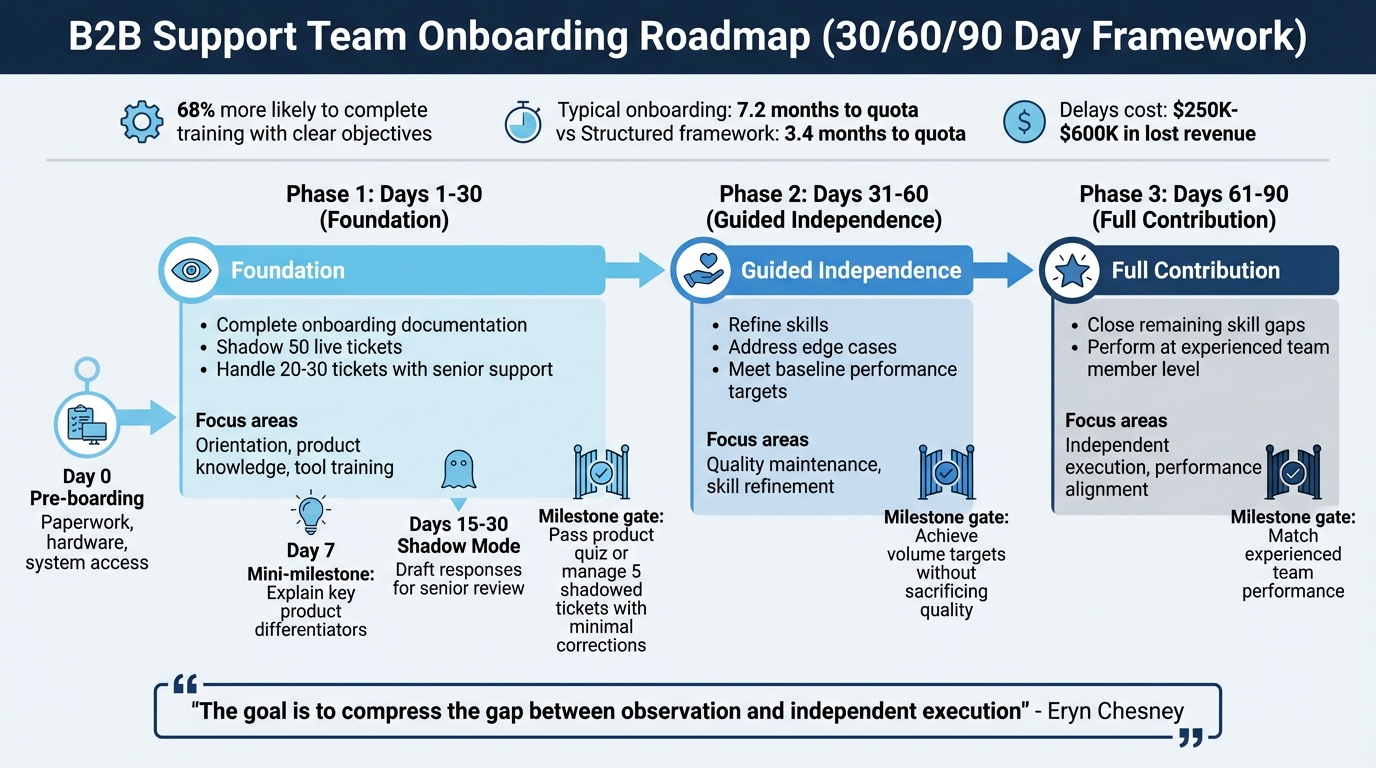
30/60/90-Day B2B Support Onboarding Roadmap with Key Milestones
Design your training program with clear, progressive phases. This method not only simplifies traditional onboarding but also integrates AI tools to support continuous learning. With a modular structure, you can set clear milestones and tailor training to specific roles, ensuring a more effective learning experience.
Break Training into Phases
Structure the training journey into three stages: observation, guided practice, and independent execution. A 30/60/90 day roadmap works perfectly for this:
- Day 1–30 (Foundation): Focus on orientation, product knowledge, and learning the tools. Key goals include completing onboarding documentation, shadowing around 50 live tickets, and actively handling 20–30 tickets with the support of senior team members [1].
- Day 31–60 (Guided Independence): Shift to refining skills, addressing edge cases, and meeting baseline performance targets while maintaining quality [1].
- Day 61–90 (Full Contribution): Close any remaining skill gaps to align with the performance of experienced team members [1]. Research shows that learners given clear objectives upfront are 68% more likely to complete their training [7].
"The goal is to compress the gap between observation and independent execution." – Eryn Chesney, CX Leader [1]
Create Role-Specific Training Paths
Tailor training to the responsibilities of each role. For example:
- Support Representatives: Emphasize technical troubleshooting and ticket resolution workflows.
- Account Managers: Focus on negotiation strategies, value selling, and quarterly business reviews [8].
Organize training around "intents" – common customer needs like billing disputes, technical setups, or RMAs. Start with Tier-1 intents (frequent, low-risk issues) before progressing to more complex Tier-2 scenarios [3][4]. Without reinforcement, trainees often forget 87% of their training within a month, highlighting the need for ongoing learning [8].
Set Milestones and Timelines
Define clear milestones and timelines to track progress. Start with Day 0 pre-boarding, where administrative tasks like paperwork, hardware setup, and system access provisioning (CRM, helpdesk, AI tools) are completed to ensure a smooth first day [9]. By Day 7, new hires should achieve a tangible goal – such as explaining key product differentiators or completing a knowledge assessment – to build early confidence [5][10].
Introduce milestone gates to ensure readiness before advancing. For instance, agents might need to pass a product quiz or manage five shadowed tickets with minimal corrections. Between Day 15–30, transition to shadow mode, where agents draft responses for senior review [1][3]. This structured approach can significantly reduce onboarding time. While typical onboarding takes 7.2 months to reach quota, a well-organized framework can cut this down to 3.4 months [10]. Delays in ramping up new hires can cost businesses between $250,000 and $600,000 in lost revenue and coaching expenses [10].
Develop Core Training Modules
It’s time to build training modules that address identified gaps and align with the complexity of support accounts. These modules should focus on three main areas: case management workflows, knowledge base usage, and AI-powered tools. Each module should be practical, scenario-driven, and designed to help agents work more efficiently.
Case Management and Escalations
Start by pinpointing your 20–30 most frequent support intents – these could include billing disputes, API integration issues, or security-related queries. For each intent, map out the ideal resolution path (the "happy path"), alternative scenarios, and "stop-and-escalate" conditions where immediate handoff is necessary[4].
Define clear escalation tiers to distinguish between basic (Tier 0/1) and complex (Tier 2) support. For example, cases involving refunds over a certain amount, suspected fraud, or compliance concerns should go straight to senior agents[4][3]. Training should emphasize detailed handoffs, ensuring agents capture all relevant context – like the customer’s objective, current progress, error logs, and interaction history[2][4].
Use "gold" tickets – examples of perfectly resolved cases – as teaching tools. These showcase proper policy adherence, effective communication, and ideal behavior[3]. Additionally, establish clear "do" and "don’t" rules, such as guidelines for handling sensitive information, verifying identities before account actions, and maintaining an appropriate tone[4].
With case management covered, it’s essential to standardize how agents use and contribute to the knowledge base.
Knowledge Base and Stakeholder Communication
Implement structured templates for your knowledge base with sections like Symptoms, Cause, Fix, Verification, and Escalation Steps. This ensures information is easy to find and consistently formatted[2]. Agents should follow a strict policy: if they can’t find an answer in the knowledge base, they should acknowledge it and create a ticket rather than guessing[2]. When providing account-specific answers, make sure agents gather key details – workspace ID, user role, and integration type. This is especially crucial in B2B settings, where 76% of consumers express frustration with impersonal interactions[2].
Organize stakeholders using tools like the Power-Interest Grid[11][12]. Assign owners to specific knowledge base sections and establish regular review schedules to keep content up to date[4][2].
"If a human agent needs three messages to get enough context, your bot will fail too unless you fix context collection first."
– Apptension [2]
Once these foundational elements are in place, the next step is integrating AI tools to streamline operations further.
AI Tools and Automation
Train agents to use AI tools effectively. For example, platforms like Supportbench offer features such as case summaries, predictive CSAT and CES, and automated knowledge base article creation. These tools help new hires grasp both technical and brand-specific details more quickly.
Begin training with 5–10 high-volume, low-risk workflows, like resending invitations or checking webhook statuses[2]. Use a brief shadow phase (2–3 weeks) to compare manual responses with AI-generated ones. This builds trust in the tools and allows teams to verify accuracy before full implementation[4]. With this approach, teams can pilot AI support within 30–45 days and achieve stable Tier 0/1 automation in 60–90 days[4].
Enforce a "no source, no claim" rule for AI tools, requiring citations for all factual claims to avoid misinformation[2]. Define clear "refusal behaviors" so agents know when the AI must escalate to a human, particularly for high-risk or sensitive tasks[2][4]. Additionally, be mindful of real-time tool latency; if AI responses are too slow, agents may bypass them and create manual tickets instead[2].
These tools are not just about efficiency – they also enhance the training process by speeding up learning while maintaining quality.
"AI tools can help a new hire find the right words faster, but they can’t teach empathy or replace the judgment that comes with experience."
– Eryn Chesney, CX Leader [1]
| Component | Training Focus | Common Failure to Avoid |
|---|---|---|
| Case Management | Intent mapping, clear escalation rules, and robust context handoffs | Incomplete context during escalations[2][4] |
| Knowledge Base | Use of structured templates, strict routing policies, and stakeholder prioritization | Relying on outdated or unverified documentation[2] |
| AI/Automation | Shadow mode, enforcing citation requirements, and defined refusal behaviors | Allowing AI to suggest actions without verifying permissions[2] |
Set Up Checklists, QA, and Performance Tracking
After developing your training modules, the next step is ensuring that new hires consistently apply what they’ve learned. This requires creating process checklists, establishing quality assurance (QA) workflows, and tracking key performance metrics. These systems act as the safety net that keeps training from falling apart during implementation, bridging the gap between learning and operational success.
Create Process Checklists
Once training is complete, checklists become indispensable. Start with pre-boarding logistics to ensure a smooth first day. Take care of administrative tasks like completing paperwork, shipping hardware, and granting system access (CRM tools, helpdesk software, AI platforms) before your new hire even starts. This eliminates frustrating delays that can hinder early productivity[9]. Automating provisioning templates tailored to specific roles – like a Customer Success Manager – can streamline this process further[9].
Next, outline process-specific workflows for your most frequent tasks. Focus on the top 20–30 high-volume scenarios, mapping out the ideal paths, common variations, and clear "stop-and-escalate" points for complex situations. For example, billing disputes or suspected fraud should have clear handoff rules to avoid missteps.
Introduce a graduated practice structure to help new hires build confidence. Start with shadowing sessions, move to supervised ticket handling, and finally transition them to working independently[1]. A sandbox environment can provide a risk-free space for practicing tasks and generating reports without affecting live data[9]. Regularly review and update your internal documentation to keep it accurate and useful.
Establish QA Workflows and Feedback Loops
Before granting full autonomy, place new hires in a QA-focused shadowing phase for 2–3 weeks. During this time, compare their responses to AI-generated suggestions to help them understand when to rely on automation and when to override it[1]. This phase not only reinforces training but also highlights areas where additional guidance is needed.
Leverage AI sentiment analysis to flag interactions with negative customer feedback, such as signs of frustration or confusion[7]. Tools like Supportbench can even predict customer satisfaction (CSAT) and customer effort scores (CES), helping you intervene before issues escalate[13].
Track refusal accuracy, which measures how well new hires (or AI systems) adhere to rules, such as rejecting unauthorized refund requests[4]. Implement a 30/60/90-day review structure to evaluate progress. For example:
- Day 30: Ensure foundational processes are mastered and core workflows are understood.
- Day 60: Confirm volume targets are met without sacrificing quality.
- Day 90: Assess whether the new hire performs on par with experienced team members and gathers feedback to refine onboarding[1].
During the early stages, review 20–50 interactions per week to coach improvements and ensure adherence to company policies[4].
"Onboarding is 3.5x more effective when managers are actively involved."
– Devlin Peck[13]
Define and Monitor Success Metrics
To solidify the onboarding process, track metrics that reflect both efficiency and quality. For efficiency, monitor time-to-productivity, average handle time (AHT), and deflection rates using real-time dashboards. AI-powered onboarding programs can reduce ramp-up time by up to 5 days and cut time-to-productivity by 40% in mid-sized SaaS companies[7][13].
For quality, focus on first-contact resolution (FCR), CSAT scores, and policy adherence. AI sentiment analysis and QA reviews can help identify areas for improvement[4][2].
Track engagement and retention by measuring course completion rates, knowledge check scores, and employee retention. A positive onboarding experience can lead to 70% of employees staying at least three years, while ineffective programs often result in 20% of new hires leaving within 45 days[13].
If you’re working with technical roles, include metrics like time to first value (TTFV) and activation rate. Use AI tools to flag low-confidence responses for human review, ensuring that questionable outputs receive prompt attention[2][4]. To maintain transparency, send weekly status updates – Tuesdays or Wednesdays are ideal – and identify any blockers[5].
| Metric Category | Key Performance Indicators | Monitoring Method |
|---|---|---|
| Efficiency | Time-to-productivity, AHT, Deflection rate | Real-time dashboards[13][4] |
| Quality | FCR, CSAT, Refusal accuracy, Policy adherence | AI sentiment analysis, QA reviews[4][2] |
| Engagement | Course completion rates, Knowledge check scores | Learning Management System analytics[13] |
| Retention | Employee/Client churn rate, 3-year retention | 30/60/90-day milestone tracking[13][1] |
Conclusion
Creating an onboarding curriculum for complex B2B support isn’t just about handing over a pile of documents – it’s about designing a modular, role-specific system that helps new hires hit the ground running. The 30/60/90-day framework divides onboarding into three clear phases: laying a foundation, practicing with guidance, and achieving full contribution. This structure avoids overwhelming new team members while preparing them to handle intricate accounts with multiple stakeholders.
A strong curriculum starts with a solid knowledge base. Before onboarding begins, review your documentation to fix broken links and update outdated procedures. Without a reliable and accurate source of truth, new hires may struggle with inconsistent support quality. Once the foundational documentation is in place, integrating AI can accelerate the learning process. AI co-writers, for example, can suggest responses in your brand’s voice, offering new hires a dependable starting point.
"Using AI to help new hires ramp faster is a competitive advantage. Using it to replace what makes a great support rep is a shortcut that shows up in falling CSAT scores."
– Eryn Chesney, CX Leader
The results speak for themselves. AI-powered onboarding can reduce ramp-up time by 40% and increase productivity by 70% compared to traditional methods [6][7]. Teams using structured, AI-driven training report 3x higher course completion rates and achieve 45–60% Tier-1 coverage within just two months [3][7]. However, speed alone isn’t enough. Clear guardrails are essential – things like refusal rules, stop-and-escalate conditions, and intent-level KPIs like First Contact Resolution ensure consistent, high-quality support. These safeguards are critical for training both human agents and AI.
Training AI for support mirrors the onboarding process for humans. Start by grounding the AI in your actual documentation, let it operate in shadow mode for 2–3 weeks, and treat it like you would a new hire.
"Training AI for support isn’t an engineering marathon – it’s operational excellence achieved through innovative tools."
– Ameya Deshmukh, VP of Customer Support
This unified approach to onboarding – whether for human agents or AI – ensures smooth management of complex B2B workflows. The end goal is the same: prioritize resolution over interaction, equipping every agent to handle intricate challenges from day one. By focusing on cost-efficient, AI-driven support operations, you can achieve both speed and quality at scale.
FAQs
What should my agents be able to do by day 30, 60, and 90?
By Day 30, agents should have wrapped up their onboarding, become familiar with essential policies and tools, and confidently handle straightforward queries on their own. They should also actively engage in structured training sessions to build their skills.
By Day 60, agents are expected to tackle more complex issues, make efficient use of AI tools, and perform their duties with minimal supervision.
By Day 90, agents should be fully autonomous, capable of solving intricate cases, and actively contribute to refining processes. They should also effectively use AI for quality assurance and tracking performance.
How do I decide which tickets must be “stop-and-escalate”?
To handle support tickets effectively, it’s crucial to identify when a case should be escalated. These "stop-and-escalate" tickets typically involve complex issues, long-standing problems, or situations with multiple stakeholders. Escalation is especially important when a resolution demands specialized knowledge or cannot be achieved quickly.
To streamline this process, set clear criteria for escalation based on three key factors:
- Urgency: How critical is the issue for the customer? Does it impact their operations significantly?
- Complexity: Does the ticket involve intricate technical details or require expertise beyond the frontline team?
- Expertise Needs: Is specialized knowledge or a higher level of authority required to resolve the matter?
By establishing these guidelines, you can ensure that tickets are escalated promptly, reducing resolution times and keeping support quality consistently high.
How can I use AI in onboarding without risking wrong answers?
You can integrate AI into onboarding processes effectively by setting up structured training programs with well-defined goals and safeguards. For instance, using a "shadow mode" allows you to observe AI responses in real-time without giving it full control, ensuring it behaves as expected before full deployment. It’s also crucial to anchor AI systems in verified, trustworthy data to prevent misinformation.
To maintain reliability, conduct regular performance evaluations and tailor training to address specific needs. This approach ensures AI delivers accurate and consistent information, creating a smoother onboarding experience while minimizing potential risks.