



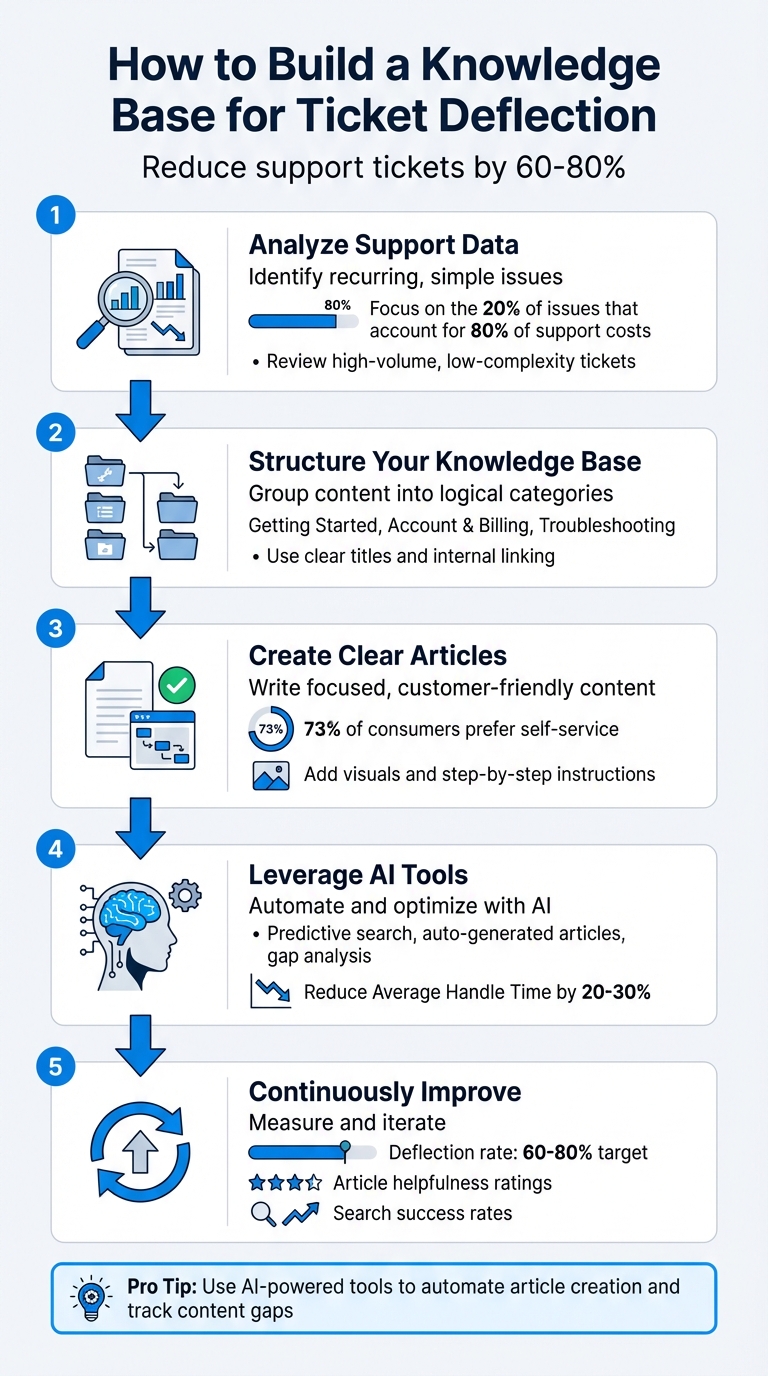
Here’s the bottom line: A well-organized knowledge base can reduce support tickets by 60–80%, saving time and money while improving customer satisfaction. By addressing common questions with clear, structured content, you empower customers to resolve issues on their own. This lets your team focus on complex tasks that add more value.
Key Steps to Get Started:
- Analyze Support Data: Identify recurring, simple issues that can be solved through self-service.
- Structure Your Knowledge Base: Group content into logical categories like "Getting Started" or "Troubleshooting."
- Create Clear, Focused Articles: Use customer-friendly language, visuals, and step-by-step instructions.
- Leverage AI Tools: Automate article creation, track content gaps, and enable predictive search for faster resolutions.
- Continuously Improve: Measure deflection rates, track article performance, and update content regularly.
Pro Tip: Use tools like Supportbench to automate article creation, analyze ticket trends, and integrate AI-powered recommendations. This ensures your knowledge base stays relevant and reduces repetitive tickets effectively.
5 Steps to Build a Knowledge Base That Reduces Support Tickets by 60-80%
40% Ticket Deflection in 90 Days: A Playbook That Actually Works
Step 1: Analyze Support Tickets to Identify Content Gaps
The first step to creating a helpful knowledge base is figuring out what your customers need assistance with. Your support tickets are a treasure trove of insights – they show where customers struggle, the terms they use to describe their issues, and which queries take up the most time for your support team. The key is to pinpoint high-volume, low-complexity questions that can be documented and resolved with self-service. This analysis sets the stage for a customer-friendly knowledge base.
Review High-Volume, Low-Complexity Issues
Dive into your ticket data to spot recurring patterns. A good way to measure impact is by multiplying ticket volume by the time it takes to handle each one. This helps you uncover the 20% of issues that typically account for 80% of your support costs. For example, if a 5-minute password reset request appears 200 times a month, that’s 1,000 minutes of agent time you could save with a single article.
Focus on identifying the top 10–20 topics that generate the most tickets but don’t require deep troubleshooting. Reviewing commonly used canned responses and tag clouds can also help you zero in on these pain points. If support agents are repeatedly copying and pasting the same answers, it’s a sign that a dedicated knowledge base article could save time and effort.
Use Customer Language to Frame Content
Pay attention to the exact words and phrases your customers use when describing their issues. Export your ticket data and review search queries that return "no results" in your help center. This can highlight mismatches between the terms customers use and the language in your documentation. For instance, customers might search for "invite coworkers", while your articles use the phrase "add team members."
Your support agents are also an invaluable resource. They interact with customers daily and know the language customers use and the questions that come up most often. Regularly meeting with your support team can uncover issues currently handled manually that could be addressed with a simple guide. To make your articles more accessible, include common synonyms and even frequent misspellings as tags or keywords.
Use AI Tools for Faster Analysis
Manually combing through tickets can be a slow process, especially if you’re dealing with thousands of them each month. AI tools can speed things up by automatically grouping tickets into common themes based on language patterns. This allows you to quickly identify trends that might otherwise take weeks to uncover.
For example, Supportbench’s AI-driven case analysis can automatically detect recurring issues, helping you prioritize which content to create. It can also track "zero-result" searches and low-confidence chatbot interactions, pinpointing exactly where your documentation is falling short. By incorporating AI into your workflow, you can save time while building a scalable and efficient support system.
"High Frequency + High Resolution Time + High Impact = FIRST ARTICLES" – Iryna Ostapenko, Guide, Knowledge Base
Step 2: Design a Customer-Friendly Knowledge Base Structure
Now that you’ve figured out what content to create, the next step is making sure it’s organized in a way that helps customers find what they need – quickly and easily. A messy or confusing knowledge base can frustrate users, sending them straight back to your support team, which defeats the whole purpose. The goal? Build a navigation system that feels natural, whether someone is browsing through categories or searching for a specific answer.
Organize Content into Logical Categories
Start by grouping your content into broad sections that reflect how your customers think about their issues – not how your company is structured. Common categories might include Getting Started, Account & Billing, Product Features, Integrations, and Troubleshooting. If your support data shows that billing questions make up 30% of your inquiries, then make sure that category is easy to find.
Each article should focus on a single topic or task, making it easy for customers (and even AI tools) to locate the right information. For instance, an article titled "How to Reset Your Password" should stick to that specific task, while a separate article could cover "How to Update Your Email Address." This modular approach ensures that users can piece together answers without wading through unnecessary details.
Use Clear Titles and Internal Linking
Your titles should leave no room for doubt – users should instantly know whether an article will solve their problem. Instead of vague headings like "User Management", opt for action-oriented titles like "How to Invite Team Members" or "How to Remove a User from Your Account."
Internal linking is just as critical as clear titles. It helps users navigate through your knowledge base without hitting dead ends. For example, if an article explains how to create a new project, link it to related topics like adding team members or setting up integrations. Use descriptive anchor text that tells users exactly where the link will take them, avoiding generic phrases like "click here" or "read more."
"It’s one of the biggest things that you can do on a website to kind of guide Google and guide visitors to the pages that you think are important" – John Mueller, Google.
A well-structured knowledge base not only improves navigation but also sets the stage for better engagement through visual aids.
Add Multimedia to Improve Clarity
Sometimes, text just isn’t enough – especially for complex workflows or multi-step processes. Visuals like screenshots, GIFs, and short videos can make instructions easier to follow. Studies show that visual information is processed faster and sticks better. Use annotated screenshots with arrows or highlights to show users exactly where to click, and include short video clips (around 30 seconds) for more intricate tasks like setting up integrations or navigating a new interface.
Make sure all multimedia elements load quickly and are accessible. Add descriptive alt text for screen readers and keep the design consistent for a polished look. When done right, visuals don’t just make instructions clearer – they also reduce frustration and keep users from giving up on self-service and reaching out to support instead.
Step 3: Create and Optimize Knowledge Base Articles
After outlining your structure, the next step is crafting the articles themselves. A knowledge base thrives on clarity and precision. The aim? To deliver content that directly addresses customer issues using simple language and an easy-to-navigate format.
Write Content That Answers Specific Questions
Start by analyzing support tickets to identify common customer questions. For instance, if 40% of your tickets are about inviting team members, don’t settle for a broad article like "User Management." Instead, create a focused guide such as "How to Invite Team Members to Your Account", breaking down each step in detail. Every article should tackle a single task, making it easier for both customers and AI tools to find and process.
Use the exact words your customers use when titling your articles. Stick to a consistent structure: a clear title, a brief overview, step-by-step instructions (with visuals), and links to related resources. This format ensures that the 73% of consumers who prefer self-service can quickly find the help they need without reaching out to support.
"A well-designed self-service knowledge base is the secret weapon that empowers users, reduces repetitive tickets, and frees your support team to focus on complex issues." – Supportify
For example, a startup significantly reduced its support ticket volume simply by including clear, visual instructions in its articles. This is the kind of result you can achieve when your content directly addresses actual customer pain points.
Once your targeted articles are live, maintaining their relevance is key to long-term success.
Keep Content Updated and Relevant
A knowledge base isn’t a "set it and forget it" tool. To keep deflecting tickets effectively, your content needs to evolve alongside your products, policies, and customer expectations. Add a "Was this article helpful?" prompt at the bottom of each page to gather feedback. Articles with low ratings or flagged by support agents for outdated information should be prioritized for updates.
Schedule quarterly reviews to fix broken links, refresh visuals, and revise content after product updates. Pay close attention to articles with high view counts but low satisfaction scores – these usually indicate a need for improvement. If customers still contact support after reading an article, it’s a strong sign the content isn’t solving their problem.
Consistently updating your knowledge base not only keeps it accurate but also enhances the effectiveness of AI-driven support tools.
Use AI to Speed Up Article Creation
AI tools can significantly speed up the process of creating knowledge base articles by analyzing ticket data and identifying recurring issues. For example, Supportbench’s AI can generate article drafts by summarizing resolved cases from the past 30 days and grouping similar customer concerns. Instead of starting from scratch, your team can refine these drafts, saving time and effort.
The platform’s AI KB Article Creation from Case History feature transforms complex cases into structured articles. These drafts include concise titles, summaries, and relevant keywords. When an agent resolves a tricky issue that could benefit others, the AI can turn that resolution into a reusable article. It also automatically removes any personally identifiable information (PII), ensuring customer data remains safe.
"Automation is only as good as the knowledge it sits on." – Enjo.ai
sbb-itb-e60d259
Step 4: Integrate AI for Dynamic Optimization and Ticket Deflection
It’s time to let AI take your knowledge base to the next level. Modern AI tools don’t just help customers and agents find answers – they predict what users need, often before they even finish typing.
Enable Predictive Search and Recommendations
Traditional search systems rely on users guessing the right keywords, which can be frustrating. AI-powered semantic search changes the game by understanding the intent behind a query. For instance, if a customer types “can’t log in,” the AI doesn’t just look for those exact words. Instead, it connects the dots to related topics like password resets or account lockouts, even if the customer uses different phrasing.
Supportbench takes this a step further with Retrieval-Augmented Generation (RAG). Instead of directing users to lengthy articles, RAG pulls specific, relevant pieces of information directly from your knowledge base. This means users get precise, actionable answers without wading through unnecessary details. Plus, because the AI relies on your official documentation, it avoids making up answers or offering generic advice.
Another powerful feature is intent classification. For example, if someone searches “billing,” the AI can determine whether they’re asking about payment methods, invoice history, or refund policies and then serve the most relevant content. High-performing systems like this can deflect 60–80% of common, high-volume support issues.
"The AI knowledge base is now the enterprise brain that powers AI assistance, not a static article library." – Radu, Head of Digital Transformation, BlueTweak
To ensure your AI performs at its best, it’s important to structure your articles with clear headings, concise content, and metadata. This makes it easier for the AI to retrieve the right information and adapt to customer needs over time.
Use AI Bots for Customer and Agent Assistance
AI bots aren’t just for customers – they’re also a huge asset for your support team. These bots provide instant, accurate answers to customers while helping agents quickly locate the right content. For example, Supportbench’s Customer QA AI Bot scans your FAQ and documentation to intelligently respond to customer questions. If it can’t find a match, it escalates the issue to a human agent, ensuring no query goes unanswered.
For your team, the AI Agent-Copilot is a game changer. It reviews past cases and searches both internal and external knowledge bases to suggest solutions. By analyzing ticket content, the AI recommends relevant articles, cutting down on manual searches and improving first-contact resolution rates. On top of that, the AI Agent Knowledgebase Bot dives into your documentation to deliver precise answers, reducing Average Handle Time (AHT) by 20–30% by providing the right information at the right time.
When an issue requires escalation, the AI bot hands over the complete conversation history and any suggested articles to the human agent. This ensures the customer doesn’t have to repeat themselves and gives agents the context they need to resolve issues quickly.
Automate Content Creation and Updates
AI doesn’t just help locate content – it can also keep your knowledge base up to date. Supportbench’s AI monitors support interactions to identify gaps and generate article drafts in real time. For example, if an agent solves a tricky issue, the AI can create a draft article with a clear title, summary, and relevant keywords. It even automatically removes any sensitive information from the draft.
By analyzing ticket data, the platform identifies recurring issues and generates article hierarchies or draft content based on what customers are asking for most. This eliminates the guesswork of deciding what to create next, allowing your team to focus on refining and publishing AI-generated drafts.
The AI also tracks search queries and unresolved bot interactions to spot missing content. This feedback loop ensures your knowledge base evolves with your customers’ needs. Automated updates keep your documentation accurate and effective, making it a powerful tool for deflecting tickets and improving customer satisfaction.
"Automation is only as good as the knowledge it sits on." – Enjo.ai
Step 5: Measure Effectiveness and Continuously Improve
Once your knowledge base is set up and filled with content, the real work begins: measuring its performance and making ongoing improvements. Without consistent tracking and updates, even the best-designed knowledge base can lose its edge.
Track Key Metrics for Success
Start by keeping an eye on the numbers that matter most. One of the top indicators is the deflection rate – the percentage of customer issues resolved without needing an agent. For common, high-volume problems, aim for a deflection rate between 60–80%. If you’re not hitting that range, it’s a sign that your content isn’t addressing customer needs effectively.
Another critical metric is article helpfulness ratings. That simple "Was this article helpful?" question at the end of each piece can reveal a lot. If ratings are low, it’s a red flag that the article might need clearer instructions or a complete overhaul. Pay close attention to these ratings – they often highlight content gaps.
Search success rates are just as important. This metric shows whether customers can find the answers they’re looking for. Keep track of how often searches lead to clicks versus "no results" queries. If searches are coming up empty, it might mean your terminology is off or you’re missing key topics. For instance, if customers are searching for "reset password" but your article is titled "Account Credential Recovery", you’ve got a mismatch that needs fixing.
Lastly, monitor how your knowledge base impacts Average Handle Time (AHT). A well-optimized knowledge base should reduce AHT by 20–30%. If agents are still spending the same amount of time on tickets, it could mean the content is hard to find or lacks the accuracy needed for agents to trust it. Improving these metrics can significantly reduce your ticket volume.
Use AI to Predict and Prevent Issues
AI tools can take your knowledge base to the next level by identifying potential problems before they escalate. For example, Supportbench’s predictive AI can estimate customer satisfaction levels even before surveys are sent, helping you spot and fix self-service issues proactively.
AI can also perform a gap analysis by analyzing failed chatbot responses, no-result searches, and recurring customer queries. This comprehensive view helps pinpoint where your knowledge base is falling short. For instance, if customers frequently ask about a feature that isn’t covered in your articles, the AI can flag that gap automatically.
Another useful metric to track is tickets reopened within 72 hours. These cases often signal that the existing content isn’t solving the issue and needs immediate attention. Reopen rates are one of the most reliable indicators of content quality.
Iterate Based on Customer Feedback
While AI can provide valuable insights, nothing beats direct feedback from your users. Beyond simple "Was this helpful?" ratings, ask open-ended questions like "What was missing?" to uncover exactly where your articles fall short.
Your support agents are another goldmine of feedback. They’re often the first to notice when documentation is outdated or unclear. Set up a formal process – whether it’s a Slack channel or a custom ticket field – to let agents flag problematic articles. With 73% of consumers preferring to solve issues on their own, keeping your documentation accurate and up-to-date is critical.
Create a routine for addressing feedback. Fix small issues like typos or broken links right away, and add larger updates or rewrites to a prioritized backlog. Make it a habit to review the top 20% of your articles quarterly, as these typically account for 80% of your support costs. Lower-traffic articles can be reviewed annually, but high-impact content requires constant maintenance to stay effective.
"A great knowledge base doesn’t just answer questions – it prevents problems." – Katico
Conclusion
After diving into the analysis, structure, and AI-powered tools discussed earlier, here are the standout points you need to know.
Key Takeaways for Building an Effective Knowledge Base
If you want to cut down on support tickets, focus on these core strategies: Analyze your support data to pinpoint common, straightforward issues, and organize your content into well-structured, clearly labeled sections (e.g., "How to Reset Your Password"). Avoid using internal jargon that might confuse users. Leverage AI to simplify article creation, enable predictive search, and identify knowledge gaps before they lead to ticket surges. Keep an eye on critical metrics like deflection rates, article helpfulness scores, and search success rates, and make it a habit to review and update your content regularly.
As highlighted earlier, self-service portals are no longer optional – they’re essential for meeting customer expectations. However, even the most well-designed content needs ongoing maintenance. Regularly revisiting and refreshing high-impact articles will help you stay cost-effective and relevant.
How Supportbench Makes It Easier
Ready to put these strategies into action? Supportbench offers a suite of tools that simplify the entire process. Designed for B2B teams handling complex customer needs and long-term cases, Supportbench eliminates the hassle of juggling multiple systems and the extra costs of AI add-ons. Instead, it provides AI-powered knowledge base tools as part of its core offering.
With features like automated article creation based on ticket history and predictive search that surfaces the right content at the right time, Supportbench streamlines your workflow. The AI Agent-Copilot digs into past cases and internal documents to quickly find accurate answers, while the AI KB Article Creation tool turns resolved cases into polished articles in just a few clicks. For customer-facing self-service, the Customer QA AI Bot navigates your knowledge base intelligently, escalating to a human agent only when necessary.
All of these features come standard, starting at just $32 per agent per month – no hidden fees. Whether you’re a small team getting started or a large enterprise upgrading from an outdated system, Supportbench delivers a comprehensive platform with built-in AI, case management, workflows, and live human support from day one.
FAQs
How can AI make a knowledge base more effective for ticket deflection?
AI transforms a knowledge base into a dynamic, self-service tool that helps users find answers quickly and with precision. By leveraging advanced techniques like vector embeddings and generative models, AI can interpret user queries – even when they’re phrased ambiguously – and connect them to the most relevant content. This reduces the need for manual searches and helps lower ticket volume.
AI also ensures the knowledge base stays current by analyzing recent ticket data to spot recurring issues. It can even draft articles automatically for review, cutting down on the manual effort required to keep content relevant. On top of that, AI tracks how well articles perform – like whether they successfully resolve issues or boost customer satisfaction. These insights allow for continuous improvement, making the knowledge base an essential tool for streamlining support and cutting operational costs.
What metrics should I track to ensure my knowledge base is effective?
To gauge how well your knowledge base is performing, focus on metrics that show its influence on customer experience and support efficiency. Start with ticket deflection – this measures the percentage of customer inquiries resolved through self-service options rather than creating new support tickets. Another key indicator is the Customer Satisfaction (CSAT) score, which tends to rise when users can quickly locate accurate answers. Similarly, the Customer Effort Score (CES) is crucial; it reflects how easy it is for customers to find the information they need. A lower effort score often translates to happier, more loyal customers.
You should also pay attention to article feedback, such as thumbs-up or thumbs-down ratings and user comments, as these provide direct insights into content effectiveness. Additionally, search analytics can reveal how often users engage with suggested articles and whether they abandon searches after multiple attempts. These data points can pinpoint which content is working well and where improvements are needed. By keeping an eye on these metrics, you can ensure your knowledge base not only reduces support tickets but also boosts customer satisfaction and adapts to evolving user needs.
How often should I update my knowledge base to keep it effective?
To keep your knowledge base effective for ticket deflection, it’s essential to keep the content up-to-date. A solid approach is to schedule a formal review every quarter while also making quick updates whenever there are changes to products, policies, or noticeable patterns in support requests.
AI tools can make this process much easier. For instance, platforms like Supportbench can track how articles are performing, spot outdated information, and suggest updates. This means you can tackle issues as they arise, without having to wait for the next scheduled review. By blending regular reviews with AI-powered insights, you can maintain a knowledge base that’s accurate, relevant, and provides a smooth self-service experience.
Related Blog Posts
- 10 Ways to Reduce Support Ticket Response Time
- How AI Cuts Knowledge Base Costs for B2B Support Teams
- Ultimate Guide To Scaling Support With Self-Service
- How Knowledge Base Integration Improves First-Contact Resolution
Evaluating help desks for a B2B team?
Supportbench is all-inclusive from $32 per agent per month, with migration and onboarding included. See pricing or book a 20-minute demo.






