
Struggling to manage your call center workforce efficiently? Here’s the key: Workforce Management (WFM) ensures the right number of skilled agents are available to handle customer interactions – calls, chats, or emails – while keeping costs in check.
Why It Matters:
- 70-75% of a contact center’s budget goes to staffing.
- Overstaffing wastes resources; understaffing leads to long wait times and stressed agents.
- 38% agent turnover rate (2022) shows the need for better planning.
Common Beginner Challenges:
- Forecasting demand: Predicting call volume is tough without proper tools.
- Scheduling: Balancing service goals, agent preferences, and labor laws is tricky.
- Real-time adjustments: Sudden spikes in demand can overwhelm managers.
How to Get Started:
- Forecast demand using historical data and AI tools for accuracy.
- Build efficient schedules with a mix of full-time and part-time agents.
- Assign tasks wisely using skills-based routing to match agents with the right queries.
- Monitor performance with real-time dashboards and adjust schedules as needed.
Pro Tip: AI-powered tools simplify forecasting, scheduling, and real-time management, saving time and improving accuracy.
Ready to dive deeper? Let’s break it all down step by step.
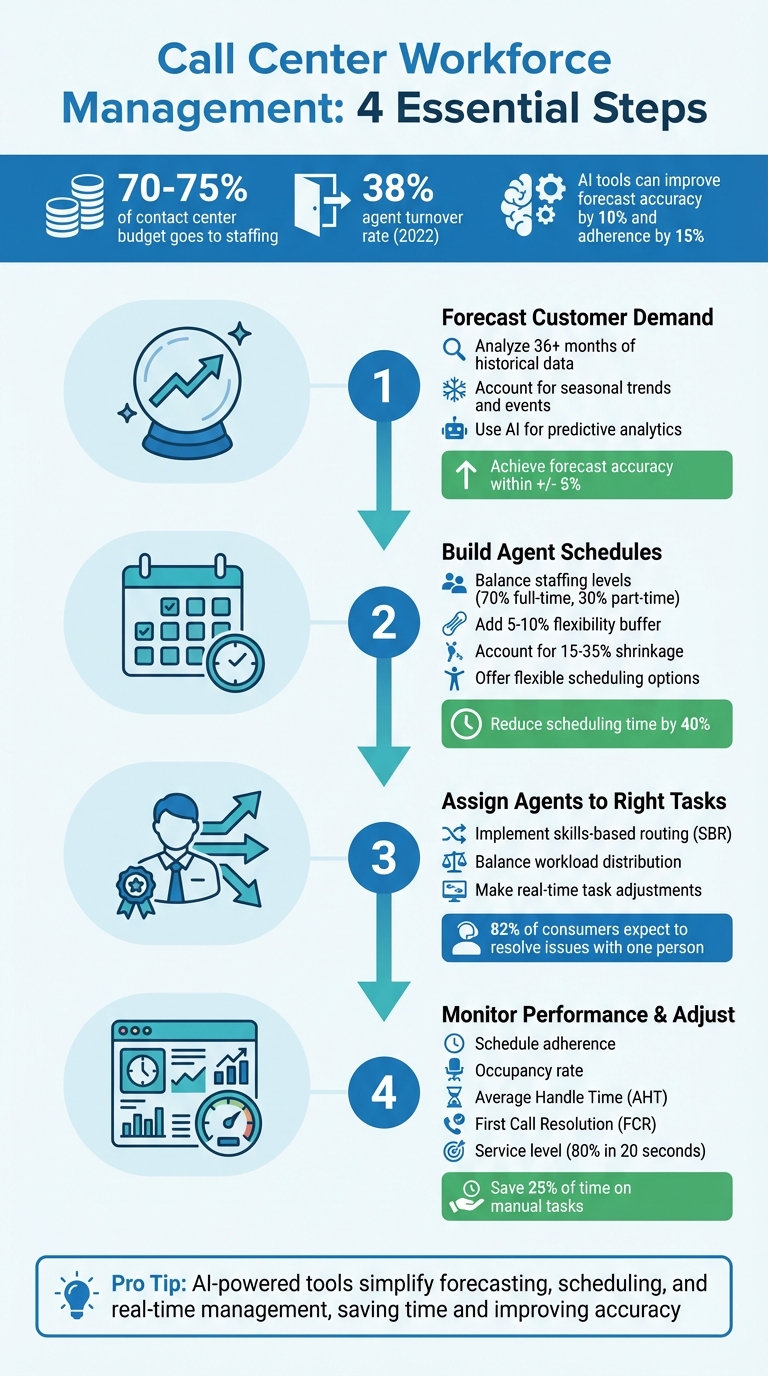
4-Step Call Center Workforce Management Process Guide
Step 1: Forecasting Customer Demand
Analyzing Historical Data
To determine staffing needs, start by reviewing historical call volumes and average handle time (AHT). Ideally, gather at least 36 months of data to identify long-term trends and seasonal patterns.
Eliminate anomalies like outages or unexpected promotions, as these can skew your data significantly – potentially throwing forecasts off by 20% to 40%. However, recurring events such as Black Friday or billing cycles should be tracked separately for more accurate predictions.
Once your data is cleaned, compare year-over-year (YoY) metrics and examine how call volumes vary by month, day, and even in 15- or 30-minute intervals. For example, Wix transitioned from manual forecasting to AI-powered tools, reducing scheduling time by 40% while improving forecast accuracy by 10% and adherence by 15%.
Accounting for Seasonal Trends and Events
Customer demand is rarely static. For instance, retail centers may see call volumes double during the holiday season, while a single TV commercial can trigger a 300% spike in contacts.
To prepare for such fluctuations, maintain open communication with marketing, sales, and operations teams. This collaboration helps you anticipate volume surges and plan accordingly. Advanced forecasting techniques, like Triple Exponential Smoothing (also called the Holt-Winters method), can isolate seasonal patterns and quantify how specific months deviate from the average demand.
GE Appliances provides a great example of the benefits of seasonal planning. By adopting modern forecasting tools, they improved schedule adherence by 11% and saved 40 administrative hours each week. Shifting from reactive scheduling to proactive, seasonally informed strategies was a key factor in their success.
Using AI for Predictive Analytics
AI tools are transforming demand forecasting by automatically identifying patterns across multiple channels, such as voice, chat, and email. Machine learning algorithms continuously refine predictions as new data becomes available, making forecasts increasingly accurate.
Neural Networks take this a step further by uncovering relationships between external factors – like weather, marketing campaigns, or billing cycles – and contact volume. They also automate the creation of highly detailed forecasts at 15- or 30-minute intervals, a task that traditional spreadsheets struggle to handle accurately.
AI-driven forecasting tools can achieve accuracy within +/- 5%, a critical improvement given that staffing expenses typically account for about 70% of operating costs. A manager from GE Appliances highlighted the impact of these advancements:
"The self-service capabilities have been a game-changer for both our agents and management team. We’re seeing happier agents and better coverage, all while spending less time on administrative scheduling tasks."
With a solid forecast in place, the next step is creating efficient schedules for your team.
Step 2: Building Agent Schedules
Balancing Staffing Levels
Once you’ve nailed down accurate forecasts, it’s time to turn them into efficient agent schedules. Tools like Erlang C or Erlang A formulas are great for calculating the balance between staffing levels, support volume, and your target response times. These formulas help you avoid the pitfalls of overstaffing (which wastes money) and understaffing (which hurts service quality).
A smart staffing mix – 70% full-time agents and 30% part-time – offers flexibility while keeping operations smooth. Adding a 5–10% flexibility buffer ensures you can handle unexpected spikes in demand without compromising service. Keep in mind, staffing costs typically eat up 70–75% of your operating budget, so even small tweaks in scheduling accuracy can lead to noticeable savings.
Don’t forget to factor in shrinkage – things like breaks, training, and meetings that take agents off the phones. Shrinkage rates in most contact centers range from 15% to 35%. For instance, if you need 100 agents actively working but your shrinkage is 25%, you’ll actually need to schedule about 133 agents to fully cover your needs.
Once you’ve got the basics down, consider introducing flexible options to prevent burnout and adapt to changing demand.
Adding Flexible Scheduling Options
Burnout is a serious issue. In 2022, 63% of agents reported being at high risk of burnout, and the average attrition rate hit 38%. Flexible scheduling can help by giving agents more control over their work-life balance.
Take Wix as an example. They serve over 282 million users and introduced automated scheduling tools that cut scheduling time by 40%, improved adherence by 15%, and even boosted customer satisfaction by 3%. Daniela G., Wix’s Workforce Optimization Manager, highlighted the benefits:
"Understanding the value that transparency brings is vital. Now we can see how to improve efficiency as well as increase job satisfaction for our agents."
Flexible options like micro-shifts (1 to 3 hours), split shifts, and voluntary time-off (VTO) cater to diverse lifestyles while also managing demand fluctuations. Centers that use mobile shift-swap apps often see a 20% boost in their Employee Net Promoter Score. Automated approval workflows can streamline the process – set rules to auto-approve shift swaps and time-off requests as long as coverage needs are met. AI-driven scheduling tools further refine these flexible options, ensuring coverage while keeping agents happy.
Building on flexible schedules, shift bidding takes things a step further by aligning agent preferences with business needs.
Using Shift Bidding and Agent Preferences
Shift bidding flips traditional scheduling on its head, turning it into a collaborative process. Agents can bid on shifts they prefer, with priority often based on performance metrics or seniority. This approach not only boosts engagement but also ensures critical shifts are covered by top-performing agents.
GE Appliances put this idea into action with self-service scheduling tools that let agents manage their own schedules via a mobile app. The results? An 11% improvement in schedule adherence, 40 hours per week saved on admin tasks, and lower attrition rates.
During onboarding, collect agent preferences – such as their willingness to work nights, weekends, or four-day workweeks. Use this data to create schedules that balance business needs with personal preferences. Centers using agent-friendly scheduling tools often see attrition rates drop by 10–15%. Research from Calabrio backs this up: agents value flexibility so much that it can outweigh financial incentives like raises or bonuses. Modern AI-powered platforms can integrate these preferences into scheduling algorithms, making it easier to meet both business goals and employee satisfaction.
Next, we’ll dive into performance monitoring and real-time adjustments to round out the scheduling process.
Step 3: Assigning Agents to the Right Tasks
Skill-Based Task Assignment
Once you’ve got your schedules in order, the next step is making sure agents are matched with tasks that suit their strengths. The idea is simple: the right agent on the right call can make all the difference. This is where skills-based routing (SBR) comes into play. Instead of assigning tasks to whoever is free, SBR directs inquiries to agents based on their expertise – whether it’s technical troubleshooting, billing questions, or product knowledge. Why does this matter? Because 82% of consumers expect to resolve complex issues by speaking with just one person, and 86% are likely to abandon a brand after two poor service experiences. That’s a lot riding on getting it right.
Start by categorizing common customer needs, such as sales, billing, or troubleshooting, and assign proficiency scores (on a scale of 0–100) to agents for each area. These scores can then be used within your IVR system to route calls to the most qualified agent. Modern AI-powered systems take this a step further, analyzing digital messages from SMS, chat, email, and social media to determine customer intent and automatically match them with the right specialist.
Keep a close eye on your transfer rates – if they’re high, it’s a sign that your routing rules may need tweaking or that agent skill profiles are outdated. Regularly audit agent skills, ideally every quarter, to account for new training, certifications, or performance improvements. Cross-training agents in secondary skills is also a smart move, creating a backup team to handle unexpected surges in call volume. Once tasks are assigned, focus on balancing workloads to keep things running smoothly.
Balancing Workload and Preventing Burnout
Skills-based routing is only half the battle; you also need to ensure workloads are evenly distributed to avoid burning out your best agents. Remember, 63% of agents are considered at high risk for burnout, and with turnover rates reaching 38% in 2022, keeping your team engaged is critical to your bottom line.
One way to manage this is by integrating skills-based routing with least-occupied logic, ensuring no single agent gets overwhelmed. Schedule time for coaching, training, and breaks to help reduce stress and keep your team motivated. Keep an eye on occupancy rates to measure how much time agents spend actively working versus waiting for calls. During slow periods, consider offering voluntary time-off (VTO) to cut costs and give agents a breather rather than leaving them idle. AI-powered tools can monitor workloads in real time, flagging when an agent is at risk of burnout and suggesting task reallocations to ease the pressure. By keeping workloads balanced, you can create a healthier, more productive work environment.
Making Real-Time Task Adjustments
Static schedules are no match for the unpredictable nature of customer service. That’s where intraday management comes in – monitoring adherence to schedules throughout the day and making real-time adjustments as needed. Visual dashboards can help you compare actual agent activity with planned schedules, making it easier to pivot when unexpected volume spikes occur, like during a product launch or service outage.
AI tools shine in this area, analyzing service levels and adjusting schedules on the fly. They can move lunches or breaks, shift agents between channels, or even recommend overtime during busy periods. Running "what-if" scenarios, such as a 20% spike in call volume, allows you to test how workloads can be redistributed before the surge happens. Intraday analytics also let you re-optimize rosters hourly, ensuring you can meet demand without overwhelming your team. This approach satisfies the 90% of consumers who consider immediate responses essential while keeping your agents from feeling stretched too thin.
Step 4: Monitoring Performance and Making Real-Time Adjustments
Metrics to Track
Once you’ve forecasted demand, set schedules, and assigned tasks, the next step is to ensure everything is running smoothly. To do this, you’ll need to keep a close eye on key metrics that reveal how well your operations are performing and where adjustments might be necessary. Start with schedule adherence, which measures how closely agents stick to their planned schedules in real time. If adherence drops, it could mean agents aren’t following their assigned shifts, potentially throwing off your staffing plans.
Another important metric to track is the occupancy rate, which shows the percentage of time agents spend actively handling calls or completing after-call work versus waiting for new tasks. This helps you identify if your staffing levels are balanced or if agents are at risk of burnout. Additionally, Average Handle Time (AHT) – which includes talk time, hold time, and after-call work – provides a snapshot of efficiency. However, it’s crucial to balance speed with quality; reducing AHT shouldn’t come at the cost of First Call Resolution (FCR), which measures how often customer issues are resolved on the first attempt.
Other metrics worth monitoring include service level (the percentage of calls answered within a specific time, like 80% answered within 20 seconds), call abandonment rate (the percentage of customers who hang up before speaking to an agent), and shrinkage (the time agents are unavailable due to breaks, training, or unscheduled absences). Considering that labor costs make up about 75% of a contact center’s operating budget, keeping track of these metrics is essential for balancing quality and cost control. Tools like visual dashboards with color-coded alerts make it easier for supervisors to identify issues quickly, while daily adherence tracking allows for more responsive management. These insights enable you to adapt swiftly to unexpected changes in call volume.
Managing Unexpected Call Volume Spikes
Even with the most accurate forecasts, unexpected surges in call volume can still occur. Whether due to a product launch, a service outage, or a seasonal rush, these spikes require quick action. AI-powered tools can help you adapt in real time. For example, intraday dynamic scheduling can automatically adjust agent breaks and lunches to align with lower-demand periods, ensuring better coverage during peak times. You can also open up overtime opportunities or offer voluntary time off during slower periods to manage labor costs effectively.
Real-time adherence monitoring can send alerts or notifications when agents deviate from their schedules, allowing supervisors to reallocate resources immediately. Advanced AI tools can even detect patterns and trends early, giving you a head start on making staffing adjustments before service levels are affected. By automating manual tasks with workforce management software, contact centers can save up to 25% of the time previously spent on these activities.
Coaching and Performance Improvement
Performance data isn’t just for immediate adjustments – it’s also a powerful tool for ongoing coaching and development. Real-time data allows you to provide instant feedback through live adherence alerts and quality monitoring, rather than waiting for periodic reviews. This approach keeps employees engaged; in fact, workers who receive regular feedback are 3.6 times more likely to stay committed to their roles. Generative AI tools can further enhance coaching by reducing AHT by up to 12% through real-time guidance.
Empowering agents with self-service portals that display real-time adherence and performance data encourages them to self-correct without needing supervisor intervention. During slower periods, short "micro-learning" sessions can provide targeted training without disrupting productivity. AI-powered tools can also offer live guidance and dynamic scripts during calls, helping agents minimize errors and resolve issues on the spot.
Workforce management automation can ensure that coaching sessions and one-on-one meetings remain on the schedule, even during peak times. Cross-training agents to handle multiple interaction types – such as switching between voice and chat – based on real-time data can also improve flexibility and reduce stress. This is especially important in high-pressure environments, where agent turnover rates can reach nearly 40%. These strategies create a more agile and supportive operation, helping you maintain both efficiency and service quality.
sbb-itb-e60d259
Common Mistakes in Workforce Management
Relying on Outdated Forecasting Methods
It’s common for newcomers to workforce management to rely on spreadsheets and manual calculations to keep costs low. While this might seem practical, manual forecasting is both time-consuming and prone to errors. Most contact centers using this approach only update their forecasts 1–4 times a year, leaving them vulnerable to overstaffing during slow periods or understaffing when demand spikes, especially during seasonal fluctuations.
The stakes are high – staffing expenses make up 70% to 75% of a contact center’s total operating budget. Even small forecasting mistakes can lead to significant financial strain. Modern AI-powered tools offer a solution by analyzing historical data alongside factors like marketing campaigns, weather trends, and real-time demand. These tools can detect patterns that manual methods often miss and provide updates on a weekly – or even daily – basis. Centers that adopt workforce management (WFM) automation report saving about 25% of the time previously spent on manual tasks.
But forecasting is just one piece of the puzzle. Effective workforce management also requires scheduling that considers the needs of your agents.
Ignoring Agent Feedback
Focusing only on workload metrics while neglecting agent needs is a recipe for high turnover. When schedules fail to account for breaks, training, and personal preferences, burnout becomes inevitable. On the flip side, companies with highly engaged employees see 24% higher profitability rates.
One way to address this is by offering shift bidding and flexible scheduling options that balance business goals with agent preferences. For example, GE Appliances introduced self-service scheduling capabilities in 2024, which led to an 11% improvement in schedule adherence and saved over 40 hours of administrative work each week. Their Contact Center Operations Manager shared:
"The self-service capabilities have been a game-changer for both our agents and management team. We’re seeing happier agents and better coverage, all while spending less time on administrative scheduling tasks."
Features like self-service portals empower agents to swap shifts, request time off, and bid on preferred schedules. These tools not only improve retention but also boost performance. However, even the best schedules can fall short if they aren’t adjusted in real time.
Not Adjusting Schedules in Real Time
Creating an optimized schedule is only part of the equation. Without real-time adjustments, even the best-laid plans can fall apart when unexpected events occur – whether it’s a product recall, service outage, or a sudden surge in call volume. Static schedules simply can’t keep up with the constant changes in workload demand.
Failing to adjust schedules dynamically can lead to costly consequences. Overstaffing, for example, can add as much as $35,000 per year per agent in unnecessary expenses, while understaffing often results in overtime costs and higher attrition rates. In early 2025, a consumer-tech support center implemented AI-driven forecasting combined with real-time schedule adjustments. This boosted their forecast accuracy from 87% to 96% and, within three months, reduced overtime spending by 18% year-over-year. They also cut average wait times by 35 seconds, raising customer satisfaction from 72% to 81%.
Dynamic tools like break optimization can automatically adjust agent lunches and breaks based on fluctuating call volumes. Similarly, offering voluntary time off (VTO) during slow periods and voluntary overtime (VOT) during busy times helps maintain balance. Monitoring schedule adherence on a daily basis instead of weekly allows managers to fine-tune operations and meet real-time demand effectively. Intraday management isn’t optional – it’s essential for staying efficient and responsive.
Getting Started with Workforce Management
What to Remember
Workforce management (WFM) revolves around predicting demand, creating schedules, assigning tasks, and tracking performance. Start by examining historical data to estimate call volumes and use that information to design schedules with a 5–10% buffer to handle unexpected surges. Throughout the day, keep an eye on schedule adherence and service levels, making real-time adjustments as needed. For example, you can offer voluntary time off during slower periods or open up overtime when call volumes spike.
It’s worth noting that staffing costs often dominate operating budgets. Even slight improvements in forecasting accuracy and adherence to schedules can lead to substantial cost savings and better service delivery.
Once you’ve mastered the basics, incorporating AI can take your workforce management to the next level.
Using AI for Workforce Management
AI tools can take the guesswork out of forecasting and scheduling, making WFM more efficient. Instead of manually crunching numbers in spreadsheets, AI processes historical data alongside real-time variables to deliver highly accurate predictions. Take the example of JK Moving: in 2024, they implemented an AI-driven WFM tool that predicted call volume within just three calls on its first day of use, leading to a 74% revenue boost. Ken Cohen, SVP of Sales & Business Development at JK Moving, shared:
"Talkdesk Workforce Management uses AI to predict call spikes so we can assign agents accordingly… the first day we tried it, it came within three calls of accurately predicting our total call volume and has only gotten better."
AI doesn’t stop at forecasting. Automated shift swaps and 24/7 chatbots ease the burden on managers, allowing them to focus on coaching and strategy. Additionally, tools like speech and sentiment analytics can monitor every single interaction, replacing the outdated and time-consuming practice of randomly sampling calls for quality assurance.
Starting Small and Scaling Over Time
With a solid foundation and AI tools in place, it’s smart to begin with a pilot program. Test forecasting and scheduling with one team before rolling it out across the board. This approach helps pinpoint training needs, document early wins, and build support from stakeholders using concrete results. The 80/20 rule is a helpful guide: focus on the 20% of contact types that account for 80% of your volume to maximize impact early on.
A surprising 41.3% of contact centers still rely on manual spreadsheets for workforce management. While this might seem like a cost-saving measure, it becomes unsustainable as operations grow. For instance, Wix, which serves over 282 million users, used to spend up to four days per market creating two-week schedules manually. After switching to automated WFM tools, they cut scheduling time by 40%, improved accuracy by 10%, and increased adherence by 15%. Daniela G., Workforce Optimization Manager at Wix, explained:
"Our focus has changed from piecing together schedules to continuous improvement. Understanding the value that transparency brings is vital. Now we can see how to improve efficiency as well as increase job satisfaction for our agents."
As you gain confidence, expand your capabilities to include advanced features like AI-powered predictive forecasting, dynamic intraday scheduling, and mobile-friendly self-service tools for agents. Treat your workforce management strategy as a flexible, evolving plan that adapts based on performance metrics and shifting business priorities.
What is Workforce Management in Call Centers? A Complete Guide
FAQs
How does AI improve workforce management in call centers?
AI brings a transformative edge to call center workforce management by improving demand forecasting, refining agent scheduling, and enabling real-time adjustments. By diving into historical data, customer behavior patterns, and external influences, AI tools can predict call volumes with greater accuracy. This ensures the right number of agents are scheduled at the right times, cutting down on both overstaffing and understaffing. The result? Lower costs and a smoother experience for customers.
AI also supports dynamic scheduling, allowing shifts to be adjusted on the fly to handle unexpected surges in call volume or workload changes. Beyond scheduling, AI keeps an eye on agent performance, pinpoints areas where training is needed, and takes over repetitive tasks. This frees agents to focus on resolving more complex customer issues. Together, these features help call centers stay flexible, efficient, and ready to meet the demands of today’s fast-moving, multichannel support landscape.
What are the advantages of flexible scheduling for call center agents?
Flexible scheduling brings a host of advantages to call center operations. By giving agents the ability to adjust their work hours within set parameters, businesses can align staffing levels more closely with customer demand. This means shorter wait times, happier customers, and fewer instances of overstaffing during slower hours – all of which help trim operational costs.
For agents, the perks are just as clear. Flexible schedules make it easier to balance work and personal life, leading to higher job satisfaction and lower turnover rates. A content and engaged team is not only more productive but also more dedicated, creating a stronger and more reliable support system. In today’s AI-powered customer service landscape, this kind of flexibility is key to supporting both employee well-being and smooth operations.
What is skills-based routing, and how does it improve customer service in call centers?
Skills-based routing takes customer service to the next level by ensuring customers are connected with agents who have the expertise to address their specific concerns. This method not only speeds up resolution times but also cuts down on wait times, leading to happier, more satisfied customers.
By pairing issues with the right skill sets, this approach reduces the chances of miscommunication and creates a smoother experience for everyone involved. It also helps call centers maximize their team’s strengths, making operations more efficient and productive.