
Choosing the right help desk system in 2026 depends on your business’s support needs. Whether you’re a product-led SaaS team, a large enterprise, or a B2B organization, aligning your platform with your workflow is key. Here’s a quick breakdown:
- Pylon: Best for SaaS teams using Slack or Teams for real-time messaging. Offers bidirectional sync and AI-driven ticket deflection and routing.
- Zendesk: Ideal for large teams managing high ticket volumes across multiple channels like email, chat, and phone. Highly scalable but can be costly.
- Supportbench: Tailored for B2B teams focused on account management, providing account-level insights, AI features, and transparent pricing.
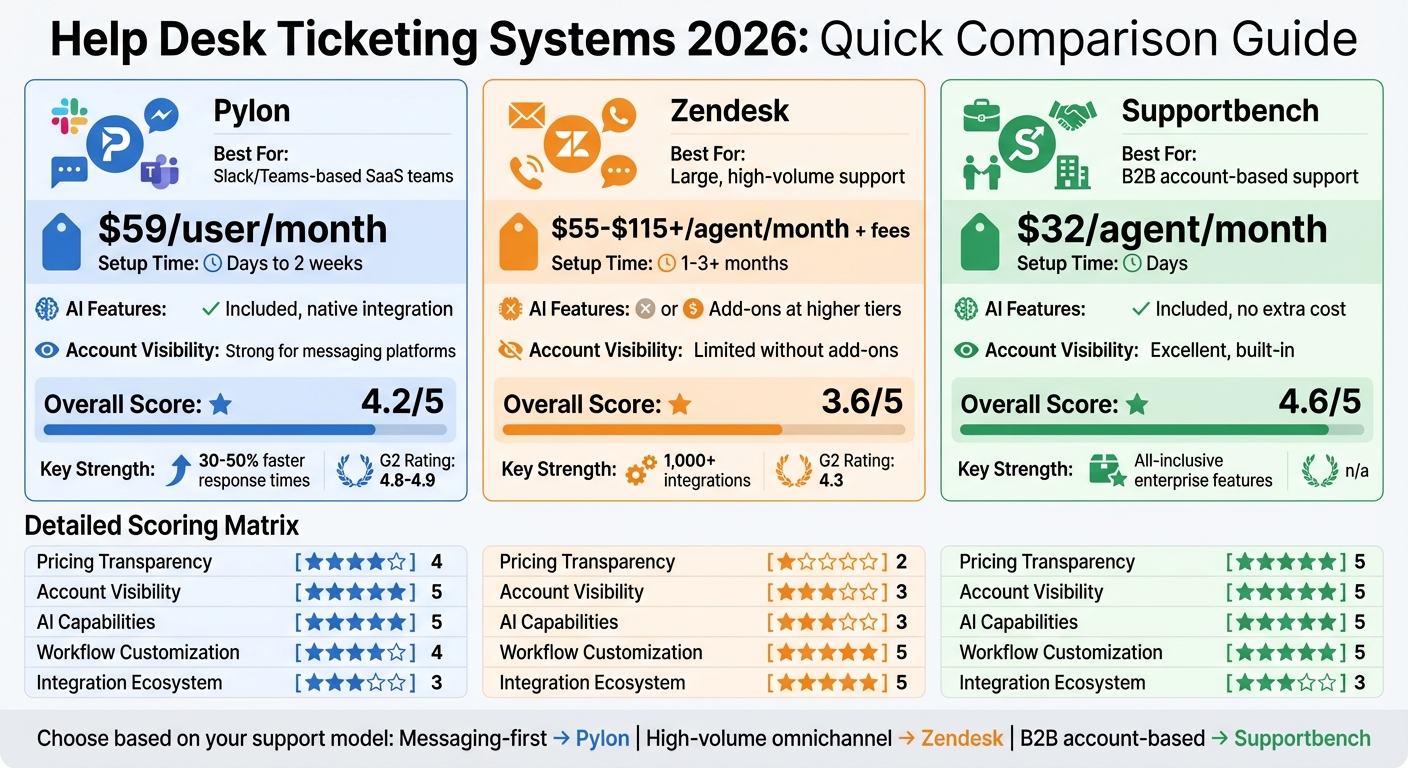
Quick Comparison
| Feature | Pylon | Zendesk | Supportbench |
|---|---|---|---|
| Best For | Slack/Teams-based SaaS teams | Large, high-volume support | B2B account-based support |
| AI Features | Included, native integration | Add-ons at higher tiers | Included, no extra cost |
| Pricing | $59/user/month | $55–$115+/agent/month + fees | $32/agent/month |
| Setup Time | Days to 2 weeks | 1–3+ months | Days |
| Account Visibility | Strong for messaging platforms | Limited without add-ons | Excellent, built-in |
Focus on your support model, customer communication channels, and budget to make the best decision.
Help Desk Comparison: Pylon vs Zendesk vs Supportbench Features and Pricing
7 Best Helpdesk Software & Ticketing Systems for 2025 (Ranked by Best Use Cases)
Who Should Choose What: Quick Summary
Pressed for time? Here’s a straightforward guide to help you pick the right platform. Each tool is tailored to a specific support model, so the key is aligning the platform with your team’s needs instead of forcing a mismatch.
This summary highlights how support motions influence your choice and categorizes the three platforms accordingly. Each excels in distinct B2B support scenarios, which we’ll dive into later.
Best for Pylon: Product-Led Teams Using Slack and Teams
Go with Pylon if your customers rely on Slack Connect or Microsoft Teams. It’s a great fit for product-led SaaS teams that benefit from seamless messaging integration.
Unlike older platforms that treat Slack as a bolt-on feature, Pylon offers full bidirectional synchronization – ensuring updates in Slack and your support system stay perfectly in sync. Plus, its AI-driven deflection tackles routine inquiries automatically, allowing your team to focus on more complex issues. Teams typically get up and running in just days to two weeks. With a G2 rating of 4.8 to 4.9, users report 30–50% faster response times.
Best for Zendesk: Large Agent Teams Managing High Ticket Volume
Choose Zendesk if you operate a large-scale support team handling thousands of tickets monthly across email, chat, phone, and social channels. It’s built for high-volume, multichannel ticketing.
Zendesk shines in environments requiring advanced routing, escalation workflows, and quick scalability for agent teams. However, enterprise deployments often take two to six months, and many B2B-specific features require integrations or higher-tier plans. Rated 4.3 on G2, it’s ideal for teams managing heavy ticket loads and needing broad channel support.
Best for Supportbench: B2B Teams Managing Accounts and Relationships
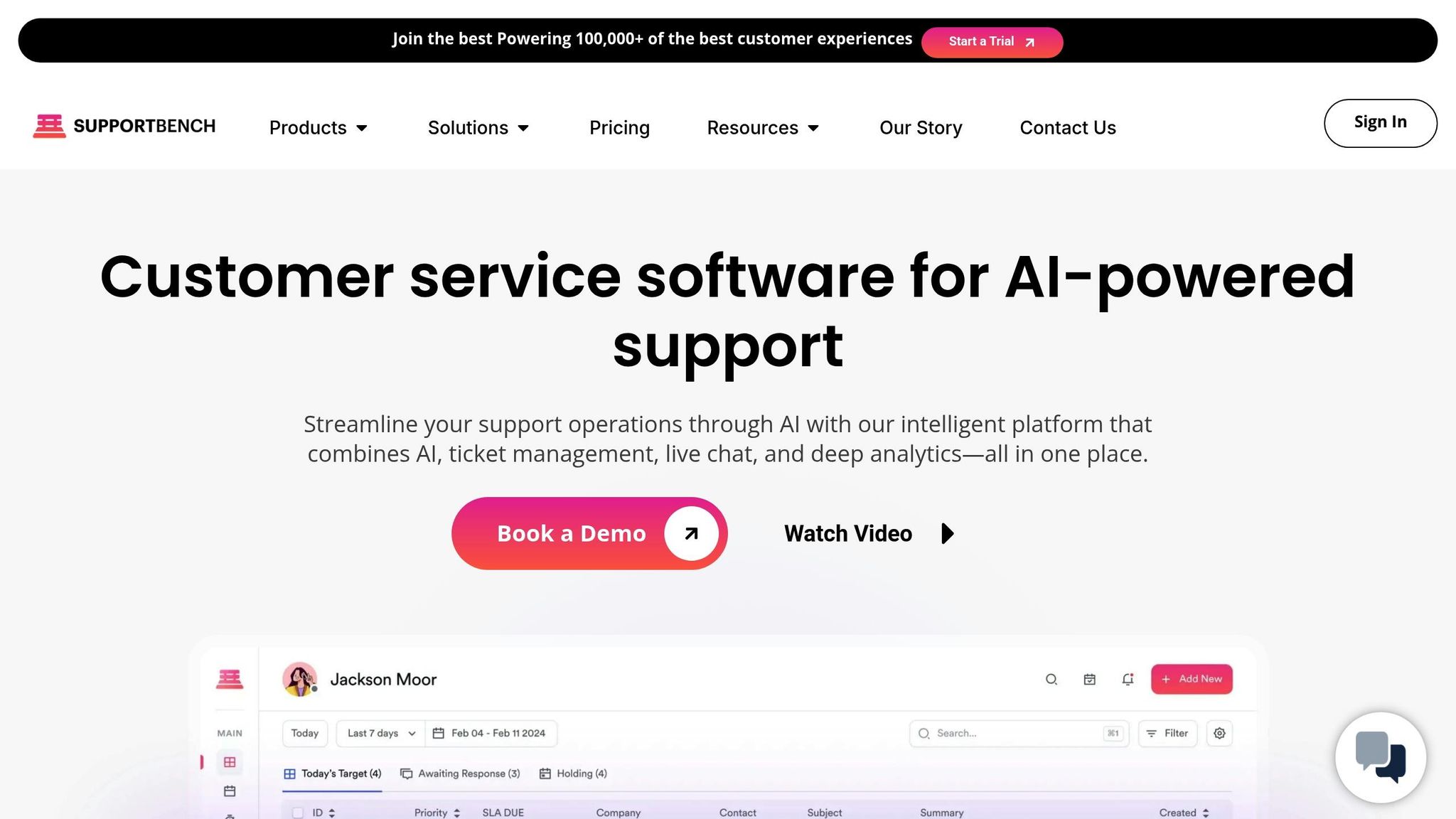
Opt for Supportbench if your focus is account-based B2B support, where every interaction ties directly to customer health and contract details. It provides a clear view of account health, contract terms, and renewal timelines.
Supportbench includes native B2B features like parent/child cases, multi-team approvals, and renewal-aware SLAs that adjust based on account value or renewal proximity. From day one, you get access to all AI features, workflows, dashboards, and live human support – without costly add-ons or the need for dedicated IT teams. It’s perfect for B2B teams seeking enterprise-level tools without the hefty price tag.
These overviews lay the groundwork for a detailed comparison in the sections ahead.
What to Evaluate When Choosing a B2B Help Desk
Picking the right help desk isn’t about finding the one with the most features. It’s about aligning the platform with your team’s needs, avoiding unnecessary complexity, and steering clear of expensive workarounds or administrative headaches.
Three key factors to focus on are pricing transparency, account-level insights, and AI tools that actually lighten the workload. These elements directly impact your costs and how effectively you manage B2B relationships. Let’s break down why they matter.
Pricing Model and Hidden Costs
Most help desks use a per-agent, monthly pricing structure, with plans ranging from $15 to over $150. But that sticker price often doesn’t tell the whole story. For example, legacy systems might charge implementation fees starting at $8,000 per channel, and some vendors tack on an extra 20-35% of your annual license cost for “Premier Support”.
AI tools and essential integrations – like conversation summaries, predictive health scoring, or syncing with your CRM – are often locked behind higher-tier plans or sold as add-ons. This means you’ll need to confirm whether these features are included or come with extra fees. Many teams find they’re only using a fraction of their platform’s capabilities – sometimes less than 30% – while paying for the full suite.
Don’t forget to factor in additional costs like implementation, training, and ongoing admin work. Legacy platforms, for instance, might require half to a full-time employee just to handle workflows and integrations, which can significantly increase your indirect costs. Data migration can also add up, costing anywhere from $300 to over $3,000 if third-party services are involved. A pricing model that aligns with your team’s scale and needs is critical for keeping costs under control.
Once you’ve nailed down the pricing, it’s time to think about how the platform handles account-level data.
Account-Level Visibility and Customer Context
B2B support often involves multiple stakeholders – buying committees, technical teams, and executives. Your help desk needs to bring all of this together under one account view instead of treating every interaction as a standalone ticket.
Account-level visibility means your team can see everything from health scores and renewal dates to contract details and recent product usage, all alongside the support history. This is crucial because 76% of customers expect seamless interactions across departments, and you can’t deliver that without a unified source of account data.
The best platforms offer bidirectional CRM syncing, where support interactions automatically update customer records. This allows agents to view live deal stages and renewal timelines without juggling multiple tabs. For teams focused on account-based support, this kind of integration is essential – it ties every interaction to retention and growth opportunities.
Finally, let’s talk about AI and how it can make your team’s job easier.
AI Features That Actually Help
AI tools can transform your support operations – if they’re done right. Key features to look for include conversation summaries, predictive health scoring, and intelligent routing.
"92% of CRM leaders report AI has improved response times, with 77% believing AI will handle most tickets by 2025." – HubSpot 2024 State of Service Report
The most effective platforms have native AI integration, meaning the AI is built directly into the system rather than added as an afterthought. Native AI can analyze resolved tickets to identify gaps in documentation, automatically draft new knowledge base articles, and summarize long Slack or Teams threads without requiring manual tagging. Teams using these workflows often see 30-50% faster response times compared to those relying on older systems.
It’s also worth checking whether the AI offers "agentic" workflows – where it can autonomously resolve issues and update records – or if it’s limited to "assistive" tools that only draft responses for human review. For B2B support, AI that can read account-level data (like renewal dates or contract values) and prioritize tasks accordingly is a game-changer. This ensures faster, context-aware customer interactions while reducing repetitive work for your team.
Choosing a help desk that gets these three areas right can make all the difference in delivering efficient, cost-effective B2B support.
sbb-itb-e60d259
Pylon vs Zendesk vs Supportbench: Full Comparison
Here’s a detailed look at how Pylon, Zendesk, and Supportbench stack up against each other based on key factors like pricing, account visibility, AI capabilities, workflow customization, and integrations. Each platform caters to a distinct support model, so knowing their strengths and limitations can help you make the right choice for your team.
Pylon: Built for Product-Led Teams
Pylon is tailored for teams operating within Slack or Microsoft Teams. If your customers prefer messaging and your team works in shared channels, Pylon integrates ticketing directly into these platforms.
Strengths:
Pylon’s native two-way sync with Slack and Teams allows customers to stay in their preferred channels, leading to response times that are 30% to 50% faster compared to email-first tools. Its Account Intelligence feature consolidates data from tickets, call recordings, and other interactions to flag churn risks and calculate customer health scores.
Challenges:
Pylon isn’t ideal for teams that handle large volumes of email tickets or rely heavily on phone support. Its integrations are primarily focused on messaging platforms, so if your customers don’t use Slack or Teams, its core benefits may not apply.
Best Fit:
Product-led B2B SaaS companies with engineering-focused support teams and customers who prefer messaging platforms. It’s most effective for teams where collaboration and conversation drive support efforts rather than a strict ticketing approach.
Who Thrives with It:
- Developer tool companies with customers relying on shared Slack channels for quick technical support.
- SaaS startups where support and customer success teams need a unified view of customer health for shared accountability.
Zendesk: Designed for High-Volume Support
Zendesk is a long-standing leader in the helpdesk space, built for large teams managing thousands of tickets across various channels like email, phone, chat, and social media.
Strengths:
Zendesk is perfect for omnichannel support at scale, offering over 1,000 integrations and extensive customization options to tailor workflows to specific needs.
Challenges:
Its ticket-centric design makes it harder to achieve account-level visibility without extra add-ons. AI capabilities are often tacked on with higher-tier plans, and implementation can take anywhere from 1 to 3+ months. Managing the platform often requires a dedicated administrator, and costs can escalate quickly, with Suite plans ranging from $55 to $115+ per agent per month, plus add-ons or services starting at $8,000 per channel.
Best Fit:
Large enterprises with high ticket volumes and dedicated IT/admin teams. It’s ideal for organizations managing thousands of tickets across multiple channels.
Who Thrives with It:
- Global SaaS companies with 100+ support agents handling inquiries across time zones via email, phone, and chat.
- E-commerce businesses with seasonal spikes in inquiries requiring advanced reporting and analytics.
Supportbench: Tailored for Account-Based B2B Support
Supportbench is crafted for B2B teams that need detailed account-level context, embedded AI, and straightforward pricing. It’s designed for organizations focused on managing relationships and safeguarding revenue rather than just closing tickets.
Strengths:
Supportbench includes AI-driven features, dynamic SLAs, and predictive scoring for CSAT and CES – all at a flat rate of $32 per agent per month. Its bidirectional Salesforce sync ensures agents can access licensing details, renewal dates, and deal stages directly within the case view.
Challenges:
Supportbench isn’t the best fit for teams handling high volumes of B2C inquiries or those requiring extensive phone support. As a newer platform, its brand recognition and integration marketplace are still growing.
Best Fit:
B2B organizations with account-based support models, long-term cases, and a need for built-in AI workflows without the complexity or cost of legacy systems. It’s especially effective for teams where support, sales, and success need shared visibility into customer health.
Who Thrives with It:
- B2B software companies managing multi-stakeholder accounts with collaborative support involving customer success, engineering, and sales.
- Manufacturing or distribution businesses dealing with long email threads and requiring SLA tracking across departments.
Side-by-Side Scoring Across Key Criteria
Here’s how the three platforms compare across pricing, account visibility, AI capabilities, workflow customization, and integrations. Scores are on a scale of 1 to 5, with 5 being the best fit.
Pricing Model and Hidden Costs:
- Pylon: 4/5 – Transparent pricing starts at $59 per user per month.
- Zendesk: 2/5 – Basic plans start at $19 per agent per month, but Suite plans range from $55 to $115+ per agent per month, with significant add-on costs.
- Supportbench: 5/5 – Flat $32 per agent per month includes all features, without hidden fees.
Account-Level Visibility and Customer Context:
- Pylon: 5/5 – Account Intelligence consolidates customer signals and detects churn risks.
- Zendesk: 3/5 – Primarily ticket-centric; account-level insights often require additional tools or integrations.
- Supportbench: 5/5 – Purpose-built for account-based workflows with native Salesforce syncing and dynamic SLAs.
AI Features That Actually Help:
- Pylon: 5/5 – Native AI agents assist with triage, drafting, and resolution.
- Zendesk: 3/5 – AI is available but often requires higher-tier plans and additional fees.
- Supportbench: 5/5 – AI is embedded throughout, offering predictive scoring, case summaries, and automation at no extra cost.
Workflow Customization and SLAs:
- Pylon: 4/5 – Strong workflows for Slack and Teams but less suited for email or phone-based support.
- Zendesk: 5/5 – Highly customizable workflows, though they require dedicated admin resources.
- Supportbench: 5/5 – Dynamic SLAs adjust automatically based on account data without IT complexity.
Integration Ecosystem:
- Pylon: 3/5 – Focused on Slack, Teams, and Discord with a growing list of integrations.
- Zendesk: 5/5 – Over 1,000 integrations available.
- Supportbench: 3/5 – Includes essential integrations like Salesforce syncing but lacks a broad marketplace.
How to Choose the Right Platform in 30 Minutes
You can make a solid decision in just 30 minutes by focusing on the right questions. These questions are designed to align your support model with the platform that best suits your needs.
The trick? Match your support model to the platform’s core capabilities. For example, a tool designed for high-volume B2C chat won’t work for a B2B team managing complex, multi-stakeholder accounts. Likewise, if your customers rely on email, a Slack-native platform won’t cut it.
Checklist: 8 Questions to Narrow Down Your Options
Work through these eight questions with your support leader. The answers will help you zero in on the platform that fits your workflow.
- Which channels drive customer interactions, and do they integrate natively with your help desk? If your customers use Slack or Microsoft Teams for real-time communication, you’ll need native messaging integration. If they prefer email or web portals, a ticketing system will work fine.
- Are you supporting individuals or entire accounts? B2B teams handling multi-stakeholder accounts need features like account-level visibility, health scores, and tools to track renewal dates and deal stages.
- Do you deal with high volumes of simple inquiries or fewer, more complex ones? High-volume teams need tools with strong routing, macros, and scalability. For fewer but more complex cases, collaboration features and integration with teams like engineering or product are essential.
- Is real-time CRM data important during support interactions? If your agents need access to licensing details, contract values, or renewal dates while working on cases, a platform with native CRM sync is a must.
- How much IT support can your team handle? If you lack dedicated IT resources or a Salesforce admin, steer clear of platforms with lengthy setup times and ongoing maintenance. Opt for tools that can go live in days rather than months.
- Does your support team collaborate with other departments? If your agents frequently escalate cases to engineering, product, or customer success teams, look for platforms with internal threading, @mentions, and integrations with tools like Jira or Linear.
- Do you need to monitor account health and churn risk? If your team is responsible for identifying at-risk customers or contributing to retention, choose a platform that tracks health scores based on metrics like response times, ticket volume, and sentiment.
- What’s your budget? Consider all costs, including per-seat pricing, implementation fees (which can start at $8,000 per channel for older tools), add-ons, and admin overhead. A $19/seat plan that requires a full-time admin might end up costing more than a $32/seat all-inclusive platform.
Decision Tree: Match Your Support Model to the Best Tool
Once you’ve answered these questions, use this decision tree to guide your choice.
Step 1: Are your customers B2B or B2C? If you’re focused on B2C or high-volume transactional support, you’ll need a different category of tools. For B2B with account-based relationships, move to the next step.
Step 2: Where do your customers communicate? For customers who use Slack or Teams and expect support through those channels, Pylon is a strong fit. If they rely on email or web portals, proceed to the next question.
Step 3: How many stakeholders are involved per account? If you’re managing accounts with multiple decision-makers (63% of B2B deals involve four or more stakeholders) and need visibility into renewal dates, contract values, and health scores, consider a platform like Supportbench. For individual users with straightforward needs, a simpler email-focused tool will suffice.
Step 4: Do you have IT resources for setup? If you lack a dedicated admin or developer, look for platforms that support managers can configure themselves. For example, Zendesk typically requires at least four weeks for basic setup, plus an extra week for every 10 users. Modern tools like Pylon can be operational in just a few days.
Step 5: How important is AI? If you need AI-driven features like predictive scoring, case summaries, and automation from day one (without extra fees), choose a platform where AI is baked in. If AI is more of a "nice to have", legacy platforms offer it as an add-on at higher pricing tiers.
Conclusion: Choose Based on Your Support Model, Not Marketing
The best help desk solution isn’t necessarily the one with the flashiest features or the most buzzworthy marketing. It’s the one that fits seamlessly into your support workflow and aligns with how your team communicates with customers.
This takeaway stems from our detailed comparisons and evaluation criteria. Trying to force a product-centric tool into an enterprise-level omnichannel setup will lead to inefficiencies. Similarly, retrofitting an outdated system to handle modern B2B messaging can drain your team’s time and your budget.
How to Make the Final Decision
Now that you’ve explored the strengths of each platform, here’s how to make your final choice.
Start by clearly defining your support workflow using the checklist we’ve outlined. During demos, simulate real-world scenarios. For example, run a multi-stakeholder escalation, test how the system manages internal threading, and ensure agents can access CRM data – like renewal dates and contract values – without hopping between tabs. Use a weighted scoring system to evaluate each demo (e.g., 25% for account management, 20% for native messaging, 15% for AI capabilities). This approach ensures a neutral, data-backed decision.
Don’t forget to account for hidden costs by following best practices for implementing a new helpdesk, including setup fees and training. A platform that’s $19 per seat but comes with $8,000 in setup fees, weeks of training, and ongoing admin support could end up being pricier than a $32-per-seat solution that’s ready to go within days. Also, consider the cost of additional integrations, AI add-ons, and the productivity hit from inefficient workflows.
If You’re Considering Supportbench
Here’s why Supportbench stands out for account-based B2B teams.
Supportbench shines when it comes to providing robust account-level visibility and integrated AI features. The platform offers AI-driven case summaries, predictive CSAT and CES scoring, dynamic SLAs, and automated knowledge base management – all included as standard.
Pricing starts at $32 per agent per month, and that includes all enterprise features from day one. There are no implementation fees, no per-channel costs, and no extra charges for AI tools. Support managers can easily customize workflows, dashboards, and integrations without needing help from IT.
If your team handles accounts with multiple stakeholders, monitors renewal risks, or collaborates closely with customer success teams to reduce churn, Supportbench is built for your needs. It consolidates fragmented systems and outdated tools into a single, cost-effective solution geared for modern B2B support operations.
FAQs
How can I choose the best help desk system for my business?
To find the right help desk system for your business, start by identifying your specific support requirements. Think about the complexity of your workflows, the size and structure of your teams, the communication channels you rely on, and whether you need advanced automation or integrations.
Choose platforms that align with your business goals. For instance, if your focus is on account-based customer management, prioritize tools that provide detailed customer insights and enable collaboration across teams. If quick response times and scalability are key, look for systems that include AI-driven automation for tasks like ticket routing and management.
Don’t forget to evaluate practical factors like pricing, ease of setup, and the ability to customize workflows. Creating a checklist with questions about integration options, automation capabilities, and reporting features can streamline your decision-making process.
What should I consider when evaluating the cost of a help desk platform?
When assessing the cost of a help desk platform, it’s important to weigh several factors to make the best decision for your business. Start by examining the pricing model – is it subscription-based, tiered, or pay-as-you-go? Be sure to check if there are extra charges for features like integrations, automation tools, or detailed reporting. These hidden costs can add up quickly.
You’ll also want to factor in operational expenses, such as the cost per ticket and how well the platform handles high-volume environments. Platforms that streamline workflows or minimize manual tasks can lead to significant savings over time. Additionally, check if the platform supports team collaboration and offers account-based visibility, as these features can cut down on staffing and coordination expenses.
Lastly, take a close look at the AI capabilities and customization options. Features like automated ticket routing or AI-generated knowledge bases can reduce ongoing administrative costs. Opt for platforms with clear, upfront pricing to avoid unexpected fees and ensure you’re maximizing the platform’s value.
Why is it important for B2B support teams to have a complete view of customer accounts?
Account-level visibility plays a key role for B2B support teams by offering a centralized view of all interactions, support tickets, and account-specific details. This consolidated perspective allows support agents to provide personalized, context-driven assistance, cutting down on miscommunication and speeding up resolutions.
Beyond resolving issues, it empowers teams to spot potential risks, like customer churn, while also uncovering upsell opportunities or trends in customer satisfaction. In complex setups with multiple stakeholders or departments, this visibility ensures that support efforts remain coordinated and aligned with the broader customer relationship strategy.