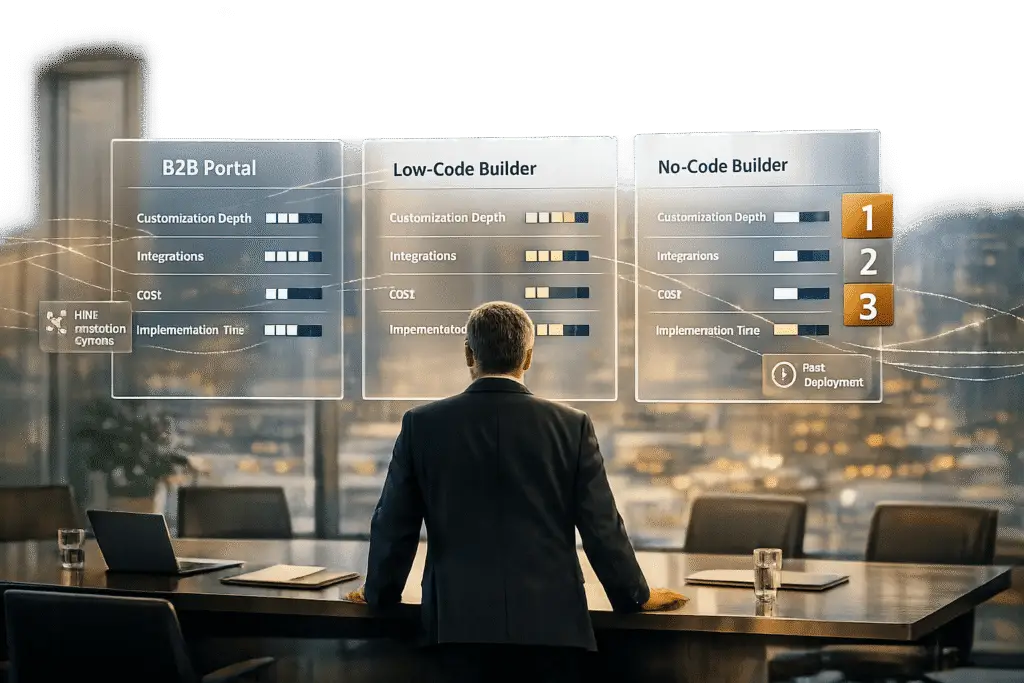
Customer portal software in 2026 prioritizes customization, helping B2B teams manage accounts, streamline workflows, and deliver tailored client experiences. With 71% of customers expecting personalization and 65% demanding fast responses, choosing the right portal is critical for meeting expectations and improving customer retention. This article reviews three categories of software based on customization capabilities and business needs:
- Supportbench: A B2B-focused platform with AI-driven tools, dynamic SLAs, and deep CRM integration. Ideal for managing complex accounts and scaling operations.
- Low-Code Builders: Offer drag-and-drop design with backend flexibility for teams with technical expertise. Great for balancing speed and control but requires some coding knowledge.
- No-Code Builders: Simplify portal creation for non-technical users with fast deployment and affordable pricing. Best for straightforward workflows but limited in handling complex logic.
Below is a quick comparison of these options.
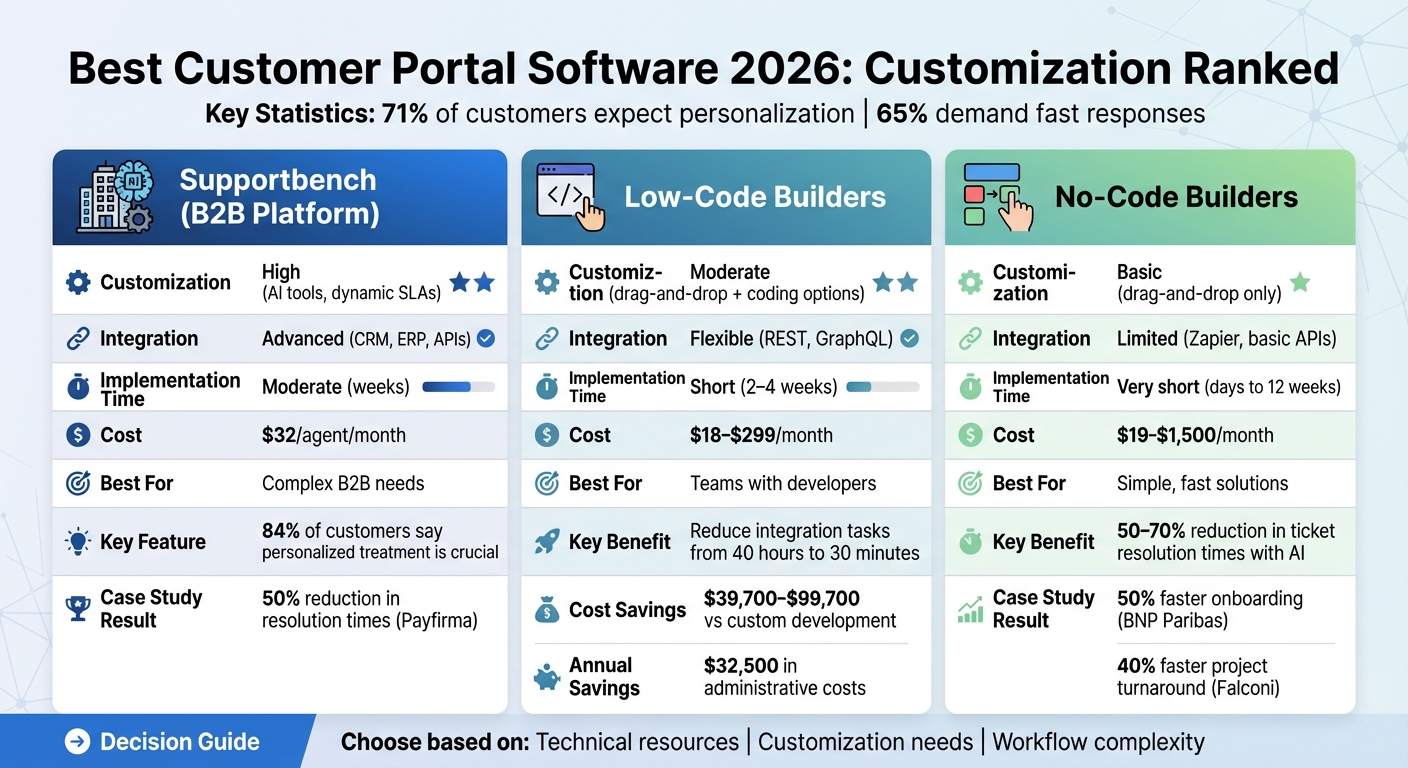
Quick Comparison
| Feature/Platform | Supportbench | Low-Code Builders | No-Code Builders |
|---|---|---|---|
| Customization | High (AI tools, dynamic SLAs) | Moderate (drag-and-drop + coding options) | Basic (drag-and-drop only) |
| Integration | Advanced (CRM, ERP, APIs) | Flexible (REST, GraphQL) | Limited (Zapier, basic APIs) |
| Implementation Time | Moderate (weeks) | Short (2–4 weeks) | Very short (days to 12 weeks) |
| Cost | $32/agent/month | $18–$299/month | $19–$1,500/month |
| Best For | Complex B2B needs | Teams with developers | Simple, fast solutions |
Choose a solution based on your team’s technical resources, customization needs, and workflow complexity. Each option has strengths tailored to different business goals.
Customer Portal Software Comparison: Supportbench vs Low-Code vs No-Code Builders 2026
1. Supportbench – B2B Customer Support & Success Platform
Customization Depth
Supportbench stands out by offering dynamic interfaces that adjust to each customer’s unique history, preferences, and needs. Using AI, it provides tailored recommendations, predictive support solutions, and real-time content adjustments, delivering a truly personalized experience. In fact, 84% of customers report that personalized treatment is crucial for earning their business [5].
Designed specifically for B2B needs, the platform includes features like customer health scoring and dynamic Service Level Agreements (SLAs) that automatically tighten based on specific triggers, such as an upcoming renewal date. Its scalable infrastructure supports detailed analytics and customizable dashboards, allowing businesses to refine their operations continuously [5]. These advanced customization tools seamlessly integrate with the platform’s broader capabilities.
Integration Capabilities
Supportbench ensures a smooth flow of real-time data with bidirectional CRM synchronization for platforms like Salesforce, HubSpot, and Microsoft Dynamics. This integration gives agents a full picture of key customer details, such as contract information, product usage patterns, and renewal timelines, all within their workflow [6]. The platform also connects with ERP systems like SAP and provides API access for custom internal system connections [7]. A standout feature is its datatables functionality, which lets teams store and manage complex B2B data – such as infrastructure details, login credentials, or trained personnel lists – within customer records.
One notable example is Vancouver-based payment processor Payfirma. In October 2025, the company used Supportbench’s intelligent workflows and CRM synchronization to handle nearly 10,000 customers with just four agents managing 800 to 1,000 monthly requests. This approach cut resolution times by 50% and significantly improved first response times [6].
Implementation Time and Cost
Supportbench is priced at $32 per agent per month, including all enterprise features – such as AI tools, workflows, dashboards, and live support – from day one [website]. There are no hidden fees or restrictive feature tiers, making it accessible for small teams and scalable for growing businesses. The platform shifts customer support strategies from reactive to proactive, thanks to tools like customer health scoring and dynamic SLAs [5].
Its mobile-first design is particularly relevant, given that over 54% of global internet traffic was mobile as of 2021 [5]. Additionally, discounted pricing is available for startups and non-profits [website].
sbb-itb-e60d259
2. Low-Code Portal Builders
Customization Depth
Low-code platforms strike a balance between ready-made solutions and fully custom development. They feature drag-and-drop visual builders that simplify design while still allowing access to the underlying code for more intricate workflows. However, some technical expertise is often required [8].
These platforms offer faster deployment and lower costs compared to traditional development. While they may not provide the same level of customization as fully bespoke solutions – particularly for specialized industry logic or embedded in-product support – they still enable much quicker deployment without the hefty price tag of custom builds [4]. AgileSoftLabs highlights this trade-off:
"Support as a core differentiator is the clearest case for building: when the customer support experience is part of your product’s value proposition, off-the-shelf platforms impose a ceiling on how differentiated that experience can be" [4].
For B2B support teams, low-code solutions often include essential features like role-based access control (RBAC), automated SLA monitoring, and multi-step ticket routing [13][9]. Many companies take a hybrid approach – leveraging low-code for common channels like email and chat while building custom modules for unique, proprietary workflows [4]. This approach also benefits from robust integration options.
Integration Capabilities
For B2B teams, smooth integration is just as important as customization. Low-code portal builders often rely on API-first architectures like REST and GraphQL to connect with various backend systems, including SQL databases and external APIs [10][1]. Pre-built connectors for platforms like Salesforce, SAP, and PostgreSQL can reduce integration tasks from 40 hours to just 30 minutes. Additionally, bidirectional data synchronization allows users to view and update records in real time across tools like Airtable, Google Sheets, and Notion [11][10][2].
Some platforms even offer code export features, such as with Vue.js, enabling businesses to self-host and maintain full control over integrations [10]. When assessing options, prioritize solutions with extensive API coverage – ideally 90% or higher – to avoid potential integration hurdles [1].
Implementation Time and Cost
Low-code platforms can deliver functional portals in just 2–4 weeks, compared to the 3–6 months typically required for traditional development [11][14]. This speed also translates to major cost savings. For instance, building a low-code portal can reduce initial development expenses by $39,700 to $99,700 compared to creating a custom solution from scratch [12].
Consider the experience of Adam Steele, owner of Loganix, who spent $80,000 over eight months developing two custom dashboards before switching to a low-code solution. The change reduced technical debt and improved flexibility [14]. Similarly, Wholesale Distributor Steve Hawker at Art Systems implemented a low-code platform, saving about $32,500 annually in administrative costs while handling twice the number of calls [12].
Subscription costs for low-code platforms typically range from $18 to $25 per month for standard packages, while specialized B2B solutions can cost between $129 and $299 per month [12][14]. These subscriptions often include maintenance, helping organizations avoid the $30,000 to $35,000 annually required for custom-built infrastructure upkeep [4]. However, for larger teams – like those with 100 agents or more – custom builds might become more cost-effective over a five-year period, assuming sufficient technical resources are available to manage them [4].
3. No-Code Portal Builders
Customization Depth
No-code platforms take the simplicity of low-code tools a step further, enabling teams without technical expertise to build functional portals at lightning speed. These platforms rely on drag-and-drop editors, making it easy for non-technical users to create portals tailored to their needs. Many of them include features like role-based access control (RBAC) at both the field and record levels, branded interfaces, and pre-built templates designed for common workflows like client onboarding or document sharing. However, this speed comes at the expense of handling more intricate logic. Some platforms allow minor CSS or JavaScript tweaks, but their priority is rapid deployment rather than advanced customization. For teams managing large amounts of relational data, database-backed solutions like Bubble and Stacker perform better than spreadsheet-based tools, especially when scaling up [16].
Integration Capabilities
Modern no-code builders shine in creating seamless connections with other tools, ensuring a unified data environment. They integrate directly with popular CRMs like Salesforce and HubSpot, storage platforms such as SharePoint and Box, and billing systems. Native two-way synchronization keeps data updated across all connected systems in real time. Platforms like Zapier Interfaces, which link over 7,000 apps, enable users to trigger automated workflows directly from portal buttons. AI integrations are also becoming commonplace. For instance, tools like Latenode provide access to more than 400 AI models (including GPT-4o and Claude 3.5 Sonnet) under one subscription. Additionally, Retrieval-Augmented Generation (RAG) allows AI tools to pull answers from existing resources like help center articles or past tickets. This feature can significantly reduce agent workload, cutting ticket resolution times by 50–70% [17].
Implementation Time and Cost
One of the biggest advantages of no-code solutions is their speed and affordability. These portals can be up and running in as little as a few days or up to 12 weeks, depending on complexity. For example, BNP Paribas managed to cut its customer onboarding time in half in 2025 by using Moxo‘s no-code portal to digitize its KYC processes. Similarly, Falconi Consulting shortened project turnaround times by 40% by centralizing client interactions within a branded portal [15].
In terms of cost, monthly subscription fees for no-code platforms typically range from $29 to $1,500, depending on the features and number of users. Some platforms, like Softr, offer free plans with paid options starting at $49 per month for 20 users. Others, such as SuiteDash, have plans starting at $19 per month with unlimited client access [18]. By contrast, building traditional custom portals can cost anywhere from $25,000 to $60,000. When planning a no-code portal project, it’s wise to allocate an additional 25% to the estimated timeline for revisions and testing [19].
9 Best Client Portal Software Tools in 2025 (Ranked by Best Use Cases)
Pros and Cons
This section breaks down the key strengths and trade-offs of each portal type, helping you align the right solution with your team’s needs and business goals.
B2B platforms like Supportbench are designed for managing complex account hierarchies and long-term client relationships. They come equipped with features such as AI-driven sentiment analysis, dynamic SLAs that tighten during renewal periods, and customer health scoring – tools that transform support into a relationship-building asset [5]. Additionally, these platforms integrate seamlessly with Salesforce and include AI functionalities without requiring costly add-ons. On the flip side, they demand more upfront configuration to align with your specific workflows and account structures.
Low-code builders provide backend flexibility, allowing connections to various data sources via REST, GraphQL, or SQL [20]. They offer full CSS control and the option to export code for self-hosting, making them a great fit for teams with developer expertise who require custom data structures. However, these platforms often involve learning proprietary scripting languages (like Zoho’s Deluge) and can present a steeper learning curve. While their customization capabilities are a major advantage, they may also pose integration challenges.
No-code platforms shine in their simplicity and speed, with implementation times measured in hours or days instead of weeks [10]. For instance, Softr starts at $49 per month for 20 users, while SuiteDash offers flat-rate pricing from $19 per month for unlimited access [2]. These platforms excel at connecting to tools like Airtable, Notion, or HubSpot through live data synchronization [2]. However, their ease of use comes at the expense of advanced customization, making them less suitable for intricate workflows like multi-level approvals or hierarchical pricing structures [3][1].
Real-world examples further highlight the impact of these platforms. In February 2026, BUFA Chemicals cut their order processing time by 60% through deep ERP integration with their B2B portal [1]. Similarly, a European distributor managing 15 warehouses reduced fulfillment times by 35% using real-time inventory synchronization [1].
Conclusion
The right portal choice depends entirely on your customization needs and operational priorities. For B2B support leaders handling intricate account hierarchies, Supportbench offers the depth required. Its features – like dynamic SLAs, AI-driven sentiment analysis, and seamless CRM integration – are tailored for managing long-term, multi-layered B2B relationships.
For those seeking a balance between flexibility and control, low-code solutions might be the answer. These platforms are ideal for teams with developer resources, offering the ability to create custom data structures and integrate with proprietary systems via REST or GraphQL. While they provide backend flexibility and full CSS control, they come with a learning curve, requiring time to master platform-specific scripting and manage complex integrations.
On the other hand, no-code platforms shine when speed and simplicity are key. They allow for rapid deployment, often within hours, making them a cost-effective option for straightforward workflows. However, they may struggle with the demands of multi-level approvals, hierarchical pricing, or the advanced account management often required in B2B environments.
Ultimately, if your operation involves managing multi-company hierarchies, contract-specific pricing, or renewal-focused SLAs, a B2B-native solution is the way to go. While these systems might require more upfront configuration, the payoff comes in the form of greater operational efficiency and stronger customer retention.
FAQs
How do I know if I need a B2B-native portal?
If your business handles complex, high-value accounts that demand personalized engagement, custom workflows, and smooth integration with existing systems, a B2B-native portal is likely the right choice. These portals bring everything together – support, onboarding, and communication – while also providing tailored self-service options and automation to meet your specific needs.
On the other hand, if your requirements are simpler, like basic ticketing or straightforward communication, a general SaaS solution could do the job. Deciding between the two comes down to how intricate your operations are and what you aim to achieve in terms of customer engagement.
What data should my portal sync in real time?
Your portal needs to sync real-time data such as customer details, support tickets, account updates, product or service statuses, and workflows. This keeps all systems aligned with instant updates, streamlining operations and enhancing the overall customer experience.
How do I estimate total portal cost in 2026?
To figure out the potential costs of a customer portal in 2026, you’ll need to account for both initial development and ongoing expenses.
- Initial development costs: A simple portal can cost between $25,000 and $60,000, but if you’re looking for a highly tailored solution, the price can go beyond $250,000.
- Ongoing costs: These can include things like licensing fees, software subscriptions (often around $15–$20 per user/month for SaaS platforms), regular maintenance, and system updates.
Start by clearly outlining your specific requirements and the complexity of the portal you need. This will help you create a budget that’s realistic for your project.