
Salesforce is often too expensive and complex for mid-market B2B teams. With costs starting at $165 per user per month and long implementation timelines, many companies are seeking better CRM options. This article highlights five alternatives that are more affordable, easier to implement, and tailored for mid-market needs:
- Supportbench: Focused on post-sale support with AI tools, starting at $32/agent/month. As a dedicated customer service software for B2B SaaS, it scales with your growth.
- HubSpot Sales Hub: Unified sales and marketing platform with Breeze AI, starting at $890/month for five users.
- Zoho CRM: Affordable and feature-rich at $40/user/month for the Enterprise plan.
- Pipedrive: Simple and visual, ideal for smaller sales teams, starting at $49/user/month.
- Creatio: No-code platform for automating workflows, starting at $15/user/month.
Each option offers unique strengths in cost, scalability, AI capabilities, and ease of use, making them suitable for different business needs.
Quick Comparison:
| Platform | Starting Price | Key Strengths | Ideal For |
|---|---|---|---|
| Supportbench | $32/agent/month | AI-driven support tools | Complex B2B support operations |
| HubSpot | $890/month (5 users) | Sales-marketing alignment | Teams needing unified workflows |
| Zoho CRM | $40/user/month | Budget-friendly features | Cost-conscious mid-market teams |
| Pipedrive | $49/user/month | Visual simplicity | Small to mid-sized sales teams |
| Creatio | $15/user/month | Workflow automation | Teams seeking no-code flexibility |
For mid-market teams, selecting the right CRM can lower costs, improve efficiency, and better align with your goals.
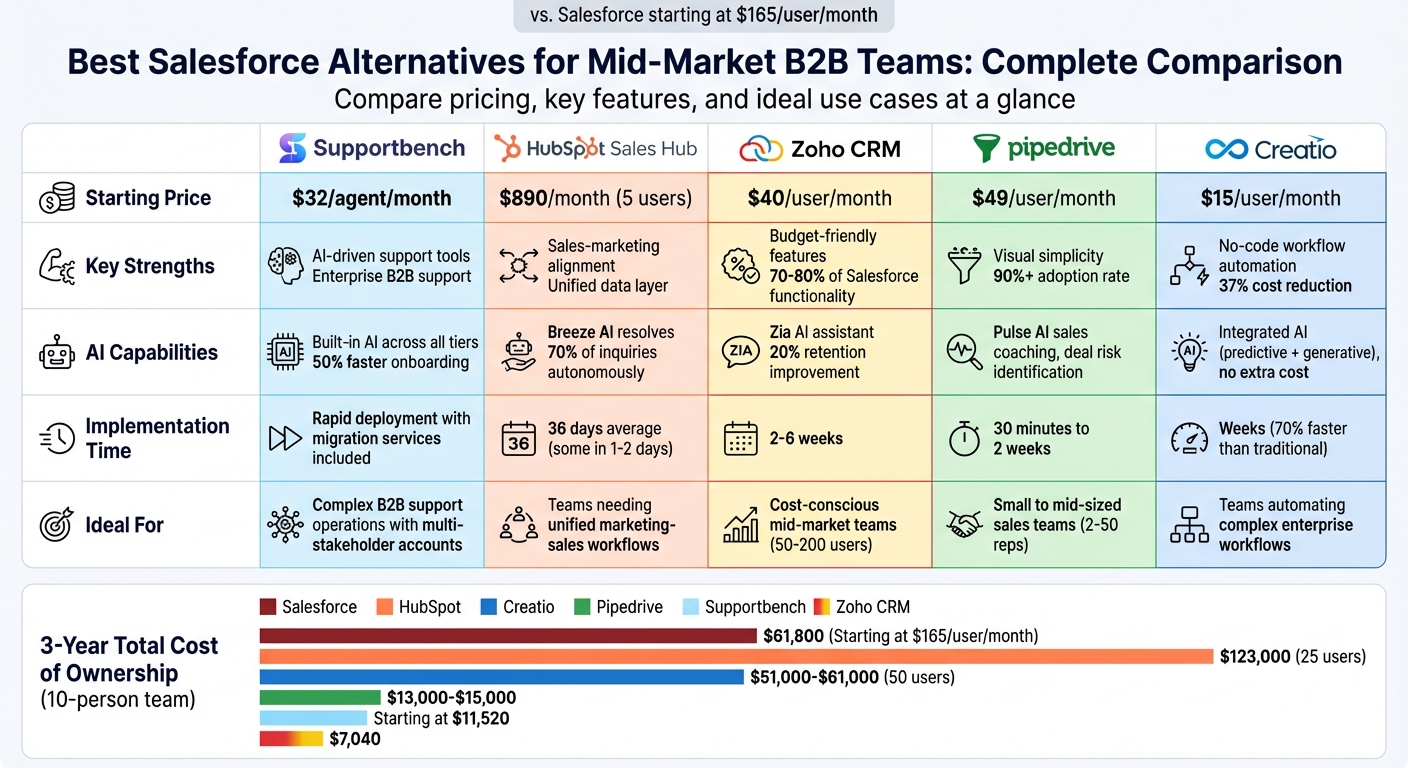
Salesforce Alternatives Comparison: Pricing, Features & Best Use Cases for Mid-Market B2B Teams
Top Salesforce Alternatives 2026 | Analyst Compares Competitors [3/3]
sbb-itb-e60d259
1. Supportbench
Supportbench was designed specifically for mid-market B2B teams managing complex accounts. Unlike Salesforce, which primarily serves as a sales-focused data repository, Supportbench zeroes in on post-sale operations like support, customer success, and retention – without requiring developers or consultants.
AI Capabilities
Supportbench integrates AI features across all pricing tiers, making enterprise-grade tools accessible to every user. Key AI-powered tools include generative summaries to cut down on reading time, real-time sentiment analysis to identify potential churn risks, and agent copilots that recommend next steps based on historical case data and the knowledge base. One standout feature is the automatic updating of the knowledge base after a case is resolved. In fact, agent copilots can reduce onboarding time by up to 50% [4][5].
These AI tools enhance efficiency and provide the agility needed to handle the complexities of B2B support operations.
Scalability for B2B Operations
Supportbench is tailored to the intricate nature of B2B relationships, offering dynamic SLA management that adjusts service levels based on factors like account tier, contract terms, or renewal timelines. Each ticket is tied to the overall client relationship, displaying critical information such as health scores, contract details, and usage history alongside support interactions. Collaborative workflows are supported through features like case swarming and linked case structures.
"Using Supportbench has provided our department with a complete client management system. Since everything is one platform, we have a clear overview of all client and team interaction." – Jonathan Pasquel, Personnel Manager
Cost-Effectiveness
Supportbench combines robust features with affordability. Pricing begins at $32 per agent per month, giving all users access to the same enterprise-level platform from the start. This includes AI capabilities, integrated workflows, dashboards, and live human support. For teams already tied to Salesforce contracts, Supportbench offers a contract buyout, allowing them to use the platform for free until their current renewal date. By automating tasks like ticket categorization and data entry, Supportbench enables teams to grow without needing to increase headcount proportionally.
Ease of Implementation
Supportbench integrates seamlessly with Salesforce and HubSpot, synchronizing data bi-directionally to create a unified source of truth. Its user-friendly interface balances functionality with simplicity, avoiding the steep learning curve often associated with enterprise CRMs. Migration services, including data transfer, system configuration, and team training, are included at no additional cost.
"Supportbench is incredible at getting things done compared to other success and case management solutions I’ve used. In my opinion, it is incomparably superior when it comes to resolving end-user issues." – Caitlyn Langston, Chief Technology Officer
The platform also meets enterprise security standards, being HIPAA-compliant and ISO 27001 certified, without adding unnecessary complexity. This streamlined setup ensures rapid deployment, perfectly suited for mid-market B2B teams.
2. HubSpot Sales Hub
HubSpot Sales Hub has grown beyond its small business origins to become a strong option for mid-market teams focusing on marketing and sales alignment. With around 248,000 customers as of late 2024, the platform has made strides in addressing enterprise needs, such as improved customization and permission controls [20,22]. Let’s take a closer look at how HubSpot Sales Hub uses AI to enhance support operations.
AI Capabilities
HubSpot integrates its AI tool, Breeze AI, directly into its platform. Breeze AI includes features like the Customer Agent, which can autonomously handle and resolve up to 70% of inquiries, and Breeze Intelligence, which enriches customer records with critical B2B details. These tools help deliver faster support and more tailored engagement [9].
In 2025, Nutribees reported a 77% reduction in human-handled support tickets thanks to Breeze Customer Agent. According to their CMO Pietro Ripanti, having 24/7 support availability also boosted their conversion rates [9]. Similarly, Agicap saved 750 hours weekly and saw a 20% increase in deal velocity [9].
Scalability for B2B Operations
HubSpot is well-suited for managing complex B2B accounts through features like integrated account-based marketing (ABM) tools and a unified customer timeline. This timeline consolidates sales history, deal values, and marketing interactions into a single view, making it easier for teams to stay aligned [7]. For mid-market B2B companies with 200 to 1,000 employees, the platform scales efficiently, especially when marketing and sales alignment is the main focus. However, it may fall short for organizations with more intricate territory management needs [10].
What sets HubSpot apart is its minimal administrative requirements. On average, it demands less than 0.5 full-time equivalent staff for management, which is significantly less than other enterprise platforms. This aligns with its emphasis on AI-powered support operations [8,17].
Cost-Effectiveness
When it comes to cost, HubSpot offers a compelling advantage. Its total cost of ownership is typically two to four times lower than comparable enterprise platforms [10]. The Professional Plan starts at $890 per month for five users, including Breeze AI and advanced automation. The Enterprise Plan begins at $3,600 per month for ten users [8].
For a mid-sized team with 20 sales and 5 marketing users, the three-year total cost of ownership is roughly $123,000, compared to $376,000 for other platforms [12]. Additionally, HubSpot eliminates the need for a certified administrator, saving companies between $70,000 and $100,000 annually. AI-powered actions are fueled by HubSpot Credits, costing approximately $0.01 per credit, or $10 for 1,000 credits [9].
Ease of Implementation
HubSpot Sales Hub is quick to implement, with most teams going live in just 36 days, and some in as little as one to two days [18,19]. The platform scores 4.4 out of 5 for ease of use, with 70% of users citing this as a key reason for choosing it [6,24]. Its user-friendly design and extensive training resources boost adoption rates, with integrated CRM users being 86% more likely to surpass their sales goals [11].
"HubSpot is straightforward and intuitive." – Verified Reviewer [12]
That said, the platform does have some drawbacks. Reporting features may lack the depth needed for advanced multi-entity forecasting, and its contact-based pricing model can lead to higher costs as databases grow [6,8]. Even so, its features provide practical insights for teams seeking to align sales and support efforts effectively.
3. Zoho CRM
Zoho CRM supports over 300,000 businesses globally and has been recognized as a Visionary in the 2025 Gartner Magic Quadrant for Sales Force Automation Platforms [13][18]. For mid-market B2B teams, it delivers 70–80% of Salesforce’s functionality at a much lower cost [20][21].
Here’s how Zoho CRM tackles common operational challenges for mid-market B2B teams.
AI Capabilities
Zoho’s AI assistant, Zia, automates repetitive support tasks like tagging incoming tickets, identifying gaps in the knowledge base, and suggesting pre-written responses [14][16]. Zia also uses sentiment analysis to assess the tone of emails and support requests, enabling teams to prioritize frustrated customers and handle urgent issues more effectively [14][16].
What sets Zia apart is its ability to integrate data from across the Zoho ecosystem – finance, projects, marketing – providing a complete customer view without needing to switch platforms [17]. Zoho’s data shows that 98% of sales teams using AI report better lead prioritization, and businesses using generative AI in their CRM are 83% more likely to surpass sales targets [17].
For example, an e-commerce company that adopted Zoho’s AI-powered CRM between 2024 and 2025 achieved a 20% improvement in customer retention within six months. With Zia’s lead scoring and automated segmentation, they also boosted response rates by 35% [15].
Scalability for B2B Operations
Zoho CRM’s Enterprise tier, priced at $40/user/month, is tailored for mid-market teams managing complex accounts. It includes features like territory management, multi-user portals, and journey orchestration [20]. Tools like Blueprint help standardize sales processes, while Canvas allows teams to declutter the interface with role-specific layouts [20].
Agappe, a user of Zoho CRM, centralized their information and automated workflows, leading to an 80% productivity increase in just one year:
"Zoho CRM offers us technology that allows us to be more proactive and insight-driven, with all information in a single place. With our complete business under control, our productivity is up by 80% in the last year." [13]
Cost-Effectiveness
Zoho CRM’s pricing is designed with mid-market budgets in mind. The Enterprise plan costs $40/user/month (billed annually), and the Ultimate plan is $52/user/month [18][20]. For a team of 550 users, Zoho CRM Enterprise costs about $264,000 annually, offering savings of 70–90% compared to alternatives [18][19]. Over three years, a 10-person team would spend approximately $7,040 with Zoho CRM versus $61,800 with Salesforce [21]. The platform also operates on a pay-as-you-go basis, avoiding the need for long-term contracts [13].
Ignacio Galarraga, CEO of The NetMen Corp, highlighted:
"Zoho had all of the functionality that we could ever need, at a fraction of the cost of Salesforce. It felt much more intuitive." [18]
Beyond affordability, Zoho CRM’s straightforward deployment accelerates team adoption.
Ease of Implementation
Zoho CRM implementations for mid-market teams typically take 2–6 weeks [3][13]. This efficiency comes from Zoho’s low-code tools like Kiosk Studio and Deluge scripting, which make the platform accessible even for teams without dedicated developers [18][3]. Mid-market teams with 50–200 users often manage Zoho CRM without needing a full-time administrator. In contrast, Salesforce deployments for teams larger than 25 users frequently require a certified admin [22]. This reduces both administrative complexity and costs.
4. Pipedrive
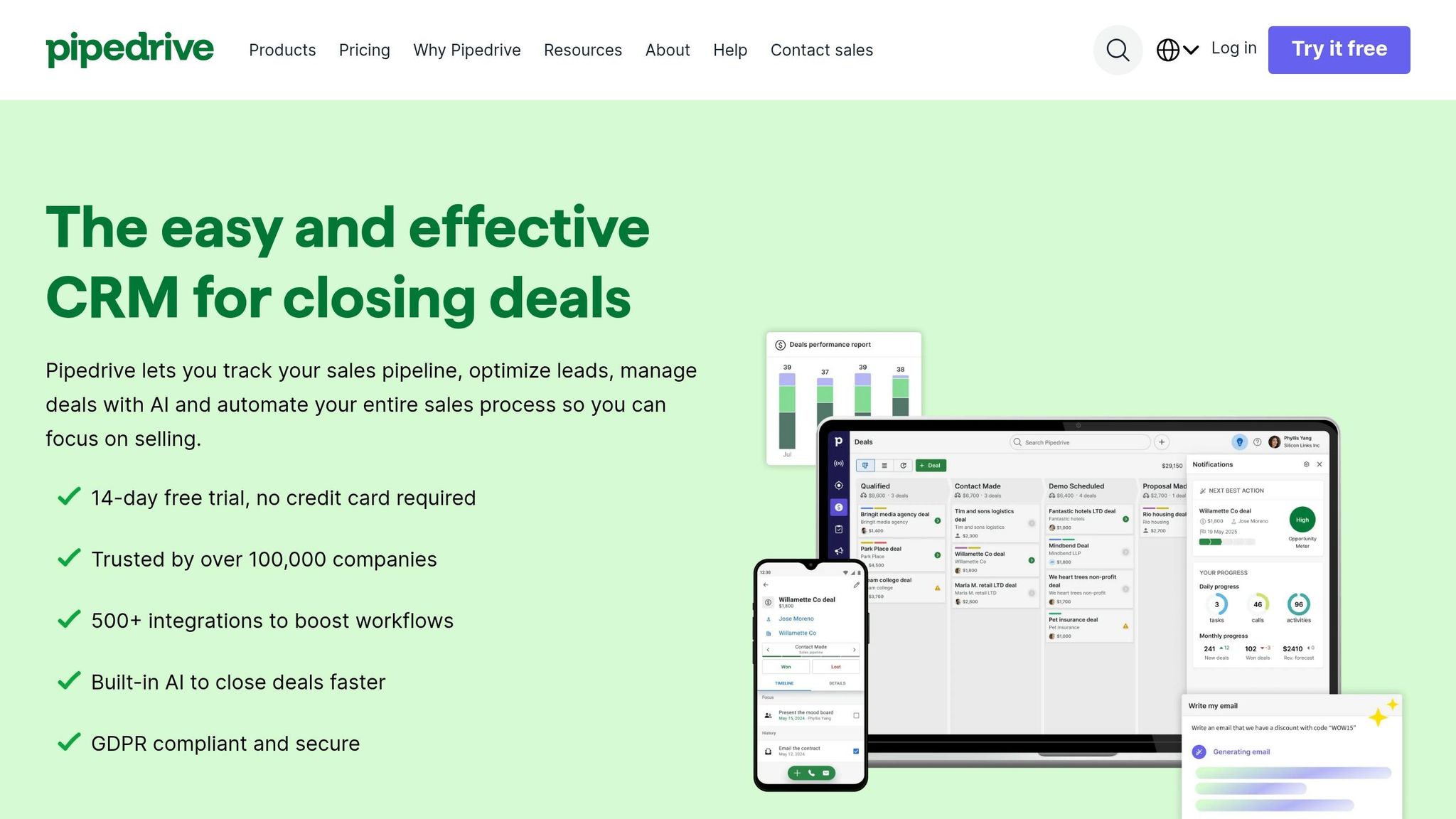
Pipedrive is tailored for sales teams of 2–50 reps who need a straightforward, visual CRM without the bulkiness of enterprise platforms. With a G2 rating of 4.3/5, it’s built around helping teams focus on the next actionable step. It’s a solid choice for mid-market teams with simpler sales processes, offering quick setup and competitive pricing. However, it may not be the best fit for handling more complex support operations. Let’s break down its AI tools, scalability, cost, and ease of implementation for mid-market B2B teams.
AI Capabilities
Pipedrive’s Pulse AI focuses on sales coaching, helping teams identify deals at risk, prioritize opportunities with higher close probabilities, and even draft emails based on deal details [8][25]. It also features an AI Sales Assistant that provides workflow automation insights, streamlining repetitive tasks [23]. That said, Pulse AI doesn’t include autonomous support functionalities, meaning teams need third-party tools to handle customer service. While its AI acts more as a "coach", studies have shown that 83% of sales teams using AI saw revenue growth by 2025, underscoring the potential benefits of AI – even with Pipedrive’s limitations [8].
Scalability for B2B Operations
Pipedrive thrives in smaller sales-led teams but struggles with scaling for complex, multi-stakeholder B2B accounts. It lacks advanced features like custom objects, relying instead on custom fields within standard objects like Deals, Contacts, and Organizations [25]. For teams exceeding 30–50 users, it falls short in areas like field-level security, territory management, and detailed audit trails. Reporting capabilities work well for small to medium-sized businesses but don’t meet the demands of larger mid-market teams needing in-depth, cross-entity analysis. While Pipedrive shines in basic sales tracking, teams requiring advanced support operations may need to integrate additional tools.
"Pipedrive is a very easy and simple software solution. We were able to track all the different markets, our whole sales team’s performance, new leads and customer cases easily – and we did the implementation by ourselves just in a couple of days." – Jesse Pärnänen, VP of Sales, Framery [26]
Cost-Effectiveness
Pipedrive offers a cost-friendly alternative compared to larger platforms. Its Premium plan is $49 per user, per month (billed annually) and includes features like AI lead scoring, 150 automations, and an AI email writer. For a 10-person team, the first-year total cost of ownership (TCO) is estimated at $13,000–$15,000 – far less than Salesforce Pro Suite, which ranges from $38,000 to $48,000. Plus, Salesforce often requires a certified admin (costing $70,000–$110,000 annually), while Pipedrive can be managed by a sales manager with just 2–5 hours of weekly effort. Optional add-ons like LeadBooster ($32.50/month) make it even more budget-friendly compared to pricier tools like Pardot [25][27][29].
Founder Tiffany Largie chose Pipedrive for its affordability and simplicity, enabling her team to close deals faster and generate over $2.5 million in sales [28][29].
Ease of Implementation
Getting started with Pipedrive is quick and painless. Most teams can become productive in just 30 minutes to a day, with full implementation taking anywhere from a few days to two weeks. Setup costs range between $0 and $5,000. Compare this to Salesforce, where implementation can take 8–16 weeks and consulting fees range from $10,000 to $150,000 or more for mid-market companies [25]. Pipedrive’s drag-and-drop interface makes it easy for sales reps to adopt, reducing data entry errors and improving overall efficiency. With over 500 Marketplace app integrations (as of 2026), teams can connect their existing tools without needing custom development [25][24].
5. Creatio
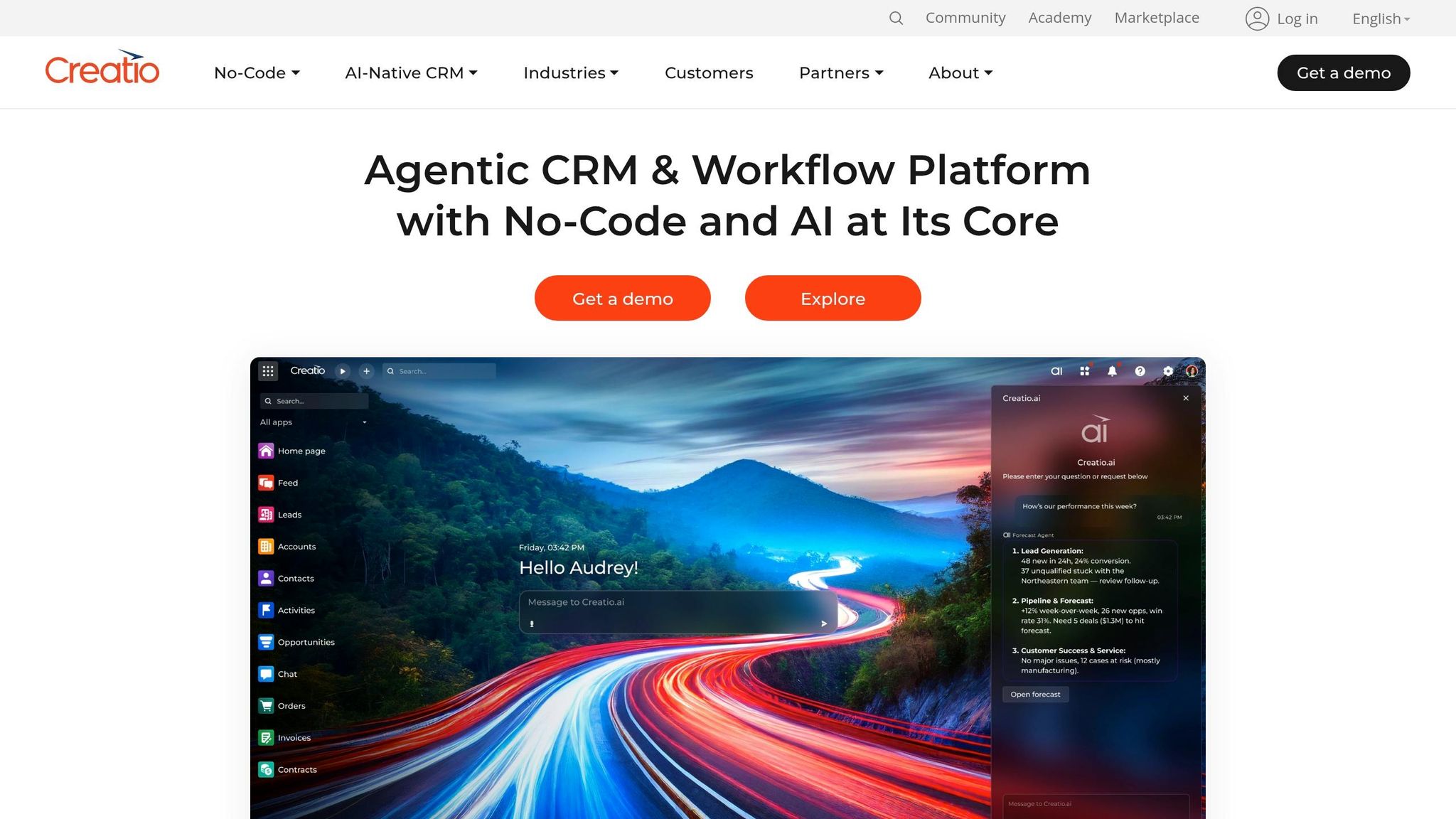
Creatio provides an enterprise-level solution designed with no-code functionality, making it a great fit for mid-market teams. With a G2 rating of 4.7/5, it stands out for its no-code architecture and integrated AI capabilities, eliminating the need for extra add-ons [32]. It’s particularly effective for teams managing complex B2B accounts across sales, marketing, and service. Let’s dive into how it performs in areas like AI, scalability, cost, and implementation.
AI Capabilities
Creatio’s AI is built right into the platform, setting it apart from systems that rely on external add-ons. It includes pre-built, role-specific agents for automating tasks like case routing, sentiment analysis, and updating knowledge bases. Additionally, the No-Code Agent Builder allows users to create custom agents using natural language and visual design tools [30][34]. The platform combines predictive AI, which prioritizes cases, with generative AI for drafting responses and summarizing interaction histories [32].
For example, in March 2026, Forgotten Harvest reduced its operational workload by over 75% after adopting Creatio’s agentic CRM system [34]. What’s more, all AI features – predictive, generative, and agentic – are included in every pricing tier at no extra cost, unlike competitors that often charge additional fees for similar features [33]. This integrated AI framework also supports seamless scalability, which we’ll explore next.
Scalability for B2B Operations
Creatio’s composable architecture is designed to scale effortlessly, accommodating teams ranging from a few dozen to thousands of users without creating technical debt [33]. By unifying sales, marketing, and service in one platform, it provides a comprehensive view of complex B2B accounts.
Take BSN Sports, for instance – they manage 2,600 users with just three administrators, which contributed to a 60% boost in average order size [34]. The platform also offers flexibility with both cloud and on-premise deployment options, making it ideal for industries with strict data residency requirements. Its no-code design empowers business users to adjust workflows, data models, and UI pages independently, eliminating the need for technical expertise [30].
Cost-Effectiveness
Creatio’s pricing model is modular, ensuring companies only pay for what they actually need. The Service module starts at $15 per user per month, with additional plans available at Growth ($25/user/month), Enterprise ($55/user/month), and Unlimited ($85/user/month) [33]. For a 50-user team, the first-year costs range from $51,000 to $61,000, which is significantly lower than the $225,000–$312,000 price range of other enterprise tools [33].
Switching to Creatio has helped organizations cut technology costs by 37% and reduce manual data entry by 17% [33]. Its no-code approach also eliminates the need for expensive developer customizations, saving companies between $15,000 and $40,000 annually.
"We replaced Salesforce with Creatio to simplify our systems and drive more efficient automation across our companies." – CIO, Emeria [33]
Ease of Implementation
Creatio implementations are quick, often taking weeks instead of months, and deliver results up to 70% faster than traditional setups [33]. For example, Howdens, a UK-based building supplies company, launched its first location in just 12 weeks as part of a larger rollout for 7,000 users across 800 depots. The team called this timeline "record time" [33].
Setup costs range from $5,000 to $15,000, significantly less than the $20,000–$80,000 typically associated with similar platforms [33]. Purplebricks, under CTO Dan Rafferty’s leadership, deployed a fully customized platform in just four months, achieving a 35% rise in leads and a 50% boost in conversion rates [33]. The platform’s drag-and-drop interface and visual tools make it easy for business users to configure solutions, earning it an ease-of-setup score of 8.3/10 and a quality-of-support score of 9.1/10 on G2 [31].
Pros and Cons
Choosing the right platform depends on your team’s specific needs and priorities. Below, we’ve summarized the strengths, limitations, and ideal use cases for each option to help you make an informed decision.
Supportbench stands out for enterprise-level B2B support with built-in AI, starting at $32 per agent per month. It avoids costly add-ons and is designed to handle complex, multi-stakeholder accounts and long-term cases without requiring dedicated IT support.
HubSpot Sales Hub offers a unified data layer across marketing, sales, and service, with 70% of users praising its ease of use [2]. However, its costs can rise quickly as databases expand, and it offers fewer customization options compared to more advanced enterprise systems [2][30].
Zoho CRM provides powerful enterprise features at about 25% of Salesforce’s cost. While affordable, its older interface and simpler reporting tools may not satisfy teams accustomed to modern, sophisticated platforms [2][30].
Pipedrive boasts over 90% adoption rates thanks to its user-friendly visual pipeline interface [1]. While it’s easy to onboard, it lacks native marketing automation and struggles with more complex setups, such as multi-tier approvals or territory management [2].
Creatio emphasizes no-code flexibility, reducing technology costs by 37% and speeding up deployment by up to 70% [30]. However, it may present a steeper learning curve for teams unfamiliar with no-code tools [30].
The table below provides a quick comparison of these platforms:
| Platform | Key Strengths | Notable Limitations | Best Fit |
|---|---|---|---|
| Supportbench | Enterprise-grade B2B support, built-in AI, $32/agent/month | Focused on support, not full-scale sales management | Complex B2B accounts with long case cycles |
| HubSpot Sales Hub | Unified data layer, Breeze AI resolves 50% of tickets autonomously [2] | High costs as databases grow, limited customization [2][30] | Teams aligning marketing and sales |
| Zoho CRM | 610% ROI, $40/user/month enterprise tier, 45+ native apps [2][35] | Dated interface, less advanced reporting [2][30] | Budget-conscious teams needing rich features |
| Pipedrive | 90%+ adoption, intuitive visual pipelines, $49/user/month [1][2] | No native marketing automation, limited scalability [2] | Small to mid-sized sales teams (2–50 reps) |
| Creatio | No-code flexibility, unified sales-marketing-service platform [30] | Steeper learning curve for no-code tools [30] | Teams automating complex enterprise workflows |
When deciding, mid-market B2B teams should weigh factors like ease of adoption (HubSpot, Pipedrive), cost efficiency (Zoho, Supportbench), or the need for flexibility without technical debt (Creatio). For complex B2B support operations, consider the total cost of ownership rather than just licensing fees. For example, Salesforce’s additional costs – like Einstein AI ($50/user/month) and CPQ ($75/user/month) – can make alternatives 40–60% more affordable while delivering similar functionality [1].
Conclusion
Choosing the right CRM boils down to how well it matches your operational needs. For mid-market B2B teams handling intricate, multi-stakeholder accounts, picking the wrong CRM can drive up costs and hinder growth. On the flip side, selecting the right one can reduce churn by 20–30% by improving forecasting and providing a unified view of your customers [36].
Supportbench is specifically designed for complex B2B support operations. It excels in areas like advanced SLA management, multi-stakeholder account handling, and AI-driven capabilities. It offers enterprise-level tools – such as predictive forecasting, a unified customer view, and proactive retention features – without piling on expensive add-ons [37]. As Nooshin Alibhai, Founder and CEO of Supportbench, explains:
"For B2B SaaS companies, Supportbench’s AI capabilities are particularly valuable because they help manage complex, long-term customer relationships without adding heavy operational costs" [6].
For teams with simpler needs, other platforms may be sufficient. Basic solutions can handle straightforward workflows, while Zoho CRM appeals to budget-conscious teams with its solid automation features. However, its interface and reporting tools may feel outdated [38].
Ultimately, the right CRM isn’t just about cost – it reflects your commitment to efficient, AI-powered support. When considering total cost of ownership, factors like licensing, integration, add-ons, and implementation time matter. For complex B2B support operations, Supportbench delivers about 80% of the functionality of larger platforms but at a fraction of the cost and complexity [36].
FAQs
How do I know if I need a support-first CRM?
If your primary goal is to provide outstanding customer support and build long-term relationships, a support-first CRM might be exactly what you need. These systems are designed for teams that focus on managing customer tickets, nurturing ongoing relationships, and delivering post-sale services.
You might be ready for a support-first CRM if you’re facing issues like juggling complex multi-stakeholder relationships, dealing with the high costs or complicated features of traditional CRMs, or if you’re looking for tools like AI-powered automation, proactive customer health tracking, and smooth multi-channel support. All of these features work together to help boost customer satisfaction and retention.
What data should I migrate first from Salesforce?
When beginning a data migration, focus on transferring core records essential for daily operations – like customer accounts, contacts, and opportunities. These records form the backbone of your business processes, ensuring smooth operations while minimizing potential disruptions. By prioritizing these key data sets, you can maintain critical business relationships and validate the accuracy of the migration early in the process, setting the stage for a successful transition.
How can AI reduce support costs without hurting quality?
AI helps reduce support costs without compromising service quality by automating routine tasks like password resets and order tracking. These tasks cost far less to handle with AI than with human support, allowing teams to focus on more complicated issues that require personal attention.
Beyond automation, AI-powered predictive analytics can spot potential problems early, helping businesses address them proactively. This reduces the number of support tickets and enhances overall customer satisfaction. By streamlining workflows and allocating resources more effectively, AI not only cuts costs but also ensures a high standard of service.
Related Blog Posts
- What’s the best alternative to Salesforce Service Cloud for B2B support teams?
- Pylon alternatives for B2B support: what should you use as you scale?
- HappyFox alternatives for B2B: what platforms support complex workflows best?
- Help Scout alternatives for B2B teams: what to choose when you outgrow shared inbox